OverView
| Follow @anir0y | |
|---|---|
| ItsyBitsy |  |
Task 01: Introduction
Room Machine
Before moving forward, deploy the machine. When you deploy the machine, it will be assigned an IP Machine IP: MACHINE_IP. The machine will take up to 3-5 minutes to start. Use the following credentials to log in and access the logs in the Discover tab.
Task 02: Scenario - Investigate a potential C2 communication alert
Scenario
During normal SOC monitoring, Analyst John observed an alert on an IDS solution indicating a potential C2 communication from a user Browne from the HR department. A suspicious file was accessed containing a malicious pattern THM:{ ________ }. A week-long HTTP connection logs have been pulled to investigate. Due to limited resources, only the connection logs could be pulled out and are ingested into the connection_logs index in Kibana.
Our task in this room will be to examine the network connection logs of this user, find the link and the content of the file, and answer the questions.
Answer the questions below
2.1: How many events were returned for the month of March 2022?
Executing the following query in Kibana will give the number of events for March 2022.
@timestamp >= "2022-03-01T00:00:00Z" and @timestamp < "2022-03-31T00:00:00Z"
Answer: 1482 events
2.2: What is the IP associated with the suspected user in the logs?
Upon reviewing the logs, two IP addresses are associated with the user. Further investigation reveals that 192.166.65.54 is involved in suspicious activity.
Answer: 192.166.65.54
2.3: The user’s machine used a legit windows binary to download a file from the C2 server. What is the name of the binary?
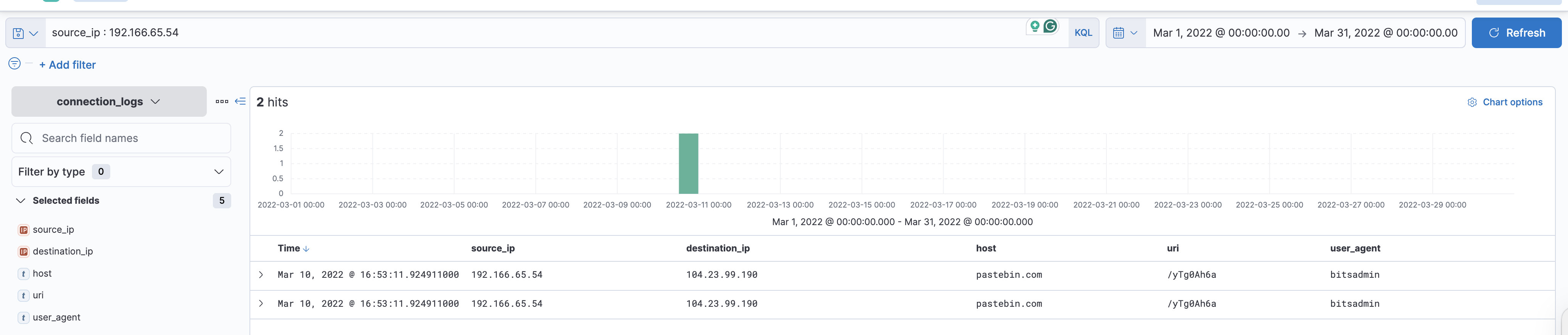
Knowing the infected host’s IP address, we can filter the logs in Kibana to show only traffic originating from this IP and specifically look for GET requests, which might indicate file downloads.
source_ip : 192.166.65.54 AND method : "GET"
Answer: bitsadmin
2.4: The infected machine connected with a famous filesharing site in this period, which also acts as a C2 server used by the malware authors to communicate. What is the name of the filesharing site?
Based on the filtered traffic and the screenshot above, the filesharing site used as a C2 server is pastebin.com.
Answer: pastebin.com
2.5: What is the full URL of the C2 to which the infected host is connected?
From the same filtered logs and screenshot, the full URL of the C2 server is identified.
Answer: pastebin.com/yTg0Ah6a
2.6: A file was accessed on the filesharing site. What is the name of the file accessed?
By visiting the identified Pastebin link, we can view the content and determine the name of the accessed file.
link: https://pastebin.com/yTg0Ah6a
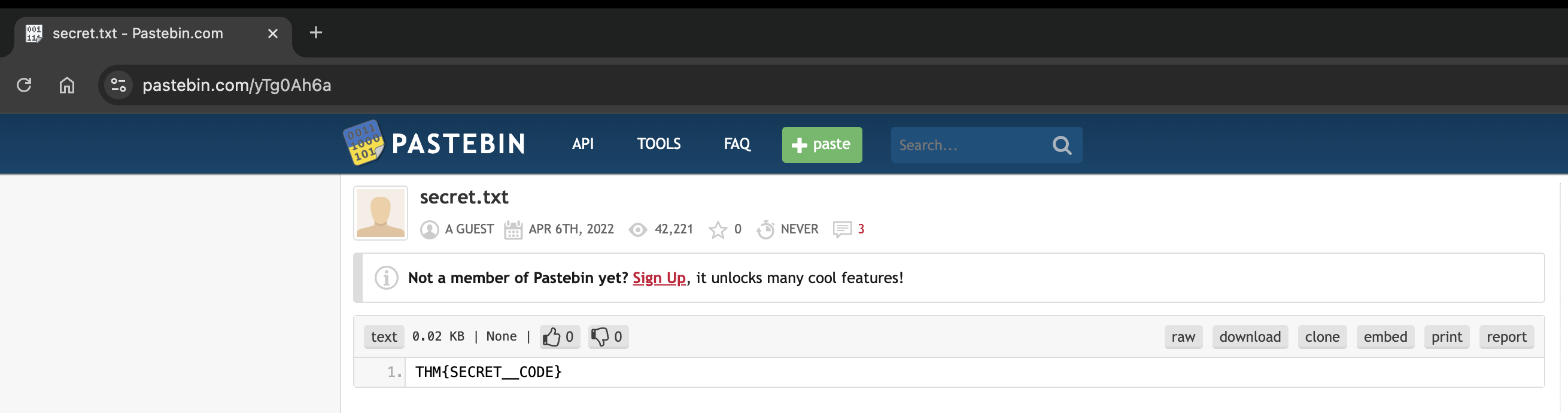
The name of the file accessed is secret.txt
2.7: The file contains a secret code with the format THM{_____}.
Refer the above screenshot, the secret code is THM{SECRET__CODE}