Understand how attackers discover assets in a network, and how to detect that activity.
OverView
| x/@anir0y | |
|---|---|
| Network Discovery Detection |  |
Task 01: Introduction
Whenever an attacker wants to target a network, they first have to better understand their target. To do this, attackers perform certain actions to discover the target network. This is often one of the first steps of detecting an attacker’s activity and perhaps one of the most common stages of attack a SOC analyst observes in their shift. In this room, we will explore network discovery in detail.
Learning Objectives
By the end of this room, we aim to understand:
- What is network discovery
- Why attackers perform network discovery
- What are the different types of network discovery
- How network discovery techniques work, and how we can detect them
Task 02: Network Discovery
Attackers and Network Discovery
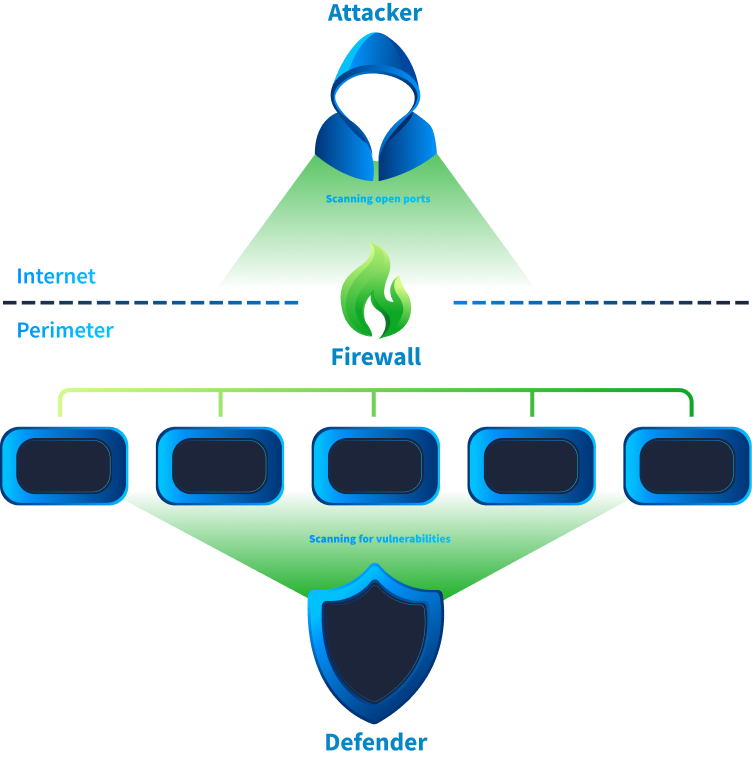
As discussed in the previous task, attackers start their attack by trying to discover an organisation’s assets that are open to the publicly accessible internet (called the attack surface). During this discovery phase, the attacker attempts to ascertain some of the following information:
- What assets can be accessed by the attacker?
- What are the IP addresses, ports, OS, and services running on these assets?
- What versions of services are running? Does any service have a vulnerability that can be exploited?
In short, the attacker is trying to find an opening that will allow them to exploit the network.
Defenders and Network Discovery
On the other hand, defenders also sometimes run software that performs network discovery activity. During this activity, defenders want to achieve the following goals:
- Inventory the organisation’s assets and ensure all assets are documented.
- Ensure no unnecessary IP, port, or service is open, and whatever is running is necessary.
- Ensure vulnerabilities are patched, or at least the exploitable vulnerabilities are patched. In short, defenders attempt to reduce the attack surface as much as possible
The Challenge in Detecting Network Discovery
As you might have noticed, both attackers and defenders perform discovery actions. Multiple research organisations, web crawlers, search engines, etc., also perform similar discovery actions to map the resources present on the Internet. SOC teams must differentiate between good and bad discovery. To mitigate this challenge, SOC teams often use the following techniques.
- Allowlist known internal and benign external scanners, ensuring no alerts are triggered on those sources.
- Integrate Threat Intelligence with detection use cases and flag scanning activity only from known malicious or suspicious sources.
- Since the previous point has a chance of missing some malicious scanning activity, some teams use the Threat Intelligence to raise the severity of the alerts instead of only triggering alerts on them. In addition, they add some generic use cases to alert on scanning behavior, which we will learn about in the next tasks.
Answer the questions below
2.1 What do attackers scan, other than, IP addresses, ports, and OS version, in order to identify vulnerabilities in a network?
the ans is services
Task 03: External vs Internal Scanning
External Scanning Activity
A SOC analyst might encounter scanning activity from outside their organisation’s network and scan the machines inside the network, mainly the public-facing assets on the perimeter. The SOC analyst will observe that the source IP in this type of attack is an external IP and the destination is an IP address belonging to the organisation. This type of scan indicates that the attack is still in the Reconnaissance phase of the MITRE ATT&CK lifecycle. The attacker does not have a foothold inside the network and is doing initial reconnaissance to identify opportunities to gain initial access to the network.
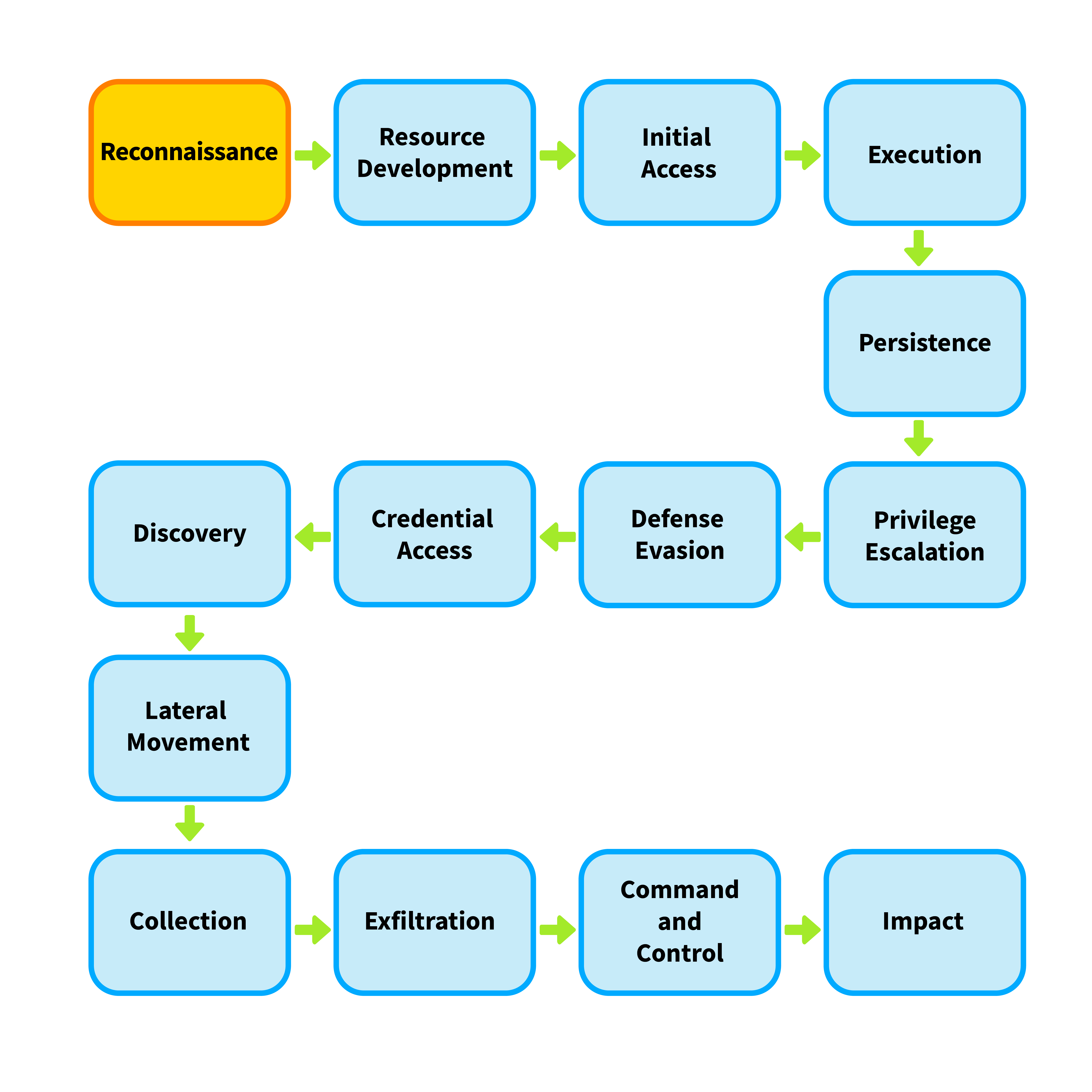
This type of scanning is in the initial phases of the attack, and the attacker hasn’t yet achieved any foothold in the network, so it is a low-severity type of scanning. In response to an external scanning activity, a SOC analyst can block the offending IP addresses on the perimeter firewall of the organisation’s network. However, we must note that the attacker might come back again by masking their IP address.
Internal Scanning Activity
The other type of scanning that a SOC analyst might observe is an internal-to-internal scanning activity. The SOC analyst will observe that the source and destination IP addresses are private IP addresses inside the organisation’s network. This type of scan initiates inside the organisation’s network and scans assets from the same network. This type of scan indicates that the attack has progressed to the Discovery phase of the MITRE ATT&CK lifecycle. In some other frameworks, it might also be called internal reconnaissance, indicating that the attacker has a foothold in the network and is now gearing up for lateral movement.
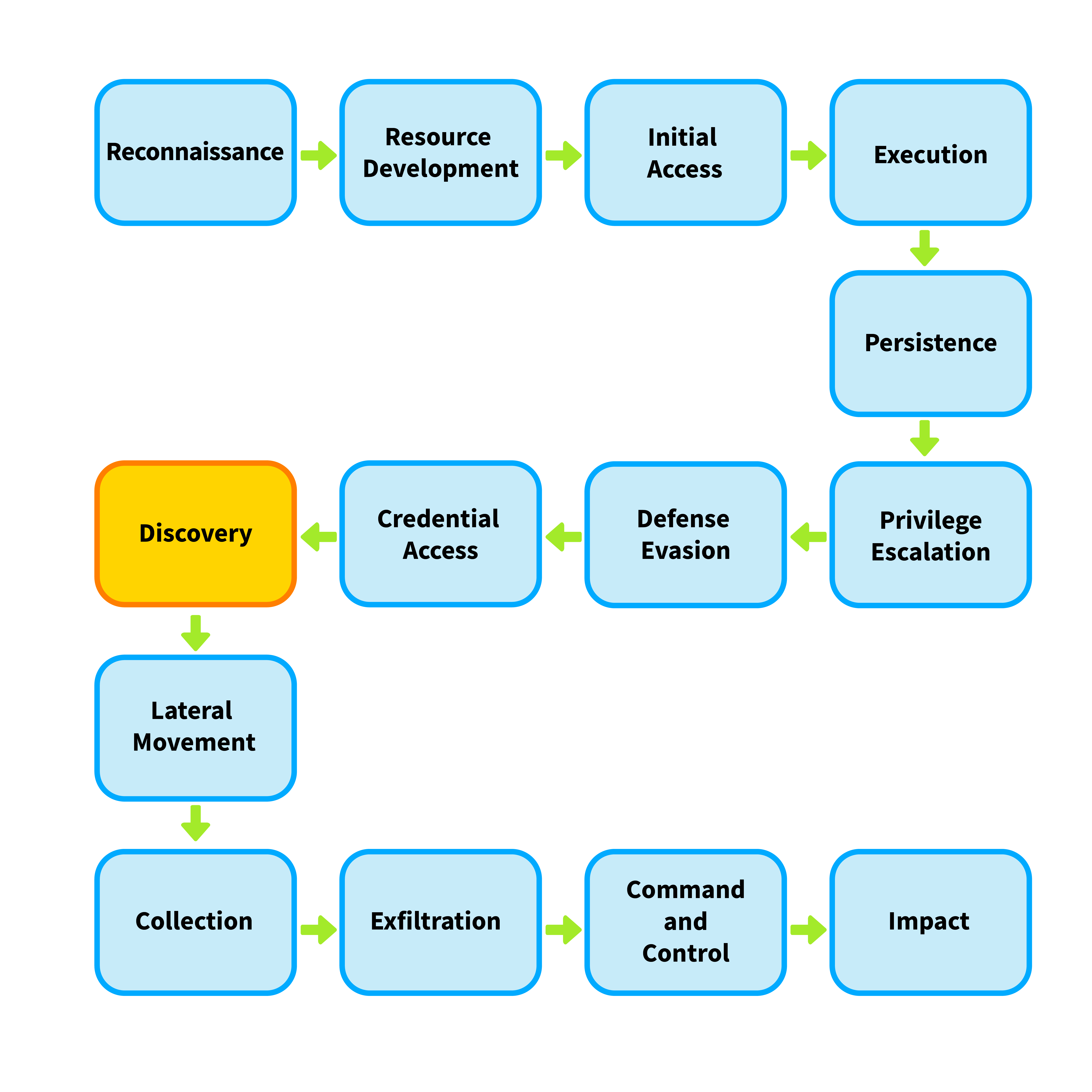
Since this type of scanning indicates that the attacker is already inside the network, it is a high-severity alert. After ensuring this is not some authorised activity, a SOC analyst will escalate this alert and initiate the Incident Response process. In this case, merely blocking the source IP on the firewall will be insufficient, and a deeper investigation into the system will be required, and root cause analysis will have to be performed.
Identifying Internal and External Scanning
Let’s see what scanning activity looks like in firewall logs.
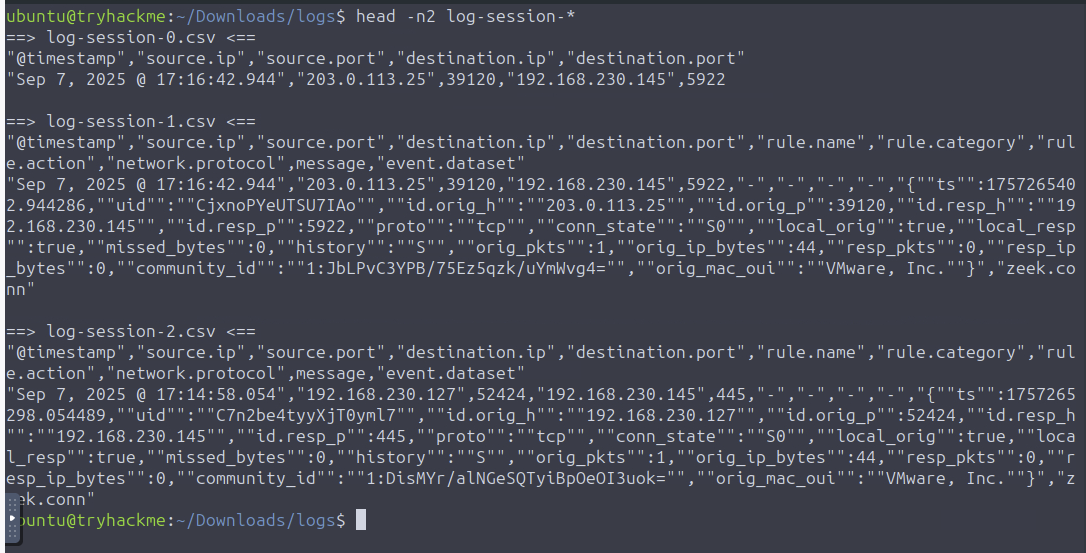
In the attached VM, open a terminal and navigate to /home/ubuntu/Downloads/logs. There will be a few CSV files in this directory, that have been exported from a SIEM solution. While the logs contain one file with sanitized output, the others might feel hard to read. However, this is how real life log files will often look when extracted from security appliances. We can use the head command to get a preview of the contents of the files.
ubuntu@tryhackme:~/Downloads/logs$ head -n2 log-session-1.csv
"@timestamp","source.ip","source.port","destination.ip","destination.port","rule.name","rule.category","rule.action","network.protocol",message,"event.dataset"
"Sep 7, 2025 @ 17:16:42.944","203.0.113.25",39120,"192.168.230.145",5922,"-","-","-","-","{""ts"":1757265402.944286,""uid"":""CjxnoPYeUTSU7IAo"",""id.orig_h"":""203.0.113.25"",""id.orig_p"":39120,""id.resp_h"":""192.168.230.145"",""id.resp_p"":5922,""proto"":""tcp"",""conn_state"":""S0"",""local_orig"":true,""local_resp"":true,""missed_bytes"":0,""history"":""S"",""orig_pkts"":1,""orig_ip_bytes"":44,""resp_pkts"":0,""resp_ip_bytes"":0,""community_id"":""1:JbLPvC3YPB/75Ez5qzk/uYmWvg4="",""orig_mac_oui"":""VMware, Inc.""}","zeek.conn"
Once we are familiar with the content of the file, we can use the cut utility with the , delimiter to filter different columns of the CSV files. Please note that since the date contains a comma, we will have to calculate the column accordingly. Let’s go through these files and answer the following questions.
3 - Answer the questions below
3.1: Which file contains logs that showcase internal scanning activity?
Running the command below on each file will help identify the correct file.
head -n2 log-session* head
it shows that log-session-2.csv contains internal scanning activity.
3.2: How many log entries are present for the internal IP performing internal scanning activity?
To find the number of log entries for the internal IP performing internal scanning activity, we can use the following command:
cat log-session-2.csv | wc -l
2277
The number of log entries is 2277.
3.3: What is the external IP address that is performing external scanning activity?
ubuntu@tryhackme:~/Downloads/logs$ cat log-session-1.csv | awk -F',' '{print $3}' | uniq
"source.port"
"203.0.113.25"
the and is 203.0.113.25
Task 04: Horizontal vs Vertical Scanning
Once the attackers know what hosts are present on a network, they often want to identify what ports are open on these hosts. This is called a port scan, and can be of the following types:
Horizontal Scanning
Sometimes, an attacker will scan for the same port across multiple destination IP addresses. This type of scan is called a horizontal scan. Horizontal scans are performed to identify which hosts expose a particular port. An attacker might perform this scan if they intend to exploit that specific port. An example can be the WannaCry ransomware, which spread through the network using an SMBv1 vulnerability and scanned for machines with port 445 (which is used for SMB) open.
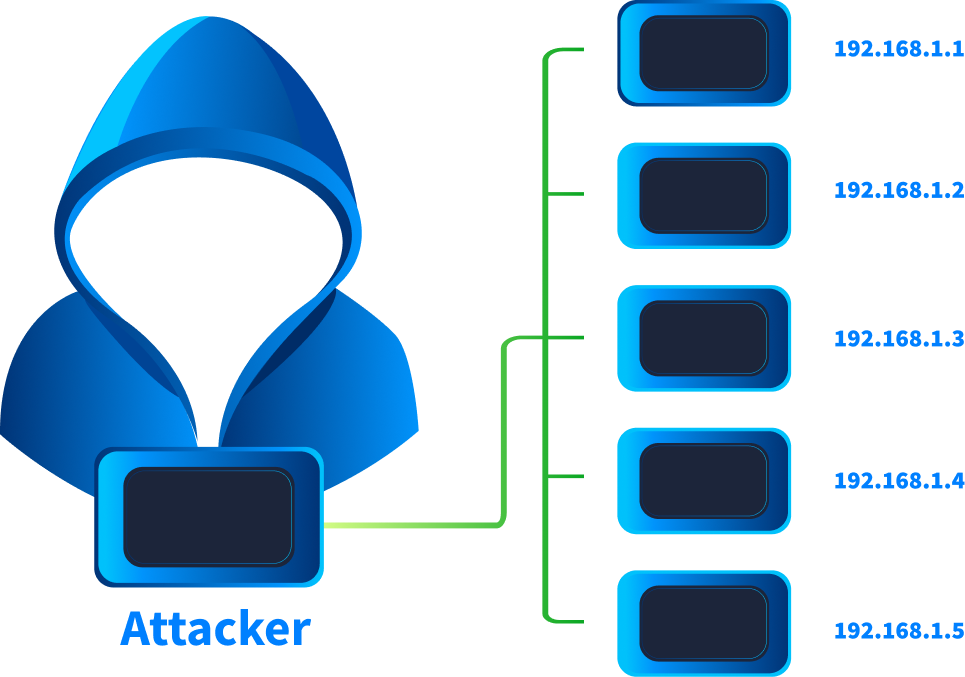
We can detect a horizontal scan in the logs if we see the same source IP, a single destination port, but multiple destination IP addresses across multiple events.
Vertical Scanning
Vertical scanning occurs when a single host IP address is scanned across multiple ports. Attackers perform vertical scanning to footprint a host and identify its exposed services. This activity might be performed when an attacker is focused on identifying a vulnerability on a single machine because they consider it a valuable target based on their objectives. For example, if an organisation exposes only a single server to the internet, any attacker who wants to breach that organisation would first perform a vertical scan on that server to identify open ports and understand the services running on the machine.
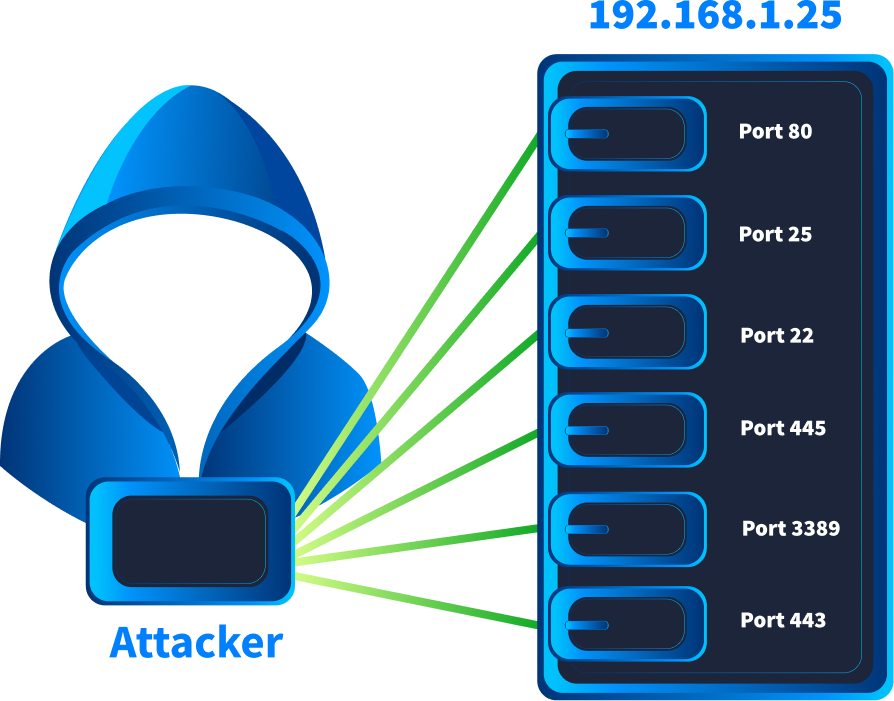
We can detect a vertical scan in the logs if we observe the same source IP, the same destination IP, but multiple destination ports across multiple events.
Sometimes attackers might perform mixed horizontal and vertical scans to gain the advantages of both types of scans.
Let’s use what we learned here to answer the following questions.
4 - Answer the questions below
4.1: One of the log files contains evidence of a horizontal scan. Which IP range was scanned? Format X.X.X.X/X
by running the command below, we can identify the IP range that was scanned.
ubuntu@tryhackme:~/Downloads/logs$ cat log-session-* | awk -F',' '{print $3, $5}'
ans is 203.0.113.0/24
4.2: In the same log file, there is one IP address on which a vertical scan is performed. Which IP address is this?
by running the command below, we can identify the IP address on which a vertical scan is performed.
cat log-session-2.csv | awk -F',' '{print $3,$4, $5,$6 }'
"source.port" "destination.ip" "destination.port" "rule.name"
"192.168.230.127" 52424 "192.168.230.145" 445
"192.168.230.127" 52424 "192.168.230.145" 3389
"192.168.230.127" 52424 "192.168.230.1" 3389
"192.168.230.127" 52424 "192.168.230.1" 445
"192.168.230.127" 52424 "192.168.230.145" 80
"192.168.230.127" 52422 "192.168.230.145" 445
"192.168.230.127" 52422 "192.168.230.145" 80
"192.168.230.127" 52422 "192.168.230.1" 3389
"192.168.230.127" 52422 "192.168.230.145" 3389
Ans is 192.168.230.145
4.3: On one of the IP addresses, only a few ports are scanned which host common services. Which are the ports that are scanned on this IP address? Format: port1, port2, port3 in ascending order.
by running the command below, we can identify the ports that are scanned on this IP address.
cat log-session-2.csv | awk -F',' '{print $3,$4, $5,$6 }'
"source.port" "destination.ip" "destination.port" "rule.name"
"192.168.230.127" 52424 "192.168.230.145" 445
"192.168.230.127" 52424 "192.168.230.145" 3389
"192.168.230.127" 52424 "192.168.230.1" 3389
"192.168.230.127" 52424 "192.168.230.1" 445
"192.168.230.127" 52424 "192.168.230.145" 80
"192.168.230.127" 52422 "192.168.230.145" 445
"192.168.230.127" 52422 "192.168.230.145" 80
"192.168.230.127" 52422 "192.168.230.1" 3389
"192.168.230.127" 52422 "192.168.230.145" 3389
In ascending order, the ports are 80, 445, 3389
Task 05: The Mechanics of Scanning
Now that we understand the different types of network discovery scans that can be run, let’s dive into the mechanics of how these scans work.
Ping Sweep
This is one of the most basic network scanning techniques. Ping sweeps are generally used to identify hosts present (and online) on a network. This scan is run by sending an Internet Control Message Protocol (ICMP) packet to the host. If the host is online, it will reply with an ICMP packet of its own. However, it is often blocked by security controls in some organisations nowadays, making it easier to defeat this type of scanning activity.
TCP SYN Scans
A TCP connection is initiated by a three-way handshake, following the steps SYN, SYN-ACK, ACK to establish the connection. Network scanners can sometimes use this functionality of the TCP handshake to identify online hosts and their open ports. The scanner sends a SYN request to the recipient. If a SYN-ACK response is received, it means that the host is online and the port on which the SYN connection was sent is also open. This is a stealthy scan that often blends in with the rest of the network traffic and is harder to detect.
UDP Scan
Another way to identify online hosts and open ports is by sending a (usually empty) UDP packet. If the port is closed, the host sends back an ICMP port unreachable reply. This signifies that the port is closed, but the host is online. In some cases, the scanner will not receive any response until a set timer is reached. If no response is received, the scanner will mark the port as open (but this is not a clear evidence of the port being open). In rare cases, the scanner might receive a UDP packet in response, which is evidence of the port being open. As we can infer, a UDP scan is unreliable and slow as it relies on waiting until it does not receive any response till a timeout is reached.
Most organisations often perform internal scans to check for vulnerabilities, keep an eye on rogue assets, and identify any opportunities for attack surface reduction. It is pertinent for a SOC analyst to know the details of these scans, such as the IP address from where they run, the type of scanning being performed, and any scanning schedules. Ideally, these scans should be excluded from any detection use cases of the SOC team to reduce noise.
Identifying Scan Types
Let’s see if we can identify the types of scans using the firewall logs. We will do that using Kibana. In a browser, use the following details to access the Kibana dashboard. Login using the credentials below.
Use your own credentials to login to Kibana
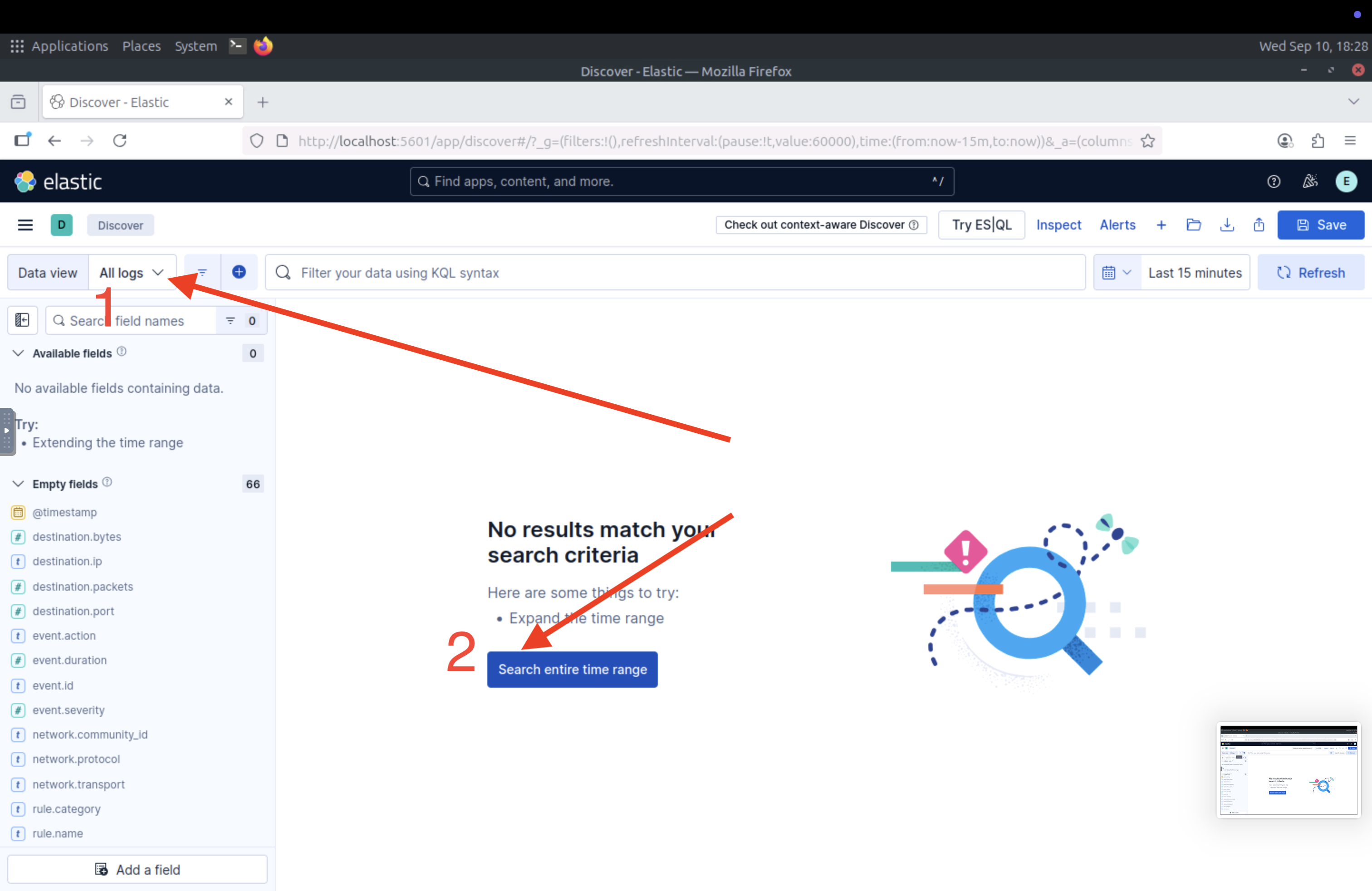
Navigate to the hamburger menu on the top-left side, and click on Discover.
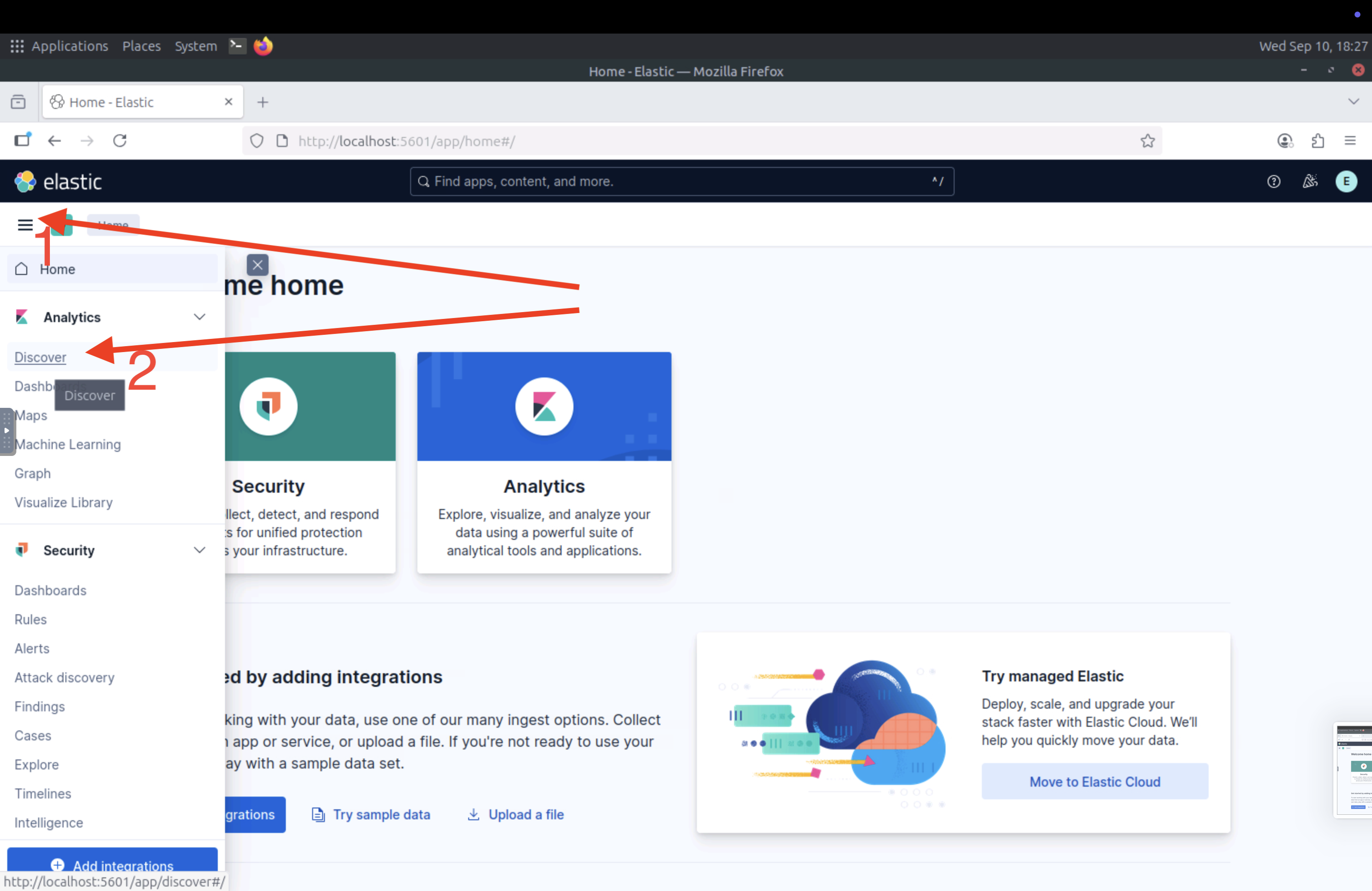
On the top-left, select All logs in the Data View field, and select Search entire time range to view logs from the entire time range.
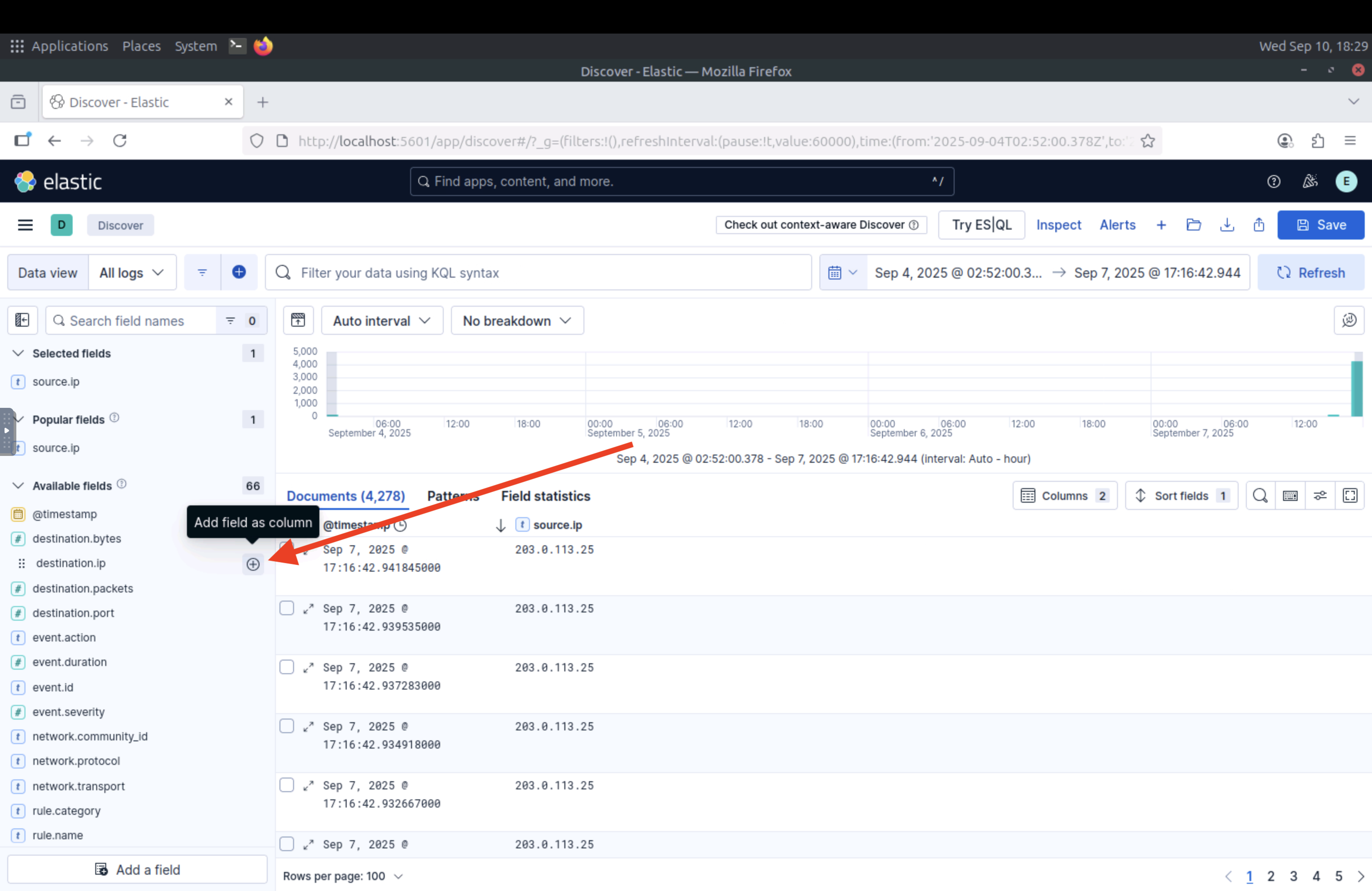
Once all logs are visible, we can use the “+” sign in front of each field in the left column to add it to the search results as a separate column.
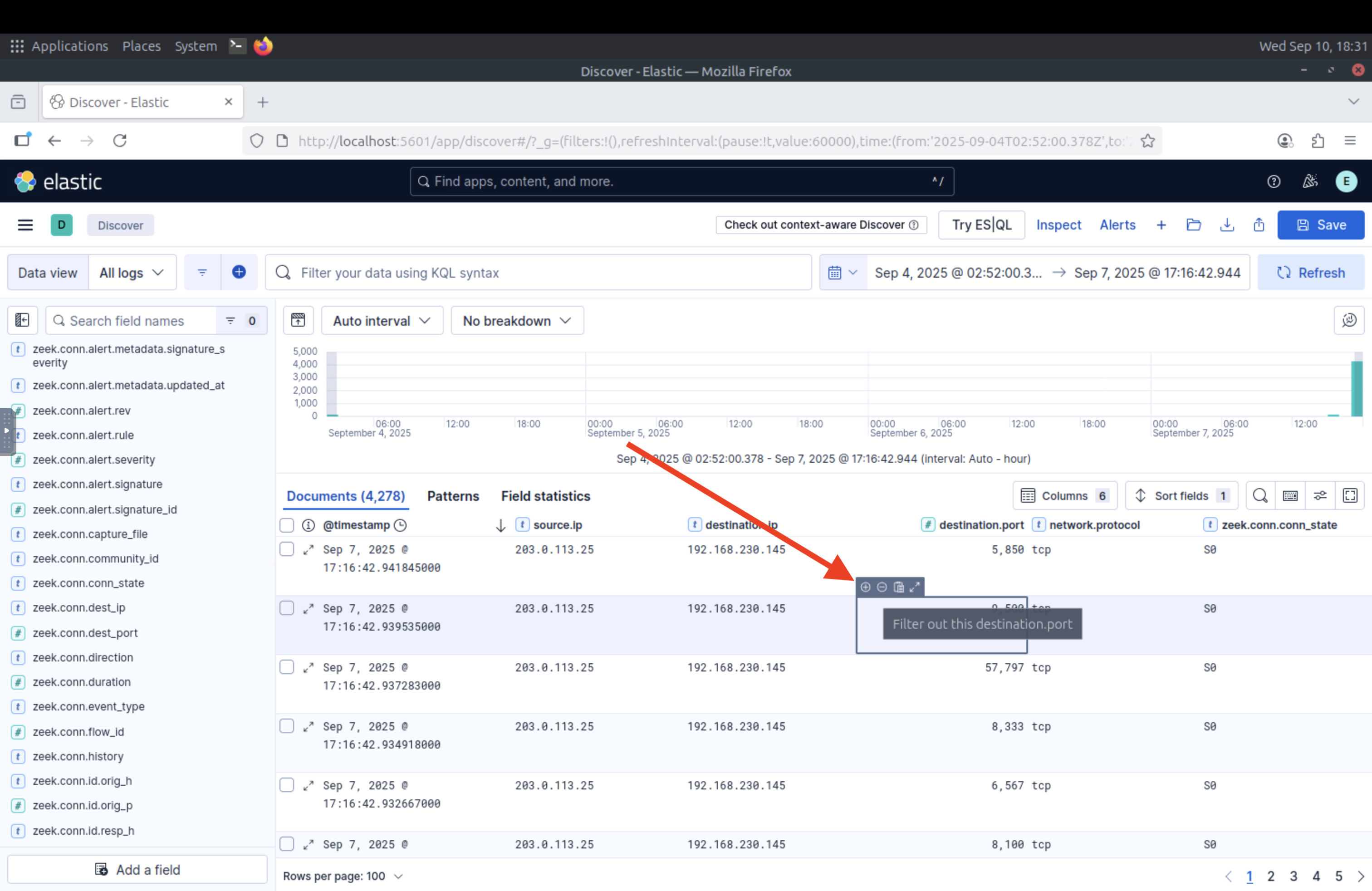
Finally, we can use the controls on each value to either filter only for that field or filter that field out.
Now, let’s use the Kibana dashboard to answer the following questions from the logs.
5 - Answer the questions below
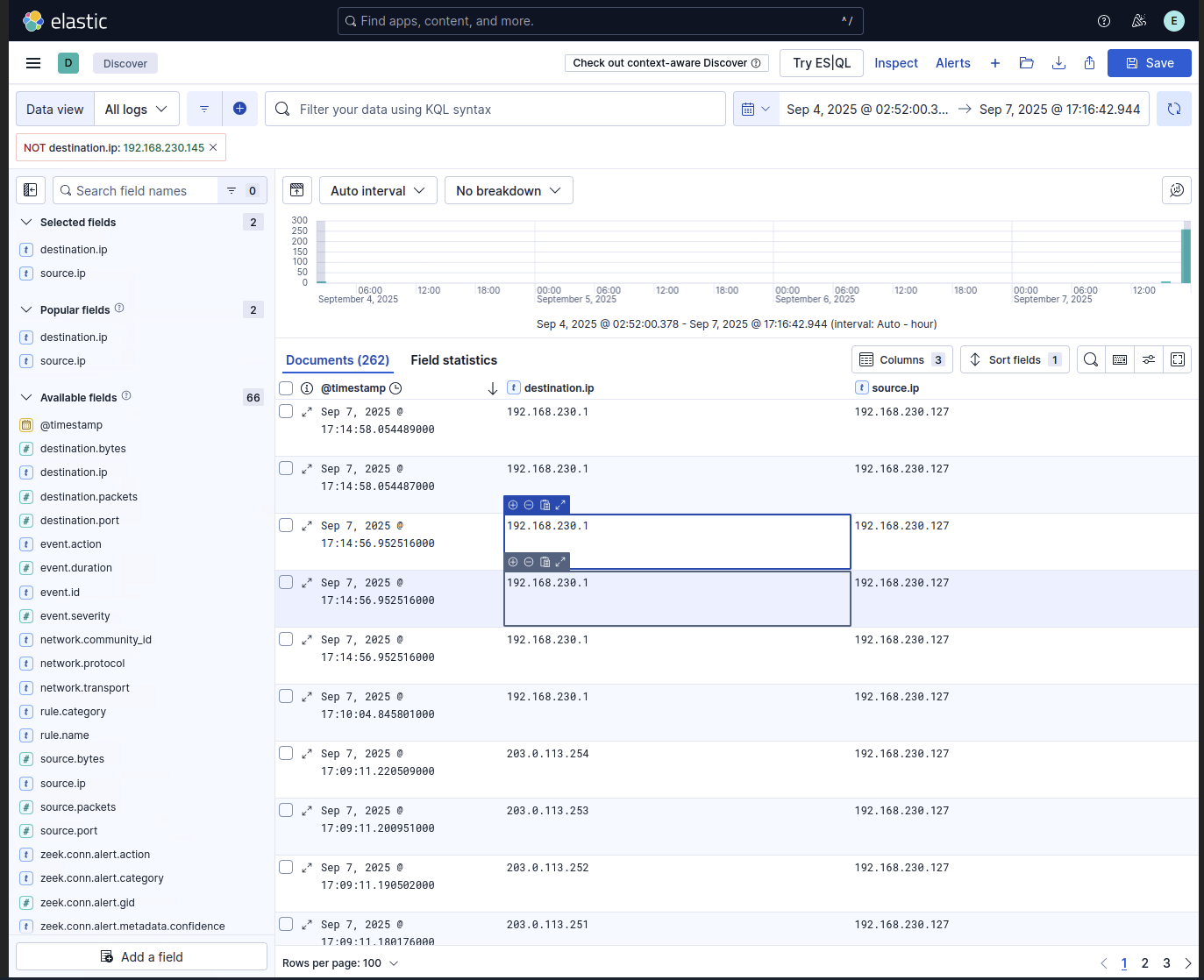
5.1: Which source IP performs a ping sweep attack across a whole subnet?
As we can see on elasticsearch logs, the source IP performing a ping sweep attack across a whole subnet is 192.168.230.127
5.2: The zeek.conn.conn_state value shows the connection state. Using the information provided by this value, identify the type of scan being performed by 203.0.113.25 against 192.168.230.145
let’s filer the logs
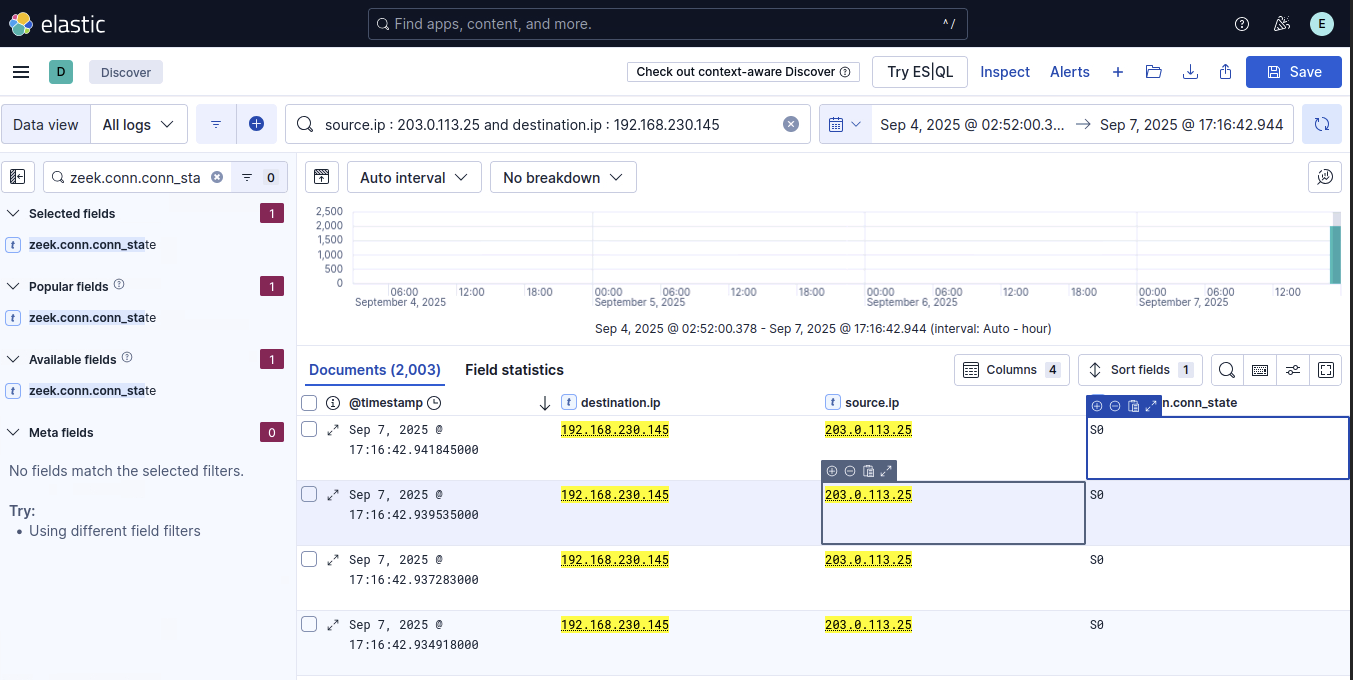
now search for Zeek State S0 which indicates as TCP SYN Scan.
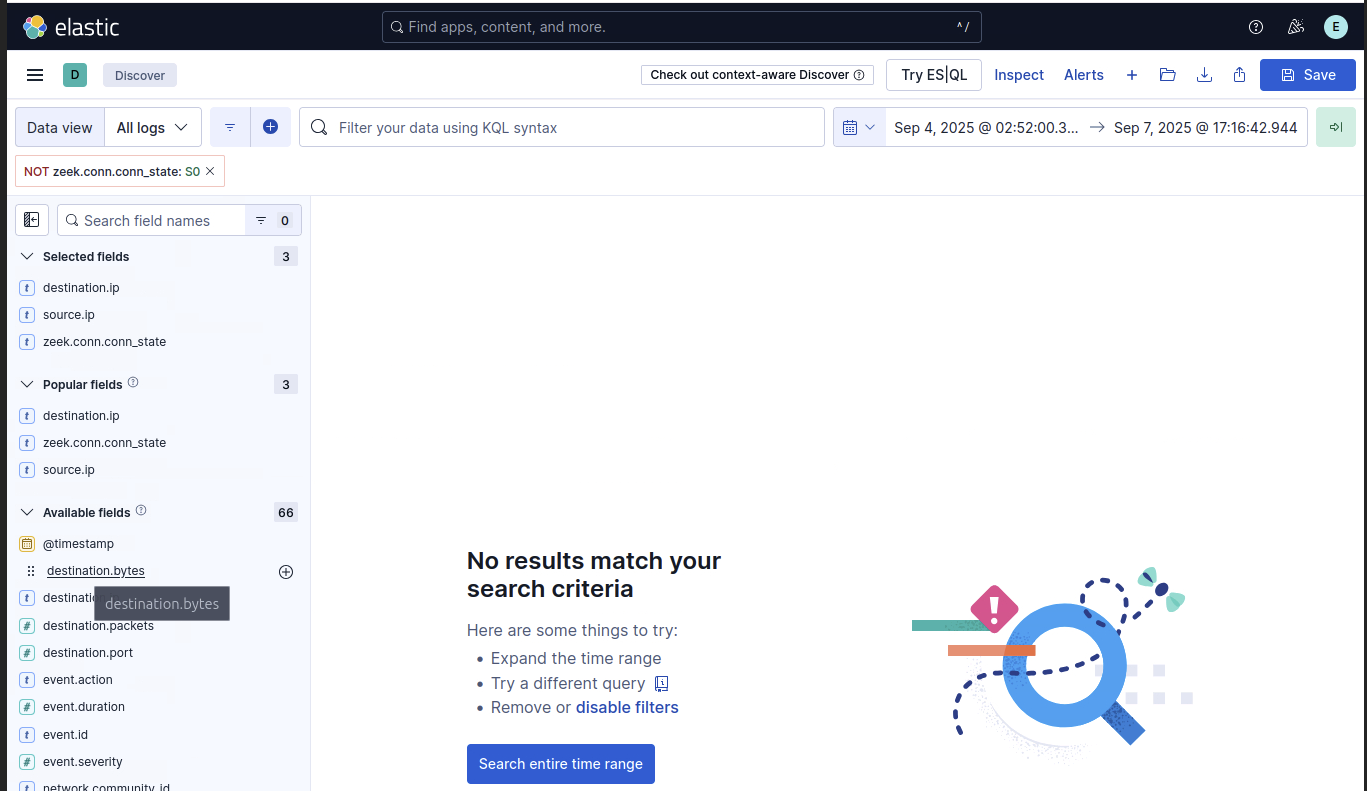
5.3: Is there any UDP scanning attempt in the logs? Y/N
If we filter the logs for network.protocol: udp, we can see that there are no UDP scanning attempts in the logs.
Conclusion
I hope you enjoyed this TryHackMe room walkthrough on Network Discovery Detection. Network discovery is a crucial phase of an attack, and SOC analysts must be able to identify and respond to such activity effectively. Understanding the different types of scans and their mechanics will help SOC analysts build better detection use cases and respond appropriately to such alerts.
Thank you for reading!