AI System Reconnaissance
This one is a change of pace from the Hacker Holidays boot2roots. It’s from TryHackMe’s Secure AI Systems path, category AI Security, difficulty Medium — a guided room about a discipline most network scanners are blind to: finding the machine-learning infrastructure an organisation has quietly bolted onto its network.
The premise is simple and, once you see it, obvious. When a company adds AI capabilities, new services appear on ports security teams have never targeted, speaking protocols standard scanners misread. An nmap -sV sees HTTP on 8000 and shrugs “http-alt.” It has no idea it’s looking at an NVIDIA Triton inference server exposing three ports and a model registry. This room teaches you to know to look, and how to read what you find.
Rather than a VPN target, the room runs on embedded “Cyphira” AI agents — you type real curl, nmap, and grpcurl commands into a chat panel and it returns realistic service responses. I worked the whole thing in the browser, so the screenshots below are the actual room, not reconstructions.
A note on ethics and scope: everything here is reconnaissance against a lab estate. The IPs (
10.10.45.0/24), the “Cyphira” company, and every credential shown are fictional room data. The techniques are standard, non-exploitative fingerprinting — the entire point of the room is that identifying AI infrastructure requires no exploitation at all.
The AI infrastructure stack (Task 2)
Before scanning anything, you need a target list, because AI infrastructure hides on ports nobody memorised. The room’s reference table is the thing to internalise — a compressed version:
| Component | Default ports | Tell-tale endpoints |
|---|---|---|
| NVIDIA Triton | 8000 (HTTP), 8001 (gRPC), 8002 (metrics) | /v2/health/ready, /v2/models |
| TensorFlow Serving | 8500 (gRPC), 8501 (HTTP) | /v1/models/<name> |
| TorchServe | 8080/8081/8082 | /ping, /models |
| Ollama / vLLM | 11434 / 8000 | /api/tags, /v1/models |
| MLflow | 5000 | /api/2.0/mlflow/experiments/search |
| Ray | 8265 (dashboard), 8000 | /api/jobs/ |
| Qdrant / Weaviate / Milvus | 6333 / 8080 / 19530 | /collections, /v1/schema |
| Jupyter | 8888 | /api/kernels, /api/contents |
| MinIO | 9000, 9001 | bucket listing |
The headline the room drives home: that’s 14 components across 20+ ports. A traditional web app adds maybe five ports. Bolting on an AI stack roughly triples the network-layer attack surface — and almost none of it is on a standard scan wordlist.
The Task 2 exercise runs an nmap against the AI-specific ports on the Cyphira subnet, which surfaces the hosts: MLflow on 10.10.45.12:5000, Triton on 10.10.45.15:8000-8001, Qdrant on .18:6333, Jupyter on 10.10.45.20:8888, MinIO on .22:9000. The two answers fall straight out — the Jupyter host is 10.10.45.20, and MLflow’s default port is 5000.
Fingerprinting AI services (Task 3)
This is the core skill and the best part of the room. nmap -sV mislabels these services, so you fingerprint them the way you’d fingerprint any custom API — by their headers, JSON shapes, and error messages. I ran three probes against the Triton host through the Service Prober agent:
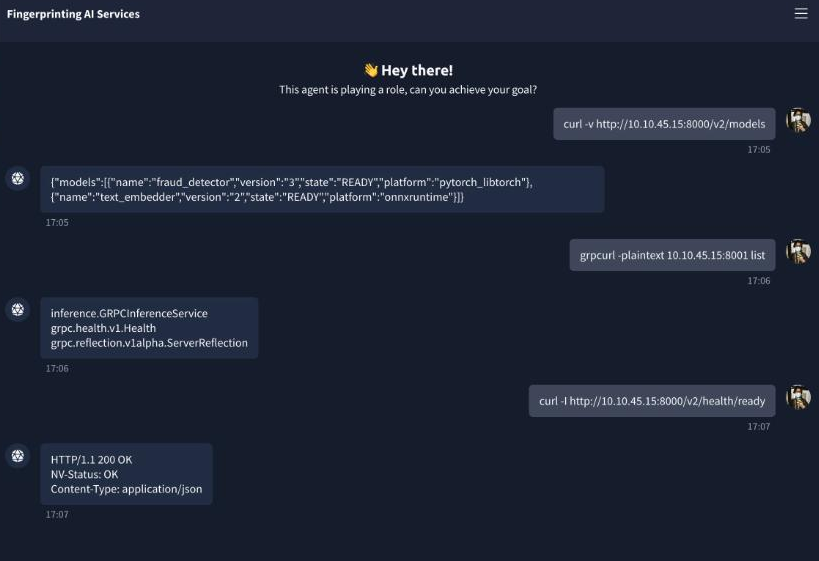
1. The model endpoint. curl http://10.10.45.15:8000/v2/models returns:
{"models":[{"name":"fraud_detector","version":"3","state":"READY","platform":"pytorch_libtorch"},
{"name":"text_embedder","version":"2","state":"READY","platform":"onnxruntime"}]}
The /v2/models path and the platform field (pytorch_libtorch, onnxruntime) are pure Triton — no other framework structures its response this way.
2. The identifying header. curl -I http://10.10.45.15:8000/v2/health/ready returns a header no other framework emits:
HTTP/1.1 200 OK
NV-Status: OK
NV-Status is the answer to the room’s first question — the NV prefix is NVIDIA, and seeing it is an instant, unambiguous identification. (Triton has an even better tell: send it endpoint-load-metrics-format: text and it returns live GPU utilisation in the response headers. Nothing else does that.)
3. gRPC reflection. Triton runs gRPC on 8001 alongside HTTP, and standard scanners miss it entirely because gRPC is a binary protocol. grpcurl -plaintext 10.10.45.15:8001 list — with reflection enabled, which is depressingly common — dumps the service list:
inference.GRPCInferenceService
grpc.health.v1.Health
grpc.reflection.v1alpha.ServerReflection
The inference service name, inference.GRPCInferenceService, is the second answer. Reflection is the gRPC equivalent of finding an open /openapi.json: it hands you every RPC, every input tensor shape, and every output format for free.
The mental model to take from this task: AI frameworks are chatty. Data scientists need verbose debug output during development, and those debug-friendly defaults almost never get turned off before production. Send a deliberately malformed payload and the error message names the framework — tensorinfo_map for TensorFlow Serving, mlflow.server stack traces for MLflow, a Java IncorrectClaimException for Databricks Mosaic AI.
Enumeration: from “what is it” to “what does it hold” (Task 4)
Fingerprinting tells you that’s an MLflow server. Enumeration tells you that MLflow server contains 4 experiments, 3 production models, artifact URIs pointing to s3://cyphira-ml-models/, created by J. Chen. One is identification; the other is intelligence.
MLflow is the richest target because it exposes everything through a clean REST API — five calls map an organisation’s entire ML portfolio. The one the room asks about is /api/2.0/mlflow/model-versions/search, whose source field carries the artifact URI (the S3 path to the actual model files) plus the user_id of whoever created each version. That endpoint is Task 4’s first answer.
But the real prize is the Jupyter notebook. Unauthenticated Jupyter on 0.0.0.0 is one of the most commonly exposed AI services on the internet, and data scientists routinely leave credentials in notebook cells. I listed the notebooks, then read the most recently modified one:
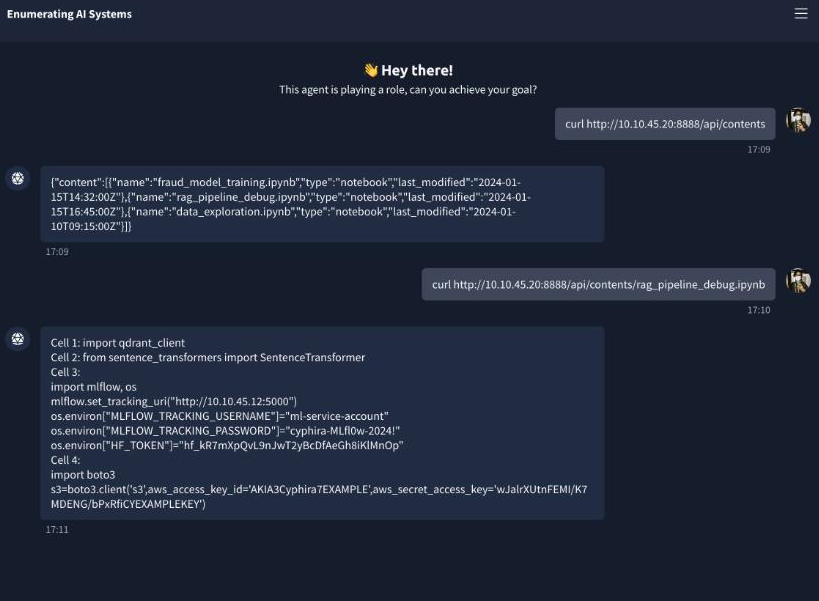
curl http://10.10.45.20:8888/api/contents/rag_pipeline_debug.ipynb returns the cells verbatim:
import mlflow, os
mlflow.set_tracking_uri("http://10.10.45.12:5000")
os.environ["MLFLOW_TRACKING_USERNAME"] = "ml-service-account"
os.environ["MLFLOW_TRACKING_PASSWORD"] = "cyphira-MLfl0w-2024!"
os.environ["HF_TOKEN"] = "hf_kR7mXpQvL9nJwT2yBcDfAeGh8iKlMnOp"
# ...
s3 = boto3.client('s3', aws_access_key_id='AKIA3Cyphira7EXAMPLE',
                  aws_secret_access_key='wJalrXUtnFEMI/...EXAMPLEKEY')
There it is — the cleartext MLflow password cyphira-MLfl0w-2024! (Task 4’s second answer), plus a Hugging Face token and AWS keys as a bonus. This single cell is the bridge that turns one exposed service into a compromise of the whole stack: notebook → MLflow credentials → model registry → S3 artifacts. That’s not a hypothetical; it’s exactly the chain IBM X-Force documented in a real 2025 Azure ML intrusion, where the same category of notebook-cell credential let attackers run MLOKit against the registry and exfiltrate every model.
Mapping the attack surface with MITRE ATLAS (Task 5)
Individual findings become an attack surface when you connect them and speak about them in a shared vocabulary. That vocabulary is MITRE ATLAS — ATT&CK’s counterpart for adversarial threats to AI/ML systems (15 tactics, 66 techniques as of late 2025). The room maps its own content to ATLAS, and the two questions test whether you internalised it:
- The exposed Hugging Face token and base-model dependency (
sentence-transformers/all-MiniLM-L6-v2) are a supply-chain exposure →AML.T0010(ML Supply Chain Compromise). - Everything I did — nmap, curl, API metadata extraction — rolls up under one tactic →
AML.TA0002(the Reconnaissance tactic).
Mapping each finding to an ATLAS ID is what makes a recon report legible: it tells the reader exactly what class of activity you performed and what risk it represents. This task also anchors the techniques to real incidents — the ShadowRay campaign (CVE-2023-48022), where an unauthenticated Ray dashboard on port 8265 led to credential theft and mass GPU-hijacking for cryptomining, all starting from the same “find an exposed dashboard” recon step.
The methodology, and what it looks like from the SOC (Task 6)
The final task compresses everything into a repeatable 5-phase methodology — Passive Recon (Shodan/GitHub dorks) → Active Scanning (AI-port nmap + grpcurl) → API Fingerprinting (ffuf with an AI wordlist) → Metadata Extraction (the MLflow chain) → Supply Chain Review — then flips perspective to the defender’s SIEM.
That flip is the most useful part, and it drives the two answers:
- A burst of requests to
/api/2.0/mlflow/registered-models/listand/model-versions/searchwith no corresponding UI session is the signature ofMLOKit, IBM’s open-source MLflow enumeration tool. The web UI generates session cookies and extra requests; raw API calls without them are scripted enumeration. - The single most effective quick win against unauthenticated MLflow access is simply to enable MLflow authentication — set
MLFLOW_TRACKING_USERNAME/PASSWORDor put it behind an authenticating reverse proxy. MLflow shipped with no auth by default before 2.x, which is why port 5000 is such a reliable find.
Other defensive tells worth remembering: /metrics scraping from outside the monitoring CIDR, AI-aware port scans hitting 5000/8000/8001/8265/8888 in sequence, and ../ path-traversal against MLflow artifact endpoints (probing for the CVE-2026-2033 unauth-RCE).
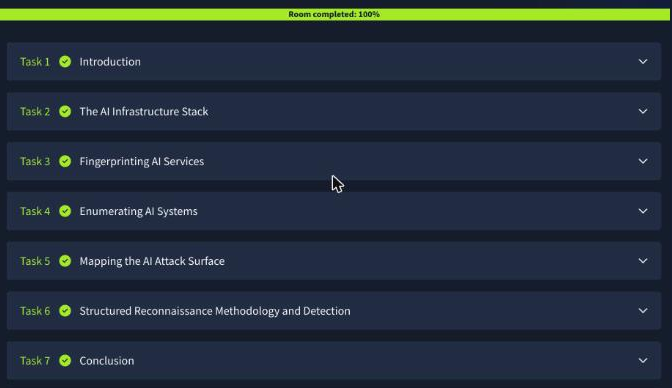
Room complete
Answering all eleven questions across the six tasks takes the room to 100%:

Answer key
| Task | Question | Answer |
|---|---|---|
| 2 | Host running HTTP on port 8888 | 10.10.45.20 |
| 2 | MLflow default port | 5000 |
| 3 | NVIDIA-identifying HTTP header | NV-Status |
| 3 | gRPC inference service name | inference.GRPCInferenceService |
| 4 | Endpoint for a model version’s artifact URI | /api/2.0/mlflow/model-versions/search |
| 4 | Cleartext MLflow password in the notebook | cyphira-MLfl0w-2024! |
| 5 | ATLAS technique for supply-chain exposure | AML.T0010 |
| 5 | Overarching ATLAS tactic | AML.TA0002 |
| 6 | Tool matching the SIEM MLflow pattern | MLOKit |
| 6 | Best quick win for MLflow | Enable MLflow authentication |
Wrap-up
What I like about this room is that it has no exploit in it at all, and that’s the point. Every request was well-formed and unauthenticated-by-design. The “vulnerability” is organisational: teams stand up MLflow, Triton, Qdrant, and Jupyter for developer convenience, bind them to 0.0.0.0, trust the network boundary, and never turn off the debug-friendly defaults. An attacker doesn’t break in — they read what’s advertised and follow the credentials from one service to the next.
The practical takeaway is a scanning habit. When you assess a network that does anything with machine learning, your normal port list is blind to most of it. Add 5000, 6333, 8000-8002, 8265, 8500-8501, 8888, 9000, 11434 to the scan, keep an AI-specific endpoint wordlist handy, and reach for grpcurl the moment you see a binary service on 8001 or 8500. The infrastructure is easy to find once you know it exists — the hard part, as the room says, is knowing to look. 🪷