AI & Automation in Detection Engineering
Room: AI & Automation in Detection Engineering on TryHackMe.
Room five of six in the Detection Engineering for SOC module, after Intro to Detection Engineering, Detection Rules Development, Sigma Language, and SigHunt. Only DetectMare remains after this one, the Task 6 question literally reads “Ready for DetectMare!”, which is a nice way of confirming where you are in the arc.
The previous rooms taught you to write a detection. This one is about everything that happens to the detection after you write it: who reviews it, what tests it, what ships it, and what happens when you let an LLM draft it for you.
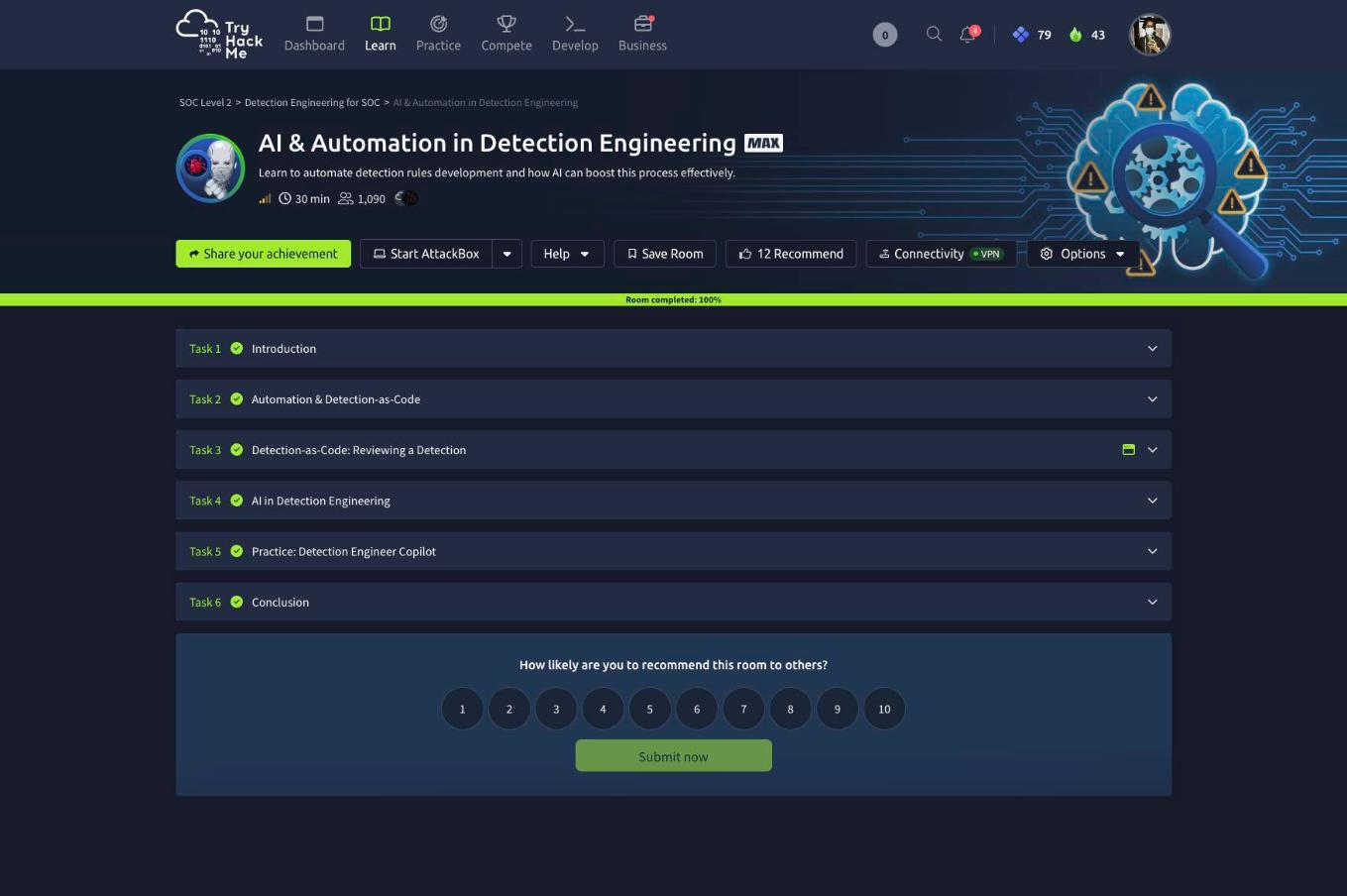
Six tasks, ten answers, 72 points. No AttackBox and no SIEM, the practical work is a browser-based Git clone in Task 3 and a live LLM agent in Task 5.
Task 2: automation, and why DaC lives outside the SIEM
The scenario is Aurora Logistics, where an engineer under backlog pressure decided to skip peer review on “simple” rules, skip the post-deploy testing window, and push straight into the SIEM. A month later false positives were up roughly 60%, a working rule had silently broken in production with no record of who changed it, and alerts were firing with no context. The room’s framing is sharp: the root cause was not bad detections, it was a process with no safety net.
Detection-as-Code is that safety net, borrowed wholesale from software engineering. Rules live as files in Git, changes arrive as pull requests, a CI pipeline lints and tests them against sample data, and merging triggers the deploy.
Three answers here, all straight from the prose:
- The change request that forces a second engineer to review before production is a Pull Request.
- Sigma rules are stored as YAML.
- The company type that leans hardest on DaC is an MSSP SOC.
That last one is worth dwelling on. The reasoning in the task is that the moment you run more than one detection technology, no single vendor console governs them all, an MSSP engineer would otherwise have to run the whole life cycle separately per technology per client. The structure has to live in the repo and the pipeline, not in any one SIEM.
Answer-format note: the third box is masked ____ ___, two words. I submitted “MSSP” first and the box visibly kept a trailing ___, which is how I knew a second word was expected. As on every THM room, reading the underscore mask before submitting is free information, it told me the answer was two tokens, 4 and 3 characters, long before I would have guessed at it.
Task 3: reviewing a real pull request in TryGitMe
This is the best part of the room. TryGitMe is a GitHub clone with a repo, issues, pull requests, an Actions tab, and a detection-health dashboard. Your teammate analyst-1 has opened PR #1 adding a Sigma rule for print.exe abused to copy credential files (T1003.002 / T1003.003), a LOLBin whose /D flag names a destination file, so it can quietly copy ntds.dit or the SAM hive instead of sending a print job.
The PR opens with a red check.
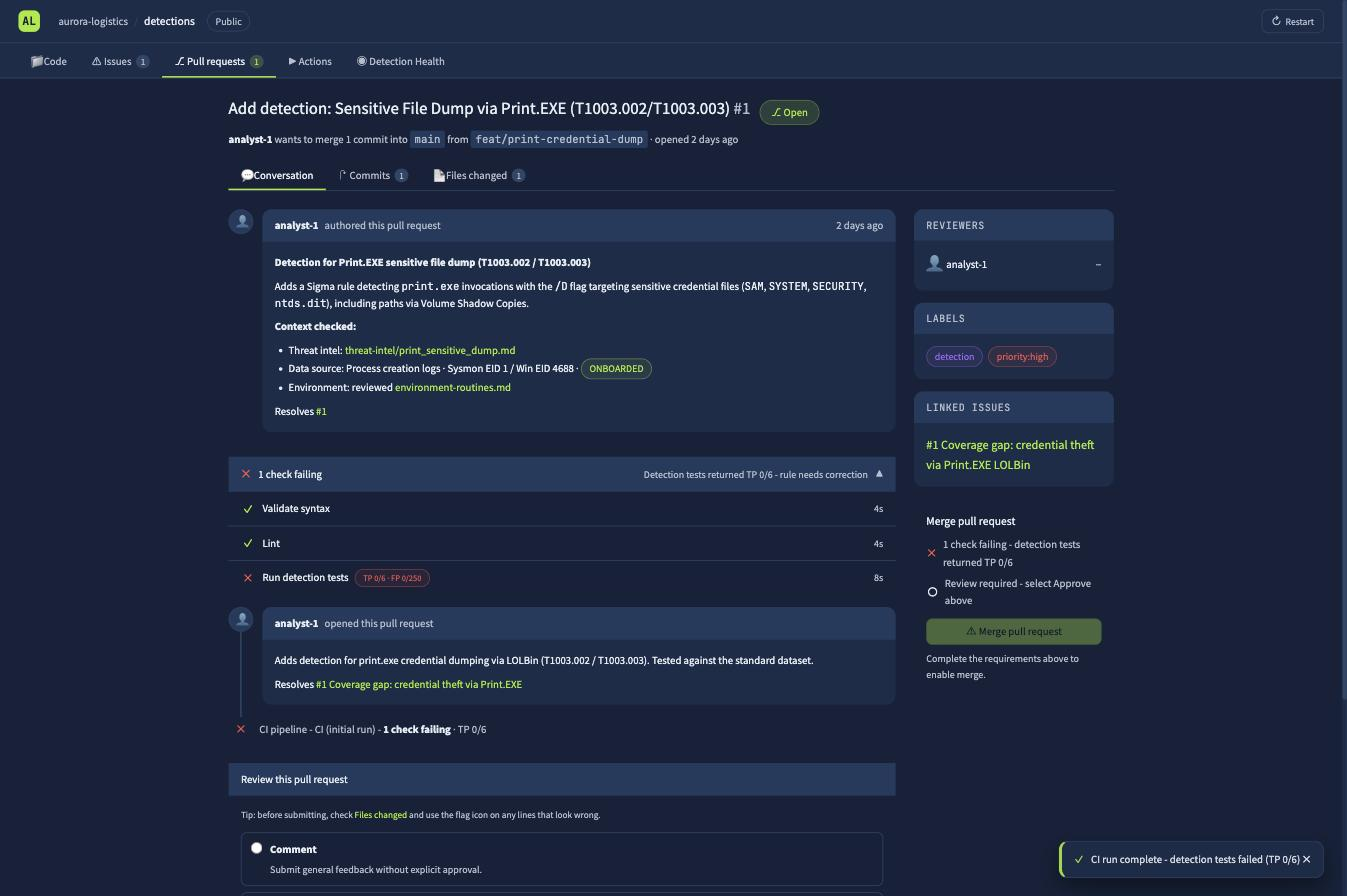
CI pipeline - CI (initial run) - 1 check failing - TP 0/6
  Validate syntax   PASS   4s
  Lint              PASS   4s
  Run detection tests   FAIL   TP 0/6 - FP 0/250   8s
Syntax passes. Lint passes. The rule is valid, and it matches nothing. That gap between “well-formed” and “correct” is the whole lesson.
Over to Files changed. The pipeline gives you three review slots, and the rule has exactly three bugs.
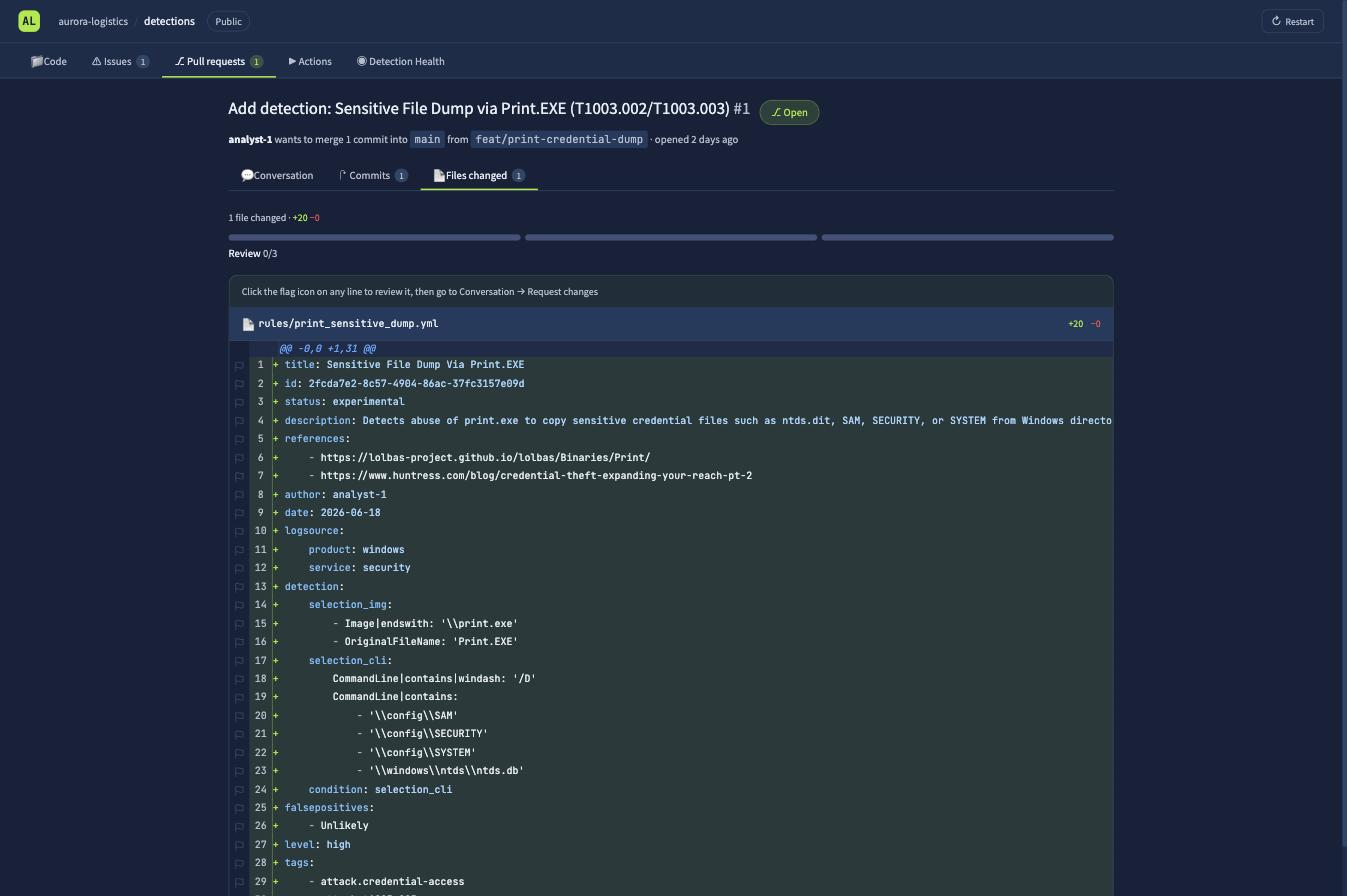
Walking it against the threat intel and the environment docs in the repo:
Line 12, service: security. This is the one the task hands you. The Security event log carries authentication events like 4624; process starts are Sysmon EID 1 / Windows EID 4688, which in Sigma is category: process_creation. The rule is compiled against a log source that will never contain a print.exe execution. This alone explains TP 0/6.
Line 23, '\\windows\\ntds\\ntds.db'. The Active Directory database is ntds.dit, Directory Information Tree. A one-character typo, and it silently drops the single highest-value target in the whole detection. .db looks plausible enough that syntax and lint both wave it through.
Line 24, condition: selection_cli. The rule defines selection_img (the process is print.exe) and selection_cli (the command line contains /D and a sensitive path), then conditions on selection_cli alone. As written, any process whose command line mentions \config\SAM fires the rule, backup agents and SCCM jobs included. It needs all of selection_* so print.exe is actually required.
Flag each line with the flag icon in the gutter, and the review counter fills up.
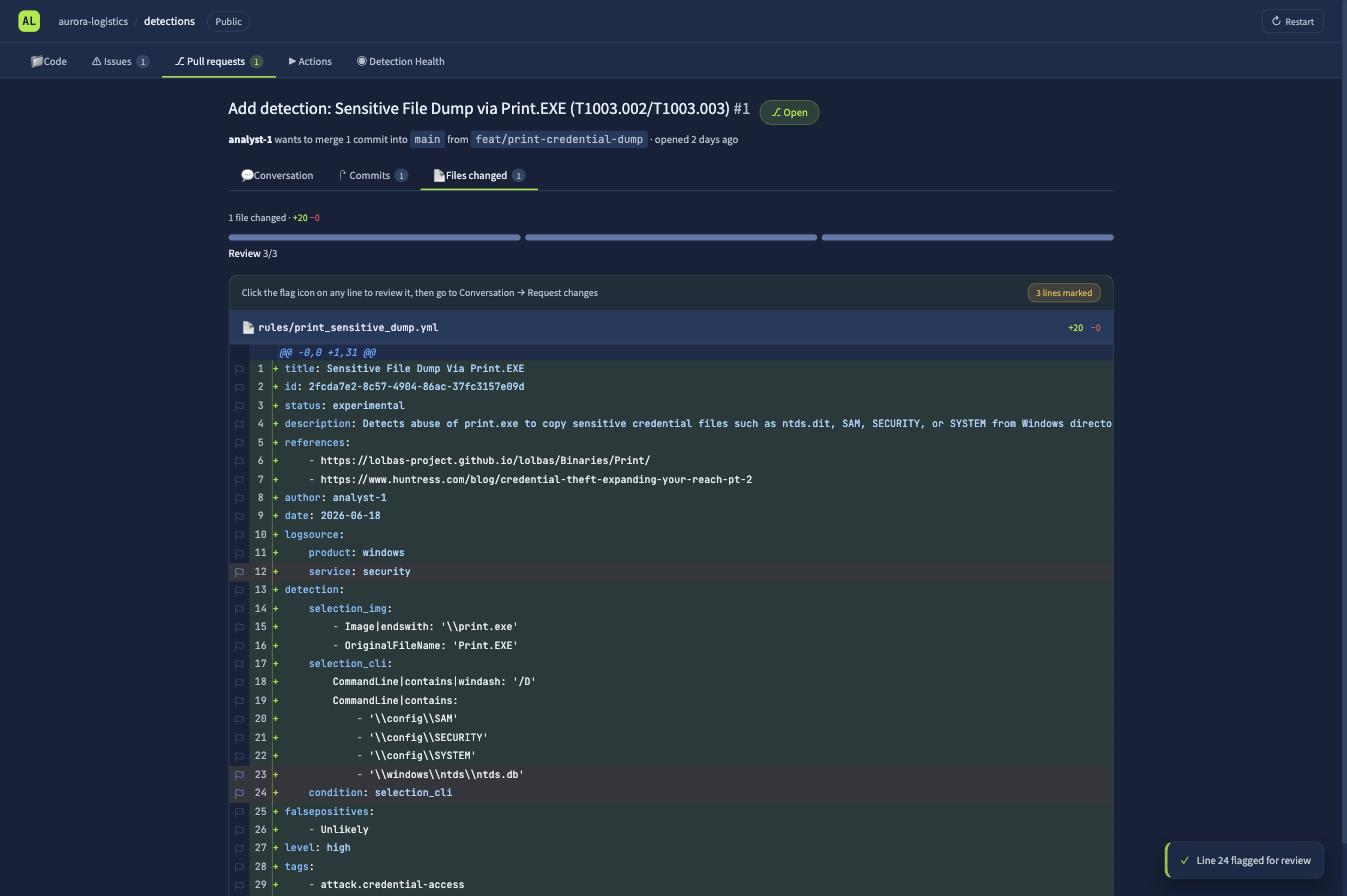
Then back to Conversation, select Request changes, and leave a comment explaining each one. The teammate pushes a fix commit and CI re-runs clean.
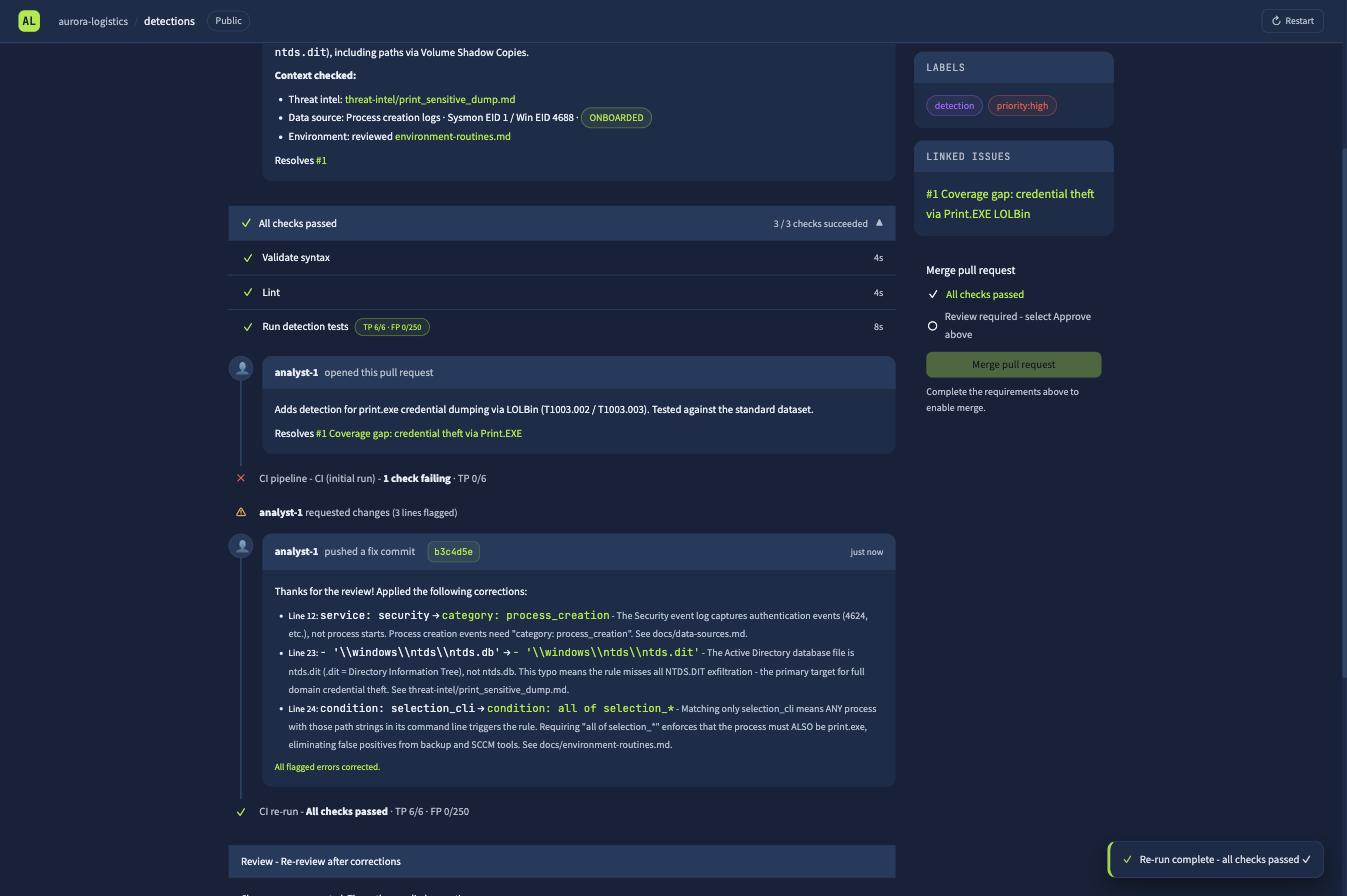
CI re-run - All checks passed - TP 6/6 - FP 0/250
Six for six on the known-bad set, zero false positives across 250 benign events. Approve, merge, and the deploy job converts the Sigma to a SIEM query and pushes it live as rule id 1042.
Where the flag actually is
The in-app toast says “Open the Deploy job logs below to retrieve the flag”. That is misleading, I opened the Deploy job and its log is four lines of Connecting to SIEM... Converted Sigma → SIEM query, with no flag anywhere.
The task text is the accurate one: click into the CI re-run execution, not the deploy, and expand its Run detection tests step. The flag is on the last verbose line, dressed up as a pipeline token so it reads like log noise.
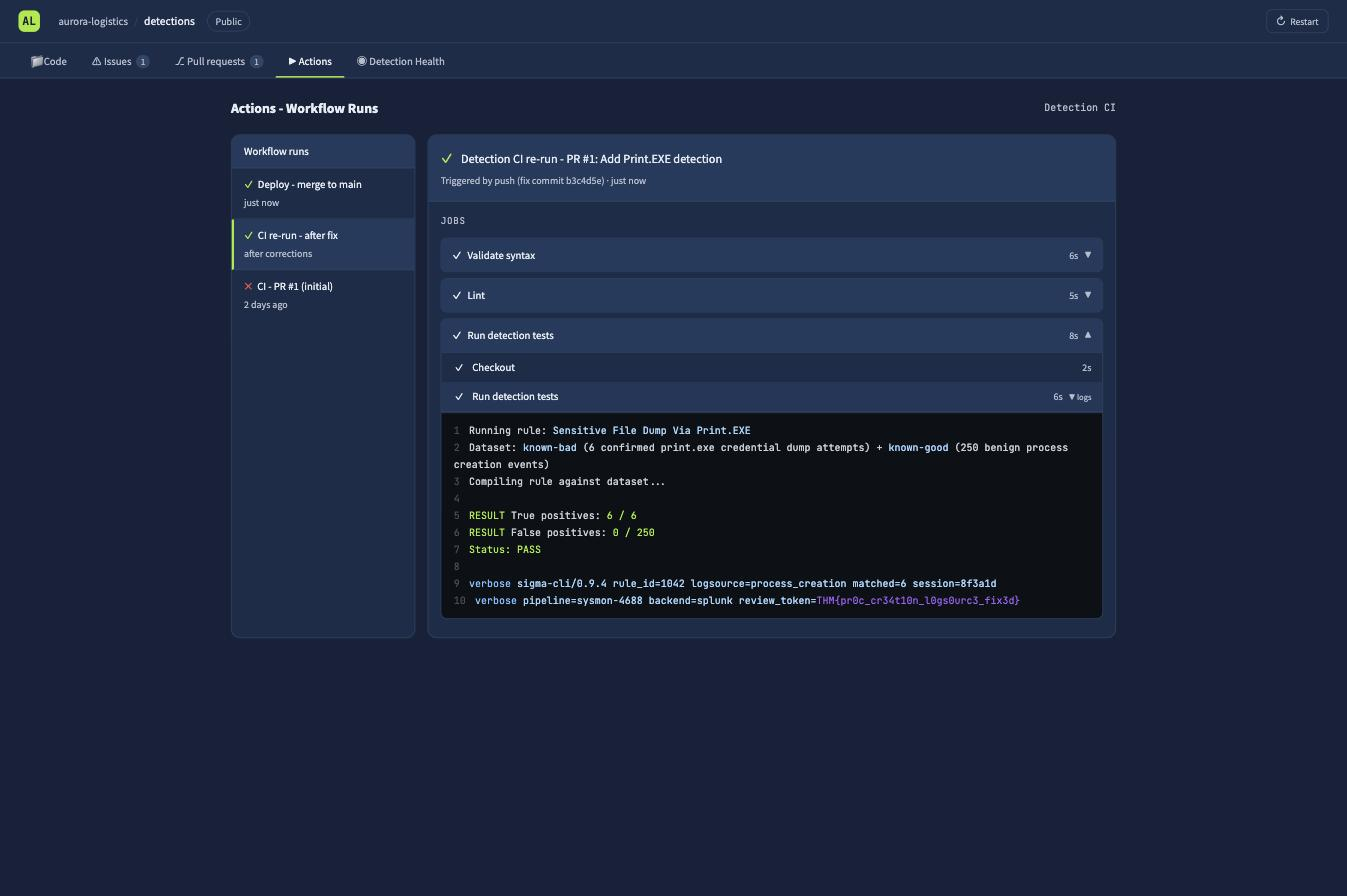
RESULT True positives: 6 / 6
RESULT False positives: 0 / 250
Status: PASS

verbose sigma-cli/0.9.4 rule_id=1042 logsource=process_creation matched=6 session=8f3a1d
verbose pipeline=sysmon-4688 backend=splunk review_token=THM{pr0c_cr34t10n_l0gs0urc3_fix3d}
Flag:
THM{pr0c_cr34t10n_l0gs0urc3_fix3d}
The flag names the first bug, the log source fix, which is a fair summary of why the rule was dead on arrival.
The maintenance question
The second Task 3 answer comes from the Detection Health tab, which is the Step 6 maintenance loop rendered as a dashboard.
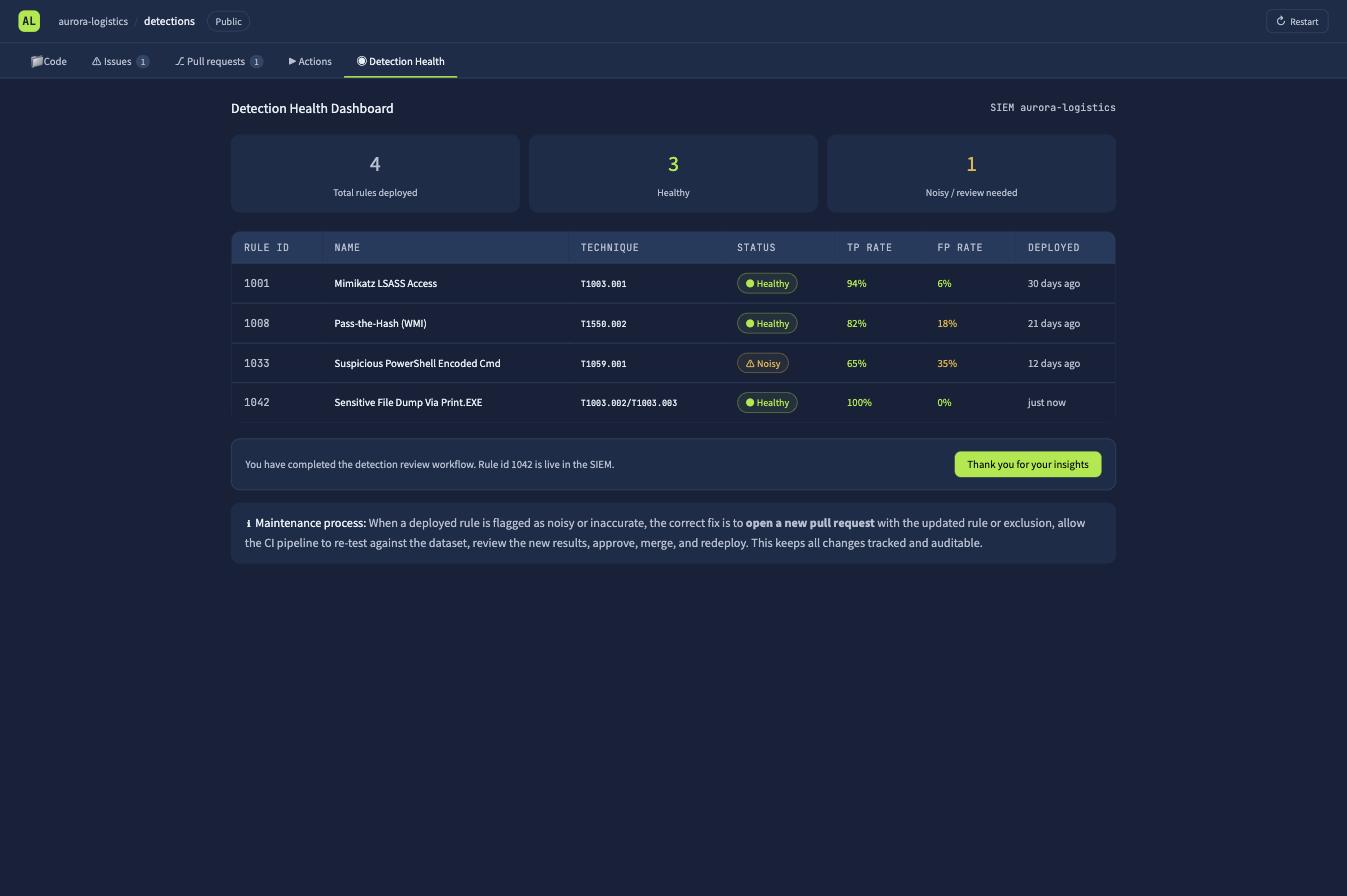
| Rule | Technique | Status | TP | FP |
|---|---|---|---|---|
| 1001 Mimikatz LSASS Access | T1003.001 | Healthy | 94% | 6% |
| 1008 Pass-the-Hash (WMI) | T1550.002 | Healthy | 82% | 18% |
| 1033 Suspicious PowerShell Encoded Cmd | T1059.001 | Noisy | 65% | 35% |
| 1042 Sensitive File Dump Via Print.EXE | T1003.002/003 | Healthy | 100% | 0% |
The one to prioritise for tuning is Suspicious PowerShell Encoded Cmd, 35% false positives, the only row flagged Noisy. The dashboard footer makes the process point explicitly: you do not patch a noisy rule in the SIEM console. You open another pull request, let the pipeline re-test, and redeploy through the same rails.
Task 4: what AI is good for, and where it lies to you
The useful applications are unsurprising, drafting rules, converting a query between languages, suggesting exclusions from a sample of alerts, writing documentation to your team’s standard. The risks are the interesting half, and three of the room’s questions come from a single diagram:
- Missing Environment Context, a rule can be semantically perfect and still useless, because the model does not know what “normal” looks like in your estate.
- Hallucinations, invented field names, log sources, and query functions that produce a rule which looks valid and matches nothing.
- False Confidence, output that reads authoritatively enough that you deploy a detection which misses the technique, with a false sense of coverage.
- Sensitive Data Exposure, pasting internal logs or rules into a public LLM.
- Indirect Prompt Injection, you hand an agent external content such as a threat report, and that content carries text crafted to hijack the agent’s behaviour.
So: the risk from feeding an agent external documentation carrying hijack instructions is Indirect Prompt Injection, and the technically-wrong-but-100%-certain answer is False Confidence.
The third question maps the Agentic Detection Development pipeline onto the detection life cycle. Six agents: Chat Prompt, Developer Agent, Reviewer Agent, Converter Agent, Validation Agent, Deployment Agent. The one that runs the query to confirm the detection actually works against real data and schema is the Validation Agent.
One line in this task deserves to survive the room: the agentic pipeline’s own “reviewer agent” does not remove the human review step from your DaC pipeline. The AI reviewer is a fast quality pre-check, not a person signing off.
Task 5: the AI copilot writes a perfect rule for the wrong company
This task attaches a live LLM agent, the DE-Copilot, and the scenario is DCSync against Aurora’s hybrid AD / Entra ID estate. Prompt one is the obvious one:
“Create a Sigma rule to detect DCSync attacks in an Active Directory environment.”
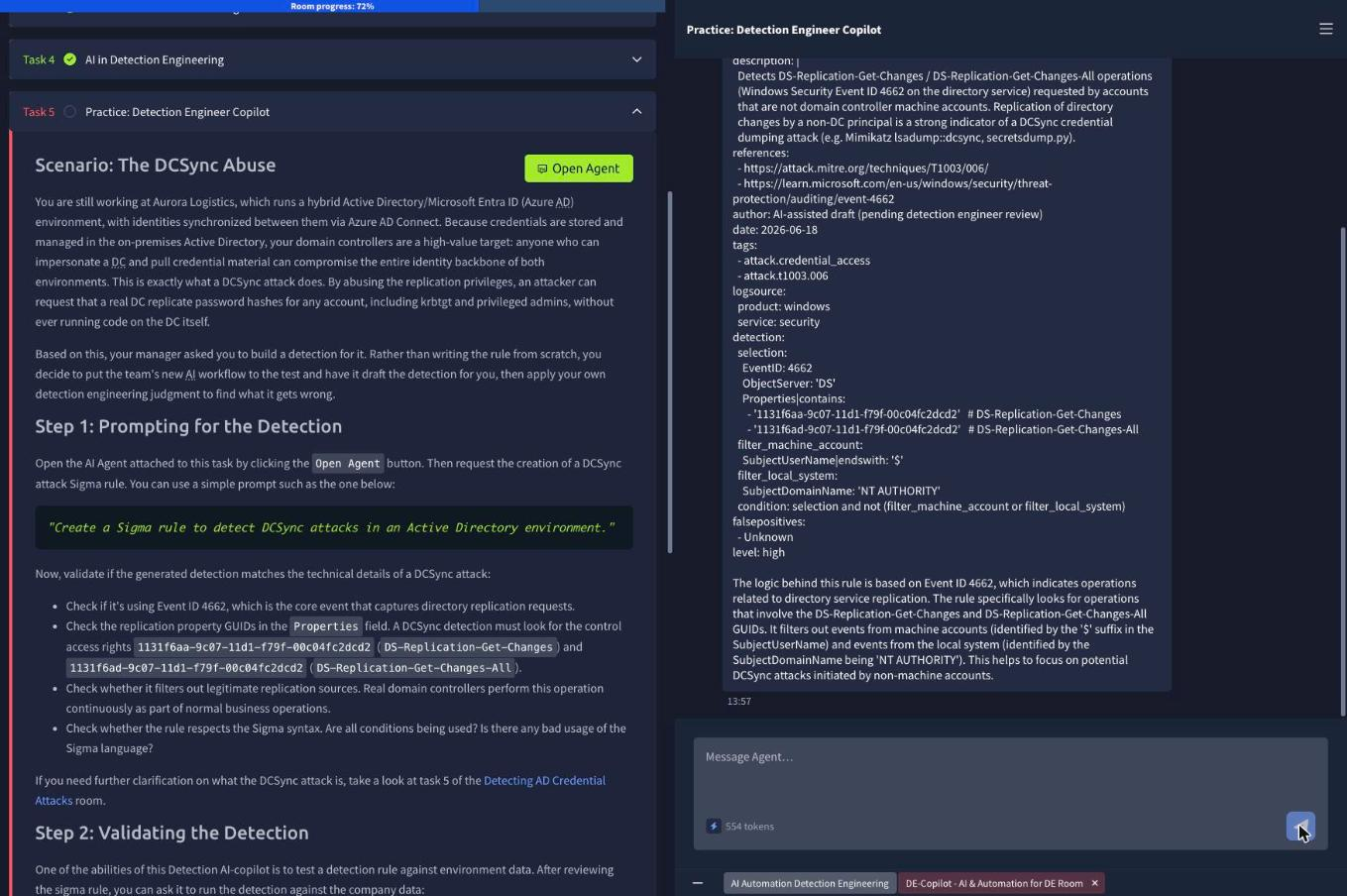
The draft is genuinely good. I checked it against the room’s four criteria and it passes every one:
logsource:
  product: windows
  service: security
detection:
  selection:
    EventID: 4662
    ObjectServer: 'DS'
    Properties|contains:
      - '1131f6aa-9c07-11d1-f79f-00c04fc2dcd2'  # DS-Replication-Get-Changes
      - '1131f6ad-9c07-11d1-f79f-00c04fc2dcd2'  # DS-Replication-Get-Changes-All
  filter_machine_account:
    SubjectUserName|endswith: '$'
  filter_local_system:
    SubjectDomainName: 'NT AUTHORITY'
  condition: selection and not (filter_machine_account or filter_local_system)
level: high
Event ID 4662, correct. Both control access right GUIDs, correct. It even pre-empts the obvious noise source by excluding machine accounts ($ suffix) and NT AUTHORITY, because real domain controllers replicate against each other constantly. As the room puts it, as an exam answer it scores full marks.
Then you ask it to test against environment data, and the trap springs.
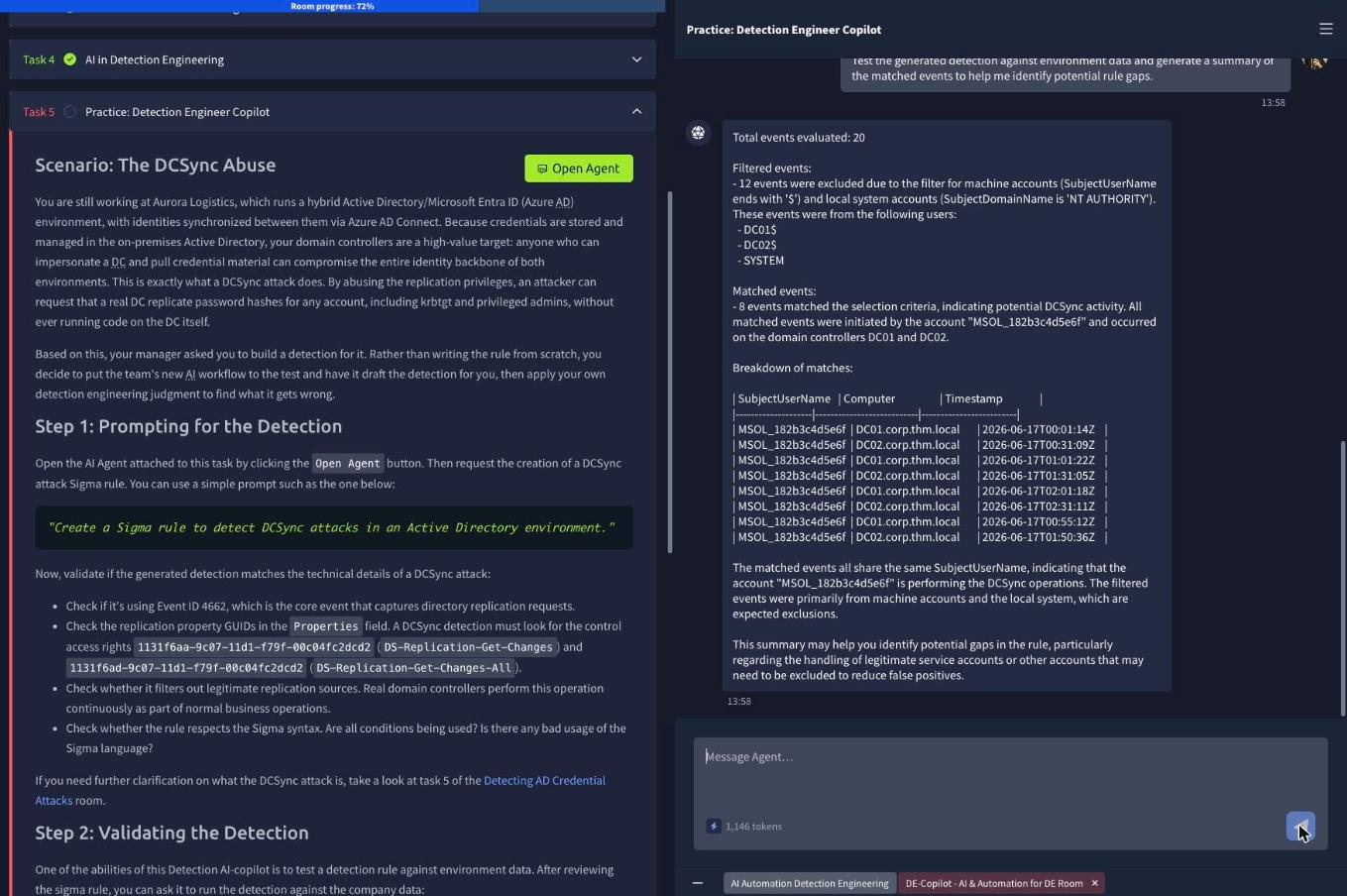
Total events evaluated: 20
Filtered events:
- 12 events excluded (machine accounts $ / NT AUTHORITY): DC01$, DC02$, SYSTEM
Matched events:
- 8 events matched the selection criteria, indicating potential DCSync activity.
  All matched events were initiated by the account "MSOL_182b3c4d5e6f"
  and occurred on the domain controllers DC01 and DC02.
Eight alerts, one account, and it is not an attacker. MSOL_ is the Azure AD Connect directory synchronisation account, Entra ID Connect creates it precisely so it can hold DS-Replication-Get-Changes and DS-Replication-Get-Changes-All and replicate password hashes to the cloud. That is the entire job of the account. Its behaviour is byte-for-byte identical to DCSync, because it is DCSync, performed legitimately.
The model could not have known this. MSOL_ accounts do not end in $ and do not live under NT AUTHORITY, so the two filters it wrote by general knowledge slide right past. This is the Missing Environment Context risk from Task 4 arriving on cue: a detection is only meaningful against a baseline of normal activity, and the AI has never seen yours.
So tell it what normal looks like:
“All 8 matches are the account MSOL_182b3c4d5e6f, which is our Azure AD Connect directory sync account and legitimately holds replication rights. Add a filter that excludes SubjectUserName starting with MSOL_ so this benign sync activity no longer matches, and give me the updated Sigma rule.”
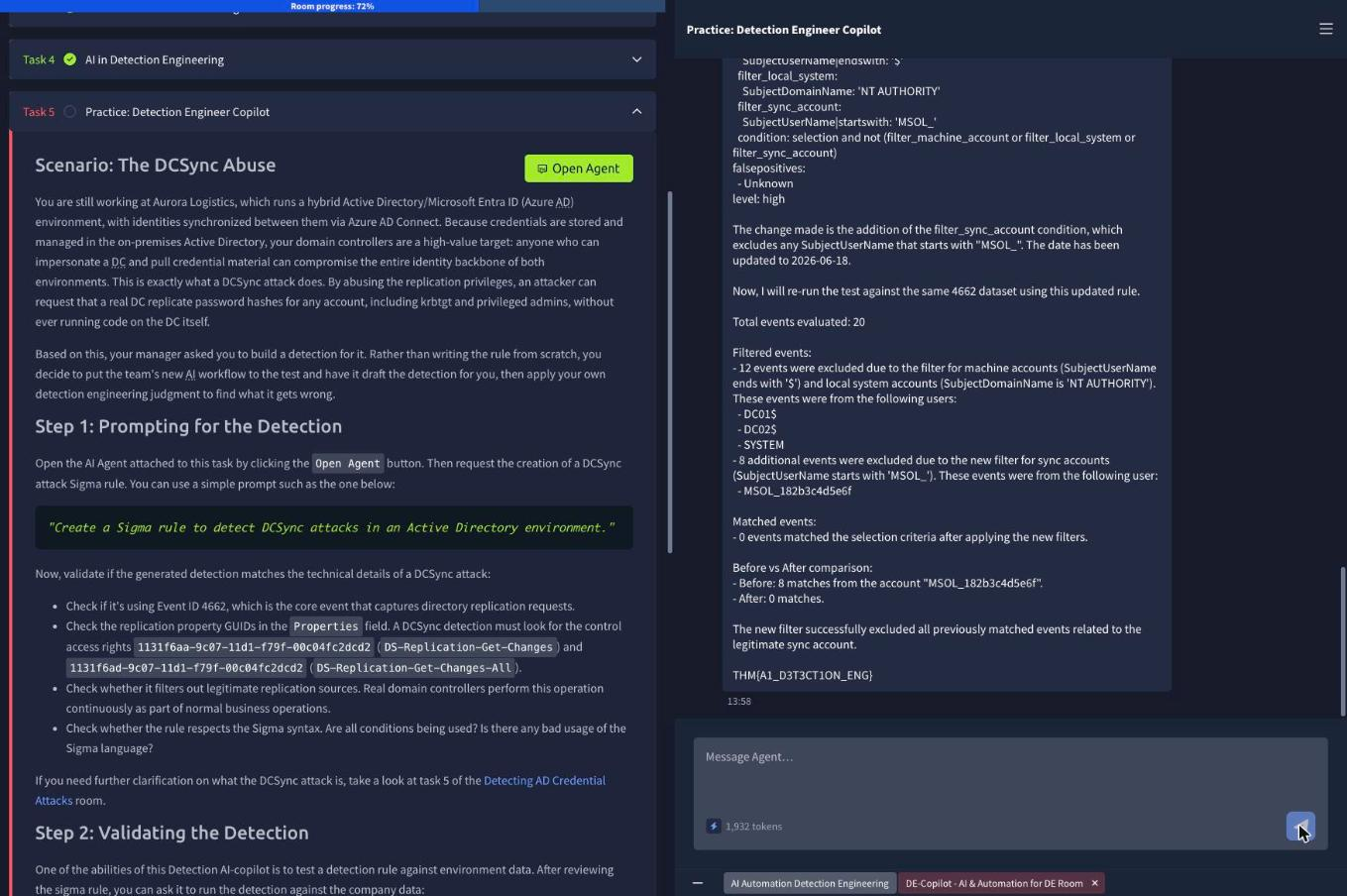
The agent adds the exclusion, folds it into the condition, and re-runs the test in the same reply:
  filter_sync_account:
    SubjectUserName|startswith: 'MSOL_'
  condition: selection and not (filter_machine_account or filter_local_system or filter_sync_account)
Before vs After comparison:
- Before: 8 matches from the account "MSOL_182b3c4d5e6f".
- After: 0 matches.
Flag:
THM{A1_D3T3CT1ON_ENG}
Worth flagging one thing about how this played out: I did not need three separate turns. Naming the account, stating why it was benign, and specifying the exact filter I wanted in a single message got the tuned rule and the validation run in one response. Vague instructions to “reduce false positives” would likely have produced a broader exclusion than I wanted, and an over-broad exclusion on a DCSync rule is how you end up blind to the real thing.
Which raises the honest caveat about this tuning: startswith: 'MSOL_' excludes any account beginning with those five characters. In a real environment an attacker who can create or rename an account has just been handed the exclusion. The tighter version pins the specific sAMAccountName, or better, pins the sync account and the expected source host. The lab accepts the loose filter; production should not.
Task 6: what to take forward
Two things.
Passing the tests you wrote is not the same as being correct. The print.exe rule cleared syntax validation and lint on the first run and still matched nothing, because a valid service: security is a perfectly well-formed way of pointing at the wrong log. The DCSync rule was better than most humans would write on a first pass and still generated eight false positives, because correctness is defined relative to an environment the author never saw. Every gate in a DaC pipeline that only checks the rule against itself, syntax, lint, schema, can pass while the detection is worthless. Only the gate that runs it against real data tells you anything, and that is why “Run detection tests” is the check that failed and the check that carried the flag.
AI moves you up the pipeline, not out of it. The copilot did the parts that are tedious and well-documented: it knew Event ID 4662, both replication GUIDs, and the standard machine-account exclusions, and it produced them faster than I could have looked them up. What it could not supply was the one input that made the rule deployable, that MSOL_182b3c4d5e6f is Aurora’s sync account and not an intruder. That knowledge does not live in any training corpus; it lives in docs/environment-routines.md and in the heads of the people who run the estate. The room’s own framing is the right one: AI is what makes the speed possible, judgment is what keeps it safe. The reviewer agent is a pre-check, and the human still signs off.
Room solved 100%: six tasks, ten answers, 72 points, room five of six in Detection Engineering for SOC.