Atomic Bird Goes Purple #1
This is the room where the Threat Emulation module stops teaching and starts testing you. Intro to Threat Emulation gave you the vocabulary, Atomic Red Team gave you the tooling, and this room hands you a Windows box wired with Sysmon and Aurora EDR and a set of customised atomic tests to run against it. The whole exercise is a loop: execute a technique, immediately investigate the logs, directory and registry it touched, and turn that artefact into a detection. That loop is what “going purple” means in practice, the red action and the blue follow-up done by the same person.
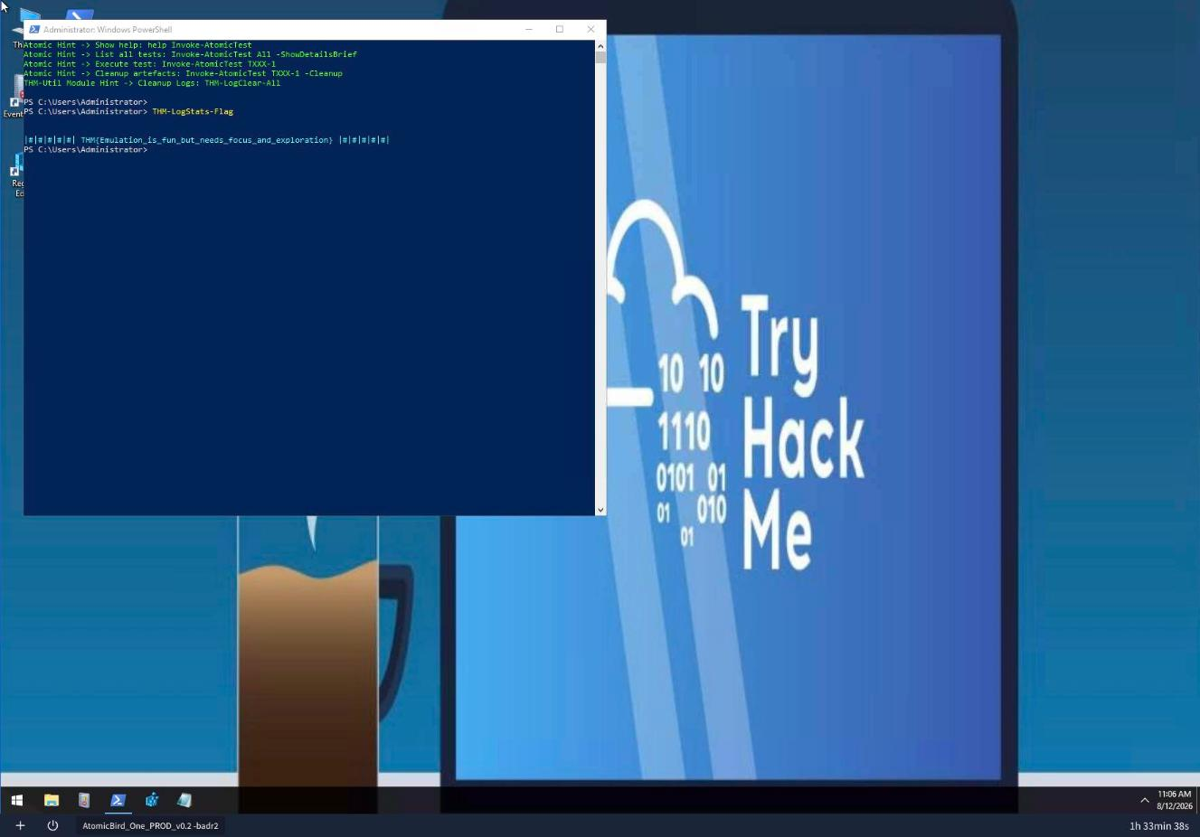
The lab machine boots to a Windows Server 2019 desktop (hostname AtomicBird) preloaded with the custom Atomic Red Team module, the THM-Utils PowerShell helpers, Sysmon and Aurora EDR. This is the real box the rest of the room is driven from.
Task 2: custom exercises and the investigation mindset
Task 2 frames the method before any test runs. The custom atomics are grouped into three cases, each mapped to a small set of ATT&CK techniques: Case 1 covers Execution, Discovery and Collection (T1056.002, T1059, T1082); Case 2 covers Lateral Movement through removable and shared media (T1091); Case 3 covers Collection via clipboard and system-file abuse (T1115). The important discipline the task sets is that the outcome you care about is not the test succeeding, it is what you can see right after it runs. Some atomics are deliberately not provided in cleartext, so you are expected to reason about them from the event logs alone, which is exactly how you handle a real sample you cannot decompile.
Task 3: the toolset that makes a run investigable
The box ships two custom PowerShell helpers. THM-Utils summarises the noisy Windows logs into something you can actually read, and the Atomic Red Team module runs the tests. The single most useful habit here is to clear the logs before every test so the events you see afterwards belong to that test and nothing else.
THM-LogClear-All wipes the logs, THM-LogStats-All gives you a RecordCount per source, and the per-source commands (THM-LogStats-Sysmon, THM-LogStats-Security, and so on) group events by Count, Event ID, Task Category and Provider. Running THM-LogStats-Flag prints the task’s flag directly, which is THM{Emulation_is_fun_but_needs_focus_and_exploration}.
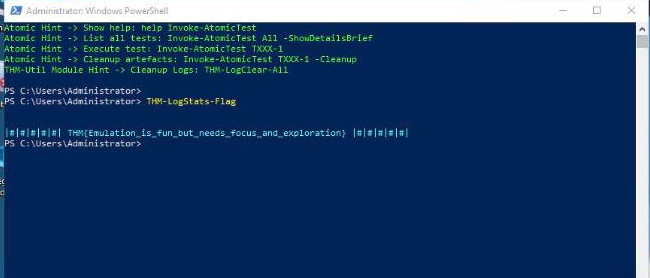
The command banner at the top is the customised PowerShell profile: it prints the Atomic Red Team hints (Invoke-AtomicTest All -ShowDetailsBrief, Invoke-AtomicTest TXXX-1, Invoke-AtomicTest TXXX-1 -Cleanup) and the THM-Utils log-cleanup hint every time a shell opens.
On the offensive side, Invoke-AtomicTest All -ShowDetailsBrief lists every custom test and Invoke-AtomicTest T0000-1 runs one, so the command that undoes a specific test and restores the files it changed is Invoke-AtomicTest T0123-4 -Cleanup. Clear, execute, stat the logs, clean up: that four-step cycle is the whole room.
Task 4: execute, investigate, detect
The first case runs three tests and asks you to read the result of each. This is where the mindset from Task 2 pays off.
Executing T0004-1 performs system enumeration and drops a Task-Result.txt document on the Desktop; opening it, the OS Build info reads 10.0.17763 N/A Build 17763 (Windows Server 2019).
 T0004-2 emulates a GUI credential prompt, the T1056.002 GUI Input Capture technique, and capturing the cleartext credential yields the flag
 THM{THM_Emulation_Room}. T0004-3 is the interesting one: the test is designed to fail, and the point is to find the attempted command in the logs rather than in any output. Reading the PowerShell and Sysmon events shows the failed command was <!bin/bash>, a Linux shebang fragment that Windows could never execute, which is exactly the kind of artefact-only evidence the room wants you comfortable reading.
Task 5: the universal suspicious share
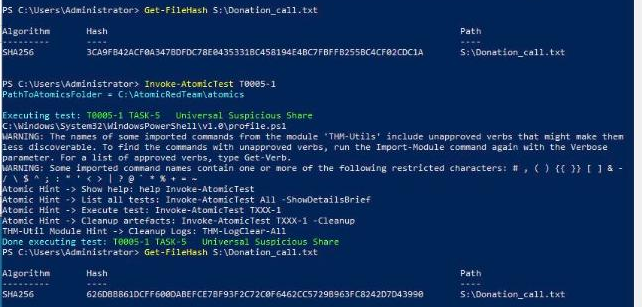
Case 2 is a clean, provable demonstration of file manipulation on a shared drive (T1091). The shared folder mounts as the Share4All (S:) drive, and the .txt document is S:\Donation_call.txt. The method is to fingerprint the file first, run the test, then fingerprint it again and compare. Hashing it before anything runs gives a SHA256 of 3CA9FB42ACF0A347BDFDC78E0435331BC458194E4BC7FBFFB255BC4CF02CDC1A. After executing T0005-1 and recalculating, the hash is 626DBB861DCFF600DABEFCE7BF93F2C72C0F6462CC5729B963FC8242D7D43990. The two hashes differing is the entire finding: a file on a share silently changed, and you can prove it to the byte without ever seeing the code that did it. That is the blue-team half of the purple loop in one comparison.
Task 6: dump and go
The final case covers Collection and staging for exfiltration (T1115). T0006-1 dumps command-line history to a file, the kind of artefact an attacker harvests for credentials and internal hostnames, and locating that malicious history dump reveals the flag THM{THM_analytics_to_exfiltration_with_NexGenHunt}. T0006-2 hijacks a system file to stage data for exfiltration, and finding that system-file modification activity gives THM{NextGenHunt.thm.jhn}. Both answers live in the artefacts the tests leave behind, not in any console output, which is the last reinforcement of the room’s core lesson.
Every answer
| Task | Question | Answer |
|---|---|---|
| 3 | Flag from the required PowerShell command | THM{Emulation_is_fun_but_needs_focus_and_exploration} |
| 3 | Cleanup command for test T0123-4 | Invoke-AtomicTest T0123-4 -Cleanup |
| 4 | T0004-1 OS Build info | 10.0.17763 N/A Build 17763 |
| 4 | T0004-2 flag | THM{THM_Emulation_Room} |
| 4 | T0004-3 failed command | <!bin/bash> |
| 5 | .txt SHA256 before T0005-1 | 3CA9FB42ACF0A347BDFDC78E0435331BC458194E4BC7FBFFB255BC4CF02CDC1A |
| 5 | .txt SHA256 after T0005-1 | 626DBB861DCFF600DABEFCE7BF93F2C72C0F6462CC5729B963FC8242D7D43990 |
| 6 | T0006-1 history dump flag | THM{THM_analytics_to_exfiltration_with_NexGenHunt} |
| 6 | T0006-2 system-file modification flag | THM{NextGenHunt.thm.jhn} |
Wrap-up
Atomic Bird Goes Purple #1 is the first room in the module that feels like real purple-team work, because the answers are not facts to recall but observations to make. Every question is the output of the same discipline: clear the logs, run one customised atomic, and then look hard at the Sysmon events, the Aurora EDR alerts, the dropped file, the changed hash, the modified registry value. Two of the tests are built to be read only from their artefacts, which is the most transferable habit the room teaches, since you rarely get source for the thing that hit your environment. Run the technique, read what it left behind, and write the detection. Next up in the module is Atomic Bird Goes Purple #2, which turns the difficulty up on the same loop.