Basic Vulnerability Identification Techniques sits in the Vulnerability Knowledge module of the Jr Penetration Tester path. It is an easy room that walks the phase between reconnaissance and exploitation: map the attack surface, pull exact service versions, probe a web app for common flaws, test system services for misconfigurations, then sort what you find by impact. If you enjoyed the tooling in my Vulnerability Scanning Tools walkthrough, this room is the manual, methodical counterpart.
I solved it from the THM AttackBox because the Mac could not route to the lab this session. Every finding below came from the AttackBox terminal against the single target machine.
Task 1: Introduction
The opening task frames vulnerability identification as its own phase. Reconnaissance gathers information, exploitation leverages a confirmed weakness, and identification is the disciplined middle step that removes guesswork before you commit to an attack path. No answer is required. The single Check marks the task complete.
Task 2: Understanding the Attack Surface
The attack surface is every point where an attacker can interact with a system: open ports, running services, input fields, API endpoints, user accounts, file permissions. The task splits it into an external surface (everything reachable before you have any access) and an internal surface (file shares, management interfaces, database servers) that only comes into reach once you are inside.
The question asks which surface becomes accessible only after gaining an initial foothold. That is the Internal attack surface.
Task 3: Service Enumeration and Banner Grabbing
Time to touch the target. A full service and version scan with the default scripts gives the exact software running on each port.
  # nmap -sV -sC full-port scan of the target
nmap -sV -sC -p- --min-rate 3000 10.48.156.56
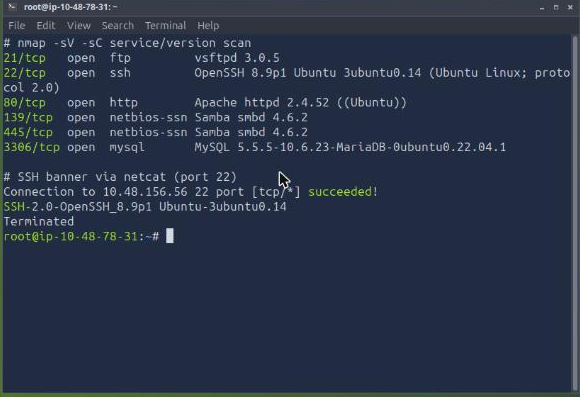
The target exposes FTP (vsftpd 3.0.5), SSH, HTTP, SMB on 139 and 445 (Samba 4.6.2), and MySQL/MariaDB. The web server line reads Apache httpd 2.4.52 ((Ubuntu)), so the Apache version on port 80 is 2.4.52.
The room then asks for the SSH banner grabbed with netcat rather than nmap. Connecting raw to port 22 makes the daemon announce itself.
  # grab the SSH banner directly off port 22
nc -nv 10.48.156.56 22
  # SSH-2.0-OpenSSH_8.9p1 Ubuntu-3ubuntu0.14
The full OpenSSH version string returned is OpenSSH_8.9p1. Note that the illustrative version table printed inside the task text (OpenSSH 7.6p1, Apache 2.4.29) is only an example. Scanning the real box is what gives the accepted answers.
Task 4: Matching Services to Known Exploits
A version string maps to public CVE entries, but a version match is a lead, not a confirmed vulnerability. The task poses a scenario: a CVE describes remote code execution in the running version, but the administrator patched the service without bumping the version string. Is it still exploitable through that CVE?
Because the code is already patched, the flaw is gone even though the banner still looks vulnerable. The answer is Nay. This is exactly why identification and exploitation are separate phases: you confirm during exploitation instead of trusting the version alone.
Task 5: Identifying Web Application Vulnerabilities
Web apps need a different approach from version matching. You probe how the application behaves. First, read the homepage source for anything the developers left behind.
curl -s http://10.48.156.56/ | grep -o "<!--.*-->"
  # <!-- Portal version: 3.2.1-internal -->
  # <!-- Deployment note: staging DB is at 10.10.14.50:3306 -->
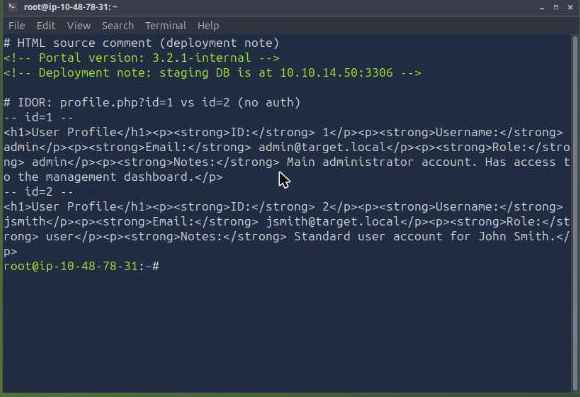
The deployment note comment references the internal IP 10.10.14.50.
Next, the profile page takes a numeric id in the URL. Requesting profile.php?id=1 returns the admin profile, and simply changing it to id=2 returns a different user with no authentication in between.
curl -s "http://10.48.156.56/profile.php?id=1"   # admin
curl -s "http://10.48.156.56/profile.php?id=2"   # jsmith, no auth required
Reading another user’s object by manipulating its identifier is an Insecure Direct Object Reference, so the vulnerability type is IDOR.
Finally, the /admin/ dashboard is reachable without logging in and prints a full user table, including a notes column. One row stands out.
  # GET http://10.48.156.56/admin/  (no authentication)
ID 4  dbadmin  [email protected]  admin
      Notes: Database administrator. Credentials for backup server: backup_usr / <redacted>
The user whose notes contain backup server credentials is dbadmin. The backup password itself is looted data, redacted here.
Task 6: Identifying System and Network Vulnerabilities
System services are often misconfigured rather than unpatched. Anonymous FTP is the first check.
curl -s --user anonymous: ftp://10.48.156.56/pub/
  # README.txt  maintenance-schedule.txt  network-map.txt
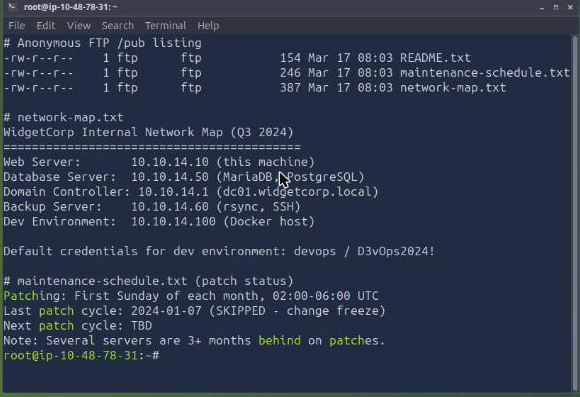
The file in /pub that holds the internal network map is network-map.txt. Reading it lays out the whole environment and leaks a credential.
curl -s --user anonymous: ftp://10.48.156.56/pub/network-map.txt
  # Web Server 10.10.14.10, Database 10.10.14.50, DC 10.10.14.1, Backup 10.10.14.60, Dev 10.10.14.100
  # Default credentials for dev environment: devops / D3vOps2024!
The default credentials for the Dev environment are devops:D3vOps2024!.
SMB is next. A null session lists the shares without any password.
smbclient -L //10.48.156.56/ -N
  # Sharename   Type   Comment
  # shared      Disk   Internal shared documents
  # IPC$        IPC    IPC Service (WidgetCorp File Server)
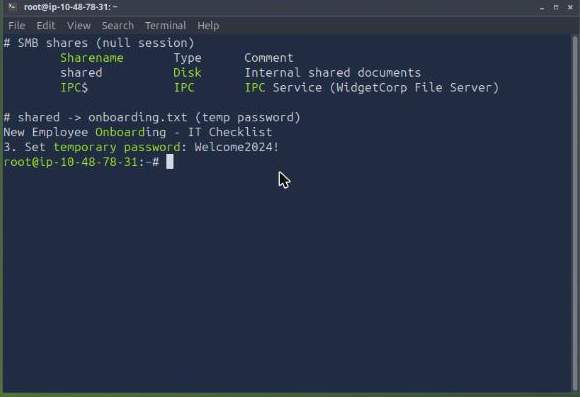
The readable share is shared.
Task 7: Triaging and Documenting Findings
Not every finding carries the same weight. The room groups them into three tiers. Tier 1 gives immediate access or significant escalation with minimal effort: unauthenticated remote code execution, default credentials on critical services, access-control flaws exposing admin functionality. Tier 2 needs more work to confirm or exploit. Tier 3 is lower impact and unlikely to lead anywhere on its own.
An unauthenticated remote code execution flaw on an externally facing web server is the highest priority, so it belongs to tier 1. A service using a deprecated protocol with no clear exploitation path is low impact, which is tier 3.
Task 8: Practical Challenge
The challenge ties every technique together against the same machine. Three findings from the earlier tasks answer it directly.
The admin dashboard is exposed without authentication at the URL path admin (/admin/). The FTP server carries a maintenance note about patch lag.
curl -s --user anonymous: ftp://10.48.156.56/pub/maintenance-schedule.txt
  # Last patch cycle: 2024-01-07 (SKIPPED - change freeze)
  # Note: Several servers are 3+ months behind on patches.
The file revealing that several servers are 3+ months behind on patches is maintenance-schedule.txt.
The SMB shared share holds an onboarding document. Reading it gives the last answer.
smbclient //10.48.156.56/shared -N -c 'get onboarding.txt /tmp/o.txt'; grep -i password /tmp/o.txt
  # 3. Set temporary password: Welcome2024!
The default temporary password assigned to new employees is Welcome2024!.
Task 9: Conclusion
The final task summarises the methodology and needs no answer. Its single Check completes the room.
Takeaways
Two lessons stick from this room.
- Scan the box, do not trust the brief. Task 3 prints an example version table inside its own text. The accepted answers came only from scanning the live target, where Apache was 2.4.52 and SSH was OpenSSH_8.9p1, not the sample numbers on the page. Enumerate the real thing every time.
- A version match is a lead, not a finding. Task 4 makes the point explicitly: a patched service keeps its old banner, so the CVE no longer applies. Identification produces a prioritised list of candidates. Confirmation happens later, during exploitation, which is why triaging by impact tier matters before you spend effort.
Room solved 100%: 9 tasks, 17 answers.