Building Wazuh Rules
Part of the Wazuh for SOC and GRC module on the SOC Level 2 path, and the first room in a while that asks you to write detection content rather than consume it. The module frames Wazuh as a dual-purpose tool, a SIEM for the SOC and an evidence engine for compliance, and this room is the SOC half: decoders, rules, CDB lookups, correlation, and tuning out your own false positives.
What makes it good is the mini-challenge in Task 5. The first four tasks teach syntax against synthetic web logs, then Task 5 drops you into a manager that already has real alerts in it and asks you to read someone else’s rules. That inversion, from author to reader, is where the room earns its “medium”.
I worked it mostly from the Wazuh dashboard’s own JavaScript context rather than clicking through panels, because the Wazuh API and the OpenSearch search endpoint both accept same-origin requests once you are logged in. Two helpers cover everything:
// Wazuh manager API, proxied by the dashboard plugin
window.__wz = async (path, method='GET', body=null) => {
  const r = await fetch('/api/request', {method:'POST',
    headers:{'osd-xsrf':'true','Content-Type':'application/json'},
    body: JSON.stringify({method, path, body: body||{}, id:'default'}),
    credentials:'same-origin'});
  return {s:r.status, t:await r.text()};
};

// OpenSearch, for aggregations the Events tab will not give you
window.__os = async (index, body) => {
  const r = await fetch('/internal/search/opensearch', {method:'POST',
    headers:{'osd-xsrf':'true','Content-Type':'application/json'},
    body: JSON.stringify({params:{index, body}}), credentials:'same-origin'});
  return {s:r.status, t:await r.text()};
};
Task 2: Decoders, and what a field name actually is
Wazuh handles JSON, CSV, EVTX and Syslog natively. Anything else needs a decoder, and the room’s example is a custom TryHackMe access log:
29/Mar/2025 13:36:36 WEB tryhackme.com 203.45.12.88 "GET /index.php HTTP/1.1" 200 1024 "-" "Mozilla/5.0"
The thm-web decoder is split into three blocks that share one name. The first is a cheap pre-filter, the next two do the extraction:
<decoder name="thm-web">
    <prematch>^\d+/\w+/\d+ \d+:\d+:\d+ WEB</prematch>
</decoder>
<decoder name="thm-web">
    <parent>thm-web</parent>
    <regex>^\S+ \S+ WEB (\S+) (\S+)</regex>
    <order>website, srcip</order>
</decoder>
<decoder name="thm-web">
    <parent>thm-web</parent>
    <regex offset="after_regex">"(\w+) (\S+) \S+" (\d+) (\d+) "(\S+)" "(\S+)"</regex>
    <order>method, url, status, bytes, referer, useragent</order>
</decoder>
Both questions are answered by <order> rather than by the log line. The field holding tryhackme.com is website, and the last field the decoder extracts is useragent. That is worth dwelling on: the hostname could reasonably have been called hostname, domain or dstname, and Mozilla/5.0 could have been user_agent with an underscore. The decoder author decides, so the answer lives in the XML and nowhere else. When you inherit a Wazuh ruleset, <order> is the field dictionary.
Note the offset on the third block. after_regex starts it where the previous block’s regex stopped, which is what lets three short regexes cover one long line instead of one unreadable regex covering all of it. Block two carries no offset and re-anchors at the start of the line with ^, so the two styles sit side by side in the same decoder.
Task 3: Rules, and reading a shipped ruleset
Rules consume decoded fields. The room’s own pattern is a level-0 base rule that just claims the events, plus a level-12 child that alerts:
<rule id="200000" level="0">
    <decoded_as>thm-web</decoded_as>
    <description>Custom - THM Web Request</description>
    <group>web</group>
</rule>
The first question asks which rule description applied to the third tested web event. The third event is a plain GET /contact.php returning 200, so it never reaches the admin-login rule and stops at the base rule: Custom - THM Web Request. Level 0 does not mean “no match”, it means “matched, do not alert”: the rule still fires, still labels the event, and is still what the Ruleset Test reports.
The second question sends you into the prebuilt ruleset for the PSEXEC detection. The answer is (?i)PSEXESVC.exe, and the two details that matter are both easy to drop: the (?i) case-insensitivity prefix, and the escaped dot. The answer mask (************\.***) settles both before you submit, because it renders the backslash literally while masking everything else.
Task 4: CDB lists and correlation
A CDB list is a flat file of indicators on the Wazuh server that a rule can look up per event:
<rule id="200002" level="15">
    <if_sid>200000</if_sid>
    <list field="srcip" lookup="address_match_key">etc/lists/malicious-ioc/malicious-ip</list>
    <description>SOC Alert - THM Web Request From Bad IP</description>
    <mitre><id>T1071</id></mitre>
</rule>
The MITRE tactic shown for the brute-force alert in the Ruleset Test output is Credential Access, which is the tactic for T1110 (the technique the rule tags). The IP that matched the list is 158.51.96.38, and it is worth confirming against the list itself rather than eyeballing the Ruleset Test output. The list on this box holds 199 entries, and reading it back through the /lists endpoint on the manager API confirms 158.51.96.38 is one of them.
lookup="address_match_key" is the part people get wrong when they write their own. A plain match_key does string equality, which fails the moment the list holds CIDR ranges; address_match_key does network-aware matching. Picking the wrong lookup gives you a rule that silently never fires.
Task 4, continued: how frequency rules actually count
The frequency rule shape is straightforward:
<rule id="160001" level="12" frequency="5" timeframe="60">
  <if_matched_sid>60122</if_matched_sid>
  <same_field>win.eventdata.targetUserName</same_field>
  <description>Security - Account brute force (5 fails / 60 sec)</description>
  <mitre><id>T1110</id></mitre>
</rule>
The counting is not straightforward, and the room says so. Wazuh emits at most one alert per event, so eight login failures produce eight failure alerts, and the correlation rule rides on top of them. The room’s own worked example walks eight failures in 60 seconds and fires the brute-force alert twice, at events #3 and #6, resetting the counter each time.
That does not match frequency="5" read literally, and it does not match the lab data either. In Task 5’s manager there are 15 failure alerts naming rick.brown and exactly 3 brute-force alerts, which is one per five failures, not one per three. So the room’s table and the room’s own dataset disagree about what frequency counts. I would not build a production threshold on either reading without testing it against the specific Wazuh version in front of me, and that is the practical takeaway: frequency is an off-by-something trap, and the only reliable calibration is replaying real volume through Ruleset Test.
same_field is the other half. Without it the rule correlates across every account, so five failures spread over five different users would fire a “brute force” alert that describes nothing. Pinning it to targetUserName is what makes the alert mean password guessing against one identity.
Task 5: Reading someone else’s rules
The mini-challenge hands you a manager with real Sysmon and Security alerts and four questions, none of which are answerable from the dashboard’s default views. Every custom rule lives in one file, task_5.xml, and the Rules panel filtered to custom rules is the fastest way to see the shape of it:
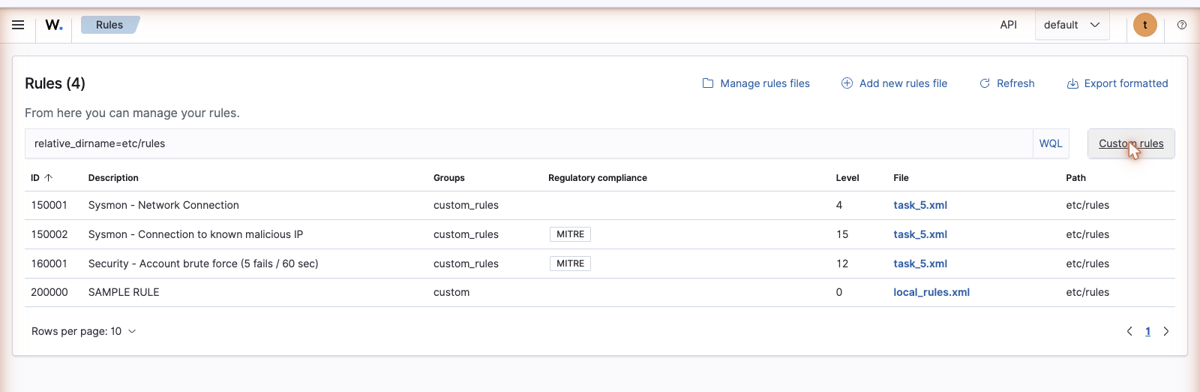
Three rules, all in etc/rules/task_5.xml, plus the SAMPLE RULE stub in local_rules.xml left over from the earlier tasks. The levels alone tell you the intent: 150001 is a level-4 collector for all Sysmon/3 network connections, 150002 is the level-15 CDB rule built on top of it, and 160001 is the level-12 brute-force correlation.
Q1: how many login attempts against rick.brown. An aggregation is cleaner than counting rows:
await __os('wazuh-alerts-*', {size:0,
  query:{terms:{'rule.id':['60122','160001']}},
  aggs:{r:{terms:{field:'rule.id'},
           aggs:{u:{terms:{field:'data.win.eventdata.targetUserName'}}}}}});
// 60122  -> 18   (rick.brown 15, Administrator 3)
// 160001 -> 3    (rick.brown 3)
The accepted answer is 18. Be aware that two different readings both land on 18 here and only one of them is about rick.brown: all 18 rule-60122 logon failures across every account, or all 18 alert documents tagged rick.brown across both rules. The number of actual failed logons naming rick.brown is 15. The coincidence is why the two-character mask does not help you distinguish them, and it is the one answer in this room I would call ambiguous rather than tricky.
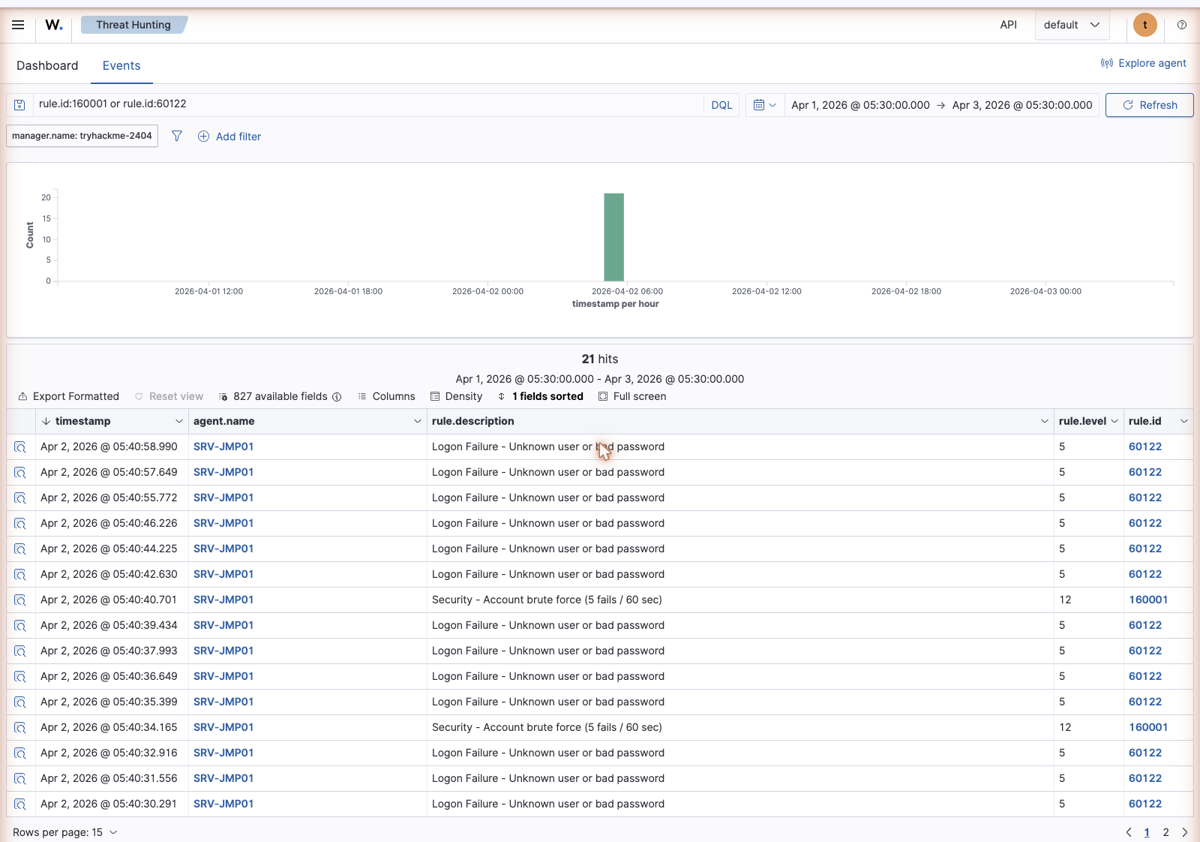
The interleaving in that view is the frequency rule working in real time: runs of level-5 failures with a level-12 correlation alert dropped in whenever the counter trips.
Q2: the hidden flag. The Rules panel renders rules, not files, so the flag is invisible there. It sits in an XML comment after the last </rule>. Fetching the file raw is one call:
const r = await __wz('/rules/files/task_5.xml?raw=true');
r.t.match(/THM\{[^}]*\}/)[0];
// THM{wazuh_detection_engineer}
THM{wazuh_detection_engineer}, sitting in <!-- Your flag: ... --> at the very end of the file. Worth noting for its own sake: ?raw=true on /rules/files/<name> is the difference between reading a parsed rule and reading what an author actually wrote, comments included. Anything a colleague left in a comment (a ticket number, a tuning rationale, a “temporary” exclusion from two years ago) only exists in the raw view.
Q3 and Q4: the CDB hit. Rule 150002 is the CDB rule in this file, matching win.eventdata.destinationIp against the same malicious-ip list. It fired exactly twice:
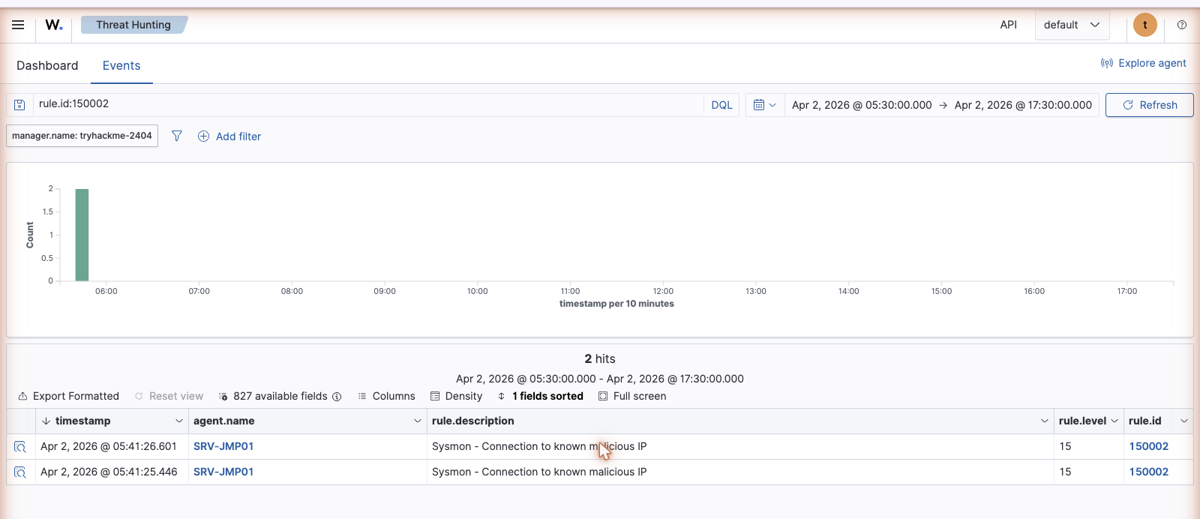
Expanding either document gives both remaining answers at once:
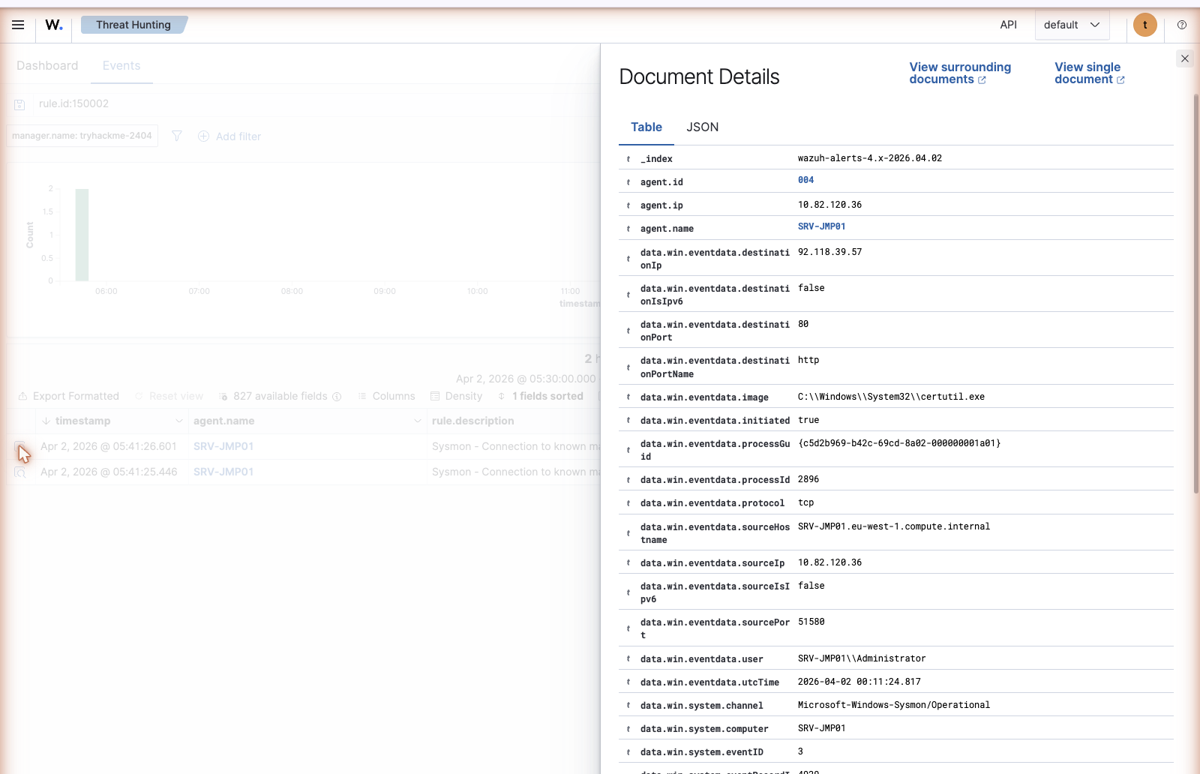
The IP is 92.118.39.57 and the program is certutil.exe, running as SRV-JMP01\Administrator and talking out over plain HTTP on port 80. That is the whole detection in one row: certutil.exe is a signing utility with a -urlcache download mode, so a Windows binary that has no business making outbound web requests is making one to an address on a threat-intel list. The CDB rule caught it, but the Sysmon EventID 3 that fed the rule is what makes it explainable.
Task 6: Exclusions are rules, not filters
Wazuh has no NOT clause you bolt onto a rule. A false positive is suppressed by writing a child rule at level 0 that matches the benign case more specifically:
<rule id="100005" level="12">
    <if_sid>100003</if_sid>
    <field name="audit.file.name">malware|shell</field>
    <description>Audit: $(audit.exe) created a suspicious file: $(audit.file.name).</description>
</rule>
<rule id="100006" level="0">
    <if_sid>100005</if_sid>
    <field name="audit.file.name">shell-checker-thm.sh</field>
    <description>False positive. The script is used by our red team for testing.</description>
</rule>
So shell-checker-thm.sh matches 100005 on the shell keyword, then matches the more specific child, and the rule that ends up on the event is 100006 at level 0. A file named malware.elf matches 100005 and nothing narrower, so its alert level stays 12.
Two things follow from this that are easy to miss. The exclusion still fires: it is a real rule with a real ID, so you can search for it and see how often your “false positive” is actually happening, which a filter would have thrown away silently. And the description field is doing documentation work: “used by our red team for testing” is the only record of why the exclusion exists, sitting where the next analyst will actually find it.
The task also covers overwrite="yes", which is how you extend a shipped rule without editing files that a Wazuh upgrade will replace. Copy the rule into overwrite_rules.xml, keep the ID, add your keywords. The caveat the room raises is the real one: after you widen a rule, every exclusion hanging off it needs re-checking, because a broader parent means the children are now suppressing more than they were written to suppress.
Two things worth keeping
The field dictionary is the decoder, not the log. Three of this room’s twelve answers were field or rule names that no amount of staring at the raw event would give you: website, useragent, Custom - THM Web Request. In Wazuh, <order> and <description> are the contract between whoever wrote the decoder and everyone who queries the data afterwards. When you join a team with an existing Wazuh deployment, reading etc/decoders/ end to end is a better use of the first afternoon than reading dashboards.
Read the file, not the rendering. The Rules panel is a good index and a bad source of truth. It showed me three custom rules and their levels instantly, and it silently dropped the XML comment holding Task 5’s flag, along with any <!-- --> rationale an author left behind. GET /rules/files/<file>?raw=true costs one request and returns what was actually written. The same gap shows up everywhere a SIEM parses config for display: the parsed view answers “what does this do”, and only the raw view answers “what did someone mean”.
Room solved 100%: 7 tasks, 12 answers.