Content Discovery
Room two of the Web Application Security Fundamentals module on the Jr Penetration Tester path, straight after Walking An Application. That room was about reading a site you can already see. This one is about finding the parts nobody linked: staff portals, forgotten backups, admin panels, virtual hosts that never made it into DNS.
The target is the same fake company, Acme IT Support, at http://MACHINE_IP. It routed straight from my Mac over the THM tunnel, so I skipped the AttackBox entirely and ran curl and gobuster locally. The room splits content discovery into three approaches and gives you two answers from each: manual, OSINT, automated.
One honest note on evidence up front. My Mac screen was locked while I worked, so window screenshots came back as stale frames of an earlier command and I threw them away rather than pass them off as live output. The terminal work below is reproduced as real command output in code blocks; the screenshots that survived are the framework’s own public documentation pages, which are the actual pivot in this room.
Task 2: robots.txt and sitemap.xml, two lists from opposite directions
Both files are meant for crawlers, and they leak in opposite directions. robots.txt names paths the owner wants kept out of search results, which is a curated list of the things worth looking at. sitemap.xml names the paths the owner wants indexed, including staging pages and endpoints that no navigation link reaches.
  # robots.txt tells us where NOT to look
$ curl -s http://10.48.167.70/robots.txt
User-agent: *
Allow: /
Disallow: /staff-portal

  # sitemap.xml tells us where the owner WANTS crawlers to look
$ curl -s http://10.48.167.70/sitemap.xml | grep -oE '<loc>[^<]+</loc>' | sed 's|</*loc>||g'
http://10.48.167.70/
http://10.48.167.70/news
http://10.48.167.70/news/article?id=1
http://10.48.167.70/news/article?id=2
http://10.48.167.70/news/article?id=3
http://10.48.167.70/contact
http://10.48.167.70/customers/login
http://10.48.167.70/s3cr3t-area
The disallowed directory is /staff-portal. The interesting path in the sitemap, the one nothing on the site links to, is /s3cr3t-area.
Worth noticing that the sitemap also exposes article?id=1,2,3. A numeric identifier in a query string is an input point, and this is exactly the shape of an IDOR test later in the path.
Task 3: response headers and a framework version string
Headers are the cheapest fingerprint you can take. -D- writes the response headers to stdout without dumping the body.
$ curl -s -D- -o /dev/null http://10.48.167.70/
HTTP/1.1 200 OK
Server: nginx/1.18.0 (Ubuntu)
Date: Mon, 31 Aug 2026 13:59:07 GMT
Content-Type: text/html; charset=UTF-8
Transfer-Encoding: chunked
Connection: keep-alive
X-FLAG: THM{HEADER_FLAG}
X-FLAG: THM{HEADER_FLAG}
X-Powered-By: THM-Framework
The custom header hands over the first flag, THM{HEADER_FLAG}. It reads like a placeholder rather than a real flag, and I second-guessed it before submitting. The answer mask settled it: ***{******_****} is exactly THM{ plus six characters, an underscore, four characters, so HEADER_FLAG is the only thing that fits. It was accepted.
X-Powered-By: THM-Framework is the more useful line. Confirmation of what it is sits at the bottom of every rendered page:
$ curl -s http://10.48.167.70/ | tail -3
<!--
Page Generated in 0.03120 Seconds using the THM Framework v1.2 ( https://static-labs.tryhackme.cloud/sites/thm-web-framework )
-->
That comment is the pivot for the rest of the task. The framework is public software, and public software ships documentation.
Reading the vendor’s own docs
The framework site has three pages: home, change log, documentation. The documentation page gives away the admin path and the default credentials in three sentences.
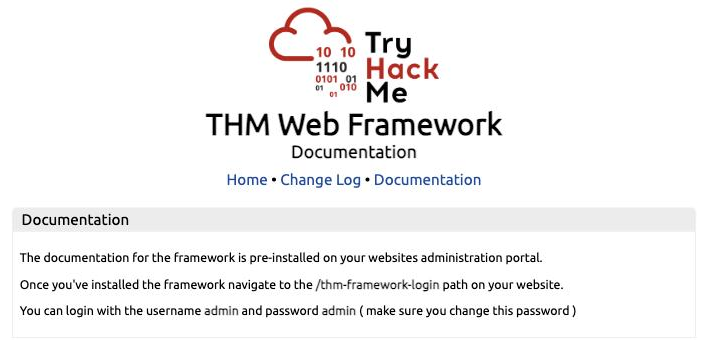
$ curl -s -X POST -d 'username=admin&password=admin' -L \
    http://10.48.167.70/thm-framework-login | grep -oE 'THM\{[^}]*\}'
THM{CHANGE_DEFAULT_CREDENTIALS}
The second flag is THM{CHANGE_DEFAULT_CREDENTIALS}, and the name is the lesson.
The change log is worth reading too even though the room does not ask about it. It documents a backup process that used to leave /tmp.zip in the web root, fixed in v1.3, and the target announces itself as v1.2:
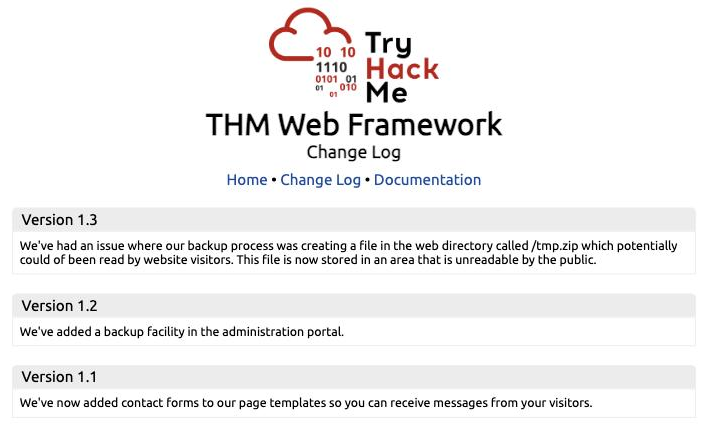
A vendor change log is a disclosure feed. Every “we fixed X in version N” entry is a working exploit against every install still on N minus one.
Task 4: search engine operators
Two lookups, no target interaction. The Google dork operator that restricts results to a single domain is site:, as in site:tryhackme.com. The tool that fingerprints a site’s technology stack, available both as a web service and a browser extension, is Wappalyzer.
Task 5: archives and buckets
Also research answers. The Wayback Machine lives at https://web.archive.org/, and it matters because it serves pages that were deleted from the live site years ago, including old admin endpoints and JavaScript that still references internal hosts.
Amazon S3 buckets are addressed at .s3.amazonaws.com, so a bucket named acmeitsupport sits at http://acmeitsupport.s3.amazonaws.com. Guessing bucket names from the company name plus common suffixes is a standard step, and a misconfigured bucket lists its contents to anyone.
Both answers were confirmed against the mask before submitting. *****://***.*******.***/ has five characters before the scheme separator and a trailing slash, which rules out the bare archive.org form.
Task 6: Gobuster dir mode
No wordlists were installed on my Mac, so I pulled two from SecLists first:
$ mkdir -p ~/wordlists && cd ~/wordlists
$ curl -sO https://raw.githubusercontent.com/danielmiessler/SecLists/master/Discovery/Web-Content/common.txt
$ curl -sO https://raw.githubusercontent.com/danielmiessler/SecLists/master/Discovery/DNS/subdomains-top1million-5000.txt
Then the directory scan:
$ gobuster dir -u http://10.48.167.70 -w common.txt -t 40 -q
assets               (Status: 301) [Size: 178] [--> http://10.48.167.70/assets/]
contact              (Status: 200) [Size: 3108]
customers            (Status: 302) [Size: 0] [--> /customers/login]
development.log      (Status: 200) [Size: 27]
monthly              (Status: 200) [Size: 28]
news                 (Status: 200) [Size: 2538]
private              (Status: 301) [Size: 178] [--> http://10.48.167.70/private/]
robots.txt           (Status: 200) [Size: 46]
sitemap.xml          (Status: 200) [Size: 1383]
The directory beginning with /mo is /monthly, and the log file is development.log.
Note what the scan found that neither robots.txt nor the sitemap mentioned: /monthly, /private, and a development log sitting in the web root. Manual discovery gave two paths. Automation gave four more in about thirty seconds. Neither replaces the other, which is the actual point of splitting the room this way.
Task 7: subdomains versus virtual hosts
The distinction is the whole task. A subdomain resolves through DNS, so gobuster dns asks a resolver whether each candidate name exists. A virtual host is resolved by the web server from the Host: header, so gobuster vhost sends every candidate to the same IP and watches for a different response. Virtual hosts never appear in public DNS, which is why internal admin sites so often hide there.
For dns mode, the shorthand flag required alongside -w is -d, which names the domain to brute-force.
For the vhost scan you need a baseline first, or every wildcard response counts as a hit:
$ curl -s -o /dev/null -w '%{http_code} %{size_download}\n' \
    -H 'Host: zzzznope.acmeitsupport.thm' http://10.48.167.70/
404 306
Any name that does not exist returns a 306-byte 404, so that length is the filter:
$ gobuster vhost -u "http://10.48.167.70" --domain acmeitsupport.thm \
    -w subdomains-top1million-5000.txt --append-domain -t 30 -q --exclude-length 306
admin.acmeitsupport.thm Status: 200 [Size: 66]
blog.acmeitsupport.thm  Status: 200 [Size: 58]
shop.acmeitsupport.thm  Status: 200 [Size: 58]
3 virtual hosts respond with 200.
Establishing the bogus-host baseline before the scan is not optional here. Without --exclude-length, every one of the 5000 candidates returns the same 404 page with a 200-ish shape in some setups and the output is unreadable.
Two things worth keeping
A vendor change log is an exploit feed. The Acme site advertises THM Framework v1.2 in an HTML comment, and the framework’s public change log says v1.3 fixed a readable /tmp.zip backup in the web root. That is a disclosed vulnerability with a version check attached, published by the vendor, requiring no scanning at all. The same reasoning applies to real CMS and plugin change logs: read the fix notes, then check what version the target admits to.
Answer masks are arithmetic, not decoration. THM{HEADER_FLAG} looked like a leftover placeholder, and I nearly went hunting for a “real” flag. The mask ***{******_****} allows exactly six characters, an underscore, then four, and nothing else in the response fits that. Counting the mask is faster than second-guessing the lab, and it caught the format for both the Wayback Machine URL and the S3 suffix before I burned a submission on either.
Room solved 100%: 8 tasks, 13 answers.