Conti
Part of the SOC Level 2 Capstone Challenges module, alongside Volt Typhoon and Servidae. Same shape as those two: a compromised host, a pile of logs, and no hand-holding. The difference here is that the intrusion is over before you arrive. Employees cannot open Outlook, the Exchange admin cannot reach the Admin Center, and readme files have appeared on the server. You are doing post-mortem forensics, not detection.
Two tasks, eleven questions, one Splunk instance holding about 28,000 events. The whole room is Windows event logs plus IIS, and the answers are all one search away once you know which sourcetype holds them.
Getting a queryable session
The Splunk REST API is far faster than the UI for this, but the export endpoint on Splunk 8.2.2 rejected POST:
POST /en-US/splunkd/__raw/servicesNS/-/search/search/jobs/export  ->  405
POST /en-US/splunkd/__raw/services/search/jobs/export             ->  405
GET  /en-US/splunkd/__raw/servicesNS/-/search/search/jobs/export  ->  200
405 Method Not Allowed on all the POST variants, 200 on the same path with GET. Worth remembering, because every helper snippet floating around uses POST. Moving the parameters into the query string fixes it:
window.__FK = document.cookie.split('; ')
  .find(c => c.startsWith('splunkweb_csrf_token_8000')).split('=')[1];

window.spl = async function(q){
  const p  = '/en-US/splunkd/__raw/servicesNS/-/search/search/jobs/export';
  const qs = new URLSearchParams({search:'search '+q, output_mode:'json',
                                  earliest_time:'0', latest_time:'now'});
  const r = await fetch(p+'?'+qs, {method:'GET', credentials:'same-origin',
    headers:{'X-Splunk-Form-Key':window.__FK, 'X-Requested-With':'XMLHttpRequest'}});
  return (await r.text()).trim().split('\n')
    .map(l => {try{return JSON.parse(l).result}catch(e){return null}}).filter(Boolean);
};
earliest_time:'0' is mandatory. The data is from 8 September 2021, so the UI default of Last 24 hours returns an empty screen that looks exactly like a broken lab.
The first search is always the inventory:
await spl('index=* | stats count by index sourcetype');
// main | WinEventLog:Security                          13476
// main | WinEventLog:Application                        5422
// main | WinEventLog:System                             3607
// main | WinEventLog:Microsoft-Windows-Sysmon/Operational  2664
// main | iis                                            2864
// main | WinEventLog:Setup                               111
One index, six sourcetypes. Sysmon is only a tenth of the volume and holds nearly every answer.
Task 2: The ransomware and its notes
The binary is at C:\Users\Administrator\Documents\cmd.exe, found through Sysmon event ID 11 (FileCreate). A real cmd.exe lives in System32; one in a user’s Documents folder is the entire finding.
Its hash comes from the process-creation event rather than the file-creation one, because event ID 11 does not carry hashes and event ID 1 does:
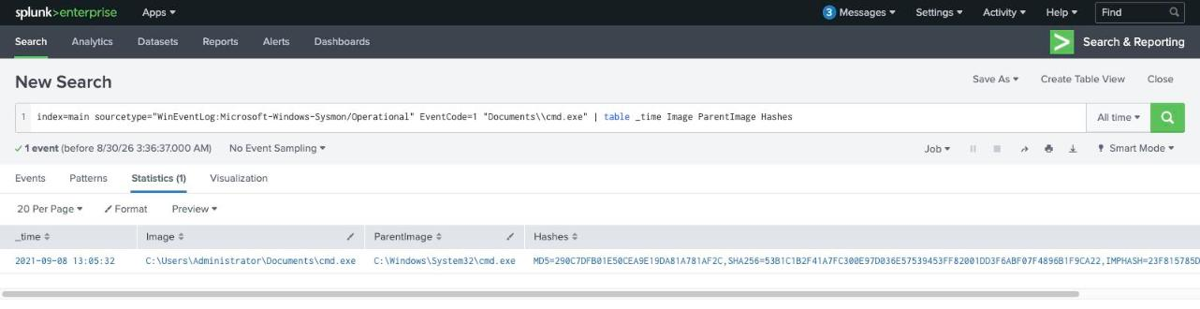
await spl('index=main sourcetype="WinEventLog:Microsoft-Windows-Sysmon/Operational" '
        + 'EventCode=1 "Documents\\\\cmd.exe" | table _time Image ParentImage Hashes');
// 2021-09-08 13:05:32  C:\Users\Administrator\Documents\cmd.exe
//   parent  C:\Windows\System32\cmd.exe
//   MD5=290C7DFB01E50CEA9E19DA81A781AF2C
//   SHA256=53B1C1B2F41A7FC300E97D036E57539453FF82001DD3F6ABF07F4896B1F9CA22
MD5 290C7DFB01E50CEA9E19DA81A781AF2C. Note the parent: the real cmd.exe in System32 launched the fake one in Documents, which is a nice example of why parent-child pairs matter more than image names alone.
The file written to many locations is readme.txt, the Conti ransom note:
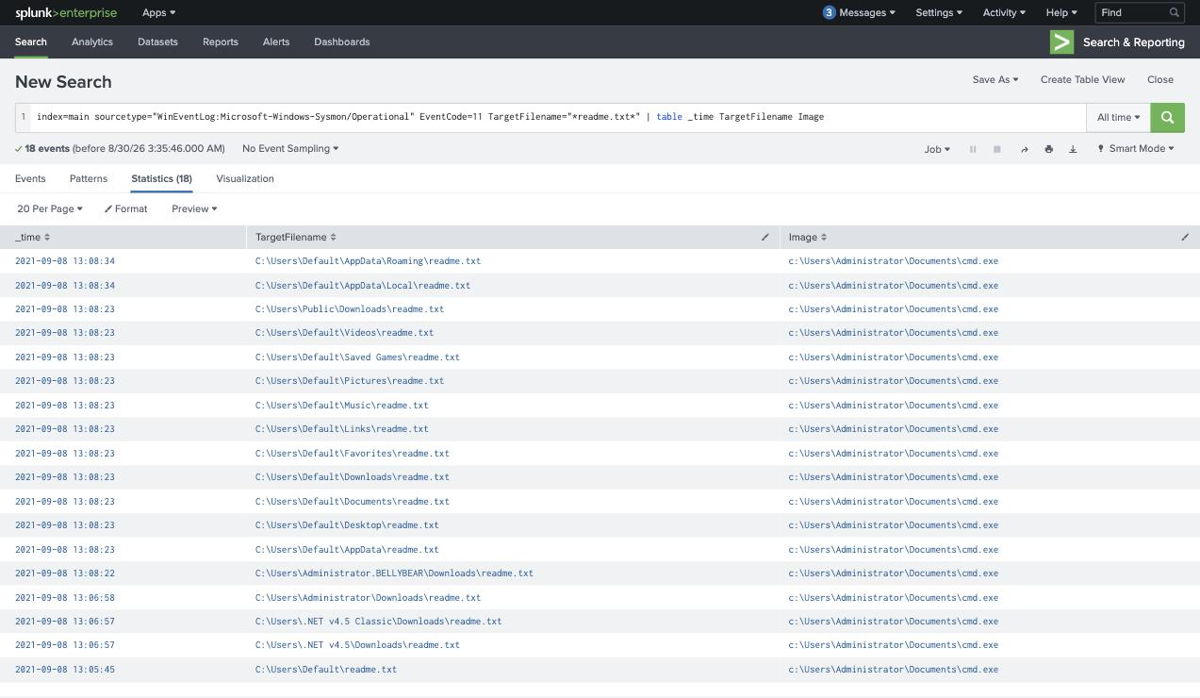
Eighteen drops in under two minutes, from 13:05:45 to 13:08:34, every one attributed to the same fake cmd.exe. The spread is the giveaway: C:\Users\Default\ gets thirteen of them, including Desktop, Documents, Downloads, Music, Pictures, Videos, Favorites, Links and Saved Games. Writing a note into Default means every future profile created on that box inherits it.
Task 2: Persistence, migration and credential access
Three answers come out of one search over process creation:
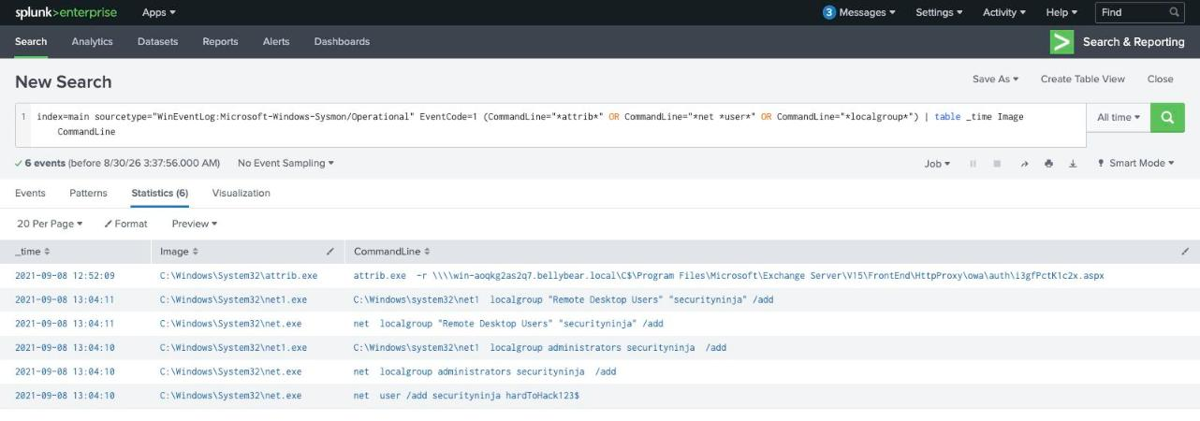
The account creation is net user /add securityninja hardToHack123$, at 13:04:10, followed one second later by two group additions:
13:04:10  net  user /add securityninja hardToHack123$
13:04:10  net  localgroup administrators securityninja  /add
13:04:11  net  localgroup "Remote Desktop Users" "securityninja" /add
The answer mask is worth a note here. Splunk renders the command line as net user with two spaces, but the mask is *** **** /*** ************* **************, single spaces throughout. Submit what the mask describes, not what the field displays.
Process migration shows up as Sysmon event ID 8, CreateRemoteThread, and there are exactly two in the entire dataset:
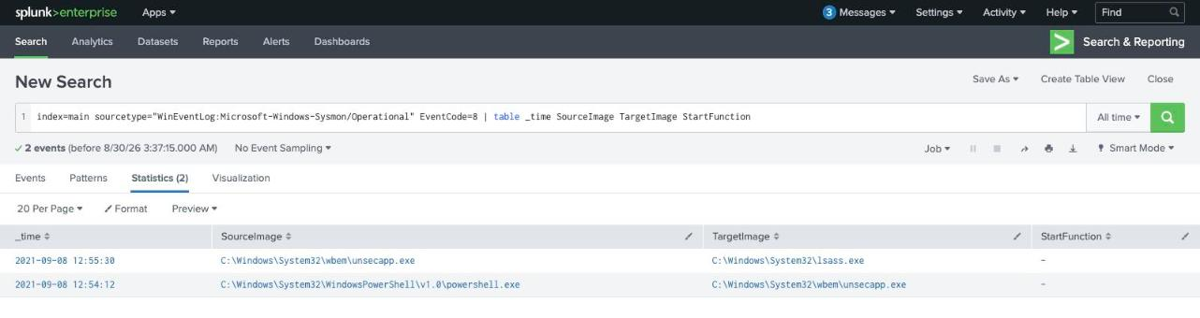
12:54:12  C:\Windows\System32\WindowsPowerShell\v1.0\powershell.exe
             -> C:\Windows\System32\wbem\unsecapp.exe
12:55:30  C:\Windows\System32\wbem\unsecapp.exe
             -> C:\Windows\System32\lsass.exe
Two rows, and they tell the whole middle of the intrusion. The implant starts in powershell.exe, migrates into unsecapp.exe (a legitimate WMI callback host, and a much quieter place to live), then reaches into C:\Windows\System32\lsass.exe to dump credentials. That last one answers the hash-dumping question: the process image is lsass.exe, the target rather than the tool.
The migration question has an ordering quirk. It asks for “the migrated process image, and … the original process image”, which reads as unsecapp.exe then powershell.exe. The accepted answer is the other way round:
C:\Windows\System32\WindowsPowerShell\v1.0\powershell.exe,C:\Windows\System32\wbem\unsecapp.exe
The mask settles it before you submit: the first segment is 17 characters where WindowsPowerShell goes, so PowerShell is first regardless of how the question is phrased.
Task 2: The web shell and the ProxyShell chain
The web shell never appears in a Sysmon file-creation event, and searching EventCode=11 TargetFilename="*.aspx" returns nothing at all. It surfaces instead in a command line, and there is exactly one:
await spl('index=main "*.aspx*" NOT sourcetype=iis | stats count by CommandLine EventCode');
// 1 result
attrib.exe  -r \\\\win-aoqkg2as2q7.bellybear.local\C$\Program Files\Microsoft\
   Exchange Server\V15\FrontEnd\HttpProxy\owa\auth\i3gfPctK1c2x.aspx
The web shell is i3gfPctK1c2x.aspx, dropped into Exchange’s FrontEnd\HttpProxy\owa\auth\ directory, which is the canonical ProxyShell landing spot. attrib.exe -r clears the read-only attribute, and the path is a UNC path to the machine’s own C$ share rather than a local path, which is how the exploit writes the file through the Exchange PowerShell backend.
That command line is also the answer to the next question verbatim, all 143 characters of it, including the double space after attrib.exe and the four literal backslashes. This is the one answer where copying from the Splunk field beats retyping: the mask is 143 characters and matches the raw field exactly.
Supporting evidence is in the IIS logs, where the ProxyShell request pattern is visible in the URI stems:
await spl('index=main sourcetype=iis | stats count by cs_uri_stem | sort -count');
//  396  /rpc/rpcproxy.dll
//  216  /powershell
//  202  /PowerShell/
//   31  /Autodiscover/autodiscover.json
/Autodiscover/autodiscover.json followed by /powershell is the ProxyShell signature: the SSRF in Autodiscover is used to reach the PowerShell backend, which then writes the shell.
The CVE question, and where I went wrong
The final question asks for three CVEs in ascending order, with the hint “External research required.” Everything in the logs says ProxyShell, so I submitted the ProxyShell chain:
CVE-2021-31207,CVE-2021-34473,CVE-2021-34523 -> rejected
The mask is what caught the mistake. It is 43 characters split 14,14,13, and all three ProxyShell CVEs are 14 characters, so the answer could not be that set no matter what order you put it in. I then burned three more attempts on truncation theories, assuming the room’s answer key had lost a character, which was wrong too.
The answer has nothing to do with the exploit in the logs. Task 1 links a CISA advisory on Conti and tells you to read it, and the question is keyed to the CVEs that advisory lists as commonly exploited by Conti operators:
CVE-2018-13374,CVE-2018-13379,CVE-2020-0796
Two FortiOS path-traversal and credential-disclosure bugs, plus SMBGhost. That is 14,14,13 exactly. CVE-2020-0796 is the only 13-character CVE in the set, and it is the reason the mask looked broken.
I want to be straight about the reasoning failure here: I treated “this exploit” as referring to the Exchange compromise I had just reconstructed, when the question was really asking about Conti’s general tooling from the linked reading. The mask told me my answer was structurally impossible on the first attempt, and rather than re-reading the question I spent three more attempts assuming the room was wrong. The mask was right and I was answering a different question.
The timeline
Everything on 8 September 2021, host WIN-AOQKG2AS2Q7.bellybear.local:
12:52:09  attrib.exe -r on i3gfPctK1c2x.aspx        (web shell staged)
12:54:12  powershell.exe -> unsecapp.exe            (migration)
12:55:30  unsecapp.exe   -> lsass.exe               (credential dump)
13:04:10  net user /add securityninja hardToHack123$
13:04:10  net localgroup administrators securityninja /add
13:04:11  net localgroup "Remote Desktop Users" securityninja /add
13:05:32  C:\Users\Administrator\Documents\cmd.exe  (ransomware executes)
13:05:45  first readme.txt
13:08:34  last of 18 readme.txt notes
Sixteen minutes from web shell to ransom note.
Two things worth keeping
When the mask contradicts your answer, re-read the question, not the mask. A 43-character answer field cannot hold three 14-character CVEs, and that was knowable before the first submission. I treated the mismatch as evidence of a broken answer key because I was confident about the exploit chain, and that confidence was the problem: I had correctly identified ProxyShell and incorrectly assumed the question was about it. A format hint that rules out your answer is telling you something about the question.
Sysmon event ID 8 is worth its own saved search. Two CreateRemoteThread events in a 28,000-event dataset gave up the migration path and the credential dump in a single table, with no keyword guessing. Process injection is rare in normal operation and enormously informative when it happens, which makes it one of the highest signal-to-noise searches available on a Windows estate. The same is true of event ID 11 filtered to executable extensions in user profile directories, which found the ransomware in one query.
Room solved 100%: 2 tasks, 11 answers.