Detecting AD Lateral Movement
Fourth room in the Active Directory for SOC module, following Monitoring Active Directory, Detecting AD Initial Access, and Detecting AD Credential Attacks. The previous room ended with the attacker holding stolen credentials. This one is what they do next: move.
Three techniques, SMB/admin shares, PsExec, and RDP, plus a discovery phase before them and an unguided challenge after. Eight tasks, sixteen graded answers, all solved 100%. Two indexes: win for the walkthrough and challenge for Task 7.

As with the rest of the module I drove Splunk through its REST API and re-ran the good searches in the UI for screenshots. Same standing advice: set the time picker to All time, the data is timestamped March 2026.
Task 2: discovery comes first
Nobody moves laterally without looking around first, and the recon phase is usually the loudest part of an intrusion. On THM-MKT-WS, michelle.smith ran a textbook sequence in about forty seconds:
index=win EventCode=1 (CommandLine="*net *" OR CommandLine="*nltest*" OR CommandLine="*whoami*")
| table _time, host, User, CommandLine | sort _time
#   03:50:50   nltest  /domain_trusts
#   03:50:56   net  user /domain
#   03:51:03   net  group "Domain Admins" /domain
#   03:51:09   net  group "Enterprise Admins" /domain
#   03:51:15   net  localgroup Administrators
#   03:51:23   net  view \\THM-SHR-SRV /all
The first discovery command is nltest /domain_trusts, mapping trust relationships before anything else. Then domain users, then the two groups that matter most, then local admins, then shares.
The PowerShell enumeration question wants this:
Import-Module ActiveDirectory; Get-ADUser -Filter * -Properties MemberOf | Select-Object Name, SamAccountName
Two answer-format notes that will save you a retry. Sysmon renders these command lines with a double space after the image name (nltest /domain_trusts), and the room warns about it explicitly. And for the PowerShell question the grader wants only the inner command, not the powershell -Command "…" wrapper it was invoked with. The underscore mask on the answer box tells you which: count the tokens against your candidate string before submitting and you will never guess wrong.
Task 3: how lateral movement is logged
Two knowledge answers that anchor the rest of the room. In Event 4624, Logon Type 10 is RemoteInteractive, an RDP session. And on the source system, Event 4648 records a process using explicit alternate credentials to reach a remote resource.
4648 is the underrated one. Most detection focuses on the destination, but 4648 fires on the machine the attacker is sitting at, and it names both identities: who they are logged in as, and whose credentials they just used. That is exactly the pivot Task 4 needs.
Task 4: SMB and the admin shares
ADMIN$ maps to C:\Windows and exists on every Windows host for remote administration. It is also the drop point for almost every SMB-based lateral movement tool. Event 5140 logs share access:
index=win EventCode=5140 Share_Name="*ADMIN$*"
| table _time, host, Account_Name, Source_Address | sort _time
#   03:53:46   THM-DEV-WS    luke.sullivan   10.5.50.12
#   03:57:48   THM-SHR-SRV   luke.sullivan   10.5.50.12
#   03:58:02   THM-SQL-SRV   luke.sullivan   10.5.50.12
The account used to reach ADMIN$ is luke.sullivan. But note the source: every one of those comes from 10.5.50.12, which is THM-MKT-WS, michelle.smith’s workstation, not luke.sullivan’s. That mismatch is the finding, and Event 4648 on the source machine proves it:
index=win EventCode=4648 NOT Target_Server_Name=localhost
| table _time, host, Subject_Account_Name, Account_Name, Target_Server_Name | sort _time
#   03:53:14   THM-MKT-WS   michelle.smith -> luke.sullivan   THM-SHR-SRV
So michelle.smith is the account actually executing the lateral movement, wielding luke.sullivan’s credentials. One user, two identities, and only the source-side event connects them.
Worth internalising when you filter 5140 in a real environment: the vast majority of hits are IPC$ and SYSVOL from machine accounts, which is ordinary domain operation. ADMIN$ accessed by a user account from a workstation that is not theirs is the shape worth alerting on.
Task 5: PsExec
PsExec is the classic. It copies a service binary to ADMIN$, registers it as a service, runs your command through it, then cleans up. That leaves fingerprints on both ends, and this dataset captures both:
index=win EventCode=1 (CommandLine="*PsExec*" OR ParentImage="*PSEXESVC*")
| table _time, host, ParentImage, CommandLine | sort _time
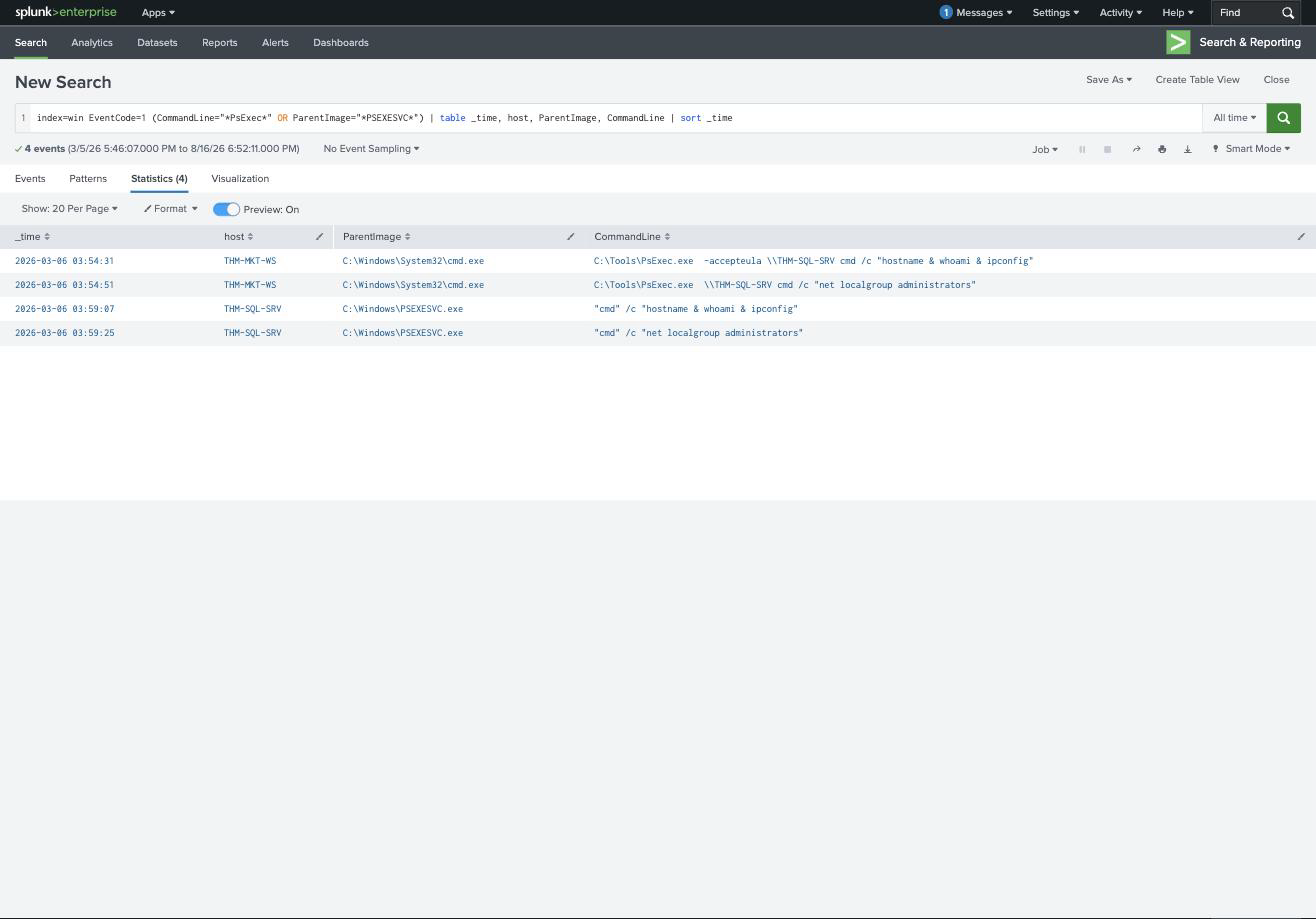
The table reads as a matched pair. On the source (THM-MKT-WS), cmd.exe spawns C:\Tools\PsExec.exe. On the target (THM-SQL-SRV), C:\Windows\PSEXESVC.exe spawns exactly the same commands a few minutes later. The destination host is THM-SQL-SRV, and the first PsExec command is:
C:\Tools\PsExec.exe -accepteula \\THM-SQL-SRV cmd /c "hostname & whoami & ipconfig"
Two things stand out. The -accepteula flag is a giveaway, it exists to suppress the first-run EULA dialog, so it appears when someone is scripting PsExec rather than using it interactively. And hostname & whoami & ipconfig is orientation: the attacker does not know where they landed, so the first thing they ask the new host is what it is and who they are on it.
The service side confirms it independently:
index=win (EventCode=7045 OR EventCode=4697)
#   03:59:06   THM-SQL-SRV   PSEXESVC   %SystemRoot%\PSEXESVC.exe
PSEXESVC is the default service name, which makes this trivially detectable, and is exactly why real operators rename it. The challenge in Task 7 does precisely that.
Task 6: the RDP hop chain
RDP is the quietest of the three because it looks like administration. The detection is Logon_Type=10, and the value is in reading the results in order:
index=win EventCode=4624 Logon_Type=10
| table _time, host, Account_Name, Source_Network_Address | sort _time
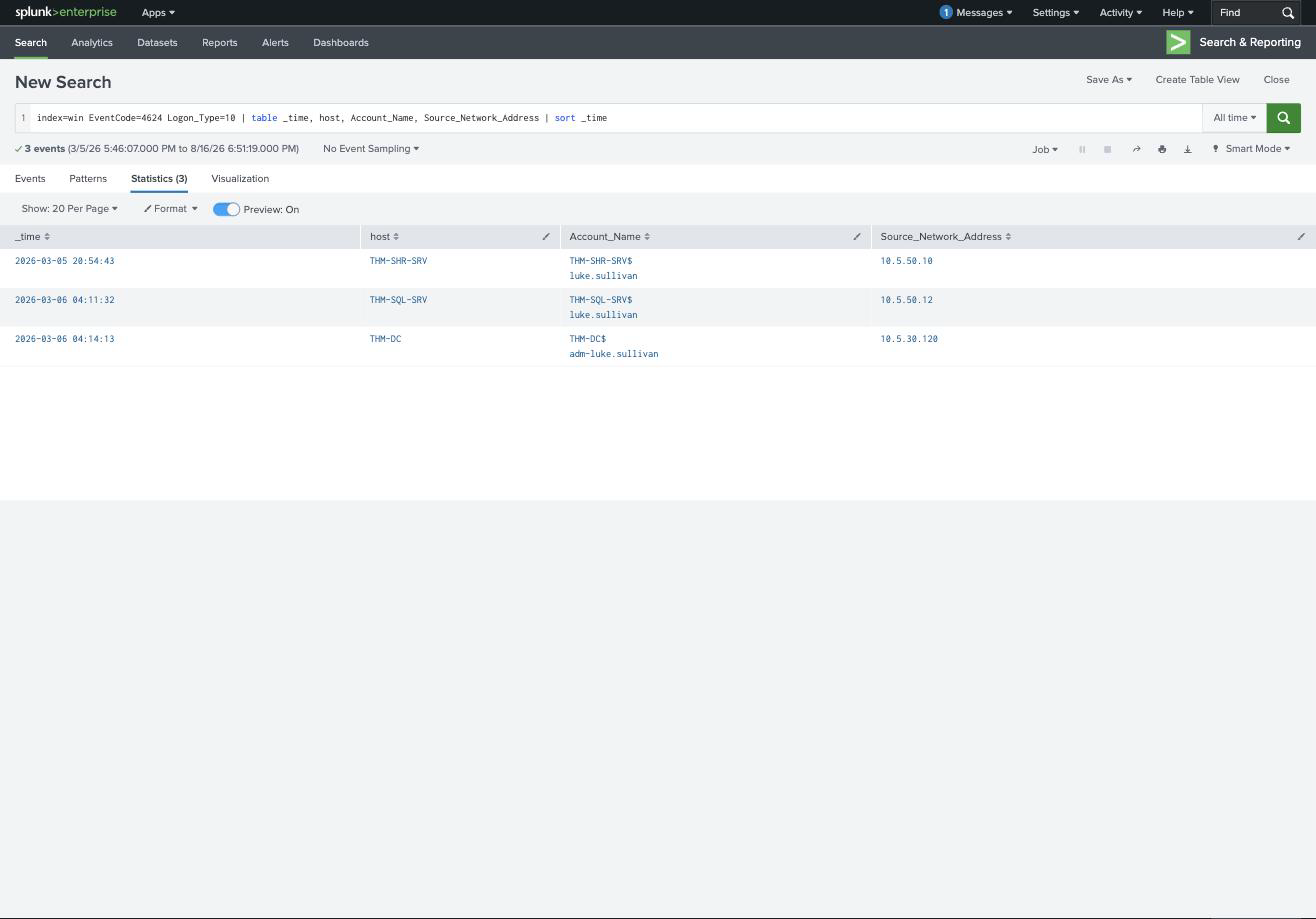
Three rows, and the last two are the intrusion:
| Time | Target | Account | Source |
|---|---|---|---|
| 04:11:32 | THM-SQL-SRV | luke.sullivan | 10.5.50.12 (THM-MKT-WS) |
| 04:14:13 | THM-DC | adm-luke.sullivan | 10.5.30.120 (THM-SQL-SRV) |
The RDP session that landed on the Domain Controller came from 10.5.30.120, and tracing backward the chain began at 10.5.50.12.
This is the whole point of the task. Looking at the DC event alone, the story is “a domain admin RDP’d in from the SQL server”, which is unremarkable. It only becomes an incident when you notice that the SQL server was itself RDP’d into three minutes earlier from a marketing workstation. Each hop launders the origin, and the source IP of one hop is the destination of the previous one. You chain them by matching addresses to hosts, and the escalation is visible in the account column too: luke.sullivan into the SQL server, adm-luke.sullivan out of it into the DC.
Task 7: the investigation challenge
New index, same methodology, and the tooling has been deliberately disguised. One query recovers all four answers:
index=challenge ((EventCode=5140 AND Share_Name="*ADMIN$*") OR EventCode=7045 OR (EventCode=1 AND ParentImage="*svcupdate*"))
| eval evidence=case(EventCode==5140, "ADMIN$ access by ".Account_Name." from ".Source_Address,
                     EventCode==7045, "Service installed: ".Service_Name." -> ".Service_File_Name,
                     true(), "Remote exec: ".CommandLine)
| table _time, host, EventCode, evidence | sort _time
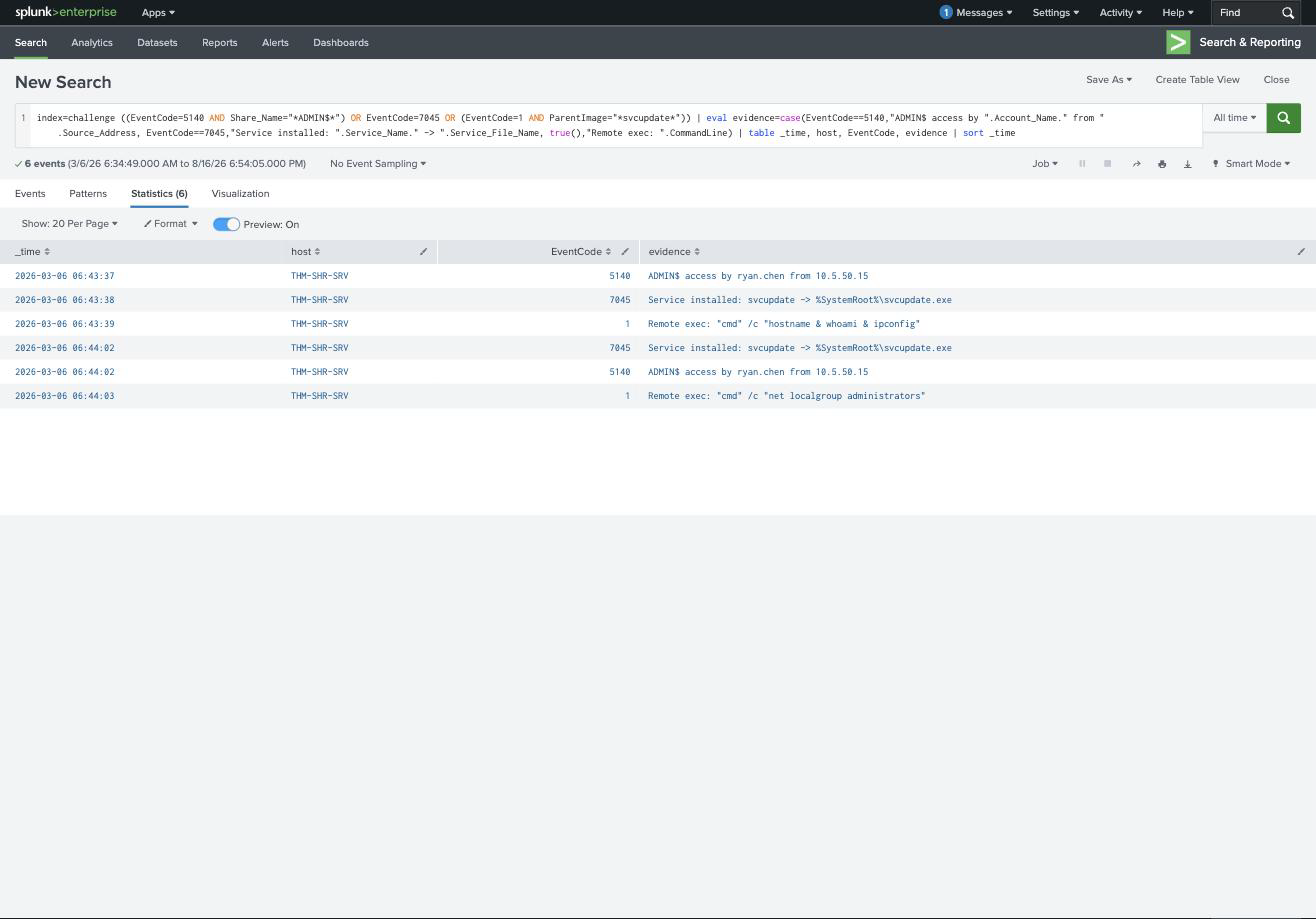
Six rows, twenty-six seconds, and the full sequence:
| Time | Event | What happened |
|---|---|---|
| 06:43:37 | 5140 | ADMIN$ accessed by ryan.chen from 10.5.50.15 |
| 06:43:38 | 7045 | Service installed: svcupdate → %SystemRoot%\svcupdate.exe |
| 06:43:39 | 1 | Remote exec: "cmd" /c "hostname & whoami & ipconfig" |
| 06:44:02 | 7045 | Service installed again: svcupdate |
| 06:44:03 | 1 | Remote exec: "cmd" /c "net localgroup administrators" |
So the service binary is %SystemRoot%\svcupdate.exe, the account is ryan.chen, the source is 10.5.50.15, and the first remote command is "cmd" /c "hostname & whoami & ipconfig". Mapping that address against the machine accounts in the dataset puts the origin at THM-HR-WS.
The lesson is in what changed and what did not. The service is called svcupdate instead of PSEXESVC, and the binary is svcupdate.exe instead of PSEXESVC.exe, a name-based detection rule catches nothing here. But the behaviour is byte-for-byte identical: ADMIN$ write, service create, service spawns cmd /c, one second apart, with the same hostname & whoami & ipconfig orientation command as the walkthrough. Detect the sequence, not the string.
The double service install is also worth noting, svcupdate is registered twice, once per command, because PsExec-style tools install, execute, and remove the service for each invocation. A service that appears and disappears repeatedly in minutes is a stronger signal than any single install.
Task 8: what carries over
The three techniques share one structure: authenticate to a remote host, drop or invoke something, execute. SMB gives you the authentication and the file drop, PsExec adds the service, RDP replaces all of it with an interactive session. The event IDs differ but the questions do not, who authenticated, from where, using whose credentials, and what ran afterwards.
Two things I would keep. Source-side and destination-side logs answer different questions, and the room hammers this: 5140 and 7045 tell you what happened on the target, but only 4648 on the source reveals that michelle.smith was driving luke.sullivan’s account. Neither side alone gets you there, the same lesson the Initial Access room taught with IIS and Security logs.
And hop chains have to be read backwards. The alert fires on the last hop, which is always the most innocuous-looking one, because by then the attacker is using a legitimate admin account from a legitimate server. The interesting question is never “where did this session come from” but “and where did that come from”, repeated until you reach a workstation that has no business being in the chain at all.
Room solved 100%: eight tasks, sixteen answers, 120 points.