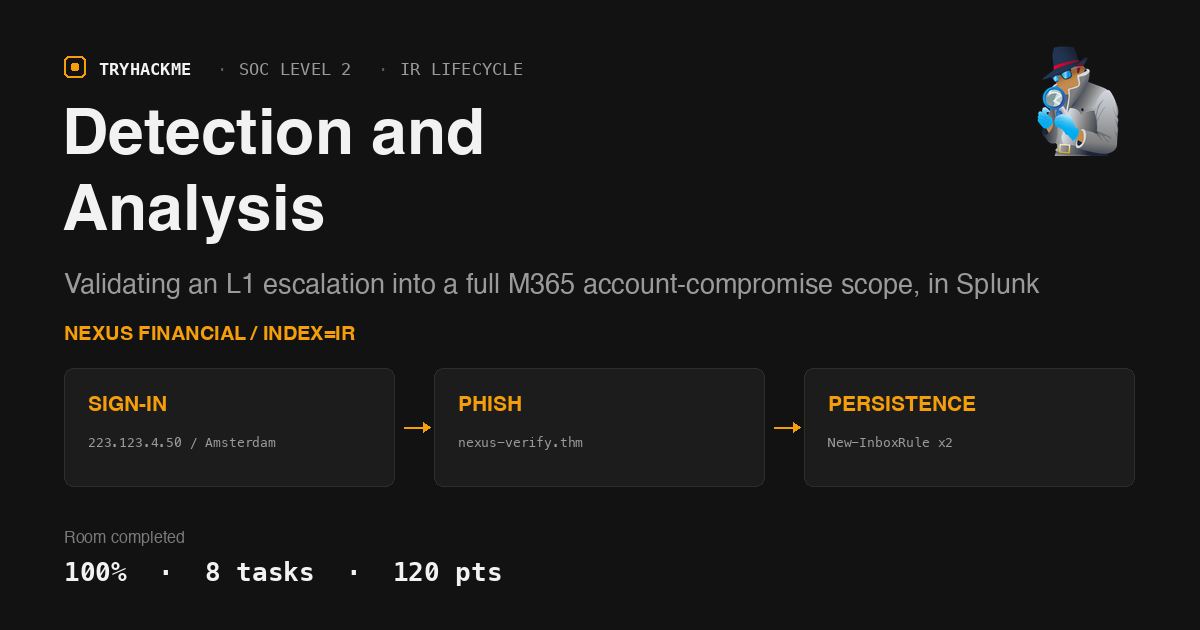
Detection and Analysis
This is room 2 of 4 in the Incident Response Lifecycle module on the SOC Level 2 path, sitting between Preparation and Response and Recovery. The four rooms work one continuous incident at Nexus Financial, so what you find here is what you carry into containment later. Everything is Microsoft 365 telemetry in Splunk, which makes it a direct sequel to the Entra ID Monitoring and Exchange Online Monitoring rooms, the sourcetypes are identical, only now they belong to a live incident instead of a lab exercise.
The framing is deliberately narrow. You are the L2 analyst. Marcus Webb, the L1, has already triaged a geo-anomaly alert on [email protected], called it a true positive, and handed you ticket NXF-SOC-2026-0312. That is the entire brief. The room’s actual lesson is that the escalation ticket is the floor of the investigation, not the ceiling: the alert names one account and one login, and by the end you have two compromised accounts, two persistence mechanisms, five exfiltrated files and a second phishing wave the SIEM never fired on.
Task 2: what the two words actually mean
The vocabulary questions are the room’s spine, so they are worth getting right rather than guessing. Detection is the process of confirming that a security incident has actually occurred, true positive or false positive, nothing more. Analysis is the process of understanding the full extent of that incident: which accounts, which systems, which data.
The split maps onto the SOC tiers. L1 receives the alert, does the cheap validations (IP reputation, call the user), and decides real or not. L2 validates that finding without assuming it is complete, then traces the chain back to the entry point and forward to the damage. The room is blunt that poor analysis is the most common cause of failed IR: if you miss one account or one persistence mechanism during scoping, eradication is theatre.
Task 3: triggers and the communication tax
An IR process needs something to start it, and relying on one trigger source means every incident that does not generate that trigger goes undetected. A threat intelligence provider or law enforcement telling you that you are breached is a Third-party notification, the trigger with the worst detection window of the lot, because by the time it arrives the data is already somewhere else.
The other answer here is the boring one that matters most in a real engagement: every action, finding and decision during an investigation belongs in a Ticketing system. Verbal updates that never get written down are how evidence trails develop holes.
Task 4: the two documents you cannot investigate without
IOC stands for Indicator of Compromise, and the running record of every indicator found during an investigation is the IOC Tracker. Paired with the asset inventory, that is your scoping apparatus, the inventory tells you what exists, the tracker tells you what is dirty. Nexus Financial’s inventory openly admits it does not track mobile devices, which is the kind of gap that turns “we scoped it” into “we scoped the part we knew about”.
Task 5: the brief, and the log sources
Everything ships into Splunk under index=ir across three sourcetypes, and the room hands you the field names up front:
azure:aad:signin              userPrincipalName, ipAddress, location.city,
                              location.countryOrRegion, appDisplayName, status.errorCode
o365:reporting:messagetrace   Received, SenderAddress, RecipientAddress, Subject, Status, FromIP
o365:management:activity      Operation, UserId, Workload, ClientIP, ObjectId,
                              SourceFileName, Name, SubjectContainsWords, DeleteMessage
The data is backdated to 30 March 2026, so All Time is not optional, the default Last 24 hours returns an empty result set and looks exactly like a broken lab. Every query below ran at earliest=0.
Known-good baseline from the ticket: all staff work from the London office at 197.32.45.112.
Task 6: detection, confirming Marcus was right
Start where the alert points and let the data separate normal from not. One stats over Laura Chen’s sign-ins, grouped by IP and geo, answers three of the five questions at once:
index=ir sourcetype=azure:aad:signin userPrincipalName="[email protected]"
| stats count min(_time) as first max(_time) as last
    by ipAddress, location.city, location.countryOrRegion
| eval first=strftime(first,"%F %T"), last=strftime(last,"%F %T")

Two IPs, and the anomalous one is unambiguous: 223.123.4.50, geolocating to Amsterdam, NL, with 18 sign-in events in a six-minute window against 63 legitimate London events spread over three hours. Marcus’s call holds.
The timestamp question is where I lost a submission. The earliest event from the attacker IP is 16:41:28, so that is what I sent, and it was rejected. Pulling the raw sequence explains why:
index=ir sourcetype=azure:aad:signin ipAddress="223.123.4.50"
  userPrincipalName="[email protected]"
| sort _time | table _time status.errorCode appDisplayName

# 2026-03-30 16:41:28   50140   OfficeHome    <- interrupted, not a sign-in
# 2026-03-30 16:41:30       0   OfficeHome    <- first successful sign-in
# 2026-03-30 16:41:32       0   OfficeHome
50140 is the “keep me signed in” interrupt, not an authentication. The first sign-in is the first event with status.errorCode=0, which is 2026-03-30 16:41:30, and it matches the alert time in the ticket exactly. The room is testing whether you read the error code column rather than sorting by time and taking row one.
With the sign-in confirmed, the question becomes how the credentials leaked. There are only twelve message-trace events in the whole index, so it is cheaper to read all of them than to filter:
index=ir sourcetype=o365:reporting:messagetrace
| sort Received | table Received SenderAddress RecipientAddress Subject Status
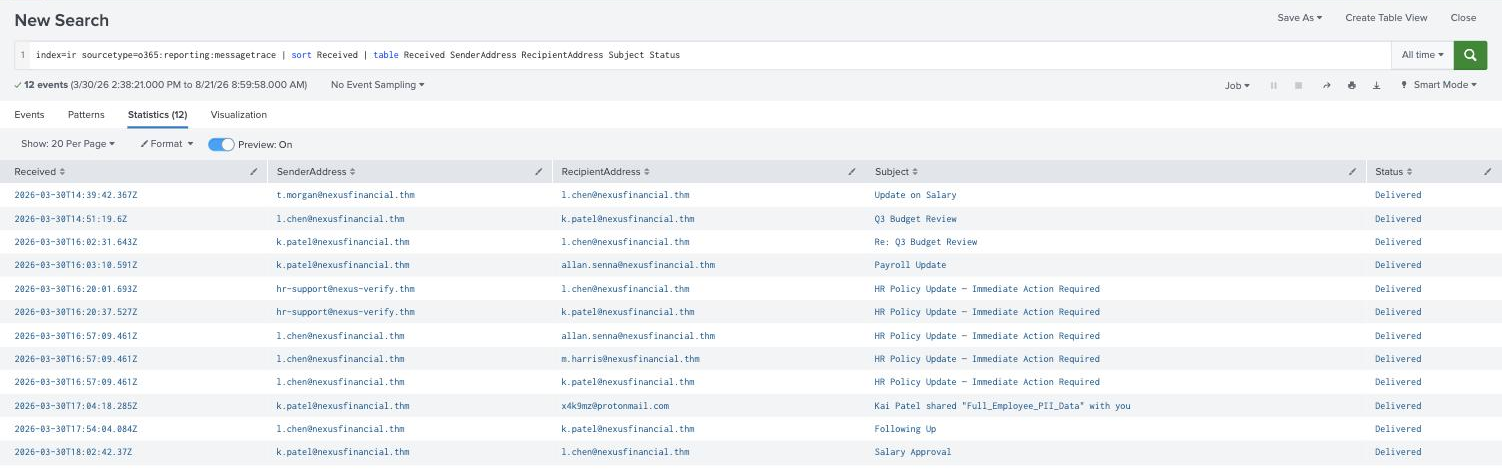
At 16:20:01Z, twenty-one minutes before the sign-in, [email protected] delivers HR Policy Update, Immediate Action Required to Laura Chen. The sender domain is nexus-verify.thm, a lookalike of nexusfinancial.thm that is not the corporate domain at all, and the phishing infrastructure IOC for the tracker.
Two format notes on that subject line. It uses a real em dash, not a hyphen, and TryHackMe’s underscore mask counts it as a single character (__ ______ ______ _ _________ ______ ________), which is how you know to copy the subject verbatim rather than retype it. That mask also confirmed the sender-domain answer was the bare domain, twelve characters, a dot, three more, rather than the full [email protected] address.
Task 7: analysis, everything the ticket did not say
The ticket names one account. The attacker IP is now a known IOC, so pivot on the IOC rather than the account:
index=ir sourcetype=azure:aad:signin ipAddress="223.123.4.50"
| stats count min(_time) as f max(_time) as l by userPrincipalName
| eval f=strftime(f,"%F %T"), l=strftime(l,"%F %T")

# [email protected]   39   2026-03-30 16:59:52   2026-03-30 17:03:00
# [email protected]    18   2026-03-30 16:41:28   2026-03-30 16:47:17
2 accounts, and the second compromised one is [email protected], Kai Patel, who never appeared in the escalation. Note the timing: k.patel’s first attacker sign-in is at 16:59:52, eighteen minutes after Laura’s, which is the entire justification for scoping. Contain only the account in the ticket and the attacker still owns the environment.
Then the same pivot against the audit logs, which is where the room sets its one real trap:
index=ir sourcetype=o365:management:activity ClientIP="223.123.4.50"
| stats count by Operation, UserId
That query returns SharePoint noise, FileAccessed, FileDownloaded, PageViewed, and no inbox rule at all. It looks like the attacker never established persistence. The reason is that Exchange admin operations record ClientIP with the source port appended, so 223.123.4.50:13651 never equals 223.123.4.50. Search on the field the room told you about instead:
index=ir sourcetype=o365:management:activity Name=*
| table _time Operation UserId Name SubjectContainsWords DeleteMessage ClientIP

There it is. The rule on Laura Chen’s mailbox is named Junk Filter Update, created at 16:58:48 from 223.123.4.50:13651, with SubjectContainsWords = security;alert;suspicious;password;verify and DeleteMessage = True. It is a classic silence rule: any warning Microsoft or the SOC sends the victim gets deleted before she sees it. The same pattern lands on Kai Patel three minutes later under the name Security Updates. The third Name=* hit is a benign TeamSettingChanged event from Microsoft Teams Sync at 14:41, worth mentioning because it is exactly the kind of unrelated match that a wildcard search drags in.
Widen the same corrected pivot to the actions that matter and the whole post-compromise sequence falls out in order:
index=ir sourcetype=o365:management:activity ClientIP="223.123.4.50*"
  (Operation=FileDownloaded OR Operation=New-InboxRule OR Operation=AddedToSharingLink)
| sort _time | table _time UserId Operation SourceFileName Name
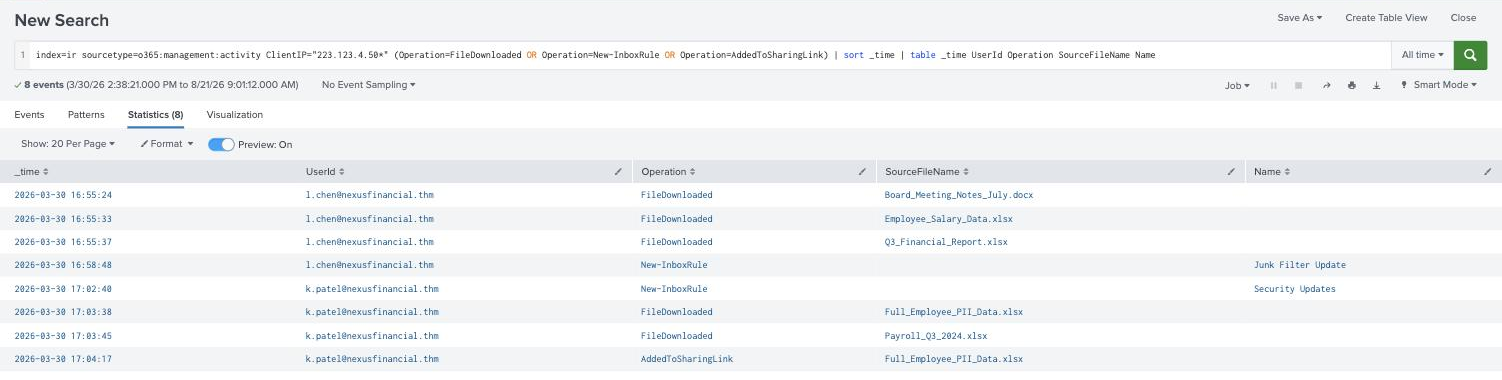
16:55:24  l.chen   FileDownloaded      Board_Meeting_Notes_July.docx
16:55:33  l.chen   FileDownloaded      Employee_Salary_Data.xlsx
16:55:37  l.chen   FileDownloaded      Q3_Financial_Report.xlsx
16:58:48  l.chen   New-InboxRule       Junk Filter Update
17:02:40  k.patel  New-InboxRule       Security Updates
17:03:38  k.patel  FileDownloaded      Full_Employee_PII_Data.xlsx
17:03:45  k.patel  FileDownloaded      Payroll_Q3_2024.xlsx
17:04:17  k.patel  AddedToSharingLink  Full_Employee_PII_Data.xlsx
The message trace closes the loop on that last line: at 17:04:18Z a sharing notification for Full_Employee_PII_Data goes to [email protected]. Exfiltration by SharePoint sharing link, using the platform’s own delivery mechanism.
The final question is the one most likely to be over-answered. How many employee accounts received the initial phishing email? The message trace shows the subject HR Policy Update, Immediate Action Required five times, but three of those are sent from [email protected] at 16:57:09Z to Kai Patel, Allan Senna and M. Harris, that is the attacker re-sending the lure from the compromised mailbox, a second wave. Only 2 accounts received it from the original external sender [email protected]: Laura Chen at 16:20:01Z and Kai Patel at 16:20:37Z. The word initial is doing all the work in that question.
That also resolves the sequencing. Kai Patel was phished in the same original batch as Laura, 39 minutes before his account was used, the second compromise was not lateral movement from Laura’s mailbox, it was the second half of a two-target campaign that happened to pay off later.
Every answer
| Task | Question | Answer |
|---|---|---|
| 2 | Confirming a security incident has occurred | Detection |
| 2 | Understanding the full extent of an incident | Analysis |
| 3 | Trigger type for a threat-intel provider notification | Third-party notification |
| 3 | System for logging every action and decision | Ticketing system |
| 4 | What IOC stands for | Indicator of Compromise |
| 4 | Running record of every malicious indicator | IOC Tracker |
| 6 | Suspicious sign-in source IP | 223.123.4.50 |
| 6 | City of origin | Amsterdam |
| 6 | First suspicious sign-in timestamp | 2026-03-30 16:41:30 |
| 6 | Subject of the phishing email | HR Policy Update, Immediate Action Required |
| 6 | Sender domain | nexus-verify.thm |
| 7 | Accounts with sign-ins from the attacker IP | 2 |
| 7 | Second compromised account | [email protected] |
| 7 | Inbox rule on Laura Chen’s account | Junk Filter Update |
| 7 | Accounts that received the initial phishing email | 2 |
IOC tracker, as handed to the next room
| Type | Value | Where found |
|---|---|---|
| IP address | 223.123.4.50 (Amsterdam, NL) | Entra sign-in logs, audit logs |
| Domain | nexus-verify.thm | Message trace, phishing sender |
| Email address | [email protected] | Message trace |
| Email address | [email protected] | Sharing-link notification, exfil destination |
| User account | [email protected] | Compromised 16:41:30 |
| User account | [email protected] | Compromised 16:59:52 |
| Inbox rule | Junk Filter Update / Security Updates | Unified audit logs, persistence |
| File name | Full_Employee_PII_Data.xlsx, Payroll_Q3_2024.xlsx, Employee_Salary_Data.xlsx, Q3_Financial_Report.xlsx, Board_Meeting_Notes_July.docx | SharePoint FileDownloaded |
Wrap-up
Two things from this room are worth keeping.
An exact-match filter on an IOC is a scoping bug waiting to happen. ClientIP="223.123.4.50" returned SharePoint activity and no persistence, which reads as “the attacker downloaded some files and left”. The Exchange side of the unified audit log stores ClientIP with a port suffix, so both New-InboxRule events were invisible to a filter that was otherwise correct. Had this been a real containment decision, the two mailbox rules quietly deleting every security warning would have survived the response. Wildcard your IOC pivots, or pivot on a field that cannot carry a suffix.
The escalation ticket is a starting coordinate, not a scope. The alert named one account, one IP and one timestamp. Pivoting on the IP rather than the account produced a second victim; pivoting on the phishing subject rather than the recipient produced a second delivery wave; and reading the error codes rather than sorting by time produced the right sign-in. Every one of those was a case of trusting the IOC over the narrative that arrived with it, which is precisely the difference between the L1 output and the L2 output the room opens by describing.
Room solved 100%: 8 tasks, 17 answers, 120 points.