Entra ID Monitoring
Second room in the Microsoft 365 for SOC module, following M365 Monitoring Basics. That room taught you where the logs are; this one runs five distinct identity attacks past you and asks you to name each one from its signature.
Seven tasks, seventeen graded answers, all solved 100%. The structure is unusually clean, one Splunk index per task (task-2 through task-5), so each attack is a self-contained dataset with no cross-contamination:
index=* | stats count by index, sourcetype
#   task-2   azure:aad:signin                                  32
#   task-3   azure:aad:signin                                  39
#   task-3   azure:aad:identity_protection:riskdetection         4
#   task-3   azure:aad:identity_protection:risky_user            1
#   task-4   azure:aad:signin                                  17
#   task-5   azure:aad:signin / azure:aad:audit            21 / 15

The lab starts from Task 1 here. Set the time picker to All time, data runs late February to early March 2026.
Task 2: spray and brute force look identical until you group them
Two different password attacks live in the same index, and the way you separate them is the lesson. Group by source address and count distinct users:
index=task-2 sourcetype=azure:aad:signin
| stats count, dc(userPrincipalName) as users, values(action) as actions,
        min(_time) as f, max(_time) as l by ipAddress
| eval first=strftime(f,"%H:%M:%S"), last=strftime(l,"%H:%M:%S")
| table ipAddress, count, users, actions, first, last | sort -count
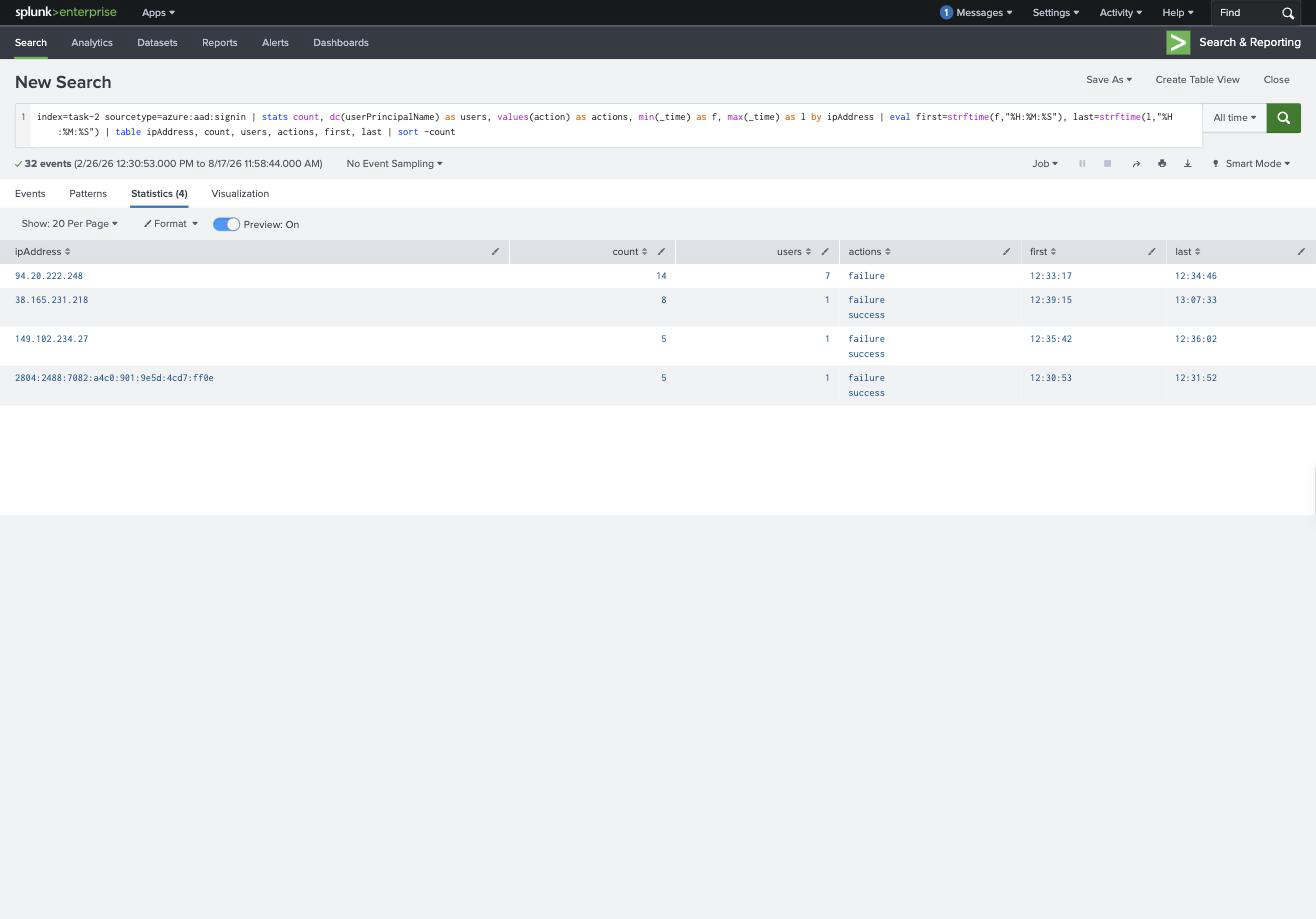
| IP | Events | Users | Actions | Window |
|---|---|---|---|---|
| 94.20.222.248 | 14 | 7 | failure only | 12:33:17 → 12:34:46 |
| 38.165.231.218 | 8 | 1 | failure + success | 12:39:15 → 13:07:33 |
| 149.102.234.27 | 5 | 1 | failure + success | 12:35:42 → 12:36:02 |
94.20.222.248 is the password spray, seven different accounts, two attempts each, all failures, done inside ninety seconds. One password tried broadly.
38.165.231.218 is the throttled brute force, a single account, eight attempts, stretched across twenty-eight minutes. Pulling the raw events shows the attempts landing at 12:39, 12:46, 12:53, 13:00, 13:07: roughly seven minutes apart, which is deliberate. Entra’s smart lockout counts failures in a window, so spacing attempts wide enough keeps the account unlocked and keeps the volume under most alert thresholds. That is what “throttling” means here, the attacker is rate-limiting themselves.
The account that fell over is [email protected], and the giveaway is the shape of its last few events: four 50126 failures, then a 50140 interrupt, then success.
Both attacks share the same error code (50126, invalid username or password), so the error code tells you nothing about which attack you are looking at. Only the ratio of attempts to distinct users does.
Task 3: Identity Protection and Conditional Access
This task adds two sourcetypes you do not get on-premises. risky_user is Entra’s verdict on an account, and there is exactly one:
index=task-3 sourcetype=azure:aad:identity_protection:risky_user
#   [email protected] | riskLevel: high | riskState: atRisk
riskdetection explains why. All four detections are anonymizedIPAddress at high, from 2a0b:f4c2::3 and 2a0b:f4c2::27 in DE, Tor or a commercial VPN. The most recent lands at 2026-03-03 13:51.
So the at-risk user is [email protected], the risk type is anonymizedIPAddress, and the last risky sign-in attempt was 2026-03-03 13:51.
The Conditional Access half is the more interesting half, because it is where you see a control actually work. Filtering the sign-in logs for conditionalAccessStatus=failure:
index=task-3 sourcetype=azure:aad:signin conditionalAccessStatus=failure
| table _time, ipAddress, userPrincipalName, "status.errorCode",
        "appliedConditionalAccessPolicies{}.displayName",
        "appliedConditionalAccessPolicies{}.result"
Four policies are evaluated on every attempt, Block Suspicious Countries, Require MFA, Allow Risky Users, Require-MFA-Risky-Users-Sign-In, and the results array lines up positionally against the names. On the blocked sign-ins only the first reads failure; the rest are notApplied. So the policy that fired is Block Suspicious Countries, the error is 53003 (blocked by Conditional Access), and the address it stopped is 94.20.222.251.
Two things worth carrying. appliedConditionalAccessPolicies is a positional multivalue pair, the displayName array and the result array are matched by index, so reading the name without the matching result tells you which policies were evaluated, not which one blocked. And a policy result of notApplied is not a failure: it means the conditions did not match, which is why forty successful sign-ins in this dataset show notApplied across all four.
Task 4: MFA fatigue
Seventeen events, one user, and the whole attack is visible in a three-row summary:
index=task-4 sourcetype=azure:aad:signin
| stats count, min(_time) as f, max(_time) as l
        by userPrincipalName, action, "status.errorCode", ipAddress, "location.countryOrRegion"
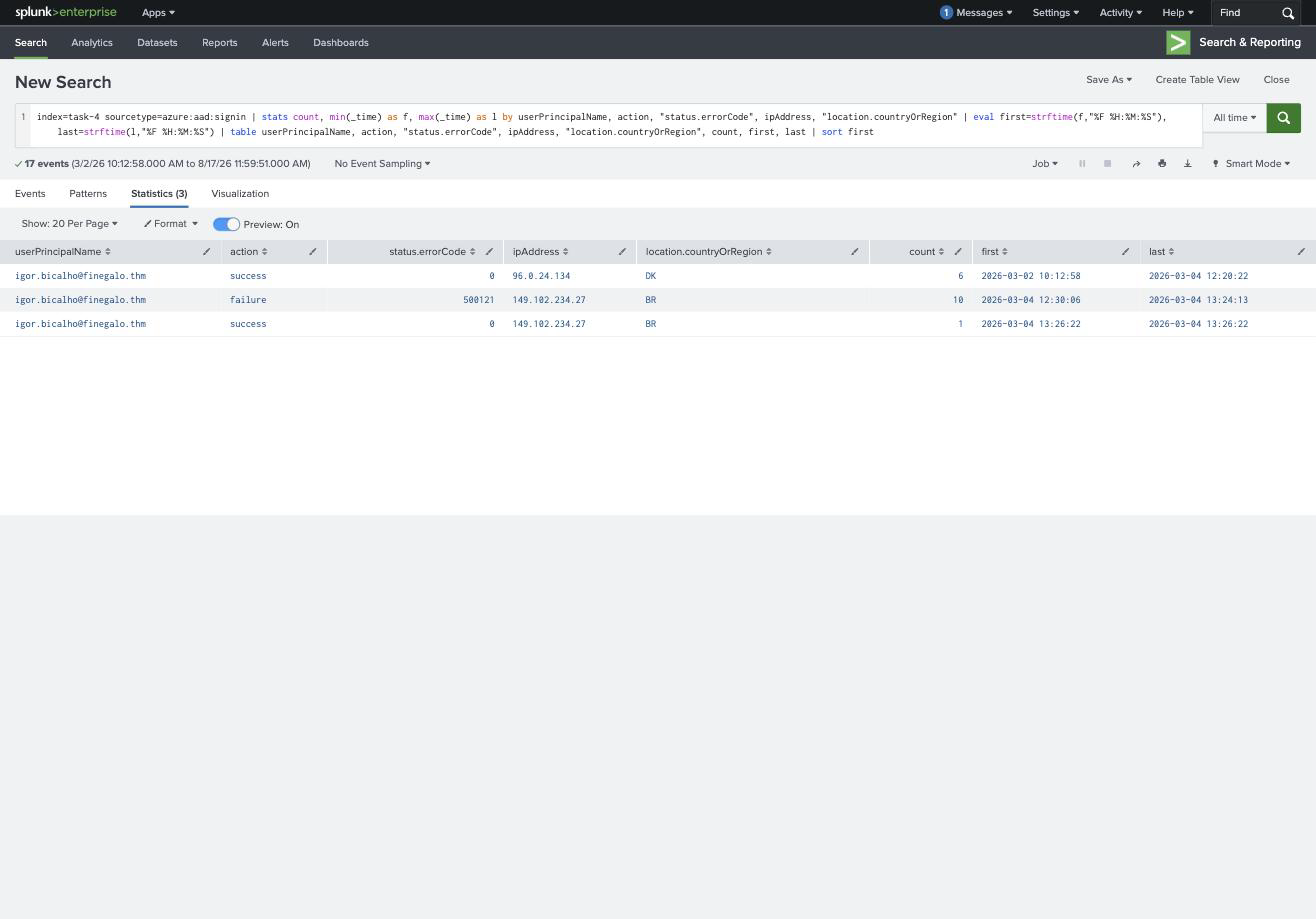
| Action | errorCode | IP | Country | Count | Window |
|---|---|---|---|---|---|
| success | 0 | 96.0.24.134 | DK | 6 | 03-02 10:12 → 03-04 12:20 |
| failure | 500121 | 149.102.234.27 | BR | 10 | 03-04 12:30:06 → 13:24:13 |
| success | 0 | 149.102.234.27 | BR | 1 | 03-04 13:26:22 |
The target is [email protected], the failed-prompt error code is 500121, the country he normally signs in from is DK, and the attacker’s successful authentication is 2026-03-04 13:26.
500121 is “Authentication failed during strong authentication request”, the MFA prompt was issued and not satisfied. Ten of them in under an hour against one account is MFA fatigue: the attacker already has the password, so every attempt reaches the second factor and pushes another notification at the user. Then one succeeds, ten minutes after the tenth denial. Someone got tired and tapped approve.
The baseline rows are what make this provable rather than suspicious. Six successful sign-ins from Denmark over two days, then the entire attack from Brazil, impossible travel and a first-time country, wrapped around a burst of MFA denials.
Task 5: privilege escalation and persistence
The audit log for this task reads like a checklist. One query on first-occurrence per activity gives the whole chain:
index=task-5 sourcetype=azure:aad:audit
| stats min(_time) as f by activityDisplayName
| eval when=strftime(f,"%F %H:%M:%S") | sort f | table when, activityDisplayName
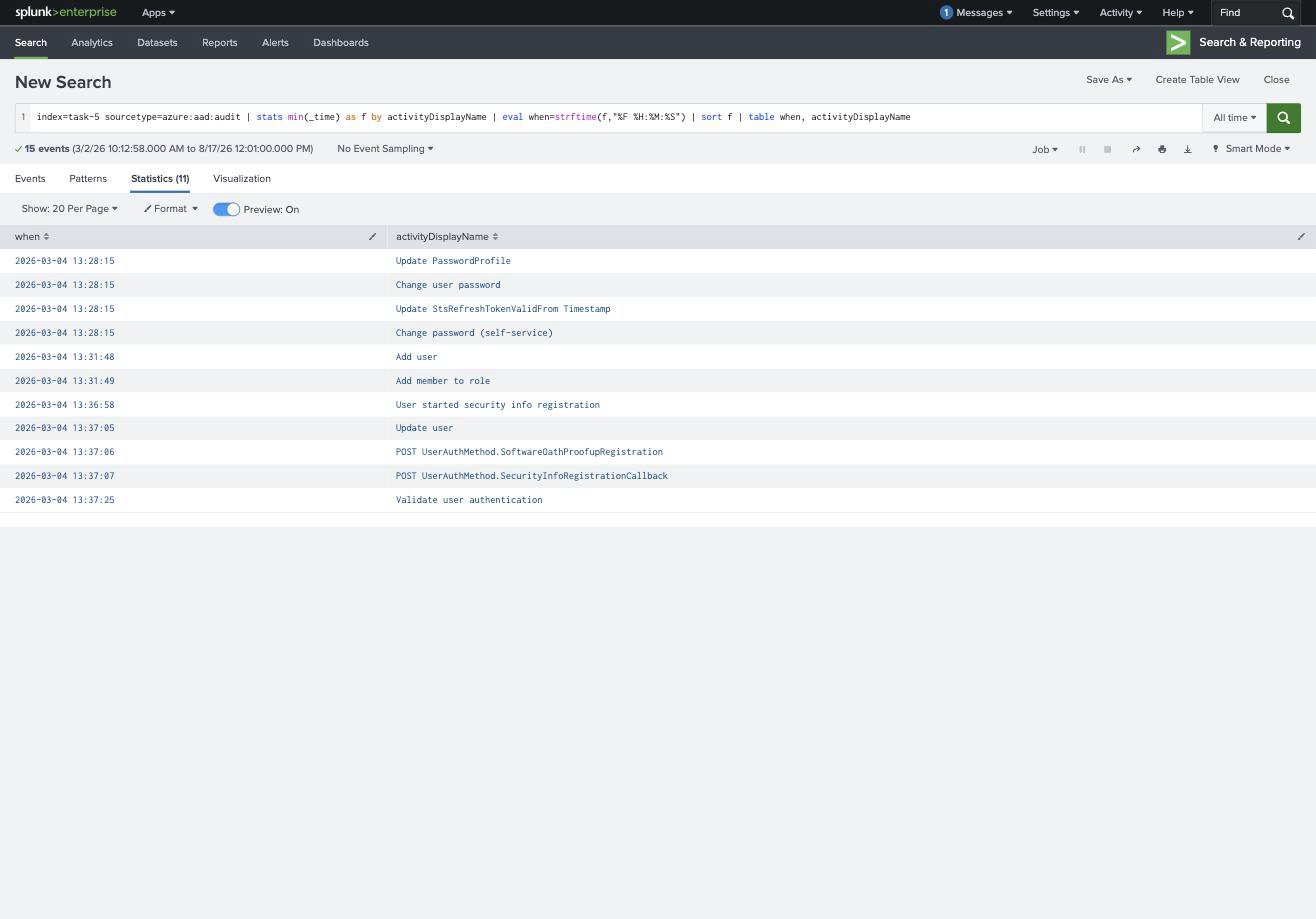
| Time | Activity | What it means |
|---|---|---|
| 13:28:15 | Change user password / Update PasswordProfile / Update StsRefreshTokenValidFrom | lock the owner out, invalidate their tokens |
| 13:31:48 | Add user | create [email protected] |
| 13:31:49 | Add member to role | grant it Global Administrator |
| 13:36:58 | User started security info registration | add an MFA device to the new account |
| 13:37:06 | POST UserAuthMethod.SoftwareOathProofupRegistration | the OATH token completes |
The account the attacker created is [email protected], the role assigned is Global Administrator, and the MFA device was added at 2026-03-04 13:36.
Two details worth pausing on. The Add member to role event carries the role in modifiedProperties as Role.DisplayName → "Global Administrator", alongside Role.TemplateId 62e90394-69f5-4237-9190-012177145e10, that GUID is the same in every tenant on earth, so it makes a better detection anchor than the display name. And the new account was created by igor.bicalho, the account taken over in Task 4, which stitches the two tasks into one intrusion: fatigue the user, take the account, then mint a fresh Global Admin so the access no longer depends on the victim at all.
One answer-format trap here. The MFA question wants 13:36 (User started security info registration), not 13:37 when the OATH proofup completes. I submitted 13:37 first and it was rejected, the room anchors on the registration starting, not finishing. The distinction is arbitrary but the underscore mask cannot help you with it, since both fit __________ __:__.
Task 6: OAuth consent, the persistence that survives remediation
No lab data for this one, and the point it makes is the sharpest in the room: you can reset the password, reset MFA, revoke sessions and delete the rogue admin, and a consented OAuth application still has access, because that access was never tied to the user’s credentials in the first place.
The permission that lets an application read every mailbox in a tenant is Mail.Read.All, the .All suffix is what promotes it from “this user’s mail” to “the entire tenant”, and as an application permission it needs admin consent, which means one approval click covers everybody. To track grants, the audit activity to hunt is Consent to application.
Task 7: what ties it together
The through-line is that in Entra ID the error code names the mechanism, but only aggregation names the attack. 50126 covers both the spray and the brute force; you separate them by counting distinct users per source. 500121 says an MFA prompt went unanswered; you only call it fatigue after counting ten of them and noticing the country changed. Add member to role is a routine administrative event; it becomes an incident because of what happened three minutes earlier. Every single answer in this room came from a stats command, not from reading an event.
The second thing is the order of a cloud identity intrusion, which by now is familiar from the previous room and worth treating as a template: get a credential, defeat or exhaust the second factor, register your own factor so the access survives cleanup, escalate into a role that no longer needs the victim, and, if you are thorough, leave a consented application behind so even a competent remediation misses you. Detection gets cheaper the earlier in that sequence you look, which is exactly why Task 2 is the spray and Task 6 has no logs to hunt through.
Room solved 100%: seven tasks, seventeen answers, 136 points.