M365 Monitoring Basics
First room in the Microsoft 365 for SOC module, and a change of ground from the Active Directory for SOC series. Same job, read the identity logs, find the intrusion, but the directory is now Entra ID and the estate is M365, so the event IDs you learned on-premises are gone and you are reading signInLogs, auditLogs, and the unified audit log instead.
Eight tasks, seventeen graded answers, all solved 100%. The nice thing about this room is that a single intrusion runs through all three log sources, so by the end you have reconstructed one attack end to end rather than three disconnected exercises.

The lab is a Splunk instance started from Task 4 rather than Task 1, so don’t go hunting for a machine section at the top. Everything lives in index=scenario across three sourcetypes:
index=* | stats count by index, sourcetype
#   scenario   azure:aad:signin              56
#   scenario   azure:aad:audit               17
#   scenario   o365:management:activity       6
79 events total. As always in this module, set the time picker to All time, this data is timestamped February 2026.
Tasks 2 and 3: the vocabulary
Four knowledge answers before the lab. Entra ID is an Identity Provider, the system that creates and manages identities, handling authentication, authorisation and auditing across connected services. The room’s three identity types are user, workload and device; a server account falls under Device, which reads oddly next to “workload” until you notice the room defines device identities as physical machines and workload identities as software components like apps, services and containers.
The other two are the point of the module in miniature: MFA is the authentication resource that stops an attacker who has only a stolen password, and logs are what let you detect and monitor cloud identity threats at all. Both matter in the investigation that follows, the attacker gets past the first and is caught by the second.
Task 4: sign-in logs, and a password spray
The whole sign-in dataset resolves to one user and one address:
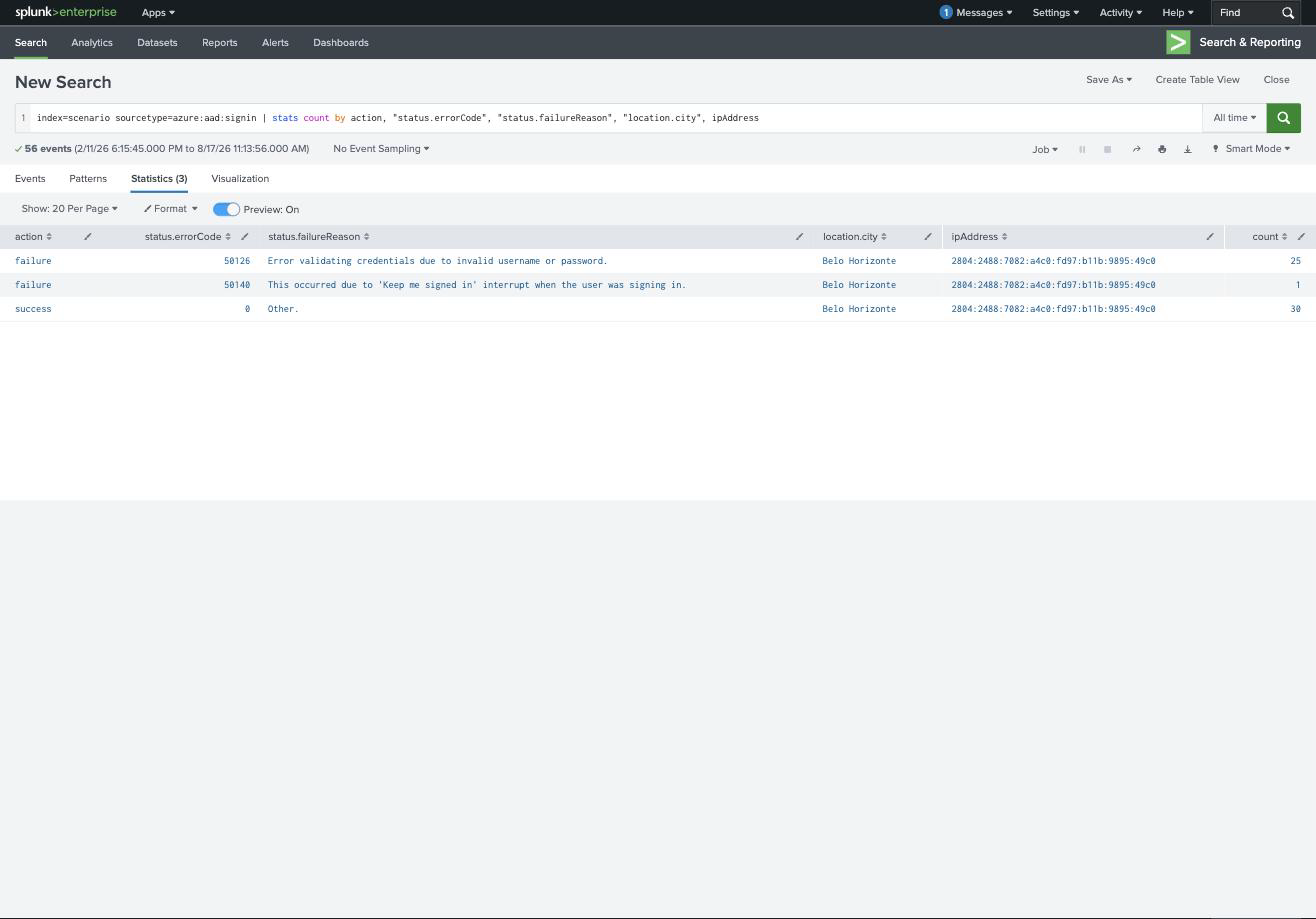
index=scenario sourcetype=azure:aad:signin
| stats count by action, "status.errorCode", "status.failureReason", "location.city", ipAddress
| action | errorCode | Meaning | Count |
|---|---|---|---|
| failure | 50126 | Invalid username or password | 25 |
| failure | 50140 | “Keep me signed in” interrupt | 1 |
| success | 0 | , | 30 |
Twenty-five credential failures followed by thirty successes, every one from 2804:2488:7082:a4c0:fd97:b11b:9895:49c0 in Belo Horizonte, BR. The compromised identity is [email protected], and error 50126 is the one to memorise, it is Entra’s “wrong username or password”, so a burst of them against a single account is brute force and a burst spread across many accounts is a password spray.
Reading the timeline in order gives the moment the guessing stopped working:
index=scenario sourcetype=azure:aad:signin
| eval t=strftime(_time,"%-m/%-d/%y %-I:%M:%S.000 %p")
| table t, action, appDisplayName | sort _time
#   6:16:01 PM … 6:16:23 PM   failure  OfficeHome   (x25)
#   6:16:53 PM                success  OfficeHome   <- first success
#   6:17:13 PM                success  One Outlook Web
First successful sign-in: 2/11/26 6:16:53.000 PM. Thirty seconds later the attacker moves from the Office home page into One Outlook Web, straight to the mailbox, which tells you the objective before they have done anything to it.
Two format notes, because both questions are graded on exact strings. The time wants Splunk’s display format (M/D/YY h:mm:ss.000 AM/PM), which strftime(_time,"%-m/%-d/%y %-I:%M:%S.000 %p") reproduces. And the application wants the literal appDisplayName value, One Outlook Web, not “Outlook” or “OWA”.
Task 5: audit logs, and the persistence
Sign-in logs tell you an account was taken. Audit logs tell you what was done to it afterwards:
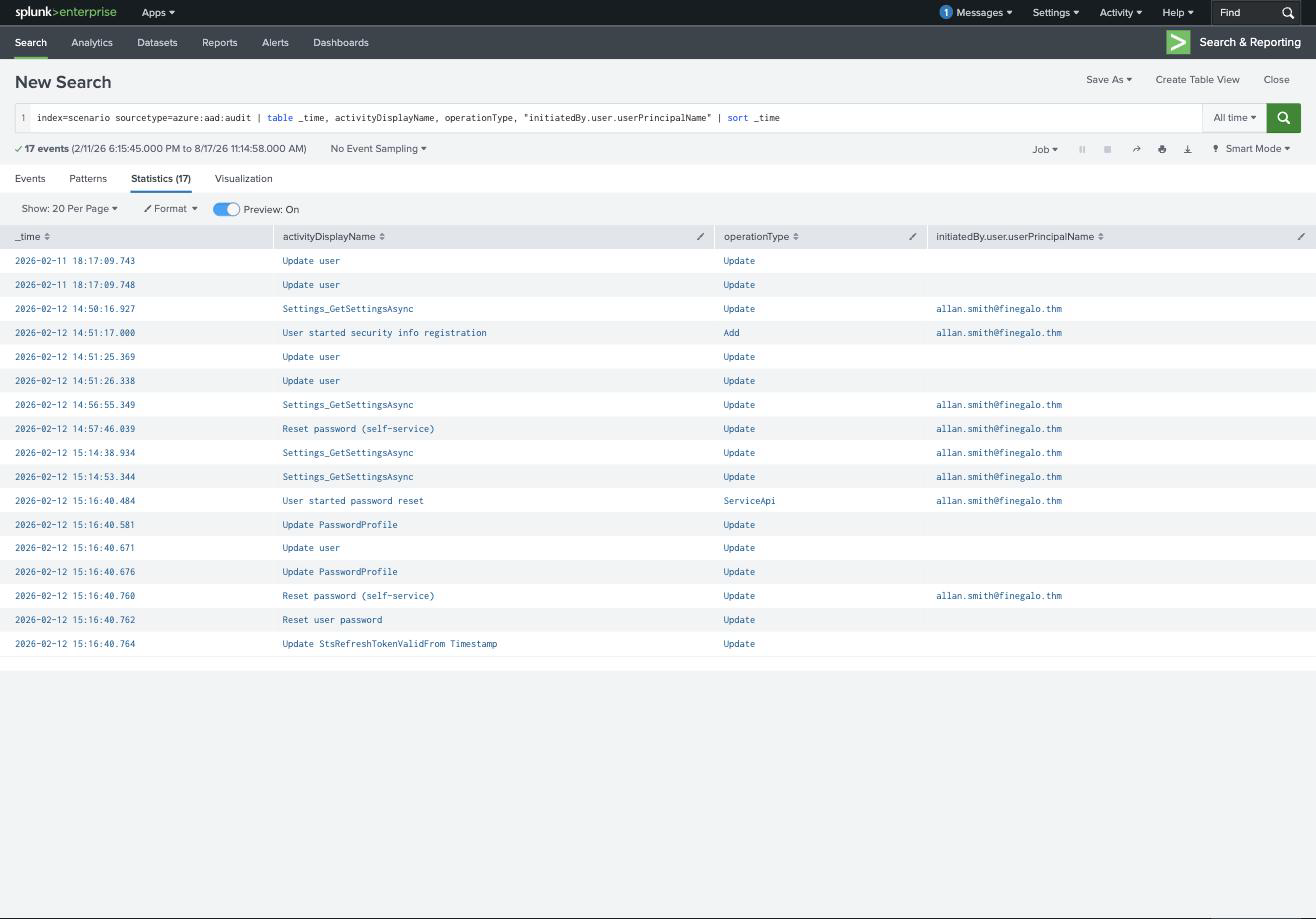
index=scenario sourcetype=azure:aad:audit
| table _time, activityDisplayName, operationType, "initiatedBy.user.userPrincipalName"
| sort _time
| Time | activityDisplayName |
|---|---|
| 2:51:17 PM | User started security info registration |
| 2:51:25 PM | Update user |
| 2:57:46 PM | Reset password (self-service) |
The first change is User started security info registration, the attacker enrolling their own MFA method. That is the single most important line in the room. Registering security info converts a stolen password into durable access: even if the real owner changes the password, the attacker’s MFA factor persists, and it makes every future sign-in look compliant rather than suspicious.
The second change is Reset password (self-service), now holding the MFA factor, the attacker resets the password through the self-service flow and locks the legitimate user out of their own account.
Between the two sits Update user, which is the answer to the question about which activity reveals the modified properties. Update user carries the modifiedProperties array, so it is the record that shows what actually changed rather than merely that something did. The other entries name an action; this one carries the before-and-after.
Tasks 6 and 7: M365 audit logs, and the business email compromise
The unified audit log covers the workloads themselves. Six events, and they read like a script:
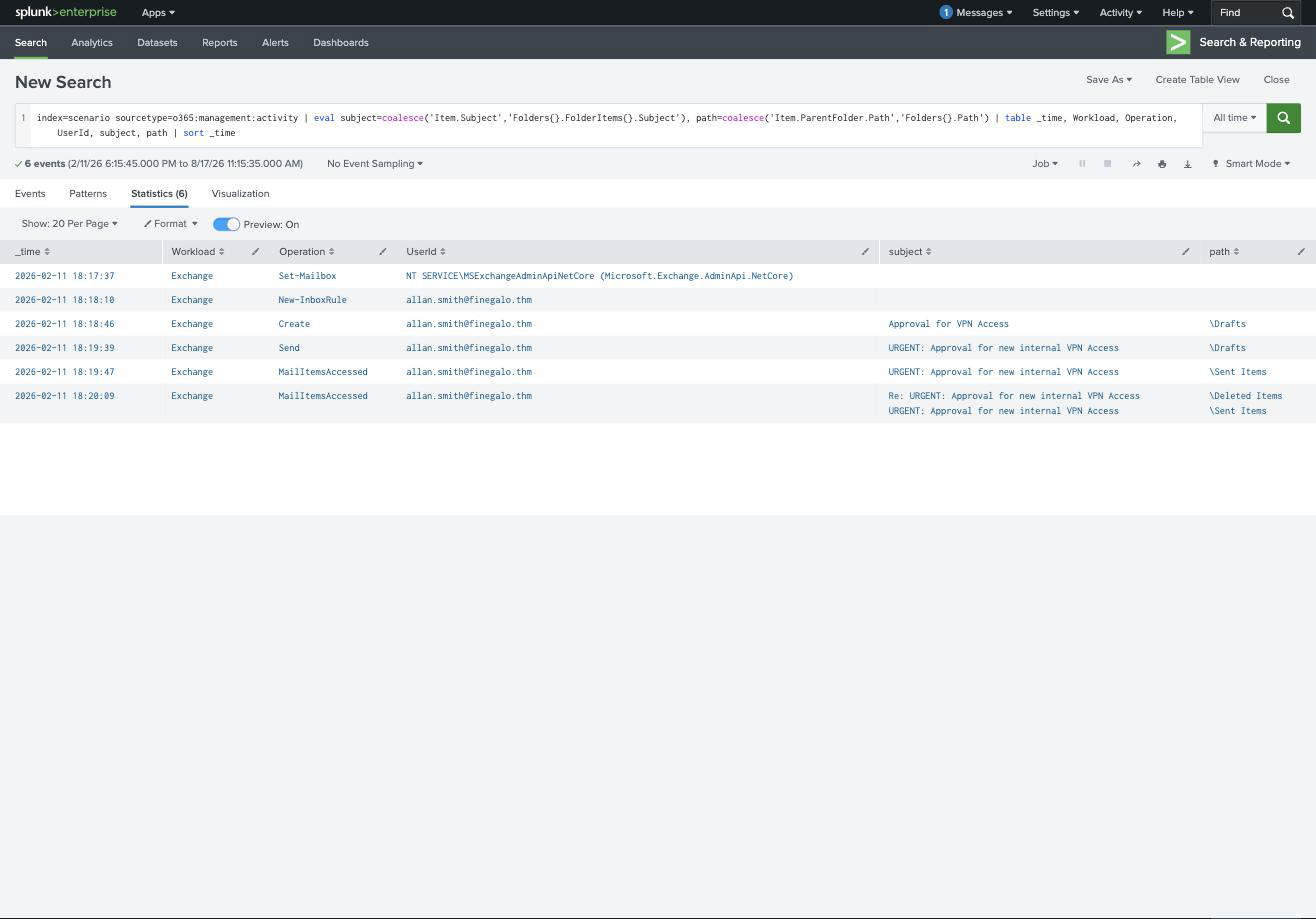
index=scenario sourcetype=o365:management:activity
| eval subject=coalesce('Item.Subject','Folders{}.FolderItems{}.Subject'),
       path=coalesce('Item.ParentFolder.Path','Folders{}.Path')
| table _time, Workload, Operation, UserId, subject, path | sort _time
| Time | Operation | Detail |
|---|---|---|
| 6:17:37 PM | Set-Mailbox | by NT SERVICE\MSExchangeAdminApiNetCore, service noise, not the attacker |
| 6:18:10 PM | New-InboxRule | the persistence |
| 6:18:46 PM | Create | draft: Approval for VPN Access in \Drafts |
| 6:19:39 PM | Send | URGENT: Approval for new internal VPN Access |
| 6:19:47 PM | MailItemsAccessed | \Sent Items |
| 6:20:09 PM | MailItemsAccessed | Re: URGENT… in \Deleted Items |
The workload is Exchange, the change is New-InboxRule, and the message subject is URGENT: Approval for new internal VPN Access, a phishing lure sent from a real, trusted internal mailbox, which is why BEC works.
The last two rows are the part worth slowing down on. At 2/11/26 6:20:09.000 PM the attacker reads the reply, and that reply is sitting in \Deleted Items. It is there because of the inbox rule created two minutes earlier: the rule moves responses out of the inbox so the real owner never sees that colleagues are replying to a request he never sent. The attacker then reads them from the folder the rule hid them in.
That is the sequence a mail rule alert is actually for. New-InboxRule on its own is a low-signal event, users create rules constantly, but a rule created minutes after a first-time sign-in from a new country, followed by mail being read out of \Deleted Items, is not ambiguous.
One practical note on the query: Item.Subject and Item.ParentFolder.Path carry the fields for Send and Create, while MailItemsAccessed uses the Folders{} multivalue structure instead. coalesce() across both is what lets one table show the entire chain.
Task 8: what the room is teaching
The structural lesson is that cloud identity compromise is split across three logs, and none of them is sufficient alone. Sign-in logs gave the who, where and when but nothing about impact. Entra audit logs gave the persistence, MFA registration and password reset, but said nothing about what the attacker wanted. Only the M365 unified audit log showed the objective: an inbox rule, a phishing email sent internally, and replies read out of a folder chosen to hide them. Investigate any one in isolation and you close the ticket with a third of the story.
The other thing worth carrying is the shape of the takeover, because it is the same every time in the cloud: spray until something works, register your own MFA so the access survives a password change, reset the password to own the account outright, then monetise it through mail. Each of those steps is a routine user action taken individually, people do register MFA and reset passwords, and it is only the ordering and the twenty-five failures in front of it that make the sequence an incident.
Room solved 100%: eight tasks, seventeen answers, 136 points.