| Follow @anir0y | |
|---|---|
| Mobile Application Security |  |
| Room [Subscription Required] | Mobile Application Security |
Mobile Application Security sits in the Specialized Domains module of the Jr Penetration Tester path. It is a concept-first room: six reading tasks build up the mobile pentest methodology and the OWASP Mobile Top 10, then one hands-on challenge, Leaky Package, asks you to pull a real Android APK and iOS IPA apart with static analysis. If you have worked through web-side rooms like Walking An Application and API Pentesting, the mindset carries over: the vulnerability classes rhyme, only the package format changes.
The room’s intended path is MobSF (the Mobile Security Framework) running on the VM attached to the Static Analysis task. I solved the practical that way conceptually, but then downloaded the two packages with the room’s own “Download Task Files” button and reproduced every finding locally on my Mac with unzip, strings, apktool, and plutil. That gives independent, grep-verified evidence rather than screenshots of someone else’s report, and it is the honest way to confirm an answer format before submitting it.
Task 1 to 3: methodology and testing approaches
The opening tasks establish the vocabulary. A mobile application package ships a Manifest file that declares the app’s permissions and component configuration (AndroidManifest.xml on Android, Info.plist on iOS). The operating system keeps apps apart with the Sandbox security model, so one app cannot freely read another’s data.
A mobile application penetration test runs in 4 phases: reconnaissance, static analysis, dynamic analysis, and reporting. The amount of access you are given shapes the engagement. Black-box starts from nothing, grey-box gives partial information, and White-box testing gives the tester full access to source code, documentation, and architectural details for the most thorough assessment.
Task 4: static analysis and MobSF
Static analysis examines the application without running it. You unpack the package, read the manifest, and search the decompiled code for hardcoded secrets. Doing this by hand is thorough but slow, so the room introduces MobSF, an open-source automated tool that unpacks a binary, decompiles it, and produces a report covering permissions, hardcoded secrets, and insecure configuration across both Android and iOS.
Findings map onto the OWASP Mobile Top 10. The category that specifically covers hardcoded credentials, API keys, and tokens left in the application code is M1: Improper Credential Usage. Over-requested permissions and exported components fall under M8: Security Misconfiguration.
Task 5: dynamic analysis, Objection and Frida
Dynamic analysis runs the app and watches it work. Many apps use SSL pinning to refuse any certificate but their own, which breaks a normal intercepting proxy. The tool most commonly associated with working around it is Objection, a runtime mobile exploration toolkit that can disable SSL pinning on a running app without touching the source. Underneath, the broader technique of attaching to a running application to observe or modify its behaviour from the outside is Runtime Instrumentation, and Frida is the framework that powers it.
Task 6: common mobile vulnerabilities
This task is the reference card for the challenge. Sensitive data written to the device in readable form maps to M9: Insecure Data Storage. Among the binary protection checks on a standard mobile checklist, the one that asks whether an app notices it is running on a tampered device is Root and jailbreak detection; its absence (alongside weak obfuscation and no tamper detection) maps to M7: Insufficient Binary Protections.
Task 7: Practical Challenge, Leaky Package
The scenario: Helix Solutions rushed an internal employee portal to release, and secrets may have been left inside the shipped packages. Two builds of the same codebase are provided, an Android APK and an iOS IPA. I grabbed both from the Download Task Files link and worked them locally.
Part 1: the Android APK
Unzipping the APK exposes three classes*.dex files. The smallest, classes3.dex, holds the app’s own classes (HelixConfig and DatabaseHelper), so a plain strings sweep over it surfaces every hardcoded secret at once.
  # unpack the APK and pull readable strings from the app's own dex
  unzip -q LeakyPackage.apk -d apk
  strings -a apk/classes3.dex | grep -iE "AIzaSy|DBroot|helix_admin|jdbc:postgresql"

Two answers fall straight out. HelixConfig.java hardcodes the API key, so the hardcoded API key found in the Java source is AIzaSyHX3mR9vKcT8nP2wY5dL0qJ7eZbFgVuN4o. DatabaseHelper.java hardcodes the production credentials, and the database password baked into it is Helix@2024!DBroot. The full JDBC string in the same class (jdbc:postgresql://db.internal.helixsolutions.local:5432/helix_employee_portal?user=helix_admin&password=...) means an attacker gets host, database name, username, and password in one line, which is exactly the M1 and M9 pairing the earlier tasks described.
Decoding the manifest with apktool shows the component problem. The application element is both debuggable and backup-enabled, and one activity is exported with no permission guard.
  # decode resources only, then read the activity declarations
  apktool d -f -s LeakyPackage.apk -o apk_decoded
  grep -oE 'android:(allowBackup|debuggable)="true"' apk_decoded/AndroidManifest.xml | sort -u
  grep -oE '<activity android:exported="[a-z]+" android:name="com.tryhackme.leakypackage.[A-Za-z]+"' apk_decoded/AndroidManifest.xml
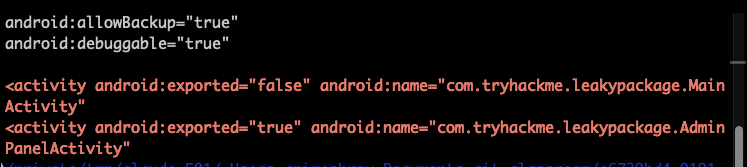
MainActivity is correctly kept private (exported="false"), but the admin screen is wide open: the exported Activity that is not protected is AdminPanelActivity. Because it is exported="true" with no permission requirement, any other app on the device can launch it with an explicit intent and skip whatever login the normal flow enforces.
Part 2: the iOS IPA
The IPA is just a zip. Unpacking it gives a Payload/LeakyPackage.app bundle with both an Info.plist and a developer-left internal_config.plist. plutil -p prints either in readable form.
  # unpack the IPA and dump the two property lists
  unzip -q LeakyPackage.ipa -d ipa
  plutil -p ipa/Payload/*.app/internal_config.plist
  plutil -p ipa/Payload/*.app/Info.plist | grep -iA2 NSAppTransportSecurity
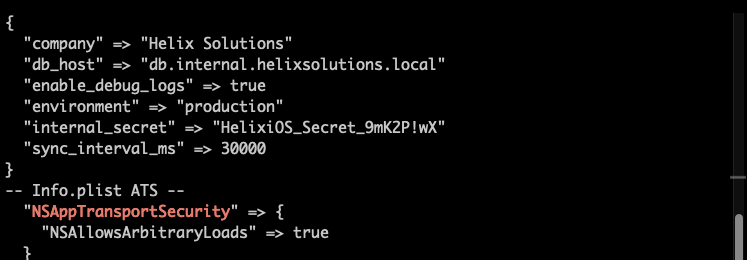
The Info.plist key set to true to switch off App Transport Security is NSAllowsArbitraryLoads, nested inside the NSAppTransportSecurity dictionary. With ATS disabled the app will happily talk plain HTTP, which is M5: Insecure Communication. Finally, the bundled internal_config.plist carries a secret no shipped app should contain: the sensitive value found there is HelixiOS_Secret_9mK2P!wX, stored under the internal_secret key next to a db_host and a production environment flag.
Two takeaways
First, a mobile package is a zip you can read offline, and the highest-value findings rarely need the app to run. A strings sweep over the right .dex and a plutil dump of the bundled plists recovered an API key, production database credentials, an exported admin activity, a disabled transport-security flag, and an internal token, all without a device or an emulator. MobSF automates exactly this, but knowing the manual commands means you can verify its report and work when no VM is available.
Second, read the answer mask before you type. Every Leaky Package field showed an underscore-per-character placeholder, so the API key was 39 characters, the database password 17, and the internal secret 24. Checking the length of my extracted value against the mask caught format questions (such as whether the OWASP answer wanted the M1: prefix, which it did not) before I spent a submission on them.
Room solved 100%: 8 tasks, 13 answers.