Monitoring AWS Logins
Third room in the Cloud Security for SOC module, after Cloud Security Pitfalls and AWS Security Logging. This is the control plane layer that Cloud Security Pitfalls named, who logs into AWS, with what credential, and what they do once they are in.
Seven tasks, sixteen answers, all solved 100%. The structure is the cleanest in the module so far, one index per task, so each scenario is a self-contained dataset:
index=* | stats count by index, sourcetype
#   task3   aws:cloudtrail   529
#   task4   aws:cloudtrail   168
#   task5   aws:cloudtrail    69
#   task6   aws:cloudtrail   236
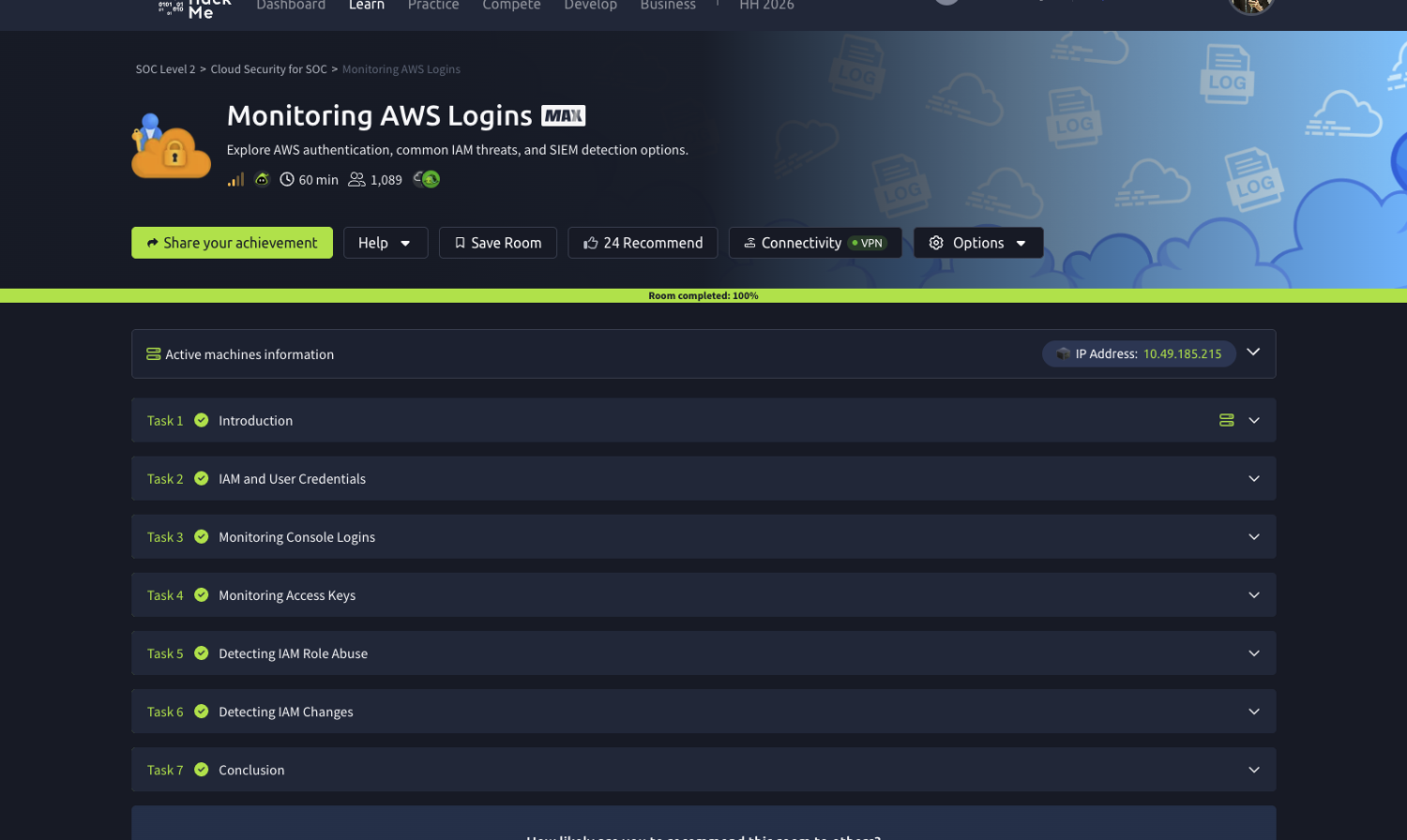
Everything is aws:cloudtrail. Set the time picker to All time, the data runs December 2025.
Task 2: three ways into an AWS account
Two definitions that set up everything after them. The credential used to reach AWS from the CLI or an SDK is an Access Key, the AKIA... / secret pair you paste into aws configure. The IAM identity type granting permissions temporarily is an IAM Role, which is assumed rather than logged into.
The room’s framing is worth keeping: rather than creating a service user with a long-term key hardcoded in application source, you create a role (its example is UserAvatarsProcessor) and attach it to the EC2 instances. No key is ever stored on disk. That single design choice is what Task 5 is about detecting.
Task 3: console logins and the MFA field
CloudTrail records interactive sign-ins as eventName=ConsoleLogin, and the two fields that matter are responseElements.ConsoleLogin for success or failure and additionalEventData.MFAUsed:
index=task3 eventName=ConsoleLogin
| eval who=coalesce('userIdentity.userName','userIdentity.type')
| stats count, values(sourceIPAddress) as ips
  by who, "userIdentity.type", "additionalEventData.MFAUsed", "responseElements.ConsoleLogin"
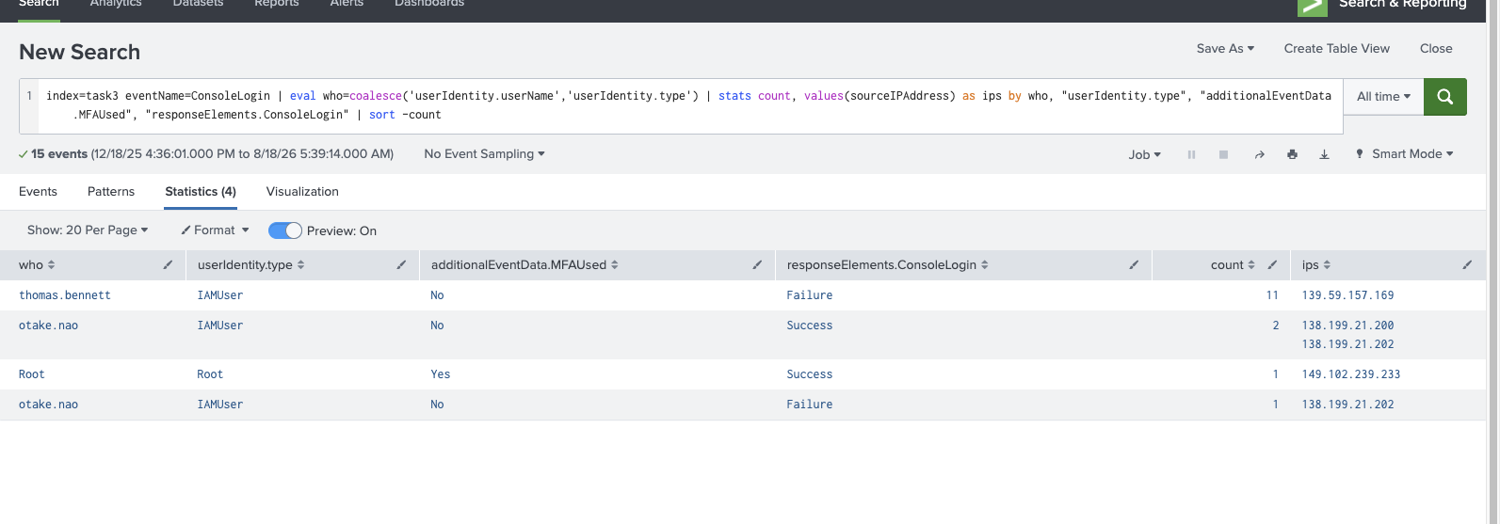
| Who | Type | MFA | Result | Count | Source |
|---|---|---|---|---|---|
| thomas.bennett | IAMUser | No | Failure | 11 | 139.59.157.169 |
| otake.nao | IAMUser | No | Success | 2 | 138.199.21.200/.202 |
| Root | Root | Yes | Success | 1 | 149.102.239.233 |
| otake.nao | IAMUser | No | Failure | 1 | 138.199.21.202 |
Thomas failed 11 times and never got in. The other user who logged in without MFA is otake.nao, twice successfully, from two addresses.
The detail worth pausing on is the last row of the table: the root account is the only identity here using MFA. That is exactly backwards from how it should read. Root is the account you protect hardest and use least, so a root console login is worth alerting on regardless of MFA; meanwhile the two ordinary IAM users are logging in with a password alone. additionalEventData.MFAUsed: No on a successful ConsoleLogin is one of the cheapest high-value detections in AWS, because it needs no baseline at all, it is a policy violation on its face.
Task 4: access keys, and what an S3 extortion looks like
The key-prefix distinction is the whole task. Grouping by user and access key:
index=task4 | stats count, values("userIdentity.accessKeyId") as keys by "userIdentity.userName"
#   thomas.bennett   100   ASIAVZZK4G6E2GWGY6UL, ASIAVZZK4G6E52OCV27N... (15 distinct)
#   michael.turner    68   AKIAVZZK4G6EW3NCJENS                          (1)
AKIA prefixes are long-term IAM user access keys. ASIA prefixes are temporary STS session credentials, the ones the console mints for you automatically, rotating constantly, which is why Thomas has fifteen of them and Michael has one. So Michael’s key used in the attack is AKIAVZZK4G6EW3NCJENS, and Thomas is the user who “did not use access keys” in the sense the room means: he was clicking around the console, not authenticating with a key he created.
Thomas’s console session is almost entirely one service:
index=task4 | stats count by "userIdentity.userName", eventSource | sort -count
#   thomas.bennett   bedrock.amazonaws.com   70
#   michael.turner   s3.amazonaws.com        62
Amazon Bedrock, ListFoundationModels, GetFoundationModelAvailability, GetAgent. Someone exploring the AI service while, in the same account, the actual attack runs on S3.
And the attack is a complete data-extortion sequence in four event names:
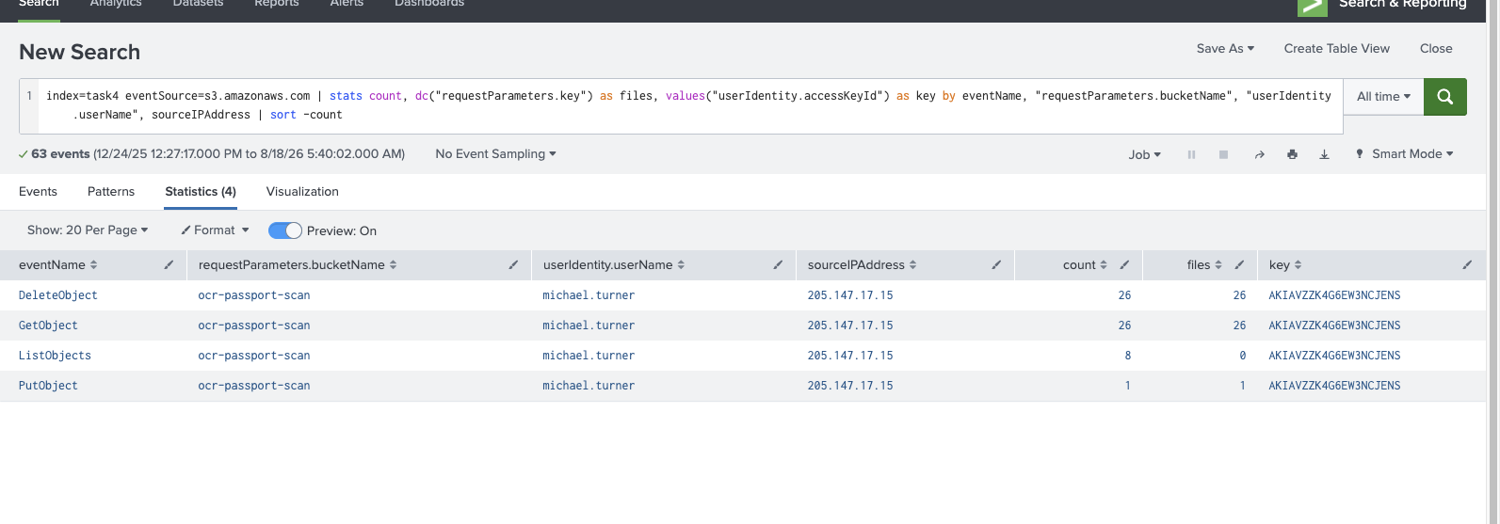
index=task4 eventSource=s3.amazonaws.com
| stats count, dc("requestParameters.key") as files by eventName, "requestParameters.bucketName"
#   ListObjects    8    (enumerate)
#   GetObject     26    26 distinct files   (exfiltrate)
#   DeleteObject  26    26 distinct files   (destroy)
#   PutObject      1    WHERE-ARE-MY-FILES.README   (ransom note)
The bucket is ocr-passport-scan, 26 files were taken and deleted, and the file uploaded at the end is WHERE-ARE-MY-FILES.README. All of it from 205.147.17.15 using one long-term key.
Note what makes this findable: GetObject and DeleteObject have the same distinct-file count. That equality is the signature, read everything, then delete exactly what you read. And the bucket name tells you the impact without opening a single object: passport scans, which is a personal-data breach on top of the extortion.
Worth saying plainly that none of this required a compromise of AWS. One long-term access key belonging to one IAM user was enough, and long-term keys do not expire, do not prompt for MFA, and are frequently committed to repositories.
Task 5: roles, and the session name that identifies the caller
Role assumption is logged as AssumeRole, and the field that does the work is requestParameters.roleSessionName:
index=task5 eventName=AssumeRole
| table _time, "userIdentity.arn", "requestParameters.roleArn", "requestParameters.roleSessionName"
#   arn:aws:iam::398985017225:user/sarah.braun   role/EU-RemoteSupport   SecretSession
So the session was named SecretSession and the user who assumed the role is sarah.braun.
The EC2 half is the more useful pattern. Finding which instance used the UserAvatarsProcessor role:
index=task5 UserAvatarsProcessor | stats count by "userIdentity.arn"
#   arn:aws:sts::398985017225:assumed-role/UserAvatarsProcessor/i-0d2b8acdedc371589   59
The instance is i-0d2b8acdedc371589, and notice where that came from, the role session name is the EC2 instance ID. AWS sets it automatically when an instance profile is used, so the assumed-role ARN carries the identity of the exact machine. This is the one place in CloudTrail where an anonymous-looking assumed-role principal resolves straight to a host, and it is how you attribute activity from a role back to hardware.
Which also explains why SecretSession stands out. A human calling AssumeRole gets to choose that string, and a genuine one usually says something operational. A deliberately coy name is not proof of anything on its own, but it is a free signal in a field most people never look at, and roleSessionName is worth surfacing in any role-assumption dashboard for exactly that reason.
Task 6: the Splunk integration that runs as root
The last task has a SOC note attached warning that the configuration is “exceptionally insecure”, and one query shows why:
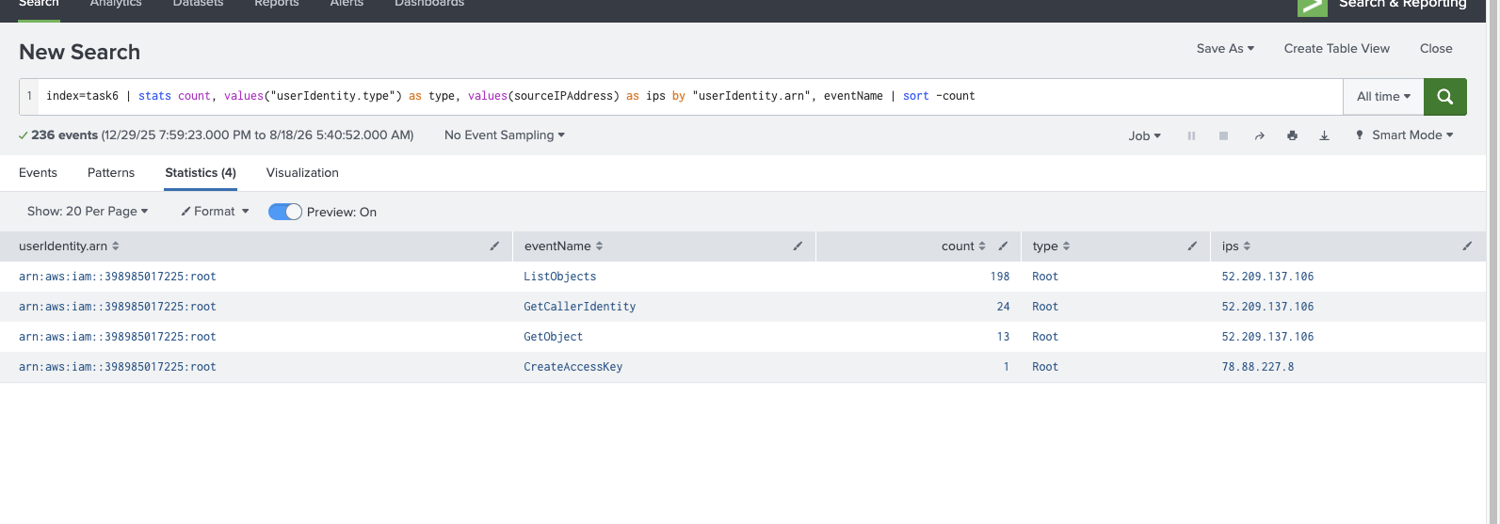
index=task6 | stats count, values("userIdentity.type") as type by "userIdentity.arn", eventName
#   arn:aws:iam::398985017225:root   ListObjects        198   Root   52.209.137.106
#   arn:aws:iam::398985017225:root   GetCallerIdentity   24   Root   52.209.137.106
#   arn:aws:iam::398985017225:root   GetObject           13   Root   52.209.137.106
#   arn:aws:iam::398985017225:root   CreateAccessKey      1   Root   78.88.227.8
Every single event in the index, all 236, is the root identity. The ARN the integration authenticates under is arn:aws:iam::398985017225:root, and the access key it uses was created at 2025-12-29 19:59:23.
Two things make this as bad as the room says. Root cannot be restricted by IAM policy, it has unconditional access to everything in the account, so a log-reading integration holding root credentials can also delete every bucket. And root activity is supposed to be near-zero, which means this integration permanently poisons the single best signal you have: once a root key is polling S3 198 times, “alert on any root API call” becomes unusable, and a real attacker using root blends straight into the noise.
The CreateAccessKey at 19:59:23 comes from a different address (78.88.227.8) than everything the key subsequently did (52.209.137.106), an admin minting the credential at their desk, then the integration using it from wherever it runs.
Task 7: what carries forward
Two things.
In AWS, the credential type tells you most of the story before you look at behaviour. A console login with MFAUsed: No, a long-term AKIA key doing bulk S3 operations, an ASIA key that is just a console session, an assumed-role ARN whose session name is an instance ID, each of those is visible in the userIdentity block of every single CloudTrail event, before you have read a single eventName. Triage in this room is largely a matter of reading that block properly, which is why the two definitions in Task 2 carry so much weight.
And the most dangerous finding here is a configuration, not an intrusion. The S3 extortion in Task 4 is the loud incident, but the Splunk integration running as root is the one that would keep me up. It was set up deliberately, by someone trying to be helpful, and it simultaneously grants unlimited blast radius and destroys the detection that would have caught its own abuse. The ocr-passport-scan attack needed a stolen key; an attacker who found that key would need nothing else at all.
Room solved 100%: seven tasks, sixteen answers, and the third of five rooms in Cloud Security for SOC.