New Hire Old Artifacts
This is the first properly hands-on blue-team room in this run, and it is a good one. The scenario: you are a SOC analyst at an MSSP, a new customer (Widget LLC) just onboarded their Splunk feed, and the Finance department is worried about one endpoint belonging to a recently hired analyst. During December 2021 the endpoint security product was switched off, and nobody ever investigated why. Your job is to sift the Splunk data and find out what happened. There is one task and eleven questions, but behind them is a complete intrusion you get to reconstruct from the logs alone.

The lab machine is a Splunk instance at MACHINE_IP:8000. I reached it over the VPN and drove the whole investigation from the Search app. The very first thing to do in any Splunk room is orient yourself, so before answering anything I asked what data even exists:
index=* | stats count by index sourcetype
That returns 27,378 events, and the one that matters is index=main sourcetype=WinEventLog:Microsoft-Windows-Sysmon/Operational with 13,922 events. Everything below is Sysmon. Four of its event codes carry the entire story, and knowing which field lives on which event is most of the skill here.
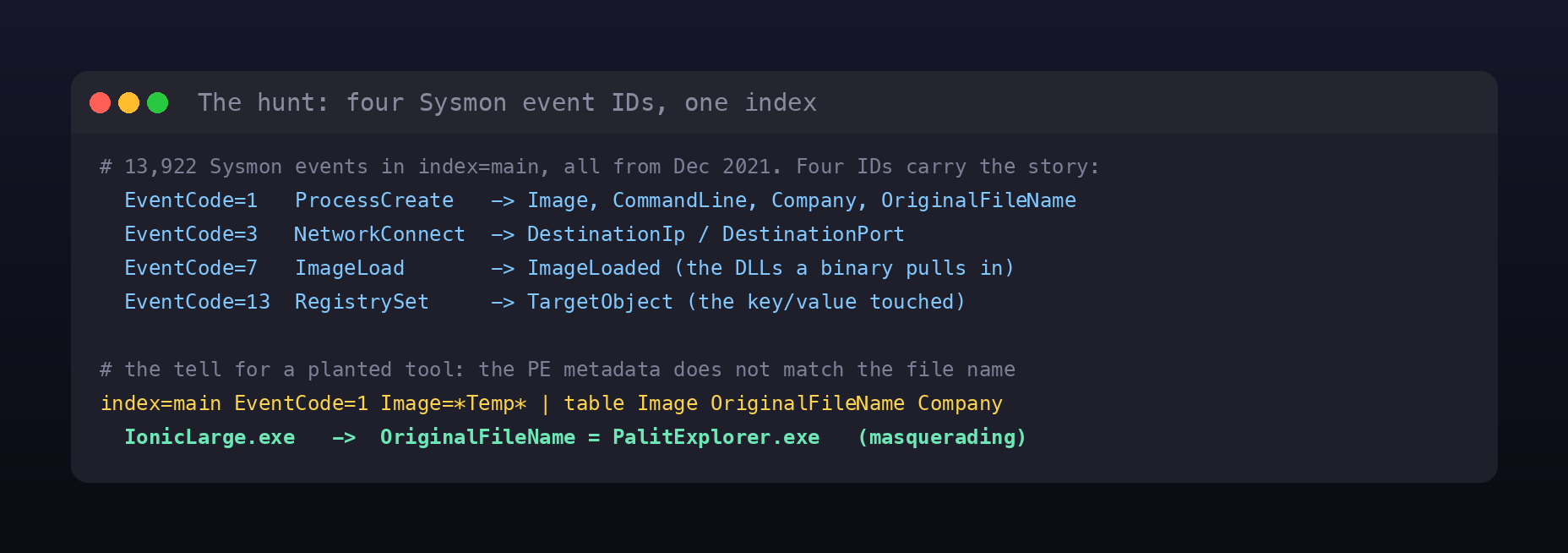
- EventCode 1 (ProcessCreate) gives you
Image,CommandLine, and, crucially, the PE metadata the file carries:Company,Product, andOriginalFileName. - EventCode 3 (NetworkConnect) gives
DestinationIpandDestinationPort. - EventCode 7 (ImageLoad) gives
ImageLoaded, every DLL a process pulls in. - EventCode 13 (RegistrySet) gives
TargetObject, the exact key or value written.
Task 2 through 3: the process story
The first two questions are about a “Web Browser Password Viewer”, which is the product description NirSoft ships on its credential-dumping tools. Searching the phrase and reading the metadata answers both at once:
index=main "Web Browser Password Viewer"
| table Image Company OriginalFileName | dedup Image
The binary is C:\Users\FINANC~1\AppData\Local\Temp\11111.exe and the listed company is NirSoft. That FINANC~1 is just the 8.3 short name for Finance01, which matters immediately, because the next question asks about “another suspicious binary from the same folder.” Listing everything executed out of a Temp path and comparing the file name against its embedded OriginalFileName is where masquerading jumps out:
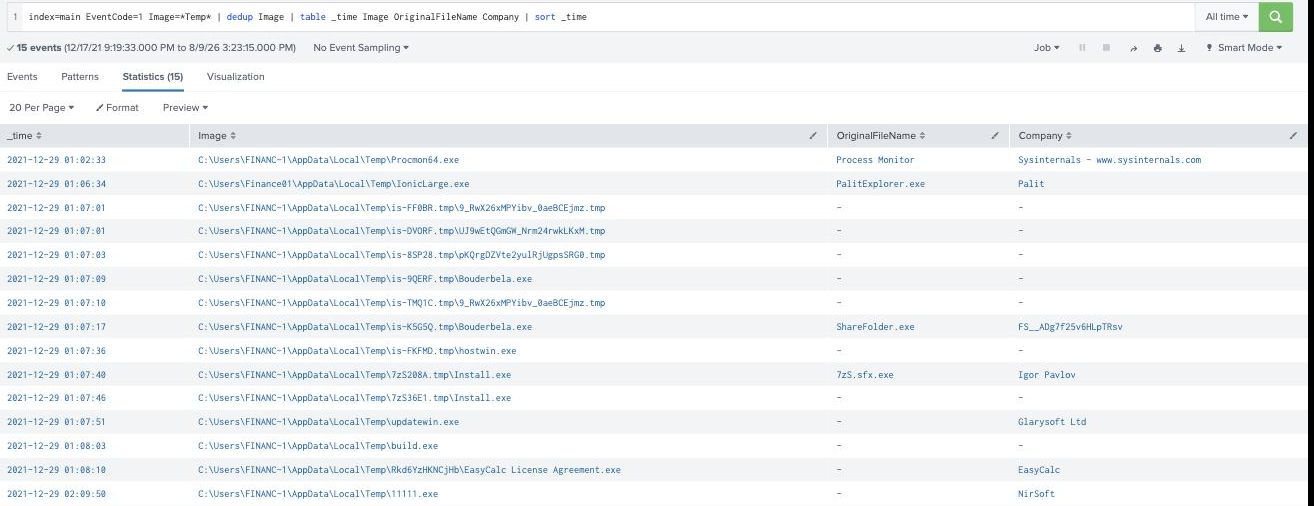
Procmon64.exe honestly reports itself as Process Monitor by Sysinternals. But IonicLarge.exe claims an OriginalFileName of PalitExplorer.exe with company “Palit”. A file whose real name disagrees with the name on disk is the classic tell of a renamed, planted tool, so IonicLarge.exe,PalitExplorer.exe is the answer, and IonicLarge.exe becomes the thread you pull for the next several questions.
Task 4 through 6: what IonicLarge did
The dropper made “two outbound connections to a malicious IP.” Ninety-odd network events for it are mostly loopback noise, so aggregating destinations by count surfaces the real one instantly:
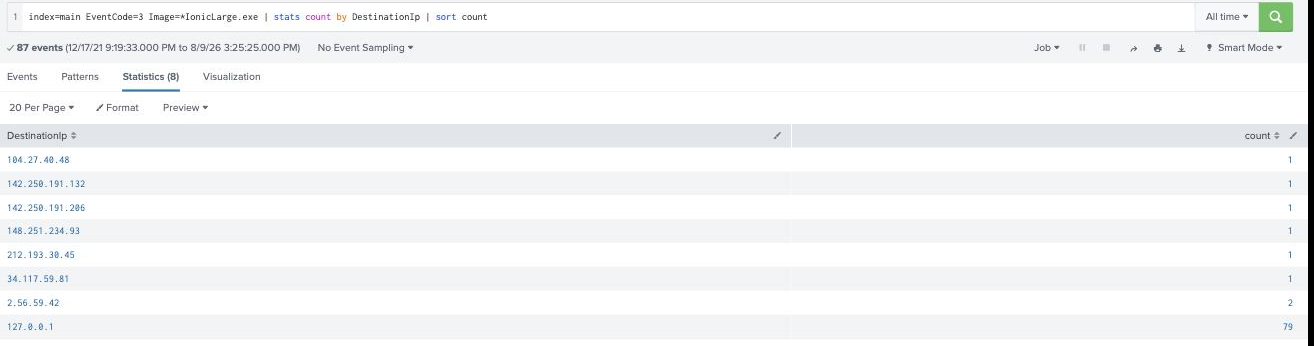
index=main EventCode=3 Image=*IonicLarge.exe | stats count by DestinationIp | sort count
127.0.0.1 has 79 hits and the Google ranges have one each; the address hit exactly twice is 2.56.59.42, which the room wants defanged as 2[.]56[.]59[.]42.
The same binary’s registry writes (EventCode 13) are all Windows Defender toggles: DisableAntiSpyware, DisableRealtimeMonitoring, DisableOnAccessProtection, and friends, each set to 1. Those are the values; the key path they all live under is HKLM\SOFTWARE\Policies\Microsoft\Windows Defender. That is the answer to “what registry key did it change”, and it explains the scenario’s opening line about the endpoint’s protection being off.
Then the attacker cleaned up. Two cmd.exe one-liners chained a taskkill /f with a del/erase, killing each process and wiping its binary:
index=main EventCode=1 (CommandLine=*taskkill* OR CommandLine=*del *)
| table _time Image CommandLine | dedup CommandLine
The two binaries killed and deleted were phcIAmLJMAIMSa9j9MpgJo1m.exe and WvmIOrcfsuILdX6SNwIRmGOJ.exe.
Task 7 through 8: tampering with Defender’s brain
Beyond flipping registry values, the attacker ran a series of commands to change Defender’s behaviour by pre-approving specific threat IDs so its own signatures would ignore them. They show up through MSFT_MpPreference:
index=main EventCode=1 CommandLine=*MpPreference* | table _time CommandLine | sort _time
The series repeats the same WMIC ... MSFT_MpPreference call Add ThreatIDDefaultAction_Ids=... call for four different IDs, wrapped in forfiles, cmd, and powershell launchers. The last command in the series, and the one the room’s answer format expects (it starts with powershell), is:
powershell WMIC /NAMESPACE:\\root\Microsoft\Windows\Defender PATH MSFT_MpPreference call Add ThreatIDDefaultAction_Ids=2147737394 ThreatIDDefaultAction_Actions=6 Force=True
Reading the timestamps, the four IDs in order of execution are 2147735503,2147737010,2147737007,2147737394.
Task 9 through 10: the second implant, and a search that lied
The last two questions point at “another malicious binary from another AppData location.” My first instinct, EventCode=1 Image=*Roaming*, returned zero results, which nearly sent me down the wrong path. Dropping the event-code filter explained why: the binary is all over the logs under EventCodes 3, 7, and 13, but it has no ProcessCreate (EID 1) event at all. With Defender disabled and logging patchy, its execution simply was not recorded as a process-create, yet it clearly ran.
index=main Image=*Roaming* | stats count by Image EventCode
The binary is C:\Users\Finance01\AppData\Roaming\EasyCalc\EasyCalc.exe, a fake calculator. Its image loads reveal what it really is:
index=main EventCode=7 Image=*EasyCalc.exe* | dedup ImageLoaded | table ImageLoaded | sort ImageLoaded
Alongside the usual system DLLs, it loads ffmpeg.dll, nw.dll, and nw_elf.dll from its own folder, the signature of an NW.js (node-webkit) application, which is a common way to smuggle a full JavaScript/Chromium runtime into a “harmless” desktop app. In alphabetical order that is ffmpeg.dll,nw.dll,nw_elf.dll.
The trick that made this room fast
TryHackMe answer boxes carry a placeholder that masks the exact accepted answer character-for-character, preserving literal separators. Reading those placeholders straight off the page (inputs.map(el => el.placeholder)) turned guesswork into arithmetic, and it caught three answers I had wrong on the first pass. The registry question wasn’t the BAM execution key many older writeups cite, it was the shorter Defender policy key, and the placeholder’s five segments ending in a space (Windows Defender) said so. The Defender command had to start with powershell (a 10-character first token), not the full WMIC.exe path. And the placeholder for the second implant showed a six-segment path ending in EasyCalc\EasyCalc.exe, not the GUID-named binary I first suspected. When an answer has a strict format, the format is free ground truth; use it.
Room summary
| Room | New Hire Old Artifacts (Splunk / SOC, Premium) |
| Data | index=main, Sysmon (Microsoft-Windows-Sysmon/Operational), Dec 2021 |
| Q1 / Q2 | C:\Users\FINANC~1\AppData\Local\Temp\11111.exe ; company NirSoft |
| Q3 | IonicLarge.exe,PalitExplorer.exe (name vs OriginalFileName mismatch) |
| Q4 / Q5 | C2 2[.]56[.]59[.]42 ; key HKLM\SOFTWARE\Policies\Microsoft\Windows Defender |
| Q6 | phcIAmLJMAIMSa9j9MpgJo1m.exe,WvmIOrcfsuILdX6SNwIRmGOJ.exe |
| Q7 / Q8 | last powershell WMIC ... Ids=2147737394 ... ; IDs 2147735503,2147737010,2147737007,2147737394 |
| Q9 / Q10 | C:\Users\Finance01\AppData\Roaming\EasyCalc\EasyCalc.exe ; ffmpeg.dll,nw.dll,nw_elf.dll |
All the queries, commented, are on the gist:
Hunt queries on GitHub Gist:
newhire_hunt.spl
Wrap-up
Strung together, the logs tell one clean story: a NirSoft tool dumped saved browser passwords, a renamed dropper beaconed to 2.56.59.42 and tore down Windows Defender both through Group Policy registry keys and by whitelisting its own threat IDs, an attacker deleted the noisy stagers behind them, and a fake NW.js calculator settled in under Roaming as the quiet second implant.
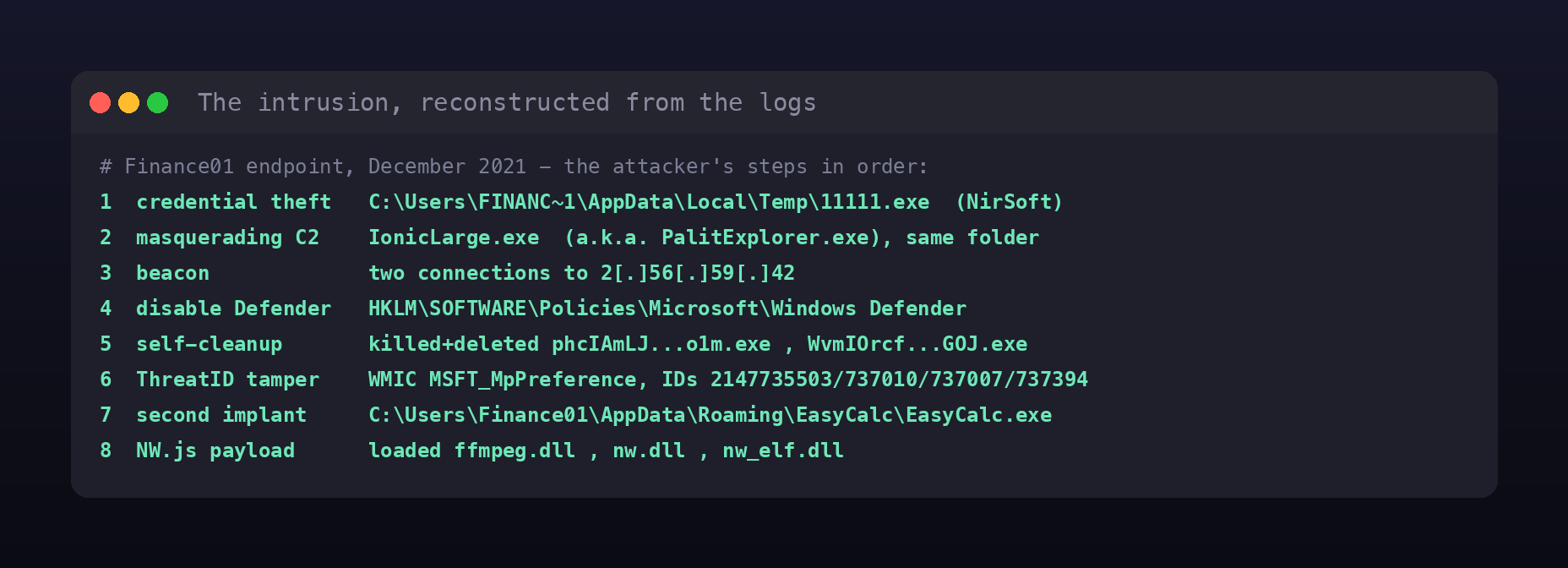
The lesson the room’s name is pointing at is that artifacts outlive the attacker’s cleanup. They deleted binaries and blinded the AV, but Sysmon had already recorded the process metadata, the network tuples, the registry writes, and the image loads. A defender who knows which field lives on which event ID can rebuild the whole intrusion after the fact from nothing but those breadcrumbs. That is the core loop of threat hunting, and this room is a tidy, self-contained rep of it.