Phishing Basics sits in the Password Attacks module of the Jr Penetration Tester path. Most of it is reading comprehension (the psychology of a lure, the anatomy of a campaign, the metrics that go in a report), but it ends with a hands-on exercise: stand up a Social-Engineer Toolkit credential harvester, spoof an internal sender, and phish a simulated finance manager named Bob. If you want more email-focused practice afterwards, it pairs well with the Phishing Emails 1 walkthrough, and it is a gentler cousin of the exploitation rooms on the same path like CVE-2026-42945 Nginx Rift.
This walkthrough answers every question and captures the flag. There is one answer-format trap worth calling out early and one genuine SET bug that makes the attack look like it failed when it actually worked.
Task 1: Why phishing matters
The opener frames phishing as the path of least resistance in an engagement: the human element is the one control no firewall covers. The only question is a readiness check with no answer needed, so click Complete and move on.
Task 2: Phishing, spear phishing, and whaling
The primary delivery channels are email, SMS, voice, and fake websites. Two of those have their own names: SMS phishing is smishing and voice phishing is vishing. So the primary channel used during a smishing attack is SMS.
The type questions turn on who is targeted. Plain phishing casts a wide net. Spear phishing is tailored to a specific person. Whaling is spear phishing aimed at a senior decision-maker. The scenario where you are a CEO who received a phishing email sent only to you is targeting a senior executive, which makes it Whaling.
Task 3: The psychology of a lure
This task lists six social-engineering principles: scarcity, urgency, authority, fear, curiosity, and trust. Each question is a scenario you map to one principle.
- An offer that will expire in 24 hours unless you act now is time pressure, which is Urgency.
- An executive demanding sensitive data while emphasising their position is leaning on status, which is Authority.
- An email claiming your credentials turned up in a data breach is designed to alarm you into reacting, which is Fear.
- A message promising exclusive access to a product no one else knows about is Curiosity.
That last one is the trap. Semantically “exclusive access no one else has” reads like scarcity, and Scarcity is 8 letters. The answer field mask was 9 characters, which rules Scarcity out and points at Curiosity (the pull of an information gap, wanting to know the thing nobody else knows). When the mask arithmetic disagrees with your first instinct, trust the mask and re-read the question rather than assuming the field is broken.
Task 4: Delivery techniques and email authentication
The URL and domain tricks include masking, homograph attacks, and typosquatting. The technique that relies on a user fat-fingering a domain (tryhacme.com for tryhackme.com) is Typosquatting.
Email spoofing is possible because SMTP has no built-in sender authentication. Three layered controls close that gap, and the answer wanted them in alphabetical order, comma separated: DKIM, DMARC, SPF. SPF authorises sending hosts, DKIM signs the message, and DMARC ties the two together with a policy and reporting.
Task 5: Campaign anatomy and reporting metrics
A phishing engagement is planning, reconnaissance (OSINT only), scenario and payload development (tracking links and fake login pages, never live malware), execution, and a report the client can act on. The report is built around a metrics table, and the three questions read straight off it.
- A 6% credential entry rate falls in the
>5%band, which the table labels High risk. - The metric for the percentage of users who open or execute an attachment is the Attachment Detonation Rate.
- For a client with a 10% click rate (inside the 8 to 14% acceptable band), the table’s recommendation is Focused security awareness training.
Task 6: Harvesting Bob’s credentials with SET
The practical is a spear-phishing attack against Bob, the head of finance at TryAccounting, whose address [email protected] was found through OSINT. The plan is to stand up a fake login portal, spoof an internal sender, and mail Bob a link that harvests whatever he types.
SSH into the lab machine as the provided attacker user and launch the Social-Engineer Toolkit (the box ships a SET alias). Walk the menus to a Credential Harvester using Custom Import, which serves the pre-staged TryAccounting portal at /home/attacker/setoolkit/index.html:
  # 1) Social-Engineering Attacks
  # 2) Website Attack Vectors
  # 3) Credential Harvester Attack Method
  # 3) Custom Import
  # IP address for the POST back in Harvester/Tabnabbing: <MACHINE_IP>
  # Path to the website to be cloned: /home/attacker/setoolkit/
  # Copy just the index.html: 1
  # URL of the website you imported: http://tryacounting.thm
SET reports the Credential Harvester is running on port 80 and serving the cloned portal. Note the link is tryacounting.thm, a typosquat of tryaccounting.thm with one missing c, which on this lab resolves to the harvester.
The delivery is the part the room really wants you to see. Sending the lure directly as [email protected] from the attacker’s own phisher.thm account trips the domain’s email security. The way through is Rainloop webmail (http://MACHINE_IP:8080, log in as [email protected]), composing a New Message and switching the From field to the [email protected] alias so the message reads as internal. The body is a routine password-expiry notice with the harvester link:
  Subject: Action Required: Password Expiration Notice

  Dear Bob,
  As part of our security policy, we require all TryAccounting employees to
  change their passwords every 3 months. Please log in to our internal portal
  and update your password before Friday: http://tryacounting.thm
Bob is a simulated victim: once the mail lands, a bot opens the link, fills the portal, and submits. Back in the SET terminal the capture appears:
  [*] WE GOT A HIT! Printing the output:
  POSSIBLE USERNAME FIELD FOUND: username=bob.wilkinson
  POSSIBLE PASSWORD FIELD FOUND: password=THM{you_just_got_phished!}
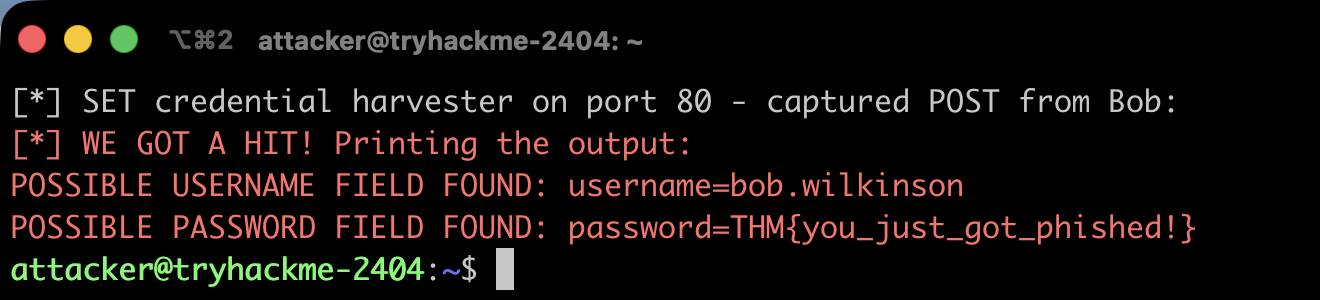
The password field is the answer, so the flag is THM{you_just_got_phished!}.
One honest gotcha from doing this the scripted way: this SET build has a bug in the harvester’s POST handler (UnboundLocalError: cannot access local variable 'RAW_URL'), so the victim’s browser gets a 500-style error and a client like curl reports the connection as failed. That looks like the attack broke, but it does not. The credential capture and the WE GOT A HIT print happen before the buggy redirect line, so the harvest still lands even though the HTTP response never completes. Check the harvester output, not the client response code.
Task 7: Wrapping up
The conclusion is a completion checkbox with no answer needed and a pointer to the You Got Mail room for more practice. Click Complete to finish the room.
Takeaways
Two things are worth keeping from this room. First, phishing is a psychology exercise wearing a technical costume. The six principles (scarcity, urgency, authority, fear, curiosity, trust) are the actual payload; the typosquatted domain and the spoofed header are just delivery. When you write the report, the metrics table is what turns “users clicked” into a defensible recommendation, so learn which number maps to which control.
Second, do not trust a tool’s error over its evidence. The SET harvester threw an exception and the victim’s request looked like it failed, yet the credentials were captured cleanly. On a real engagement the same discipline applies to answer-format masks (Curiosity, not Scarcity) and to any “it didn’t work” moment: verify against the artefact that actually records success, not the surface that happened to error.
Room solved 100%: 7 tasks, 14 answers.