Post-Incident Activity
This is room 4 of 4 in the Incident Response Lifecycle module on SOC Level 2, and it closes the NIST loop. The module runs one continuous incident at Nexus Financial: Preparation reviewed the posture, Detection and Analysis confirmed the compromise and scoped it, Response and Recovery contained and eradicated, and this room asks the question that most SOCs never get around to, what did we actually learn, and what detection do we now have that we did not have on 30 March?
The room is half conceptual and half Splunk. The conceptual half is the reporting and lessons-learned vocabulary. The Splunk half is the interesting part: reconstructing the entire attack as a single ordered table across three different sourcetypes, computing dwell time from that table, and writing the two detection rules the incident hands you for free. The data is the same index=ir dataset used in Detection and Analysis, so the Entra ID Monitoring and Exchange Online Monitoring field names apply throughout.
Task 2: the meeting nobody schedules
The structured discussion held after an incident is resolved is the Lessons Learned Meeting. It brings the IR team, IT and management together to answer a fixed set of questions: what happened, what was the root cause, how did the attacker get in, when was it detected, could it have been detected earlier, what went well, and what changes to people, process or technology stop a repeat.
NIST SP 800-61r2 wires the output of that meeting back into Preparation. That is the whole point of the framework being a cycle rather than a line, new detection rules, updated policies and better visibility are Preparation artefacts produced by the last phase, which is why an organisation that skips this phase stays exactly as vulnerable as it was.
The room is honest about why it gets skipped: after an incident the team is exhausted, leadership wants to move on, and the alert queue never stopped filling. That is a scheduling problem, not a technical one, and it is why the same gaps stay open.
Task 3: two documents, two audiences
Post-incident reporting splits into two documents that must not be merged.
The Executive Summary targets a non-technical audience, CIO, CEO, legal counsel, board. It covers what happened in plain language, the business impact, a high-level account of discovery and resolution, and the remediation being put in place. What it must not contain is IP addresses, domains, MITRE technique IDs or SPL. Those details do not inform a board decision; they dilute the message.
The Technical Summary is the one that carries every IOC, MITRE technique ID and exact timestamp. Full attack timeline, log evidence with the actual queries, root causes, and the detection gaps that produced new rules.
The room makes a point here that is worth repeating outside of a lab. Writing T1564.008 in a report communicates almost nothing. A useful technique entry names what was created, what it looked like in the logs, when it happened, and the exact indicators. For this incident, documenting T1564.008 means writing down the inbox rule name, the keywords it filtered on, the action it took, the account, and the UAL timestamp, because that is the level of detail a detection rule can actually be written from six months later.
Task 4: why a naive rule is worse than no rule
Every TTP from the investigation is a candidate detection rule, but the room spends most of the task on the reason that is harder than it sounds. Creating an inbox rule is normal. Downloading SharePoint files is normal. Signing in from a new country means someone is travelling. A rule that fires on any one of those in isolation produces hundreds of alerts a day, and the resulting Alert fatigue means the real one gets closed as noise alongside the rest.
The fix is correlation: alert on the combination, not the atom. An inbox rule created by an account that signed in from a new country in the last hour. A burst of SharePoint downloads from a single account in a short window. An external sharing event immediately following an anomalous sign-in. None of those components is suspicious alone; together they are a pattern.
The other answer in this task is a tool name: Microsoft Secure Score, which measures posture across M365 services and is useful for finding what is still open after an incident. The task also mentions Hawk and Sparrow, two PowerShell tools for pulling forensic data and checking M365-specific IOCs, though neither is used in the room.
Task 6: reconstructing the timeline
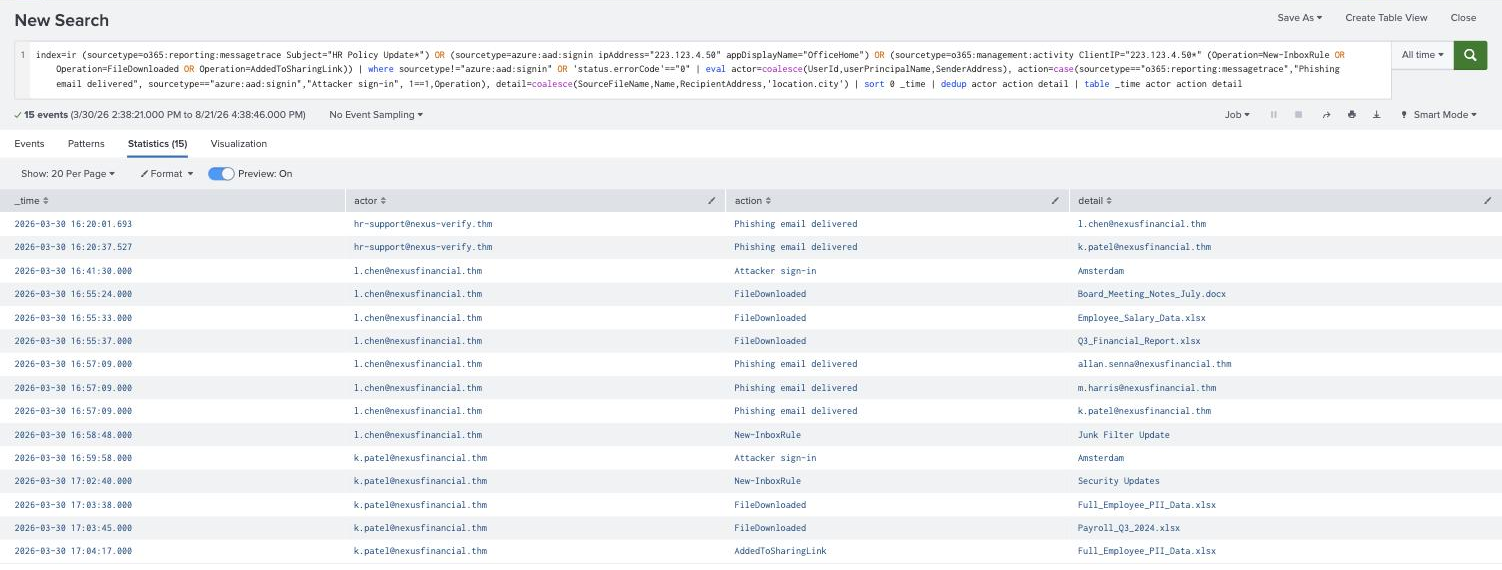
This is the practical, and the first job is turning three sourcetypes with three different schemas into one ordered narrative. The trick is coalesce, normalise the actor and the detail into common field names, label the action, then sort:
index=ir (sourcetype=o365:reporting:messagetrace Subject="HR Policy Update*")
      OR (sourcetype=azure:aad:signin ipAddress="223.123.4.50" appDisplayName="OfficeHome")
      OR (sourcetype=o365:management:activity ClientIP="223.123.4.50*"
          (Operation=New-InboxRule OR Operation=FileDownloaded OR Operation=AddedToSharingLink))
| where sourcetype!="azure:aad:signin" OR 'status.errorCode'=="0"
| eval actor=coalesce(UserId,userPrincipalName,SenderAddress),
       action=case(sourcetype=="o365:reporting:messagetrace","Phishing email delivered",
                   sourcetype=="azure:aad:signin","Attacker sign-in",
                   1==1,Operation),
       detail=coalesce(SourceFileName,Name,RecipientAddress,'location.city')
| sort 0 _time | dedup actor action detail
| table _time actor action detail
Two things in that query took a retry to get right, and both are worth knowing.
dedup drops events where any dedup field is null. My first version had detail=coalesce(SourceFileName,Name,RecipientAddress), none of which exists on a sign-in event, so dedup actor action detail silently deleted every sign-in row and produced a timeline where the attacker downloaded files without ever logging in. Adding location.city as the final coalesce fallback gave sign-ins a non-null detail and they reappeared. A pipeline stage that quietly removes rows is worse than one that errors.
sort has a default result limit, and order matters against dedup. Plain | sort _time returned the rows out of order; sort 0 _time (no limit) fixed it. And dedup keeps the first row it sees, so sort 0 _time | dedup ... keeps the earliest occurrence of each action, the other way round it kept 16:41:40 instead of the true first sign-in at 16:41:30.
The resulting fifteen rows are the whole incident:
16:20:01  [email protected]  Phishing email delivered  -> l.chen
16:20:37  [email protected]  Phishing email delivered  -> k.patel
16:41:30  l.chen                       Attacker sign-in             Amsterdam
16:55:24  l.chen                       FileDownloaded               Board_Meeting_Notes_July.docx
16:55:33  l.chen                       FileDownloaded               Employee_Salary_Data.xlsx
16:55:37  l.chen                       FileDownloaded               Q3_Financial_Report.xlsx
16:57:09  l.chen                       Phishing email delivered  -> allan.senna, m.harris, k.patel
16:58:48  l.chen                       New-InboxRule                Junk Filter Update
16:59:58  k.patel                      Attacker sign-in             Amsterdam
17:02:40  k.patel                      New-InboxRule                Security Updates
17:03:38  k.patel                      FileDownloaded               Full_Employee_PII_Data.xlsx
17:03:45  k.patel                      FileDownloaded               Payroll_Q3_2024.xlsx
17:04:17  k.patel                      AddedToSharingLink           Full_Employee_PII_Data.xlsx
From that, the documentation answers fall out. The initial attack vector was Phishing, a credential-harvesting email from a lookalike domain. The control that would have stopped the attacker even after Laura entered her password on the phishing page is MFA, absent on standard user accounts and flagged in the pentest report Nexus Financial never acted on. The internal phishing email sent onward from Laura’s own mailbox at 16:57:09 reached 3 employees. The first log source that surfaced the activity was the Entra ID Sign-in Logs, the geo-anomaly rule that produced the original alert. And the file carrying employee PII is Full_Employee_PII_Data.xlsx, which is also the one shared externally three seconds after it was downloaded.
One note on the room’s own hint text. Task 5 tells you to find the external email address by searching for SharingInvitationCreated. That operation does not exist in this dataset, the exfiltration is recorded as AddedToSharingLink and AddedToSecureLink, both at 17:04:17, both with TargetUserOrGroupName = [email protected]. Searching for the operation the hint names returns nothing at all.
Task 6, continued: dwell time
Dwell time is the gap between the first malicious action and detection. With the timeline built, it is one stats and one eval:
index=ir (sourcetype=o365:reporting:messagetrace SenderAddress="[email protected]")
      OR (sourcetype=azure:aad:signin ipAddress="223.123.4.50")
      OR (sourcetype=o365:management:activity ClientIP="223.123.4.50*")
| stats min(_time) as first_malicious max(_time) as last_attacker_action
| eval detection_alert=strptime("2026-03-30 16:41:30","%F %T")
| eval dwell_time=tostring(detection_alert-first_malicious,"duration"),
       active_after_detection=tostring(last_attacker_action-detection_alert,"duration")

Dwell time is 21 minutes 28 seconds, which for a real intrusion is excellent, the industry talks about dwell in days and weeks. But the second number is the one that belongs in the lessons-learned deck: the attacker’s last recorded action is at 17:04:31, which is 23 minutes and 1 second after the alert fired. Detection was fast; containment was not. Both inbox rules, both of k.patel’s PII downloads, and the entire external share happened after Nexus Financial already knew it had an incident.
That maps directly onto the gap the Preparation room flagged: the IR policy defines no maximum time between incident declaration and initial containment. The detection rule worked. The response clock had nobody watching it. No question in the room asks for this number, which is exactly why it is worth computing.
Task 6, continued: the rules the incident buys you
The last two questions name the building blocks. The Operation to watch for suspicious mailbox persistence is New-InboxRule, and the Entra ID field that identifies authentication from unusual countries is location.countryOrRegion.
The naive geo rule, everything outside the known corporate country, is worth running against the dataset just to see what it does:
index=ir sourcetype=azure:aad:signin status.errorCode=0
| eval country='location.countryOrRegion'
| stats earliest(_time) as first_seen count by userPrincipalName, country
| where country!="GB"

# [email protected]   NL   2026-03-30 16:59:58   37
# [email protected]    NL   2026-03-30 16:41:30   17
Two rows, both true positives, zero noise, but only because every Nexus Financial employee works from one London office and nobody in this dataset travels. In an organisation with a sales team that rule is the alert-fatigue example from Task 4, verbatim.
The correlated version is the one that survives contact with a real environment. Rather than alerting on inbox-rule creation alone, join it to the sign-in context for the same account and source:
index=ir (sourcetype=o365:management:activity Operation=New-InboxRule)
      OR (sourcetype=azure:aad:signin status.errorCode=0)
| eval user=coalesce(UserId,userPrincipalName), src=coalesce(ClientIP,ipAddress)
| eval src=mvindex(split(src,":"),0), country='location.countryOrRegion'
| eval foreign_signin=if(sourcetype=="azure:aad:signin" AND country!="GB",1,0),
       rule_created=if(Operation=="New-InboxRule",1,0)
| stats sum(foreign_signin) as foreign_signins sum(rule_created) as rules_created
        values(Name) as rule_name by user, src
| where rules_created>0

Note the mvindex(split(src,":"),0), Exchange admin operations record ClientIP with a source port appended (223.123.4.50:13651) while sign-in logs record the bare address, so without stripping the port the two sourcetypes never group together and the correlation produces nothing. That is the same field quirk that hides New-InboxRule from an exact-match IOC pivot in the Detection and Analysis room, showing up again in a different disguise.
Honest limit on this rule: the dataset contains only two inbox-rule creations, both malicious, so this query cannot demonstrate noise reduction here, there is no benign rule for it to suppress. The argument for correlation is a design argument, not a measured one on this data.
Every answer
| Task | Question | Answer |
|---|---|---|
| 2 | Structured post-incident discussion | Lessons Learned Meeting |
| 2 | Phase that Post-Incident Activity feeds back into | Preparation |
| 3 | Report for a non-technical audience | Executive Summary |
| 3 | Report containing IOCs, technique IDs, exact timestamps | Technical Summary |
| 4 | Too many alerts causing analysts to miss real threats | Alert fatigue |
| 4 | Microsoft tool measuring M365 security posture | Microsoft Secure Score |
| 6 | Initial attack vector | Phishing |
| 6 | Control that would have stopped the attacker post-credentials | MFA |
| 6 | Employees put at risk by the internal phishing email | 3 |
| 6 | First log source that identified the activity | Entra ID Sign-in Logs |
| 6 | Downloaded file containing employee PII | Full_Employee_PII_Data.xlsx |
| 6 | Operation for detecting suspicious inbox rule creation | New-InboxRule |
| 6 | Entra ID field for unusual-country authentication | location.countryOrRegion |
Wrap-up
Two things worth keeping from this room.
A pipeline stage that drops rows is more dangerous than one that fails. dedup removing every event with a null field produced a timeline that looked complete and internally consistent while missing both attacker sign-ins entirely. Nothing errored, the row count looked plausible, and the resulting narrative was wrong in a way that would have gone straight into a technical summary. Any time a reconstruction spans sourcetypes with different schemas, check the row count against the raw searches before trusting the table, the normalising commands are exactly where evidence goes quietly missing.
Detection speed and response speed are separate metrics, and only one of them was good here. Dwell time came out at 21 minutes 28 seconds, which reads like a win, and the room’s questions stop there. Extending the same query to the attacker’s last action shows 23 minutes of unimpeded activity after the alert fired, the persistence rules, the PII downloads and the external share all landed post-detection. A lessons-learned meeting that only reports dwell time congratulates itself on the half of the timeline that worked. Report both, because the fix for each is different: better rules shorten the first number, a defined containment SLA shortens the second.
Room solved 100%: 7 tasks, 16 answers, 104 points.