| Follow @anir0y | |
|---|---|
| Python: Building Scripts |  |
Python: Building Scripts is the companion room to Python: Core Concepts in the Python Scripting Basics module of the Jr Penetration Tester path. Core Concepts taught the notes: data types, strings, lists, dictionaries, operators, and loops. This room plays the song, assembling those pieces into real scripts with functions, error handling, file I/O, and third-party libraries. It builds on the same scenario that Python: Simple Demo opened, and it finishes with a working Password Strength Checker.
The room ships an in-browser VS Code machine. The example scripts live in /home/ubuntu/Building-Scripts/, and five of the fifteen questions ask you to run one of them and read the output. The rest are concept questions where the only real trap is the answer mask: a method name like .strip() is counted to the character, parentheses included.
Task 1: Introduction
No answer needed. The room frames the goal: stop copying code snippets and start writing scripts that organize logic, survive errors, read and write files, and reuse other people’s code. Click Complete.
Task 2: Functions
A function is a reusable block of code that takes input, does a task, and optionally hands a value back. You define one with def, a name, parentheses for parameters, and a colon. The keyword that sends a value back to the caller is return. When Python hits return it exits the function immediately; a function with no return hands back None.
Parameters can have default values. Given def scan(target, port=80):, calling scan("192.168.1.1") with no second argument leaves port at its default of 80.
The room’s functions_demo.py shows a score_password() that adds a point for length over 8, length over 12, a digit, an uppercase letter, and not being in a common list. Run it on the VM and read the score for TryHackMe2025!:
  # /home/ubuntu/Building-Scripts
python3 functions_demo.py
  #   score_password('TryHackMe2025!') = 5
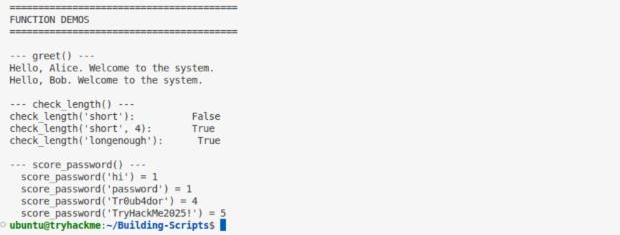
The password is 14 characters with a digit, an uppercase letter, and is absent from the demo’s list, so it clears all five checks: the score is 5.
Task 3: Error Handling
A script that crashes on the first bad input is useless in the field. Python raises typed exceptions you can catch with try/except. Three come up directly from the exceptions table and a quick test:
int("hello")cannot parse that string as a number, so it raises a ValueError.- Opening a path that does not exist raises a FileNotFoundError, which is about as self-describing as exception names get.
- Dividing by zero in a Python terminal raises the exception on the last line of the traceback:
python3 -c 'print(10 / 0)'
  # Traceback (most recent call last):
  #   File "<string>", line 1, in <module>
  # ZeroDivisionError: division by zero

The answer is ZeroDivisionError.
Task 4: Reading and Writing Files
open() takes a path and a mode ("r", "w", "a"). The problem with a bare open()/close() pair is that an error in between leaks the file handle. The keyword that introduces a context manager to open files safely is with; it closes the file when the block ends, even on an exception.
Reading a wordlist line by line leaves a trailing newline on each line. The string method that strips it is .strip(). Watch the mask here: the accepted answer is .strip() with the parentheses, which render as asterisks but still count.
The room’s files_demo.py loads common_passwords.txt and reports the count. Run it and read the “Loaded” line:
python3 files_demo.py
  # Loaded 58 common passwords.
  # First three: ['password', '123456', 'admin']
  # Last three:  ['vpn', 'dashboard', 'monitor']
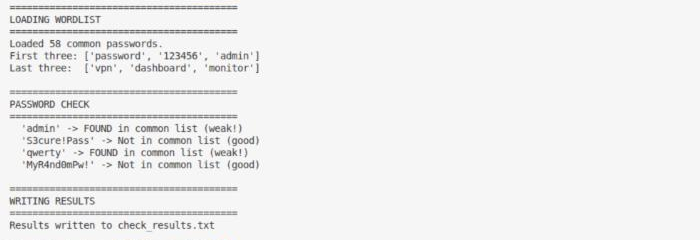
A quick wc -l common_passwords.txt agrees: the script loads 58 passwords.
Task 5: Libraries and Pip
A library is pre-written code you import instead of reinventing. The standard library ships with Python; third-party packages are installed with Python’s package manager, pip (as in pip install requests).
The module that exposes constants like ascii_uppercase, digits, and punctuation for character-variety checks is string. The room’s imports_demo.py pulls in datetime, string, and hashlib, then prints the SHA-256 hash of a default input string:
python3 imports_demo.py
  # --- hashlib module ---
  # Input string: 'password'
  # SHA-256 hash: 5e884898da28047151d0e56f8dc6292773603d0d6aabbdd62a11ef721d1542d8
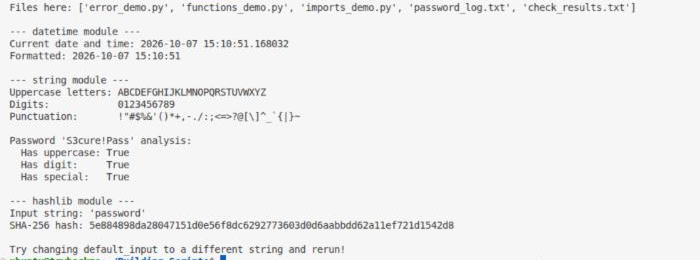
The hash for the default input password starts with 5.
Task 6: Putting It All Together, the Password Strength Checker
The capstone, password_checker.py, combines every concept: it imports string, loads a common-password list with a try/except file read, scores a password from 0 to 5, maps the score to a label (Weak, Moderate, Strong), and appends a masked result to a log file.
Scoring awards a point each for length over 8, length over 12, an uppercase letter, a digit, and a special character. One rule overrides the rest: if the password is in the common list, the score is reset. So a password found in common_passwords.txt receives a score of 0.
Run the checker with TryHackMe!2025:
printf 'TryHackMe!2025\nquit\n' | python3 password_checker.py
  # Strength: Strong (5/5)

Fourteen characters, mixed case, a digit, and ! for punctuation clear all five checks, so the label is Strong. The log never stores the plaintext; it writes one asterisk per character:
tail -n 1 password_log.txt
  # Password: ************** | Strength: Strong (5/5)
tail -n 1 password_log.txt | grep -o '*' | wc -l
  # 14
TryHackMe!2025 is 14 characters, so the log line shows 14 asterisks.
Task 7: Conclusion
No answer needed. The room closes the Python Scripting Basics arc: you can now write functions, handle errors, work with files, and lean on libraries, which is enough to build small tools instead of one-off snippets. Click Complete.
Takeaways
Two things worth carrying forward from this room:
- Match the answer mask, not just the meaning.
.strip()andZeroDivisionErrorare “right” in plain English, but the grader counts every character, including parentheses rendered as asterisks. When a concept answer is rejected, re-read the mask before doubting yourself. - The password checker is a real pattern, not a toy. Load a wordlist with a context manager, score against length and character variety, and override everything if the candidate is in a known-bad list. That same shape shows up in actual credential-strength tooling and in the logic behind password-spray defenses.
Room solved 100%: 7 tasks, 15 answers.