| Follow @anir0y | |
|---|---|
| Python: Pentesting Scripts |  |
Python: Pentesting Scripts is the last room in the Python Scripting Basics module of the Jr Penetration Tester path, and it is where the earlier rooms pay off. Python: Core Concepts taught the building blocks and Python: Building Scripts assembled them into real programs with functions, error handling, and file I/O. This room points all of that at a target: six small scripts for web recon, network discovery, port scanning, hash cracking, and SSH brute-forcing, then a capstone that wires them into one menu.
The room ships an in-browser VS Code machine. The scripts and the wordlist live in /home/ubuntu/Pentesting-Scripts/, and every tool is run against the same VM over 127.0.0.1 or the machine’s own IP. Most questions are answered by running a script and reading its output. A few are concept questions, and the only trap there is the answer mask, which counts a function name to the character, parentheses included.
Task 1: Introduction
The scenario is the end of a recon phase against a mid-sized e-commerce target: twelve subdomains, a /24 internal network, three web apps, and a set of harvested password hashes. The point of the room is that a handful of Python scripts can do exactly what you need, formatted how you want, and chain into one workflow.
Start the machine, wait for VS Code to open, and confirm the files are there:
ubuntu@tryhackme:~/Pentesting-Scripts$ ls
arp_scanner.py  dir_enum.py  downloader.py  hash_cracker.py
numbers.txt  port_scanner.py  ssh_brute.py  subdomain_enum.py
target_urls.txt  toolkit.py  wordlist.txt
No answer is needed. Mark it complete and move on.
Task 2: Web Reconnaissance with a Directory Enumerator
dir_enum.py is a wordlist-driven HTTP prober. It reads each word, builds <target_url>/<word><extension>, sends a GET, and records any response that is not a 404. Run it against the web server on port 8000 with the .html extension:
  # python3 dir_enum.py <target_url> <wordlist> [extension]
ubuntu@tryhackme:~/Pentesting-Scripts$ python3 dir_enum.py http://127.0.0.1:8000 wordlist.txt .html
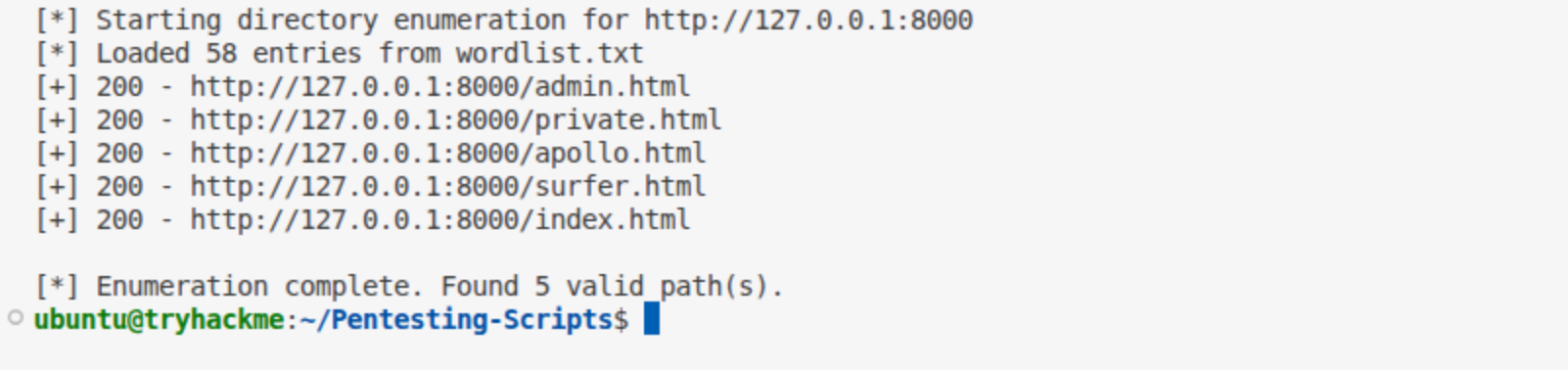
The script identifies 5 .html pages and prints Found 5 valid path(s). Trust that summary line rather than a grep -c over the output, which also counts the status banners.
The five pages are admin.html, private.html, apollo.html, surfer.html, and index.html. The login page is the one whose title gives it away:
ubuntu@tryhackme:~/Pentesting-Scripts$ curl -s http://127.0.0.1:8000/private.html | grep -i title
        <title>Stratford Systems - Staff Login</title>
So the login page lives at private.html. The answer mask (seven characters, then .html) rules out the other four names anyway.
Task 3: Network Discovery with Scapy ARP
arp_scanner.py crafts an Ether/ARP broadcast for the target range and sends it at Layer 2. The function that sends at Layer 2 and collects the replies is srp():
answered, unanswered = srp(packet, timeout=timeout, iface=interface, inter=0.1, verbose=False)
The mask here is five characters, so the accepted answer includes the parentheses: srp(), not srp. The field validates length before it submits, and parentheses render as asterisks in the mask.
To run the scan on a different interface such as ens33, you change the interface variable, which the script reads from sys.argv[2] and passes into scan_network.
Task 4: Port Scanning with Sockets
port_scanner.py opens a TCP socket per port and calls connect_ex, which returns 0 on success instead of raising an exception the way connect does. The answer, nine characters with the parentheses, is connect_ex().
The question asks you to scan the target at its machine IP, so point the scanner there rather than at loopback:
  # python3 port_scanner.py <target> [max_port]
ubuntu@tryhackme:~/Pentesting-Scripts$ python3 port_scanner.py $(hostname -I | awk '{print $1}') 10000
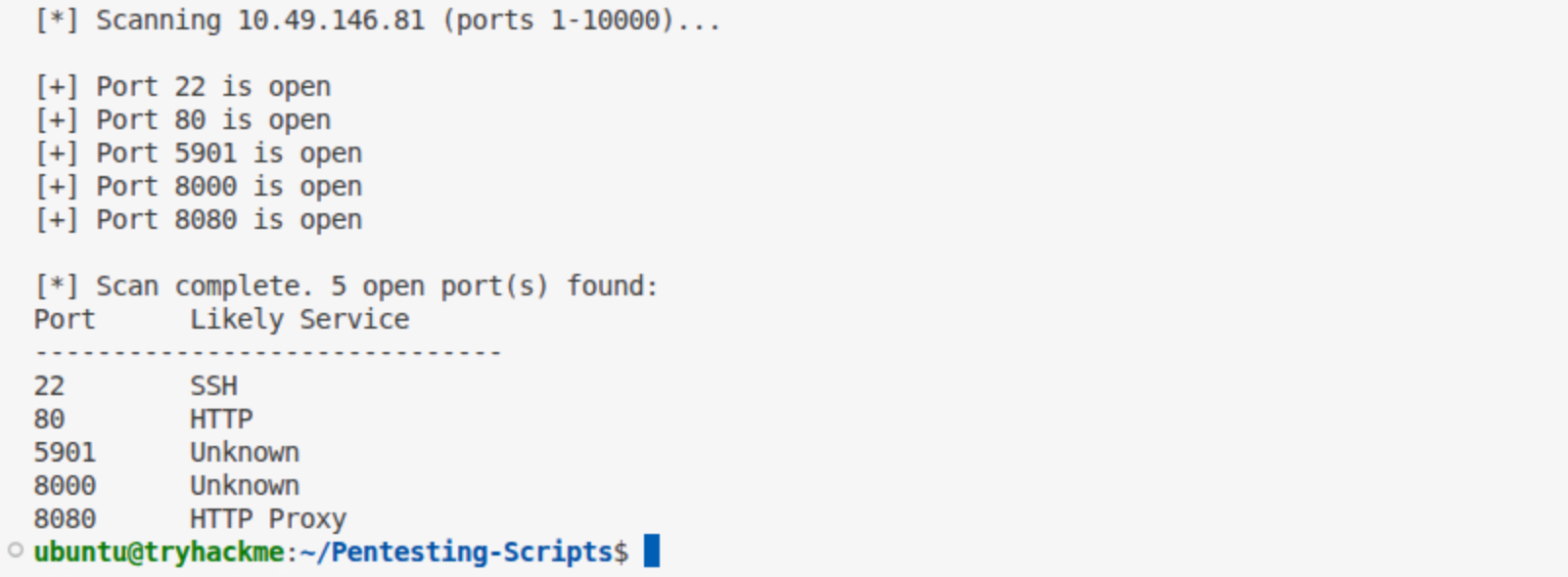
Under port 10000 there are 5 open ports (22, 80, 5901, 8000, 8080), and the highest is 8080.
One detail worth noting: scan 127.0.0.1 instead and you get six ports, because the VM runs CUPS on 631 bound only to loopback. The question says to scan the machine’s IP, where 631 is not exposed, so five is the correct count. Scan the asset you are actually asked about.
Task 5: Automating Downloads
downloader.py retrieves a file with requests.get() and writes the body to disk. The question mask is eight characters, a dot, then five, so the answer carries its parentheses: requests.get().
The output file is opened in wb mode. Writing binary content such as an image in text mode corrupts it, so the script uses with open(output_path, "wb") as f:.
Task 6: Hash Cracking with hashlib
hash_cracker.py hashes each wordlist entry with hashlib.new(algorithm) and compares it to the target. The algorithm defaults to MD5 and can be switched with a third argument. Crack the MD5 hash discovered in apollo.html, then the SHA-256 hash:
  # python3 hash_cracker.py <hash> <wordlist> [md5|sha1|sha256|sha512]
ubuntu@tryhackme:~/Pentesting-Scripts$ python3 hash_cracker.py cd13b6a6af66fb774faa589a9d18f906 wordlist.txt md5
ubuntu@tryhackme:~/Pentesting-Scripts$ python3 hash_cracker.py 5030c5bd002de8713fef5daebd597620f5e8bcea31c603dccdfcdf502a57cc60 wordlist.txt sha256

The MD5 hash cracks to rainbow, and switching the algorithm to sha256 recovers redwings for the second hash.
Task 7: Credential Testing with Paramiko
ssh_brute.py tries each password over SSH and catches paramiko.AuthenticationException when the server rejects the attempt, which is the answer to the first question: AuthenticationException. Run it against the user tester:
  # python3 ssh_brute.py <target> <username> <wordlist> [port]
ubuntu@tryhackme:~/Pentesting-Scripts$ python3 ssh_brute.py 127.0.0.1 tester wordlist.txt 22
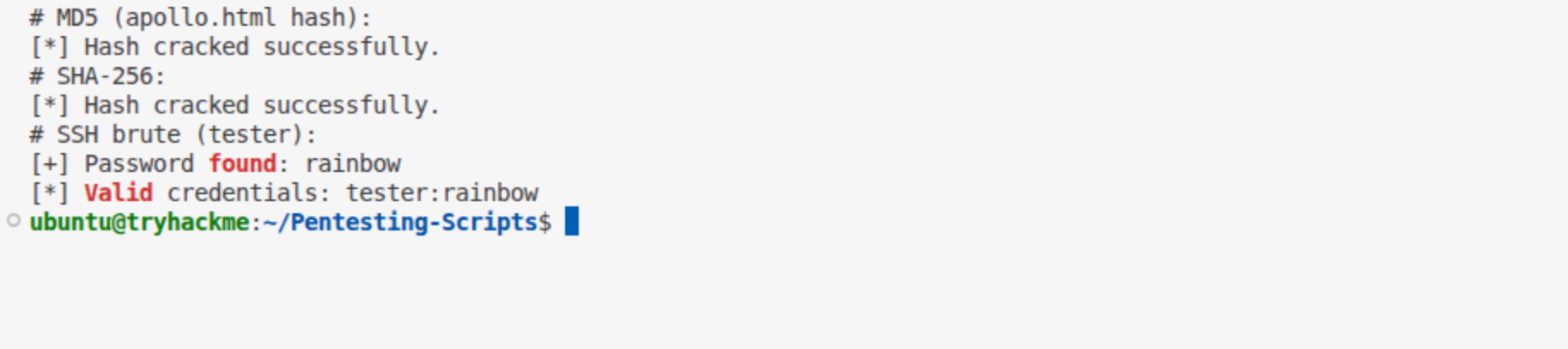
The valid password is rainbow. With credentials in hand, the last question wants the contents of flag.txt. The box has no sshpass, so a one-line Paramiko session reads the file:
ubuntu@tryhackme:~/Pentesting-Scripts$ python3 -c "import paramiko;c=paramiko.SSHClient();c.set_missing_host_key_policy(paramiko.AutoAddPolicy());c.connect('127.0.0.1',username='tester',password='rainbow');i,o,e=c.exec_command('cat flag.txt');print(o.read().decode())"
THM{python_brute_force_success}
The flag is THM{python_brute_force_success}, stored at /home/tester/flag.txt.
Task 8: Bringing It Together
toolkit.py is the capstone that exposes the earlier tools through a numbered menu. To map a menu choice to the function that handles it, it uses a dispatch dictionary: the actions variable keys each option number to a callable, so one lookup replaces a long chain of if/elif. That pattern is the whole point of the capstone, a reminder that individual scripts become far more useful when composed into a workflow.
Task 9: Conclusion
A wrap-up task with no answer. Mark it complete to finish the room.
Takeaways
Two things from this room carry past the lab:
- Function-name answers include their parentheses. The masked field checks length before it submits, so
srp,connect_ex, andrequests.getare rejected as too short whilesrp(),connect_ex(), andrequests.get()pass. When the mask arithmetic rules an answer out, re-read the mask before blaming the box. - Scan the exact asset you are asked about. The same port scanner returns six open ports against
127.0.0.1and five against the machine IP, because a loopback-only service like CUPS on 631 never appears to a remote scan. On a real engagement the same gap decides whether a finding is reachable, so match your scope to what the target actually exposes.
Room solved 100%: 9 tasks, 15 answers.