
Report Writing for SOC L2
This is the third room of the Intro to SOC Level 2 module, following Senior Security Analyst Intro and SOC L2 Alert Triage. Those rooms covered what an L2 does and how they triage; this one covers the soft skill that makes all of it count: turning your findings into reports that people outside the SOC can act on. The argument is simple. An L1 can triage an alert brilliantly, but if the finding is never communicated clearly, it has no value. As an L2 you are the bridge between the SOC and the outside world, and your report is how that world sees your team.
Task 2: L1 vs L2 communication
L1 analysts communicate almost entirely inside the team through ticket notes and escalations. L2 is where that changes: you may talk to top management, external MSSP customers, and DFIR/CTI teams, so you carry the higher soft-skill load. That makes L2 the tier that bridges the SOC and the outside world, which is the first answer: L2.
The room also names the artefact that does the bridging. L1 lives on short alert comments (200 to 500 characters), but when something serious happens the L2 writes formal Reports (the second answer, one word): a business-focused case summary for C-level, an actionable email for an MSSP customer, or handover notes for DFIR. The task closes with a table of channels (voice call, email, ticketing system, corporate chat) and one rule that runs through all of them: security updates should always be followed up in writing over email, with the relevant parties in CC, so there is a clear audit trail.
Task 3: leadership communication
Reporting to a CISO, CTO, or CEO follows five rules: focus on business impact (not SOC internals), keep a formal tone, keep it simple (no jargon for a non-technical reader), talk in facts with evidence, and do not panic (show the situation is under control). MSSP-customer reporting splits into an initial report that highlights urgency and the immediate action to take, and a final report that formally closes the incident. Because of that split, you keep working after the first report goes out: yes, you complete the analysis after sharing the initial report (Yea), and yes, you keep your team informed about the ongoing communication (Yea).
The challenge drops you into a C-level report for a Business Email Compromise on a CFO’s account (t.balmer) and asks you to fix what is wrong for that audience by clicking the highlighted parts:
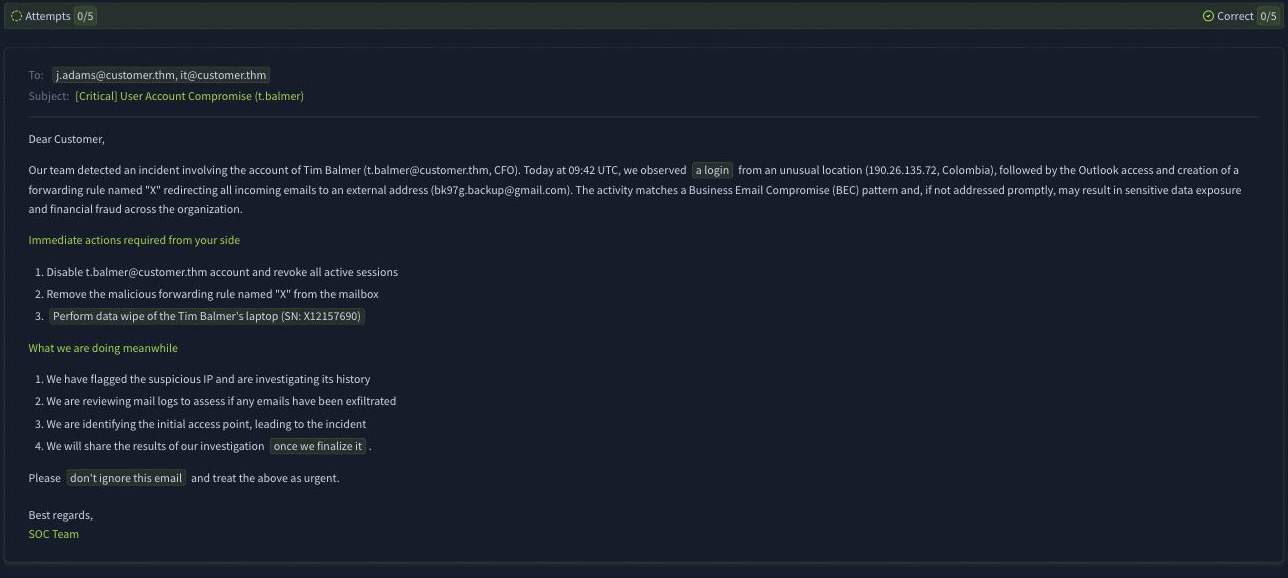
The corrections are all about the reader. An executive does not need a laptop serial number or a raw “data wipe” instruction, does not benefit from vague phrasing like “once we finalize it,” and should never be told “don’t ignore this email” in a professional report. Fix the highlighted parts into simple, business-focused, factual language and the app returns the flag:
THM{executive_summary_approved}
Task 4: SOC/DFIR communication
DFIR teams are the opposite audience: they care about raw facts and evidence, not tone or style. One page of real SIEM findings beats ten pages of filler, so handover notes are explicitly not written for a non-technical audience (Nay). The room lists what a DFIR team wants: incident context, attack timeline, attack scope, performed actions, and raw indicators. The part that lists your findings chronologically is the Attack Timeline.
The second challenge is a handover to an external DFIR team (TrySaveMe) for an Acme Corp incident that started with a malicious PyPI package (request-utils==2.4.1) dropping hello.exe and opening a reverse shell:
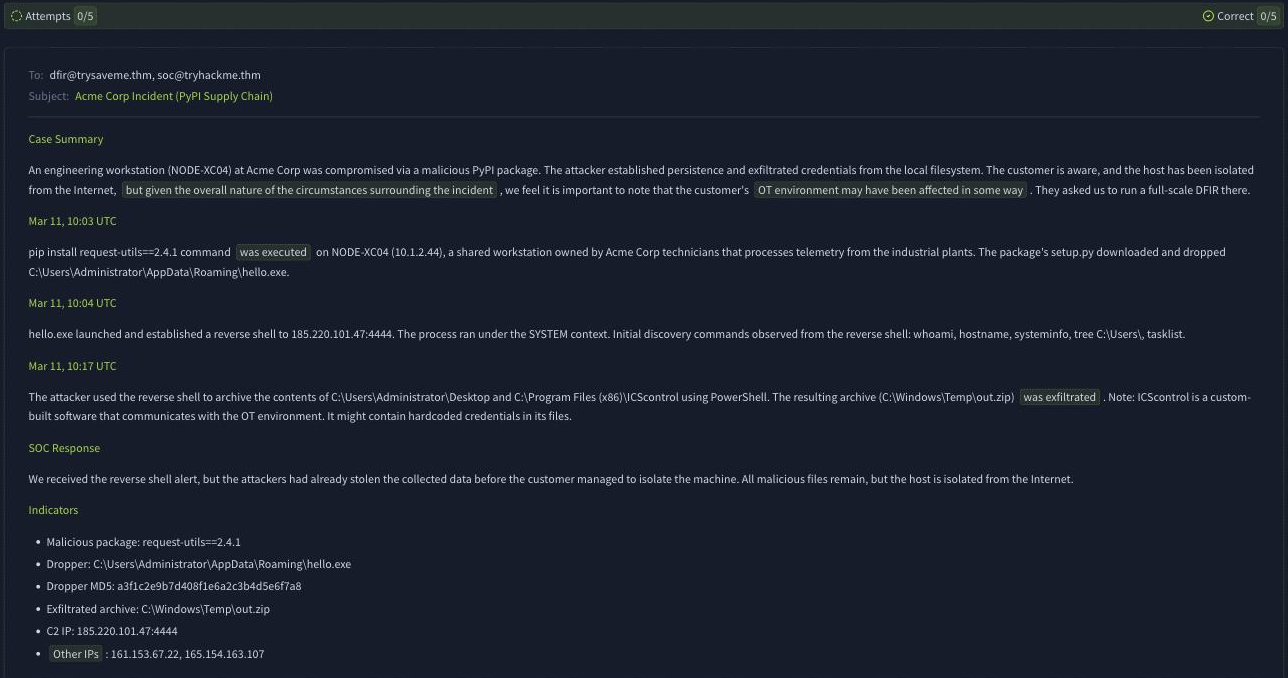
Here the corrections push the other way: DFIR wants precision, so you replace the hedging and filler (phrases like “the overall nature of the circumstances surrounding the incident” or “may have been affected in some way”) with concrete, factual statements. Clean up the highlighted parts and the app hands over the flag:
THM{trysaveme_would_be_proud}
Task 5: responsible AI usage
GenAI is a genuine time-saver for report writing, but the room is clear that it is an assistant, not the decision maker. The quality of an AI-assisted report depends entirely on the Context you provide (customer profile, asset details, threat intelligence, historical context, monitoring notes), which is the first answer. And no, you should never fully rely on GenAI for critical decisions (Nay). The task lists four concrete pitfalls worth remembering: sensitive-data exposure (never paste customer data or hardcoded credentials into a cloud prompt), too much filler text, hallucinations (an AI with no tool context will “panic” at benign security-tool behaviour), and destructive containment (the memorable example being an AI recommending you quarantine explorer.exe, which would break the whole OS and remediate nothing).
Every answer
| Task | Question | Answer |
|---|---|---|
| 2 | Which SOC tier bridges the SOC and the outside world? | L2 |
| 2 | What L2 analysts write to summarize SOC findings (one word) | Reports |
| 3 | Complete the analysis after sharing the initial report? (Yea/Nay) | Yea |
| 3 | Keep your team informed about the ongoing communication? (Yea/Nay) | Yea |
| 3 | Flag from the C-level challenge | THM{executive_summary_approved} |
| 4 | Are L2 handover notes for a non-technical audience? (Yea/Nay) | Nay |
| 4 | Part of the handover notes that lists findings chronologically | Attack Timeline |
| 4 | Flag from the DFIR challenge | THM{trysaveme_would_be_proud} |
| 5 | What to provide in the AI prompt for the best reports | Context |
| 5 | Fully rely on GenAI for critical decision making? (Yea/Nay) | Nay |
Both challenge flags ship Base64-encoded inside each static app’s JavaScript bundle, so decoding the bundle returns the same answer without playing through the correction game, the same client-side pattern seen across this module’s rooms:
for app in soc-l2-report-clevel soc-l2-report-dfir; do
  curl -s https://static-labs.tryhackme.cloud/apps/$app/assets/index-*.js \
    | grep -oE '"[A-Za-z0-9+/]{18,}={0,2}"' | tr -d '"' \
    | while read s; do echo "$s" | base64 -d 2>/dev/null | grep -q '^THM{' && echo "$s" | base64 -d; done
done
# prints THM{executive_summary_approved} then THM{trysaveme_would_be_proud}
Wrap-up
Report Writing for SOC L2 is the room that turns triage into impact. The single idea to carry forward is that the report is written for the reader, not the writer: a C-level executive needs business language and no jargon, an MSSP customer needs urgency and a clear next step, and a DFIR team needs raw facts and indicators with zero filler. The two simulations make that concrete by having you rewrite the same kind of report for two opposite audiences, and GenAI can accelerate all of it as long as you provide the context and stay the decision maker. This closes out the Intro to SOC Level 2 module; from here the path moves into the deeper L2 skill sets that these reports are meant to communicate.