SharePoint Online Monitoring
Fourth room in the Microsoft 365 for SOC module, after M365 Monitoring Basics, Entra ID Monitoring and Exchange Online Monitoring. Identity, then mail, and now the file store, where the data actually lives and where an attacker with a stolen session goes to take it.
Seven tasks, fourteen graded answers, all solved 100%. Two indexes: practice for the guided walk and challenge for the unguided scenario.

index=* | stats count by index, sourcetype
#   practice    azure:aad:signin             7    o365:management:activity   78
#   challenge   azure:aad:signin            25    o365:management:activity  123
Same standing advice as the rest of the module: All time on the picker. Data is dated February 2026.
Tasks 2-5: the vocabulary you need first
Six of the fourteen answers are definitions, and they matter because the investigation questions all reference these exact field and operation names.
OneDrive is SharePoint’s personal-use counterpart, and SharePoint’s top-level container is a Site, the room states it directly: “SharePoint organizes data into top-level containers called sites, where each site is tied to an email group … and contains files, folders, or web pages.”
For detection, the two field names to memorise are FileDownloaded (the operation logged every time a file is pulled down) and ApplicationDisplayName (the field naming the application behind an event). Both come up in the challenge.
On abuse: the file type most often used to smuggle phishing through SharePoint is OneNote, a .one notebook renders inline, is trusted by users, and carries clickable content without triggering the attachment scanning an emailed file would. And the event generated when a file is shared with an external user is AddedToSecureLink.
That last one is worth being precise about, because SharePoint logs a cluster of events for a single share:
index=practice sourcetype=o365:management:activity
(Operation=SharingSet OR Operation=AddedToSecureLink OR Operation=AddedToSharingLink)
#   18:02:40  AddedToSharingLink   →  [email protected]   (Guest)
#   18:02:40  SharingSet           →  SharingLinks.dbc6480d-…   (SharePointGroup)
#   18:02:40  AddedToSecureLink    →  [email protected]   (Guest)
Three operations, same second, same share. SharingSet names an internal SharePoint group rather than a person, so it is useless for identifying who got access. AddedToSecureLink and AddedToSharingLink both name the guest, and the room grades on AddedToSecureLink, which the 17-character answer mask confirms.
Task 3: following a share end to end
The guided exercise is a clean three-hop pivot. Start in Entra ID to prove Emily reached SharePoint at all:
index=practice sourcetype=azure:aad:signin
| table _time, userPrincipalName, appDisplayName, id, ipAddress
#   17:55:52  [email protected]  Office 365 SharePoint Online  22192ff2-272a-458c-8fac-7155db417700
The appDisplayName of Office 365 SharePoint Online is what confirms it, OfficeHome two seconds earlier only proves she opened the portal. The sign-in event ID is 22192ff2-272a-458c-8fac-7155db417700.
Then into the unified audit log for what she did: FileUploaded gives four files, of which the PDF is Instructions.pdf. And the share four minutes later goes to [email protected], flagged TargetUserOrGroupType: Guest, an address outside the tenant.
The Guest type is the field that makes external sharing findable at scale. You do not need a list of your own domains to spot it; SharePoint has already classified the recipient for you.
Task 6: the unguided compromise
New index, five questions, no guidance. The opening move is the same one that worked in the previous two rooms, baseline the sign-ins and read the row that does not fit:
index=challenge sourcetype=azure:aad:signin
| stats count, values(action) as actions, min(_time) as f
  by userPrincipalName, ipAddress, "location.city", "location.countryOrRegion"
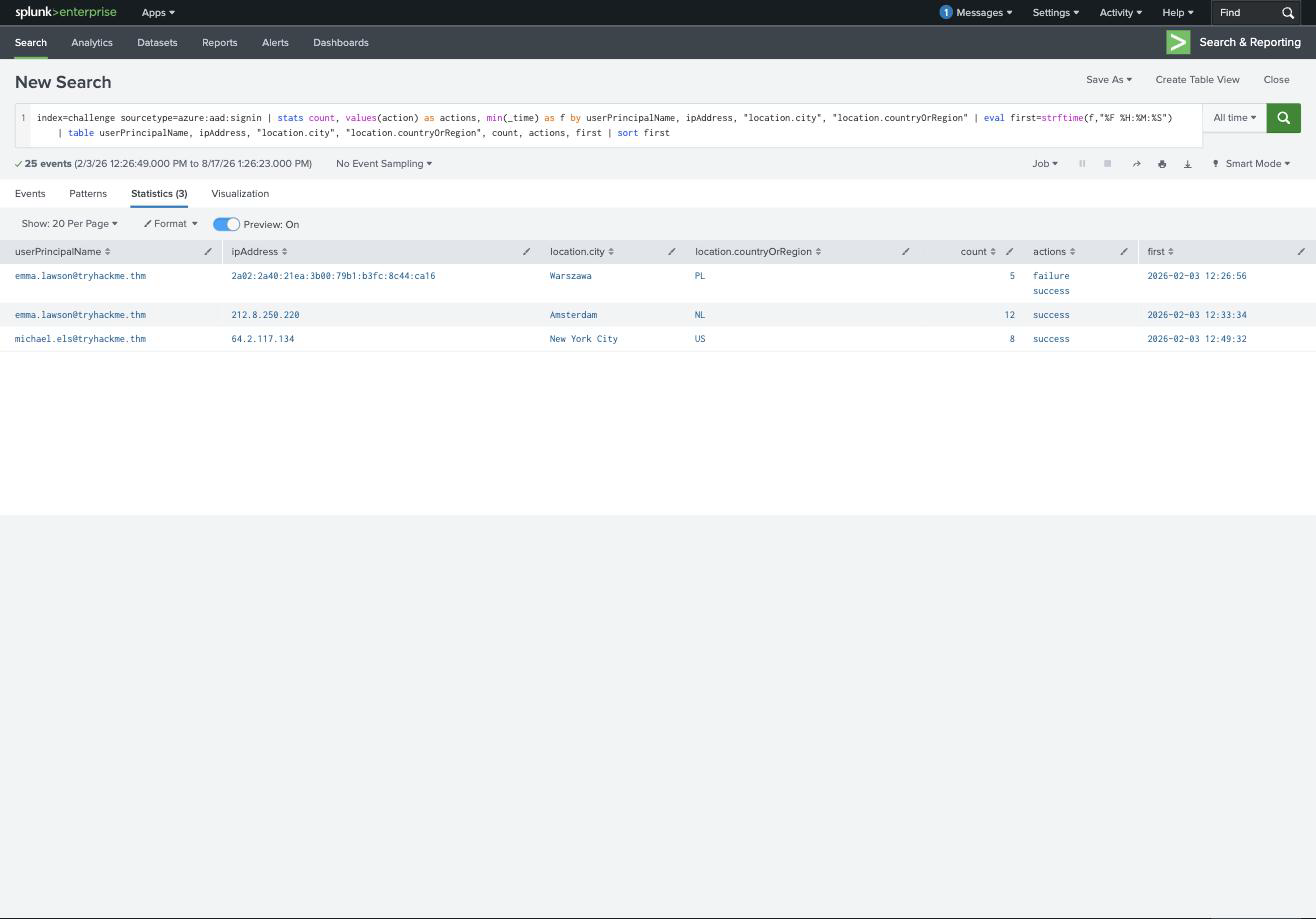
| User | IP | City | Count | Actions | First |
|---|---|---|---|---|---|
| emma.lawson | 2a02:2a40:21ea… | Warszawa, PL | 5 | failure, success | 12:26:56 |
| emma.lawson | 212.8.250.220 | Amsterdam, NL | 12 | success only | 12:33:34 |
| michael.els | 64.2.117.134 | New York City, US | 8 | success | 12:49:32 |
Emma signs in from Warszawa with a few failures mixed in, normal human behaviour. Seven minutes later the same account appears from Amsterdam with twelve clean successes and no failures at all. That is the malicious login, and the city is Amsterdam.
The absence of failures is the tell. A real user fumbles a password occasionally; a session-riding attacker never does, because they are not typing one.
From that address, the attacker went shopping before phishing:
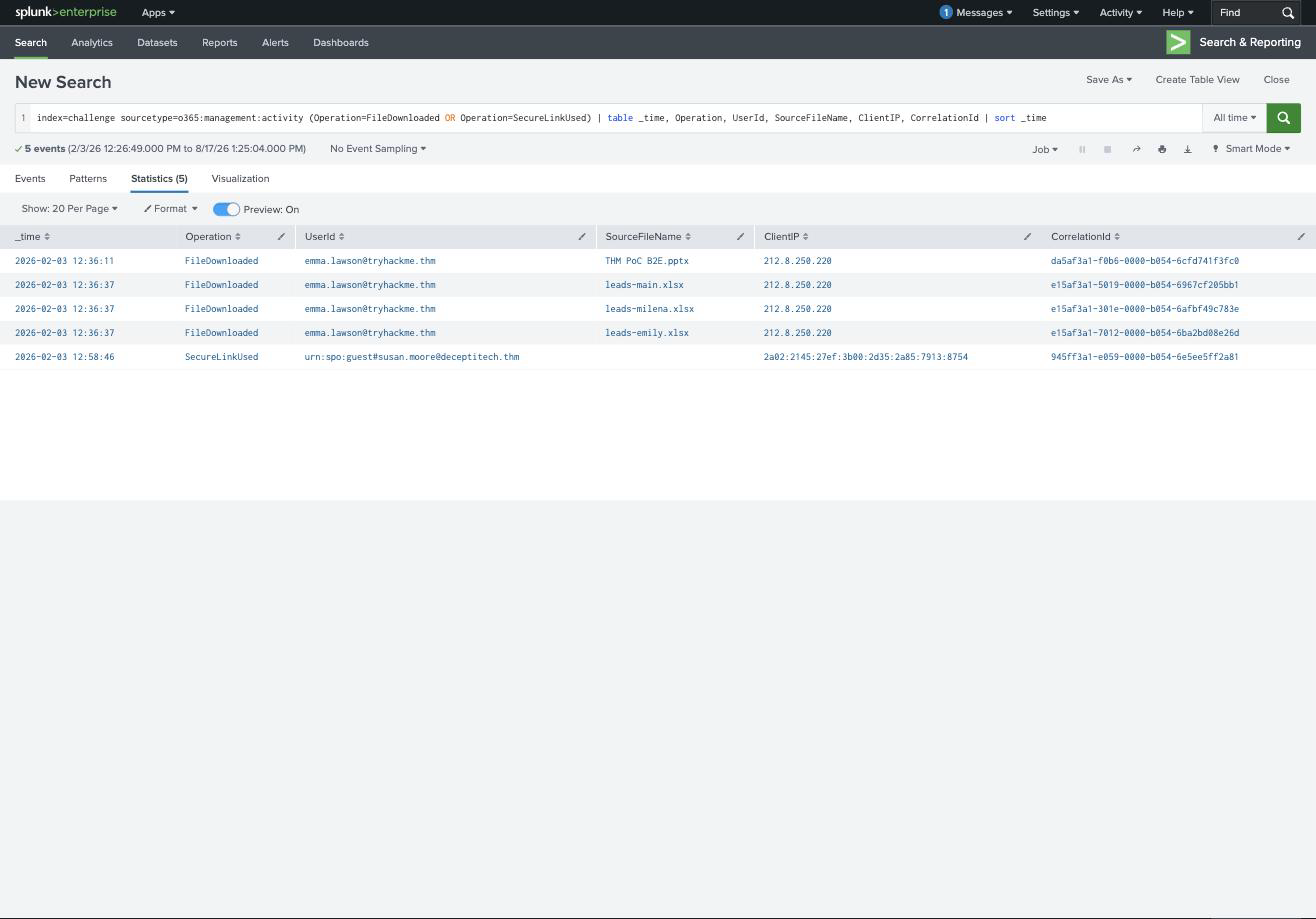
12:36:11  FileDownloaded  THM PoC B2E.pptx    212.8.250.220
12:36:37  FileDownloaded  leads-main.xlsx     212.8.250.220
12:36:37  FileDownloaded  leads-milena.xlsx   212.8.250.220
12:36:37  FileDownloaded  leads-emily.xlsx    212.8.250.220
The PowerPoint exfiltrated is THM PoC B2E.pptx, taken alongside three spreadsheets of sales leads, all within twenty-six seconds of each other and all from the Amsterdam address. Note the question asks only for the presentation, but in a real report the leads-*.xlsx files are the more serious loss.
Then the phishing. Emma’s account uploaded a OneNote notebook and shared it outward:
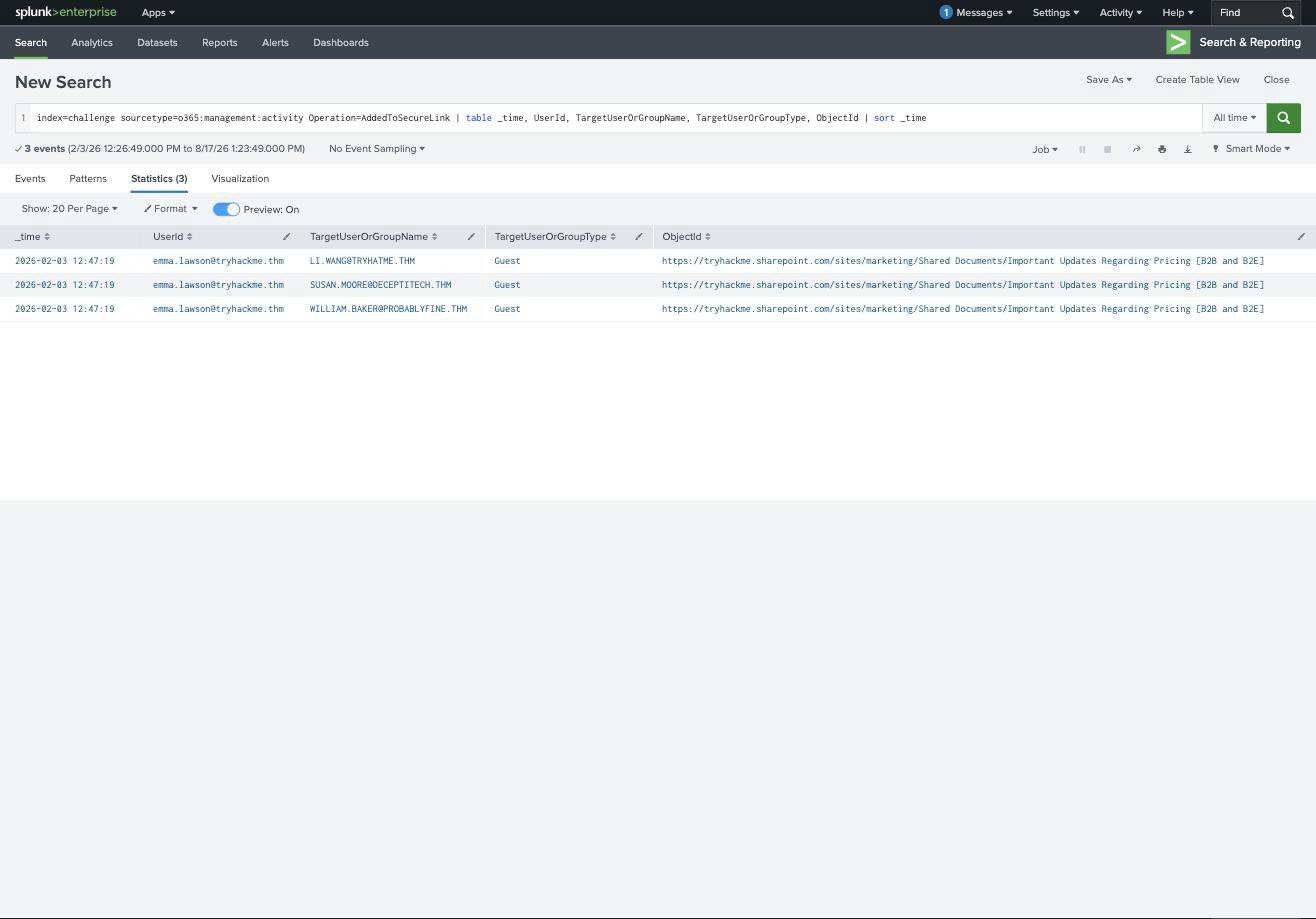
index=challenge sourcetype=o365:management:activity Operation=AddedToSecureLink
| table _time, UserId, TargetUserOrGroupName, TargetUserOrGroupType, ObjectId
#   12:47:19  emma.lawson  [email protected]            Guest
#   12:47:19  emma.lawson  [email protected]     Guest
#   12:47:19  emma.lawson  [email protected]  Guest
Three external addresses, all in the same second, all Guest, all pointed at Important Updates Regarding Pricing [B2B and B2E]:
[email protected], [email protected], [email protected]
Look at those domains. tryhatme.thm is a typosquat of the tenant’s own tryhackme.thm, and deceptitech.thm / probablyfine.thm are attacker infrastructure wearing corporate names. A recipient skimming the sender would not blink.
Internally, michael.els opened the shared notebook at 2026-02-03 12:49:44, a FileAccessed on Open Notebook.onetoc2, forty-five seconds after his own sign-in from New York.
The last question is the sharpest one in the room: which CorrelationId proves the sharing link was opened? Not a FileAccessed, but this:
12:58:46 SecureLinkUsed urn:spo:guest#[email protected] 945ff3a1-e059-0000-b054-6e5ee5ff2a81
SecureLinkUsed is the operation that fires when an external recipient actually redeems a sharing link, and the urn:spo:guest# prefix on the UserId marks it as a guest identity rather than a tenant account. So 945ff3a1-e059-0000-b054-6e5ee5ff2a81 is the proof, and susan.moore is the guest who took the bait.
That pairing, AddedToSecureLink when the link is created, SecureLinkUsed when it is redeemed, is the single most useful thing to take from this room. The first tells you exposure; only the second tells you the exposure was realised.
Task 7: what carries forward
Two things carry forward.
Sharing is a two-event story, and most alerting only covers half of it. Creating a link is a routine action that users perform constantly; a link being used by an external guest is a much rarer event and a far better trigger. If you alert on AddedToSecureLink alone you drown; if you alert on SecureLinkUsed from a urn:spo:guest# identity you get something a human can triage.
The baseline trick has now worked in four consecutive rooms, and that is the real lesson of the module rather than any single field name. M365 Monitoring Basics had one office IP, Entra ID Monitoring had one country, Exchange Online had one egress address, and here it is one city plus the absence of failed logins. In every case the detection was a stats grouped on source, and the finding was the row that did not belong. Cloud identity logs are high-volume and low-variety, which makes them unusually well suited to exactly that.
Room solved 100%: seven tasks, fourteen answers, 112 points. One room left in the module: Microsoft Intune Monitoring, where the platform stops being somewhere attackers read data and becomes somewhere they destroy it.