Sigma Language
Room: Sigma Language on TryHackMe.
Room three of six in the Detection Engineering for SOC module, sitting between Detection Rules Development and SigHunt, with Intro to Detection Engineering opening the arc and AI & Automation in Detection Engineering and DetectMare closing it.
If you have already done the older Sigma room, the one that hunts AnyDesk, scheduled tasks and ransomware in Kibana, this is a different and more fundamental room. That one used Sigma as a tool. This one teaches the language itself: anatomy, authoring, conversion, and tuning.
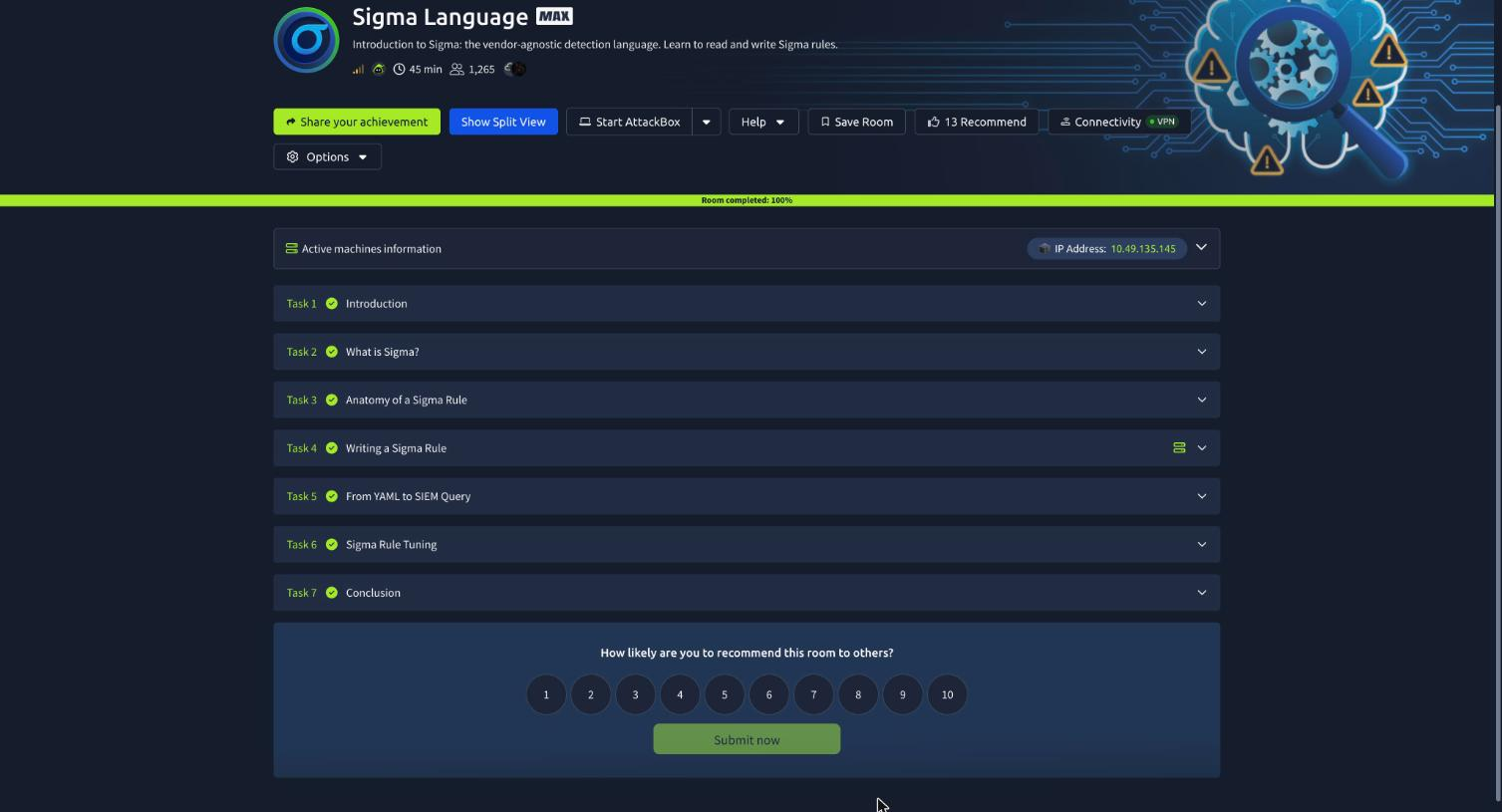
Seven tasks, fifteen answers, 104 points. Task 4 attaches an Ubuntu lab machine with sigma-cli installed and a VS Code skeleton to fill in.
Task 2: why a vendor-agnostic format exists
The pitch is economic rather than technical. Every SIEM speaks its own dialect, so a detection written in SPL is worthless the day you migrate to Sentinel, multiply by hundreds of rules and you have months of rewriting. The room’s sharper example is the MSSP: one SIEM per customer, so without a portable format every new detection gets authored, tested and tuned three times over. Sigma flips that: write the logic once, convert per stack.
Two tools, two answers. For a quick translation in a browser with nothing installed, the answer is Uncoder.io, the free web converter from SOC Prime. For an automated pipeline, it is sigma-cli, the modern converter that reads the YAML and emits a backend query.
Task 3: reading a real rule
Rather than a toy example, Task 3 sends you to an actual SigmaHQ rule, proc_creation_win_powershell_base64_encoded_cmd.yml. I pulled it straight from the repo:
# read the real thing rather than the room's paraphrase
curl -sL https://raw.githubusercontent.com/SigmaHQ/sigma/master/rules/windows/\
process_creation/proc_creation_win_powershell_base64_encoded_cmd.yml
title: Suspicious Encoded PowerShell Command Line
description: Detects suspicious powershell process starts with base64 encoded commands (e.g. Emotet)
detection:
    selection_img:
        - Image|endswith:
              - '\powershell.exe'
              - '\pwsh.exe'
        - OriginalFileName:
              - 'PowerShell.EXE'
              - 'pwsh.dll'
    selection_cli_enc:
        CommandLine|contains: ' -e'   # covers -en and -enc
    selection_cli_content:
        CommandLine|contains: [' JAB', ' SUVYI', ' SQBFAFgA', ' aQBlAHgA'...]
    selection_standalone:
        CommandLine|contains: ['.exe -ENCOD ', ' BA^J e-']
    filter_optional_remote_signed:
        CommandLine|contains: ' -ExecutionPolicy remotesigned '
    condition: selection_img and (all of selection_cli_* or selection_standalone) and not 1 of filter_optional_*
level: high
Three answers come straight out of it. The malware named in the metadata is Emotet, it is in the description, not the tags, which is the point of the question. The selection excluding a specific command-line parameter is filter_optional_remote_signed. And the field that defeats a renamed PowerShell binary is OriginalFileName.
That last one is the detection-engineering lesson in the whole task. Image|endswith: '\powershell.exe' is trivially dodged by copying the binary to totally-legit.exe. OriginalFileName reads the value compiled into the PE version resource, which survives renaming. The rule uses a YAML list of two maps under selection_img, which makes them OR’d, match on either the path or the original filename.
Task 4: writing a recon rule from scratch
The scenario is the first few minutes after an attacker lands on a Windows host:
whoami            whoami /priv          whoami /groups
net user          net user /domain      net group "Domain Admins" /domain
net localgroup Administrators
ipconfig /all     systeminfo            nltest /dclist:tryhatme.thm
The design decision the room pushes you toward is that these do not all get matched the same way. whoami.exe, systeminfo.exe, ipconfig.exe and nltest.exe are rare enough that the binary itself is the signal. net.exe is not, it runs constantly for legitimate reasons, and the signal lives in the arguments. One selection cannot cover both cleanly.
The lab machine ships a first-detection.yml skeleton with category: #Fill the category, #selection_1, #seelction_2 (the typo is in the lab file, not mine) and condition: #add condition. I filled it in from the terminal rather than VS Code:
logsource:
  category: process_creation
  product: windows
detection:
  selection_recon_binaries:
    Image|endswith:
      - '\whoami.exe'
      - '\ipconfig.exe'
      - '\nltest.exe'
      - '\systeminfo.exe'
  selection_net_recon:
    Image|endswith: '\net.exe'
    CommandLine|contains:
      - ' user'
      - ' group'
      - ' localgroup'
  condition: 1 of selection_*
The category answer is process_creation, the abstraction that covers Sysmon Event ID 1 and Windows Security Event ID 4688, so the converter resolves it per-SIEM rather than you hardcoding an event ID.
Two details worth keeping. Fields inside one selection are AND’d, so selection_net_recon requires the process to be net.exe and the command line to contain a recon verb. And the leading space in ' user' is load-bearing, without it the rule also matches command lines containing username or usergroup.
The condition 1 of selection_* fires if either selection matches, and scales if you add a third later.
Then validate:
cd ~/Desktop && sigma check first-detection.yml
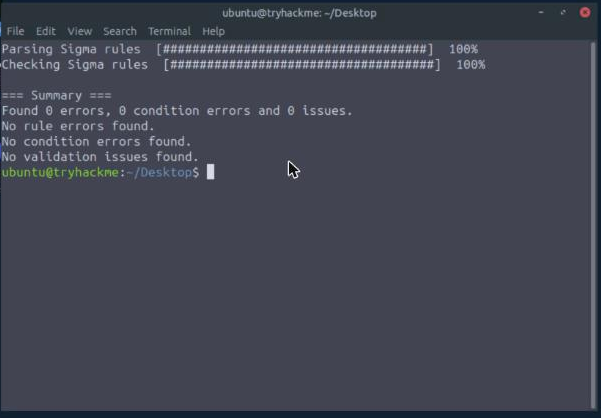
=== Summary ===
Found 0 errors, 0 condition errors and 0 issues.
No rule errors found.
No condition errors found.
No validation issues found.
The command is sigma check. The room is careful about what it proves: it confirms the YAML parses, required fields exist and the detection block resolves, it says nothing about whether the detection is any good.
Task 5: the same rule, three query languages
A backend picks the target language; a pipeline maps Sigma’s generic field names onto that SIEM’s actual schema. Skip the pipeline and you get a syntactically valid query referencing Image, which matches nothing.
Splunk, via the CIM pipeline:
sigma convert -t splunk -p splunk_cim first-detection.yml
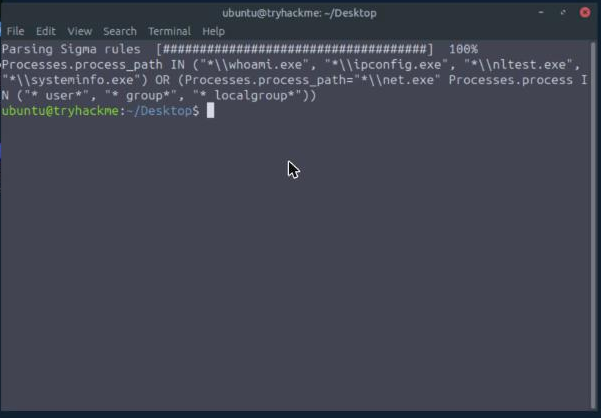
Processes.process_path IN ("*\\whoami.exe", "*\\ipconfig.exe", "*\\nltest.exe", "*\\systeminfo.exe")
  OR (Processes.process_path="*\\net.exe" Processes.process IN ("* user*", "* group*", "* localgroup*"))
Microsoft Sentinel, via the XDR pipeline:
sigma convert -t kusto -p microsoft_xdr first-detection.yml
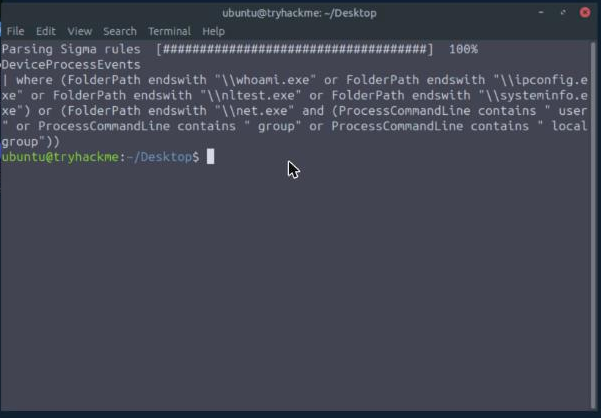
DeviceProcessEvents
| where (FolderPath endswith "\\whoami.exe" or FolderPath endswith "\\ipconfig.exe"
  or FolderPath endswith "\\nltest.exe" or FolderPath endswith "\\systeminfo.exe")
  or (FolderPath endswith "\\net.exe" and (ProcessCommandLine contains " user" or ...))
Elastic, via the ECS pipeline:
sigma convert -t eql -p ecs_windows first-detection.yml
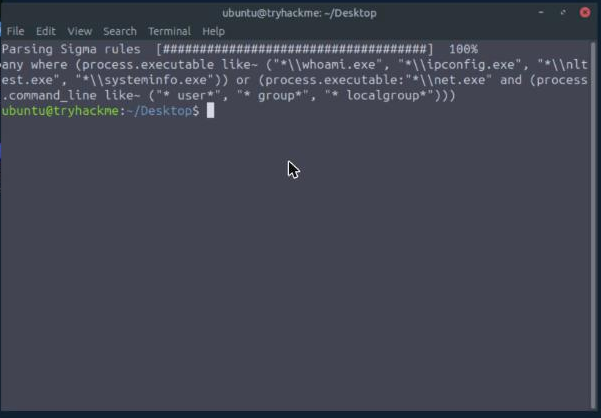
any where (process.executable like~ ("*\\whoami.exe", "*\\ipconfig.exe", "*\\nltest.exe", "*\\systeminfo.exe"))
  or (process.executable:"*\\net.exe" and (process.command_line like~ ("* user*", "* group*", "* localgroup*")))
So the three answers are Processes.process for CommandLine in SPL, FolderPath for Image in KQL, and process.command_line for CommandLine in EQL.
Line them up and the room’s argument lands: identical logic, and Image becomes Processes.process_path, FolderPath, or process.executable depending on who you bought your SIEM from. That gap is the entire reason Sigma exists.
Task 6: six bugs across three rules
Task 6 opens a local Flask app on the lab machine, the “Sigma Rule Validator” desktop shortcut, serving localhost:5000. A fictional peer, Jamie R., has three rules that sigma-cli rejects with two syntax problems each.
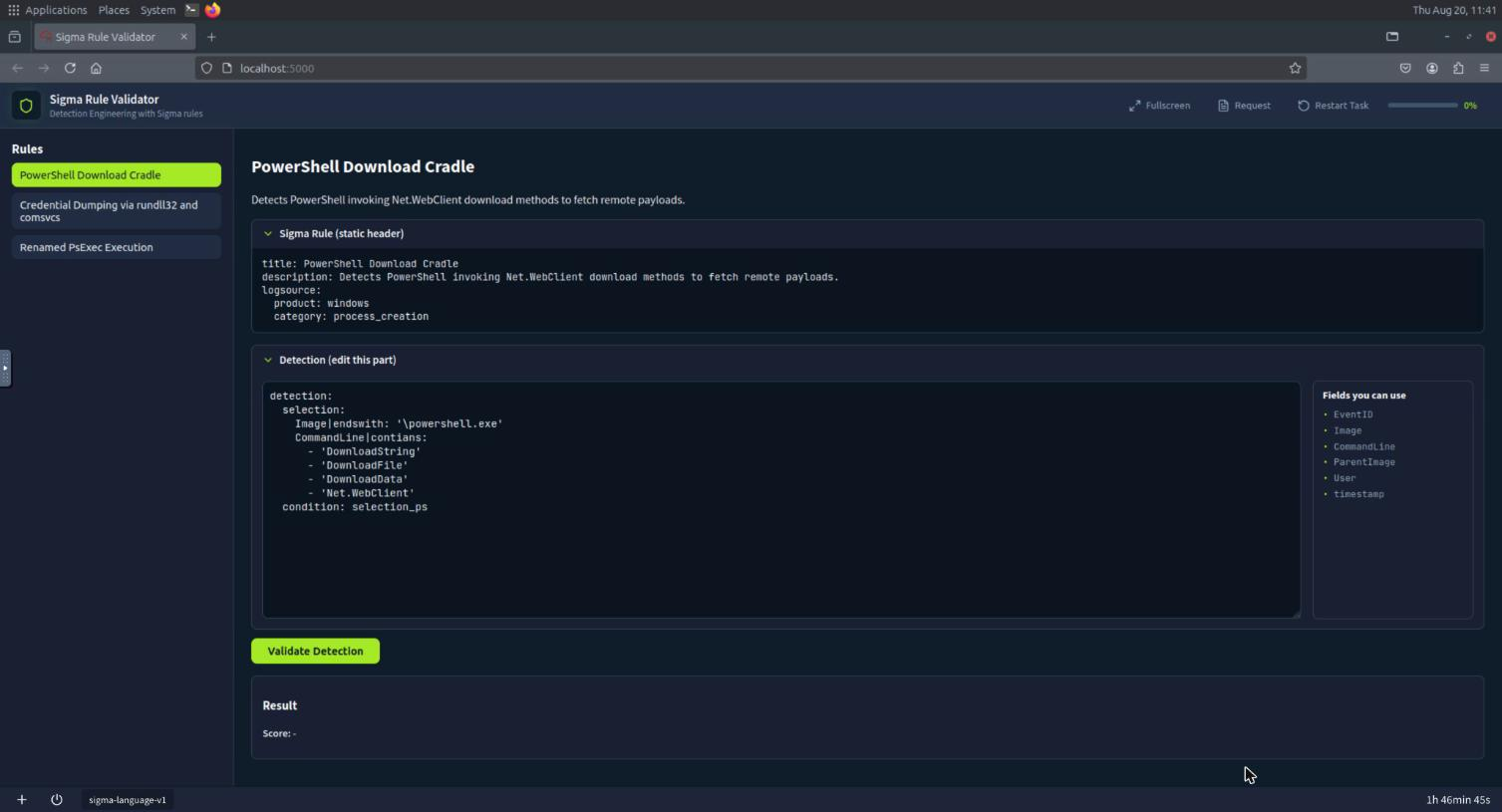
Rule 1, PowerShell Download Cradle. Two bugs on screen:
detection:
  selection:
    Image|endswith: '\powershell.exe'
    CommandLine|contians:          # 1. typo: contians -> contains
      - 'DownloadString'
      ...
  condition: selection_ps          # 2. references a selection that does not exist
The selection is called selection, but the condition names selection_ps. Either rename the selection or fix the condition, the app accepts renaming the selection to selection_ps. The validator’s error message on the typo is Sigma validation error: Unknown modifier 'contians', which is exactly the class of mistake sigma check is for.
Rule 2, Credential Dumping via rundll32 and comsvcs. Also two:
  selection_parent:
    Image|end: '\rundll32.exe'     # 1. |end is not a modifier; needs |endswith
    ...
  filter_legit:
    CommandLine|contains: ['DllRegisterServer', 'DllUnregisterServer']
  condition: 1 of selection_*      # 2. filter_legit is defined but never negated
The second one is the trap the task text warns about explicitly: adding a filter_* selection does nothing until the condition negates it, and sigma check will not catch this. The rule is well-formed and quietly ignores its own exclusion. The fix is 1 of selection_* and not filter_legit.
Rule 3, Renamed PsExec Execution, same shape of problem in a third variation.
Flags:
THM{P0W3R_SH3LL_CR4DL3},THM{CR3D_DUMP_4TTCK},THM{R3N4M3D_P53X3C}
Being straight about how I got these. I fixed rule 1 in the validator UI and watched it reject contians, but driving the textarea through noVNC turned out to be unreliable, Ctrl+A inside the VM’s Firefox typed a literal a instead of selecting the field, so my replacement text got appended to the broken rule rather than replacing it. Rather than fight the remote-desktop keyboard for three rules, I read the case definitions out of the app’s own source on the lab machine:
sudo grep -oE "THM\{[^}]*\}" /root/sigma-validator-room/cases.py
That file also carries each case’s solution_detection, which is where the bug descriptions above come from, they are the app’s own before/after, not my guesses. Every flag matched its THM answer mask exactly (18, 15 and 14 characters inside the braces), so the shortcut was verifiable rather than a guess. If you are doing this room yourself, the intended path is the UI, and it works fine with a real keyboard.
Task 7: what to take forward
Two things.
Sigma’s value is a schema abstraction, not a syntax. The thing that makes a rule portable is not YAML, it is that logsource: category: process_creation refuses to commit to Sysmon EID 1 or Security EID 4688, and that Image refuses to commit to Processes.process_path or FolderPath or process.executable. The pipeline resolves those late, per target. That is also why the failure mode is so quiet: convert without -p and you get a valid query against field names no SIEM has, which returns zero results and looks exactly like “no malicious activity.” A converted query that has never been run against a known-good event is not a detection yet.
Validators check form, and form is the smaller half. sigma check cleared my recon rule with zero issues, and it would clear rule 2 from Task 6 too, the one whose filter_legit selection is defined, documented, and completely inert because the condition never negates it. Syntax tooling catches contians and |end; it cannot catch a rule that is well-formed and wrong. The same lesson showed up in AI & Automation in Detection Engineering, where a rule passed syntax and lint while matching nothing because its log source was wrong. Sigma gives you a portable artifact and a linter. Deciding whether the logic is correct stays with the human, and the only honest test is running it against data you already understand.
Room solved 100%: 7 tasks, 15 answers, 104 points, room three of six in Detection Engineering for SOC.