
SOC L2 Alert Triage
This is the core-duty room of the SOC Level 2 track. The Senior Security Analyst Intro room set the scene for what an L2 does; this one drills into the single thing an L2 does most: triaging escalated alerts. The room walks the full workflow, from the moment an L1 hands you a case to the moment you close it and reflect on what you learned, and then hands you an interactive triage exercise to prove you internalised it. The flag says it plainly: get the triage right and you are triage_done_right!.
Task 2: the L2 workflow
Every job needs a trigger. For an L1 that trigger is a new alert; for an L2 it is a reported incident, most commonly an escalated SOC alert (but it can also be a direct request from management or an MSSP customer). That is the answer to the first question about the most common trigger for L2 to start triage: an Escalated alert.
The room lays out the difference between the two tiers in a table worth remembering. L1 optimises for triage speed and staying inside SLA; L2 optimises for triage quality and a correct verdict. An L1 might review and escalate an alert in ten minutes, while the L2 spends two more hours investigating it, coordinating with other teams, and fully mitigating the attack. L1 lives mostly in the ticketing system and SIEM with basic responses (quarantine a download, approve a SOAR playbook); L2 reaches for a wider range of SOC and IT tools and applies advanced responses (manually clean malware, disable users, isolate hosts).
Task 3: log analysis as L2
The heart of L2 work is deeper log analysis, and the room frames it as a two-step habit. First you should understand the rule before you triage: know the technique the rule is meant to detect. That is the answer to whether you should understand the rule purpose before triaging: Yea. Rushing into logs without knowing what the rule watches for is how you reach the wrong verdict fast.
The analysis itself splits into See What Happened (a quick high-level story: why the rule fired, what the process did next, what launched it, and whether it resembles a known attack pattern) and Build a Timeline (the detailed reconstruction of process, file, and network activity). That chronological list of events tied to the attack is exactly the second answer: a Timeline.
The worked example is a “Rundll32 Spawned by PowerShell” alert that turns out to be an infostealer launched by an unknown NetDbg application. Timelining the NetDbg activity surfaces three concrete indicators, a dropped DLL (lxdhk.dll), a C2 domain (netupdate-pro.shop), and an IP (159.89.143.156), and confirms NetDbg is either compromised or malware itself. When one timeline is not enough, L2 analysis becomes a threat hunting loop: form a hypothesis from the alert, build a timeline to fill the gaps, check whether the story is now complete start to finish, and if not, expand the hypothesis and go again.
Task 4: threat response
Response is where your investigation turns into action that actually stops the threat. The room breaks it into a few ideas.
Verification of activity is the human step: only the user can confirm “yes, that was me” for an anomalous login, so you reach out. If the risk is high and there is no reply, you disable the account until they confirm. The same pattern applies to asking IT about an unfamiliar tool, confirming a new admin user, checking a suspicious API call with DevOps, or asking the red team whether an “intrusion” is really their pentest.
The response itself has three parts, applied at different times: Containment (stop the threat spreading by isolating hosts or disabling users), Eradication (clean up malware, rotate stolen passwords, revoke privileges), and Recovery (lift containment, patch, and watch for reinfection). That temporary response that stops the threat from spreading is the answer to the first question: Containment.
The second question is a judgement call: you see clearly malicious activity on a corporate device, you know there is an ongoing pentest, but the red team is not answering. Do you isolate before confirmation? Yea. For a major incident where every second matters, you contain first and investigate second; an unconfirmed pentest is never a reason to let real-looking malicious activity run. The room also makes the point that even False Positives deserve a response, just a less urgent one: rule tuning for a flawed query, security hardening when a FP exposes something like Internet-facing RDP, and team improvement when the L1 analysis was incomplete.
Task 5: the triage challenge
The interactive task drops you into a realistic escalation. L1 hands you a critical alert: EDR flagged unusual activity on workstation LPT-1601, where a Claude Desktop binary suddenly spawned PowerShell commands that downloaded and executed malware, and it was not blocked.
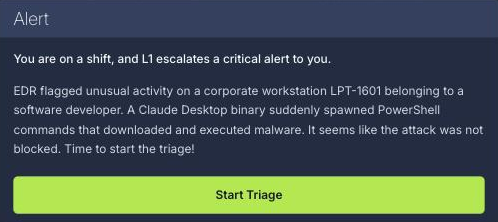
The exercise is a drag-and-drop board that makes you split the triage into the three stages the room just taught. Six analysis steps have to land in the right bucket:
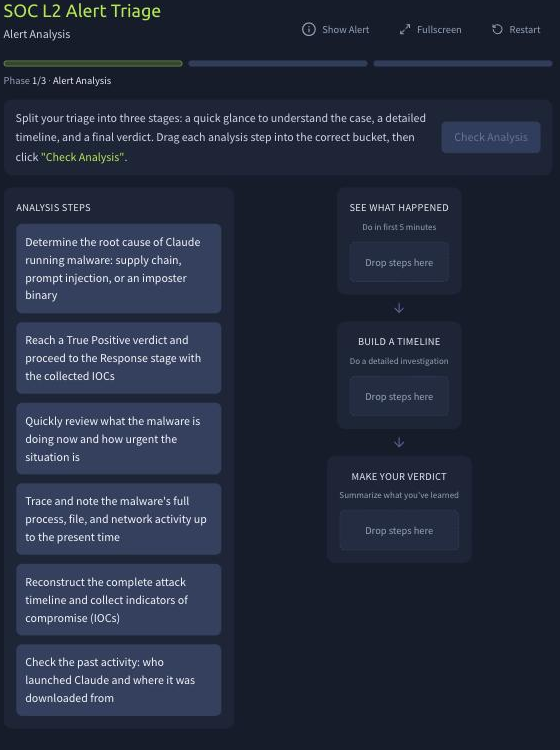
- See What Happened (the first-five-minutes glance): quickly review what the malware is doing now and how urgent it is, and check the past activity of who launched Claude and where it was downloaded from.
- Build a Timeline (the detailed investigation): trace the malware’s full process, file, and network activity up to the present, and reconstruct the complete attack timeline while collecting IOCs.
- Make Your Verdict (summarise): determine the root cause (supply chain, prompt injection, or an imposter binary) and reach a True Positive verdict, then proceed to the Response stage with the collected IOCs.
Work through analysis, response, and lessons, and the app hands you the flag:
THM{triage_done_right!}
As with the previous room, the app is a static single-page bundle on static-labs.tryhackme.cloud and the flag ships Base64-encoded inside the JavaScript, so pulling and decoding the bundle gives the same answer without playing through. It is a good reminder that a client-side flag reveal is never a real secret:
curl -s https://static-labs.tryhackme.cloud/apps/soc-l2-alert-triage/assets/index-*.js \
  | grep -oE '"[A-Za-z0-9+/]{16,}={0,2}"' | tr -d '"' \
  | while read s; do echo "$s" | base64 -d 2>/dev/null | grep -q '^THM{' && echo "$s" | base64 -d; done
# THM{triage_done_right!}
Every answer
| Task | Question | Answer |
|---|---|---|
| 2 | Most common trigger for L2 to start the triage | Escalated alert |
| 3 | Should you understand the rule purpose before triaging? (Yea/Nay) | Yea |
| 3 | Term for a chronological list of events related to the attack | Timeline |
| 4 | Term for a temporary response that stops the threat from spreading | Containment |
| 4 | Isolate the device before confirmation during an unconfirmed pentest? (Yea/Nay) | Yea |
| 5 | Flag from the challenge | THM{triage_done_right!} |
Wrap-up
SOC L2 Alert Triage is where the senior mindset from the intro room becomes a repeatable process. The through-line is quality over speed: understand the rule before you dig, build the story before you build the timeline, and loop the hypothesis until the case reads cleanly from start to finish. Response is not one action but three (contain, eradicate, recover), and containing first under pressure is a feature of seniority, not recklessness. The LPT-1601 challenge ties it together by forcing you to bucket every analysis step into glance, timeline, and verdict, which is exactly the discipline the room is teaching. Next in the path is Report Writing for SOC L2, where all of this investigation has to be communicated clearly, the soft skill that separates a good analyst from a senior one.